ELECTRICAL
8.1
CHAPTER 8
ELECTRICAL
8
GENERAL INFORMATION . . . . . . . . . . . . . . . . . . . . . . . . . . . . . . . . . . . . . . . . . . . . . . . . 8.2
SPECIAL TOOLS . . . . . . . . . . . . . . . . . . . . . . . . . . . . . . . . . . . . . . . . . . . . . . . . . . . . . . . 8.2
BATTERY MAINTENANCE / TESTING . . . . . . . . . . . . . . . . . . . . . . . . . . . . . . . . . . . . . . 8.2
ELECTRICAL SERVICE NOTES . . . . . . . . . . . . . . . . . . . . . . . . . . . . . . . . . . . . . . . . . . . 8.2
GENERAL WIRE COLOR FUNCTION . . . . . . . . . . . . . . . . . . . . . . . . . . . . . . . . . . . . . . . 8.2
OVERHEAT CONTROL CIRCUIT OPERATION . . . . . . . . . . . . . . . . . . . . . . . . . . . . . . . 8.2
48 VOLT FUSE AND RELAY LOCATION . . . . . . . . . . . . . . . . . . . . . . . . . . . . . . . . . . . . 8.3
12 VOLT AUXILIARY POWER OUTLET . . . . . . . . . . . . . . . . . . . . . . . . . . . . . . . . . . . . . 8.3
AUXILIARY 12 VOLT TERMINAL BOARD . . . . . . . . . . . . . . . . . . . . . . . . . . . . . . . . . . . . 8.3
SWITCHES / CONTROLS . . . . . . . . . . . . . . . . . . . . . . . . . . . . . . . . . . . . . . . . . . . . . . . . . 8.4
HEADLIGHT SWITCH . . . . . . . . . . . . . . . . . . . . . . . . . . . . . . . . . . . . . . . . . . . . . . . . . . . 8.4
AWD / 2WD / TURF SWITCH . . . . . . . . . . . . . . . . . . . . . . . . . . . . . . . . . . . . . . . . . . . . . . 8.5
DIRECTION SELECTOR SWITCH (F / N / R) . . . . . . . . . . . . . . . . . . . . . . . . . . . . . . . . . 8.6
DRIVE MODE SWITCH (HIGH, MAX RANGE, LOW) . . . . . . . . . . . . . . . . . . . . . . . . . . . 8.7
DIFFERENTIAL SOLENOID / SOLENOID DRIVER MODULE . . . . . . . . . . . . . . . . . . . . 8.8
BRAKE LIGHT SWITCH (HYDRAULIC) . . . . . . . . . . . . . . . . . . . . . . . . . . . . . . . . . . . . . . 8.9
PARKING BRAKE SWITCH . . . . . . . . . . . . . . . . . . . . . . . . . . . . . . . . . . . . . . . . . . . . . . . 8.9
INDICATOR LIGHT CIRCUITS . . . . . . . . . . . . . . . . . . . . . . . . . . . . . . . . . . . . . . . . . . . . 8.10
INDICATOR LAMP REPLACEMENT . . . . . . . . . . . . . . . . . . . . . . . . . . . . . . . . . . . . . . . 8.10
INDICATOR LIGHTS . . . . . . . . . . . . . . . . . . . . . . . . . . . . . . . . . . . . . . . . . . . . . . . . . . . 8.11
BATTERY DISCHARGE INDICATOR . . . . . . . . . . . . . . . . . . . . . . . . . . . . . . . . . . . . . . 8.12
CHARGE STATUS INDICATOR . . . . . . . . . . . . . . . . . . . . . . . . . . . . . . . . . . . . . . . . . . . 8.12
DIGITAL WRENCH DIAGNOSTIC SOFTWARE . . . . . . . . . . . . . . . . . . . . . . . . . . . . . . 8.13
ACCELERATOR PEDAL POSITION SENSOR . . . . . . . . . . . . . . . . . . . . . . . . . . . . . . . 8.13
ALL WHEEL DRIVE (AWD) COIL . . . . . . . . . . . . . . . . . . . . . . . . . . . . . . . . . . . . . . . . . . 8.13
AWD SYSTEM . . . . . . . . . . . . . . . . . . . . . . . . . . . . . . . . . . . . . . . . . . . . . . . . . . . . . . . . 8.13
DIAGNOSING SYSTEM FAILURES . . . . . . . . . . . . . . . . . . . . . . . . . . . . . . . . . . . . . . . . 8.13
HEADLIGHTS . . . . . . . . . . . . . . . . . . . . . . . . . . . . . . . . . . . . . . . . . . . . . . . . . . . . . . . . . 8.14
HEADLIGHT ADJUSTMENT . . . . . . . . . . . . . . . . . . . . . . . . . . . . . . . . . . . . . . . . . . . . . 8.14
HEADLIGHT BULB REPLACEMENT . . . . . . . . . . . . . . . . . . . . . . . . . . . . . . . . . . . . . . . 8.15
HEADLIGHT HOUSING REMOVAL . . . . . . . . . . . . . . . . . . . . . . . . . . . . . . . . . . . . . . . . 8.15
TAIL LIGHT / BRAKE LIGHT . . . . . . . . . . . . . . . . . . . . . . . . . . . . . . . . . . . . . . . . . . . . . . 8.16
LED LAMP REPLACEMENT . . . . . . . . . . . . . . . . . . . . . . . . . . . . . . . . . . . . . . . . . . . . . 8.16
SYSTEM WIRING DIAGRAMS . . . . . . . . . . . . . . . . . . . . . . . . . . . . . . . . . . . . . . . . . . . . 8.17
BATTERY SYSTEM WIRING DIAGRAM . . . . . . . . . . . . . . . . . . . . . . . . . . . . . . . . . . . . 8.17
DRIVE MOTOR ENCODER SYSTEM WIRING DIAGRAM . . . . . . . . . . . . . . . . . . . . . . 8.18
BATTERY CHARGING SYSTEM WIRING DIAGRAM . . . . . . . . . . . . . . . . . . . . . . . . . . 8.19
AUXILIARY (ACCESSORY) BATTERY SYSTEM WIRING DIAGRAM . . . . . . . . . . . . . 8.20
13.5 VOLT SYSTEM WIRING DIAGRAM . . . . . . . . . . . . . . . . . . . . . . . . . . . . . . . . . . . . 8.21
LIGHTING SYSTEM WIRING DIAGRAM . . . . . . . . . . . . . . . . . . . . . . . . . . . . . . . . . . . . 8.22
PARKING BRAKE SYSTEM WIRING DIAGRAM . . . . . . . . . . . . . . . . . . . . . . . . . . . . . . 8.23
AWD SYSTEM WIRING DIAGRAM . . . . . . . . . . . . . . . . . . . . . . . . . . . . . . . . . . . . . . . . 8.24
AWD / 2WD / TURF SWITCH CONTACTS . . . . . . . . . . . . . . . . . . . . . . . . . . . . . . . . . . 8.25
DIRECTION SELECTOR - SYSTEM WIRING DIAGRAM . . . . . . . . . . . . . . . . . . . . . . . 8.26
DIRECTION SELECTOR SWITCH CONTACTS . . . . . . . . . . . . . . . . . . . . . . . . . . . . . . 8.27
DRIVE MODE (HIGH / MAX RANGE / LOW) - SYSTEM WIRING DIAGRAM . . . . . . . . 8.28
ACCELERATOR PEDAL POSITION SENSOR - SYSTEM WIRING DIAGRAM . . . . . . 8.29
FUSE BOX . . . . . . . . . . . . . . . . . . . . . . . . . . . . . . . . . . . . . . . . . . . . . . . . . . . . . . . . . . . 8.30
8.2
ELECTRICAL
© Copyright 2009 Polaris Sales Inc. 2010 RANGER EV Service Manual 9922618
GENERAL INFORMATION
Special Tools
Battery Maintenance / Testing
See Chapter 1 “General / Battery” for battery service
procedures, maintenance, and connections.
Electrical Service Notes
Note the following when diagnosing an electrical problem:
• BATTERY INFORMATION - All battery information
including Safety, Maintenance, Service, and Testing is
in Chapter 1 General Information and Battery .
• FLOATING CHASSIS - Remember that the chassis on
the RANGER EV is not used as a conductor and is not at
ground potential. The ground wire in the wire harness
must be used as a ground reference for your meter or
when instructed to connect a wire on the vehicle to
“ground”.
• 48 VOLT FUSES AND RELAYS - Some fuses and
relays are 48 Volt and must not be substituted with
similar looking 12 volt parts.
• Disconnect the Main Power Connector (See Chapter 1)
before disconnecting any electrical component. The
Main Power Connector should be the last connection
made after battery service.
• Refer to wiring diagram or the system break-out
diagram for electrical component resistance
specifications and location on the vehicle.
• When measuring resistance of a component that has a
resistance value under 10 Ohms, remember to subtract
meter lead resistance from the reading. Connect the
leads together and record the resistance. The true
resistance is equal to tested value minus lead resistance.
• Be sure your meter leads are in the proper jack for the
test being performed (i.e. 10A jack for current
readings). Refer to the Owner’s Manual included with
your meter for more information.
• Voltage, amperage, and resistance values included in
this manual are obtained with a Fluke™ 77 Digital
Multimeter (PV-43568) or an equivalent Fluke meter.
Readings obtained with other meters may differ.
• Pay attention to the prefix on the multimeter reading (K,
M, etc.) and the position of the decimal point.
• For resistance readings, isolate the component being
tested by disconnecting it from the wiring harness or
power supply.
• Verify battery voltage and general battery condition.
• Inspect battery and contactor terminal cleanliness,
condition, and fastener torque.
• Inspect all connections at the controller
• Connectors in a circuit - Separate the connector and
closely inspect terminal pins or sockets for corrosion.
Verify all pins are aligned in mating connectors. Check
wires closely to be sure pins and sockets are secure
(locked in) the connector housing.
• Secure all wiring to prevent contact with sharp edges or
moving parts after service.
General Wire Color Function
Following is a description of wire color function for the main
circuits on the RANGER EV. Some exceptions may occur.
Always refer to the System Wiring Diagram or to the Chassis
Wiring Diagram for reference.
Overheat Control Circuit Operation
Overheating of the controller or drive motor will illuminate the
TEMP light on the indicator light panel. When the TEMP lamp
is on, the controller will reduce performance or terminate power
delivery (if severe overheating exists) until the overheat
condition has passed. Operation will return to normal when the
controller and /or motor has cooled.
Part Number Tool Description
PV-43568 Fluke™ 77 Digital Multimeter
Commercially
Available
Battery Hydrometer (Temperature
compensated with numerically graduated
scale) (Not floating ball type)
PU-47063 Digital Wrench™ Diagnostic Software
PU-47471 Digital Wrench™ SmartLink Module Kit
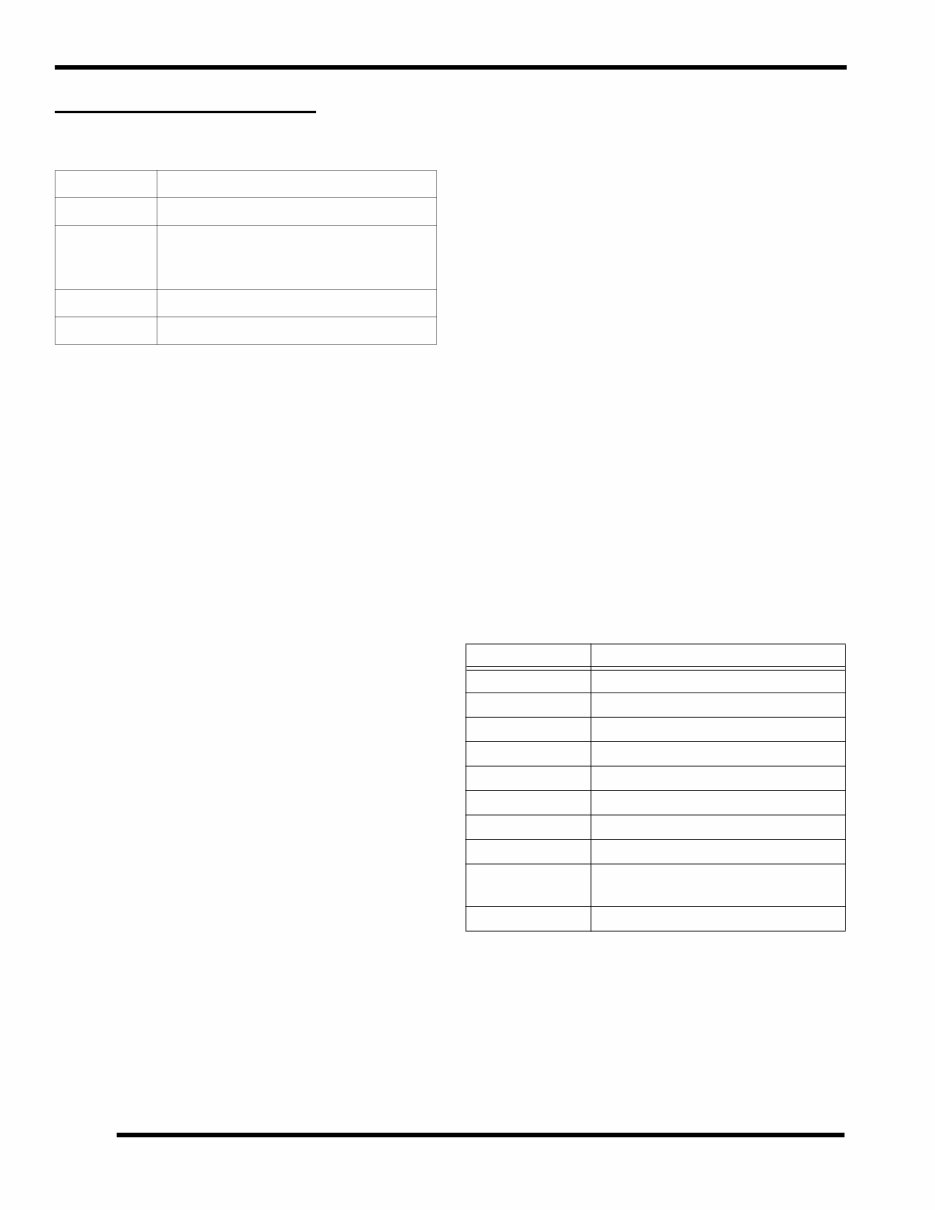
WIRE COLOR PRIMARY CIRCUIT FUNCTION
RD/WH 48 Volt Switched Power
RD/BK 13.5 Volt Switched Power
BN Ground
OR/BK 13.5 Volt Switched Accy Power
PK/BK 13.5 Volt Constant Accy Power
GY AWD (+)
BN/WH AWD Switching (Low Side)
RD/YE Lighting
OR/RD
Park Brake Monitor Circuit
(Grounded in Park)
VT Reverse Monitor (Grounded in Reverse)
8.3
ELECTRICAL
8
© Copyright 2009 Polaris Sales Inc. 2010 RANGER EV Service Manual 9922618
48 Volt Fuse and Relay Location
There are two 48 volt / 20 amp fuses and one spare fuse in the
fuse block (A) located at the rear side of the controller. Open
cargo box for access.
A 48 volt relay and a 48 volt fuse (fuse is for accessory battery
charge circuit) are located in the fuse box (B) under the hood.
12 Volt Auxiliary Power Outlet
VOLTAGE LEVEL: 13.5 VDC
LOCATION: Dashboard
OVERVIEW: The 12-volt receptacle (A) is wired with the
accessory terminal board. The dash mounted receptacle and the
12 volt terminal board are on the same (10A ACCY) fuse in the
fuse box (10 amps total current capacity of both accessory
power locations). Terminal A4 in fuse box is power to OR/WH
ACCY power wires leading to the terminal board and
receptacle.
SYSTEM WIRING DIAGRAM REFERENCE: See page 8.21.
Auxiliary 12 Volt Terminal Board
VOLTAGE LEVEL: 13.5 VDC
LOCATION: Under hood on driver’s side.
OVERVIEW: The 12-volt terminal board (B) contains a
switched 12-volt supply (C), a ground terminal (D), and a
constant (non-switched) 12-volt supply (E). The terminals are
limited to 10 amps (including loads connected to the Auxiliary
Power Outlet as described above).
SYSTEM WIRING DIAGRAM REFERENCE: See page 8.21.
A
B
48 Volt Fuse
48 Volt Relay
DO NOT SUBSTITUTE
A
C
B
D
E
8.4
ELECTRICAL
© Copyright 2009 Polaris Sales Inc. 2010 RANGER EV Service Manual 9922618
SWITCHES / CONTROLS
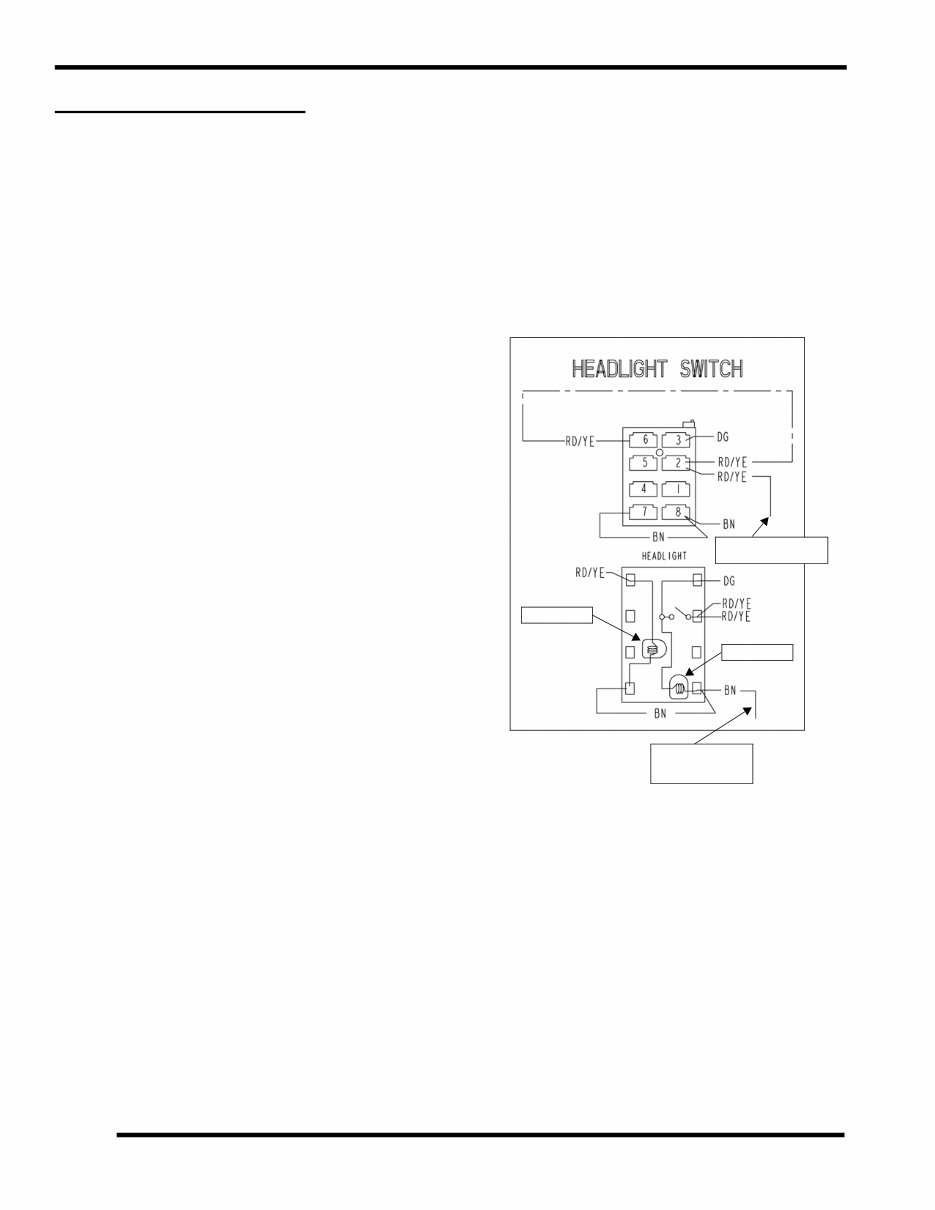
Headlight Switch
VOLTAGE LEVEL: 13.5 VDC
LOCATION: On Dashboard.
SYSTEM WIRING DIAGRAM REFERENCE: See page 8.22.
OVERVIEW: Headlight power is supplied to the headlight
switch via the RD/YE wire leading from the 10A LIGHTS fuse
(located in the fuse box under the hood), through Pin 10 of the
Chassis to Dash connector block. Power enters the headlight
switch on terminal 2.
When the headlight switch is in the OFF position, power
entering terminal 2 of the switch flows through the RD/YE
jumper wire to terminal 6, through the switch lamp to terminal
7 and 8, then to ground on the BN wire.
When the headlight switch is ON, power flows from terminal 2
to terminal 3 (DG), back through the Chassis / Dash connector
Pin 11 and on to the headlights. Note that in the ON position the
other switch lamp is powered and ground path is through
terminal 8 (BN).
If the headlight switch lamp is illuminated with the key switch
ON, power is reaching the switch through the fuse. If switch
lamp does not turn on with key switch, check the fuse. If fuse is
good (and powered), test for power on the RD/YE wire (terminal
2) of the switch harness. If power is present, test switch
continuity and ground path on the BN wires in the harness.
Headlight Switch Power and Ground Testing
NOTE: If switch is illuminated, this test is not required. The
ground is for switch lighting only.
1. Open hood. Reach under the dash and press tab on
headlight switch connector to disconnect wire harness
from switch. Do not pull on wiring.
2. Turn key switch ON.
3. Verify 12-14Vdc is present on the RD/YE wire.
4. Turn key switch OFF.
5. Verify ground path of BN wire(s) to the negative (-)
terminal on the controller with an Ohmmeter.
Headlight Switch Testing
1. Open hood. Reach under the dash and press tab on
headlight switch connector to disconnect wire harness
from switch. Do not pull on wiring.
2. Remove headlight switch from the dash.
3. Verify continuity exists between terminals 2 (RD/YE) and
terminal 3 (DG) when the switch is in the ON position.
• When the headlight switch is turned on, there should be
continuity between terminals 2 (Yellow) and 3 (Green).
From Pin 10 Chassis /
Dash connector
To chassis ground
splice (BN) in dash
Switch Lamp
Switch Lamp
harness
8.5
ELECTRICAL
8
© Copyright 2009 Polaris Sales Inc. 2010 RANGER EV Service Manual 9922618
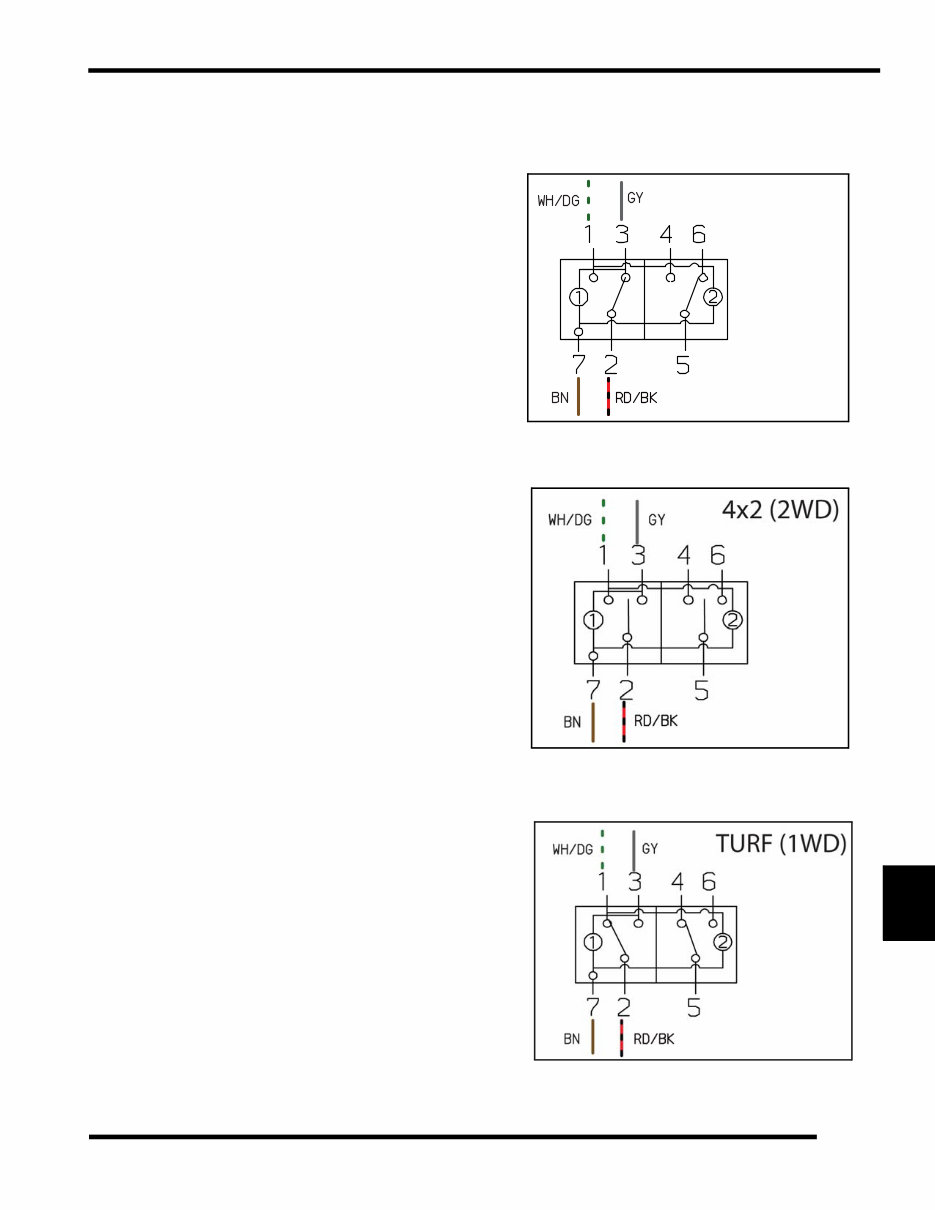
AWD / 2WD / TURF Switch
VOLTAGE LEVEL: 13.5 VDC
LOCATION: On Dashboard.
SYSTEM WIRING DIAGRAM REFERENCE: See page 8.24.
OVERVIEW: Power supply from terminal A8 of the fuse box
(RD/BK) is connected through Pin 9 of the Chassis to Dash
harness connector to terminal 2 of the AWD switch.
Power entering terminal 2 is switched as follows:
AWD (4x4): Power switched to terminal 3 (GY wire) is
connected through Pin 13 of the Chassis to Dash harness
connector to the AWD GY splice to the front hub coil connector
under the hood. If the BN/WH wire (to Pin 2 of the VCIM) is
connected to ground by the module, AWD is engaged.
2WD (4x2): No power flow through AWD switch.
TURF (1 WD): Power switched to terminal 1 (WH/GN wire) is
connected through Pin 12 of the Chassis to Dash harness
connector to Pin 7 of the VCIM. The VCIM then controls the
activation of the TURF solenoid driver on the dark green (DG)
wire to activate the differential solenoid and disengage the
differential hub.
AWD Switch Testing
1. Open hood. Reach under the dash and press tab on AWD
switch connector to disconnect wire harness from switch.
Do not pull on wiring.
2. Verify power is reaching the switch as described above.
3. Inspect switch connector pins and sockets and verify switch
continuity in the various positions. (See “AWD / 2WD /
Turf Switch Contacts” on page 8.25.)
4x4 (AWD)
SWITCH CONTACTS
You're Reading a Preview
What's Included?
Lifetime Access
Access Contents & Bookmarks
Print one or all pages of your manual





 Lifetime Access




