Caution: This document contains mixed page sizes (8.5 x 11 or 11 x 17), which may affect printing. Please adjust your printer settings according to the size of each page you wish to print.
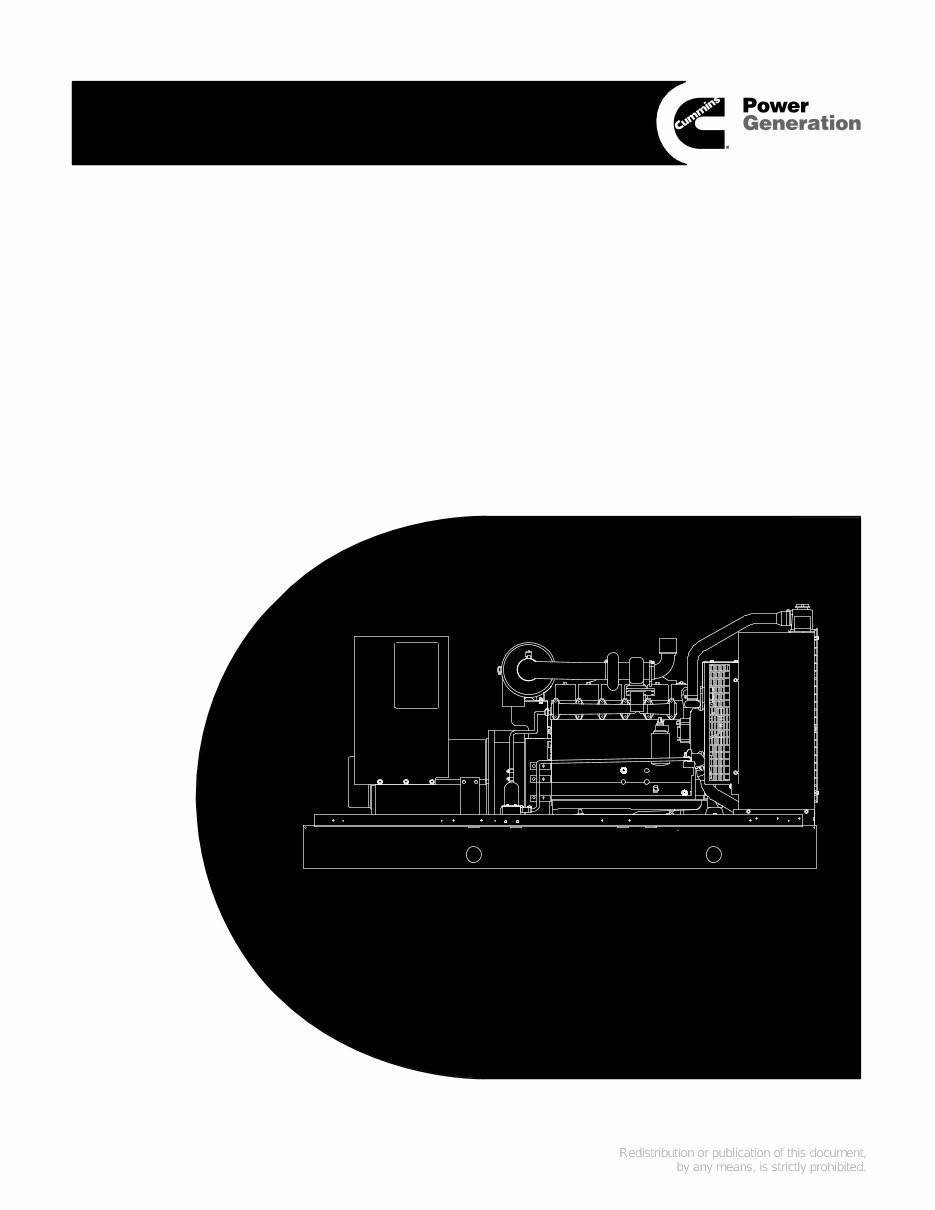
PowerCommand Control 2100 Series Generator Sets Printed in U.S.A. 960-0518D 02-2004 Service Manual Models DGBB, DGBC, DGCA, DGCB, DGCG, DGDA, DGDB, DGDK, DGFA, DGFB, DGFC
LS-14L iii IMPORTANT SAFETY INSTRUCTIONS SAVE THESE INSTRUCTIONS - This manual contains important instructions that should be followed during installation and maintenance of the generator and batter- ies. Before operating the generator set (genset), read the Operator’s Manual and become familiar with it and the equipment. Safe and efficient operation can be achieved only if the equipment is properly operated and maintained. Many accidents are caused by failure to follow fundamental rules and precautions. The following symbols, found throughout this manual, alert you to potentially dangerous conditions to the oper- ator, service personnel, or the equipment. This symbol warns of immediate hazards which will result in severe personal in- jury or death. WARNING This symbol refers to a hazard or un- safe practice which can result in severe person- al injury or death. CAUTION This symbol refers to a hazard or un- safe practice which can result in personal injury or product or property damage. FUEL AND FUMES ARE FLAMMABLE Fire, explosion, and personal injury or death can result from improper practices. • DO NOT fill fuel tanks while engine is running, un- less tanks are outside the engine compartment. Fuel contact with hot engine or exhaust is a potential fire hazard. • DO NOT permit any flame, cigarette, pilot light, spark, arcing equipment, or other ignition source near the generator set or fuel tank. • Fuel lines must be adequately secured and free of leaks. Fuel connection at the engine should be made with an approved flexible line. Do not use zinc coated or copper fuel lines with diesel fuel. • Be sure all fuel supplies have a positive shutoff valve. • Be sure battery area has been well-ventilated prior to servicing near it. Lead-acid batteries emit a highly explosive hydrogen gas that can be ignited by arc- ing, sparking, smoking, etc. EXHAUST GASES ARE DEADLY • Provide an adequate exhaust system to properly expel discharged gases away from enclosed or sheltered areas and areas where individuals are likely to congregate. Visually and audibly inspect the exhaust daily for leaks per the maintenance schedule. Make sure that exhaust manifolds are se- cured and not warped. Do not use exhaust gases to heat a compartment. • Be sure the unit is well ventilated. • Engine exhaust and some of its constituents are known to the state of California to cause cancer, birth defects, and other reproductive harm. MOVING PARTS CAN CAUSE SEVERE PERSONAL INJURY OR DEATH • Keep your hands, clothing, and jewelry away from moving parts. • Before starting work on the generator set, discon- nect battery charger from its AC source, then dis- connect starting batteries, negative (-) cable first. This will prevent accidental starting. • Make sure that fasteners on the generator set are secure. Tighten supports and clamps, keep guards in position over fans, drive belts, etc. • Do not wear loose clothing or jewelry in the vicinity of moving parts, or while working on electrical equip- ment. Loose clothing and jewelry can become caught in moving parts. • If adjustment must be made while the unit is run- ning, use extreme caution around hot manifolds, moving parts, etc. DO NOT OPERATE IN FLAMMABLE AND EXPLOSIVE ENVIRONMENTS Flammable vapor can cause an engine to overspeed and become difficult to stop, resulting in possible fire, explo- sion, severe personal injury and death. Do not operate a genset where a flammable vapor environment can be created by fuel spill, leak, etc., unless the genset is equipped with an automatic safety device to block the air intake and stop the engine. The owners and operators of the genset are solely responsible for operating the gen- set safely. Contact your authorized Cummins Power Generation distributor for more information.
iv ELECTRICAL SHOCK CAN CAUSE SEVERE PERSONAL INJURY OR DEATH • Remove electric power before removing protective shields or touching electrical equipment. Use rub- ber insulative mats placed on dry wood platforms over floors that are metal or concrete when around electrical equipment. Do not wear damp clothing (particularly wet shoes) or allow skin surface to be damp when handling electrical equipment. Do not wear jewelry. Jewelry can short out electrical con- tacts and cause shock or burning. • Use extreme caution when working on electrical components. High voltages can cause injury or death. DO NOT tamper with interlocks. • Follow all applicable state and local electrical codes. Have all electrical installations performed by a qualified licensed electrician. Tag and lock open switches to avoid accidental closure. • DO NOT CONNECT GENERATOR SET DIRECT- LY TO ANY BUILDING ELECTRICAL SYSTEM. Hazardous voltages can flow from the generator set into the utility line. This creates a potential for elec- trocution or property damage. Connect only through an approved isolation switch or an ap- proved paralleling device. GENERAL SAFETY PRECAUTIONS • Coolants under pressure have a higher boiling point than water. DO NOT open a radiator or heat ex- changer pressure cap while the engine is running. Allow the generator set to cool and bleed the system pressure first. • Used engine oils have been identified by some state or federal agencies as causing cancer or reproduc- tive toxicity. When checking or changing engine oil, take care not to ingest, breathe the fumes, or con- tact used oil. • Keep multi-class ABC fire extinguishers handy. Class A fires involve ordinary combustible materials such as wood and cloth; Class B fires, combustible and flammable liquid fuels and gaseous fuels; Class C fires, live electrical equipment. (ref. NFPA No. 10). • Make sure that rags are not left on or near the en- gine. • Make sure generator set is mounted in a manner to prevent combustible materials from accumulating under the unit. • Remove all unnecessary grease and oil from the unit. Accumulated grease and oil can cause over- heating and engine damage which present a poten- tial fire hazard. • Keep the generator set and the surrounding area clean and free from obstructions. Remove any de- bris from the set and keep the floor clean and dry. • Do not work on this equipment when mentally or physically fatigued, or after consuming any alcohol or drug that makes the operation of equipment un- safe. • Substances in exhaust gases have been identified by some state or federal agencies as causing can- cer or reproductive toxicity. Take care not to breath or ingest or come into contact with exhaust gases. • Do not store any flammable liquids, such as fuel, cleaners, oil, etc., near the generator set. A fire or explosion could result. • Wear hearing protection when going near an oper- ating generator set. • To prevent serious burns, avoid contact with hot metal parts such as radiator, turbo charger and ex- haust system. KEEP THIS MANUAL NEAR THE GENSET FOR EASY REFERENCE
1-1 1. Introduction ABOUT THIS MANUAL This manual provides troubleshooting and repair information regarding the PowerCommand 2100 Control (PCC) and generators for the gensets listed on the front cover. Engine service instructions are in the applicable engine service manual. Operating and maintenance instructions are in the applicable Operator’s Manual. This manual does not have instructions for servicing printed circuit board assemblies. After determining that a printed circuit board assembly is faulty, replace it. Do not repair it. Attempts to repair a printed circuit board can lead to costly damage to the equipment. This manual contains basic (generic) wiring diagrams and schematics that are included to help in troubleshooting. Service personnel must use the actual wiring diagram and schematic shipped with each unit. The wiring diagrams and schematics that are maintained with the unit should be updated when modifications are made to the unit. Read Safety Precautions and carefully observe all instructions and precautions in this manual. SYSTEM OVERVIEW The PCC is a microprocessor-based control for Cummins Power Generation generator sets. All generator set control functions are contained on one circuit board (Base board). The Base board provides engine speed governing, main alternator voltage output regulation, and complete generator set control and monitoring. The operating software provides control of the gen- erator set and its performance characteristics, and displays performance information on a digital dis- play panel. It accepts menu-driven control and set- up input from the push button switches on the front panel. TEST EQUIPMENT To perform the test procedures in this manual, the following test equipment must be available • True RMS meter for accurate measurement of small AC and DC voltages. Fluke models 87 or 8060A are good choices. • Grounding wrist strap to prevent circuit board damage due to electrostatic discharge (ESD). • Battery Hydrometer • Jumper Leads • Tachometer or Frequency Meter • Wheatstone Bridge or Digital Ohmmeter • Variac • Load Test Panel • Megger or Insulation Resistance Meter • PCC Service Tool Kit (Harness Tool and Sen- sor Tool) • InPower Service Tool (PC based genset ser- vice tool) HOW TO OBTAIN SERVICE Always give the complete Model, Specification and Serial number of the generator set as shown on the nameplate when seeking additional service information or replacement parts. The nameplate is located on the side of the generator output box. WARNING Incorrect service or replacement of parts can result in severe personal injury or death, and/or equipment damage. Service per- sonnel must be qualified to perform electrical and mechanical service. Read and follow Safety Precautions, on pages iii and iv. Copyright 2003 Cummins Power Generation. All rights reserved. Cummins and PowerCommand are registered trademarks of Cummins Inc.
1-2 THIS PAGE LEFT INTENTIONALLY BLANK
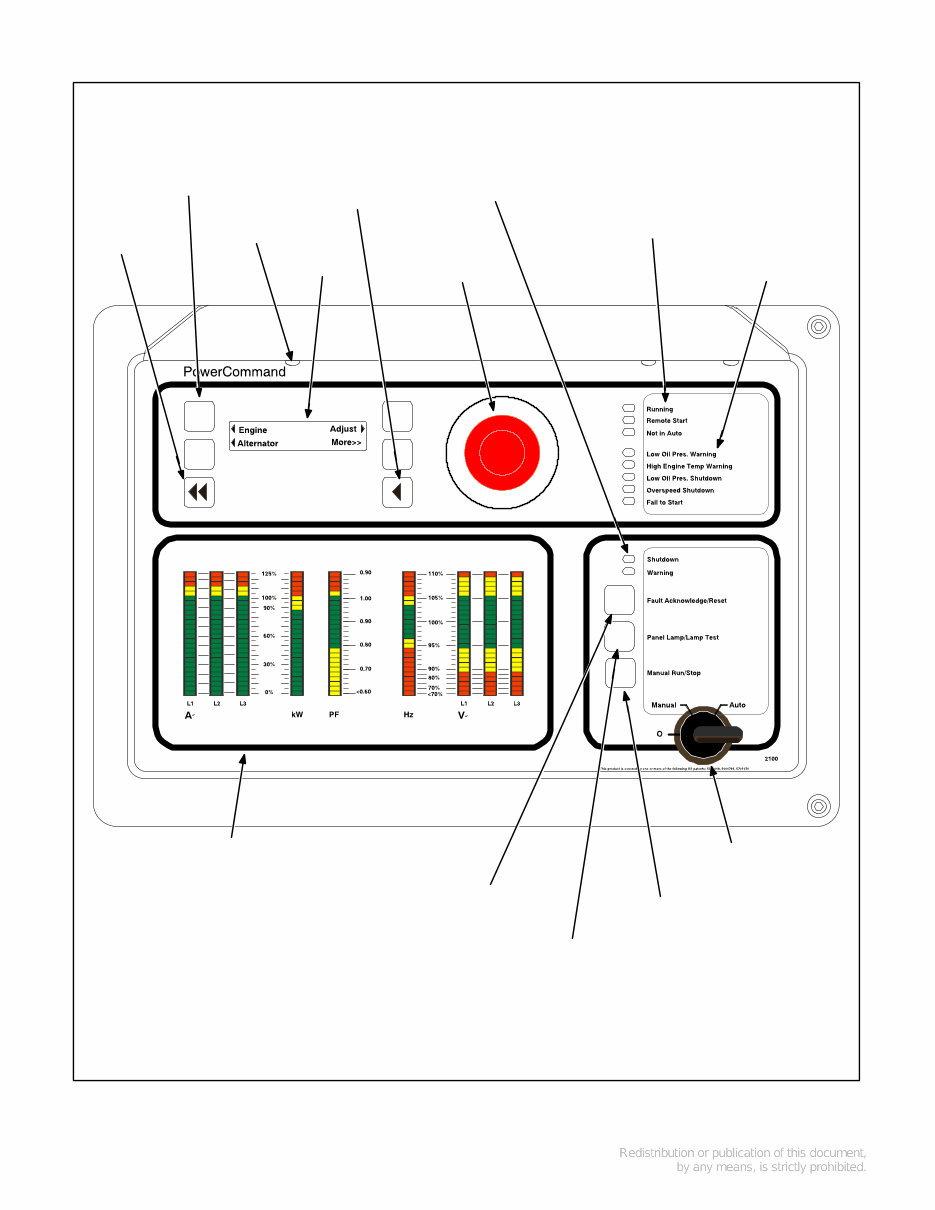
2-1 2. Control Operation GENERAL The following describes the function and operation of the PowerCommandR 2100 Control (PCC). All indicators, control switches/buttons and digital dis- play are located on the face of the control panel as illustrated in Figure 2-1. CONTROL PANEL POWER ON/OFF MODES The power on/off modes of the control panel and op- erating software are Power On, Screen Saver and Sleep/Awake. Power On Mode: In this mode, power is continu- ously supplied to the control panel. The control’s operating software and control panel LEDs/digital display will remain active until the Screen Saver mode is activated. Screen Saver Mode: Power to the digital display is removed after 30 minutes (generator set not run- ning or running). The 30 minute timer resets and be- gins after each control panel action (any button or switch selection) or signal received by the operating software. All LEDs on the control panel operate nor- mally during Screen Saver mode, indicating that the operating software is active (Awake mode). When a “Warning” signal is sensed by the PCC (for example, low coolant temp), the control displays the warning message. Sleep/Awake Mode: In the Sleep mode, the con- trol’s operating software is inactive and the LEDs and the digital display on the control panel are all off. Sleep mode is a feature used to reduce battery power consumption when the control is not being used and the O/Manual/Auto switch is in the O posi- tion. When all conditions are met (i.e., no unacknowl- edged faults and O/Manual/Auto switch is in the O position) the Sleep mode is activated. The operating software is initialized and the digital display and control panel LEDs are turned on in re- sponse to moving/pressing the following control panel switch/buttons: • Off/Manual/Auto switch • Emergency Stop button • Fault Acknowledge/Reset button • Panel Lamp/Lamp Test button To activate the control and view the menu display without starting the generator set, press Fault Ac- knowledge or Panel Lamp button or move mode switch from O to Manual. The InPower service tool is required to enable or disable the Sleep mode. When shipped from the factory, the Sleep mode is disabled. When disabled, the operating software will always remain active (Awake mode). (If network and/or power transfer control feature is installed, the sleep mode is not available and should not be enabled - will cause er- ror condition.)
2-2 PANEL LAMP (1 of 3) CONFIGURABLE INDICATORS MANUAL RUN/STOP BUTTON OFF/MANUAL/ AUTO SWITCH SHUTDOWN AND WARNING STATUS INDICATORS EMERGENCY STOP PUSH BUTTON (Pull to reset) HOME BUTTON ANALOG AC METERING PANEL (OPTIONAL) DIGITAL DISPLAY MENU SELECTION BUTTON (1 of 4) PREVIOUS MAIN MENU BUTTON FAULT ACKNOWLEDGEMENT/ RESET BUTTON RUNNING/REMOTE START/NOT IN AUTO INDICATORS PANEL LAMP AND LAMP TEST BUTTON FIGURE 2-1. FRONT PANEL
You're Reading a Preview
What's Included?
Lifetime Access
Fast Download Speeds
Online & Offline Access
Access PDF Contents & Bookmarks
Full Search Facility
Print one or all pages of your manual
$31.99
Cummins Onan DGBB DGBC DGCA DGCB DGCC DGDA DGDB DGDK DGEA DGFA DGFC Generator Set with Power Command 3100 Controller Service Rep
Cummins Onan DGBB DGBC DGCA DGCB DGCC DGDA DGDB DGDK DGEA DGFA DGFC Generator Set with Power Command 3100 Controller Service Repair Manual is an electronic version of the maintenance manual. It provides a great advantage over the paper version as it allows zooming in anywhere on your computer for clear viewing. The manual is user-friendly and contains a wealth of information, making it suitable for both professional mechanics and DIY enthusiasts.
This service repair manual covers:
Introduction
Control Operation
Circuit Boards and Modules
Troubleshooting
Control Service and Calibration
Servicing the Generator
Fuel Transfer Pump and Control
Wiring Diagrams
The manual is written in a detailed, step-by-step manner, enabling easy repairs by yourself and potentially saving on expenses. It is available in a file format compatible with all versions of Windows and Mac, and is in English language. Adobe Reader is required for viewing.
Reviews
Q&A
Recently Viewed
5,521,897Happy Clients
2,594,462eManuals
1,120,453Trusted Sellers
15Years in Business
Price:
Actual Price:
Cummins Onan DGBB DGBC DGCA DGCB DGCC DGDA DGDB DGDK DGEA DGFA DGFC Generator Set with Power Command 3100 Controller Service Rep









 Lifetime Access




