


LG LDF8874ST Dishwasher Service Manual and Repair Guide
What's Included?
 Lifetime Access
Fast Download Speeds
Online & Offline Access
Access PDF Contents & Bookmarks
Full Search Facility
Print one or all pages of your manual

DISHWASHER
SERVICE MANUAL
BEFORE SER VICING THE UNIT, PLEASE READ THIS MANUAL CAREFULL Y
FOR SAFETY AND CORRECT SER VICES.
NOTE
For Authorized Service Technician
MODEL : LDF8874ST
LDF8764ST
LDF7774ST/WW/BB
LDS5774ST
LDT9965BD


For Authorized Service Technician
- 3 -
1. CAUTION ......................................................................................................................... 4
2. SPECIFICATIONS ........................................................................................................... 5
10. WIRING DIAGRAM ........................................................................................................67
3. FEATURES & TECHNICAL EXPLANATION ................................................................... 6
4. PARTS NAME ................................................................................................................ 15
5. PROGRAM CHART ..................................................................................................... 16
6. HOW TO DISASSEMBLE ............................................................................................ 18
7. TROUBLE SHOOTING METHODS .............................................................................. 27
A. TROUBLE SHOOTING ACCORDING TO DISPLAYED ERROR MESSAGE ...........27
B. STEAM GENERATOR ERROR MESSAGE ............................................................ 29
C. TROUBLE DIAGNOSES AND REPAIR BY SYMPTOM .......................................... 42
8. INSTALLATION INSTRUCTION ................................................................................... 46
9. EXPLODED VIEW .......................................................................................................53
CONTENTS

For Authorized Service Technician
- 4 -
DISCONNECT POWER CORD BEFORE SERVICING
RECONNECT ALL GROUNDING DEVICES
IMPORTANT SAFETY NOTICE !
This service information is intended for individuals
possessing adequate backgrounds of electrical,
electronic and mechanical experience.
Any attempt to repair this appliance may result in
personal injury and property damage.
The manufacturer or seller can not be responsible
for the interpretation of this information, nor can it
assume any liability in connection with its use.
CAUTION !
For Authorized Service Technician
- 5 -
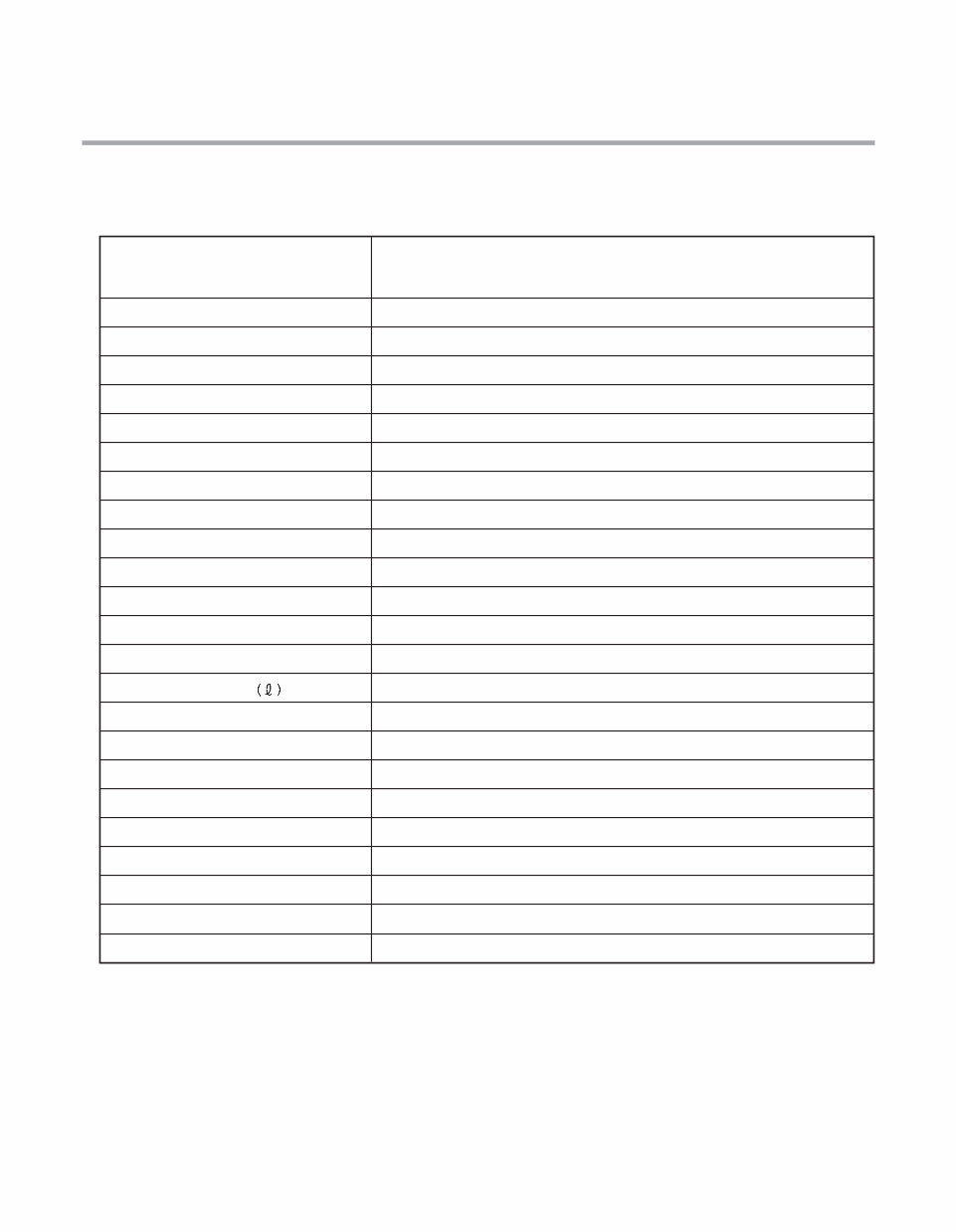
Rated Voltage / Frequency AC 120V/60Hz
Installation Built-In
Place Settings 14
Product Dimension(in) 23 3/4"x 24 5/8"x 33 1/2"
Product Weight(lbs) 1 14lbs
Door Color White, Black, Stainless, Black Diamond
Tub Material Stainless Steel
Control Electronic
Rated Power(Watt) 1,350
Heater Power(Watt) 1,200
Programs 6 (LDS5774 : 7), (LDT9965 : 5)
Upper Rack Position Adjustable
Lower Rack 100 % Fold down
Water Consumption 6.5 – 20.5 (Normal)
Power Consumption(kWh/year) 258 (Nomal)
Operating Time (min) 110 – 130 (Normal)
Fan Dry System Yes
Delay Start Function Yes
Auto-Off Power Switch Yes
Process Monitor Yes
Wash Level 5
Racks Nylon Coating
Operating Water Pressure (Bar) 20-120 (140-830kPa)
ITEM SPECIFICATION
2. SPECIFICATION
For Authorized Service Technician
- 6 -
3. FEATURES & TECHNICAL EXPLANATION
3-1. Product Features
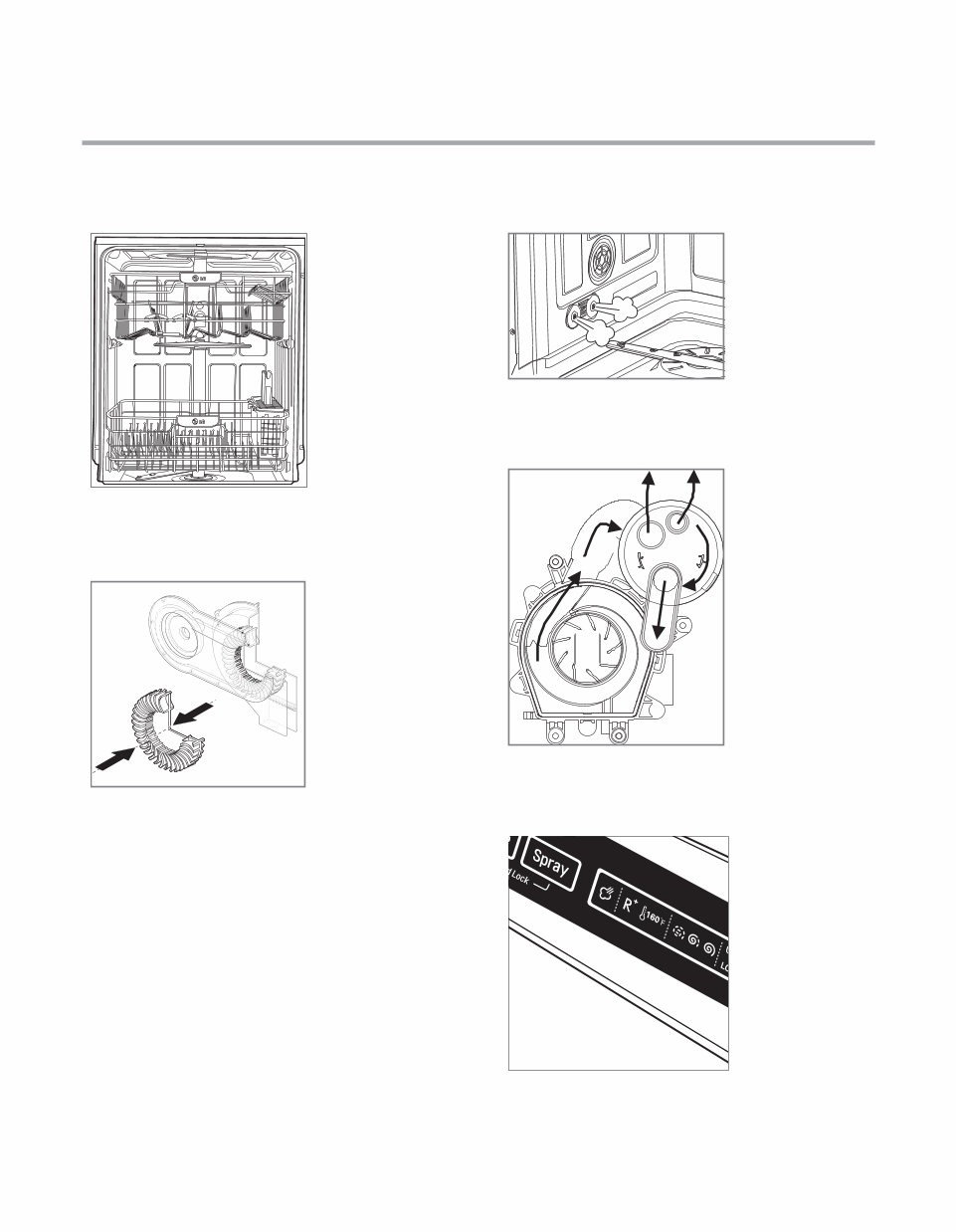
LARGE CAPACITY
LG dishwashers allow
you to load very large
items in both the upper
and lower racks. The
tall tub provides extra
overall capacity and the
clearance to accommo-
date large dishes. Extra
large items (max. 14 in.)
may be loaded in the
lower rack by raising the
upper rack.
HYBRID DRYING SYSTEM
This system effectively
dries dishes without the
use of a heating element
that would increase en-
ergy consumption.
STEAM WASHING (not available on all models)
Steam technology pro-
vides better cleaning
performance than regu-
lar wash systems. Steam
is the most energy ef-
ficient gentle care for
your finest china and
stemware.
VARIABLE SPRAY SYSTEM
Because the water spray
alternates between the
upper and lower racks,
all of the power from
the motor is directed
to one rack at a time.
This concentrates all the
cleaning power of the
motor on each rack in
turn.
LIGHT TOUCH BUTTONS
The light touch buttons
on the control panel
make selections easy
and convenient.
For Authorized Service Technician
- 7 -
LDF8874 / LDF8764
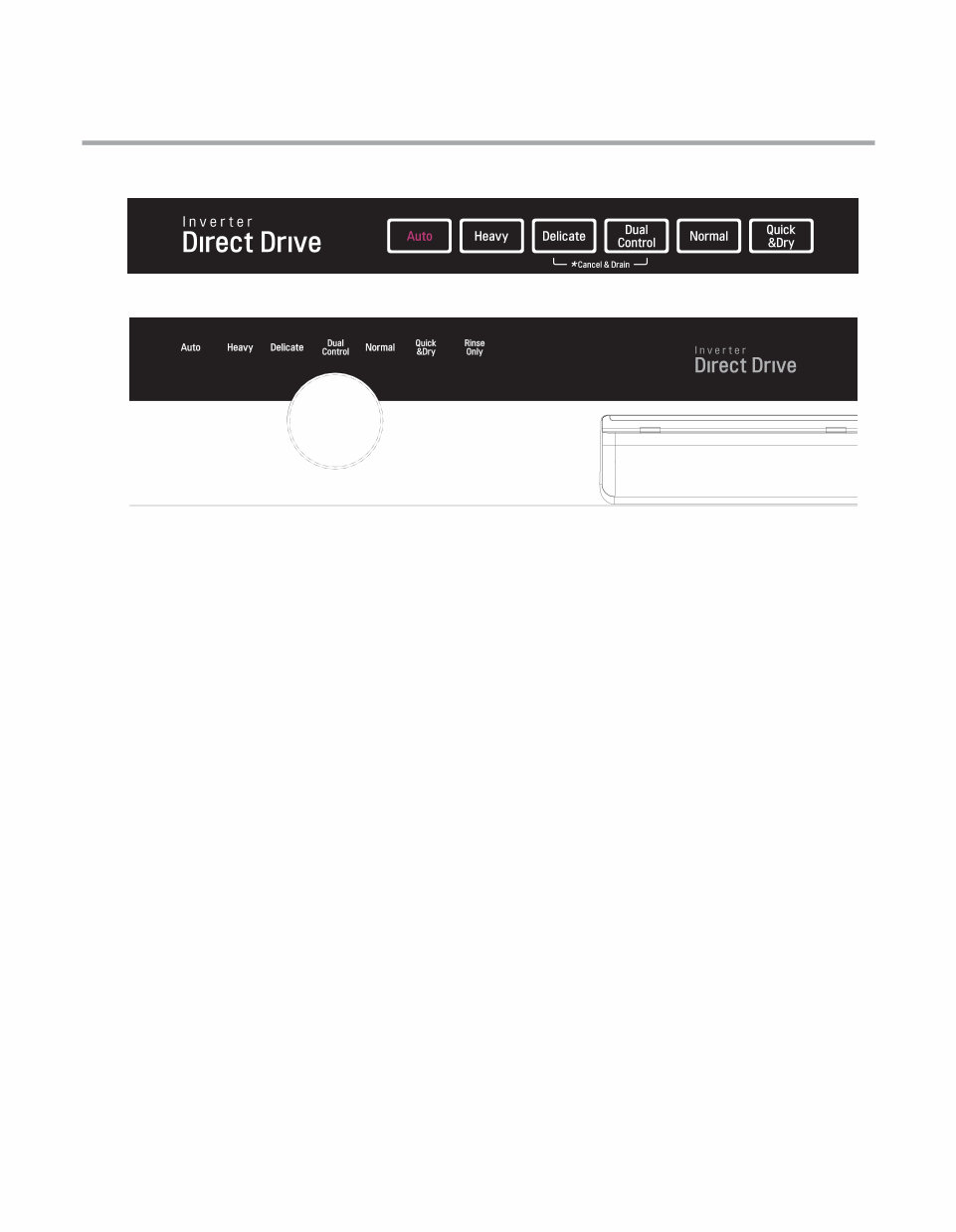
3-2. Display Panel
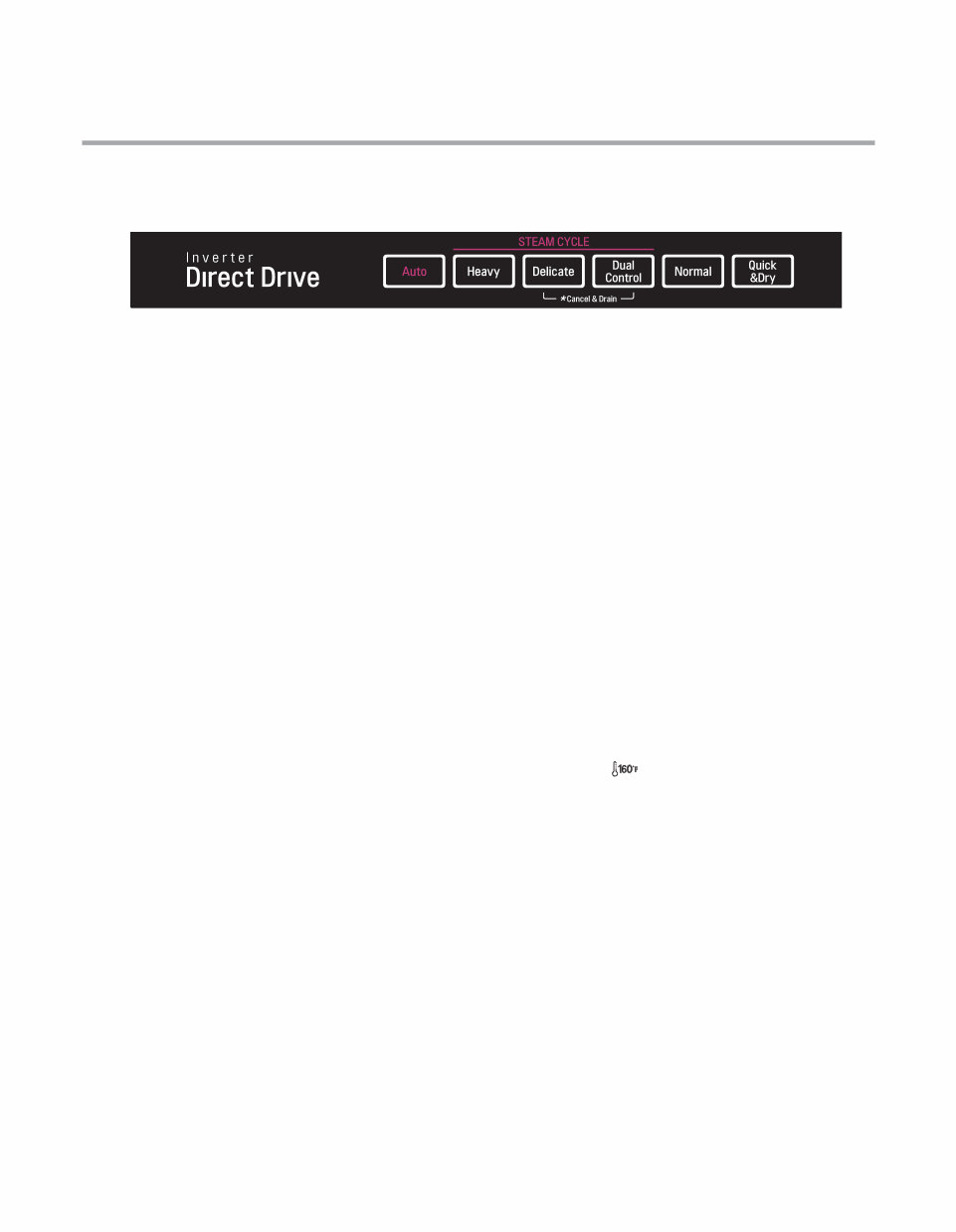
CONTROL PANEL (steam models)
Cycles
Select your desired cycle.
Auto
This cycle senses the load size, soil amount and soil tough-
ness. This cycle is optimized to achieve the best cleaning.
Heavy
This cycle is for heavily and hard soiled dishes. Heavy defaults
to the highest spray intensity and uses the power of steam to
wash heavily soiled dishes.
Delicate
This cycle adds the gentle power of steam to boost the clean-
ing power of the delicate cycle. The cycle is intended for ef-
fectively cleaning delicate items such as fine china and stem-
ware.
Dual Control
This cycle washes the upper and lower racks at different spray
intensities. The default setting for this cycle washes the low-
er rack with strong spray intensity and the upper rack with
soft spray intensity. This provides optimum cleaning perfor-
mance for mixed loads, including fine china and stemware. If
other combinations are desired, use the steps listed below to
change the intensities or to use the Half Load feature.
How To Use Dual Control:
1. Select Dual Control.
2. Press the Spray button to toggle between Soft, Medium
and Strong for the upper spray arm.
3. After making your selection for the upper spray arm, press
the Half Load button.
4. Press the Spray button to toggle between Soft, Medium
and Strong for the lower spray arm.
5. Close the door to start the cycle.
Normal
This cycle is for normally soiled, everyday loads.
Quick & Dry
This is a shortened cycle that is intended for washing and dry-
ing recently used dishes or lightly soiled loads. During this
cycle, both spray arms will run at the same time.
CHIME ON/OFF
To enable or disable the chime, first, turn on the dishwasher.
Press and hold the Delicate and Quick&Dry Buttons simulta-
neously for approximately three seconds.
TO CANCEL A CYCLE
To cancel a cycle, open the door and then press and hold the
Delicate and Dual Control Buttons together for approximate-
ly three seconds. The drain pump will activate and the cycle
will cancel. The display will show “dr” and the dishwasher will
drain the water. After the dishwasher is drained, the power
will turn off.
If the power is turned on and no cycle has been selected, the
dishwasher will power off within four minutes.
Cycle Options
(Refer to the control panel on the next page)
Press the desired cycle and then select the options for that
cycle.
Extra Dry
Select the Extra Dry option for better drying performance.
This option adds 60 minutes of extra drying time to the cycle.
The Extra Dry button will illuminate when the option has
been selected.
Rinse
Repeated pressing of the Rinse button will select the desired
Rinse option. The Sanitary, Extra Rinse, or Sanitary and Extra
Rinse lights will show in the bottom left portion of the dis-
play.
Sanitary ( )
This high-temperature rinse sanitizes dishes and glassware in
accordance with NSF/ANSI Standard 184 for residential dish-
washers. Certified dishwashers are not intended for licensed
food establishments.
Extra Rinse ( R
+
)
The Extra Rinse symbol indicates that an extra rinse has been
added to the cycle. An extra rinse can help reduce hard water
spotting on dishes. To add an extra rinse, press the Rinse but-
ton repeatedly until the Extra Rinse symbol appears in the
display.
Rinse Only (LDF****)
This cycle is a quick rinse for dishes that will not be washed
immediately. This cycle will rinse dishes that have excess soil
to soften dried on residue. Rinsing the dishes will help pre-
vent odors in the dishwasher. No detergent should be used.
To select the Rinse Only cycle, turn the dishwasher on, and
press the Rinse button once without pressing any other cycle
buttons. The Rinse Only cycle is not available with any other
cycles.
Steam Models (LDF8874, LDF8764)
For Authorized Service Technician
- 8 -
LDF7774 / LDS5774
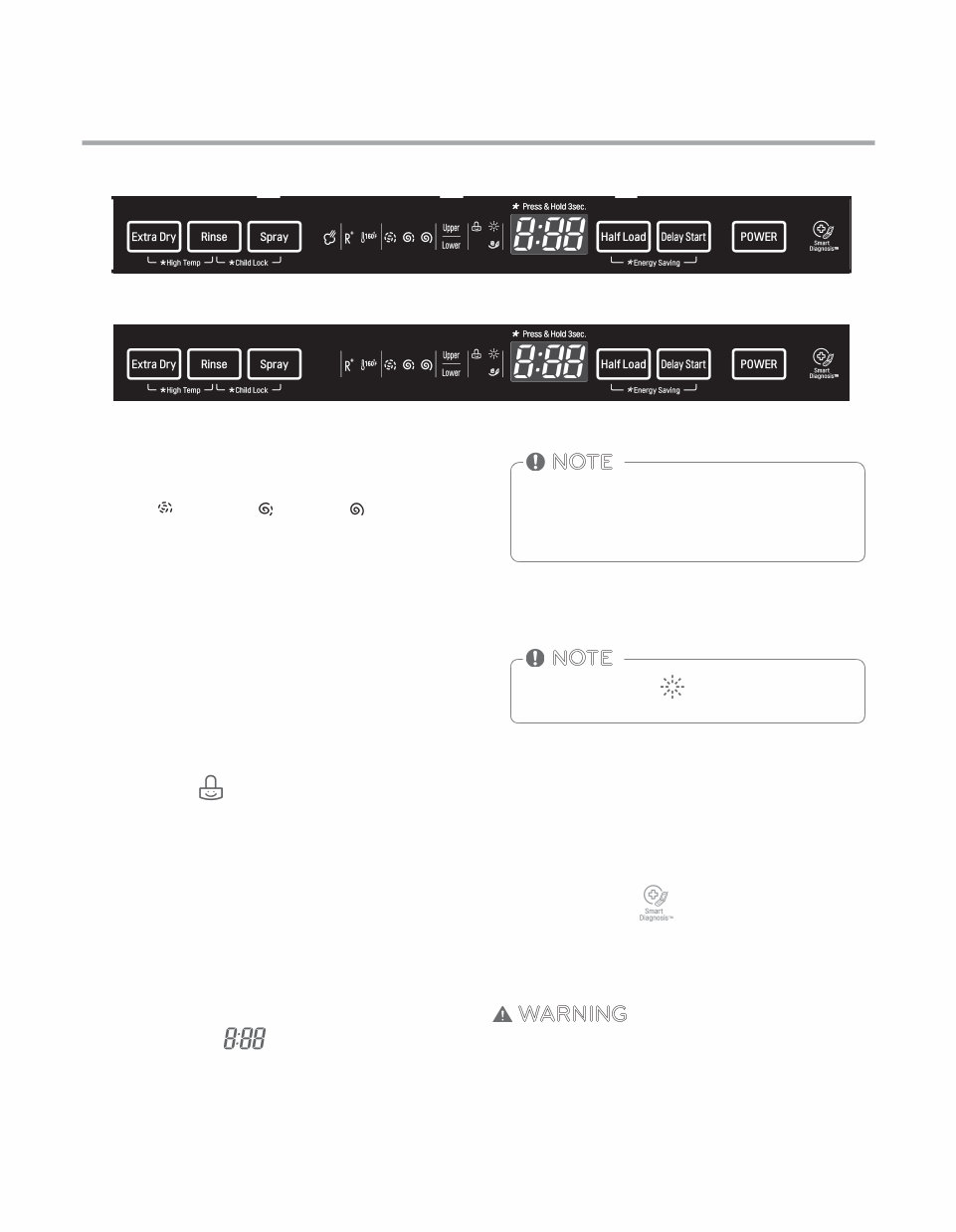
CONTROL PANEL (non-steam models)
Cycles
Select your desired cycle.
Auto
This cycle senses the load size, soil amount and soil tough-
ness. This cycle is optimized to achieve the best cleaning.
Heavy
This cycle is for heavily and hard soiled dishes.
Delicate
The cycle is intended for effectively cleaning delicate items
such as fine china and stemware.
Dual Control
This cycle washes the upper and lower racks at different spray
intensities. The default setting for this cycle washes the low-
er rack with strong spray intensity and the upper rack with
soft spray intensity. This provides optimum cleaning perfor-
mance for mixed loads, including fine china and stemware. If
other combinations are desired, use the steps listed below to
change the intensities or to use the Half Load feature.
How To Use Dual Control:
1. Select Dual Control.
2. Press the Spray button to toggle between Soft, Medium
and Strong for the upper spray arm.
3. After making your selection for the upper spray arm, press
the Half Load button.
4. Press the Spray button to toggle between Soft, Medium
and Strong for the lower spray arm.
5. Close the door to start the cycle.
Normal
This cycle is for normally soiled, everyday loads.
Quick & Dry
This is a shortened cycle that is intended for washing and dry-
ing recently used dishes or lightly soiled loads. During this
cycle, both spray arms will run at the same time.
Rinse Only (LDS5774)
This cycle is a quick rinse for dishes that will not be washed
immediately. This cycle will rinse dishes that have excess soil
to soften dried on residue. Rinsing the dishes will help pre-
vent odors in the dishwasher. No detergent should be used.
CHIME ON/OFF
To enable or disable the chime, first, turn on the dishwasher.
Press and hold the Delicate and Quick&Dry Buttons (LDS5774:
Spray and Delay Start) simultaneously for approximately
three seconds.
TO CANCEL A CYCLE
To cancel a cycle, open the door and then press and hold the
Delicate and Dual Control Buttons (LDS5774: Spray and Half
Load) together for approximately three seconds. The drain
pump will activate and the cycle will cancel. The display will
show “dr” and the dishwasher will drain the water. After the
dishwasher is drained, the power will turn off.
If the power is turned on and no cycle has been selected, the
dishwasher will power off within four minutes.
Display varies by model (LDF7774)
Display varies by model (LDS5774)
For Authorized Service Technician
- 9 -
LDF8874 / LDF8764 / LDF7774
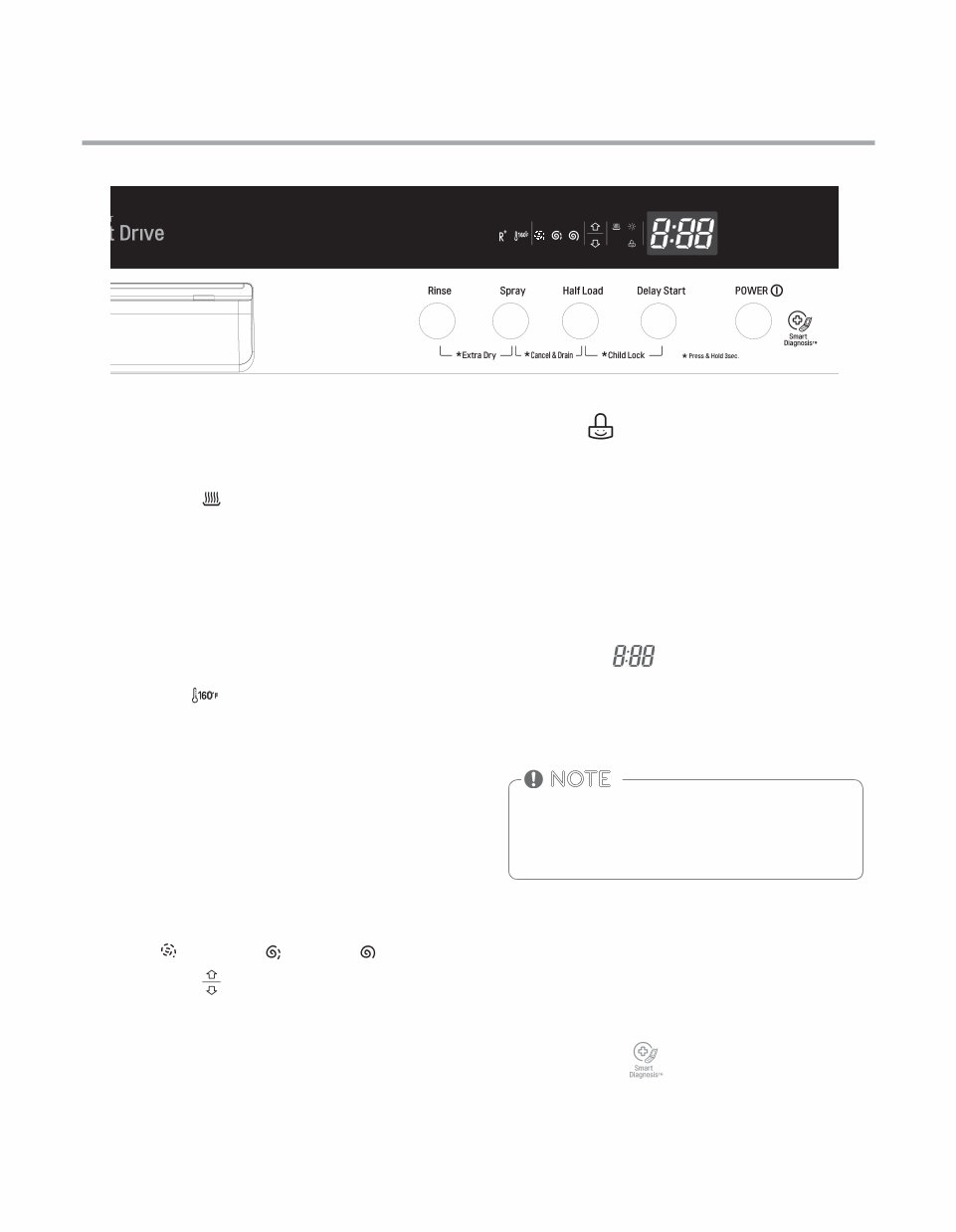
CONTROL PANEL
Spray (INTENSITY)
First, select the desired cycle. Press the Spray button repeat-
edly until the desired spray intensity is selected.
Soft ( ), Medium ( ), Strong ( )
Half Load
For small loads, you may use just the upper or lower rack to
save energy. Each press of the Half Load button cycles be-
tween upper rack only and lower rack only.
Delay Start
The Delay Start feature allows you to delay the start of a se-
lected cycle. Each time the Delay Start button is pressed, the
delay time will increase an hour. The delay start time can be
set from 1 to 19 hours, in one-hour increments.
High Temp ON/OFF
Raises the main wash temperature to improve cleaning.
Press and hold the Extra Dry and Rinse buttons simultane-
ously for approximately three seconds.
Child Lock
The Child Lock feature helps prevent your settings from be-
ing changed during a cycle. Selecting this feature locks all
of the buttons, except for the POWER button, on the control
panel. This feature does not lock the door.
To activate the Child Lock:
1. Open the dishwasher door.
2. Press the POWER button.
3. Select the cycle (and desired options).
4. Press and hold the Rinse and Spray buttons for three sec-
onds. The Child Lock indicator will illuminate in the display
once the Child Lock is activated.
5. Close the door to begin the cycle.
Digital Display
The Digital Display on the control panel shows the ESTIMAT-
ED cycle time. When the dishwasher is powered up, the dis-
play will be blank. When the cycle and options are selected,
the display will show the total estimated time to complete
those selections. During operation, the display shows the re-
maining estimated operating time.
• The estimated time shown in the display does not in-
clude delay times for heating water, etc.
• If Delay Start is selected, the display shows the delay
time in hours.
• Time may vary depending on the soil level of your load.
NOTE
Energy Saving
The Energy Saving option saves energy by using less water.
This option should only be used with light to medium soiled
dishes.
The RINSE AID symbol indicates that the rinse aid
needs to be refilled.
NOTE
POWER
• Press the POWER button to turn on the control panel. If no
cycle is selected within four minutes, the dishwasher will
power off.
• After the cycle is complete, the power automatically turns
off for purposes of safety and economy.
• If there is a power surge, power outage, or disruption of
any kind, the PF indicator will display and power will be au-
tomatically turned off for safety. The cycle will need to be
restarted.
Smart Diagnosis
Should you experience any problems with your dishwasher,
it has the capability of transmitting data to your Smart Phone
using the LG Smart Laundry & DW Application or via your
telephone to the LG call center.
WARNING
Steam can cause burns. Use caution in the area of the steam noz-
zle, on the left side of the dishwasher, if the door is opened during
the steam portion of a cycle. Contact with the steam or the steam
nozzle can cause burns.
Display varies by model (LDF8874, LDF8764)
Display varies by model (LDF7774)
For Authorized Service Technician
- 10 -
LDS5774
CONTROL PANEL
Display varies by model (LDS5774)
Cycle Options
Press the desired cycle and then select the options for that
cycle.
Extra Dry ( )
Select the Extra Dry option for better drying performance.
This option adds 60 minutes of extra drying time to the cycle.
The Extra Dry button will illuminate when the option has
been selected.
Press and hold the Rinse and Spray buttons for three seconds.
Rinse
Repeated pressing of the Rinse button will select the desired
Rinse option. The Sanitary, Extra Rinse, or Sanitary and Extra
Rinse lights will show in the bottom left portion of the dis-
play.
Sanitary ( )
This high-temperature rinse sanitizes dishes and glassware in
accordance with NSF/ANSI Standard 184 for residential dish-
washers. Certified dishwashers are not intended for licensed
food establishments.
Extra Rinse ( R
+
)
The Extra Rinse symbol indicates that an extra rinse has been
added to the cycle. An extra rinse can help reduce hard water
spotting on dishes. To add an extra rinse, press the Rinse but-
ton repeatedly until the Extra Rinse symbol appears in the
display.
Spray (INTENSITY)
First, select the desired cycle. Press the Spray button repeat-
edly until the desired spray intensity is selected.
Soft ( ), Medium ( ), Strong ( )
Half Load ( )
For small loads, you may use just the upper or lower rack to
save energy. Each press of the Half Load button cycles be-
tween upper rack only and lower rack only.
Delay Start
The Delay Start feature allows you to delay the start of a se-
lected cycle. Each time the Delay Start button is pressed, the
delay time will increase an hour. The delay start time can be
set from 1 to 19 hours, in one-hour increments.
Child Lock
The Child Lock feature helps prevent your settings from being
changed during a cycle. Selecting this feature locks all of the
buttons, except for the POWER button, on the control panel.
This feature does not lock the door.
To activate the Child Lock:
1. Press the POWER button.
2. Select the cycle (and desired options).
3. Press and hold the Half Load and Delay Start buttons for
three seconds. The Child Lock indicator will illuminate in
the display once the Child Lock is activated.
4. Close the door to begin the cycle.
Digital Display
The Digital Display on the control panel shows the ESTIMATED
cycle time. When the dishwasher is powered up, the display
will be blank. When the cycle and options are selected, the
display will show the total estimated time to complete those
selections. During operation, the display shows the remaining
estimated operating time.
• The estimated time shown in the display does not in-
clude delay times for heating water, etc.
• If Delay Start is selected, the display shows the delay
time in hours.
• Time may vary depending on the soil level of your load.
NOTE
POWER
• Press the POWER button to turn on the control panel. If no
cycle is selected within four minutes, the dishwasher will
power off.
• After the cycle is complete, the power automatically turns
off for purposes of safety and economy.
• If there is a power surge, power outage, or disruption of any
kind, the PF indicator will display and power will be auto-
matically turned off for safety. The cycle will need to be re-
started.
Smart Diagnosis
Should you experience any problems with your dishwasher, it
has the capability of transmitting data to your Smart Phone
using the LG Smart Laundry & DW Application or via your tele-
phone to the LG call center.
You're Reading a Preview
What's Included?
Lifetime Access
Fast Download Speeds
Online & Offline Access
Access PDF Contents & Bookmarks
Full Search Facility
Print one or all pages of your manual
$36.99
$48.99
Viewed 18 Times Today


Secure transaction
What's Included?
Lifetime Access
Fast Download Speeds
Online & Offline Access
Access PDF Contents & Bookmarks
Full Search Facility
Print one or all pages of your manual
$36.99
$48.99
This service and repair manual is an essential resource for both professional mechanics and DIY enthusiasts working on the LG LDF8874ST semi-integrated dishwasher.
- Product Operations, Specifications
- Features & Technical Explanation
- Disassembly Instructions
- Troubleshooting Methods
- Error Messages
- Wiring Diagrams
- Exploded Views
It provides comprehensive guidance in English and consists of 68 pages in PDF format, ensuring high-resolution print quality. Upon payment, you will gain instant access to the manual, eliminating the need for shipping and allowing you to commence repairs without delay.


