Introduction You have decided on the Audi Navigation System plus - thank you very much for your confidence in us. With this equipment, you are acquiring a highly developed technical system which offers various choices for entertainment and communication in addition to navigation. All the settings can be made centrally, using an easy-to-follow menu guide. We recommend that you read this owner's manual carefully so that you quickly become completely familiar with all of the functions and possibilities of the system and are able to make full use of them while driving. Should you have any further questions about the Audi Navigation System plus in your vehicle, please direct them to your Audi Dealer. We hope you enjoy driving your car! AUDI AG Downloaded from www.Manualslib.com manuals search engine
About this book 4 About this book Equipment and illustrations This book describes the equipment range specified for this model at the editorial deadline date as indicated on the inside of the back cover. Individual items of equipment may not yet be available at the time of printing or may only be offered in certain countries. The illustrations are designed as schematic images. Some of the details on your vehicle may therefore look slightly different than illustrated in this manual. Structure of the book The contents are systematically structured in a color-coded layout to make it easier to locate specific topics and understand them. Chapters, Table of Contents and Index The contents of the book are divided into relatively small sections that are summarized in clearly arranged chapters (e.g. “System Operation”). To make it easier to use the book, we have identified the individual chapters with the color codes from the Audi Naviga- tion System. Each color code is shown in the bottom margin of the chapter as well as in the headings and illustrations. In front of each chapter, icons shaded with the background color code of that specific section help to make the book more attractive and also serve to differentiate the fonts and facilitate navigation. The Table of Contents, organized into chapters, and the detailed Index at the end of the book help you to quickly find the information you need. Sections The information in most sections apply to all vehicles. However, since the equipment level is not the same on all vehicles, this book also contains sections which may not apply to your particular vehicle. When this is the case, the section will be identified, for example: “Applies to vehicles: with Audi cd changer”. This way, you only have to read the sections which are applicable to your vehicle. Although the information has been grouped into the appropriate sections, there are many possible equipment combinations which may be described in this book, but not installed on your vehicle. These are listed as optional equipment and marked with an asterisk “*”. ® Registered trademarks are marked with ®. The absence of this symbol does not warrant unrestricted use of a term. The paragraph continues on the next page. The square marks the end of a paragraph. Heading summaries and step-by-step instructions Each section has its own heading. Then follows a summary (in large, italic print), which tells you the subject matter of the section. Under an illustration you will find step-by-step instructions (in rela- tively large print), which tell you what you must do. Each instruction is identified with a dash. A descriptive section offering important and continuing informa- tion for each topic follows. Special symbols in this book Several symbols are used in this book. These symbols draw your attention to important information about a number of special subjects. Please familiarize yourself with the symbols and what they mean. Downloaded from www.Manualslib.com manuals search engine
About this book 5 General operation RADIO, CD NAME, TEL NAV, INFO CAR, SETUP WARNING Text with this symbol contains information about safety and how to reduce the risk of serious personal injury or death. Warning texts are the most important. Throughout this book you will find a double arrow followed by a warning symbol. This will refer you to a warning at the end of the section. You should pay particular attention to this warning. Note Text with this symbol contains information about avoiding damage to your vehicle. A note lets you know that something may cause damage to your vehicle or equipment (for example, damage to the CD player) or that something could cause an accident (for example, a street could be slippery even if the temperature is around 40° F (5° C). For the sake of the environment Text with this symbol contains important notes about the environ- ment and how you can help protect it. For the sake of the environment lets you know what you can do to help protect the environment (for example, how you can reduce fuel consumption). Tips Text with this symbol contains special tips and other information about getting the most out of your vehicle and its features. A tip makes you aware of important information which you may find useful. Downloaded from www.Manualslib.com manuals search engine
6 Downloaded from www.Manualslib.com manuals search engine
7 General operation Downloaded from www.Manualslib.com manuals search engine
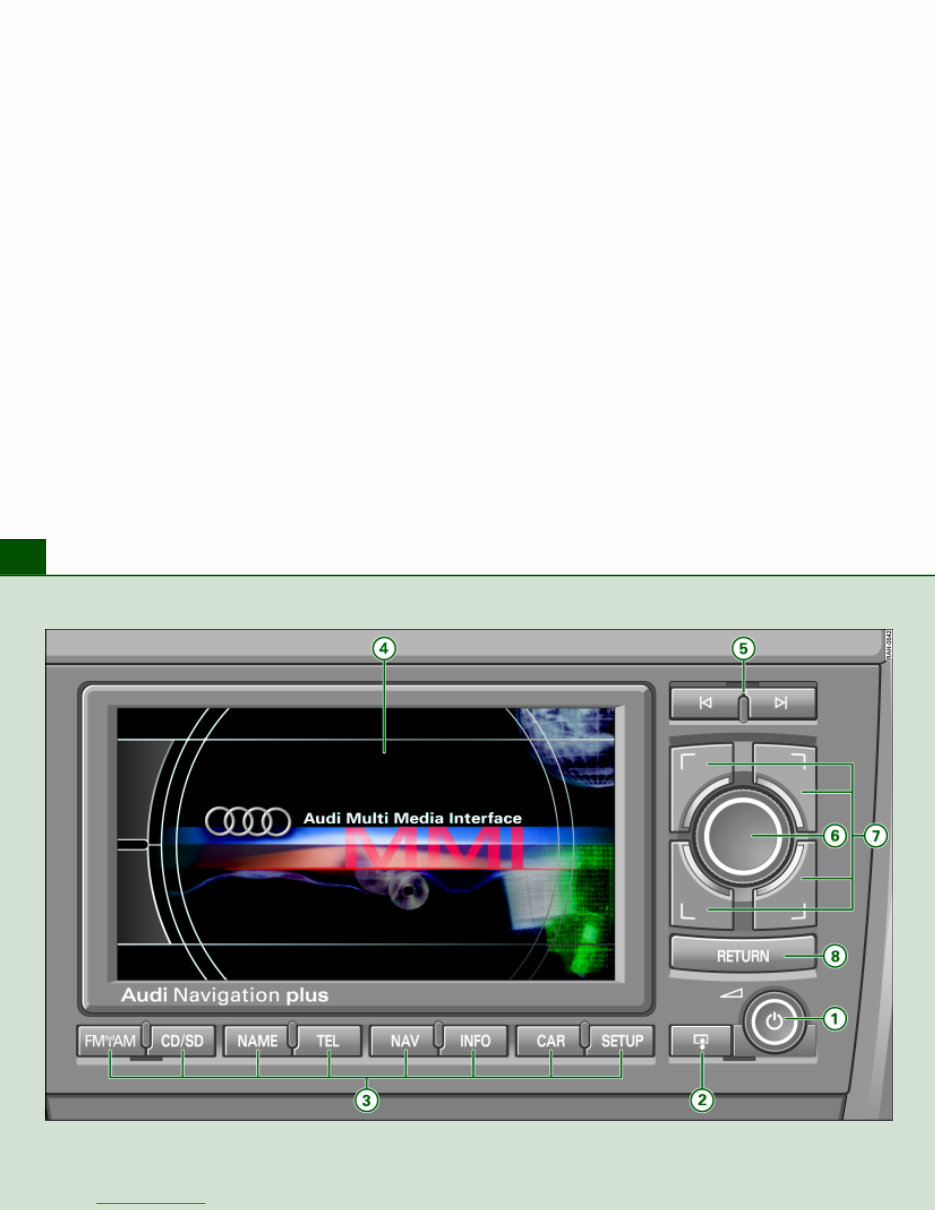
Overview 8 Fig. 1 Navigation System plus control unit Downloaded from www.Manualslib.com manuals search engine
The Audi RNS-E Navigation System Plus Version 11.04 manual is an essential resource for both professional mechanics and DIY enthusiasts. This 194-page manual provides detailed information on the operation, maintenance, and troubleshooting of the Audi RNS-E navigation system. Whether you are looking to understand the system's features or need to perform repairs, this manual offers comprehensive guidance.
With clear and concise instructions, this manual covers a wide range of topics including system overview, navigation functions, audio settings, and connectivity options. It also includes troubleshooting tips to help diagnose and resolve common issues. Whether you prefer digital or printed format, this manual is a valuable tool for anyone working with the Audi RNS-E navigation system.



 Lifetime Access