Confidential PRECAUTIONS Precautionary notations throughout the text are categorized relative to 1) Personal injury and 2) damage to equipment. DANGER Signals a precaution which, if ignored, could result in serious or fatal personal injury. Great caution should be exercised in performing procedures preceded by DANGER Headings. WARNING Signals a precaution which, if ignored, could result in damage to equipment. The precautionary measures itemized below should always be observed when performing repair/maintenance procedures. DANGER 1. ALWAYS DISCONNECT THE PRODUCT FROM THE POWER SOURCE AND PERIPHERAL DEVICES PERFORMING ANY MAINTENANCE OR REPAIR PROCEDURES. 2. NO WORK SHOULD BE PERFORMED ON THE UNIT BY PERSONS UNFAMILIAR WITH BASIC SAFETY MEASURES AS DICTATED FOR ALL ELECTRONICS TECHNICIANS IN THEIR LINE OF WORK. 3. WHEN PERFORMING TESTING AS DICTATED WITHIN THIS MANUAL, DO NOT CONNECT THE UNIT TO A POWER SOURCE UNTIL INSTRUCTED TO DO SO. WHEN THE POWER SUPPLY CABLE MUST BE CONNECTED, USE EXTREME CAUTION IN WORKING ON POWER SUPPLY AND OTHER ELECTRONIC COMPONENTS. 4. WHEN DISASSEMBLING OR ASSEMBLING A PRODUCT, MAKE SURE TO WEAR GLOVES TO AVOID INJURIER FROM METAL PARTS WITH SHARP EDGES. WARNING 1. REPAIRS ON EPSON PRODUCT SHOULD BE PERFORMED ONLY BY AN EPSON CERTIFIED REPAIR TECHNICIAN. 2. MAKE CERTAIN THAT THE SOURCE VOLTAGES IS THE SAME AS THE RATED VOLTAGE, LISTED ON THE SERIAL NUMBER/RATING PLATE. IF THE EPSON PRODUCT HAS A PRIMARY AC RATING DIFFERENT FROM AVAILABLE POWER SOURCE, DO NOT CONNECT IT TO THE POWER SOURCE. 3. ALWAYS VERIFY THAT THE EPSON PRODUCT HAS BEEN DISCONNECTED FROM THE POWER SOURCE BEFORE REMOVING OR REPLACING PRINTED CIRCUIT BOARDS AND/OR INDIVIDUAL CHIPS. 4. IN ORDER TO PROTECT SENSITIVE MICROPROCESSORS AND CIRCUITRY, USE STATIC DISCHARGE EQUIPMENT, SUCH AS ANTI-STATIC WRIST STRAPS, WHEN ACCESSING INTERNAL COMPONENTS. 5. REPLACE MALFUNCTIONING COMPONENTS ONLY WITH THOSE COMPONENTS BY THE MANUFACTURE; INTRODUCTION OF SECOND-SOURCE ICs OR OTHER NON-APPROVED COMPONENTS MAY DAMAGE THE PRODUCT AND VOID ANY APPLICABLE EPSON WARRANTY. 6. WHEN USING COMPRESSED AIR PRODUCTS; SUCH AS AIR DUSTER, FOR CLEANING DURING REPAIR AND MAINTENANCE, THE USE OF SUCH PRODUCTS CONTAINING FLAMMABLE GAS IS PROHIBITED.
Confidential About This Manual This manual describes basic functions, theory of electrical and mechanical operations, maintenance and repair procedures of the printer. The instructions and procedures included herein are intended for the experienced repair technicians, and attention should be given to the precautions on the preceding page. Manual Configuration This manual consists of six chapters and Appendix. CHAPTER 1.PRODUCT DESCRIPTIONS Provides a general overview and specifications of the product. CHAPTER 2.OPERATING PRINCIPLES Describes the theory of electrical and mechanical operations of the product. CHAPTER 3.TROUBLESHOOTING Describes the step-by-step procedures for the troubleshooting. CHAPTER 4.DISASSEMBLY / ASSEMBLY Describes the step-by-step procedures for disassembling and assembling the product. CHAPTER 5.ADJUSTMENT Provides Epson-approved methods for adjustment. CHAPTER 6.MAINTENANCE Provides preventive maintenance procedures and the lists of Epson- approved lubricants and adhesives required for servicing the product. APPENDIX Provides the following additional information for reference: • Exploded Diagram • Parts List Symbols Used in this Manual Various symbols are used throughout this manual either to provide additional information on a specific topic or to warn of possible danger present during a procedure or an action. Be aware of all symbols when they are used, and always read NOTE, CAUTION, or WARNING messages. Indicates an operating or maintenance procedure, practice or condition that is necessary to keep the product’s quality. Indicates an operating or maintenance procedure, practice, or condition that, if not strictly observed, could result in damage to, or destruction of, equipment. May indicate an operating or maintenance procedure, practice or condition that is necessary to accomplish a task efficiently. It may also provide additional information that is related to a specific subject, or comment on the results achieved through a previous action. Indicates an operating or maintenance procedure, practice or condition that, if not strictly observed, could result in injury or loss of life. Indicates that a particular task must be carried out according to a certain standard after disassembly and before re-assembly, otherwise the qual- ity of the components in question may be adversely affected. A D J U S T M E N T R E Q U I R E D C A U T I O N C H E C K P O I N T W A R N I N G
Confidential Revision Status Revision Date of Issue Description A August 8, 2007 First Release B September 28, 2007 [Chapter 4] • "Main Board Unit" (Page 64): error correction. [Chapter 5] • "Overview" (Page 115): error correction. C May 19, 2009 Revised Contents [All chapters] • Epson Artisan 50/Epson Stylus Photo T50/T59/T60/P50 added. [Chapter 1] • "1.1 Features (p.9)" is updated. • "1.2.3 Print Mode (p.11)" is updated. • "1.2.4 Supported Paper (p.13)" is updated. • "1.3 Interface (p.16)" is updated. • "1.4.1 Electrical Specifications (p.17)" is updated. • "1.4.4 Acoustic Noise (p.18)" is updated. • "1.4.5 Safety Approvals (Safety standards/EMI) (p.18)" is updated. [Chapter 2] • "2.3 Power-On Sequence (p.26)" is added. • "2.4 Printer Initialization (p.28)" is added. • "2.2 Electrical Circuit Operating Principles" is deleted. [Chapter 4] • "4.1.9 Procedural Differences (p.59)" is added. • "4.5 Disassembly/reassembly procedures of Epson Artisan 50/Epson Stylus Photo T50/T59/T60/P50 (p.99)" is added. [Chapter 5] • "5.3 Banding Reduction System (BRS) Adjustment / Paper Feed Amount Profile (PFP) Correction (p.115)" is updated. [Chapter 7] • "7.2 Electrical Circuits" is deleted.
EPSON Stylus Photo R280/R285/R290/Epson Artisan 50/Epson Stylus Photo T50/T59/T60/P50 Revision C 7 Confidential 4.3.3 P/S Assy................................................................................................... 71 4.4 Disassembling the Printer Mechanism ............................................................... 72 4.4.1 Removing the Printer Mechanism ........................................................... 72 4.4.2 Printhead .................................................................................................. 75 4.4.3 CR Scale .................................................................................................. 77 4.4.4 APG Unit ................................................................................................. 78 4.4.5 Waste Ink Tray ........................................................................................ 80 4.4.6 Waste Ink Pad .......................................................................................... 80 4.4.7 Left & Right Guide Stackers / CDR Guide Sensor ................................. 81 4.4.8 Ink System ............................................................................................... 82 4.4.9 EJ Frame Assy ......................................................................................... 84 4.4.10 PF Encoder / PF Scale ........................................................................... 86 4.4.11 PF Motor ................................................................................................ 87 4.4.12 CR Motor ............................................................................................... 87 4.4.13 CR Unit .................................................................................................. 89 4.4.14 ASF Unit ................................................................................................ 92 4.4.15 Upper Paper Guide ................................................................................ 94 4.4.16 APG Sensor Assy .................................................................................. 95 4.4.17 Front Paper Guide Assy......................................................................... 96 4.4.18 CDR Tray Sensor .................................................................................. 98 4.5 Disassembly/reassembly procedures of Epson Artisan 50/Epson Stylus Photo T50/ T59/T60/P50 ....................................................................................................... 99 4.5.1 Panel Assy ............................................................................................... 99 Chapter 5 Adjustment 5.1 Adjustment Items and Overview ...................................................................... 104 5.1.1 Servicing Adjustment Item List............................................................. 104 5.1.2 Required Adjustments ........................................................................... 107 5.2 Using the Adjustment Program ........................................................................ 109 5.2.1 Top Margin Adjustment ........................................................................ 109 5.2.2 Head Angular Adjustment ..................................................................... 109 5.2.3 Bi-D Adjustment ................................................................................... 110 5.2.4 PW Adjustment/First Dot Position Adjustment .................................... 111 5.2.5 PF Adjustment ....................................................................................... 112 5.2.6 PG Adjustment ...................................................................................... 113 5.3 Banding Reduction System (BRS) Adjustment / Paper Feed Amount Profile (PFP) Correction ......................................................................................................... 115 5.3.1 Overview ............................................................................................... 115 5.3.2 Adjustment Procedure ........................................................................... 117 Chapter 6 Maintenance 6.1 Overview .......................................................................................................... 121 6.1.1 Cleaning................................................................................................. 121 6.1.2 Service Maintenance ............................................................................. 121 6.1.3 Lubrication ............................................................................................ 122 Chapter 7 Appendix 7.1 Exploded Diagram / Parts List ......................................................................... 129
Confidential CHAPTER 1 PRODUCT DESCRIPTION
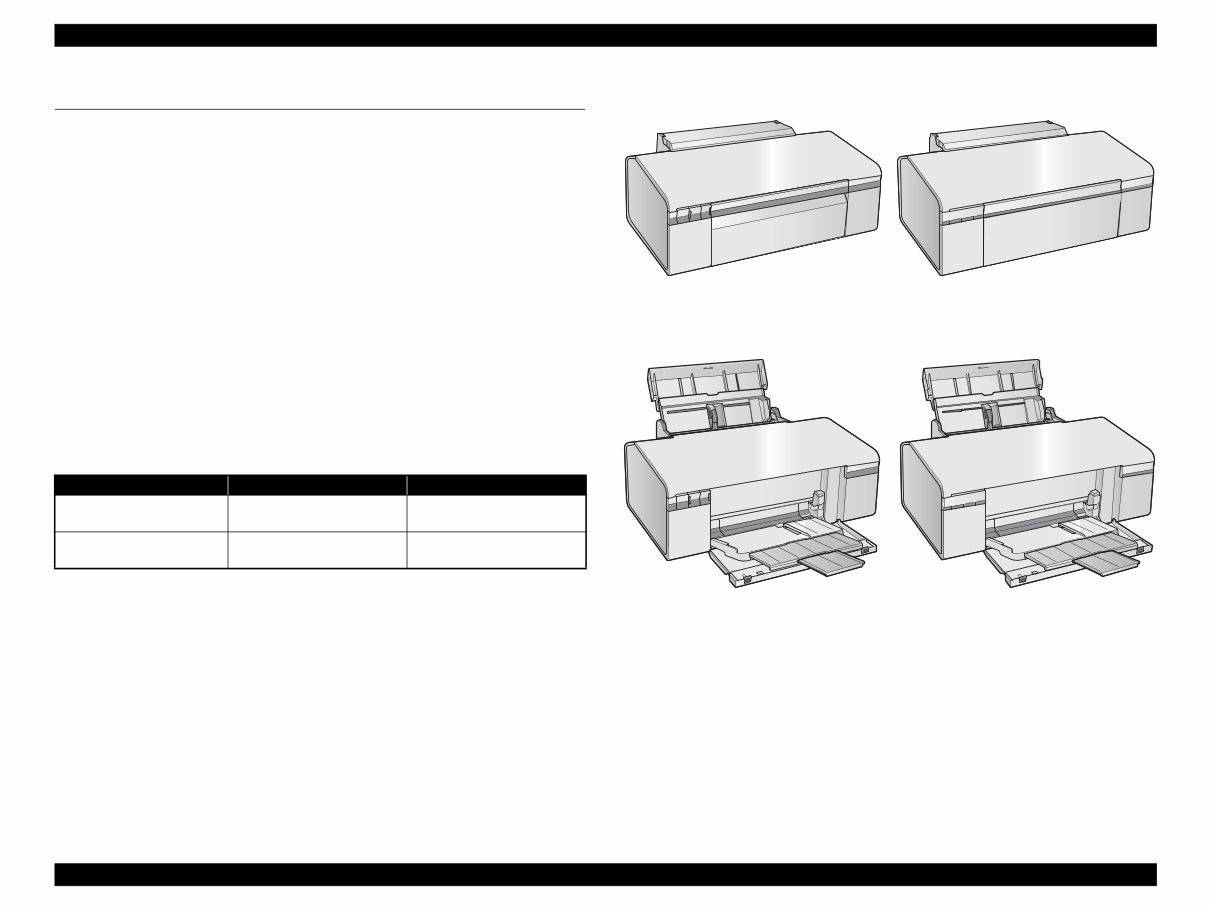
Epson Stylus Photo R280/R285/R290/Epson Artisan 50/Epson Stylus Photo T50/T59/T60/P50 Revision C Chapter 1 Product Description 1.1 Features 9 Confidential 1.1 Features Epson Stylus Photo R280/R285/R290 and Epson Artisan 50/Epson Stylus Photo T50/ T59/T60/P50 are single-function color ink-jet printers. The main features are; High speed & High quality Maximum print resolution: 5760 (H) x 1440 (V) dpi Newly developed F3 Mach Turbo II print head achieves higher print speed than ever. Six independent dye-ink cartridges enables high-resolution photo printing. CD and DVD label printing are supported. Borderless printing on specified EPSON brand paper is available. Control panel Simple design with three buttons and three indicators (LED). Dimensions and weight Note *1: Paper support and stacker are closed. Rubber feet are included. *2: Without ink cartridges Figure 1-1. External View Table 1-1. Dimensions and weight Model Dimensions (W x D x H) mm *1 Weight *2 Epson Stylus Photo R280/ R285/R290 450 x 282 x 187 5.4 kg Epson Artisan 50/Epson Stylus Photo T50/T59/T60/P50 450 x 289 x 187 5.5 kg Paper Support & Stacker are Closed Paper Support & Stacker are Opened Epson Stylus Photo R280/R285/R290 Epson Artisan 50/ Epson Stylus Photo T50/T59/T60/P50 Epson Stylus Photo R280/R285/R290 Epson Artisan 50/ Epson Stylus Photo T50/T59/T60/P50
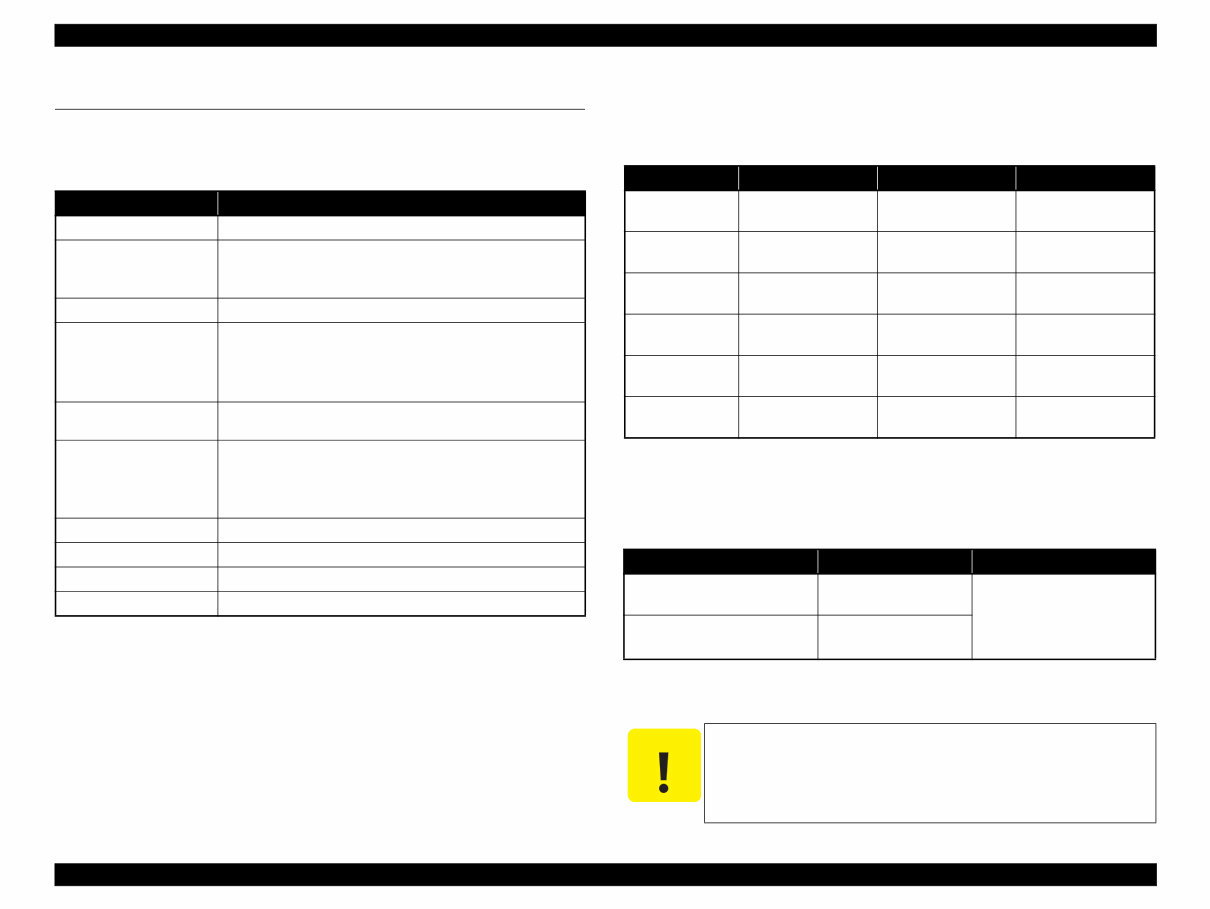
Epson Stylus Photo R280/R285/R290/Epson Artisan 50/Epson Stylus Photo T50/T59/T60/P50 Revision C Chapter 1 Product Description 1.2 Printing Specifications 10 Confidential 1.2 Printing Specifications 1.2.1 Basic Specifications 1.2.2 Ink Cartridge The product numbers of the EPSON ink cartridges for this printer are shown below. Shelf life Two years from production date (if unopened), six months after opening package. Storage Temperature Dimension 12.7 mm (W) x 68 mm (D) x 47 mm (H) Table 1-2. Printer Specifications Item Specifications Print method On-demand ink jet Nozzle configuration Black: 90 nozzles Color: 90 nozzles x 5 (Cyan, Magenta, Yellow, Light Cyan, Light Magenta) Print direction Bi-directional minimum distance printing, unidirectional printing Print resolution Horizontal x Vertical (dpi) • 360 x 180 • 720 x 540 • 360 x 360 • 720 x 720 • 720 x 360 • 5760 x 1440 Control code • ESC/P Raster command • EPSON Remote command Internal font Character code:Alphanumeric with expanded graphics (PC437) ASCII, 20H to 7FH only Font: EPSON original font Alphanumeric font: Courier Paper feed method Friction feed, using one ASF (Auto Sheet Feeder) Paper path Top feed, front out Paper feed rates 110 msec (at 25.4 mm feed) PF interval Programmable in 0.01764 mm (1/1440 inch) steps Table 1-3. Product No. of Ink Cartridges Color EAI Euro Asia, CISMEA, Latin Black T0771 (S) T0781 (SS) T0801 T0811 (S) T0821 (SS) Cyan T0772 (S) T0782 (SS) T0802 T0812 (S) T0822 (SS) Magenta T0773 (S) T0783 (SS) T0803 T0813 (S) T0823 (SS) Yellow T0774 (S) T0784 (SS) T0804 T0814 (S) T0824 (SS) Light Cyan T0775 (S) T0785 (SS) T0805 T0815 (S) T0825 (SS) Light Magenta T0776 (S) T0786 (SS) T0806 T0816 (S) T0826 (SS) Table 1-4. Storage Temperature Situation Storage Temperature Limit When stored in individual boxes -20 o C to 40 o C (-4 o F to 104 o F) 1 month max. at 40 o C (104 o F) When installed in main unit -20 o C to 40 o C (-4 o F to 104 o F) C A U T I O N The ink cartridge cannot be refilled. Do not use expired ink cartridges. The ink in the ink cartridge freezes at -16 °C (3.2 o F). It takes about three hours under 25 °C (77 o F) until the ink thaws and becomes usable.
You're Reading a Preview
What's Included?
Lifetime Access
Fast Download Speeds
Online & Offline Access
Access PDF Contents & Bookmarks
Full Search Facility
Print one or all pages of your manual
$27.99
Epson Stylus Photo R280/R285/R290 Printers OEM Service & Repair Manual
For owners of the Epson Stylus Photo R280/R285/R290 Printers, having a detailed service and repair manual on hand is essential. This OEM manual is designed to provide comprehensive and accurate information for both professional technicians and DIY enthusiasts.
With practical explanations, step-by-step procedures, and precise specifications, this manual aims to simplify the repair process and reduce maintenance costs. It covers every conceivable repair and adjustment job on your printer, offering detailed instructions for service, repair, maintenance, and fine-tuning for every component.
Features include:
Full-color pictures and photos to guide you through each procedure
Step-by-step instructions for diagnostic and repair tasks
128-page high-resolution PDF format for clear printed output
Language: English
Compatibility: Windows 10, 8, 7, Vista (32 and 64-bit), XP, ME, 98, NT, 2000, and MAC OS
This official OEM service and repair manual provides the most comprehensive diagnostic, repair, and maintenance information directly from the manufacturer. It is a must-have resource for anyone looking to maintain or repair their Epson printer.
Navigate easily through bookmarked chapters and a built-in search function, ensuring you have the most accurate and complete information to keep your Epson Stylus Photo R280/R285/R290 Printers in top condition.
Reviews
Q&A
Recently Viewed
5,521,897Happy Clients
2,594,462eManuals
1,120,453Trusted Sellers
15Years in Business
Price:
Actual Price:
Epson Stylus Photo R280/R285/R290 Printers OEM Service & Repair Manual









 Lifetime Access




