PIXMA MP170 PIXMA MP450 SERVICE MANUAL Canon Copyright 2005, Canon U.S.A. This technical publication is the proprietary and confidential information of Canon U.S.A. which shall be retained for reference purposes by Authorized Service Facilities of Canon U.S.A. Its unauthorized use is prohibited.
I. MANUAL OUTLINE This manual consists of the following three parts to provide information necessary to service the PIXMA MP170 / MP450: Part 1: Maintenance Information on maintenance and troubleshooting of the PIXMA MP170 / MP450 Part 2: Technical Reference New technology and technical information such as FAQ's (Frequently Asked Questions) of the PIXMA MP170 / MP450 Part 3: Appendix Block diagrams and pin layouts of the PIXMA MP170 / MP450 Reference: This manual does not provide sufficient information for disassembly and reassembly procedures. Refer to the graphics in the separate Parts Catalog.
II. TABLE OF CONTENTS Part 1: MAINTENANCE 1. MAINTENANCE 1 - 1. Adjustment, Periodic Maintenance, Periodic Replacement Parts, and Replacement Consumables by Service Engineer 1 - 2. Customer Maintenance 1 - 3. Product Life 1 - 4. Special Tools 1 - 5. Serial Number Location 2. LIST OF ERROR DISPLAY / INDICATION S 2 - 1. Operator Call Errors 2 - 2. Service Call Errors 2 - 3. Warnings 2 - 4. Troubleshooting by Symptom 3. REPAIR 3 - 1. Notes on Service Part Replacement (and Disassembling / Reassembling) 3 - 2. Special Notes on Repair Servicing 3 - 3. Adjustment / Settings (1) Paper feed motor adjustment (2) Main chassis and carriage rail adjustment (3) Document pressure sheet adjustment (4) Grease application (5) Waste ink counter setting (6) User mode (7) Service mode Service test print EEPROM initialization Waste ink counter reset Destination settings Button and LCD test 3 - 4. Verification Items (1) Service test print (2) EEPROM information print
Part 2: TECHNICAL REFERENCE 1. NEW TECHNOLOGIES 2. CLEANING MODE AND AMOUNT OF INK PURGED 3. PRINT MODE 3 - 1. Resolution in Printing via Computer (Print on One or Both Sides of Paper, BK Cartridge, Monochrome Mode) 3 - 2. Resolution in Printing via Computer (Print on One or Both Sides of Paper, BK and CL Cartridges, Monochrome Mode) 3 - 3. Resolution in Printing via Computer (Print on One or Both Sides of Paper, BK and CL Cartridges, Color Mode) 3 - 4. Resolution in Printing via Computer (Print on One or Both Sides of Paper, CL Cartridge, Color or Monochrome Mode) 3 - 5. Resolution in Borderless Printing (Print on One or Both Sides of Paper, BK and CL Cartridges or CL Cartridge Only, Color or Monochrome Mode) 3 - 6. Resolution in Direct Printing 3 - 7. Resolution in Copying (Copy on One or Both Sides of Paper, Color or Monochrome Mode) 4. FAQ (Problems Specific to the MP170 / MP450 and Corrective Actions) Part 3: APPENDIX 1. BLOCK DIAGRAM 2. CONNECTOR LOCATION AND PIN LAYOUT 2 - 1. Main Board 2 - 2. MP450 Operation Panel Board L 2 - 3. MP450 Operation Panel Board R 2 - 4. MP170 Operation Panel Board 2 - 5. Card Slot Board (Card Slot Unit) 2 - 6. Carriage Board (Print Head Connector) 3. SPECIFICATIONS
Part 1 MAINTENANCE
1. MAINTENANCE 1-1. Adjustment, Periodic Maintenance, Periodic Replacement Parts, and Replacement Consumables by Service Engineer (1) Adjustment *1: Red screws of paper feed motor The red screws securing the paper feed motor may be loosened only at replacement of the paper feed motor unit. Adjustment Timing Purpose Tool Approx. time EEPROM initialization (EEPROM settings) At logic board ass'y replacement To initialize settings other than the following: - USB serial number - Destination setting - Waste ink counter None. 1 min. Destination settings (EEPROM settings) At logic board ass'y replacement To set the destination. None. 1 min. LCD language settings At logic board ass'y replacement To set the language to be displayed on the LCD. None. 1 min. Waste ink counter resetting (EEPROM settings) - At bottom case unit replacement MP170: QM2-2800-000 MP450: QM2-2814-000 - At ink absorber replacement MP170: QY5-0149, QC1- 6014 MP450: QY5-0151, QC1- 6014 To reset the waste ink counter. None. 1 min. Document pressure sheet position adjustment - At document cover unit replacement - At scanning unit replacement To adjust the pressure sheet to fit in place to the four corners of the platen glass when the cover is closed None. 1 min. Print head alignment - At print head replacement - At logic board ass'y replacement - At carriage unit replacement To ensure accurate dot placement. - Machine buttons - Computer (settings via the MP driver) 2 min. Paper feed motor position adjustment *1 At paper feed motor unit replacement To adjust the belt tension. (Position the paper feed motor so that the belt is stretched tight.) None. 2 min. Grease application - At carriage unit replacement - At bottom case unit replacement - At platen replacement - At eject roller replacement - At cap blade unit replacement - - To maintain sliding properties of the carriage, cap blade unit, and eject rollers. - FLOIL KG- 107A (QY9- 0057) - MOLYKOTE PG641 (CK- 0562) 1 min. 1-1
(2) Periodic maintenance No periodic maintenance is necessary. (3) Periodic replacement parts There are no parts in this machine that require periodic replacement by a service engineer. (4) Replacement consumables There are no consumables that require replacement by a service engineer. 1-2. Customer Maintenance 1-3. Product Life (1) Machine Specified print volume (I) or the years of use (II), whichever comes first. (I) Print volume (II) Years of use 5 years of use Adjustment Timing Purpose Tool Approx. time Print head alignment When print quality is not satisfying. To ensure accurate dot placement. - Machine buttons (automatic alignment by scanning the head alignment sheet) - Computer (manual alignment via the MP driver) 3 min. Print head cleaning When print quality is not satisfying. To improve nozzle conditions. - Machine button - Computer (settings via the MP driver) 1 min. Print head deep cleaning When print quality is not satisfying, and not improved by print head cleaning. To improve nozzle conditions. - Machine button - Computer (settings via the MP driver) 2 min. Ink cartridge replacement When an ink cartridge becomes empty. (No ink error) ----- ----- 2 min. Paper feed roller cleaning When paper does not feed properly. To clean the paper feed rollers. Machine button 2 min. Bottom plate cleaning When the back side of the paper is smeared To clean the platen ribs. - Machine button - Computer (settings via the MP driver) 1 min. MP170 / MP450 8,000 pages Black 1,500 character pattern 4,000 pages Color A4, 7.5% duty per color pattern 3,200 pages A4, 30 % duty per color pattern 160 pages 4 x 6, 30 % duty per color pattern 400 pages Postcard, 30 % duty per color pattern 240 pages 1-2
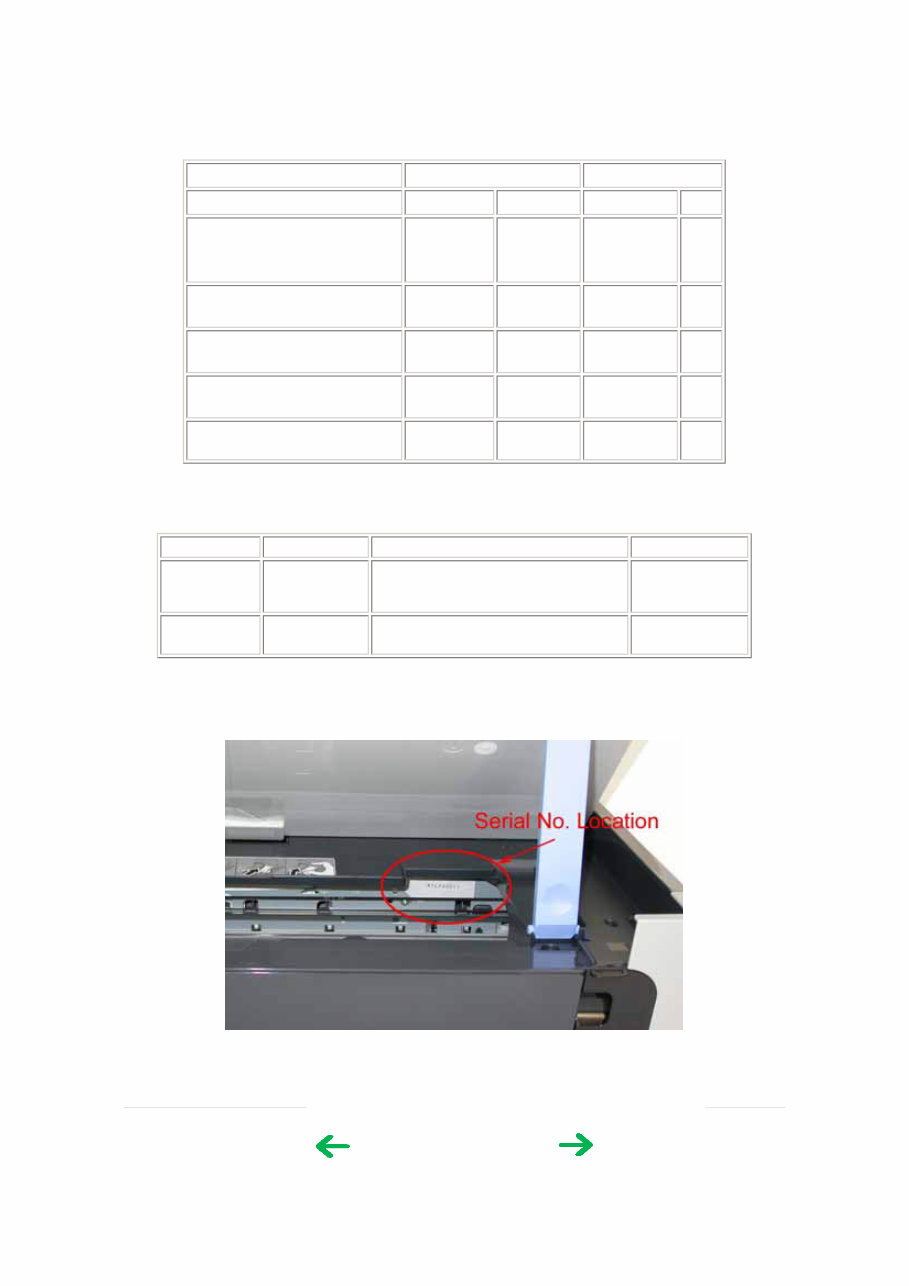
(2) Ink cartridge (ink tank with nozzles) (target value) Standard High capacity BK CL BK CL PG-40 CL-41 PG-50 CL- 51 1,500 character pattern plain paper, standard mode (BK) 490 pages - 750 pages - ISO JIS-SCID No. 5 plain paper, standard mode (BK) 760 pages - 1,170 pages - ISO JIS-SCID No. 5 plain paper, standard mode (CL) - 190 pages - 320 pages Digital camera 24 images PP-101 4x6 - 100 pages - 180 pages 1-4. Special Tools 1-5. Serial Number Location On the chassis (visible when the scanning unit is open). Name Tool No. Application Remarks MOLYKOTE PG-641 QY9-0035-000 To be applied to the chassis. In common with other models. FLOIL KG-107A QY9-0057-000 To be applied to the sliding portion of the carriage, and the platen link. In common with other models. To the table of contents To the top <Part 1: 1.MAINTENANCE> 1-3
You're Reading a Preview
What's Included?
Lifetime Access
Fast Download Speeds
Online & Offline Access
Access PDF Contents & Bookmarks
Full Search Facility
Print one or all pages of your manual
$36.99
Canon Pixma MP450 MP 450 printer service and repair manual
Get the official Canon service manual for the Pixma MP450 printer. This manual features bookmarked chapters for easy navigation, allowing you to quickly find the exact repair procedures you need. Throughout each chapter, you'll find notes, cautions, and warnings highlighting critical service information. Numbered instructions will guide you through each repair procedure in a step-by-step fashion, while bold figured numbers help you match illustrations with instructions. Detailed illustrations, exploded diagrams, drawings, and photos will assist you through every service repair procedure. The numbered table of contents makes it easy to find the information you need quickly. The manual is in English and is available in PDF format. It contains 70 pages. Purchase this repair manual by clicking on the green "Instant" button at the upper left-hand corner of this page. After purchasing, download it to your computer to save and print pages whenever you need them.
Reviews
Q&A
Recently Viewed
5,521,897Happy Clients
2,594,462eManuals
1,120,453Trusted Sellers
15Years in Business
Price:
Actual Price:
Canon Pixma MP450 MP 450 printer service and repair manual












 Lifetime Access




