


Xerox WorkCentre C2424, Service Manual & Parts List
What's Included?
 Lifetime Access
Fast Download Speeds
Online & Offline Access
Access PDF Contents & Bookmarks
Full Search Facility
Print one or all pages of your manual
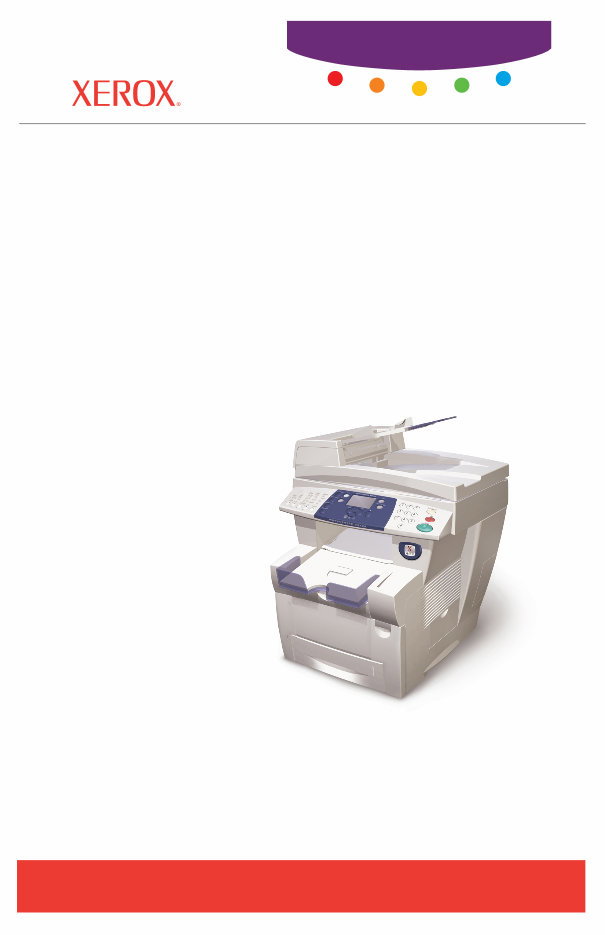
WorkCentre
®
C2424
copier-printer
Service
Manual


WorkCentre
®
C2424
Copier-Printer
Service Manual
Warning
The following servicing instructions are for use by qualified service
personnel only. To avoid personal injury, do not perform any servicing other
than that contained in the operating instructions, unless you are qualified to
do so.
First Printing: March 2005
Part Number: 604E13990

Copyright
Copyright © 2005 Xerox Corporation. All Rights Reserved. Unpublished rights reserved under the
copyright laws of the United States. Contents of this publication may not be reproduced in any form
without permission of Xerox Corporation.
Copyright protection claimed includes all forms of matters of copyrightable materials and information now
allowed by statutory or judicial law or hereinafter granted, including without limitation, material generated
from the software programs which are displayed on the screen such as styles, templates, icons, screen
displays, looks, etc.
XEROX
®
, The Document Company
®
, the digital X
®
, CentreWare
®
, FinePoint
™
, infoSMART
®
, Made For
Each Other
®
, Phaser
®
, PhaserSMART
®
, and Walk-Up
™
are trademarks of Xerox Corporation in the
United States and/or other countries.
Acrobat
®
, Adobe
®
Reader
®
, Adobe Type Manager
®
, ATM
™
, Illustrator
®
, PageMaker
®
, Photoshop
®
,
PostScript
®
, Adobe Brilliant
®
Screens, Adobe Garamond
®
, Adobe Jenson
™
, Birch
®
, Carta
®
,
IntelliSelect
®
, Mythos
®
, Quake
®
, and Tekton
®
are trademarks of Adobe Systems Incorporated in the
United States and/or other countries.
Apple
®
, AppleTalk
®
, EtherTalk
®
, LaserWriter
®
, LocalTalk
®
, Macintosh
®
, Mac OS
®
, TrueType
®
, Apple
Chancery
®
, Chicago
®
, Geneva
®
, Monaco
®
, New York
®
, and QuickDraw
®
are trademarks of Apple
Computer, Inc. in the United States and/or other countries.
HP-GL
®
, HP-UX
®
, and PCL
®
are trademarks of Hewlett-Packard Corporation in the United States and/or
other countries.
IBM
®
and AIX
®
are trademarks of International Business Machines Corporation in the United States and/
or other countries.
Windows
®
, Windows NT
®
, Windows Server
™
, and Wingdings
®
are trademarks of Microsoft Corporation
in the United States and/or other countries.
Novell
®
, NetWare
®
, NDPS
®
, NDS
®
, Novell Directory Services
®
, IPX
™
, and Novell Distributed Print
Services
™
are trademarks of Novell, Incorporated in the United States and/or other countries.
Sun
SM
, Sun Microsystems
™
, and Solaris
®
are trademarks of Sun Microsystems, Incorporated in the United
States and/or other countries.
SWOP
®
is a trademark of SWOP, Inc.
UNIX
®
is a trademark in the United States and other countries, licensed exclusively through X/Open
Company Limited.
As an ENERGY STAR
®
partner, Xerox Corporation has determined that this product with an ES Option
meets the ENERGY STAR guidelines for energy efficiency. The ENERGY STAR name and logo are registered
U.S. marks.
This product uses code for SHA-1 written by John Halleck, which is being used with his permission.
This product includes an implementation of LZW licensed under U.S. Patent 4,558,302.
PANTONE
®
Colors generated may not match PANTONE-identified standards. Consult current PANTONE
Publications for accurate color. PANTONE
®
and other Pantone, Inc. trademarks are the property of
Pantone, Inc. © Pantone, Inc., 2000.

Service Manual i
Organization of this Manual
Frontis - Introductory, Safety and Regulatory Information
This section contains important safety information regarding technical components, regulatory
agency requirements, and information about this manual.
Section 1 - General Information
This section cantains a general overview of the system and basic information regarding the
control panel, consumables, and the system’s physical, functional, electrical, environmental,
and media specifications.
Section 2 - Theory of Operation
This section contains the basic theory of operation for the entire system. It includes diagrams
and detailed operating information regarding the sub-systems (internal components), print
processes (media paths and imaging), and electronics (power supply and boards).
Section 3 - Error Codes and Messages
This section provides detailed troubleshooting procedures for the system, utilizing the
displayed control panel error codes and messages.
Section 4 - General Troubleshooting
This section covers general start-up, POST, BIST, PEST, and power supply operations of the
system to aid in troubleshooting problems not associated with a control panel message or error
code. This section also covers the Service Diagnostic functions of the system.
Section 5 - Image-Quality Troubleshooting
This section provides image-quality troubleshooting procedures for the entire system. It also
contains the various test prints available to aid in troubleshooting image-quality problems.
Section 6 - Adjustments and Calibrations
This section provides procedures for proper homing of the systems components, system
calibrations, ensuring ground integrity of the system, and resetting NVRAM.
Section 7 - Cleaning and Maintenance
This section provides basic information on cleaning and maintaining the system for optimal
operation. It also includes printer self-maintenance functions.
Section 8 - Disassembly
This section contains all the disassembly instructions for removing and replacing Xerox spared
parts.
Section 9 - Parts List
This section contains exploded diagrams and detailed parts lists for the WorkCentre C2424
Copier-Printer and the most common Xerox supplies used for this system.
Section 10 - Wiring Diagrams
This section contains the main wiring diagrams, plug-jack connector maps, and wiring
diagrams to aid in troubleshooting the PEST codes.

ii WorkCentre C2424 Copier-Printer
Manual Terms
Various terms are used throughout this manual to either provide additional information on a
specific topic or to warn of possible danger present during a procedure or action. Be aware of
all symbols and terms when they are used, and always read NOTE, CAUTION, and WARNING
statements.
Note
A note indicates an operating or maintenance procedure, practice or condition that is
neccessary to efficiently accomplish a task.
A note can provide additional information related to a specific subject or add a comment
on the results achieved through a previous action.
Caution
A caution indicates an operating or maintenance procedure, practice or condition that, if
not strictly observed, results in damage to, or destruction of, equipment.
Warning
A warning indicates an operating or maintenance procedure, practice or condition that, if
not strictly observed, results in injury or loss of life.

Service Manual iii
General Safety
The system and recommended supplies have been designed and tested to meet strict safety
requirements. Attention to the following information will ensure the continued safe operation
of the system.
Electrical Safety
■ Use the power cord supplied with the system.
■ Plug the power cord directly into a properly grounded electrical outlet.
■ Do not use a ground adapter plug to connect the system to an electrical outlet that does not
have a ground connection terminal.
■ Do not use an extension cord or power strip.
Warning
Avoid the potential of electrical shock by ensuring that the system is properly grounded.
Electrical products may be hazardous if misused.
■ Do not place the system in an area where people might step on the power cord.
■ Do not place objects on the power cord.
■ Do not block the ventilation openings. These openings are provided to prevent overheating
of the system.
■ Do not drop paper clips or staples into the system.
The power cord is attached to the system as a plug-in device on the side of the system. If it is
necessary to disconnect all electrical power from the system, disconnect the power cord from
the electrical outlet.
Warning
Do not remove the covers or guards that are fastened with screws unless you are installing
optional equipment and are specifically instructed to do so. Power should be OFF when
performing these installations. Disconnect the power cord when removing covers and
guards for installing optional equipment. Except for user-installable options, there are no
parts that you can maintain or service behind these covers.
Warning
The following are hazards to your safety:
■ The power cord is damaged or frayed.
■ Liquid is spilled into the system.
■ The system is exposed to water.
If any of these conditions occur:
1. Turn off the system immediately.
2. Disconnect the power cord from the electrical outlet.
3. Call an authorized service representative.

iv WorkCentre C2424 Copier-Printer
Maintenance Safety
■ Do not attempt any maintenance procedure that is not specifically described in the
documentation supplied with your system.
■ Do not use aerosol cleaners. The use of supplies that are not approved may cause poor
performance and could create a hazardous condition.
■ Do not burn any consumables or routine maintenance items. For information on Xerox
supplies recycling programs, go to www.xerox.com/gwa .
Operational Safety
Your system and supplies were designed and tested to meet strict safety requirements. These
include safety agency examination, approval, and compliance with established environmental
standards.
Your attention to the following safety guidelines helps to ensure the continued, safe operation
of your system.
System Supplies
■ Use the supplies specifically designed for your system. The use of unsuitable materials
may cause poor performance and a possible safety hazard.
■ Follow all warnings and instructions marked on, or supplied with, the system, options and
supplies.
Caution
Use of other than Genuine Xerox WorkCentre C2424 Solid Ink may affect print and copy
quality and system reliability. It is the only ink designed and manufactured under strict
quality controls by Xerox for specific use with this system. The Xerox Warranty, Service
Agreements, and Total Satisfaction Guarantee do not cover damage, malfunction, or
degradation of performance caused by use of non-Xerox supplies or consumables, or the
use of Xerox supplies not specified for this system.
Note
The Total Satisfaction Guarantee is available in the United States and Canada. Coverage
may vary outside these areas; please contact your local representative for details.
Moving the System
Caution
Parts of the system are hot. To avoid personal injury or damage to the system, allow the ink
to solidify. Run the shut-down procedure to cool the system quickly. Wait at least
30 minutes for the system to cool completely before moving or packing it.
■ Always allow the system to cool before it is moved to avoid ink spills which can damage
the system.
■ Use the shut-down procedure at the control panel Shut Down for Moving System for
best results.
Service Manual v
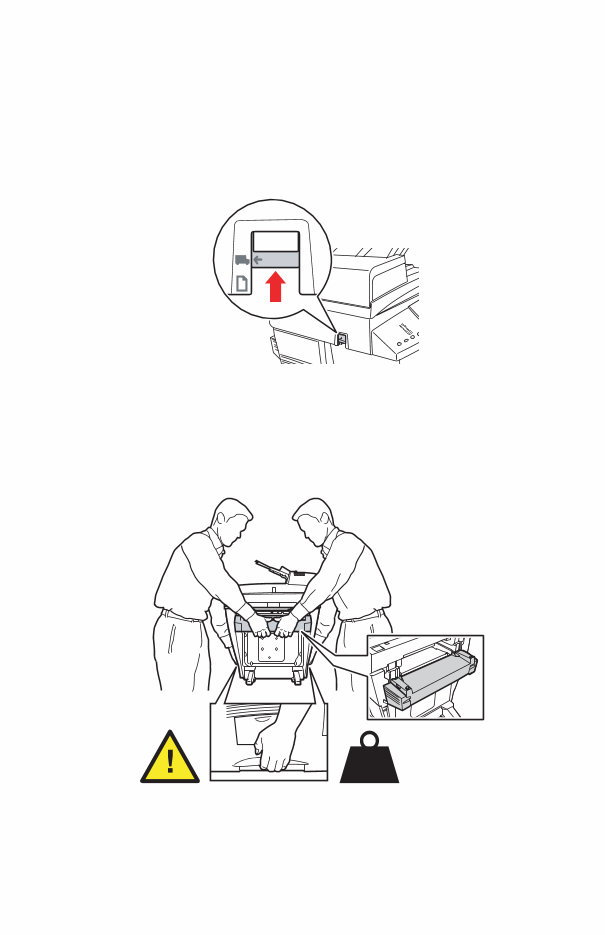
■ Never move the system if you receive a Power Down Error-Head not Parked
message at the system’s control panel. This message means the system is not ready to be
moved. If the printhead is not locked, the system can be damaged during shipment.
■ Always turn off the system using the power switch, located under the interface cover on
the right side of the system, and unplug all cables and cords. Do not turn off the system by
pulling the power cord or using a power-strip with an on/off switch.
■ Always secure the scanhead shipping restraint on the left side of the scanner to lock the
scanhead before removing the scanner portion of the system. Shipping the scanner with
the scanhead unlocked can damage the scanner.
■ Always remove the document feeder before shipping the system.
■ Always remove the scanner before shipping the system.
■ The system is heavy and must be lifted by two people. The illustration below shows the
proper technique for lifting the system.
■ Always move the system separately from optional Trays 3 and 4.
2424-107
Output
Color
Mode
2-Sided
Output
Quality
Original
Type
Graphics
Prod
Hi-Res
Enhansed
Standard
Fast
B/W
Color
Uncollated
Collated
2424-109
42 kg
93 lbs.
vi WorkCentre C2424 Copier-Printer
When shipping the system, repack the system using the original packing material and boxes or
a Xerox repackaging kit. Additional instructions for repacking the system are provided in the
repackaging kit. If you do not have all the original packaging, or are unable to repackage the
system, contact your local Xerox service representative.
Caution
Failure to repackage the system properly for shipment can result in damage to the system.
Damage to the system caused by improper moving is not covered by the Xerox warranty,
service agreement, or Total Satisfaction Guarantee.
Note
The Total Satisfaction Guarantee is available in the United States and Canada. Coverage
may vary outside these areas; please contact your local representative for details.
Operating Safety Guidelines
■ Keep hands, hair, neckties, etc., away from the exit and feed rollers.
■ Do not remove the paper source tray that you selected in either the printer driver or control
panel.
■ Do not open the doors while the system is busy.
■ Do not move the system while busy.
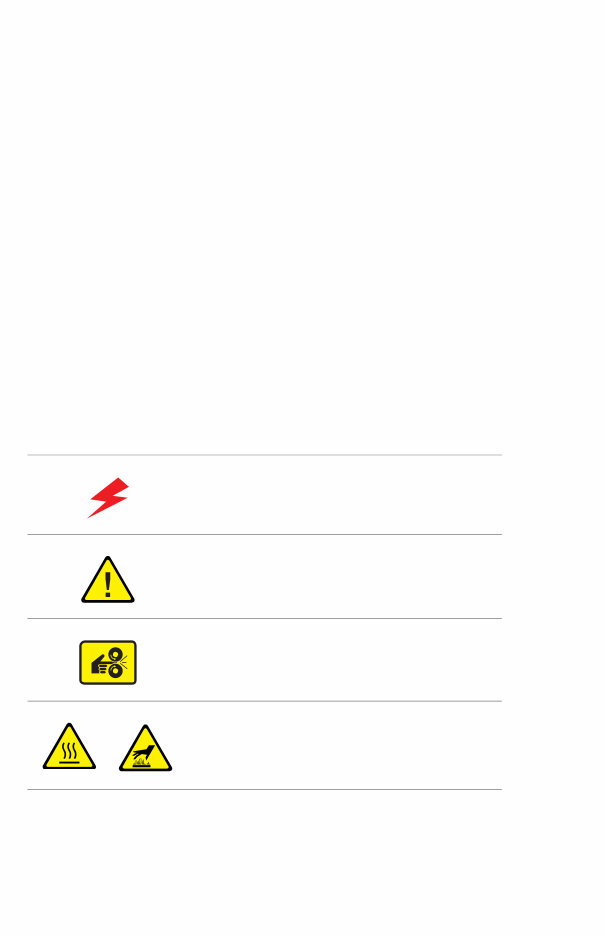
Symbols Marked on the System
Danger, high voltage.
Use caution (or draws attention to a particular
component). See the manual(s) for information.
Avoid pinching fingers in the system. Use caution to
avoid personal injury.
Hot surface on or in the system. Use caution to avoid
personal injury.
You're Reading a Preview
What's Included?
Lifetime Access
Fast Download Speeds
Online & Offline Access
Access PDF Contents & Bookmarks
Full Search Facility
Print one or all pages of your manual
$31.99
Viewed 48 Times Today


Secure transaction
What's Included?
Lifetime Access
Fast Download Speeds
Online & Offline Access
Access PDF Contents & Bookmarks
Full Search Facility
Print one or all pages of your manual
$31.99
The Xerox WorkCentre C2424 Service Manual & Parts List is a comprehensive resource for diagnosing and repairing your copier. It contains detailed diagrams, pictures, and procedures for maintenance, reset, and diagnosis. This manual is valuable for both professional mechanics and DIY enthusiasts.
- The manual includes detailed information on system introduction, features, configurations, and specifications.
- It provides a thorough explanation of the system's theory of operation, including major components and functions.
- Extensive coverage of error messages and codes, along with troubleshooting procedures, is included.
- General troubleshooting, adjustments, and calibrations are extensively covered, along with system alignments and cleaning procedures.
- Disassembly instructions for various system components, along with parts lists and wiring diagrams, are provided.
- An appendix containing control panel menu maps, media margin specifications, paper weight equivalence table, and on-site printhead troubleshooting checklist is also included.
The manual consists of 432 pages and is available in PDF format, making it easy to print, zoom, and access any section as needed.


