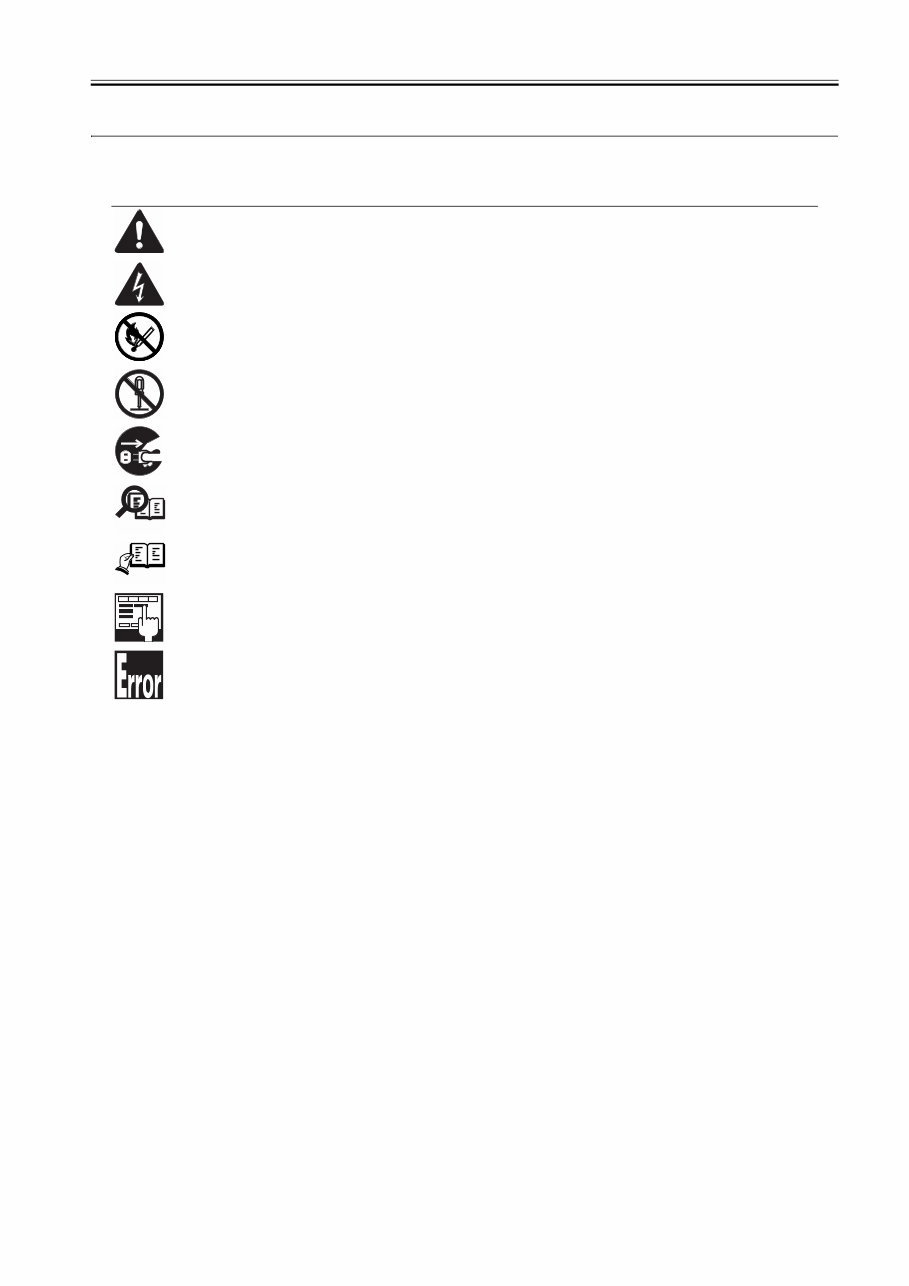
Introduction Symbols Used This documentation uses the following symbols to indicate special information: Symbol Description Indicates an item of a non-specific nature, possibly classified as Note, Caution, or Warning. Indicates an item requiring care to avoid electric shocks. Indicates an item requiring care to avoid combustion (fire). Indicates an item prohibiting disassembly to avoid electric shocks or problems. Indicates an item requiring disconnection of the power plug from the electric outlet. Indicates an item intended to provide notes assisting the understanding of the topic in question. Indicates an item of reference assisting the understanding of the topic in question. Provides a description of a service mode. Provides a description of the nature of an error indication. Memo REF.
Introduction The following rules apply throughout this Service Manual: 1. Each chapter contains sections explaining the purpose of specific functions and the relationship between electrical and mechanical systems with refer- ence to the timing of operation. In the diagrams, represents the path of mechanical drive; where a signal name accompanies the symbol , the arrow indicates the direction of the electric signal. The expression "turn on the power" means flipping on the power switch, closing the front door, and closing the delivery unit door, which results in supplying the machine with power. 2. In the digital circuits, '1'is used to indicate that the voltage level of a given signal is "High", while '0' is used to indicate "Low".(The voltage value, how- ever, differs from circuit to circuit.) In addition, the asterisk (*) as in "DRMD*" indicates that the DRMD signal goes on when '0'. In practically all cases, the internal mechanisms of a microprocessor cannot be checked in the field. Therefore, the operations of the microprocessors used in the machines are not discussed: they are explained in terms of from sensors to the input of the DC controller PCB and from the output of the DC controller PCB to the loads. The descriptions in this Service Manual are subject to change without notice for product improvement or other purposes, and major changes will be com- municated in the form of Service Information bulletins. All service persons are expected to have a good understanding of the contents of this Service Manual and all relevant Service Information bulletins and be able to identify and isolate faults in the machine."
Contents Contents Chapter 1 Introduction 1.1 System Construction .................................................................................................................................. 1- 1 1.1.1 System Configuration Overview (Delivery Accessories) ......................................................................................... 1- 1 1.1.2 System Configuration 1 (Delivery Accessories) ...................................................................................................... 1- 1 1.1.3 System Configuration 2 (Delivery Accessories) ...................................................................................................... 1- 2 1.1.4 System Configuration 3 (Delivery Accessories) ...................................................................................................... 1- 4 1.1.5 System Configuration (Delivery Accessories) ......................................................................................................... 1- 5 1.1.6 System Configuration (Pickup/Original Processing Accessories) ........................................................................... 1- 7 1.1.7 System Configuration (Pickup/Original Processing Accessories) ........................................................................... 1- 9 1.1.8 Reader Heater System Configuration.................................................................................................................... 1- 10 1.1.9 Cassette Heater System Configuration 1 .............................................................................................................. 1- 10 1.1.10 Cassette Heater System Configuration 2 ............................................................................................................ 1- 10 1.1.11 Side Deck Heater System Configuration ............................................................................................................. 1- 11 1.1.12 System Configuration (Printing/Transmission Accessories) (EUR) ..................................................................... 1- 11 1.1.13 System Configuration (Printing/Transmission Accessories) ................................................................................ 1- 12 1.1.14 Functions of Printing/Transmission Accessories (EUR) ...................................................................................... 1- 14 1.1.15 Functions of Printing/Transmission Accessories ................................................................................................. 1- 14 1.1.16 Other Options ...................................................................................................................................................... 1- 15 1.2 Product Specifications .............................................................................................................................. 1- 15 1.2.1 Names of Parts ...................................................................................................................................................... 1- 15 1.2.1.1 External View ......................................................................................................................................................................... 1- 15 1.2.1.2 Cross Section......................................................................................................................................................................... 1- 17 1.2.2 Using the Machine ................................................................................................................................................. 1- 18 1.2.2.1 Turning On the Power Switch ................................................................................................................................................ 1- 18 1.2.2.2 Points to Note About Turning Off the Main Power Switch ..................................................................................................... 1- 18 1.2.3 User Mode Items ................................................................................................................................................... 1- 20 1.2.3.1 Common Settings .................................................................................................................................................................. 1- 20 1.2.3.2 Common Settings .................................................................................................................................................................. 1- 23 1.2.3.3 Timer Settings ........................................................................................................................................................................ 1- 25 1.2.3.4 Adjustment/Cleaning .............................................................................................................................................................. 1- 25 1.2.3.5 Adjustment/Cleaning .............................................................................................................................................................. 1- 25 1.2.3.6 Report Settings ...................................................................................................................................................................... 1- 26 1.2.3.7 System Settings ..................................................................................................................................................................... 1- 26 1.2.3.8 System Settings ..................................................................................................................................................................... 1- 29 1.2.3.9 Copy Settings......................................................................................................................................................................... 1- 31 1.2.3.10 Communications Settings .................................................................................................................................................... 1- 31 1.2.3.11 Communications Settings .................................................................................................................................................... 1- 32 1.2.3.12 Mail Box Settings ................................................................................................................................................................. 1- 34 1.2.3.13 Address Book Settings ......................................................................................................................................................... 1- 34 1.2.4 User Maintenance ................................................................................................................................................. 1- 35 1.2.4.1 Cleaning ................................................................................................................................................................................. 1- 35 1.2.4.2 Inspection............................................................................................................................................................................... 1- 39 1.2.5 Safety .................................................................................................................................................................... 1- 40 1.2.5.1 Laser safety ........................................................................................................................................................................... 1- 40 1.2.5.2 CDRH Act .............................................................................................................................................................................. 1- 40 1.2.5.3 Handling of laser system........................................................................................................................................................ 1- 40 1.2.5.4 Safety of Toner ...................................................................................................................................................................... 1- 41 1.2.5.5 Notes when handling a lithium battery ................................................................................................................................... 1- 41 1.2.5.6 Notes before it works serving................................................................................................................................................. 1- 41 1.2.6 Product Specifications ........................................................................................................................................... 1- 41 1.2.6.1 Type and function .................................................................................................................................................................. 1- 41 1.2.6.2 Type and function .................................................................................................................................................................. 1- 42 1.2.6.3 Others .................................................................................................................................................................................... 1- 43
Contents 1.2.6.4 Others .................................................................................................................................................................................... 1- 43 1.2.7 Function List...........................................................................................................................................................1- 44 1.2.7.1 Print speed (image)................................................................................................................................................................ 1- 44 1.2.7.2 Print speed (image)................................................................................................................................................................ 1- 45 1.2.7.3 Type of paper ......................................................................................................................................................................... 1- 46 1.2.7.4 Type of paper ......................................................................................................................................................................... 1- 46 Chapter 2 Installation 2.1 Making Pre-Checks .................................................................................................................................... 2- 1 2.1.1 Selecting the Site of Installation ...............................................................................................................................2- 1 2.1.2 Check to Make Before Installation ...........................................................................................................................2- 2 2.1.3 Combination Table of Accessory Installation ...........................................................................................................2- 2 2.1.4 Checking the Contents.............................................................................................................................................2- 3 2.2 Unpacking and Installation ......................................................................................................................... 2- 5 2.2.1 Unpacking ................................................................................................................................................................2- 5 2.2.2 Installation of the Scanner .......................................................................................................................................2- 5 2.2.3 Installation of the Drum Unit.....................................................................................................................................2- 5 2.2.4 Installation of the Toner Retainer ...........................................................................................................................2- 10 2.2.5 Connection of the Cable ........................................................................................................................................2- 11 2.2.6 Connection of the Cable ........................................................................................................................................2- 11 2.2.7 Points to Note When Turning Off the Main Power .................................................................................................2- 11 2.2.8 Attaching Other Parts.............................................................................................................................................2- 11 2.2.9 Fixing the Machine in Place ...................................................................................................................................2- 12 2.2.10 Setting Up the Cassette .......................................................................................................................................2- 13 2.2.11 Automatic Gradation Correction ...........................................................................................................................2- 13 2.2.12 Adjusting the Image Position................................................................................................................................2- 13 2.3 Checking the Connection to the Network ................................................................................................. 2- 16 2.3.1 Checking the Connection to the Network...............................................................................................................2- 16 2.3.2 Using PING ............................................................................................................................................................2- 16 2.3.3 Making Checks Using a Remote Host Address .....................................................................................................2- 16 2.4 Troubleshooting the Network ................................................................................................................... 2- 16 2.4.1 Troubleshooting the Network .................................................................................................................................2- 16 2.4.2 Making Checks Using a Loopback Address ..........................................................................................................2- 16 2.4.3 Making a Check Using a Local Host Address ........................................................................................................2- 16 2.5 Checking the Images/Operations ............................................................................................................. 2- 16 2.5.1 Checking the Images .............................................................................................................................................2- 16 2.6 Relocating the Machine ............................................................................................................................ 2- 17 2.6.1 Relocating the Machine ......................................................................................................................................... 2- 17 2.7 Installing the Copy Tray ............................................................................................................................ 2- 17 2.7.1 Checking the Components.....................................................................................................................................2- 17 2.7.2 Turning Off the Machine ........................................................................................................................................2- 17 2.7.3 Installation Procedure ............................................................................................................................................ 2- 17 2.8 Installing the Card Reader ........................................................................................................................ 2- 18 2.8.1 Points to Note at Installation ..................................................................................................................................2- 18 2.8.2 Checking the Contents...........................................................................................................................................2- 18 2.8.3 Turning Off the Machine ........................................................................................................................................2- 18 2.8.4 Installation Procedure ............................................................................................................................................ 2- 18 2.8.5 Installation Procedure in the imageWARE Accounting Manager (hereinafter referred to iWAM) Environment .....2- 20 2.9 Installing the Original Tray ........................................................................................................................ 2- 20 2.9.1 Checking the Content ............................................................................................................................................ 2- 20 2.9.2 Installation Procedure ............................................................................................................................................ 2- 20 2.10 Installing the Key Switch Unit ................................................................................................................. 2- 21 2.10.1 Turning Off the Machine.......................................................................................................................................2- 21 2.10.2 Installation Procedure ..........................................................................................................................................2- 21 2.10.3 Checking After Installation ...................................................................................................................................2- 23
Contents 2.11 Installing the Reader Heater ................................................................................................................... 2- 23 2.11.1 Checking the Parts .............................................................................................................................................. 2- 23 2.11.2 Points to Note About Installation.......................................................................................................................... 2- 23 2.11.3 Turning Off the Machine ...................................................................................................................................... 2- 23 2.11.4 Installation Procedure .......................................................................................................................................... 2- 23 2.12 Installing the Cassette Heater ................................................................................................................. 2- 24 2.12.1 Points to Note at Installation ................................................................................................................................ 2- 24 2.12.2 Checking the Parts .............................................................................................................................................. 2- 24 2.12.3 Checking the Parts .............................................................................................................................................. 2- 24 2.12.4 Turning Off the Host Machine .............................................................................................................................. 2- 25 2.12.5 Mounting the Cassette Heater Unit ...................................................................................................................... 2- 25 2.12.6 Mounting the Heater PCB .................................................................................................................................... 2- 26 2.13 Installing the Cassette Heater for the Cassette Pedestal ....................................................................... 2- 27 2.13.1 Checking the Parts .............................................................................................................................................. 2- 27 2.13.2 Turning Off the Host Machine .............................................................................................................................. 2- 28 2.13.3 Mounting the Cassette Heater Attachment .......................................................................................................... 2- 28 2.14 Installing the Deck Heater ....................................................................................................................... 2- 29 2.14.1 Checking the Parts to Install ................................................................................................................................ 2- 29 2.14.2 Turning Off the Host Machine .............................................................................................................................. 2- 30 2.14.3 Installation Procedure .......................................................................................................................................... 2- 30 2.15 Installing the Voice Guidance Kit ............................................................................................................ 2- 32 2.15.1 Checking the Contents ........................................................................................................................................ 2- 32 2.15.2 Turning Off the Host Machine .............................................................................................................................. 2- 33 2.15.3 Installation Procedure .......................................................................................................................................... 2- 33 2.16 Installing the Voice Operation Kit ............................................................................................................ 2- 36 2.16.1 Checking the Contents ........................................................................................................................................ 2- 36 2.16.2 Turning Off the Host Machine .............................................................................................................................. 2- 37 2.16.3 Installation Procedure .......................................................................................................................................... 2- 37 2.17 Installing the Wireless Network Interface Adapter .................................................................................. 2- 41 2.17.1 Points to Note at Installation ................................................................................................................................ 2- 41 2.17.2 Checking the Contents ........................................................................................................................................ 2- 42 2.17.3 Turning Off the Host Machine .............................................................................................................................. 2- 42 2.17.4 Installation Procedure .......................................................................................................................................... 2- 42 2.17.5 Affixing the Label ................................................................................................................................................. 2- 45 2.18 Installing the Power Supply .................................................................................................................... 2- 45 2.18.1 Checking the Contents ........................................................................................................................................ 2- 45 2.18.2 Turning Off the Host Machine .............................................................................................................................. 2- 46 2.18.3 Installation Procedure .......................................................................................................................................... 2- 46 2.19 Installing the DADF ................................................................................................................................. 2- 49 2.19.1 Checking the Contents ........................................................................................................................................ 2- 49 2.19.2 Turning Off the Host Machine .............................................................................................................................. 2- 49 2.19.3 Installation Procedure .......................................................................................................................................... 2- 49 2.19.4 Cleaning the Copyboard Glass ............................................................................................................................ 2- 50 2.19.5 Adjustment ........................................................................................................................................................... 2- 50 2.19.6 Affixing Labels ..................................................................................................................................................... 2- 53 2.19.7 Operation Check .................................................................................................................................................. 2- 54 2.20 Installing the Inner 2 Way Tray ............................................................................................................... 2- 54 2.20.1 Checking the Components .................................................................................................................................. 2- 54 2.20.2 Turning Off the Host Machine .............................................................................................................................. 2- 54 2.20.3 Installation Procedure .......................................................................................................................................... 2- 54 Chapter 3 Basic Operation 3.1 Construction ............................................................................................................................................... 3- 1 3.1.1 Functional Construction ........................................................................................................................................... 3- 1
Contents 3.1.2 Connections Among Major PCBs ............................................................................................................................3- 2 3.2 Basic Sequence ......................................................................................................................................... 3- 3 3.2.1 Basic Sequence of Operations at Power-On ...........................................................................................................3- 3 3.2.2 Basic Sequence of Operations for a Print Job (full color) ........................................................................................3- 3 3.2.3 Basic Sequence of Operations for a Print Job (mono color) .................................................................................... 3- 4 Chapter 4 Main Controller 4.1 Construction ............................................................................................................................................... 4- 1 4.1.1 Construction and Functions .....................................................................................................................................4- 1 4.2 Construction of the Electrical Circuitry........................................................................................................ 4- 2 4.2.1 Main Controller PCB (main) .....................................................................................................................................4- 2 4.2.2 SRAM PCB ..............................................................................................................................................................4- 2 4.3 Start-Up Sequence ..................................................................................................................................... 4- 4 4.3.1 Overview ..................................................................................................................................................................4- 4 4.3.2 Start-Up Sequence ..................................................................................................................................................4- 4 4.4 Actions when HDD Error ............................................................................................................................ 4- 6 4.4.1 E602 in Detail...........................................................................................................................................................4- 6 4.5 Image Processing....................................................................................................................................... 4- 9 4.5.1 Overview of the Flow of Image Data ........................................................................................................................4- 9 4.5.2 Reader Input Image Processing ............................................................................................................................ 4- 10 4.5.3 Printer Output Image Processing ...........................................................................................................................4- 11 4.5.4 Compression, Decompression, and Edit Processing Blocks .................................................................................4- 12 4.6 Flow of Image Data .................................................................................................................................. 4- 12 4.6.1 Flow of Image Data for Copier Functions .............................................................................................................. 4- 12 4.6.2 Flow of Image Data for Box Functions ...................................................................................................................4- 13 4.6.3 Flow of Image Data for SEND Functions ...............................................................................................................4- 13 4.6.4 Flow of Image Data for Fax Transmission Functions.............................................................................................4- 14 4.6.5 Flow of Image Data for Fax Reception Functions ..................................................................................................4- 14 4.6.6 Flow of Image Data for PDL Functions ..................................................................................................................4- 15 4.7 Parts Replacement Procedure ................................................................................................................. 4- 16 4.7.1 Controller Box ........................................................................................................................................................4- 16 4.7.1.1 Before Removing the Main Controller Box............................................................................................................................. 4- 16 4.7.1.2 Removing the Controller Box ................................................................................................................................................. 4- 16 4.7.2 Main Controller PCB (main) ...................................................................................................................................4- 16 4.7.2.1 Before Removing the Main Controller PCB ........................................................................................................................... 4- 16 4.7.2.2 Removing the Main Controller PCB ....................................................................................................................................... 4- 16 4.7.2.3 Replacing Main Controller PCB ............................................................................................................................................ 4- 17 4.7.3 Main Controller PCB (sub R-A) ..............................................................................................................................4- 17 4.7.3.1 Before Removing the Main Controller PCB (sub-R-A) ........................................................................................................... 4- 17 4.7.3.2 Removing the Main Controller PCB (sub-R-A) ...................................................................................................................... 4- 17 4.7.4 Main Controller PCB (sub PDRM-A) ......................................................................................................................4- 17 4.7.4.1 Before Removing the Main Controller PCB (sub-PDRAM-A) ................................................................................................ 4- 17 4.7.4.2 Removing the Main Controller PCB (sub-PDRAM-A) ............................................................................................................ 4- 17 4.7.5 Main Controller PCB (sub SJ-A) ............................................................................................................................ 4- 18 4.7.5.1 Before Removing the Main Controller PCB (sub SJ-A) ......................................................................................................... 4- 18 4.7.5.2 Removing the Main Controller PCB (sub SJ-A) ..................................................................................................................... 4- 18 4.7.6 Main Controller PCB (sub LAN-A) .........................................................................................................................4- 18 4.7.6.1 Before Removing the Main Controller PCB (sub LANBAR-C) ............................................................................................... 4- 18 4.7.6.2 Removing the Main Controller PCB (sub LANBAR-C) ........................................................................................................... 4- 18 4.7.7 Main Controller PCB (sub RB-A) ...........................................................................................................................4- 19 4.7.7.1 Before Removing the Main Controller PCB (sub RB-A2) ....................................................................................................... 4- 19 4.7.7.2 Removing the Main Controller PCB (sub RB-A2) .................................................................................................................. 4- 19 4.7.8 SRAM PCB ............................................................................................................................................................4- 19 4.7.8.1 Before Removing the SRAM.................................................................................................................................................. 4- 19 4.7.8.2 Removing the SRAM ............................................................................................................................................................. 4- 20 4.7.8.3 When Replacing the SRAM PCB ........................................................................................................................................... 4- 20
This manual for the Canon iRC3380i, iRC3380, iRC2880i, iRC2880, iRC3580, iRC3580i, iRC3080, iRC3080i, iRC2380i is a comprehensive resource for diagnosing and repairing your copier. It contains detailed diagrams, pictures, and procedures essential for both professional mechanics and DIY enthusiasts.
You can print, zoom, or read any diagram, picture, or page from this Service Manual. Each chapter is fully detailed and contains simulation codes, trouble codes, maintenance procedures, reset procedures, and diagnose procedures for the Canon iRC3380i, iRC3380, iRC2880i, iRC2880, iRC3580, iRC3580i, iRC3080, iRC3080i, iRC2380i photocopier.
The table of contents includes:
Chapter 1. INTRODUCTION
System Construction
Product Specifications
User Mode Items
User Maintenance
Safety
Function List
Chapter 2. INSTALLATION
Making Pre-Checks
Unpacking and Installation
Checking the Connection to the Network
Troubleshooting the Network
Checking the Images/Operations
Chapter 3. BASIC OPERATION
Construction
Basic Sequence
Chapter 19. SERVICE TOOLS
Special Tools
Solvents and Oils
This manual consists of 682 pages and is an invaluable resource for maintaining and repairing the Canon iRC3380i, iRC3380, iRC2880i, iRC2880, iRC3580, iRC3580i, iRC3080, iRC3080i, iRC2380i copiers.











 Lifetime Access




