Procedure............................................................................................................................................................................. 41 Post-requisites.................................................................................................................................................................... 41 Chapter 25: Removing the system board..................................................................................... 42 Prerequisites....................................................................................................................................................................... 42 Procedure............................................................................................................................................................................ 42 Chapter 26: Replacing the system board..................................................................................... 45 Procedure............................................................................................................................................................................ 45 Post-requisites................................................................................................................................................................... 46 Chapter 27: Removing the audio daughter-board......................................................................... 47 Prerequisites....................................................................................................................................................................... 47 Procedure............................................................................................................................................................................ 47 Chapter 28: Replacing the audio daughter-board......................................................................... 49 Procedure............................................................................................................................................................................ 49 Post-requisites................................................................................................................................................................... 49 Chapter 29: Removing the coin-cell battery................................................................................ 50 Prerequisites....................................................................................................................................................................... 50 Procedure............................................................................................................................................................................ 50 Chapter 30: Replacing the coin-cell battery................................................................................ 52 Procedure............................................................................................................................................................................ 52 Post-requisites................................................................................................................................................................... 52 Chapter 31: Removing the keyboard............................................................................................ 53 Prerequisites....................................................................................................................................................................... 53 Procedure............................................................................................................................................................................ 53 Chapter 32: Replacing the keyboard............................................................................................ 55 Procedure............................................................................................................................................................................ 55 Post-requisites................................................................................................................................................................... 55 Chapter 33: Removing the display assembly................................................................................ 56 Prerequisites....................................................................................................................................................................... 56 Procedure............................................................................................................................................................................ 56 Chapter 34: Replacing the display assembly................................................................................ 58 Procedure............................................................................................................................................................................ 58 Post-requisites................................................................................................................................................................... 58 Chapter 35: Removing the power-adapter port............................................................................59 Prerequisites....................................................................................................................................................................... 59 Procedure............................................................................................................................................................................ 59 Chapter 36: Replacing the power-adapter port............................................................................ 60 Contents 5
Procedure............................................................................................................................................................................ 60 Post-requisites................................................................................................................................................................... 60 Chapter 37: Removing the antenna cover..................................................................................... 61 Prerequisites........................................................................................................................................................................61 Procedure.............................................................................................................................................................................61 Chapter 38: Replacing the antenna cover.................................................................................... 63 Procedure............................................................................................................................................................................ 63 Post-requisites................................................................................................................................................................... 63 Chapter 39: Removing the display hinges.................................................................................... 64 Prerequisites....................................................................................................................................................................... 64 Procedure............................................................................................................................................................................ 64 Chapter 40: Replacing the display hinges.................................................................................... 66 Procedure............................................................................................................................................................................ 66 Post-requisites................................................................................................................................................................... 66 Chapter 41: Removing the antenna module.................................................................................. 67 Prerequisites....................................................................................................................................................................... 67 Procedure............................................................................................................................................................................ 67 Chapter 42: Replacing the antenna module.................................................................................. 68 Procedure............................................................................................................................................................................ 68 Post-requisites................................................................................................................................................................... 68 Chapter 43: Removing the palm-rest assembly............................................................................ 69 Prerequisites....................................................................................................................................................................... 69 Procedure............................................................................................................................................................................ 69 Chapter 44: Replacing the palm-rest assembly............................................................................ 70 Procedure............................................................................................................................................................................ 70 Post-requisites................................................................................................................................................................... 70 Chapter 45: Downloading drivers................................................................................................. 71 Downloading the audio driver.......................................................................................................................................... 71 Downloading the graphics driver.................................................................................................................................... 71 Downloading the USB 3.0 driver.................................................................................................................................... 71 Downloading the Wi-Fi driver......................................................................................................................................... 72 Downloading the media-card reader driver................................................................................................................. 72 Downloading the chipset driver..................................................................................................................................... 72 Downloading the network driver.................................................................................................................................... 72 Chapter 46: System setup........................................................................................................... 74 Boot Sequence................................................................................................................................................................... 74 Navigation keys.................................................................................................................................................................. 74 BIOS overview.................................................................................................................................................................... 74 6 Contents
Entering BIOS setup program........................................................................................................................................ 75 System setup options....................................................................................................................................................... 75 System and setup password...........................................................................................................................................80 Assigning a system password and setup password............................................................................................ 80 Deleting or changing an existing system and or setup password.................................................................... 80 Clearing forgotten passwords................................................................................................................................... 81 Clearing CMOS settings............................................................................................................................................. 81 Real Time Clock (RTC) battery reset...................................................................................................................... 81 Flashing BIOS (USB key)............................................................................................................................................ 81 Chapter 47: Troubleshooting....................................................................................................... 82 Drain residual flea power (perform hard reset)......................................................................................................... 82 Flashing the BIOS.............................................................................................................................................................. 83 SupportAssist diagnostics............................................................................................................................................... 83 Diagnostics.......................................................................................................................................................................... 83 Wi-Fi power cycle.............................................................................................................................................................. 84 Chapter 48: Getting help and contacting Dell.............................................................................. 85 Contents 7
Before working inside your computer NOTE: The images in this document may differ from your computer depending on the configuration you ordered. Before you begin 1. Save and close all open files and exit all open applications. 2. Shut down your computer. Click Start > Power > Shut down. NOTE: If you are using a different operating system, see the documentation of your operating system for shut-down instructions. 3. Disconnect your computer and all attached devices from their electrical outlets. 4. Disconnect all attached network devices and peripherals, such as keyboard, mouse, and monitor from your computer. 5. Remove any media card and optical disc from your computer, if applicable. Safety instructions Use the following safety guidelines to protect your computer from potential damage and ensure your personal safety. NOTE: Before working inside your computer, read the safety information that shipped with your computer. For more safety best practices, see the Regulatory Compliance home page at www.dell.com/regulatory_compliance. NOTE: Disconnect all power sources before opening the computer cover or panels. After you finish working inside the computer, replace all covers, panels, and screws before connecting to the electrical outlet. CAUTION: To avoid damaging the computer, ensure that the work surface is flat and clean. CAUTION: Handle components and cards with care. Do not touch the components or contacts on a card. Hold a card by its edges or by its metal mounting bracket. Hold a component such as a processor by its edges, not by its pins. CAUTION: You should only perform troubleshooting and repairs as authorized or directed by the Dell technical assistance team. Damage due to servicing that is not authorized by Dell is not covered by your warranty. See the safety instructions that shipped with the product or at www.dell.com/regulatory_compliance. CAUTION: Before touching anything inside your computer, ground yourself by using a wrist grounding strap or by periodically touching an unpainted metal surface, such as the metal at the back of the computer. While you work, periodically touch an unpainted metal surface to dissipate static electricity, which could harm internal components. CAUTION: When you disconnect a cable, pull on its connector or on its pull tab, not on the cable itself. Some cables have connectors with locking tabs or thumb-screws that you must disengage before disconnecting the cable. When disconnecting cables, keep them evenly aligned to avoid bending any connector pins. When connecting cables, ensure that the ports and connectors are correctly oriented and aligned. CAUTION: Press and eject any installed card from the media-card reader. 1 8 Before working inside your computer
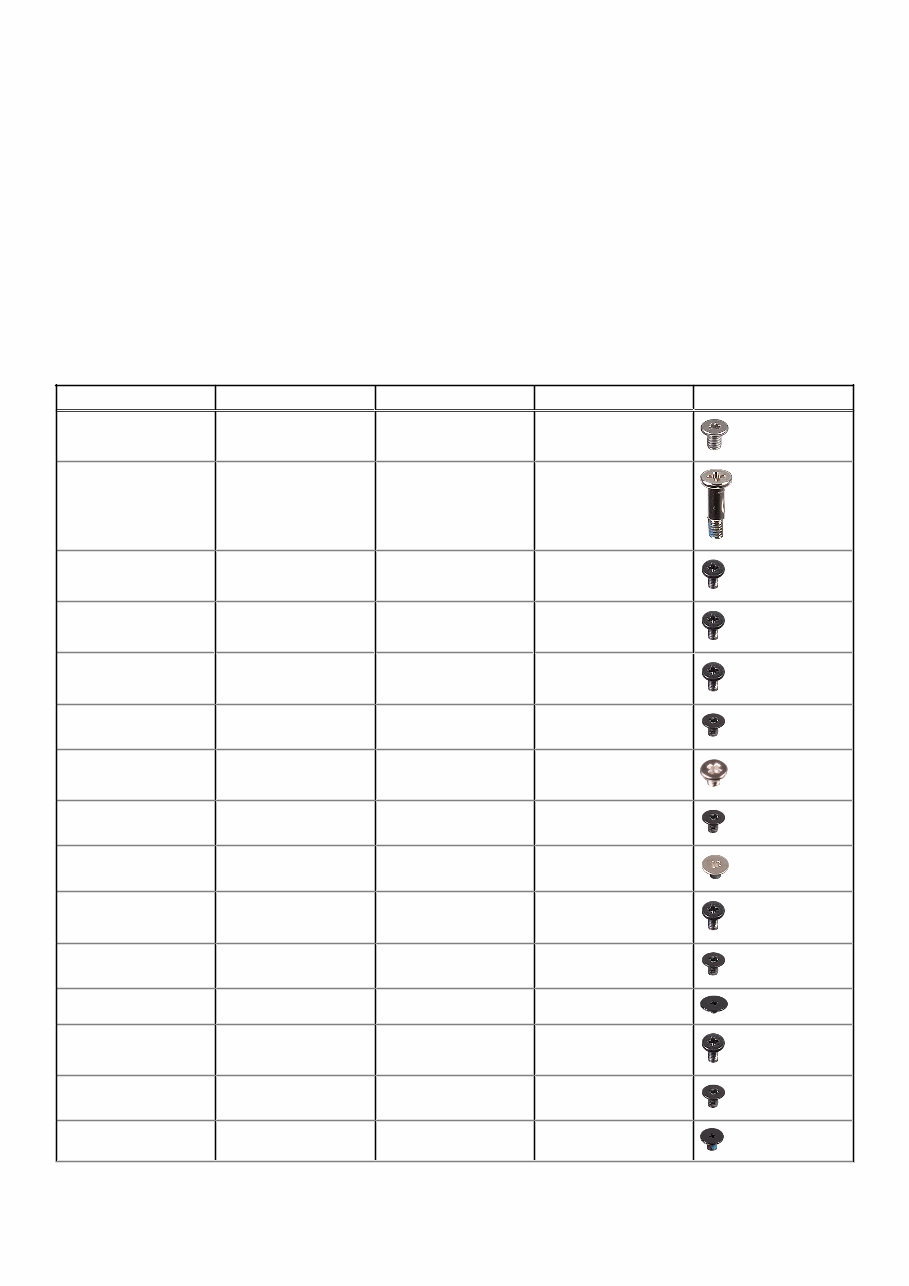
Recommended tools The procedures in this document may require the following tools: ● Phillips screwdriver #0 ● Phillips screwdriver #1 ● Torx #5 (T5) screwdriver ● Plastic scribe Screw list The following table provides the list of screws that are used for securing different components to the computer. Table 1. Screw list Component Secured to Screw type Quantity Screw image Base cover Palm-rest assembly M2x3 T5 10 System badge Palm-rest assembly M2x8 2 Battery (half-length) Palm-rest assembly M2x4 4 Battery (full-length) Palm-rest assembly M2x4 7 Hard-drive cage Hard-drive assembly M2x4 4 Solid-state drive (half- length) System board M2x3 1 Solid-state drive Solid-state drive bracket M2x2 1 Solid-state drive (full- length) System board M2x3 1 Speakers Palm-rest assembly M2x2 4 Fan System board M2x4 4 Heat-sink assembly System board M2x3 5/4 Display-cable bracket System board M2x2 1 System board Palm-rest assembly M2x4 5 Audio daughter-board System board M2x3 2 Keyboard Palm-rest assembly M1.6x1.5 31 Before working inside your computer 9
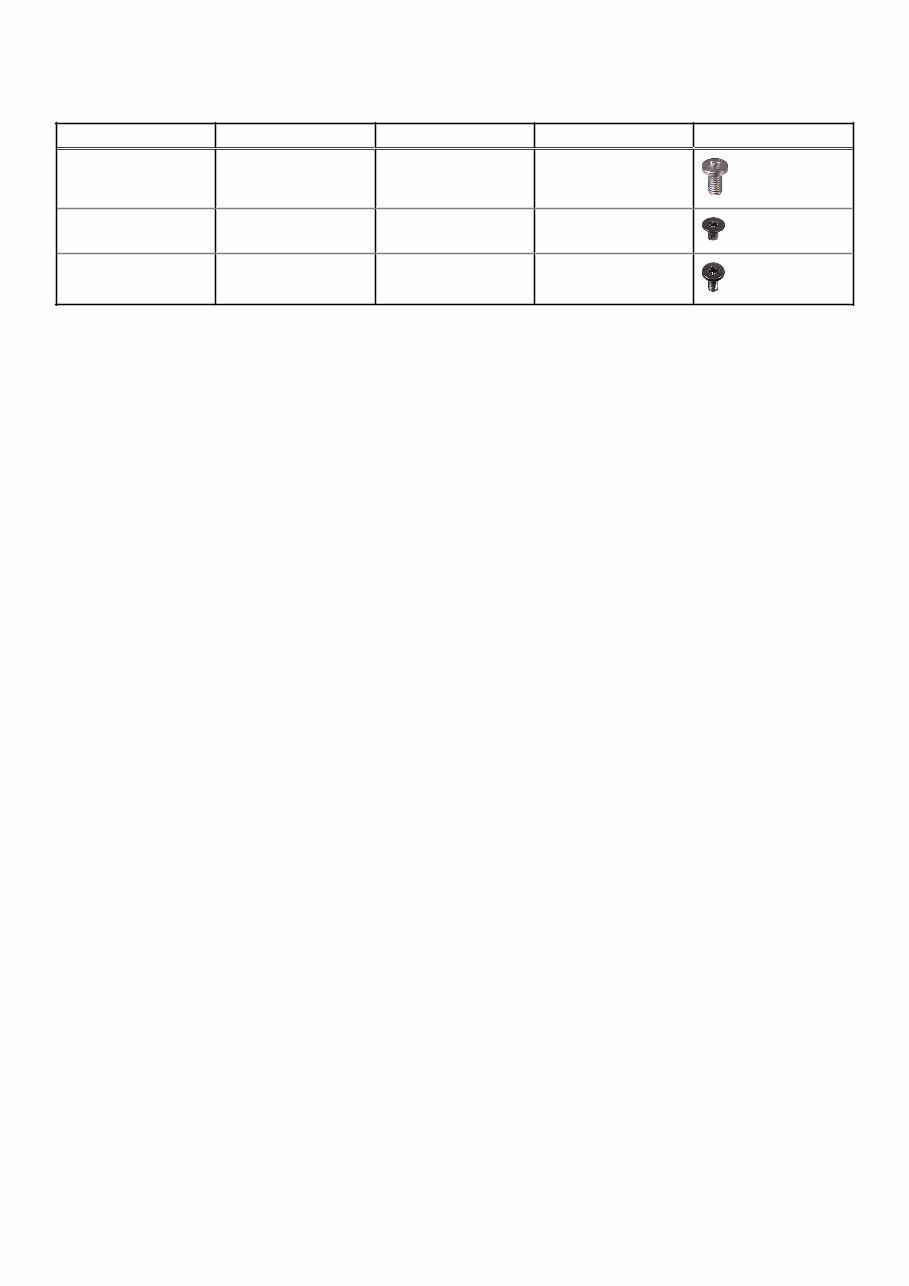
Table 1. Screw list (continued) Component Secured to Screw type Quantity Screw image Display hinges Palm-rest assembly M2.5x5 6 Power-adapter port Palm-rest assembly M2x3 1 Antenna module Display assembly M2x4 4 10 Before working inside your computer
The XPS 15z Service Manual provides comprehensive instructions for repairing or replacing internal parts of your laptop. This manual includes text and high-quality graphics for disassembly/reassembly, repair, part replacement, troubleshooting, service information, software updating, and adjustments. It is a detailed resource utilized by professional technicians and DIY enthusiasts alike.
Key features of this manual:
Disassembly and reassembly instructions
Part replacement notices
Service information
Troubleshooting guidance
Software updating procedures
Adjustments and corrections
The manual is fully illustrated with pictures and step-by-step instructions, making it suitable for various repair needs. All pages are printable, allowing for easy access to the required information at home, in the office, or at a repair shop. By using this guide, you can perform your own repairs, save money, and even consider offering repair services to others.
Ways to utilize this manual:
Repair your laptop and save money
Earn money by repairing others' laptops
Modify your laptop using the provided instructions











 Lifetime Access




