



Using iPhone’s
®
Siri Voice Command
Brad Miser
800 East 96th Street,
Indianapolis, Indiana 46240 USA

Using iPhone’s Siri Voice Command
Copyright © 2012 by Pearson Education, Inc.
All rights reserved. No part of this book shall be reproduced, stored in a retrieval
system, or transmitted by any means, electronic, mechanical, photocopying,
recording, or otherwise, without written permission from the publisher. No
patent liability is assumed with respect to the use of the information contained
herein. Although every precaution has been taken in the preparation of this book,
the publisher and author assume no responsibility for errors or omissions. Nor is
any liability assumed for damages resulting from the use of the information
contained herein.
ISBN-13: 978-0-7897-4950-5
ISBN-10: 0-7897-4950-5
First Printing: November 2011
EDITOR IN CHIEF
Greg Wiegand
ACQUISITIONS EDITOR
Laura Norman
DEVELOPMENT EDITOR
Laura Norman
MANAGING EDITOR
Sandra Schroeder
PROJECT EDITOR
Mandie Frank
PROOFREADER
Leslie Joseph
PUBLISHING COORDINATOR
Cindy Teeters
DESIGNER
Anne Jones
COMPOSITOR
Bronkella Publishing
Trademarks

All terms mentioned in this book that are known to be trademarks or service
marks have been appropriately capitalized. Que Publishing cannot attest to the
accuracy of this information. Use of a term in this book should not be regarded
as affecting the validity of any trademark or service mark.
Warning and Disclaimer
Every effort has been made to make this book as complete and as accurate as
possible, but no warranty or fitness is implied. The information provided is on an
“as is” basis. The author and the publisher shall have neither liability nor
responsibility to any person or entity with respect to any loss or damages arising
from the information contained in this book.

Meet Siri
In this digital Short, you will learn:
• Configuring and Using Siri
• Making Calls with Siri
• Emailing with Siri
• Texting with Siri
• Using Siri to Manage Time
• Finding Music with Siri
There have been many “holy grails” in the development of computers and
related technology. Things such as a truly intuitive interface, artificial
intelligence, natural language search engines, and so on. One of these grails is
voice recognition or a spoken interface, with the ultimate goal being a computer
as featured on the show Star Trek to which the user simply speaks a command
using normal language and the computer responds accordingly. There have been
many attempts at these interfaces over the years, from voice commands on the
desktop to voice-recognition dictation systems. Mostly, they’ve been marginally
successful at best and laughable failures at worst. That’s because processing and
interpreting spoken language is among the most difficult technical challenges
there is; the incredible diversity in the way humans use language is mind-
boggling. From local dialects to an individual’s pronunciation of words to
speaking cadence, the hurdles to being able to artificially interact with the
spoken word are incredible.
It’s surprising therefore (to me at least), that the next practical evolution in voice
recognition comes not in a supercomputer (no offense to IBM’s Watson
intended), but in a very small, mobile device. This evolution is Apple’s Siri
voice recognition system introduced on the iPhone 4S. Siri enables you to speak
many different commands to which the device responds, interacting with you as
needed to get more information about what you want to do. Additionally, Siri
has the ability to take dictation anywhere you use the iPhone’s keyboard.
To use Siri, you don’t need to change the way you speak; Siri is a natural
language interface. For example, when you want to create a reminder, you
simply say something like, “Remind me to walk the dog.” Siri responds with a
request for specifics such as “When do you want to be reminded?” You respond
with “Today at 5 PM.” Siri dutifully creates the reminder for you.

Siri works with many apps and in various contexts so you can speak to your
iPhone in lots of different situations.
Is Siri the holy grail of voice recognition technology? Has the Star Trek
computer arrived? Note quite. But Siri is an amazing leap forward in that
direction. Siri isn’t perfect by any means, but it does work incredibly well for
many tasks. Siri even has a sense of humor. (If you want proof, ask Siri what the
best phone is.)
In this digital short, you’ll get an overview of the amazing Siri and will find
information to help you start making the most of this incredible technology.
Configuring and Using Siri
To use Siri, you first need to configure it. Then, learn the basic pattern Siri
follows when you use it; in most cases, Siri prompts you for what it needs and
confirms what it thinks you’ve asked it to do so getting started is pretty simple.
It’s Not All Good
It wasn’t obvious to me at first, but your iPhone must be connected to the Internet for Siri to work.
To see this for yourself, put the iPhone in Airplane mode and try to activate Siri; it will tell you that
it can’t connect to the network. Sometimes, it displays a message telling you must be connected to
the Internet for Siri to work, but sometimes it doesn’t. Since the “I can’t connect to the network”
message appears to be the default when Siri is unable to accomplish something, it isn’t easy to tell
that it’s not working because your iPhone isn’t on the Internetor because of some other reason.
Configuring Siri
Before you can speak to Siri, perform the following steps to configure it:
1. Tap Settings.
2. Tap General.
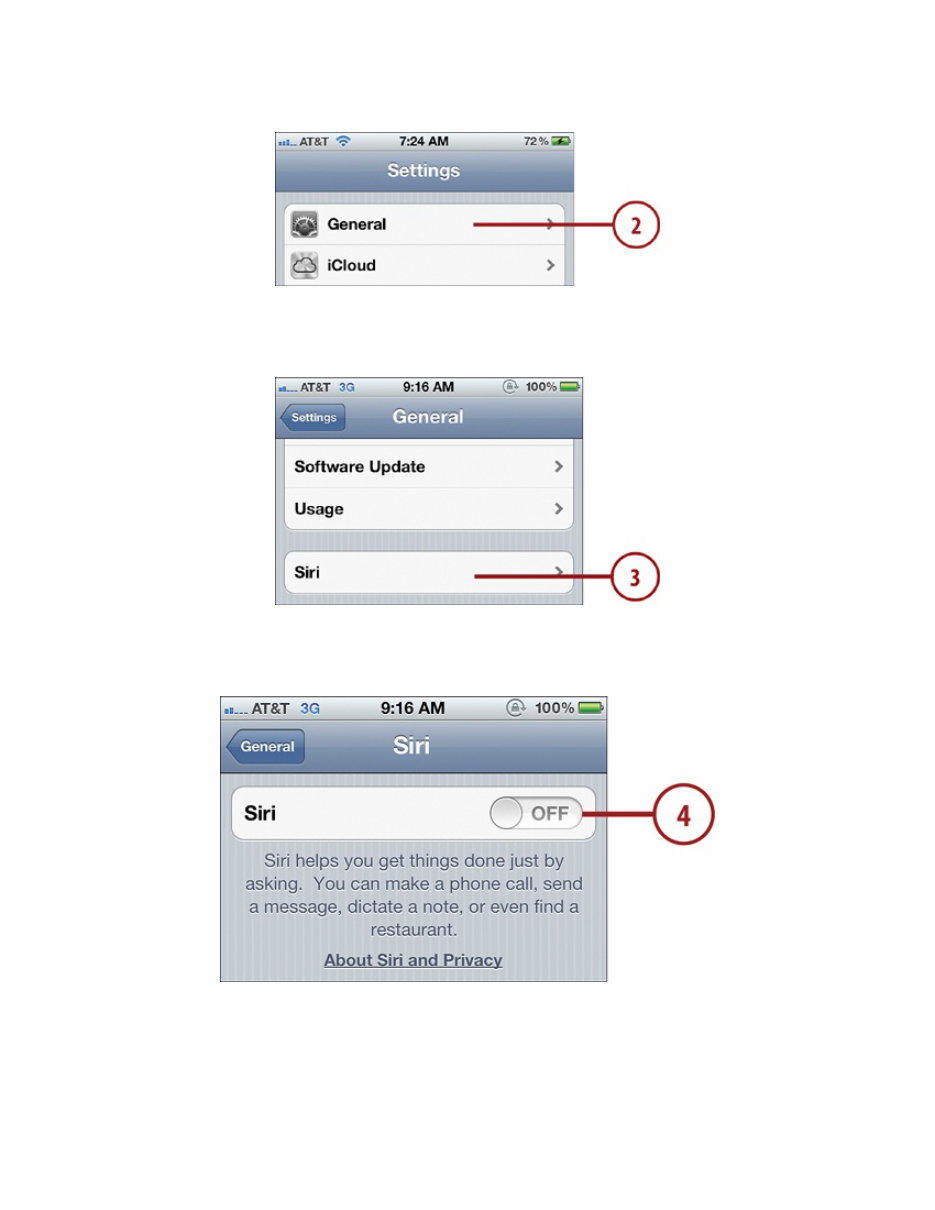
3. Tap Siri.
4. Tap the OFF slider to turn Siri ON.
5. Tap Enable Siri.
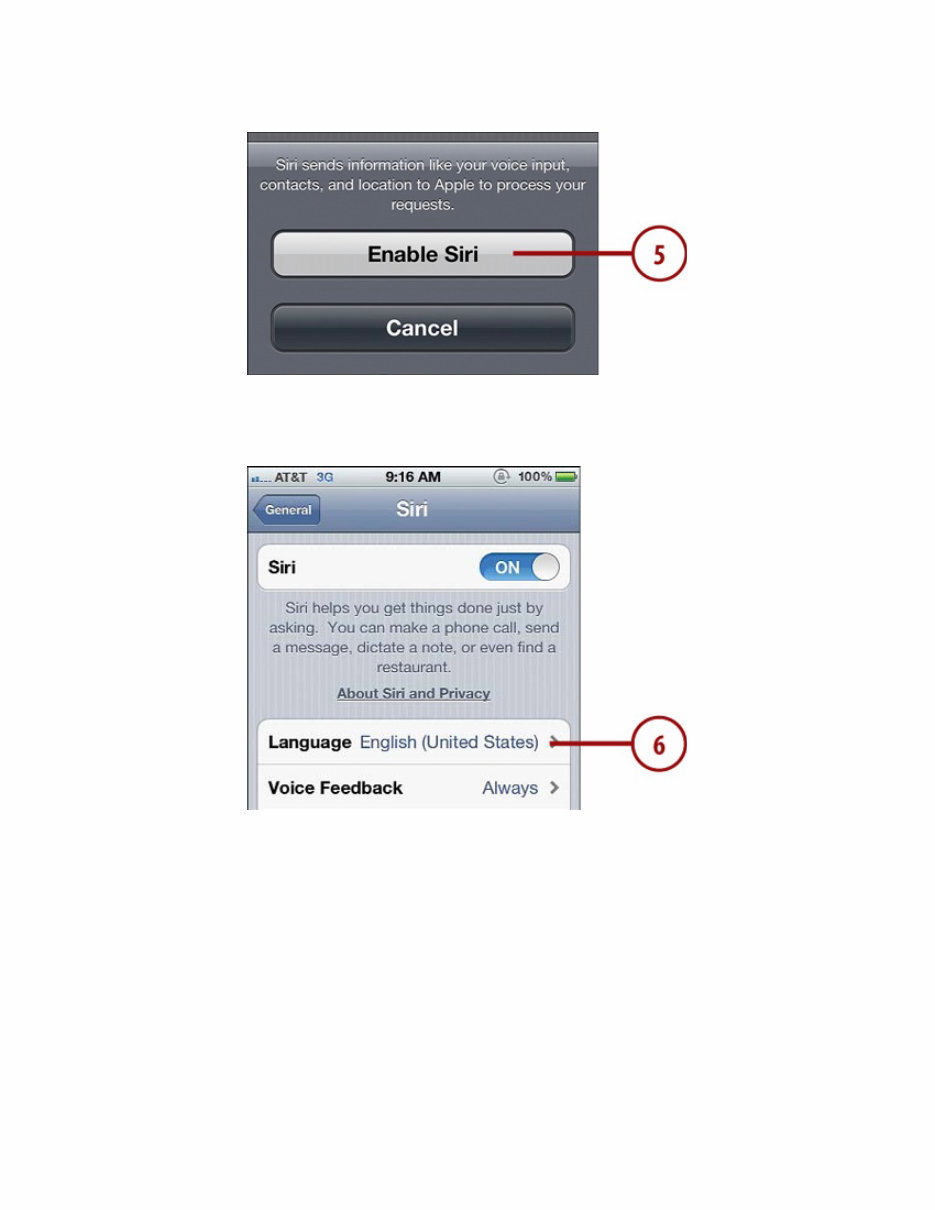
6. Tap Language.
7. Tap the language you want to use to speak to Siri.
8. Tap Siri.
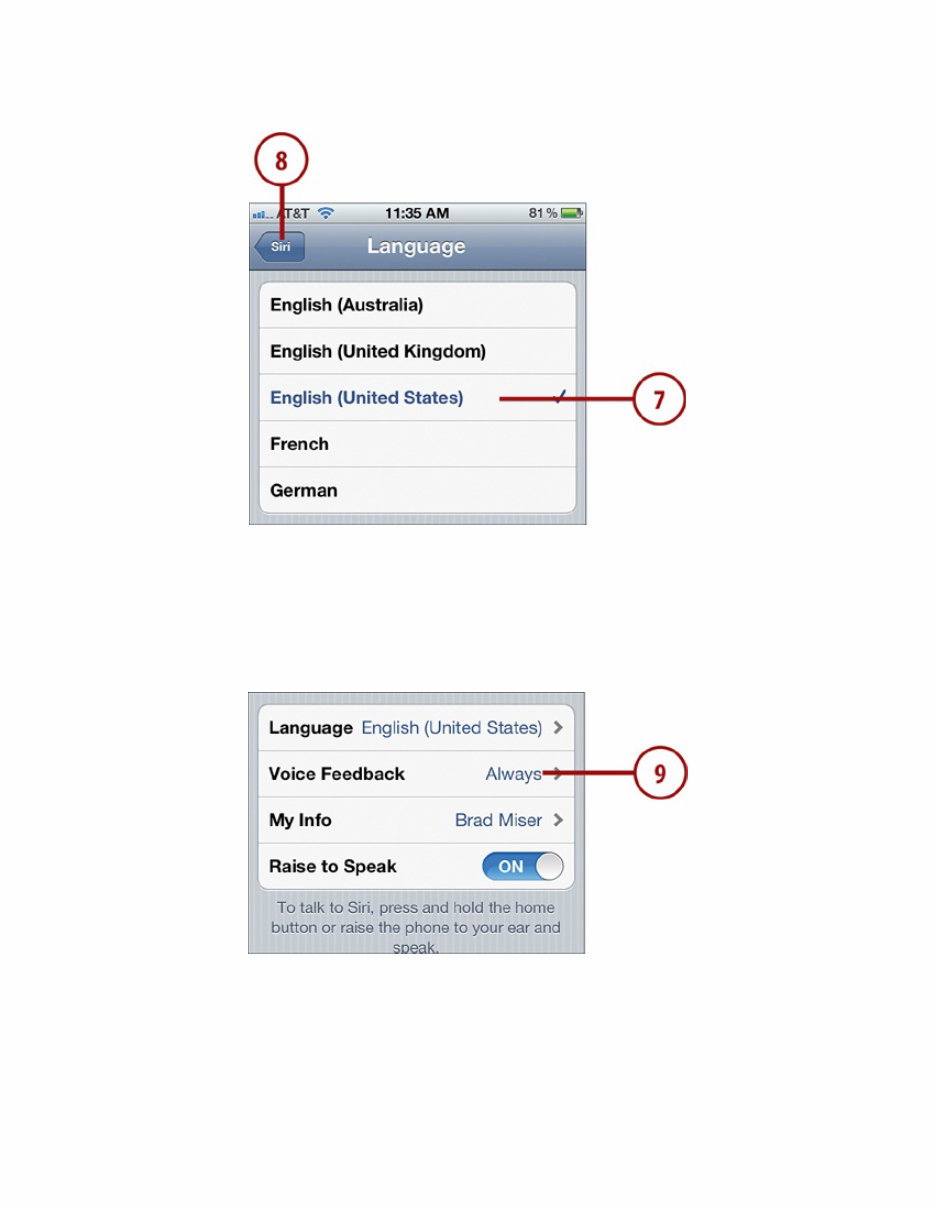
9. Tap Voice Feedback. Siri provides you with audible confirmation when you
speak to it. For example, when you tell it to create a reminder, Siri speaks
the reminder it thinks you told it to create so you know what it is without
having to look at the screen.
10. If you always want Siri’s voice feedback, tap Always or if you only want
voice feedback when you are operating in handsfree mode, such as when you
are using the iPhone’s earbuds or a Bluetooth headset, tap Handsfree Only.
If you choose Handsfree Only, when you aren’t using a headset, you can see
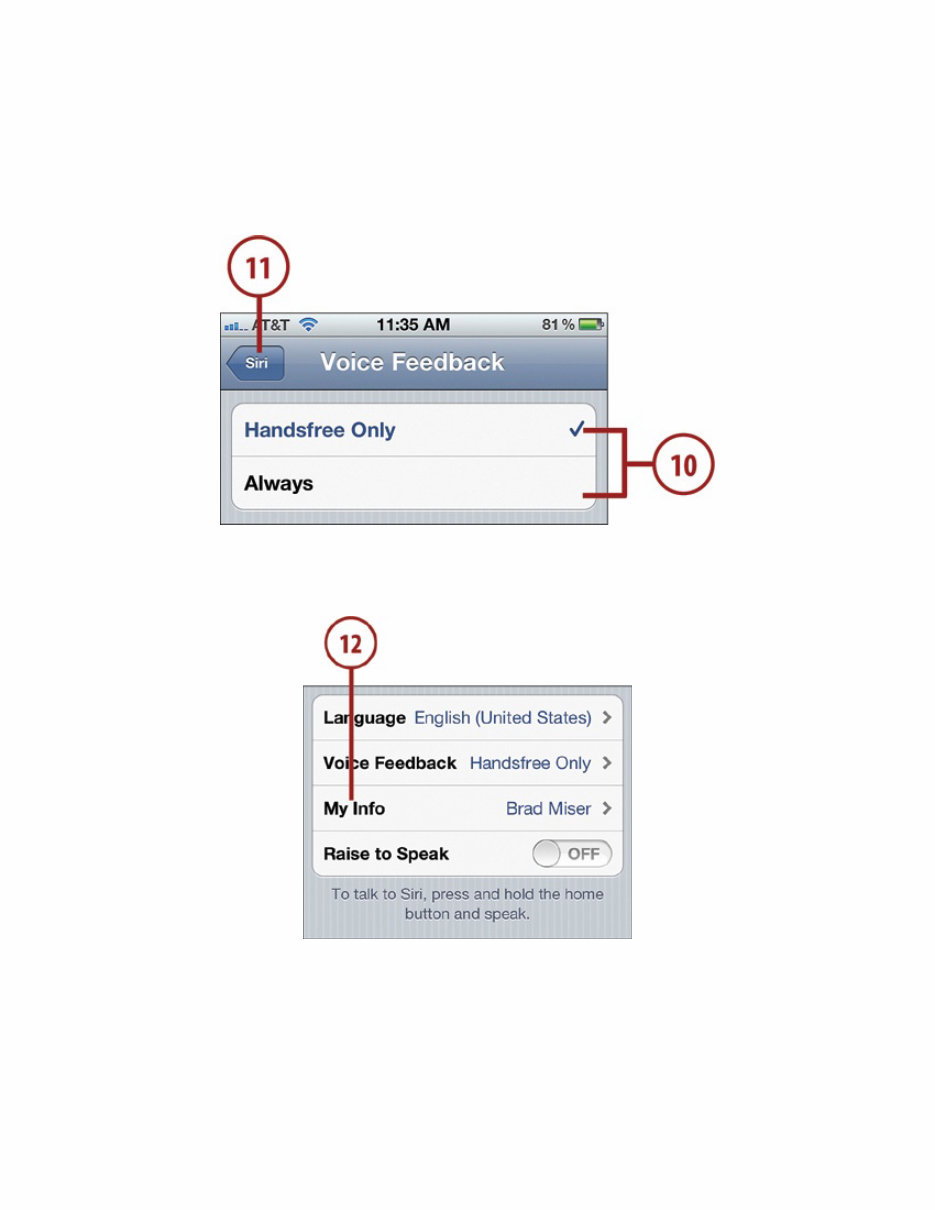
Siri’s feedback on the screen, which is typically faster than the voice
feedback.
11. Tap Siri.
12. Tap My Info.
13. Use the All Contacts screen to find and tap your information. Siri often uses
your name when it speaks to you; this tells Siri what name to use when it
addresses you. Siri also uses this for other information about you, such as
your addresses.
You're Reading a Preview
What's Included?
 Lifetime Access
Fast Download Speeds
Online & Offline Access
Access PDF Contents & Bookmarks
Full Search Facility
Print one or all pages of your manual
$23.99
Using iPhone's Siri Voice Command - Brad Miser
Viewed 68 Times Today

What's Included?
Lifetime Access
Fast Download Speeds
Online & Offline Access
Access PDF Contents & Bookmarks
Full Search Facility
Print one or all pages of your manual
$23.99

Secure transaction
What's Included?
Lifetime Access
Fast Download Speeds
Online & Offline Access
Access PDF Contents & Bookmarks
Full Search Facility
Print one or all pages of your manual
Description
Learn how to harness the power of Siri, Apple's innovative voice command system, with this comprehensive manual. Whether you're a professional mechanic or a DIY enthusiast, this step-by-step tutorial by author Brad Miser provides detailed instructions and full-color images to guide you through configuring Siri and using it with various apps on the iPhone 4S. With Siri, you can effortlessly manage tasks such as meeting requests, calendar events, texts, emails, and more, all while being hands-free. This manual covers using Siri with apps like Messages, Reminders, Mail, Music, and more, making it an indispensable tool for maximizing the potential of your iPhone's voice command capabilities.
- Author: Brad Miser
- Publisher: Que Publishing
- Illustration: No
- Language: English
- Title: Using iPhone's Siri Voice Command
- Pages: 35 (Encrypted) / 36 (Encrypted)
- On Sale: 2011-12-23
- SKU-13/ISBN: 9780789749505
- Category: Computers : Media - General


