



iPhone
User Guide
For iOS 8.4 Software

Contents
9 Chapter 1: iPhone at a glance
9 iPhone overview
11 Accessories
11 Multi-Touch screen
12 Buttons
14 SIM card
14 Status icons
16 Chapter 2: Get started
16 Set up iPhone
16 Connect to Wi-Fi
17 Connect to the Internet
17 Apple ID
17 iCloud
19 Set up other mail, contacts, and calendar accounts
19 Manage content on your iOS devices
20 Connect iPhone to your computer
20 Sync with iTunes
21 Date and time
21 Apple Watch
21 International settings
22 Your iPhone name
22 View this user guide on iPhone
22 Tips for using iOS 8
23 Chapter 3: Basics
23 Use apps
26 Continuity
28 Customize iPhone
30 Type text
32 Dictate
33 Voice Control
34 Search
35 Control Center
35 Alerts and Notification Center
36 Sounds and silence
37 Do Not Disturb
37 Sharing
39 iCloud Drive
40 Transfer files
40 Personal Hotspot
41 AirPlay
2

41 AirPrint
41 Use an Apple headset
42 Bluetooth devices
43 Restrictions
43 Privacy
44 Security
46 Charge and monitor the battery
47 Travel with iPhone
48 Chapter 4: Siri
48 Make requests
49 Siri and apps
49 Tell Siri about yourself
49 Make corrections
49 Siri Eyes Free
50 Siri settings
51 Chapter 5: Phone
51 Phone calls
55 Visual voicemail
56 Contacts
56 Call forwarding, call waiting, and caller ID
56 Ringtones and vibrations
56 International calls
57 Phone settings
58 Chapter 6: Mail
58 Write messages
59 Get a sneak peek
59 Finish a message later
60 See important messages
60 Attachments
61 Work with multiple messages
61 See and save addresses
61 Print messages
62 Mail settings
63 Chapter 7: Safari
63 Safari at a glance
64 Search the web
64 Browse the web
65 Keep bookmarks
66 Save a reading list for later
66 Shared links and subscriptions
67 Fill in forms
67 Avoid clutter with Reader
67 Privacy and security
68 Safari settings
69 Chapter 8: Music
69 Music at a glance
Contents 3

69 Access music
70 Apple Music
70 Get personalized recommendations
70 For You
71 Search for and add music
71 Play music
72 New
73 Radio
73 Connect
74 Playlists
75 iTunes Match
75 My Music
76 Siri and Voice Control
76 Music settings
78 Chapter 9: Messages
78 SMS, MMS, and iMessage
79 Send and receive messages
80 Manage conversations
81 Share photos, videos, your location, and more
82 Messages settings
83 Chapter 10: Calendar
83 Calendar at a glance
84 Invitations
84 Use multiple calendars
85 Share iCloud calendars
85 Calendar settings
86 Chapter 11: Photos
86 View photos and videos
87 Organize photos and videos
88 iCloud Photo Library
89 My Photo Stream
89 iCloud Photo Sharing
91 Other ways to share photos and videos
91 Edit photos and trim videos
92 Print photos
92 Photos settings
93 Chapter 12: Camera
93 Camera at a glance
94 Take photos and videos
96 HDR
96 View, share, and print
97 Camera settings
98 Chapter 13: Weather
100 Chapter 14: Clock
100 Clock at a glance
Contents 4

101 Alarms and timers
102 Chapter 15: Maps
102 Find places
103 Get more info
103 Get directions
104 3D and Flyover
104 Maps settings
105 Chapter 16: Videos
105 Videos at a glance
106 Add videos to your library
106 Control playback
107 Videos settings
108 Chapter 17: Notes
108 Notes at a glance
109 Use notes in multiple accounts
110 Chapter 18: Reminders
110 Reminders at a glance
111 Scheduled reminders
111 Location reminders
112 Reminders settings
113 Chapter 19: Stocks
115 Chapter 20: Game Center
115 Game Center at a glance
116 Play games with friends
116 Game Center settings
117 Chapter 21: Newsstand
118 Chapter 22: iTunes Store
118 iTunes Store at a glance
118 Browse or search
119 Purchase, rent, or redeem
120 iTunes Store settings
121 Chapter 23: App Store
121 App Store at a glance
121 Find apps
122 Purchase, redeem, and download
123 App Store settings
124 Chapter 24: iBooks
124 Get books
124 Read a book
125 Interact with multimedia
125 Study notes and glossary terms
126 Listen to an audiobook
Contents 5

127 Organize books
127 Read PDFs
128 iBooks settings
129 Chapter 25: Health
129 Your health at a glance
130 Collect health and fitness data
130 Share health and fitness data
130 Create an emergency medical ID
131 Chapter 26: Passbook
131 Passbook at a glance
131 Passbook on the go
132 Apple Pay
135 Passbook & Apple Pay settings
136 Chapter 27: FaceTime
136 FaceTime at a glance
136 Make and answer calls
137 Manage calls
137 Settings
138 Chapter 28: Calculator
139 Chapter 29: Podcasts
139 Podcasts at a glance
140 Get podcasts and episodes
141 Control playback
142 Organize your favorites into stations
142 Podcasts settings
143 Chapter 30: Compass
143 Compass at a glance
144 On the level
145 Chapter 31: Voice Memos
145 Voice Memos at a glance
145 Record
146 Play it back
146 Move recordings to your computer
147 Chapter 32: Contacts
147 Contacts at a glance
148 Use Contacts with Phone
148 Add contacts
149 Unify contacts
149 Contacts settings
150 Appendix A: Accessibility
150 Accessibility features
151 Accessibility Shortcut
151 VoiceOver
Contents 6

162 Zoom
163 Invert Colors and Grayscale
164 Speak Selection
164 Speak Screen
164 Speak Auto-text
164 Large, bold, and high-contrast text
164 Button Shapes
165 Reduce screen motion
165 On/off switch labels
165 Assignable ringtones and vibrations
165 Video Descriptions
165 Hearing aids
167 Mono audio and balance
167 Subtitles and closed captions
167 Siri
167 Widescreen keyboards
168 Large phone keypad
168 LED Flash for Alerts
168 Call audio routing
168 Phone noise cancelation
168 Guided Access
169 Switch Control
172 AssistiveTouch
174 TTY support
174 Visual voicemail
174 Voice Control
174 Accessibility in OS X
175 Appendix B: iPhone in business
175 Mail, Contacts, and Calendar
175 Network access
175 Apps
177 Appendix C: International keyboards
177 Use international keyboards
178 Special input methods
180 Appendix D: CarPlay
180 About CarPlay
180 Get started
181 Maps
181 Phone
181 Messages
182 Music
182 Podcasts
182 Other apps
183 Appendix E: Safety, handling, and support
183 Important safety information
185 Important handling information
186 iPhone Support site
Contents 7

186 Restart or reset iPhone
187 Reset iPhone settings
187 Get information about your iPhone
188 Usage information
188 Disabled iPhone
188 Back up iPhone
189 Update and restore iPhone software
190 Cellular settings
191 Sell or give away iPhone
191 Learn more, service, and support
192 FCC compliance statement
192 Canadian regulatory statement
193 Disposal and recycling information
195 Apple and the environment
Contents 8
1
9
iPhone at a glance
iPhone overview
This guide describes iOS 8.4 for:
• iPhone 6
• iPhone 6 Plus
• iPhone 5s
• iPhone 5c
• iPhone 5
• iPhone 4s
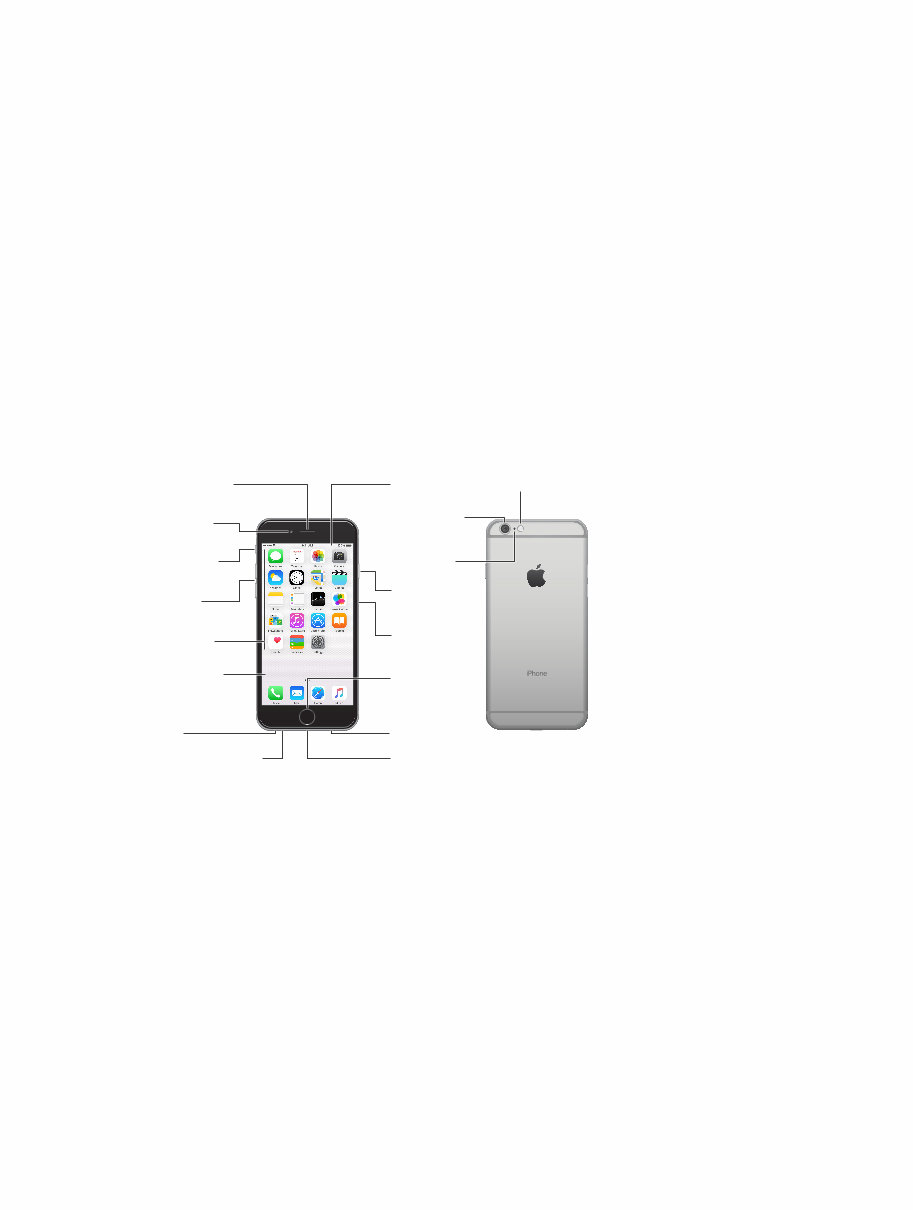
iPhone 6
Bottom microphone Bottom microphone
Ring/Silent
switch
Ring/Silent
switch
Receiver/front
microphone
Receiver/front
microphone
FaceTime
camera
FaceTime
camera
Volume
buttons
Volume
buttons
Multi-Touch
display
Multi-Touch
display
Home button/
Touch ID
sensor
Home button/
Touch ID
sensor
Headset
jack
Headset
jack
Sleep/Wake
button
Sleep/Wake
button
iSight camera iSight camera
SIM card
tray
SIM card
tray
True Tone Flash True Tone Flash
Rear
microphone
Rear
microphone
App icons App icons
Status bar Status bar
Lightning connector Lightning connector
Speaker Speaker
Chapter 1 iPhone at a glance 10
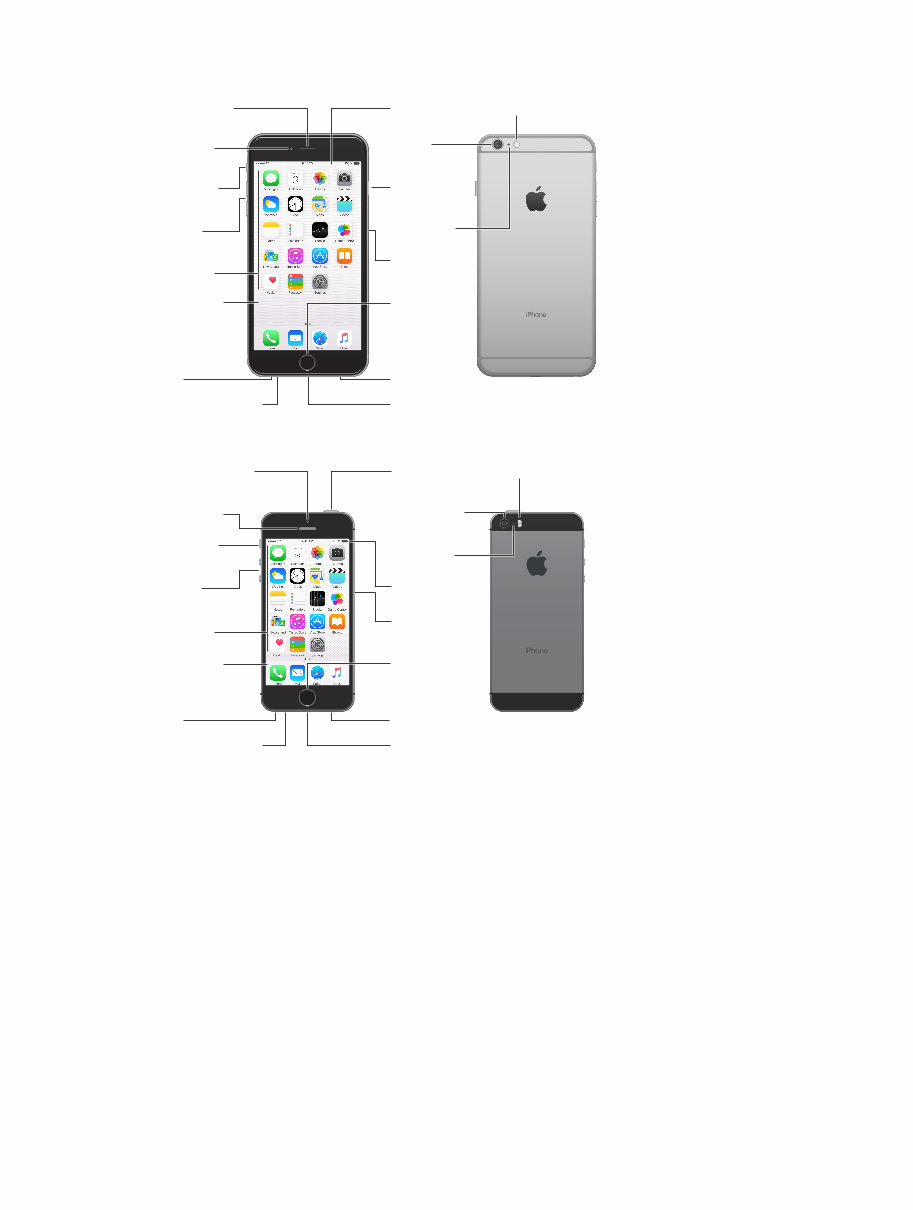
iPhone 6 Plus
FaceTime
camera
FaceTime
camera
Ring/Silent
switch
Ring/Silent
switch
Receiver/front
microphone
Receiver/front
microphone
Volume
buttons
Volume
buttons
Multi-Touch
display
Multi-Touch
display
Home button/
Touch ID
sensor
Home button/
Touch ID
sensor
Sleep/Wake
button
Sleep/Wake
button
iSight
camera
iSight
camera
SIM card
tray
SIM card
tray
True Tone Flash True Tone Flash
Rear
microphone
Rear
microphone
App icons App icons
Status bar Status bar
Bottom microphone Bottom microphone
Headset
jack
Headset
jack
Lightning connector Lightning connector
Speaker Speaker
iPhone 5s
Receiver/front
microphone
Receiver/front
microphone
Bottom microphone Bottom microphone
Ring/Silent
switch
Ring/Silent
switch
FaceTime camera FaceTime camera
Volume
buttons
Volume
buttons
Multi-Touch
display
Multi-Touch
display
Home button/
Touch ID
sensor
Home button/
Touch ID
sensor
Headset
jack
Headset
jack
Sleep/Wake
button
Sleep/Wake
button
Rear
microphone
Rear
microphone
SIM card
tray
SIM card
tray
True Tone Flash True Tone Flash
iSight camera iSight camera
App icons App icons
Status bar Status bar
Lightning connector Lightning connector
Speaker Speaker
Your iPhone features and apps may vary depending on the model of iPhone you have, and on
your location, language, and carrier. To find out which features are supported in your area, see
www.apple.com/ios/feature-availability/.
Note: Apps and services that send or receive data over a cellular network may incur additional
fees. Contact your carrier for information about your iPhone service plan and fees.
You're Reading a Preview
What's Included?
 Lifetime Access
Fast Download Speeds
Online & Offline Access
Access PDF Contents & Bookmarks
Full Search Facility
Print one or all pages of your manual
$27.99
$36.99
Apple iPhone 4s/5/5c/5s/6/6 Plus User Guide (iOS 8.4)
Viewed 65 Times Today

What's Included?
Lifetime Access
Fast Download Speeds
Online & Offline Access
Access PDF Contents & Bookmarks
Full Search Facility
Print one or all pages of your manual
$27.99
$36.99

Secure transaction
What's Included?
Lifetime Access
Fast Download Speeds
Online & Offline Access
Access PDF Contents & Bookmarks
Full Search Facility
Print one or all pages of your manual
Description
This comprehensive guide provides detailed information on using your new iPhone. Whether you are a professional mechanic or a DIY enthusiast, this manual covers a wide range of topics to help you get the most out of your device.
- Activating and Setting Up iPhone
- What You Need
- Activating iPhone
- Syncing iPhone with Your Computer
- Disconnecting iPhone from Your Computer
- Basics
- iPhone at a Glance
- Home Screen
- iPhone Buttons and Touchscreen
- Using the Stereo Headset
- Connecting to the Internet
- Using iPhone on an Airplane
- Charging the Battery
- Cleaning iPhone
- Phone
- Calling and Answering
- Visual Voicemail
- Adding Contact Information to iPhone
- Ringtones
- Using iPhone with a Bluetooth Headset or Car Kit
- Calling to and from Other Countries
- Phone Settings
- Setting Up Email Accounts
- Sending Email
- Checking and Reading Email
- Mail Settings
- Safari
- Surfing the Web
- Adding Safari Web Clips to the Home Screen
- Using Bookmarks
- Safari Settings
- iPod
- Syncing iPod Content from Your iTunes Library
- Playing Music
- Watching Videos
- iPod Settings
- Applications
- Text
- Calendar
- Photos and Camera
- YouTube
- Stocks
- Maps
- Weather
- Clock
- Calculator
- Notes
- Settings
- Airplane Mode
- Wi-Fi
- Carrier
- Usage
- Sounds and the Ring/Silent Switch
- Brightness
- Wallpaper
- General
- Phone
- Safari
- iPod
- Photos
- Restoring or Transferring Your iPhone Settings
With this manual, you can troubleshoot, repair, and maintain your iPhone with confidence.


