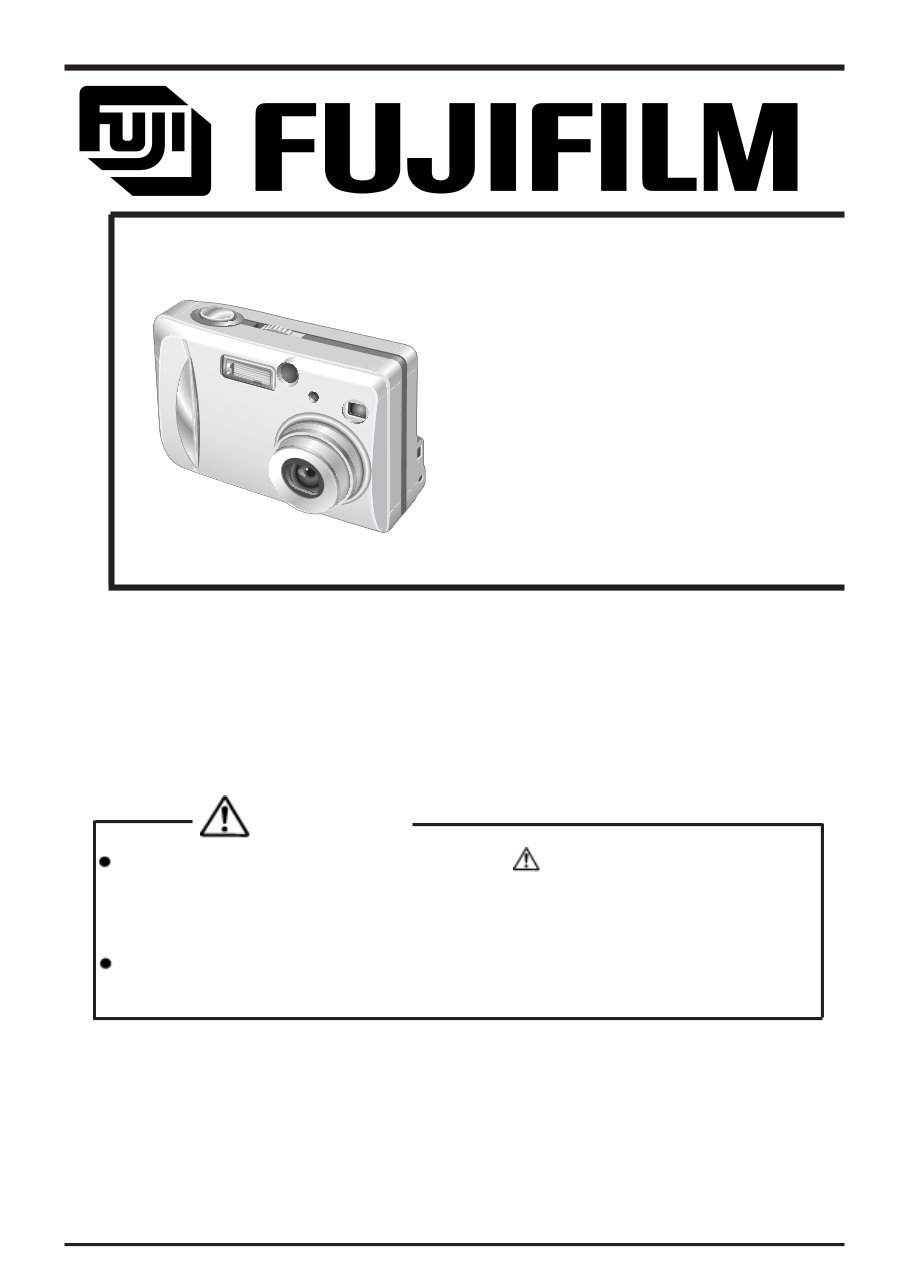
WARNING THE COMPORNENTS IDENTIFIED BY THE MARK “ ” ON THE SCHEMATHIC DIAGRAM AND IN THE PARTS LIST ARE CRITICAL FOR SAFETY. PLEASE REPLACE ONLY BY THE COMPONENTS SPECIFIED ON THE SCHEMATHIC DIAGRAM AND IN THE PARTS LIST. IF YOU USE WITH PART NUMBER UN-SPECIFIED, IT MAY RESULT IN A FIRE AND AN ELECTORICAL SHOCK. FUJI PHOTO FILM CO.,LTD. Ref.No.:ZM00453-101 Printed in Japan 2003.02(S.S.) US/EU/EG/CA/GE/AS-Model SERVICE MANUAL DIGITAL CAMERA FinePix A303
6. Make leakage - current measurements to determine that exposed parts are acceptably insulated from the supply circuit before returning the product to the customer. 7. CAUTION: FOR CONTINUED PROTECTION AGAINST FIRE HAZARD, REPLACE ONLY WITH SAME TYPE 2.5 AMPERES 125V FUSE. ATTENTION: AFIN D'ASSURER UNE PROTECTION PERMANENTE CONTRE LES RISQUES D'INCENDIE, REMPLACER UNIQUEMENT PAR UN FUSIBLE DE MEME, TYPE 2.5 AMPERES, 125 VOLTS. 8. WARNING: TO REDUCE THE ELECTRIC SHOCK, BE CAREFUL TO TOUCH THE PARTS. 2.5A125V 2.5A125V RISK OF FIRE- REPLACE FUSE AS MARKED WARNING! HIGH VOLTAGE SAFETY CHECK-OUT After correcting the original problem, perform the following safety check before return the product to the costomer. 1. Check the area of your repair for unsoldered or poorly sol dered connections. Check the entire board sur face for solder splasher and bridges. 2. Check the interboard wiring to ensure that no wires are pinched or contact high-wattage resistors. 3. Look for unauthorized replacement parts, particu larly tran sistors, that were installed during a previ ous repair. Point them out to the customer and rec ommend their replacement. 4. Look for parts which, though functioning, show obvi ous signs of deterioration. Point them out to the cus tomer and recommend their replacement. 5. Check the B + voltage to see it is at the values specified. FinePix A303 Service Manual
3 FinePix A303 Service Manual TABLE OF CONTENTS TABLE OF CONTENTS 1.General 1-1. Product specification ........................................................ 4 1-2.Names of External Components ...................................... 7 2.Disassembly 2-1.Internal Components ......................................................... 8 2-2.Removing the R PANEL ASSY ........................................ 9 2-3.Removing the LCD UNIT ................................................ 10 2-4.Removing the MAIN PWB ASSY .................................. 10 2-5.Removing the BATTERY LID ......................................... 11 2-6.Removing the CABINET INNER .................................... 11 2-7.Removing the BARRIER MOTOR ASSY ..................... 12 2-8.Removing the FLASH UNIT ........................................... 12 2-9.Removing the LENS UNIT ............................................. 13 3.Schematics 3-1.Cautions ............................................................................ 14 3-2.Basic Block Names and Functions ............................... 14 3-3.Block Diagram ................................................................. 15 3-4.MAIN PWB ASSY Mounting Diagram ........................... 16 3-5.SUB PWB ASSY Mounting Diagram ............................ 16 4.Adjustments 4-1.Adjustment Items and Procedures ............................... 17 4-2.Measuring Devices .......................................................... 17 4-3.Jigs .................................................................................... 17 4-4.Jig Connections ............................................................... 18 4-5.Environment Setup .......................................................... 18 4-6.Installing the Jig Drivers on the PC .............................. 19 4-7.Installing and Starting the Adjustment Software ........ 20 4-8.Initializing the Adjustment Software ............................. 20 4-9.Starting the Adjustment Software ................................. 23 4-10.[F5]:Camera adjustment .............................................. 26 4-11.[F6]:AF adjustment ....................................................... 29 4-12.[F4]:CCD Defect Correction ......................................... 31 4-13.[F1]:Battery voltage adjustment .................................. 33 4-14.[F3]:LCD Adjustment .................................................... 36 4-15.[F7]:Flash adjustment ................................................... 37 4-16.Firmware Download ...................................................... 39 4-17.End Setting .................................................................... 41 5. Inspection 5-1. Required Measuring Equipment ................................... 45 5-2. Connection of Measuring Equipment .......................... 45 5-3. Inspection and Factory Settings .................................. 45 6.Parts List 6-1.Packing and Accessories ............................................... 47 6-1-1.For US model ........................................................... 47 6-1-2.For EU model ........................................................... 48 6-1-3.For EG model ........................................................... 49 6-1-4.For CA model ........................................................... 50 6-1-5.For GE model ........................................................... 51 6-1-6.For AS model ............................................................ 52 6-2.Cabinet F block (US/EU/EG/CA/GE/AS model) ......... 53 6-3.Cabinet R block (US/EU/EG/CA/GE/AS model) ......... 54 6-4.Electrical Parts (US/EU/EG/CA/GE/AS model) .......... 55 7. Appendix 7-1.List of Related Technical Updates Issued ................... 56
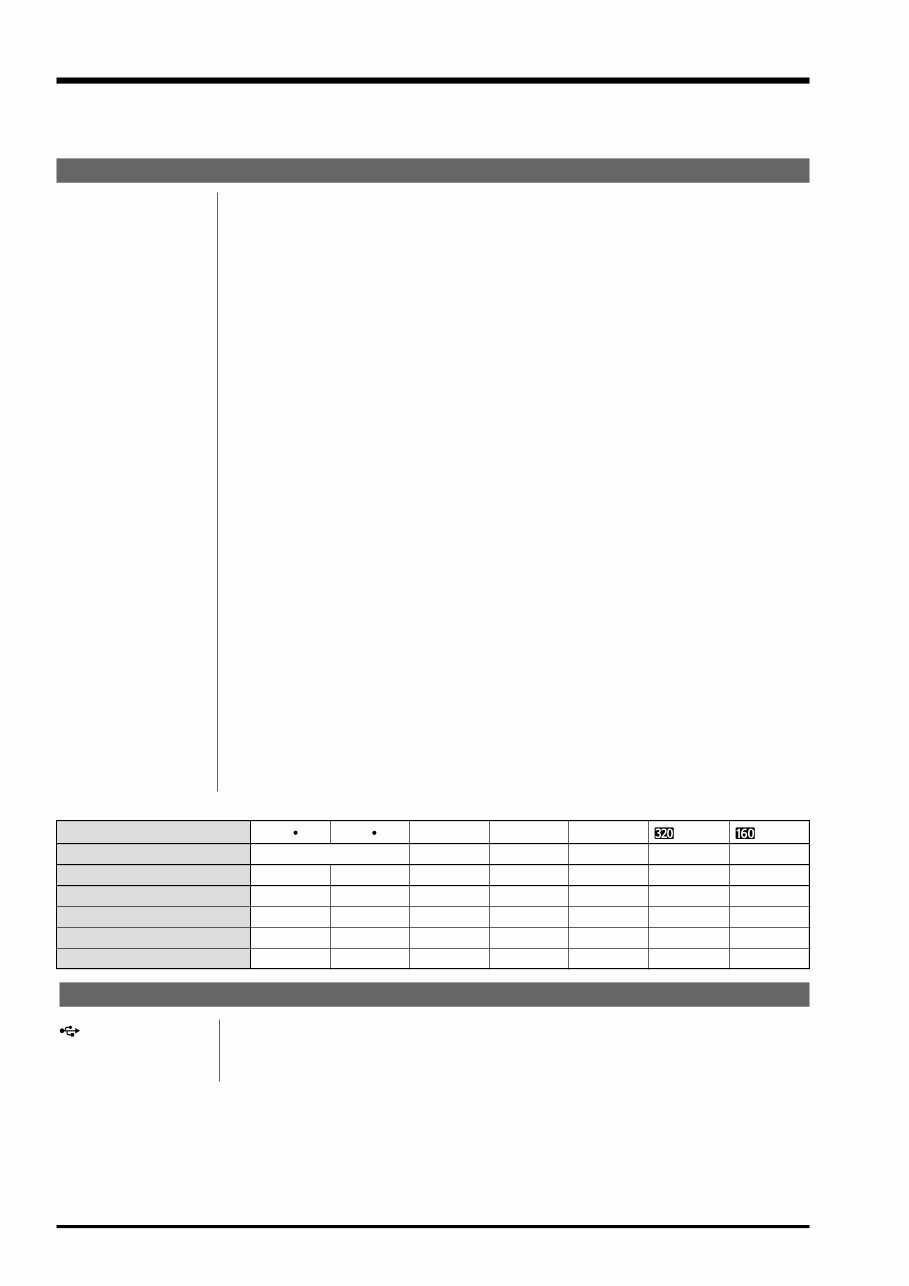
4 1.General FinePix A303 Service Manual 1.General 1-1. Product specification Input/Output Terminals (USB) socket USB (1) for image data output with a personal computer DC IN 3V (Power input) Socket for specified AC power adapter (optional) socket System Model Digital Camera FinePix A303 Number of effective pixels 3.24 million pixels CCD sensor 1/2.7-inch square pixel CCD with RGB Filter Number of total pixels: 3.24 million pixels Number of recorded pixels 2048 × 1536 pixels (3.15 million pixels)/1600 × 1200 pixels (1.92 million pixels)/ 1280 × 960 pixels/640 × 480 pixels Storage media xD-Picture Card (16MB to 128MB) File format Still image: JPEG (Exif Ver.2.2), DPOF-compatible Movie: AVI format, Motion JPEG *Design rule for Camera File system Compliant Viewfinder Real image optical; Frame coverag: 80% Lens Fujinon 3× optical zoom lens f=38-114 mm on a 35 mm camera Aperture F2.8-F4.8/F7.0-F11.6 (automatically selected) Focus distance f=5.7-17.1 mm (equivalent to 38 mm on a 114mm camera) Exposure control 64 zones TTL metering, Program AE (exposure compensation available in Manual mode) Sensitivity Equivalent to ISO 100 White balance Auto (7 positions selectable in Manual mode) Focal range Normal: Approx. 60 cm/2.0 ft. to infinity Macro: Approx. 10 cm-80 cm/3.9 in.-2.6 ft. Shutter speeds Variable-speed, 1/2 sec. to 1/2000 sec. (combined with mechanical shutter) Flash (Auto flash using Effective range: flash control sensor) Wide-angle: Approx. 30 cm-3.5 m (1.0 ft. -11.5 ft.) Telephoto-angle: Approx. 60 cm-3.0 m (2.0 ft. -9.8 ft.) Flash modes: Auto, Red-Eye Reduction, Forced Flash, Suppressed Flash, Slow Synchro LCD monitor 1.5-inches, 60,000-pixels TFT Self-Timer 10 sec. timer clock Standard number of available shots/recording time per xD-Picture Card DPC-16 (16 MB) DPC-32 (32 MB) DPC-64 (64 MB) DPC-128 (128 MB) Quality Mode Image Data Size 3M F 3M N Approx. 1300 KB Approx. 590 KB 12 26 25 53 50 102 107 215 Approx. 390 KB 39 79 159 319 Approx. 320 KB 49 99 198 398 2M 1M — Approx. 94 sec. Approx. 191 sec. Approx. 6.4 min. Approx. 12.9 min. Approx. 130 KB 122 247 497 997 0.3M (Movie) — Number of recorded pixels 2048 × 1536 1600 × 1200 1280 × 960 320 × 240 640 × 480 160 × 120 Approx. 5 min. Approx. 10.1 min. Approx. 20.2 min. Approx. 40.6 min. (Movie)
5 1.General FinePix A303 Service Manual No. of available shots using battery (battery life) This indicates the number of available frames shot consecutively at room tem- perature with a flash use rate of 50%. Note that these figures may vary depending on the ambient temperature and the amount of charge in the battery. The number of available shots or available shooting time will be lower in cold conditions. Conditions for use Temperature: 0 o C to +40 o C (+32 o F to +104 o F); 80% humidity or less (no conden- sation) Camera dimensions 97.0 mm × 63.9 mm × 34.3 mm/3.8 in. × 2.5 in. × 1.4 in. (W/H/D) (not including accessories and attachments) Camera mass (weight) Approx. 145 g/5.1 oz. (not including accessories, batteries or xD-Picture Card) Weight for photography Approx. 200 g/7.1 oz. (including batteries and xD-Picture Card) Accessories l 16 MB, xD-Picture Card (1) Supplied with: Anti-static case (1) l LR6 AA-size alkaline Batteries (2) l Hand strap (1) l Interface Set (1) CD-ROM: Software for FinePix SX (1) Special USB cable with Noise Suppression core (1) l Owners Manual (1) Optional Accessories l xD-Picture Card DPC-16 (16MB)/DPC-32 (32MB)/DPC-64 (64MB)/DPC-128 (128MB) l AC Power Adapter AC-3V l Fujifilm Rechargeable Battery 2HR-3UF l Fujifilm Battery charger with Battery BK-NH (With Euro type or UK type plug) l SC-FXA01 l DPC-R1 Image Memory Card Reader Compatible with Windows 98/98 SE, Windows Me, Windows 2000 Profes sional, Windows XP or iMac, Mac OS 8.6 to 9.2, Mac OS X (10.1.2 to 10.1.5) and models that support USB as standard. Compatible with SmartMedia of 3.3V, 4MB to 128MB. l DPC-AD PC Card Adapter Compatible with SmartMedia of 3.3V, 2MB to 128MB. With LCD monitor OFF With LCD monitor ON Battery type Ni-MH batteries HR-3UF 1700 mAh Alkaline batteries Approx. 200 frames Approx. 150 frames Approx. 300 frames Approx. 200 frames (Condition: Power saving mode ON, with fully charged battery (Ni-MH)) * * Power Supply and Others Power supply Use one of the following: 2AA-size alkaline batteries 2AA-size Ni-MH (nickel-metal hydride) batteries (optional) AC Power Adapter AC-3V (optional)
6 1.General FinePix A303 Service Manual Explanation of Terms DPOF: Digital Print Order Format DPOF is a format used for recording information on a storage media (image memory card, etc.) that allows you to specify which of the frames shot using a digital camera are printed and how many prints are made of each image. EV: A number that denotes exposure. The EV is determined by the brightness of the subject and sensitivity (speed) of the film or CCD. The number is larger for bright subjects and smaller for dark subjects. As the brightness of the subject changes, a digital camera maintains the amount of light hitting the CCD at a constant level by adjusting the aperture and shutter speed. When the amount of light striking the CCD doubles, the EV increases by 1. Likewise, when the light is halved, the EV decreases by 1. JPEG: Joint Photographics Experts Group A file format used for compressing and saving color images. The compression ratio can be selected, but the higher the compression ratio, the poorer the quality of the expanded image. Motion JPEG: A type of AVI (Audio Video Interleave) file format that handles images and sound as a single file. Images in the file are recorded in JPEG format. Motion JPEG can be played back by QuickTime 3.0 or later. PC Card: A generic term for cards that meet the PC Card Standard. PC Card Standard: A standard for PC cards determined by the PCMCIA. PCMCIA: Personal Computer Memory Card International Association (US). White Balance: Whatever the kind of the light, the human eye adapts to it so that a white object still looks white. On the other hand, devices such as digital cameras see a white sub- ject as white by first adjusting the color balance to suit the color of the ambient light around the subject. This adjustment is called matching the white balance. A function that automatically matches the white balance is called an Automatic White Balance function.
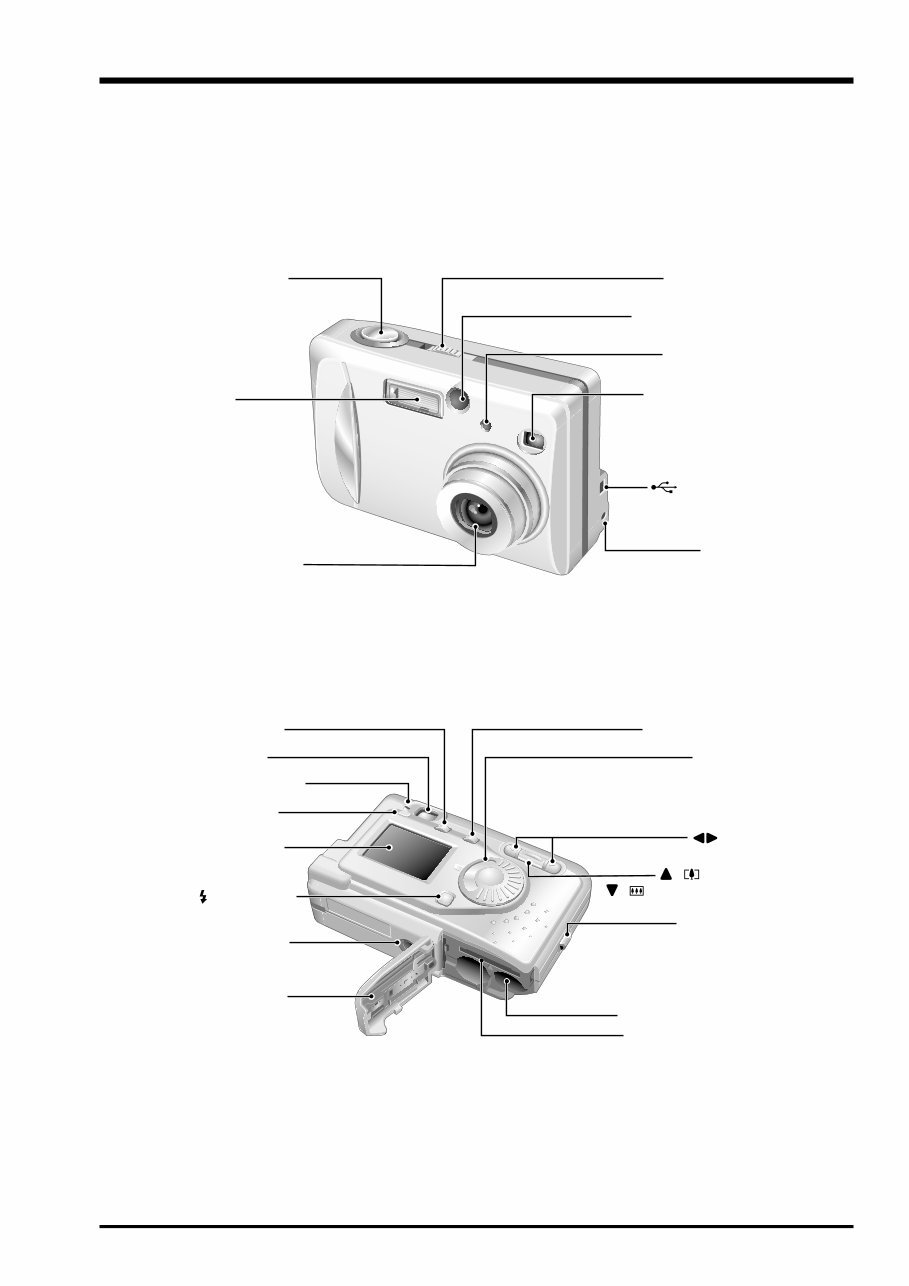
7 1.General FinePix A303 Service Manual 1-2.Names of External Components Lens/Lens cover Self-timer lamp Flash control sensor Flash DC IN 3V (Power input) socket Shutter button POWER switch Viewfinder window (USB) socket MENU/OK button Mode dial button Viewfinder lamp Viewfinder LCD monitor Tripod mount Flash button Battery cover DISP button BACK button Battery compartment Strap mount xD-Picture Card slot ( Zoom in) ( Zoom out) button
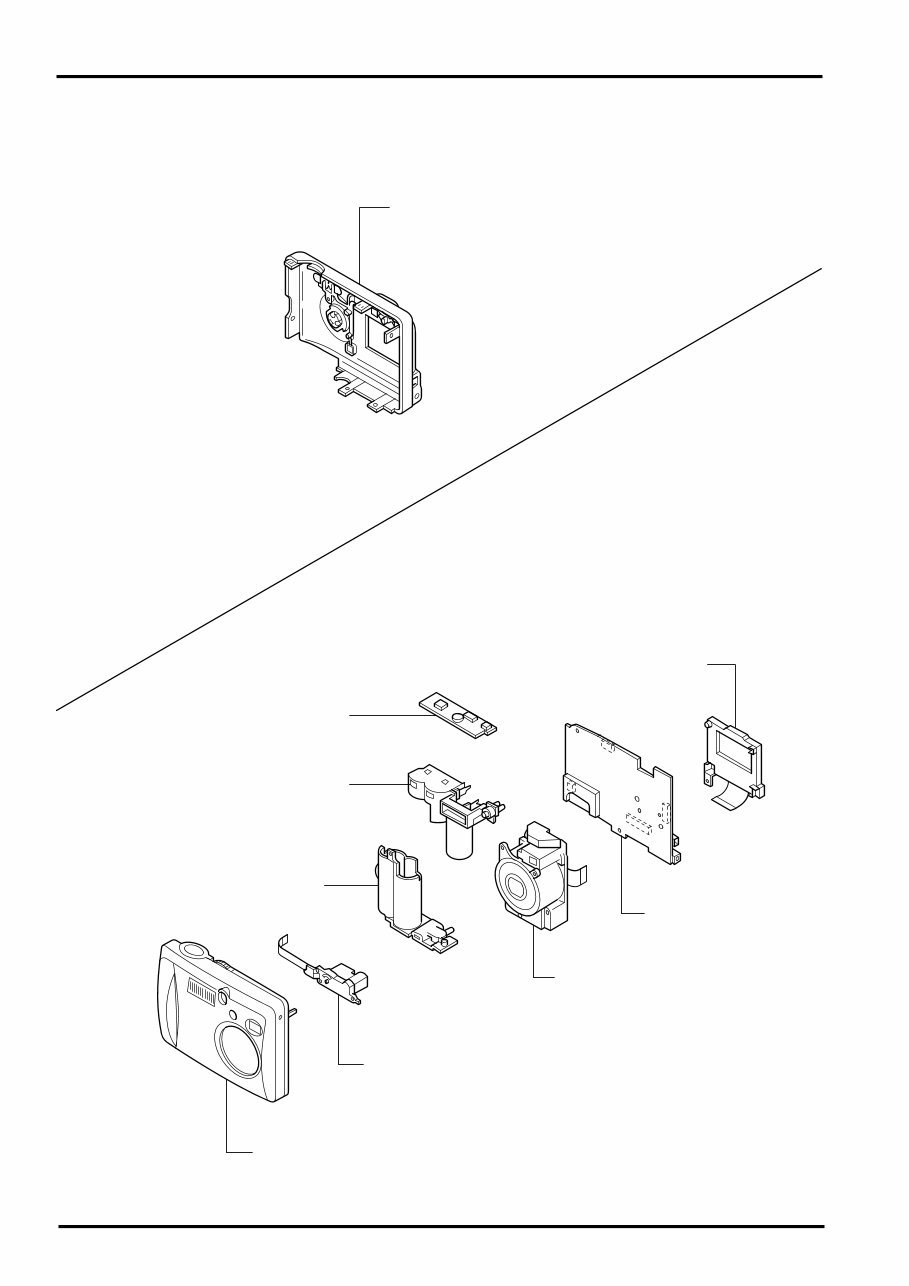
FinePix A303 Service Manual 2. Disassembly 8 2. Disassembly 2-1. Internal Components CABINET REAR ASSY MAIN PWB ASSY LENS UNIT BARRIER MOTOR UNIT CABINET FRONT ASSY BATTERY HOLDER FLASH UNIT SUB PWB ASSY LCD UNIT
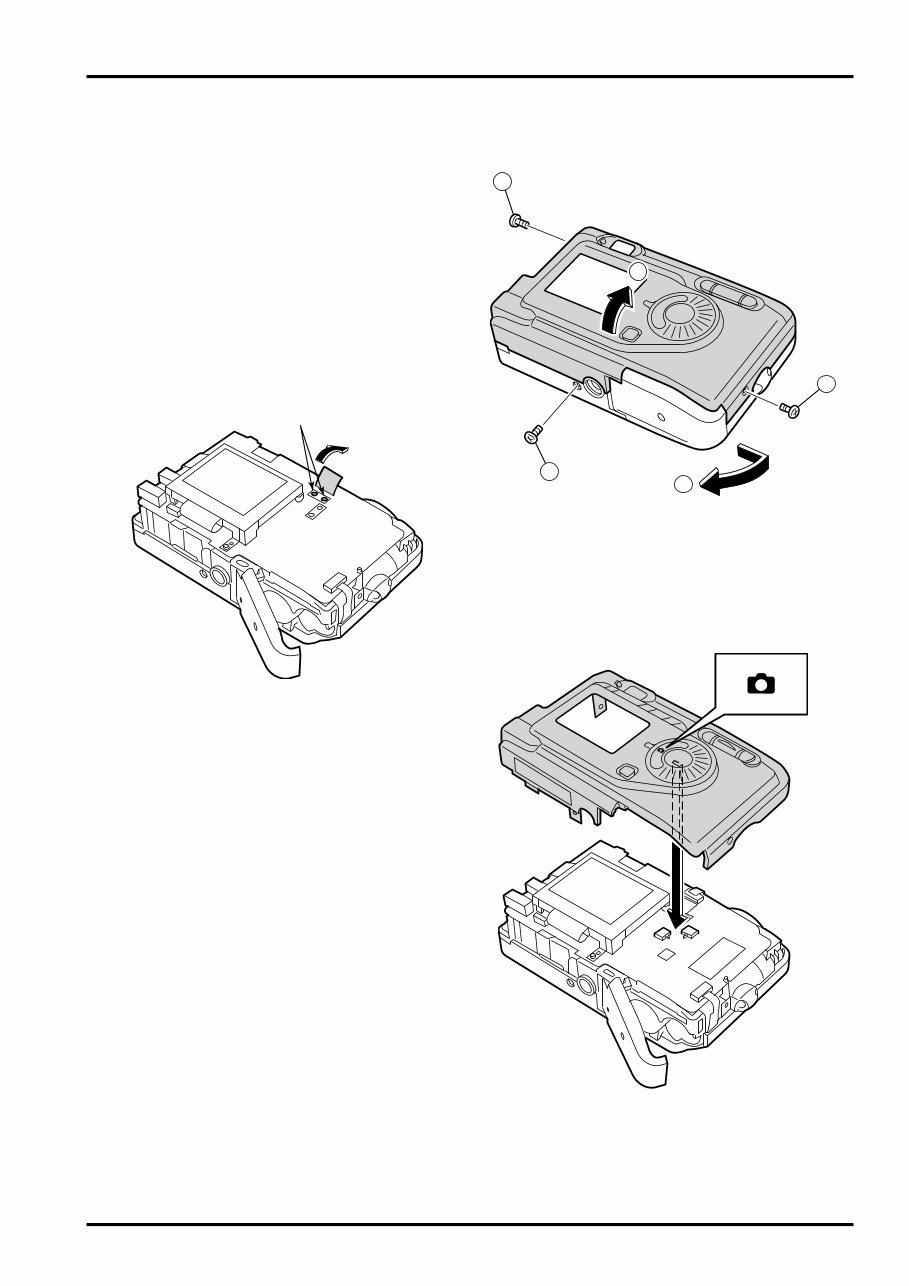
FinePix A303 Service Manual 2. Disassembly 9 2-2. Removing the R PANEL ASSY [Disassembly] 1. Remove the three M1.7x5 screws. 2. Open the battery cover. 3. Raise the R PANEL ASSY in the direction of the arrow. [Assembly] Set the mode dial to the camera position and assemble it. Assemble in the reverse order to disassembly. 1 1 1 2 3 Note: Always ensure that the FLASH ASSY main condenser is discharged before beginning disassembly. Discharge point
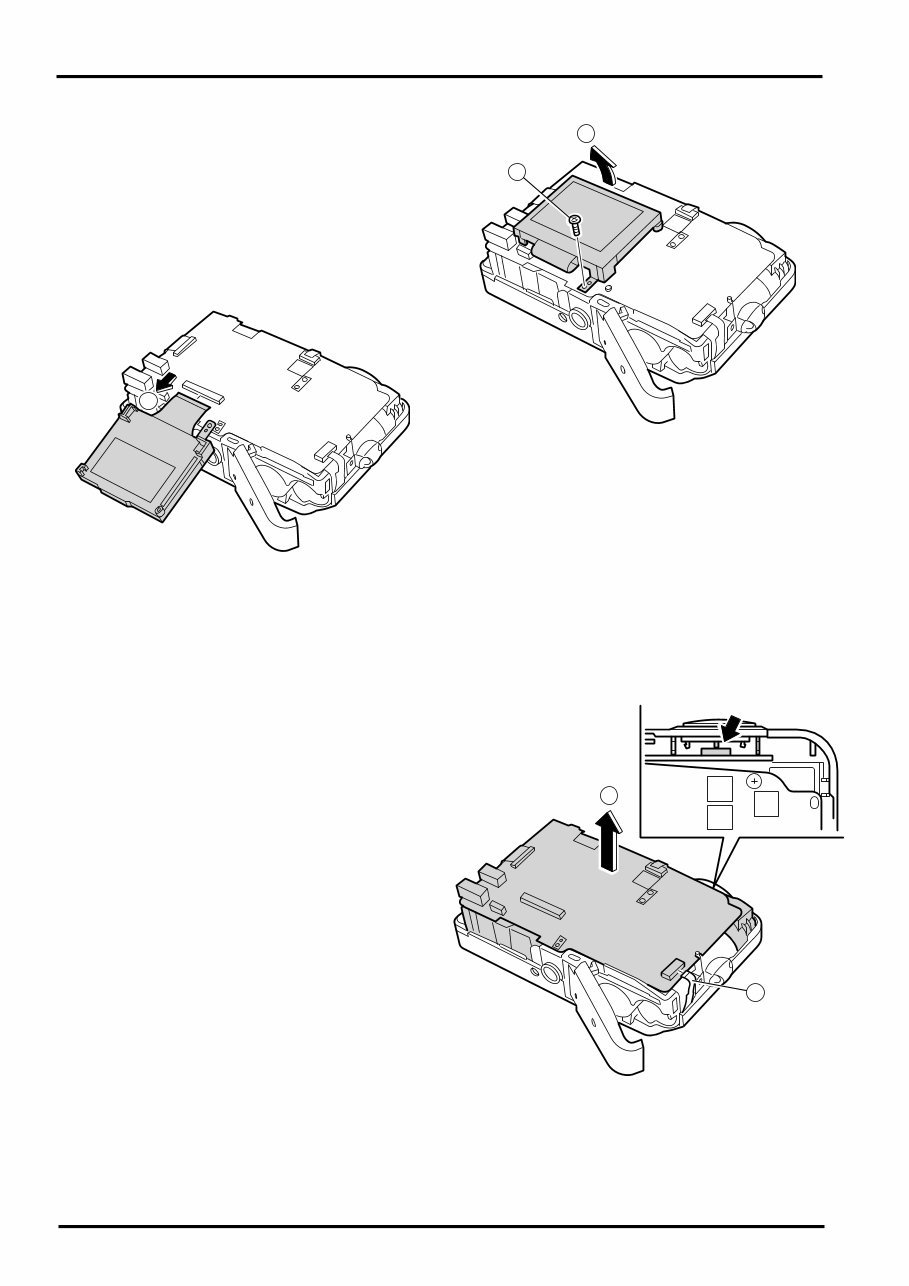
FinePix A303 Service Manual 2. Disassembly 10 2-3. Removing the LCD UNIT [Disassembly] 1. Remove the M1.7x5 screws. 2. Raise the LCD UNIT in the direction of the arrow. 3. Remove the connector. 2-4. Removing the MAIN PWB ASSY [Disassembly] 1. Remove the FFC. 2. Remove the NAIN PWB in the direction of the arrow taking care not caught of the shutter button. [Assembly] Assemble in the reverse order to disassembly. [Assembly] Assemble in the reverse order to disassembly. 1 2 3 1 2
You're Reading a Preview
What's Included?
Lifetime Access
Fast Download Speeds
Online & Offline Access
Access PDF Contents & Bookmarks
Full Search Facility
Print one or all pages of your manual
$27.99
Fujifilm Fuji Finepix A303 Service Manual & Repair Guide
Are you experiencing issues with your Fujifilm Camera? Why spend a fortune on repairs or replacements when you can take matters into your own hands?
This comprehensive service manual is utilized by Certified Fujifilm Technicians and is equally beneficial for professional mechanics and DIY enthusiasts. It provides invaluable assistance in troubleshooting and repairing your Camera.
Key features of this manual include:
Safety & Precautions
Product Specifications
Troubleshooting
Maintenance
Disassembly & Reassembly
Adjustments
System Diagrams
Exploded Views
Replacement Parts list
Containing detailed, colored pictures and step-by-step instructions, this manual ensures the best possible guidance for repairing and servicing your device.
It's important to note that this is the official manual in PDF format, guaranteeing high-resolution quality for all printed pages. With instant access upon payment, there are no shipping fees or waiting for postal delivery, allowing you to commence repairs promptly.
Specifications:
Language: English
Format: PDF
Platform: Windows and MAC
If you're in search of a specific service manual, don't hesitate to reach out to us. With one of the largest service manual databases, we may be able to fulfill your request.
Reviews
Q&A
Recently Viewed
5,521,897Happy Clients
2,594,462eManuals
1,120,453Trusted Sellers
15Years in Business
Price:
Actual Price:
Fujifilm Fuji Finepix A303 Service Manual & Repair Guide





 Lifetime Access




