Sony DSR-PD150 + PD150P Service Manual & Repair Guide
What's Included?
Lifetime Access
Fast Download Speeds
Offline Viewing
Access Contents & Bookmarks
Full Search Facility
Print one or all pages of your manual
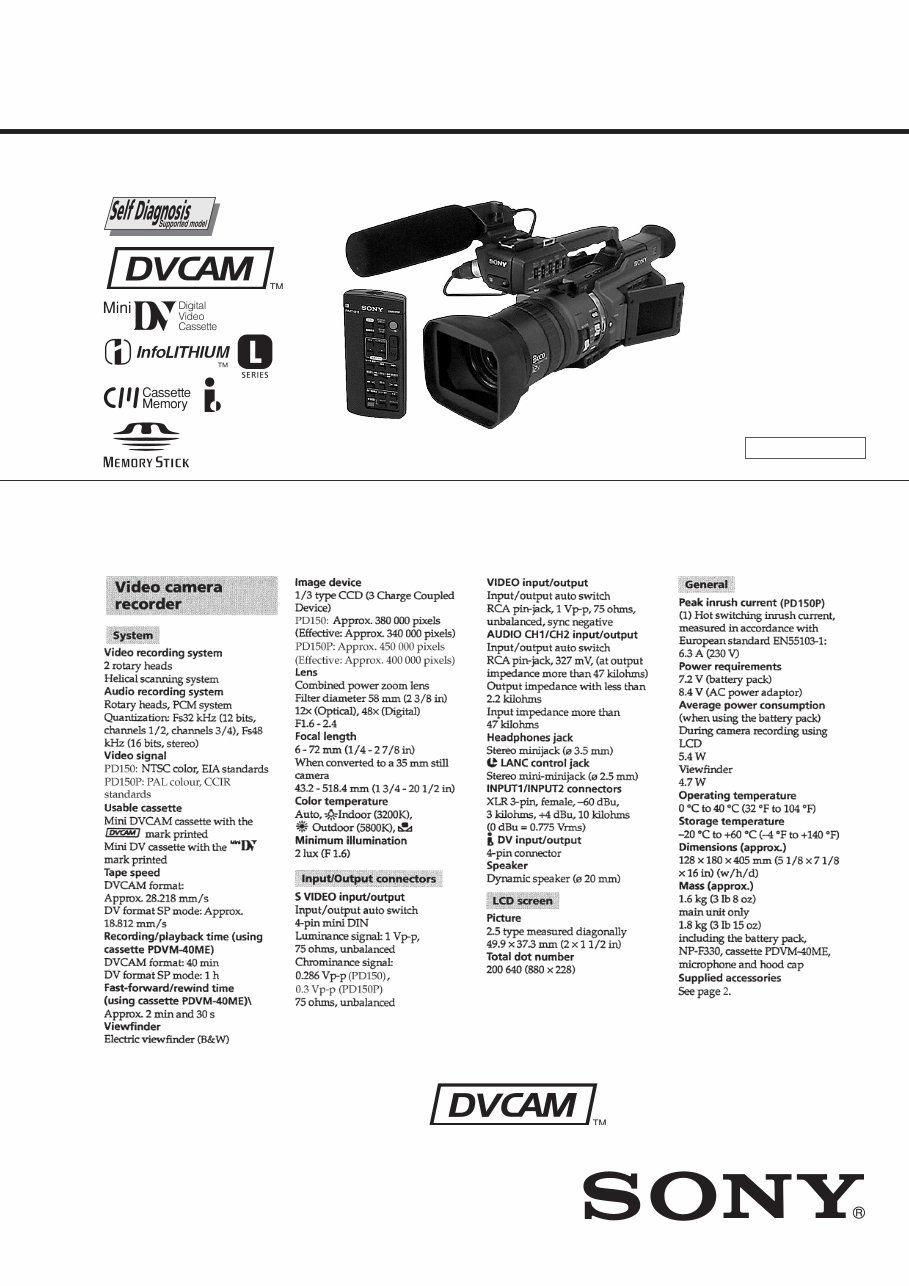
SERVICE MANUAL SERVICE MANUAL C MECHANISM — Continued on next page — Photo : DSR-PD150 US Model Canadian Model DSR-PD150 AEP Model DSR-PD150P DIGITAL CAMCORDER SPECIFICATIONS NTSC model : DSR-PD150 PAL model : DSR-PD150P DSR-PD150/PD150P RMT-811 Ver 1.0 2000. 05
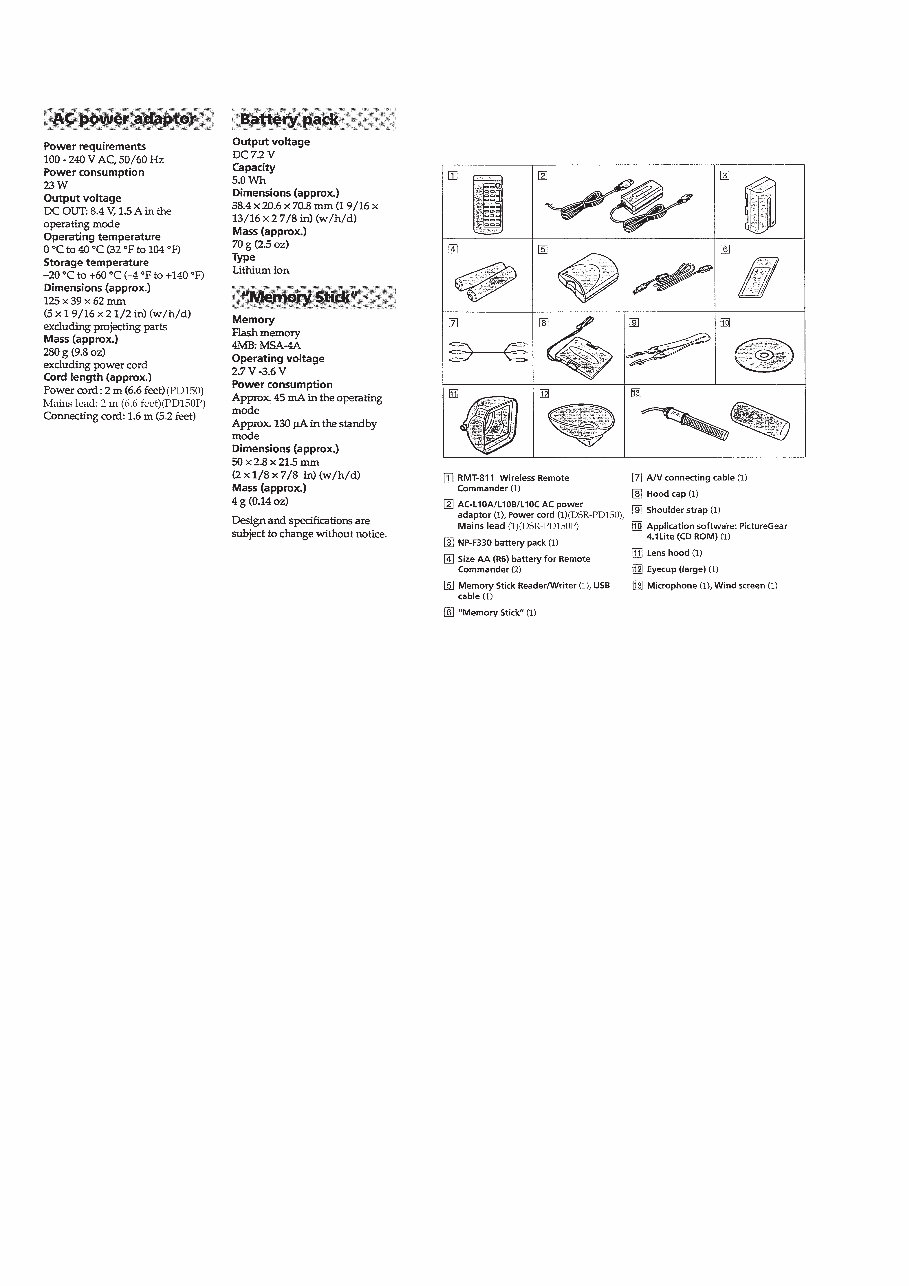
— 2 — 1. Check the area of your repair for unsoldered or poorly-soldered connections. Check the entire board surface for solder splashes and bridges. 2. Check the interboard wiring to ensure that no wires are "pinched" or contact high-wattage resistors. 3. Look for unauthorized replacement parts, particularly transistors, that were installed during a previous repair. Point them out to the customer and recommend their replacement. 4. Look for parts which, through functioning, show obvious signs of deterioration. Point them out to the customer and recommend their replacement. 5. Check the B+ voltage to see it is at the values specified. 6. Flexible Circuit Board Repairing • Keep the temperature of the soldering iron around 270˚C during repairing. • Do not touch the soldering iron on the same conductor of the circuit board (within 3 times). • Be careful not to apply force on the conductor when soldering or unsoldering. SAFETY CHECK-OUT After correcting the original service problem, perform the following safety checks before releasing the set to the customer. SAFETY-RELATED COMPONENT WARNING!! COMPONENTS IDENTIFIED BY MARK 0 OR DOTTED LINE WITH MARK 0 ON THE SCHEMATIC DIAGRAMS AND IN THE PARTS LIST ARE CRITICAL TO SAFE OPERATION. REPLACE THESE COMPONENTS WITH SONY PARTS WHOSE PART NUMBERS APPEAR AS SHOWN IN THIS MANUAL OR IN SUPPLEMENTS PUBLISHED BY SONY. ATTENTION AU COMPOSANT AYANT RAPPORT À LA SÉCURITÉ! LES COMPOSANTS IDENTIFÉS PAR UNE MARQUE 0 SUR LES DIAGRAMMES SCHÉMATIQUES ET LA LISTE DES PIÈCES SONT CRITIQUES POUR LA SÉCURITÉ DE FONCTIONNEMENT. NE REMPLACER CES COMPOSANTS QUE PAR DES PIÈSES SONY DONT LES NUMÉROS SONT DONNÉS DANS CE MANUEL OU DANS LES SUPPÉMENTS PUBLIÉS PAR SONY. • SUPPLIED ACCESSORIES Check that the following accessories are supplied with your camcorder.
— 6 — 3-1-2. Precautions on Adjusting ··············································· 5-58 3-1-3.HOW TO ENTER RECORD MODE WITHOUT CASSETTE ··································································· 5-58 3-1-4.HOW TO ENTER PLAYBACK MODE WITHOUT CASSETTE ··································································· 5-58 3-1-5. Adjusting Connectors ···················································· 5-59 3-1-6. Connecting the Equipment ············································ 5-59 3-1-7.Alignment Tapes ···························································· 5-60 3-1-8.Input/Output Level and Impedance ······························· 5-60 3-2. SYSTEM CONTROL SYSTEM ADJUSTMENT ········ 5-61 1. Initialization of A, B, C, D, E, F, 8 Page Data ···············5-61 2. Serial No. Input ····························································· 5-61 2-1. Company ID Input ························································· 5-61 2-2. Serial No. Input ····························································· 5-61 3. Battery End Adjustment ················································ 5-63 3-3. SERVO AND RF SYSTEM ADJUSTMENT ··············· 5-64 1. Cap FG Duty Adjustment (VC-242D board) ················ 5-64 2. T reel FG Duty Adjustment (VC-242D board) ············· 5-64 3. PLL f0 & LPF f0 Adjustment (VC-242D board) ············ 5-64 4. Switching Position Adjustment (VC-242D board) ········ 5-65 5. AGC Center Level and APC & AEQ Adjustment ········· 5-65 5-1. Preparations before adjustments ···································· 5-65 5-2. AGC Center Level Adjustment (VC-242D board) ········5-65 5-3. APC & AEQ Adjustment (VC-242D Board) ················ 5-66 5-4. Processing after Completing Adjustments ···················· 5-66 6. PLL f0 & LPF f0 Final Adjustment (VC-242D board) ··· 5-66 3-4. VIDEO SYSTEM ADJUSTMENTS ····························· 5-67 3-4-1. Base Band Block Adjustments ······································ 5-67 1. Chroma BPF f0 Adjustment (VC-242D board) ············· 5-67 2. S VIDEO OUT Y Level Adjustment (VC-242D board) ·· 5-67 3. S VIDEO OUT Chroma Level Adjustment (VC-242D board) ·························································· 5-68 4. VIDEO OUT Y, Chroma Level Check (VC-242D board)·· 5-68 3-4-2. BIST Check ·································································· 5-69 1. Playback System Check ················································ 5-69 1-1. Preparations for Playback ·············································· 5-69 1-2. IC301 TRX (RF) PB BIST Check ································· 5-69 1-3. IC301 AUD (ABUS) PB BIST Check ···························5-69 1-4. IC301 VFD PB BIST Check ········································· 5-69 1-5. IC301 ENCODER BIST Check ···································· 5-70 1-6. Processing after Completing Playback System Check ·· 5-70 3-5. AUDIO SYSTEM ADJUSTMENTS ···························· 5-71 1. Playback Level Check ··················································· 5-72 2. Overall Level Characteristics Check ·····························5-72 3. Overall Distortion Check ··············································· 5-72 4. Overall Noise Level Check ············································5-72 5. Overall Separation Check ·············································· 5-72 5-4. SERVICE MODE ··························································5-73 4-1. ADJUSTMENT REMOTE COMMANDER ················ 5-73 1. Using the adjustment remote commander ····················· 5-73 2. Precautions upon using the adjustment remote commander ···································································· 5-73 4-2. DATA PROCESS···························································5-74 4-3. SERVICE MODE ··························································5-75 1. Setting the Test Mode ····················································5-75 2. Emergence Memory Address ········································ 5-75 2-1. EMG Code (Emergency Code) ····································· 5-75 2-2. MSW Code ···································································· 5-76 3. Bit value discrimination ················································ 5-77 4. Switch check (1) ···························································· 5-77 5. Switch check (2) ···························································· 5-78 6. Record of Use check ······················································ 5-78 7. Record of Self-diagnosis check ····································· 5-79 8. HRS METER (Hours meter) ········································· 5-80 6. REPAIR PARTS LIST 6-1. EXPLODED VIEWS ······················································ 6-1 6-1-1.OVERALL SECTION-1 ················································· 6-1 6-1-2.OVERALL SECTION-2 ················································· 6-2 6-1-3. CABINET (L) SECTION ················································ 6-3 6-1-4. CABINET (R) SECTION-1 ············································ 6-4 6-1-5. CABINET (R) SECTION-2 ············································ 6-5 6-1-6. UPPER HANDLE SECTION ········································· 6-6 6-1-7.BATTERY PANEL SECTION ········································6-7 6-1-8. EVF SECTION ································································ 6-8 6-1-9. CENTER FRAME SECTION ········································· 6-9 6-1-10. LENS BLOCK SECTION ·········································· 6-10 6-1-11. CASSETTE COMPARTMENT, DRUM AND REEL TABLE ASSEMBLY ········································6-11 6-1-12. TAPE GUIDE, PINCH SLIDER ASSEMBLY AND BRAKE SLIDER ASSEMBLY ···································6-12 6-1-13. EACH GEARS AND LOADING/CAPSTAN MOTOR ASSEMBLY ································································6-13 6-2. ELECTRICAL PARTS LIST ········································6-14 * Color reproduction frame is shown on page 329.
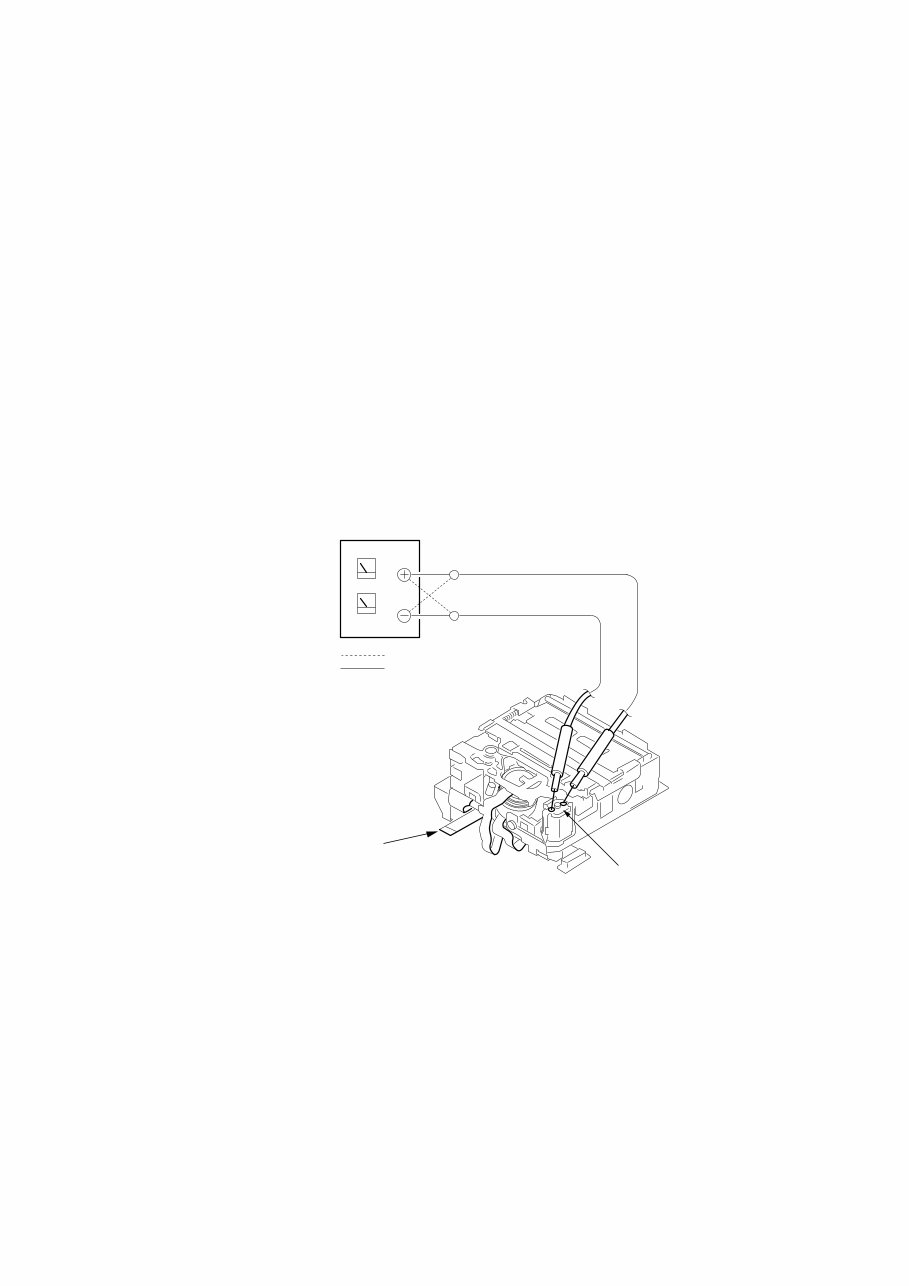
— 7 — SERVICE NOTE 1. POWER SUPPLY DURING REPAIRS In this unit, about 10 seconds after power is supplied to the battery terminal using the regulated power supply (8.4V), the power is shut off so that the unit cannot operate. These following two methods are available to prevent this. Take note of which to use during repairs. Method 1. Connect the servicing remote commander RM-95 (J-6082-053-B) to the LANC jack, and set the commander switch to the “ADJ” side. Method 2. Use the DC IN terminal. (Use the AC power adaptor. (AC-L10, AC-VQ800 etc. )) 2. TO TAKE OUT A CASSETTE WHEN NOT EJECT (FORCE EJECT) 1 Refer to 2-3. to remove the upper handle block assembly. 2 Refer to 2-5. to remove the cabinet (L) assembly. 3 Refer to 2-5. to remove the mechanism deck (Including VC-242D board and DD-138D board). 4 Remove DD-138D board from the mechanism deck (Including VC-242D board). 5 Remove the CN022 (27P 0.3 mm) of VC-242D board. 6 Supply +4.5V from the DC power supply to the loading motor and unload with a pressing the cassette compartment. Loading motor DC power supply (+4.5V) Disconnect from CN022 (27P) of VC-242D board. : loading : unloading What to do when a user forgets a password This camcorder has the forced log insertion function. A password is inputted, and this function is set up. When this function was set up, this camcorder doesn’t move if the memory stick which memorize a correct logo isn’t inserted. To release the forced logo function, the correct password must be input. This password is memorized in the IC1105 (EEPROM) on VC-242D board. Therefore, when a user forgets the password, replace the IC1105. This IC1105 memorizes the HRS METER data (Hour meter data: page A, address 00 to 13), too. Therefore, replace the IC1105 in the following order to copy the HRS METER data. Replacing procedure: 1) Note down the data of page A, address 00 to 13. 2) Replace IC1105 (EEPROM) on VC-242D board. 3) To page A, address 00 to 13, input the data noted down. (Refer to “HRS METER (Hours meter)” of “5-4. SERVICE MODE”)
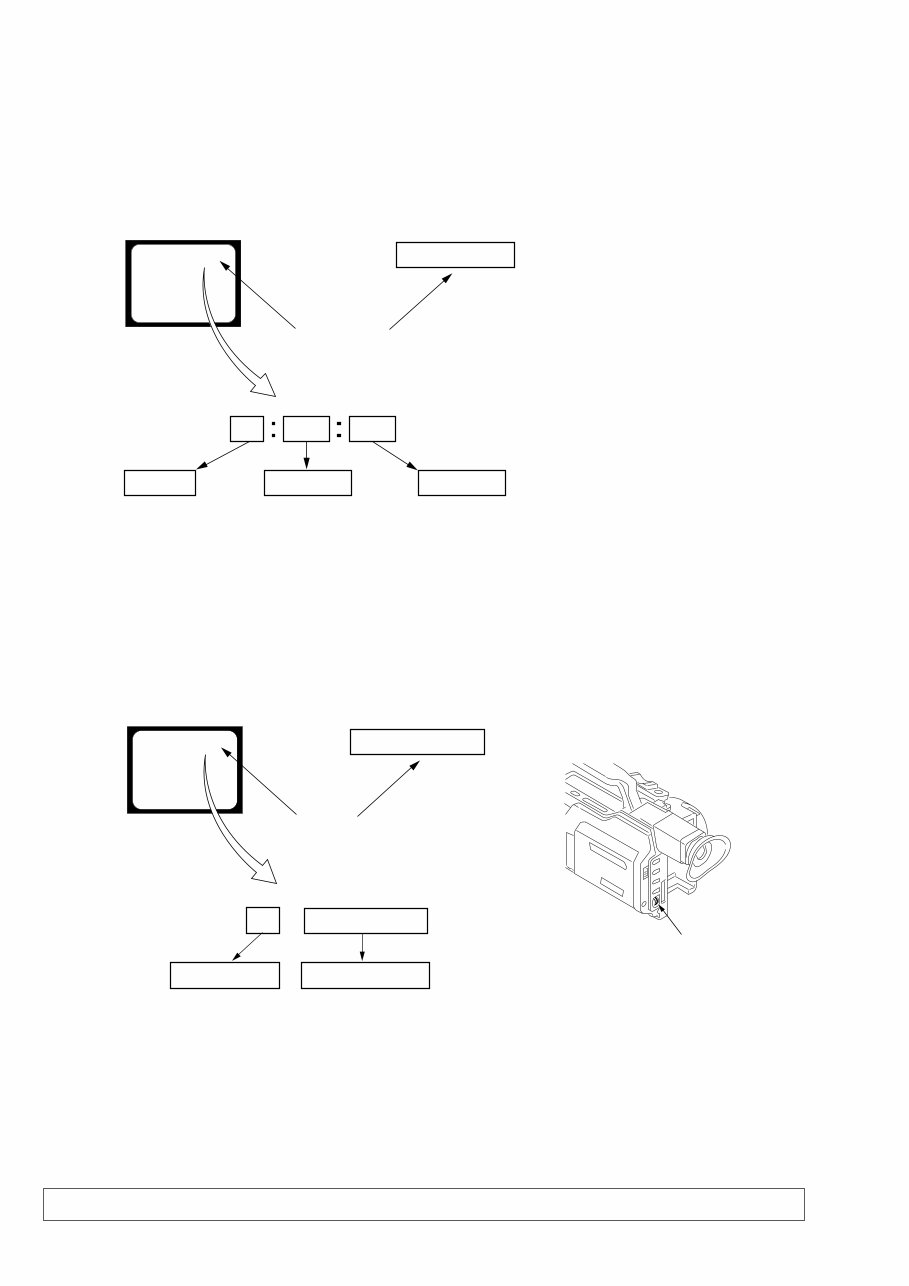
— 8 — SELF-DIAGNOSIS FUNCTION 1. SELF-DIAGNOSIS FUNCTION When problems occur while the unit is operating, the self-diagnosis function starts working, and displays on the viewfinder, LCD screen or LCD window what to do. This function consists of two display; self-diagnosis display and service mode display. Details of the self-diagnosis functions are provided in the Instruction manual. Note: The “self-diagnosis display” data will be backed up by the coin-type lithium battery of CK-093 board BT250. When CK-093 board is removed, the “self-diagnosis display” data will be lost by initialization. 2. SELF-DIAGNOSIS DISPLAY When problems occur while the unit is operating, the counter of the viewfinder, LCD screen or LCD window consists of an alphabet and 4-digit numbers, which blinks at 3.2 Hz. This 5-character display indicates the “repaired by:”, “block” in which the problem occurred, and “detailed code” of the problem. 3. SERVICE MODE DISPLAY The service mode display shows up to six self-diagnosis codes shown in the past. 3-1. Display Method While pressing the “STOP” key, set the switch from OFF to “VCR or PLAYER”, and continue pressing the “STOP” key for 5 seconds continuously. The service mode will be displayed, and the counter will show the backup No. and the 5-character self-diagnosis codes. 3-2. Switching of Backup No. By rotating the control dial, past self-diagnosis codes will be shown in order. The backup No. in the [] indicates the order in which the problem occurred. (If the number of problems which occurred is less than 6, only the number of problems which occurred will be shown.) [1] : Occurred first time [4] : Occurred fourth time [2] : Occurred second time [5] : Occurred fifth time [3] : Occurred third time [6] : Occurred the last time 3-3. End of Display Turning OFF the power supply will end the service mode display. Order of previous errors Backup No. Self-diagnosis Codes C : 3 1 : 1 1 [3] Lights up Viewfinder or LCD screen [3] C : 3 1 : 1 1 3 C : 3 1 : 11 LCD window 1 1 3 1 C : 3 1 : 11 C Repaired by: Refer to page 9. Self-diagnosis Code Table. Indicates the appropriate step to be taken. E.g. 31 ....Reload the tape. 32 ....Turn on power again. Block Detailed Code Blinks at 3.2Hz C : Corrected by customer H : Corrected by dealer E : Corrected by service engineer Viewfinder or LCD screen LCD window C : 3 1 : 1 1 Control dial
Is your Sony DSR-PD150 Video Camera letting you down?
Why replace while you can upgrade or repair it yourself? This service and repair manual is used by the Official Certified Sony Technicians. It will help you to troubleshoot and repair your Video Camera!
You will learn about:
Safety & Precautions
Product Specifications
Disassembly & Reassembly
Troubleshooting
Adjustments
Block Diagrams
Schematic Diagrams
Wiring Boards
Exploded Views
Replacement parts list
This manual is very detailed and illustrated with pictures and step-by-step instructions on how to repair/service this device the best way there is!
Please note; this is the OFFICIAL service and repair manual in .PDF format, no scanned-in or bootlegged copy. This manual is made in the highest resolution, so when you print the pages you need it is all in great quality!
You can easily print this manual from any printer and any computer!
***INSTANT access*** After your payment, you will have instant access to your manual. No shipping fee, no waiting on postal delivery, you can start doing your repairs right away!
Specifications
Language: English
Format: .PDF
Pages: 262
Platform: Windows and MAC
Looking for a service manual but can't find it anywhere? Please contact us with your request! As you can see we've got the largest & most comprehensively service manual database out there, so a good chance we can help you out!
Recently Viewed
5,521,897Happy Clients
2,594,462eManuals
1,120,453Trusted Sellers
15Years in Business
Price:
Actual Price:
Sony DSR-PD150 + PD150P Service Manual & Repair Guide



 Lifetime Access