


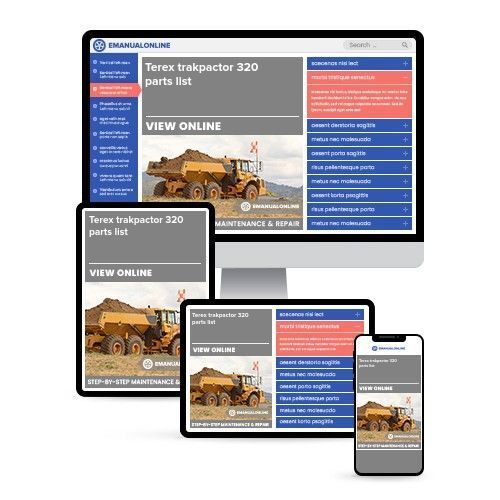
Terex trakpactor 320 parts list
What's Included?
 Lifetime Access
Fast Download Speeds
Online & Offline Access
Access PDF Contents & Bookmarks
Full Search Facility
Print one or all pages of your manual

Terex Powerscreen,
200 Coalisland Road,
Dungannon, Co. Tyrone,
N. Ireland, BT71 4DR
+44 (0) 28 87 718 500
+44 (0) 28 87 747 231
Email: sales@powerscreen.com
www.powerscreen.com
1. GENERAL INFORMATION………………….………...…...............………………………….............................
2. SPARE PARTS ORDERING PROCEDURE……………………….................……………………....................
3. SPARE PARTS ORDER FORM………………………………...……………….................................................
4. UNDERSTANDING YOUR MACHINE SERIAL NUMBER.……………………………....................................
5. PARTS SUPPORT - GOOD PRACTISE ADVICE……………………………..................................................
6. HOW TO READ YOUR TRACK IDENTIFICATION PLATE……………………………....................................
7. WHERE TO FIND YOUR ENGINE SERIAL PLATE……………………….……..............................................
8. FINDING THE SOFTWARE VERSION OF YOUR PDM AND PLC.…………...............................................
9. MACHINE NAVIGATION.........................................……………………………................................................
10. TYPES OF LINERS.................................................…...………….…………................................................
11. PAINT CODES..............................................…………………………...........................................................
SPARE PARTS – CONTENTS
COPYRIGHT
No copies or reproductions may be made from this manual, parts lists or illustrations without
written prior consent of Powerscreen. This manual complete or in part must not be loaned to a third party.
200 COALISLAND ROAD, DUNGANNON, CO.TYRONE N.IRELAND, BT71 4DR
TEL: +44(0)2887 718500
747231 or sales@powerscreen.com (SALES)
- aftersales@powerscreen.com (TECHNICAL)
- 740701 (HELPDESK)
POWERSCREEN PARTS DEPARTMENT
TEREX (GB) LTD
32 FARLOUGH ROAD, DUNGANNON, CO.TYRONE N.IRELAND, BT71 4DT
Email: parts@powerscreen.com - Website www.powerscreen.com
POWERSCREEN®
Powerscreen reserves the right to change specification without prior notice.
PARTS BOOK INTRODUCTION
1. GENERAL INFORMATION
• When purchasing Spareparts customers should in their own interest, always use genuine Powerscreen
parts.
• Spare parts must comply with the technical requirements specified by the manufacturer.
• Only spare parts from the original equipment manufacturers can be relied to do so.
• Spares parts that have not been supplied by Powerscreen cannot be relied upon for correct material,
dimensions or finish.
• Powerscreen cannot therefore be responsible for any damage arising from use of any such parts and the
Guarantee will be invalid.
2. SPARE PARTS ORDERING PROCEDURE
Ordering Procedure
To ensure delivery of your parts, when ordering please quote:
• Machine Serial Number
• Figure Number and Item Number
• Part Number
• Part Description
• Quantity Required
EXAMPLE:
If you wanted to order 1 Conveyor Tracking Roller, place your order in the following fashion:
Machine Serial Number -
Figure Number – 02-08
Item Number - 27
Part Number - 06663100
Part Description - GEARBOX
Quantity required - 1
This information will enable us to supply the correct parts with the minimum of delay.
NOTE:
Orders for spare parts must be sent to your local dealer.
To find out whom your local dealer is please log on to www.powerscreen.com and use the Dealer Search
function.
PARTS BOOK INTRODUCTION
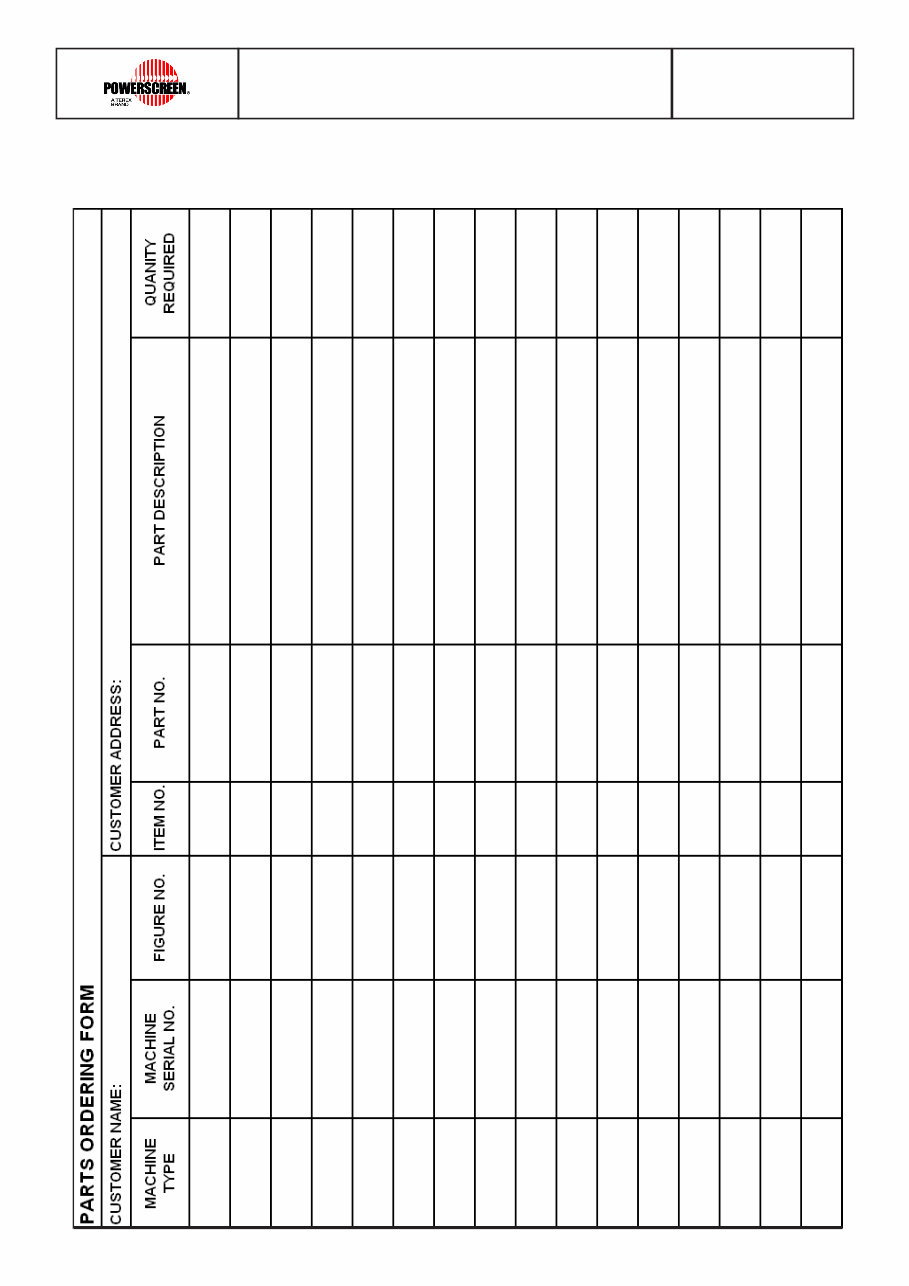
3. SPARE PARTS ORDERING FORM
PARTS BOOK INTRODUCTION
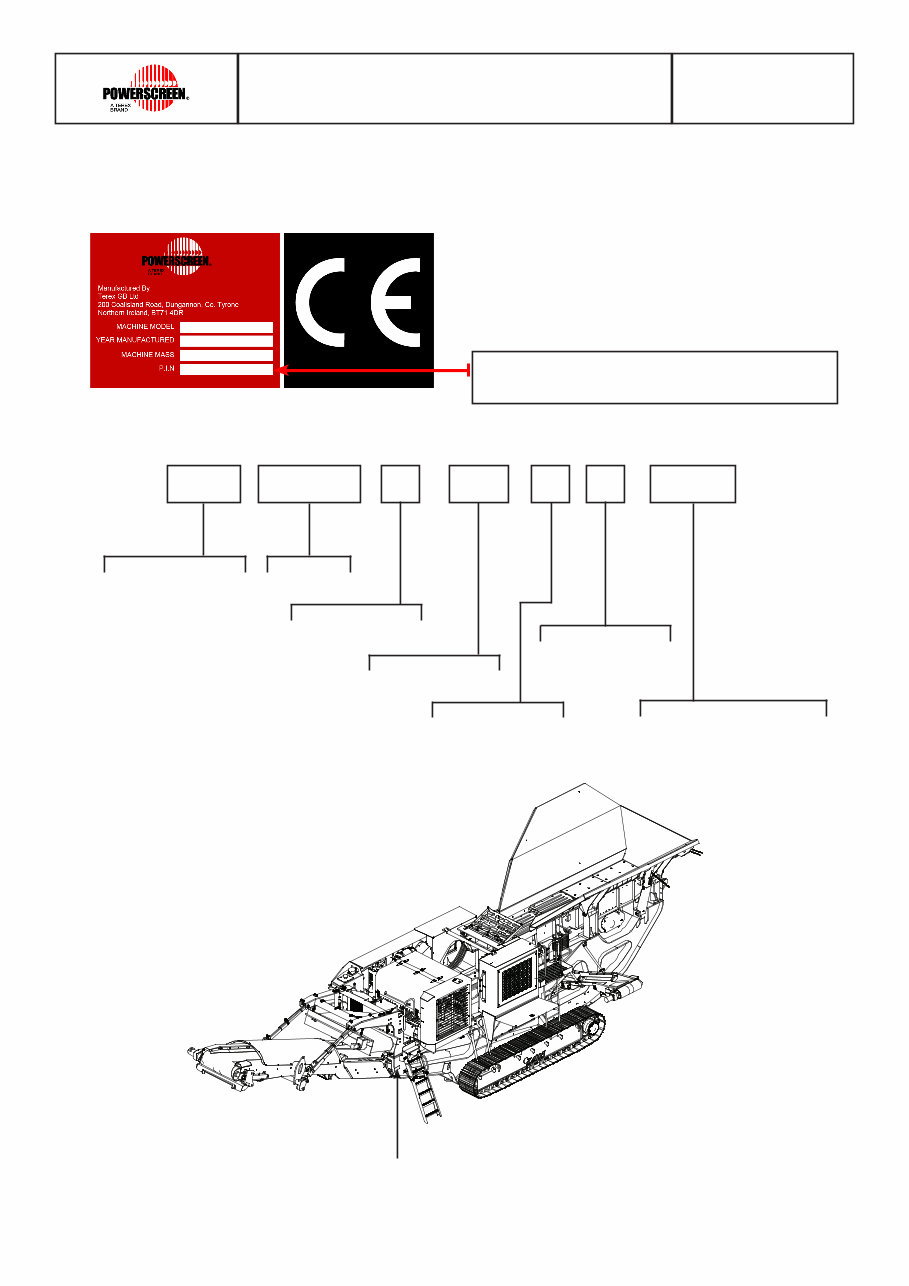
4. UNDERSTANDING YOUR MACHINE SERIAL NUMBER (CRUSHER)
XR400S
2011
44750 KG
PIDXR40SLOMB62940
PIDXR40SLOMB62940
PID XR40S L OM B 6 2940
Model
Check Digit
Plant Code
Year Code
Month Code
Sequence Number
Powerscreen
SERIAL NUMBER PLATE
PARTS BOOK INTRODUCTION
5. PARTS SUPPORT - GOOD PRACTISE ADVICE
Be aware there are enquires where the parts should not be supplied without firstly obtaining the Machine
Serial Number and checking the record card. The main components to consider are:
HYDRAULIC PUMPS
ELECTRICS
TRACK PARTS
ENGINE PARTS
Pumps vary depending on the options fitted to your machine. This is why the pumps are generally not part-
coded in the parts book.
Terex have 3-4 Track suppliers. Each track type is illustrated in the part book. It is important to select the
parts from the correct supplier. See Section 6 Where to find your Track Identification Plate.
The engine fitted to your machine can vary due to the customer preference (i.e. Deutz, CAT). Alternatively
it can differ due to machine options fitted (some options require a higher spec engine) or simply a change
over time as suppliers update engines to meet emission regulations. It is therefore important to obtain the
engine serial number to order parts. This information can be obtained from the engine plate, or from the
machine record. See Section 7 Where to find your Engine Serial Plate.
Control Panels, PC Boards, Hetronic Remotes - these items are serial number dependant and will have
ther serial numbers located on the part. See Section 8 Finding the Software Version of your PDM and PLC.
PARTS BOOK INTRODUCTION
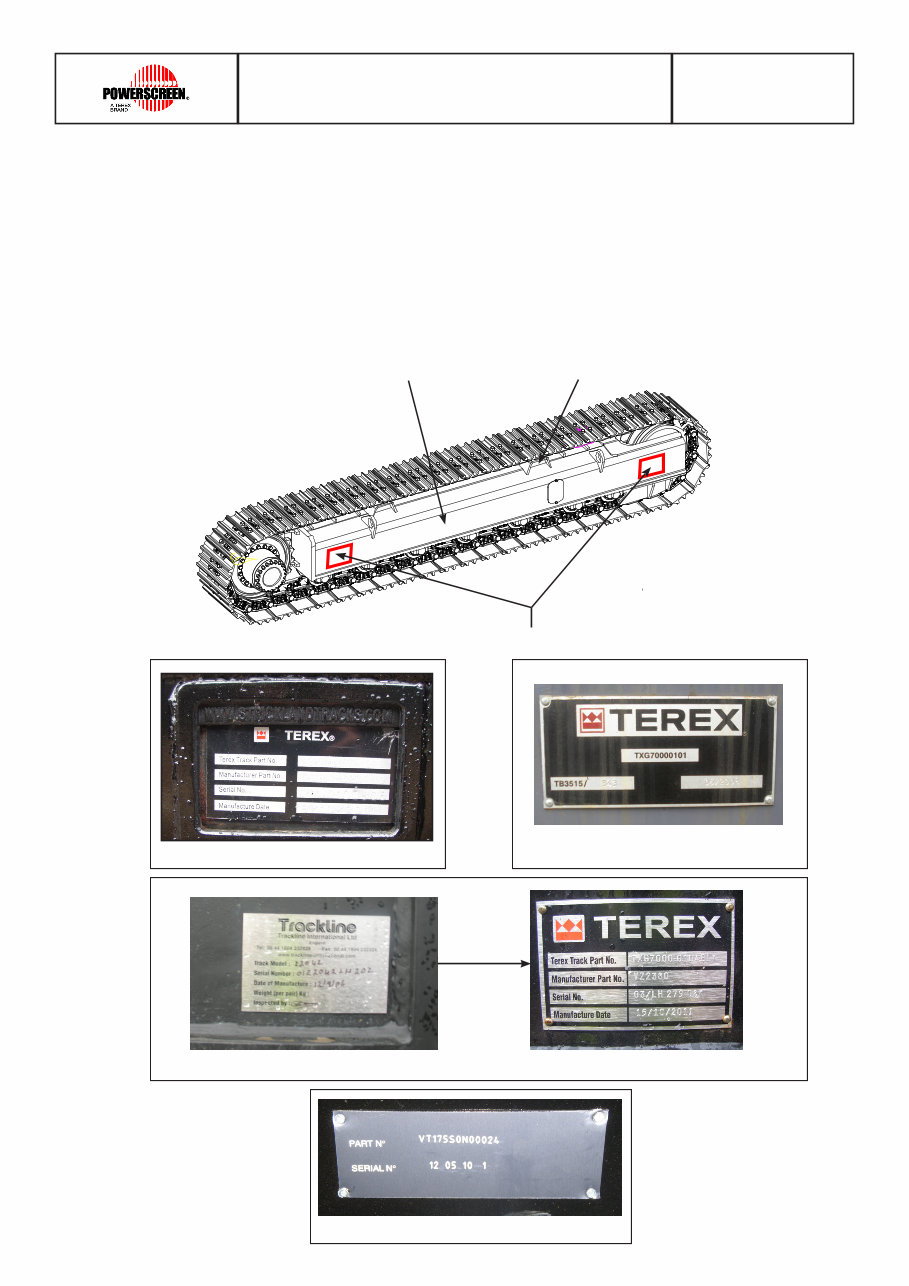
6. WHERE TO FIND YOUR TRACK IDENTIFICATION PLATE
Skid Plate
It is necessary when ordering any track spare parts, that all numbers relating to the tracks are quoted along
with your machine serial number..
The identification plate is located on the outside face of each left and right hand track. On some occasions
the Serial Number can be found stamped in the skid plate or track frame. Below is the current range of
tracks fitted to our machines.
Strickland Tracks Terex Tracks
Terex / Trackline Tracks
Identification Plate Locations
Track Frame
PARTS BOOK INTRODUCTION
RMS DUX Tracks
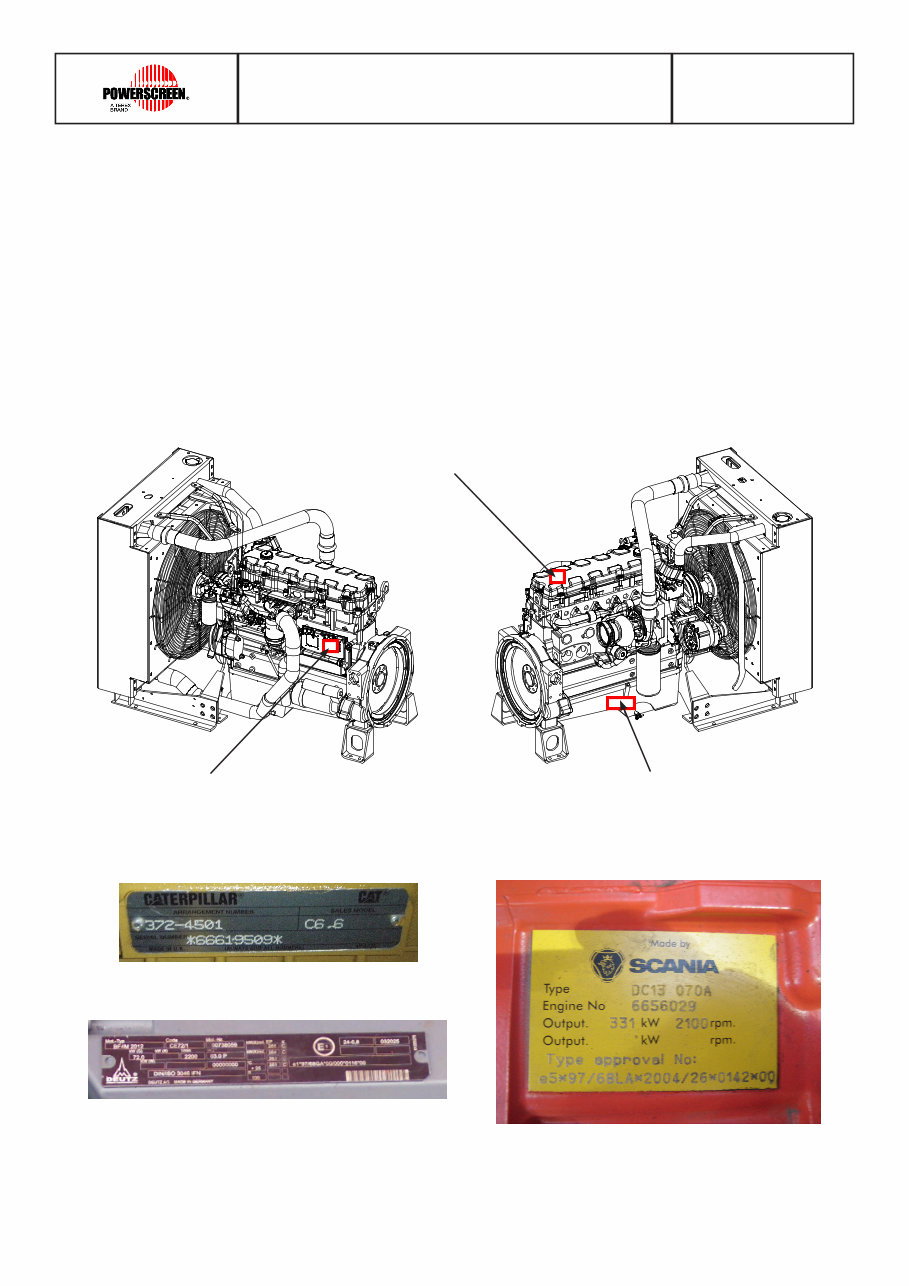
7. WHERE TO FIND YOUR ENGINE SERIAL PLATE
It is necessary when ordering any engine spare parts, that all numbers relating to the engine are quoted
along with your machine serial number..
Depending on the engine fitted, the serial plate can be found either on the left / right side of the engine and
in some cases on top. The spares department need all of these numbers in order to determine the
components that were included with the engine. This permits accurate identification of replacement part
numbers.
Right Hand Side Left Hand Side
Above
Scania
Caterpillar
Deutz
PARTS BOOK INTRODUCTION
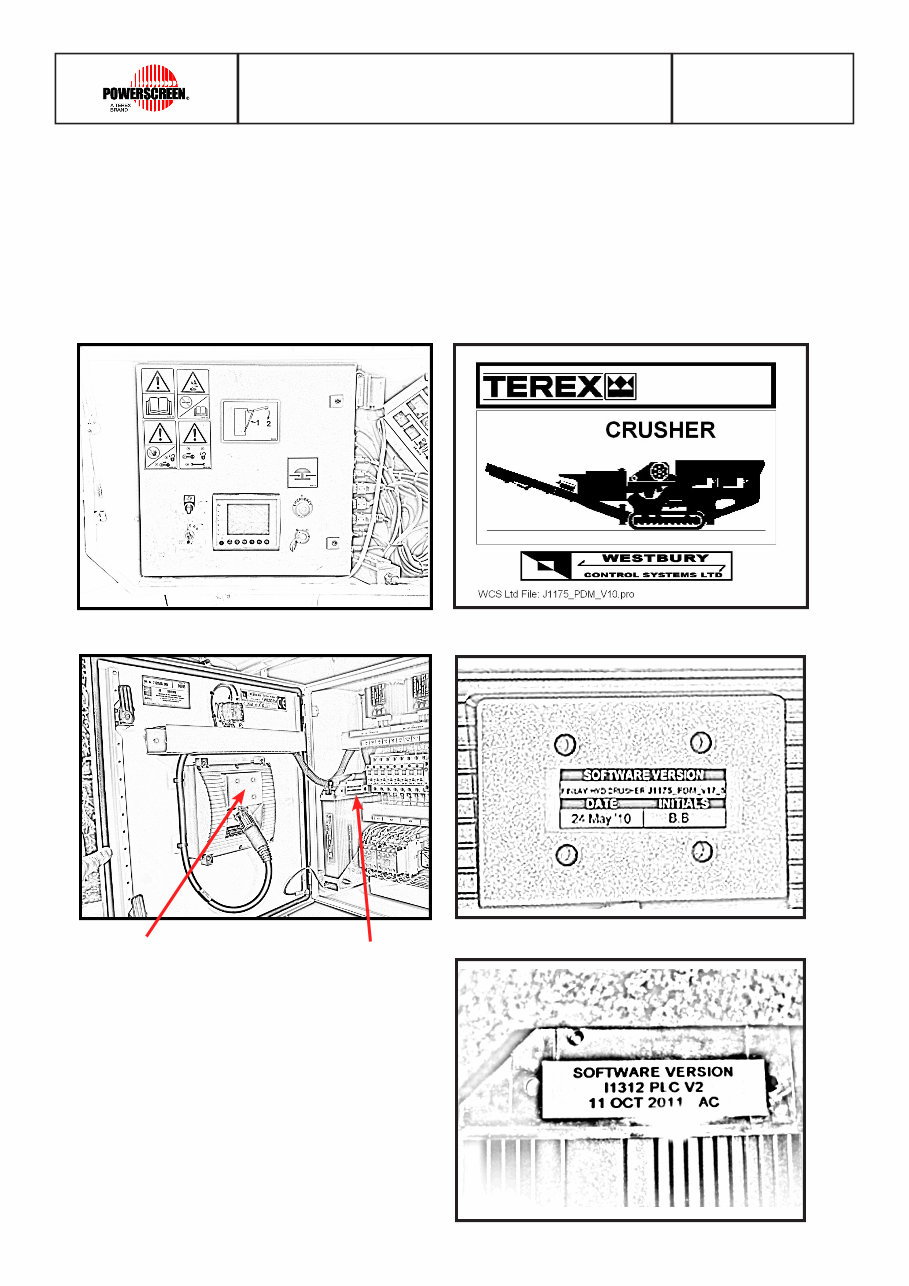
8. FINDING THE SOFTWARE VERSION OF YOUR PDM AND PLC
It is necessary when ordering a new PLC or PDM that you note all numbers relating to them, please quote
these numbers along with your machine serial number.
When you turn on the screen take note of the details from the bottom of the start up page. The identification
sticker which displays the software version is located on the outside of each the PLC and PDM.
PLC Sticker
Location
PDM Sticker
Location
PARTS BOOK INTRODUCTION
You're Reading a Preview
What's Included?
Lifetime Access
Fast Download Speeds
Online & Offline Access
Access PDF Contents & Bookmarks
Full Search Facility
Print one or all pages of your manual
$42.99
Viewed 98 Times Today


Secure transaction
What's Included?
Lifetime Access
Fast Download Speeds
Online & Offline Access
Access PDF Contents & Bookmarks
Full Search Facility
Print one or all pages of your manual
$42.99
The Terex Trakpactor 320 parts list consists of 625 pages and is available in a digital format. The edition of the file is 10-12-2014, and it provides a comprehensive overview of the parts with fully illustrated exploded views. This resource is valuable for both professional mechanics and DIY enthusiasts as it can aid in the disassembly and assembly processes.


