PB(diag)-14 Subaru Select Monitor PARKING BRAKE (DIAGNOSTICS) 6. Subaru Select Monitor A: OPERATION 1. HOW TO USE SUBARU SELECT MONI- TOR NOTE: • For detailed operation procedures, refer to “PC application help for Subaru Select Monitor”. • If communication is not possible between the parking brake control module and the Subaru Se- lect Monitor, check the communication circuit. <Ref. to PB(diag)-20, COMMUNICATION FOR INI- TIALIZING IMPOSSIBLE, INSPECTION, Subaru Select Monitor.>
PB(diag)-15 Subaru Select Monitor PARKING BRAKE (DIAGNOSTICS) 2. READ CURRENT DATA NOTE: • For detailed operation procedures, refer to “PC application help for Subaru Select Monitor”. • A list of the support data is shown in the following table. Display Contents to be displayed Unit FR Wheel Speed Wheel speed detected by front ABS wheel speed sensor RH is dis- played. km/h or MPH FL Wheel Speed Wheel speed detected by front ABS wheel speed sensor LH is dis- played. km/h or MPH RR Wheel Speed Wheel speed detected by rear ABS wheel speed sensor RH is dis- played. km/h or MPH RL Wheel Speed Wheel speed detected by rear ABS wheel speed sensor LH is dis- played. km/h or MPH Power Supply Voltage The voltage supplied to the parking brake control module is dis- played. V Engine Speed Engine speed is displayed. rpm Accel. Opening Angle Acceleration opening is displayed. % Reverse Signal Input condition of reverse signal is displayed. (When reverse: ON) ON or OFF Force Sensor The tension detected by the force sensor in the actuator is dis- played. N Stroke Sensor The parking brake cable stroke amount detected by the stroke sen- sor in the actuator is displayed. mm Clutch stroke sensor The pedal stroke amount detected by the clutch stroke sensor is displayed. % Clutch engagement point Clutch engagement position is displayed. % Actuator Inner Tempera- ture(Primary) Actuator inner temperature (PRY) is displayed. °C Actuator Inner Tempera- ture(Secondary) Actuator inner temperature (SEC) is displayed. °C Incline Incline of the vehicle is displayed. % Total Operation Number Total number of parking brake operation is displayed. time Hill Hold Operation Number Operation number of hill hold function at uphill parking is dis- played. time Auto Operation Number “0” is always displayed. time Auto Cancel Number Operation number of automatic accelerator interlock cancel func- tion at starting is displayed. time Parking Operation Number when driving Total number of parking brake operation while driving is displayed. time Engine Torque Engine torque is displayed. (According to ECM specification, engine torque value may be displayed while engine stops.) N·m Manual Parking Operation Parking brake operation condition is displayed. (At manual parking operation: 1) 1 or 0 Auto Parking Operation Parking brake operation condition is displayed. (At automatic park- ing operation: 1) 1 or 0 Parking Operation when driv- ing Parking brake operation condition is displayed. (At parking opera- tion when driving: 1) 1 or 0 Parking Cancel Parking brake operation condition is displayed. (At parking cancel: 1) 1 or 0 Hill hold lamp Hill hold indicator control condition is displayed. (When illuminat- ing: ON) ON or OFF Ignition Signal Input condition of ignition signal is displayed. ON or OFF Brake Warning Light Brake warning light control condition is displayed. (When illuminat- ing: ON) ON or OFF
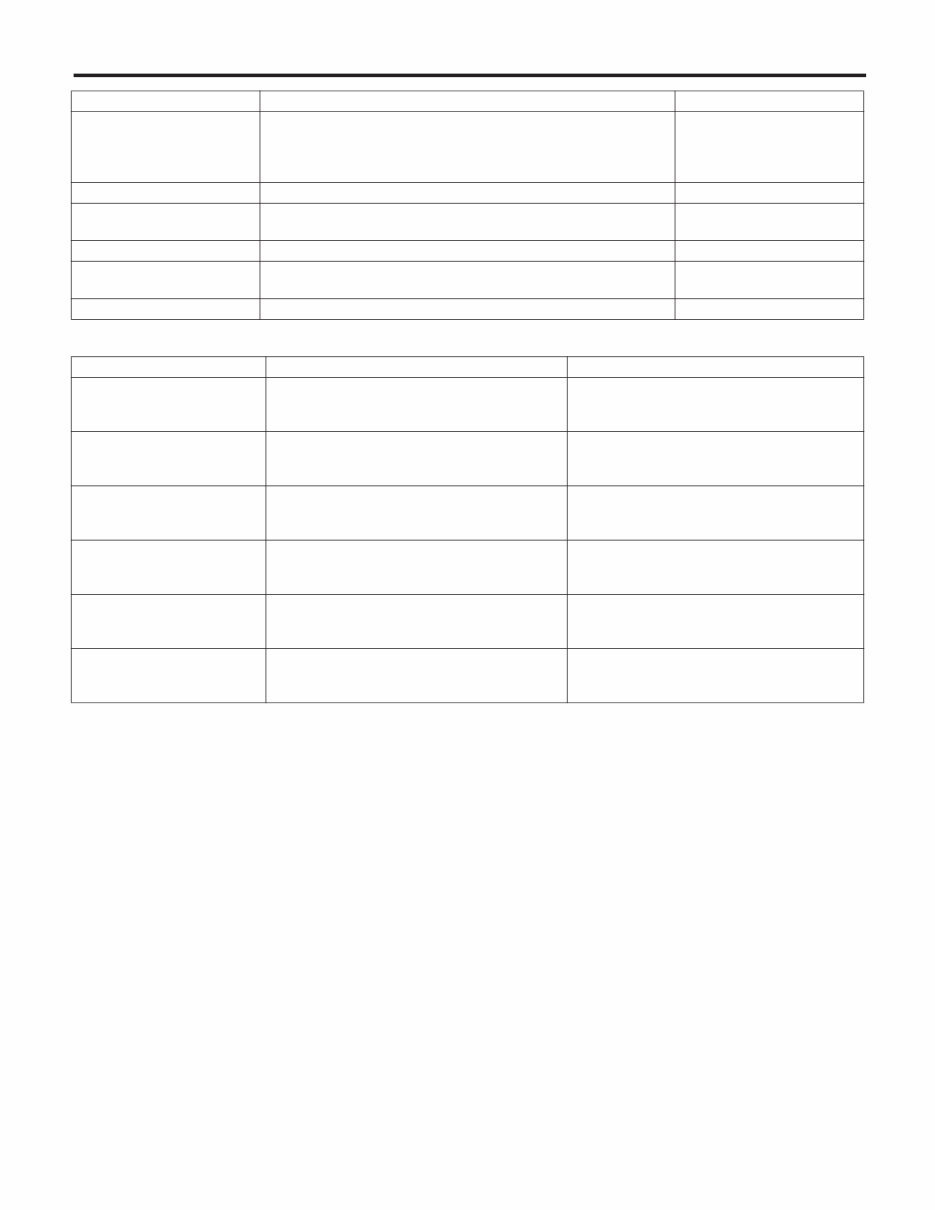
PB(diag)-16 Subaru Select Monitor PARKING BRAKE (DIAGNOSTICS) 3. MAINTENANCE OPERATION MODE Parking System Warning Light For C6 model, electronic parking brake warning light control condi- tion is displayed. (When illuminating: ON) For other than C6 model, brake warning light control condition is displayed. (When blinking: ON) ON or OFF Neutral Signal Input condition of neutral signal is displayed. (When neutral: ON) ON or OFF Brake Switch Input condition of brake pedal signal is displayed. (When depressed: ON) ON or OFF Engine idle flag Engine speed condition is displayed. (When idling: ON) ON or OFF Door Signal Input condition of door (four locations) open/close signal is dis- played. (When at least one door is open: OPEN) OPEN or CLOSE Driver Seat Belt Signal Input condition of driver’s seatbelt signal is displayed. Not in use/In use Display Contents of display Index No. Force Sensor Calibration Mode Perform the force sensor calibration. <Ref. to PB(diag)-17, FORCE SENSOR CALI- BRATION MODE, OPERATION, Subaru Select Monitor.> Break-in Parking Brake Drive Mode Perform the break-in parking brake drive mode after replacing the parking brake assembly. <Ref. to PB(diag)-18, BREAK-IN PARKING BRAKE DRIVE MODE, OPERATION, Subaru Select Monitor.> Parking Brake Removal Mode Release the cable tension before removing the parking brake cable. <Ref. to PB(diag)-17, PARKING BRAKE REMOVAL MODE, OPERATION, Subaru Select Monitor.> Parameter Initialization Mode Perform the parameter initialization. <Ref. to PB(diag)-18, PARAMETER INITIAL- IZATION MODE, OPERATION, Subaru Select Monitor.> Clutch Sensor Calibration Mode Perform the clutch sensor calibration. <Ref. to PB(diag)-19, CLUTCH SENSOR CAL- IBRATION MODE, OPERATION, Subaru Select Monitor.> Clutch Engagement Position Setting Perform the clutch sensor engagement position setting. <Ref. to PB(diag)-19, CLUTCH ENGAGE- MENT POSITION SETTING, OPERATION, Subaru Select Monitor.> Display Contents to be displayed Unit
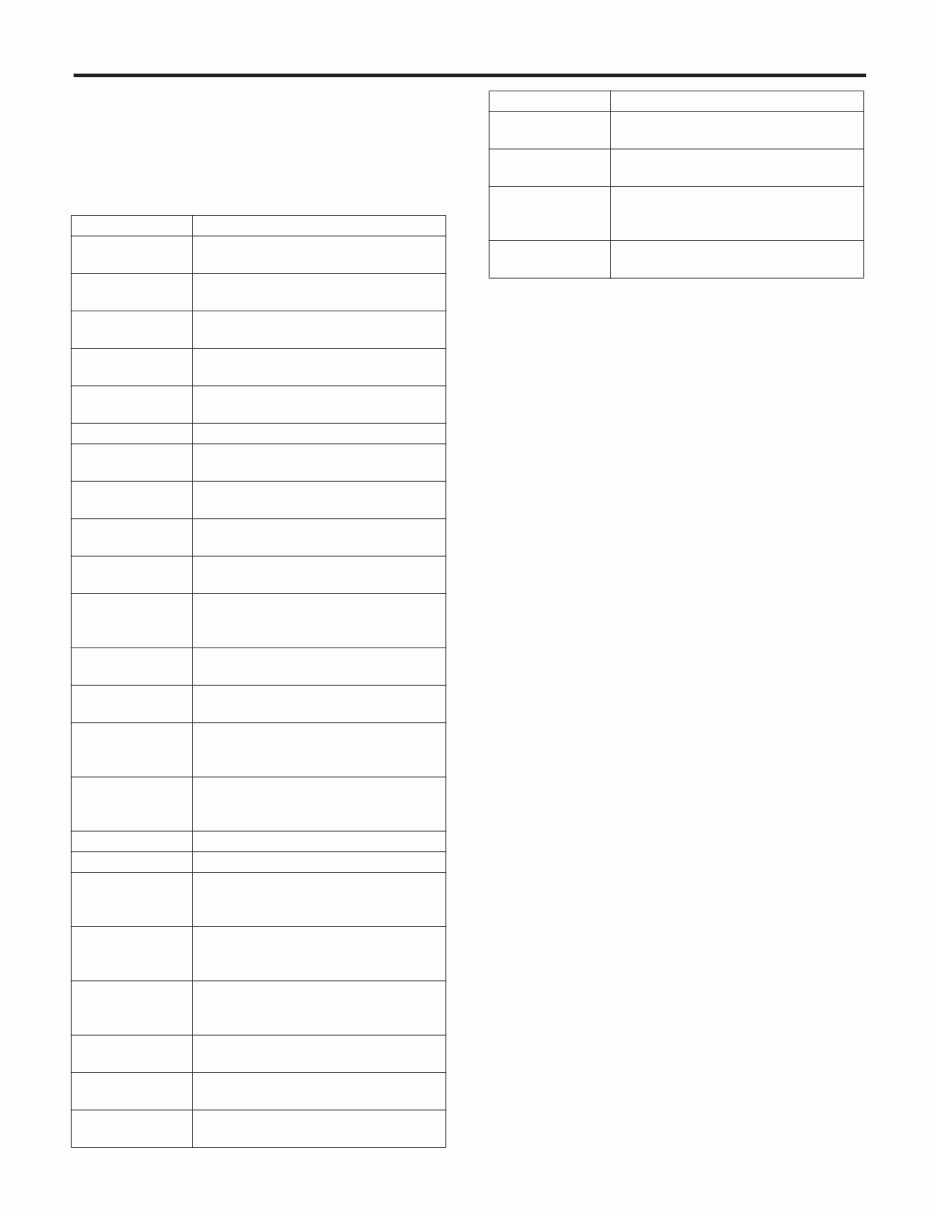
PB(diag)-17 Subaru Select Monitor PARKING BRAKE (DIAGNOSTICS) 4. FREEZE FRAME DATA NOTE: • Data stored at the time of trouble occurrence is shown on display. • Each time a trouble occurs, the latest information is stored in the Freeze Frame Data in memory. 5. PARKING BRAKE REMOVAL MODE CAUTION: • Subaru Select Monitor is required for the parking brake removal mode. • Make sure to perform this procedure with the vehicle lifted. • When this mode is performed by mistake, op- erate and then release the parking brake. NOTE: When disassembling the parking brake, use this function to set the parking brake cable at the re- lease position. 1) Lift up the vehicle. 2) Connect the Subaru Select Monitor. 3) On «Main Menu» display, select {Each System Check}. 4) On «System Selection Menu» display, select {Brake Control System}. 5) Click the [OK] button after {Parking Brake Sys- tem} is displayed. 6) On «Maintenance Operation Mode» display, se- lect {Parking Brake Removal Mode}. 7) The confirmation screen, “Perform parking brake removal?”, is displayed. Click the [YES] but- ton. 8) The message, “Releasing parking cable until re- moval position.”, is displayed on the screen, and the removal mode begins. 9) The message, “Parking cable released until re- moval position.”, is displayed on the screen. Turn the ignition switch to OFF to end the removal mode. 6. FORCE SENSOR CALIBRATION MODE CAUTION: • Subaru Select Monitor is required for the Force Sensor Calibration Mode. • Make sure to perform this procedure with the vehicle parked in a horizontal place and to use wheel chocks. NOTE: • When the following work is performed, use this function to perform calibration of force sensor in the parking brake actuator. – Removing the parking brake assembly Display Contents to be displayed FR Wheel Speed Wheel speed detected by front ABS wheel speed sensor RH is displayed. FL Wheel Speed Wheel speed detected by front ABS wheel speed sensor LH is displayed. RR Wheel Speed Wheel speed detected by rear ABS wheel speed sensor RH is displayed. RL Wheel Speed Wheel speed detected by rear ABS wheel speed sensor LH is displayed. Power Supply Voltage The voltage supplied to the parking brake control module is displayed. Engine Speed Engine speed is displayed. Accel. Opening Angle Acceleration opening is displayed. Reverse Signal Input condition of reverse signal is dis- played. (When reverse: ON) Brake Switch Input condition of brake pedal signal is displayed. (When depressed: ON) Force Sensor The tension detected by the force sen- sor in the actuator is displayed. Stroke Sensor The parking brake cable stroke amount detected by the stroke sensor in the actuator is displayed. Clutch stroke sensor The pedal stroke amount detected by the clutch stroke sensor is displayed. Clutch engage- ment point Clutch engagement position is dis- played. Actuator Inner Temperature (Primary) Actuator inner temperature (PRY) is displayed. Actuator Inner Temperature (Secondary) Actuator inner temperature (SEC) is displayed. Incline Incline of the vehicle is displayed. Engine Torque Engine torque is displayed. Manual Parking Operation Parking brake operation condition is displayed. (At manual parking opera- tion: 1) Auto Parking Operation Parking brake operation condition is displayed. (At automatic parking opera- tion: 1) Parking Opera- tion when driving Parking brake operation condition is displayed. (At parking operation when driving: 1) Parking Cancel Parking brake operation condition is displayed. (At parking cancel: 1) Hill hold lamp Hill hold indicator control condition is displayed. (When illuminating: ON) Ignition Signal Input condition of ignition signal is dis- played. Neutral Signal Input condition of neutral signal is dis- played. (When neutral: ON) Engine idle flag Engine speed condition is displayed. (When idling: ON) Door Signal Input condition of door open/close sig- nal is displayed. (When at least one door is open: OPEN) Driver Seat Belt Signal Input condition of driver’s seatbelt sig- nal is displayed. Display Contents to be displayed
PB(diag)-18 Subaru Select Monitor PARKING BRAKE (DIAGNOSTICS) – Replacing the electronic parking brake control module – Adjusting the shoe clearance • After replacing the electronic parking brake con- trol module, if the calibration of the force sensor has not yet been performed, the brake warning light will blink and “Force Sensor Line (abnormal)” DTC will be detected. 1) Park the vehicle in a horizontal place using wheel chocks. 2) Connect the Subaru Select Monitor. 3) On «Main Menu» display, select {Each System Check}. 4) On «System Selection Menu» display, select {Brake Control System}. 5) Click the [OK] button after {Parking Brake Sys- tem} is displayed. 6) On «Maintenance Operation Mode» display, se- lect {Force Sensor Calibration Mode}. 7) The confirmation screen of vehicle parking con- dition and wheel chocks usage is displayed. Con- firm the parking condition and wheel chocks, and click the [YES] button. 8) A message indicating the calibration mode in progress is displayed on the screen, and the Force Sensor Calibration Mode begins. 9) The message, “Force sensor calibration done. Turn Ignition Switch OFF.”, is displayed on the screen. Turn the ignition switch to OFF to end the calibration mode. 7. BREAK-IN PARKING BRAKE DRIVE MODE CAUTION: Subaru Select Monitor is required for the “Break-in Parking Brake Drive Mode”. NOTE: • When the parking brake shoe is replaced, use this function to perform parking brake lining break- in drive after adjusting the shoe clearance of the parking brake. <Ref. to PB-8, SHOE CLEARANCE, ADJUSTMENT, Parking Brake Assembly (Rear Disc Brake).> • After performing the “Break-in Parking Brake Drive Mode”, adjust the shoe clearance of the park- ing brake again, and perform the “Force Sensor Calibration Mode”. <Ref. to PB(diag)-17, FORCE SENSOR CALIBRATION MODE, OPERATION, Subaru Select Monitor.> 1) Connect the Subaru Select Monitor. 2) On «Main Menu» display, select {Each System Check}. 3) On «System Selection Menu» display, select {Brake Control System}. 4) Click the [OK] button after {Parking Brake Sys- tem} is displayed. 5) On «Maintenance Operation Mode» display, se- lect {Break-in Parking Brake Drive Mode}. 6) The confirmation message, “Perform break-in parking brake drive?”, is displayed on the screen. With the vehicle parked, release the parking brake, and click the [YES] button. 7) Confirm the message indicating the break-in drive mode start on the screen and the blink of the brake warning light, and begin the break-in drive. 8) Drive the vehicle at approximately 35 km/h (22 MPH) or more. 9) C6 model Drive the vehicle approximately 200 m (0.12 miles) with the parking brake switch pressed, until the brake warning light goes off. 10) Models other than C6 model Drive the vehicle approximately 200 m (0.12 miles) with the parking brake switch pressed. Release a hand from the parking brake switch once to cancel. Drive the vehicle again with the parking brake switch pressed, and if brake drag is not felt, go to step 11). If brake drag is felt, repeat steps 8) and 10) again. 11) Turn the ignition switch to OFF, and wait for 5 to 10 minutes until the parking brake temperature drops. 12) Repeat steps 2) to 10) again. 13) Turn the ignition switch to OFF to end the break-in drive mode. 14) Adjust the shoe clearance of the parking brake again. <Ref. to PB-8, SHOE CLEARANCE, AD- JUSTMENT, Parking Brake Assembly (Rear Disc Brake).> 15) Perform the Force Sensor Calibration Mode. <Ref. to PB(diag)-17, FORCE SENSOR CALIBRA- TION MODE, OPERATION, Subaru Select Moni- tor.> 8. PARAMETER INITIALIZATION MODE CAUTION: • Subaru Select Monitor is required for the Pa- rameter Initialization Mode. • This function can be used for replacement parts of the parking brake control module. NOTE: • When DTC “Parameter selection error” is detect- ed after replacing the parking brake control mod- ule, use this function to perform parameter initialization of the parking brake control module. • After performing Parameter Initialization Mode, perform the Force Sensor Calibration Mode and Clutch Sensor Calibration Mode. <Ref. to PB(diag)- 17, FORCE SENSOR CALIBRATION MODE, OP- ERATION, Subaru Select Monitor.> <Ref. to PB(di- ag)-19, CLUTCH SENSOR CALIBRATION MODE, OPERATION, Subaru Select Monitor.>
Get your hands on the 2012 Subaru Liberty Service and Repair Manual, designed to assist both professional mechanics and DIY enthusiasts in fixing vehicle issues. This comprehensive manual contains detailed instructions, procedures, technical data, diagrams, and a complete list of car parts with illustrations and pictures. Whether it's maintenance, engine, control system, mechanical, fuel service specifications, or any other aspect, this manual covers all models and repairs from A-Z.
With step-by-step instructions, wiring schematics, and specifications, this manual provides ease of use for maintaining, servicing, diagnosing, and repairing your vehicle. It is the same manual used by technicians at dealerships and includes hundreds of photos. The manual is compatible with Windows Vista 32 and 64, XP, ME, 98, NT, 2000, and Mac, ensuring accessibility for all users.
Additionally, this repair manual includes information on engine coolant, emission control systems, drive shaft, differential case assembly, cylinder head, cooling system, clutch system, brake system, steering system, electrical system, and much more. It is printable, allowing you to take the necessary pages with you to the garage or workshop. The manual is also compatible with all versions of Windows and Mac, and it is available in English language.
By having this trusty repair manual, you not only save money but also gain the experience of do-it-yourself projects. It provides a complete list of accessories to enhance your engine's performance and allows even novice car mechanics to easily follow the guides. The manual's durability ensures that it will not get dirty or torn, and you can keep it safely on your PC for quick access.
Don't miss out on the opportunity to become more knowledgeable and up-to-date with your vehicle's repair needs. This manual will guide you through the realm of your car, enabling you to perform simple repairs at the comfort of your garage. It's a valuable resource that can save you time and money, making car repair a fun and rewarding activity.
So, if you're looking to maintain, service, diagnose, or repair your 2012 Subaru Liberty, this repair manual is the ultimate solution. It's a comprehensive and detailed resource that will equip you with the knowledge and instructions needed to keep your vehicle in top condition.






 Lifetime Access




