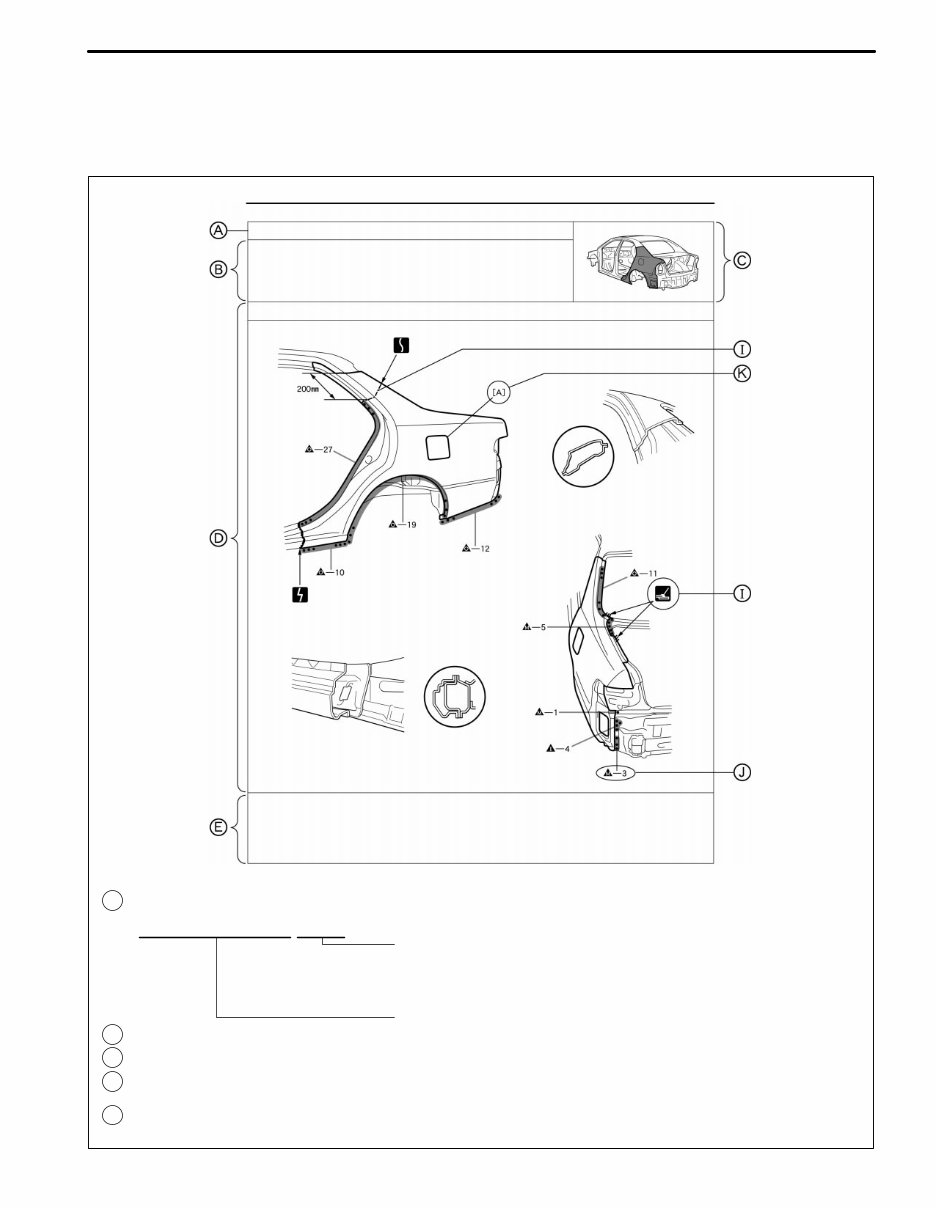
INTRODUCTION F13890A REPLACEMENT PART AND METHOD QUARTER PANEL (CUT) BODY PANEL REPLACEMENT REPLACEMENT BP-34 QUARTER PANEL (CUT) POINT 1 Remove the [A] at the same time. PART NAME [A] Fuel Filler Opening Lid A : Replacement part Replacement method (ASSY) ... Assembly replacement (CUT) ... Major cutting (less than 1 / 2 of part used) (CUT-H) ... Half cutting (about 1 /2 of part used) (CUT-P) ... Partial cutting (most of part used) REMOVAL CONDTIONS B : PART LOCATION C : REMOVAL DIAGRAM Describes in detail removal of the damaged part involving repair by cutting. D : REMOVAL GUIDE Provides additional information to more efficiently help you perform the removal. E : REMOVAL IN-5 HOW TO USE THIS MANUAL 1. BODY PANEL REPLACEMENT THIS MANUAL
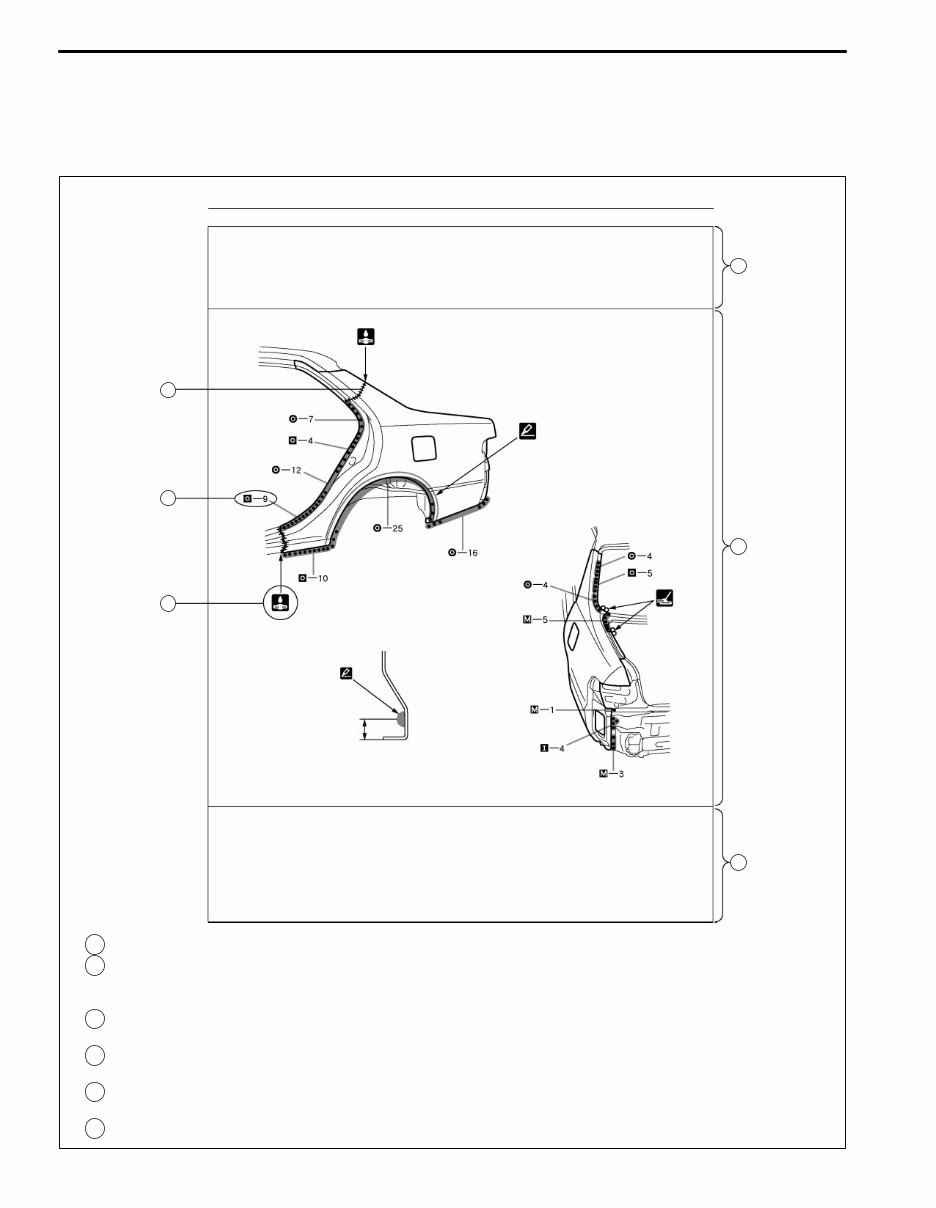
INTRODUCTION F13891A BODY PANEL REPLACEMENT BP-35 INSTALLATION D Temporaily install the new parts and measure each part of the new parts in accordance with the body dimension diagram. (See the body dimension diagram) D Inspect the fiting of the related parts around the new parts before welding. This affects the appearance of the finish. D After welding, apply the polyurethane foam to the corresponding parts. D After welding, apply body sealer and under-coating to the corresponding parts. D After applying the top coat layer, apply anti-rust agent to the inside of the necked section structural weld spots. I INSTALLATION CONDITIONS POINT 1 Before temporarily installing the new parts, apply body sealer to the wheel arch. HINT: 1) Apply body sealer about 5mm (0.20in.) front the flange, avoiding any oozing. 2) Apply sealer evenly, about 3 - 4mm (0.12 - 0.16in.) in diameter. 3) For other sealing points, refer to section PC. PART NAME [A] Fuel Filler Opening Lid [B] Waterproof Rivet INSTALLATION DIAGRAM Describes in detail installation to the new part involving repair by welding and / or cutting, but excluding painting. INSTALLATIOLN GUIDE Provides additional information to more efficiently help you perform the installation. SYMBOLS (See page IN-7) ILLUSTRATION OF WELD POINTS Weld method and panel position symbols (See page IN-9) PART NAME J I F G H 5mm F : G : H : I : J : K : IN-6
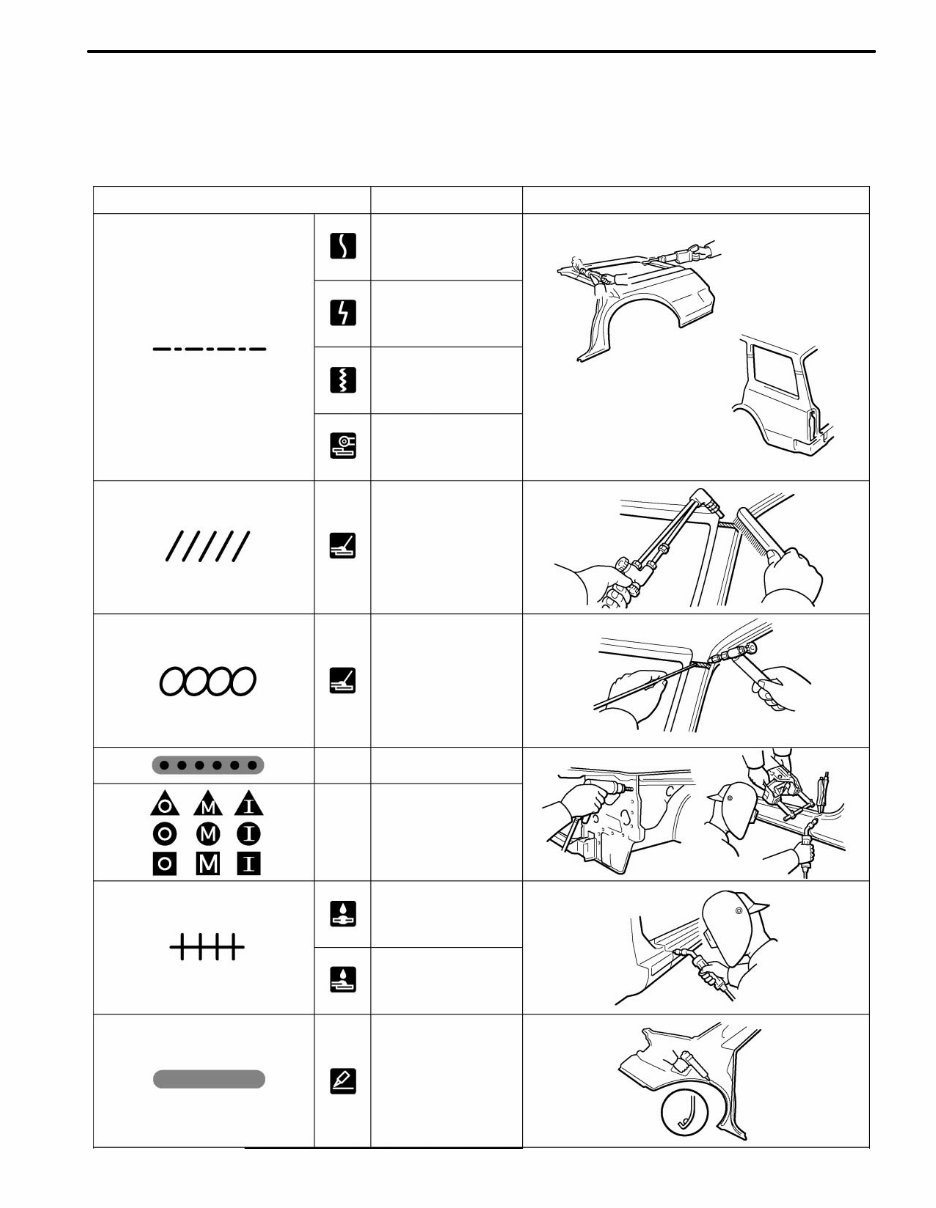
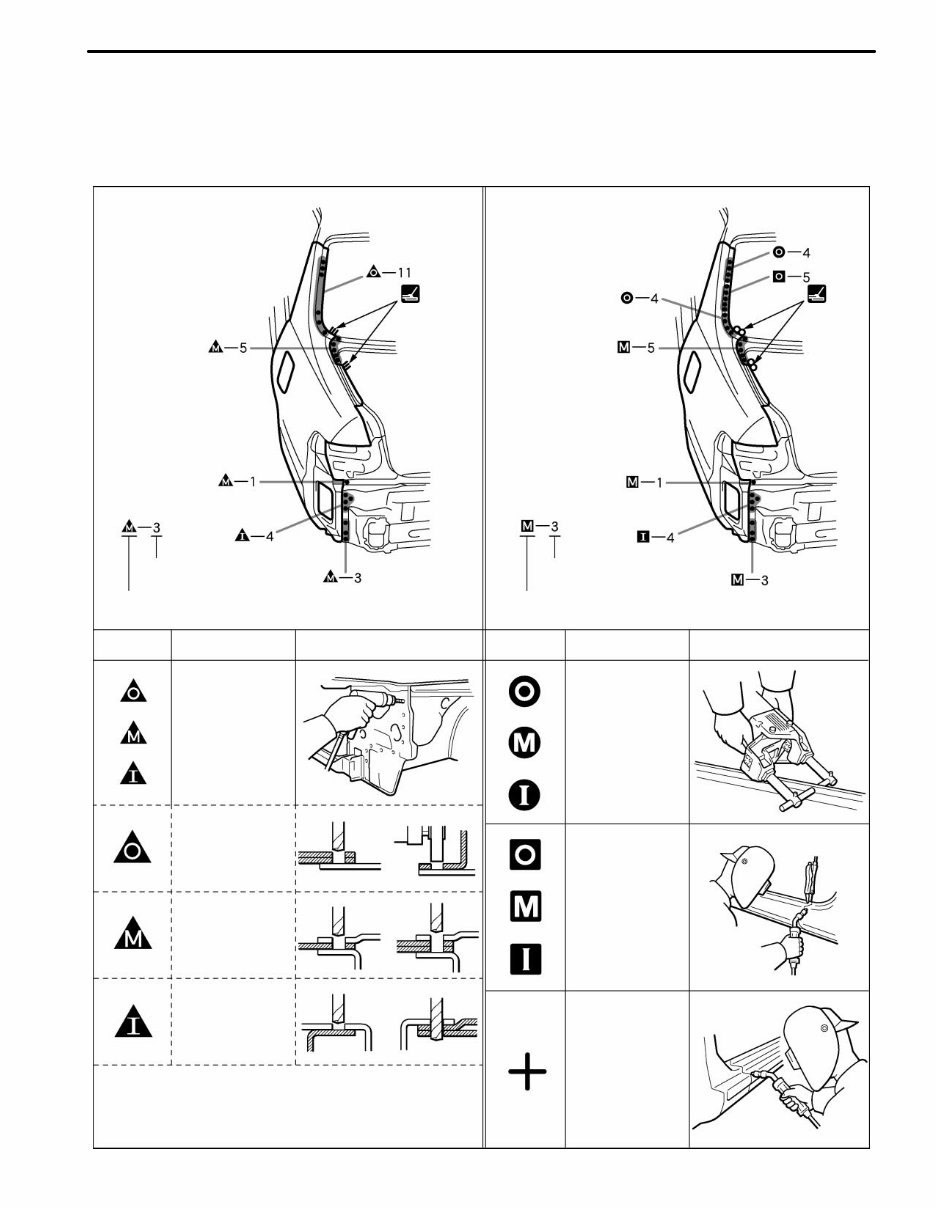
F13893A SYMBOLS MEANING ILLUSTRATION CUT AND JOIN LOCATION (SAW CUT) CUT AND JOIN LOCATION (Cut Location for Supply Parts) CUT LOCATION CUT WITH DISC SANDER, ETC. BRAZE (Removal) BRAZE (Installation) SPOT WELD OR MIG PLUG WELD (See Page IN-9) BODY SEALER WELD POINTS CONTINUOUS MIG WELD (BUTT WELD) CONTINUOUS MIG WELD (TACK WELD) — — INTRODUCTION IN-7 2. SYMBOLS The following symbols are used in the welding diagrams in section BP of this manual to indicate cutting areas and the types of weld required.
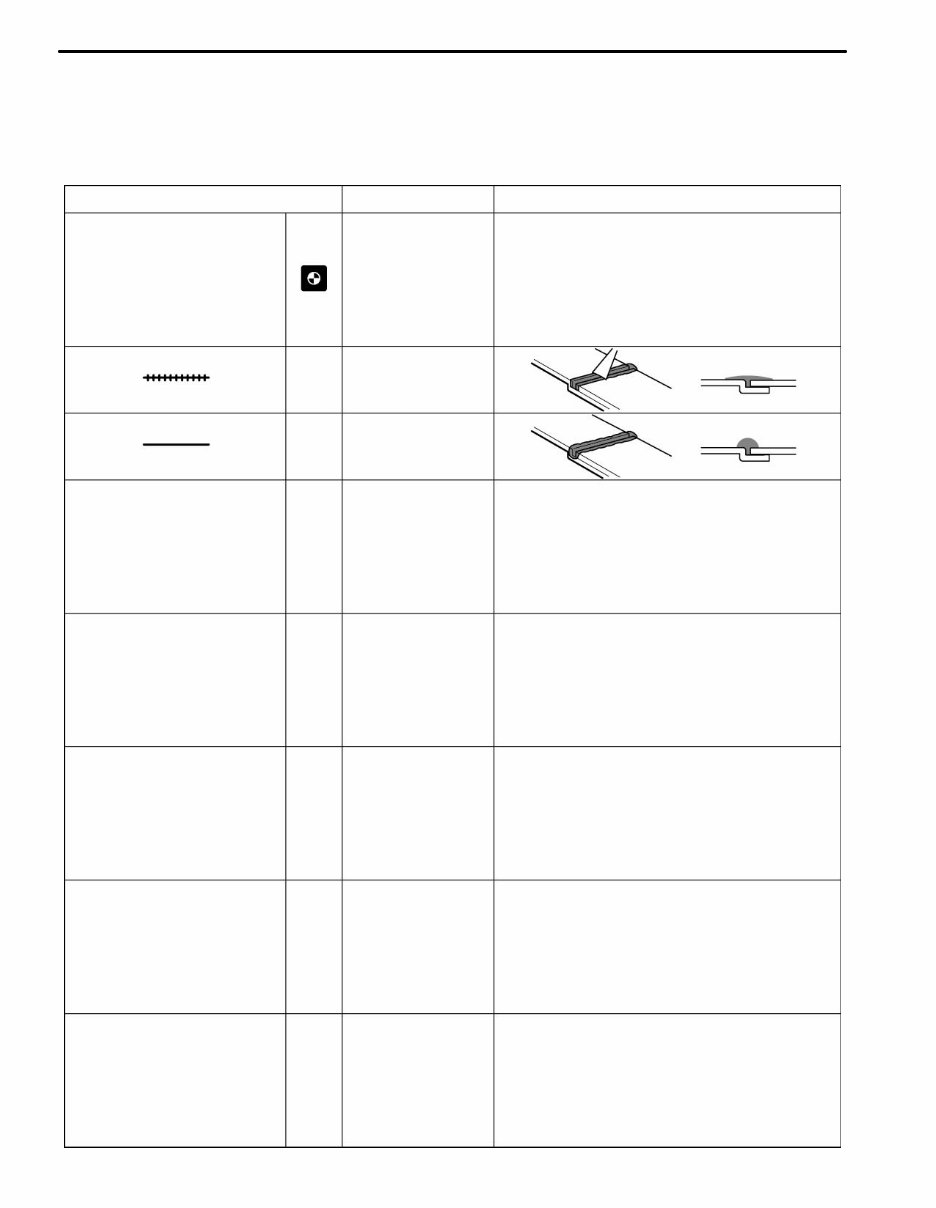
INTRODUCTION F13894A SYMBOLS MEANING ILLUSTRATION Assembly Mark BODY SEALER (Flat Finishing) BODY SEALER (No flat Finishing) — — — IN-8
F13892A REMOVAL INSTALLATION SYMBOLS Remove Weld Points (Outside) HINT: Panel position symbols are as seen from the working posture. Spot Weld MIG Plug Weld Spot MIG Weld Weld points Remove weld point and panel position Weld method and panel position Weld points MEANING ILLUSTRATION SYMBOLS MEANING ILLUSTRATION (Middle) (Inside) INTRODUCTION IN-9 3. ILLUSTRATION OF WELD POINT SYMBOLS EXAMPLE:
If you are in need of a repair manual for your 2005 Scion XB, look no further. Our accessible repair manual software is the perfect resource for both professional mechanics and DIY enthusiasts. In the past, traditional service manuals in book format were costly and inconvenient. Our digital format manual provides the same valuable information at a much lower cost and with added convenience.
Whether you are looking to fix the brakes, replace suspension components, get your engine running, or perform standard maintenance, this repair manual software has got you covered. It includes comprehensive service information for the brakes, engine, suspension, steering, drivetrain, electrical systems, heating, air conditioning, and more.
By utilizing this 2005 Scion XB repair manual software, you can save a significant amount of money on vehicle maintenance. Mechanics often charge high fees for repairs, but with this manual, you can take matters into your own hands. The software is compatible with Windows, Mac computers, smartphones, and tablets, making it easy to access and use.



 Lifetime Access