Procedure for installing Service Manual Viewer and Service Manual data
Contents 1. System requirements for installation of Service Manual Viewer .................................................................... 1 2. Procedure for installing .................................................................. 2 2-1. Flow of installation....................................................................................2 2-2. Procedure for installing Service Manual Viewer ....................................3 2-3. Procedure for installing Service Manual data ........................................7 2-3-1. Preparation of installing Service Manual data .........................................7 2-3-2. Installation of Service Manual data.........................................................10 3. Procedure for uninstalling............................................................ 19 3-1. Flow of uninstallation .............................................................................19 3-2. Procedure for uninstalling Service Manual data ..................................20 3-3. Procedure for uninstalling Service Manual Viewer ..............................23 4. Instruction of use only for Windows2000 and WindowsXP ...... 26 4-1. Valid account in using SMV ...................................................................26
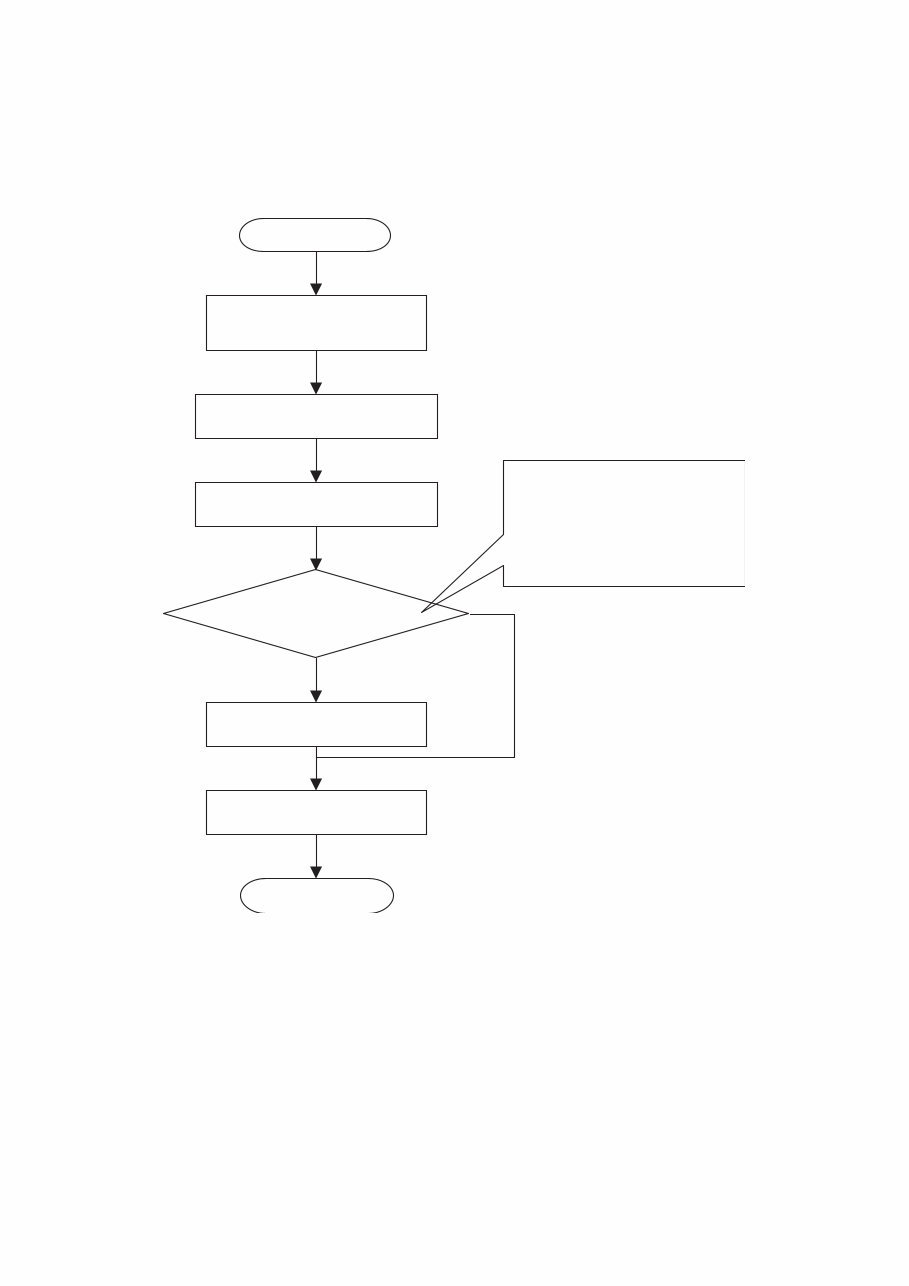
2 Chapter 2 Procedure for installing 2-1. Flow of installation Caution: In case of Windows2000, WindowsXP and Windows Vista, installation must be started after login by a user who has authority of the Administrator. Restarting PC. No 2.3.2. Installing Service Manual data Yes 2.3.1. Preparing S/M installation The set location for installation is the same folder as the system. Recommendation: If there is enough space on another drive, change of location for installation is recommended Login to the computer as an administrator Complete Start 2.2. Installing Service Manual data Change of location where Service Manual (S/M) data is installed
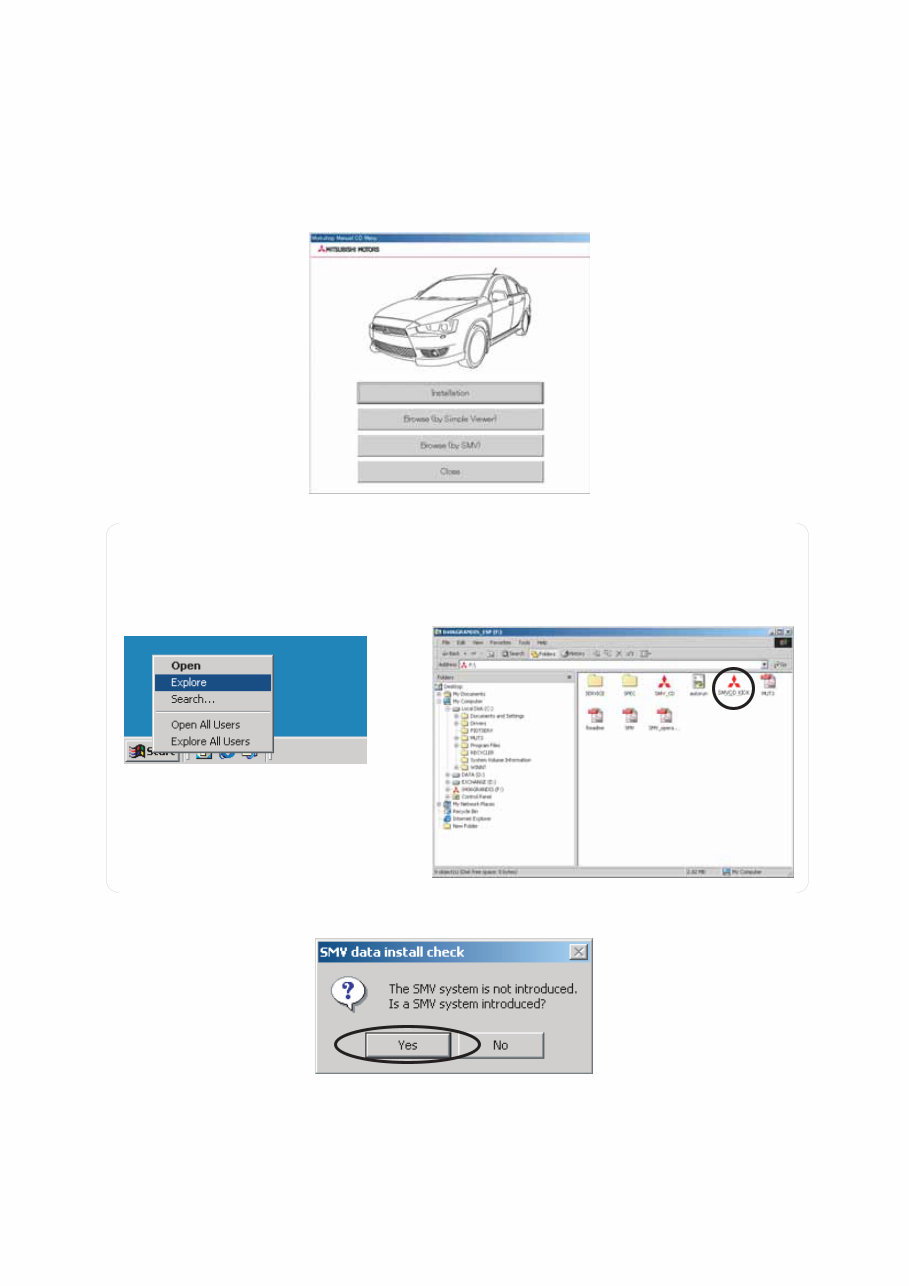
3 2-2. Procedure for installing Service Manual Viewer Caution: Exit all of other applications before installing. Some data may be lost because of restarting PC after completing installation. (1) When you set CD-ROM into CD drive, the W/M CD’s menu screen (Figure 1) appears automatically. Click [Installation] button. --Go to (2) on this page. Figure 1: W/M CD’s menu screen (2) Dialog box for confirmation of Service Manual (S/M) Viewer installation (Figure 4) appears. Click Yes. Note: In case that the above screen is not appeared, right-click on Start at the lower-left corner of the desktop and click Explore. (Refer to Figure 2) Then double-click SMVCD_KICK.exe in the CD-ROM. (Refer to Figure 3) Figure 2: Running Explore Figure 3: Running SMVCD_KICK.exe Figure 4: Dialog box for confirmation of S/M Viewer installation
You're Reading a Preview
What's Included?
Lifetime Access
Fast Download Speeds
Offline Viewing
Access Contents & Bookmarks
Full Search Facility
Print one or all pages of your manual
$31.99
2012 Mitsubishi Triton OEM Service & Repair Manual
This is the complete official full factory service repair manual for Mitsubishi Triton 2012. It is a genuine repair service factory manual that covers all aspects of repair, including but not limited to:
General maintenance
Troubleshooting
Engine service/repair
Transmission service/repair
Brake system
Wiring diagram
Electrical system
Suspension
Periodic lubrication
Steering
Cooling system
Fuel injection/fuel system
Emission system
Heater/air conditioning
Engine control system
Chassis/body
Restraint system
Interior
Differential/drive
Axle
The manual contains necessary illustrations, diagrams, and specifications to guide the mechanic through any repair procedure. It also includes an advanced troubleshooting guide to help diagnose and correct any problem. This service manual is printable without any restriction and can be viewed on all PC-based Windows operating systems and Mac. It is a valuable resource for both professional mechanics and DIY enthusiasts, covering detailed substeps, notes, cautions, warnings, numbered instructions, illustrations, and photos to guide through every procedure. The manual also facilitates diagnosing and repairing problems with the vehicle's electrical system, combining troubleshooting and electrical service procedures with detailed wiring diagrams for ease of use.
With this manual, you can save on shop labor costs and perform all servicing yourself. It provides detailed, step-by-step instructions and photos to guide through all service, maintenance, repairs, and tuning. The search function makes it easy to find the needed information, and you can print out only the pages you need. This is the Mitsubishi Triton 2012 service manual you have been waiting for.
Reviews
Q&A
Recently Viewed
5,521,897Happy Clients
2,594,462eManuals
1,120,453Trusted Sellers
15Years in Business
Price:
Actual Price:
2012 Mitsubishi Triton OEM Service & Repair Manual





 Lifetime Access




