1 Version 2.0 USER INSTRUCTIONS FOR MULTI-LINGUAL CD-ROM’S Table of contents 1. General ..........................................................................................................................2 2. Acrobat Reader Toolbar.................................................................................................2 3. Language selection screen. ...........................................................................................3 3.1. Selecting a language. ..............................................................................................3 3.2. User instructions......................................................................................................3 3.3. Copyright. ................................................................................................................4 4. Cover screen..................................................................................................................5 4.1. Starting up the manual. ...........................................................................................5 4.2. Returning to the language selection screen. ...........................................................5 5. Foreword page. ..............................................................................................................6 5.1. Selecting a Group....................................................................................................6 5.2. Returning to the language selection screen. ...........................................................6 5.3. Changing the width of the navigation pane..............................................................6 6. Group contents page......................................................................................................7 6.1. Selecting a subject. .................................................................................................7 6.2. Returning to the foreword page. ..............................................................................7 6.3. Groups containing multiple contents pages. ............................................................8 7. Browsing through the pages of a group in the manual. ................................................10 8. Service Bulletins...........................................................................................................11 8.1. Service Bulletins indicated in the manual. .............................................................11 8.2. Service Bulletins listing. .........................................................................................13 9. Closing the manual. .....................................................................................................14
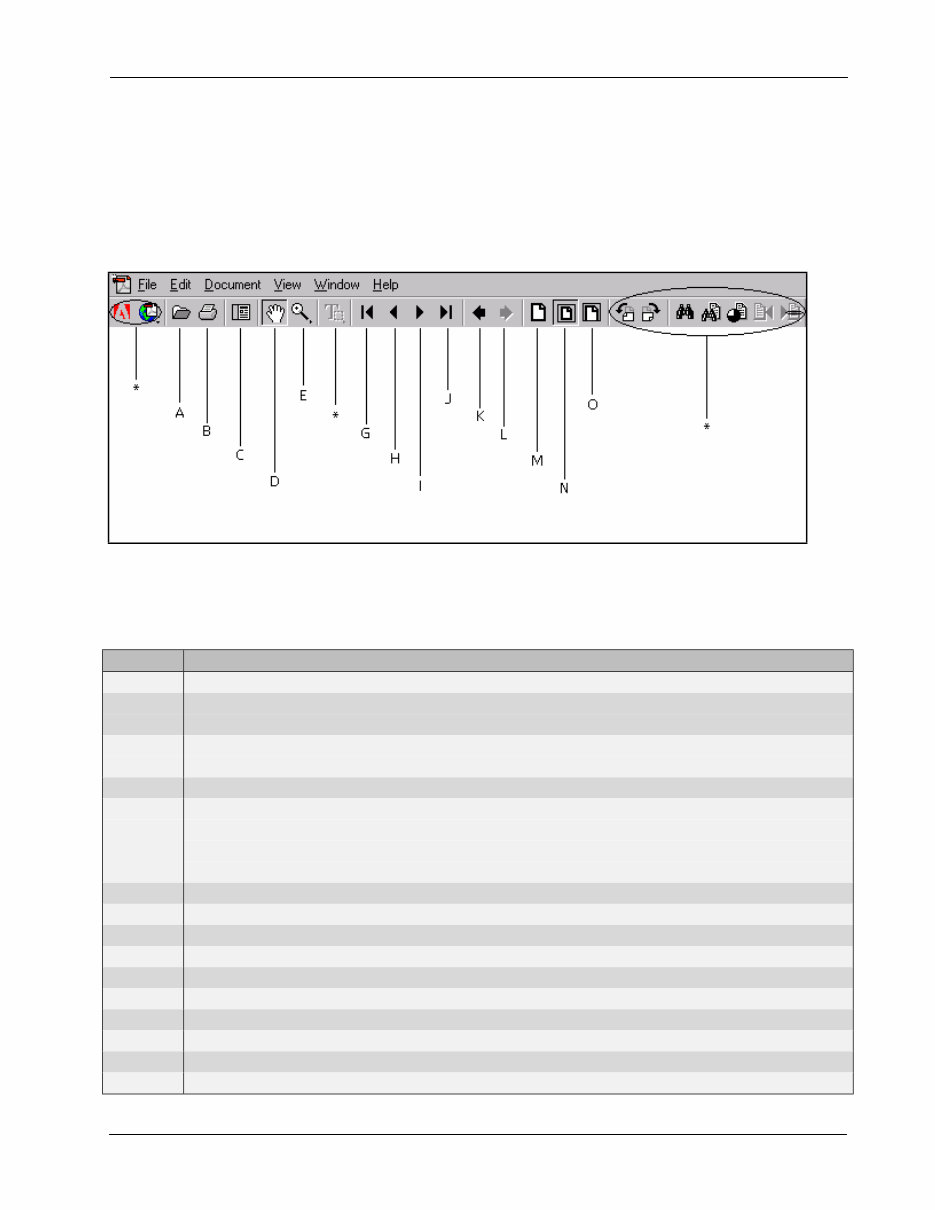
USER INSTRUCTIONS FOR MULTI-LINGUAL CD-ROM’S 2 Version 2.0 1. General The operation of this CD-ROM requires the use of Acrobat Reader 4.0 or higher. Screens shown in these instructions are taken from the English version of the manual. The functionality of the screens in other language versions is exactly the same. 2. Acrobat Reader Toolbar. Listed below is a short explanation for the Acrobat Reader toolbar. For more detailed information, please refer to the help function of the Acrobat Reader menu at the top of the screen. Number Description A Open file. B Print file. All pages will be printed. To print one page or a number of pages, use the print function from the file menu in the menu bar. C Displays and hides the bookmarks. The bookmarks should always be visible to navigate through the manual. D Selects the hand tool. Use this function during normal operation. E Selects the zoom-in tool. This function enables you to enlarge parts of the viewed page by putting the mouse pointer at the corner of the area to be enlarged and dragging a box around the area while holding the left mouse button. G Go to the first page of the currently displayed group. H Go to the previous page. I Go to the next page. J Go to the last page of the currently displayed group. K Go to the previous view. L Return to the next view. M Sets the zoom of the viewed document to 100%. N Makes the current page fit into the window. O Makes the visible width of the current page fit inside the window. * Functions not required too operate this CD-ROM.
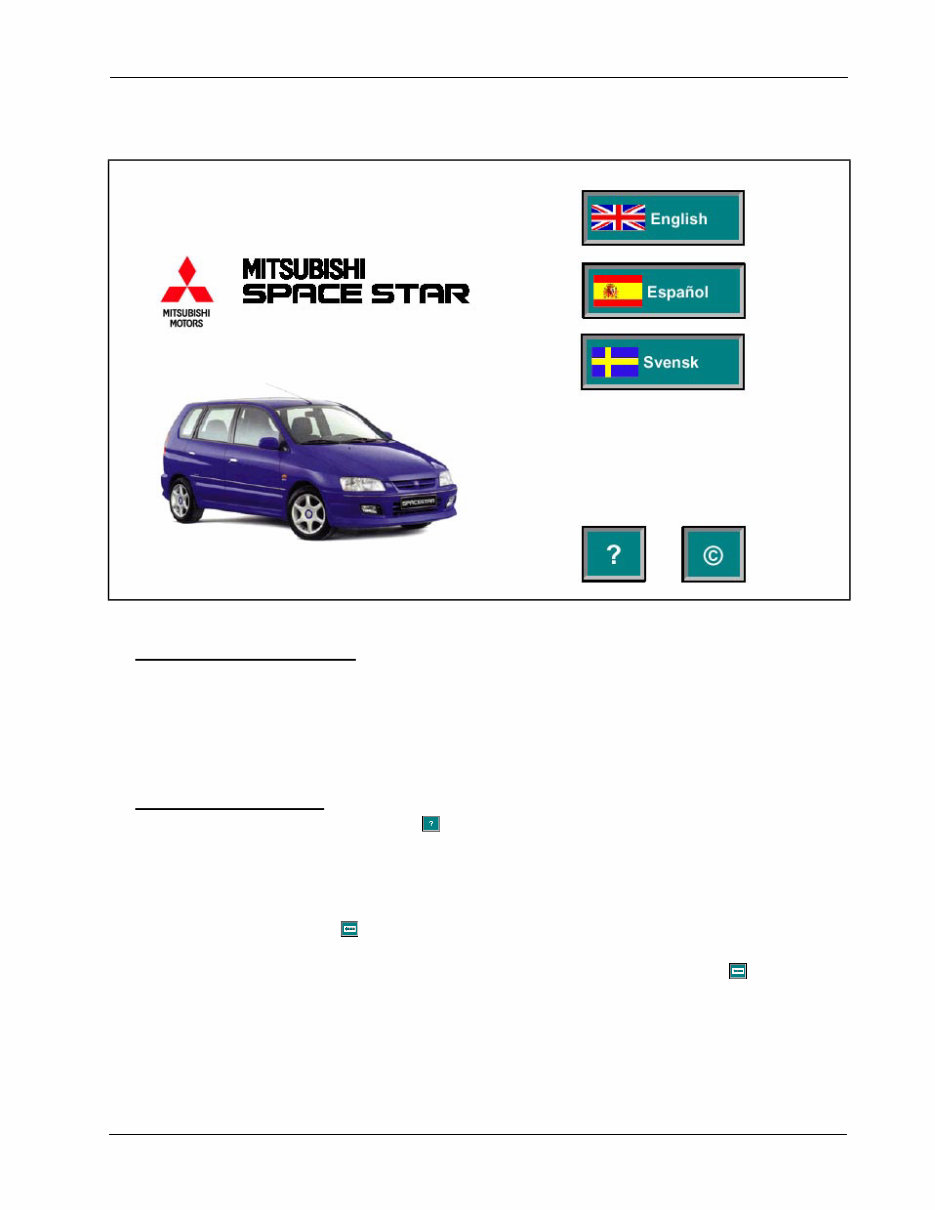
USER INSTRUCTIONS FOR MULTI-LINGUAL CD-ROM’S 3 Version 2.0 3. Language selection screen. 3.1. Selecting a language. Place the mouse pointer on the required language button. Click the left mouse button once to select the required language. The correct language will be selected automatically and the screen showing the cover page will be displayed. 3.2. User instructions. Place the mouse pointer on the button. Click the left mouse button once to select the user instructions. The next screen will be displayed. On this screen the user instructions in the desired language can be selected as described above. To return to the language selection screen for the User Instructions, place the mouse pointer on the button on top of the document and click the left mouse button once. To return to the above shown screen, place the mouse pointer on the button and click the left mouse button once.
USER INSTRUCTIONS FOR MULTI-LINGUAL CD-ROM’S 4 Version 2.0 3.3. Copyright. Place the mouse pointer on the button. Click the left mouse button once to select the copyright statement. The next screen will be started up. On this screen the Copyright statement in the desired language can be selected as described above. To return to the language selection screen for the Copyright, put the mouse pointer on the button on top of the document and click the left mouse button once. To return to the above shown screen, put the mouse pointer on the button and click the left mouse button once.
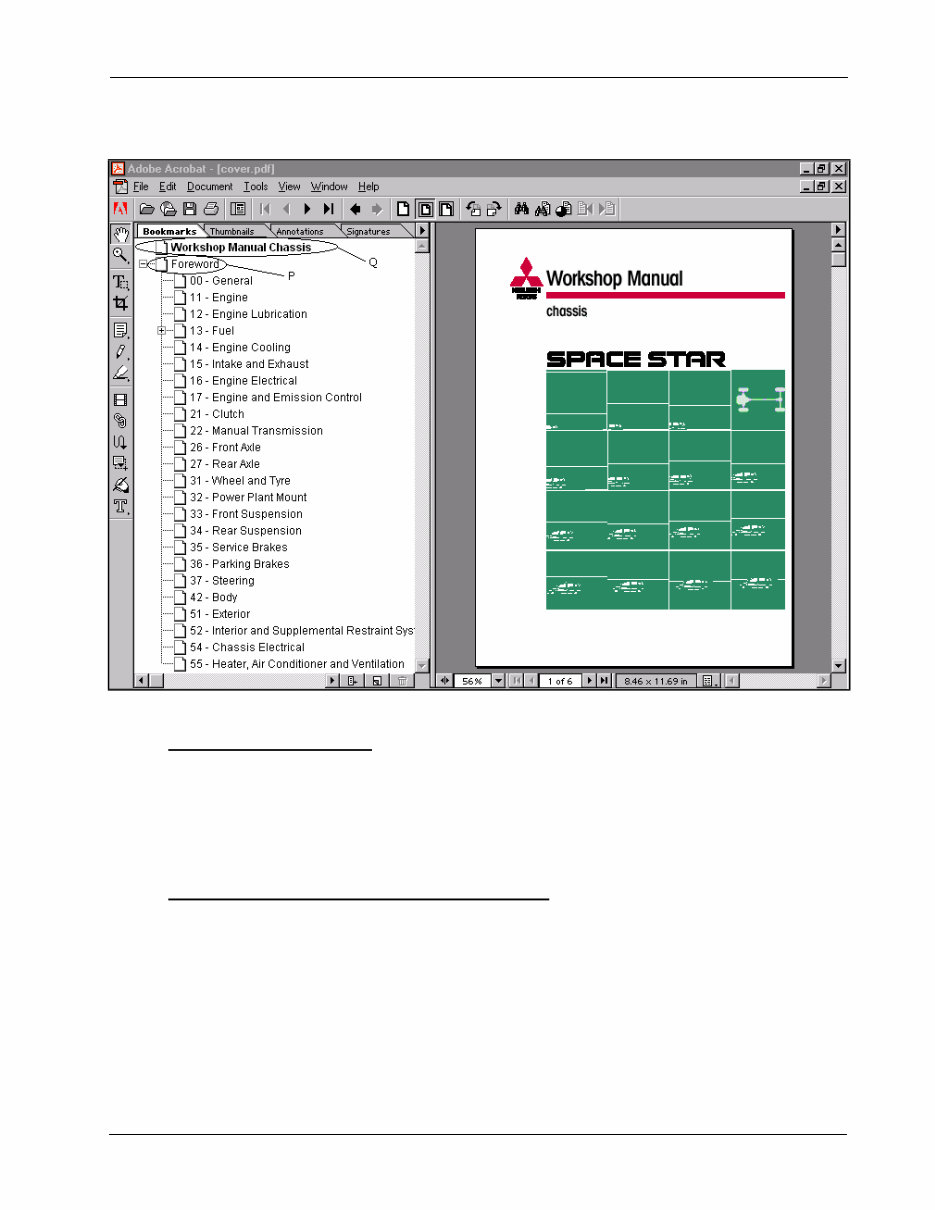
USER INSTRUCTIONS FOR MULTI-LINGUAL CD-ROM’S 5 Version 2.0 4. Cover screen. 4.1. Starting up the manual. Place the mouse pointer on Foreword bookmark “P”. Click the left mouse button once to open the manual. The correct manual will be selected automatically and the index page will be displayed. 4.2. Returning to the language selection screen. In case the wrong language is selected, return to the previous screen by putting the mouse pointer on Workshop Manual Chassis bookmark “Q” and clicking the left mouse button once.
You're Reading a Preview
What's Included?
Lifetime Access
Fast Download Speeds
Offline Viewing
Access Contents & Bookmarks
Full Search Facility
Print one or all pages of your manual
$31.99
1999-2000 Mitsubishi Montero Service Repair Manual
Our Service Repair Manual is an essential resource for both professional mechanics and DIY enthusiasts. Unlike the standard Owner's Manual, this comprehensive guide is typically exclusive to dealerships and auto shops. It contains detailed illustrations and step-by-step instructions for all minor and major repairs, from basic fluid changes to complex transmission rebuilds.
This manual covers a wide range of repair and maintenance procedures, including wiring schematics, electrical diagrams, computer diagnostic codes, suspension, brakes, air bags, air conditioning, engine/transmission service, body work, and more. It is designed to be user-friendly, requiring no software installation or specific computer requirements. The manual is provided as a single PDF file with bookmarks, allowing for easy navigation and keyword searches.
Rest assured, we offer full support for all our products. If you encounter any issues or have questions, please don't hesitate to contact us. Our goal is to ensure 100% customer satisfaction.
Reviews
Q&A
Recently Viewed
5,521,897Happy Clients
2,594,462eManuals
1,120,453Trusted Sellers
15Years in Business
Price:
Actual Price:
1999-2000 Mitsubishi Montero Service Repair Manual




 Lifetime Access




