


2006-2010 Mitsubishi Outlander European Service & Repair Manual
What's Included?
 Lifetime Access
Fast Download Speeds
Online & Offline Access
Access PDF Contents & Bookmarks
Full Search Facility
Print one or all pages of your manual
BRAKES
Anti-Lock Braking System (ABS) - Outlander
GENERAL INFORMATION
The 4 ABS ensures directional stability and control during hard braking.
This ABS uses a 4-sensor system that controls all four wheels independently of each other.
EBD
*1
(Electronic Brake-force Distribution system) control can obtain ideal rear wheel brake force.
The magnetic encoder for wheel speed detection has been installed instead of the rotor as the wheel speed
sensor.
For wiring harness saving and secure data communication, CAN
*2
bus has been adopted as a tool of
communication with another ECU.
Fail-safe function which ensures that safety is maintained.
Diagnostic function which provides improved serviceability.
Specifications
ITEM SPECIFICATIONS CHART
CONSTRUCTION DIAGRAM
NOTE:
*1
: EBD (Electronic Brake-force Distribution)
*2
: For further details on CAN communication, refer to GENERAL
INFORMATION .
On vehicles with ASC, the ABS system is controlled by the ASC-ECU. For
the system construction, refer to GENERAL INFORMATION .
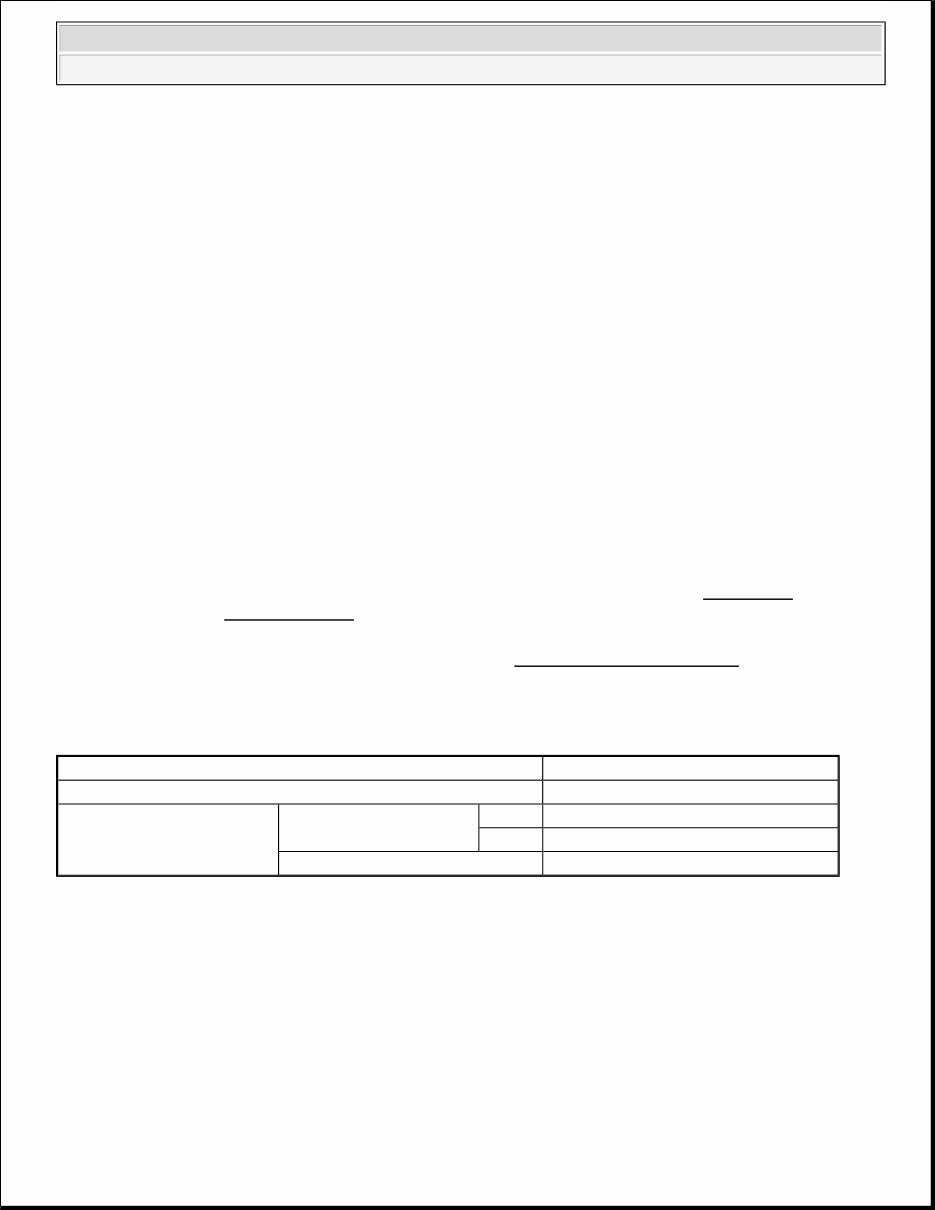
Item Specifications
ABS control type 4 sensors
Wheel speed sensor
Magnetic encoder
Front 86 (N pole: 43, S pole: 43)
Rear 86 (N pole: 43, S pole: 43)
Type Semiconductor
2007-2012 MITSUBISHI OUTLANDER SERVICE AND REPAIR MANUAL
BRAKES AKES Ant Anti-Loc -Lock B k Braking aking Syst System (ABS) - Out em (ABS) - Outlander ander
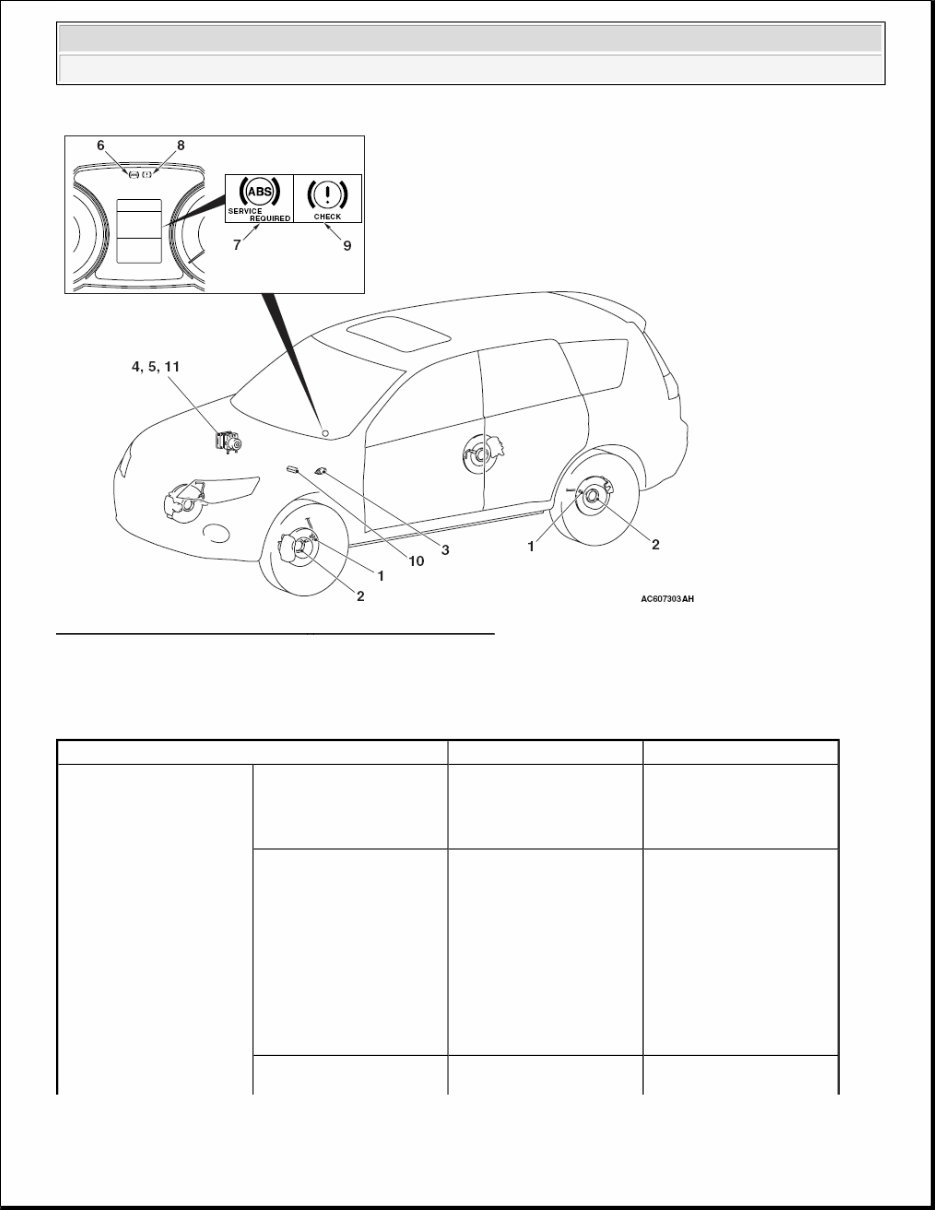
Fig. 1: Anti Lock Brake System - Construction Diagram
Courtesy of MITSUBISHI MOTOR SALES OF AMERICA.
MAIN COMPONENTS AND FUNCTIONS
MAIN COMPONENTS AND FUNCTIONS CHART
Name of part Number Outline of function
Sensor Wheel speed sensor 1 Outputs the frequency
signal in proportion to the
rotation speed of each
wheel to ABS-ECU.
Magnetic encoder for
wheel speed detection
2 When the magnetic
encoder for wheel speed
detection (a plate on
which north and south
pole sides of the magnets
are arranged alternately)
rotates, the wheel speed
sensor outputs frequency
pulse signal in proportion
to each wheel speed.
Stoplight switch 3 Outputs the signal
indicating whether the
Mitsubishi Outlander SE
BRAKES Anti-Lock Braking System (ABS) - Outlander

brake pedal is depressed
or not to ABS-ECU.
G sensor <4WD> 4 Incorporated in ABS-
ECU, and detects the
longitudinal acceleration
of the vehicle.
Actuator Hydraulic unit 5 Drives the solenoid valve
using the signal from
ABS-ECU, and controls
the brake fluid pressure
for each wheel.
ABS warning light 6 Informs the driver of the
system status by
illuminating, flashing, or
turning off the warning
light according to the
signal from ABS-ECU.
ABS warning display 7 Informs the driver of the
system status by
illuminating or turning
off the warning light
according to the signal
from ABS-ECU.
Brake warning light 8 Used as the warning light
for the parking brake,
brake fluid level, and
EBD control. Informs the
driver of the system
status by illuminating or
turning off the warning
light according to the
signal from ABS-ECU.
Brake warning display 9 Used as the warning light
for the parking brake,
brake fluid level, and
EBD control. Informs the
driver of the system
status by illuminating or
turning off the warning
light according to the
signal from ABS-ECU.
Diagnosis connector 10 Outputs the diagnosis
code and establishes the
communication with scan
tool.
ABS-ECU 11 Controls actuators
Mitsubishi Outlander SE
BRAKES Anti-Lock Braking System (ABS) - Outlander
SPECIFICATIONS
SERVICE SPECIFICATIONS
SERVICE SPECIFICATIONS CHART
ABS DIAGNOSIS
INTRODUCTION
The anti-lock brake system (ABS) operates differently from conventional brake systems. These differences
include sounds, sensations, and vehicle performance that owners and service technicians who are not familiar
with ABS may not be used to.
Some operational characteristics may seem to be malfunctions, but they are simply signs of normal ABS
operation. When diagnosing the ABS system, keep these operational characteristics in mind. Inform the owner
of the kind of performance characteristics to expect from an ABS-equipped vehicle.
ABS DIAGNOSTIC TROUBLE CODE DETECTION CONDITIONS
ABS diagnostic trouble codes (ABS DTCs) are set under different conditions, depending on the malfunction
detected. Most ABS DTCs will only be set during vehicle operation. Some ABS DTCs will also be set during
the ABS self-check immediately after the engine is started.
When you check if an ABS DTC will be displayed again after the DTC has been erased, you should duplicate
the ABS DTC set conditions. Depending on the detection timing and set conditions for the specific ABS DTC,
you must either drive the vehicle or turn the engine off and restart it. To set the proper conditions for that DTC
again, refer to "ABS DTC SET CONDITIONS" for each ABS DTC that you are trying to reset.
ABS DIAGNOSTIC TROUBLESHOOTING STRATEGY
Use these steps to plan your diagnostic strategy. If you follow them carefully, you will be sure that you have
(described above) based
on the signals coming
from each sensor.
Controls the self-
diagnosis and fail-safe
functions.
Controls the diagnosis
function (scan tool
compatible).
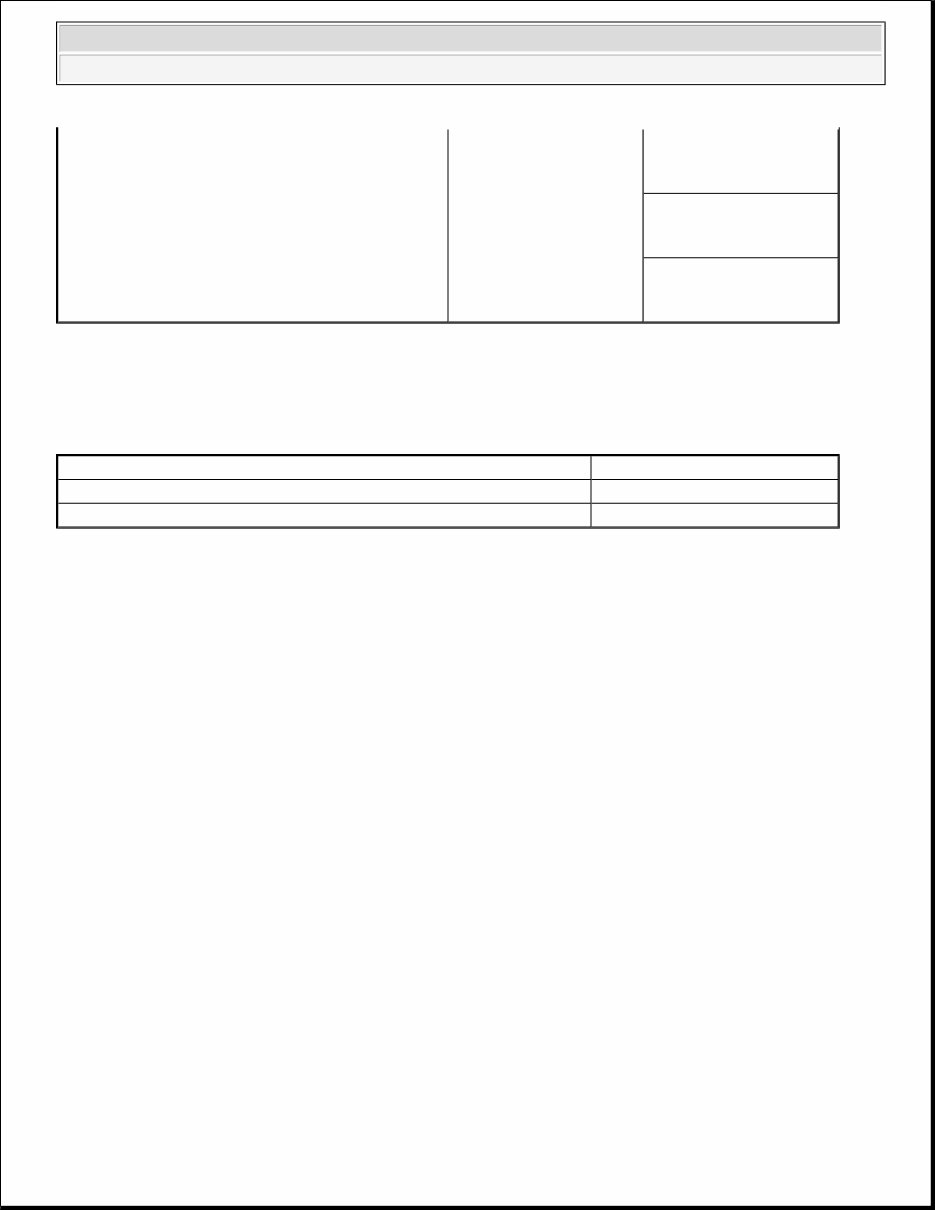
Item Standard value
Wheel speed sensor current mA 5.9 - 8.4 or 11.8 - 16.8
Wheel speed sensor insulation resistance Mohms 5 or more
2008 Mitsubishi Outlander SE
2008 BRAKES Anti-Lock Braking System (ABS) - Outlander
exhausted most of the possible ways to find an ABS fault.
1. Gather information about the problem from the customer.
2. Verify that the condition described by the customer exists.
3. Check the vehicle for any ABS DTC.
4. If you cannot verify the condition and there are no ABS DTCs, the malfunction is intermittent. Refer to
HOW TO COPE WITH INTERMITTENT MALFUNCTIONS .
5. If you can verify the condition but there are no ABS DTCs, or the system cannot communicate with the
scan tool, check that the basic brake system is operating properly.
If the basic brake system is not operating properly, refer to the BASIC BRAKE SYSTEM
DIAGNOSIS .
If the basic brake system is operating properly, refer to BRAKE BOOSTER OPERATION
CHECK .
6. If there is an ABS DTC, record the number of the DTC, then erase the DTC from the memory using the
scan tool.
7. Recreate the ABS DTC set conditions to see if the same ABS DTC will set again.
If the same ABS DTC sets again, perform the diagnostic procedures for the DTC. Refer to
DIAGNOSTIC TROUBLE CODE CHART .
If you cannot get the same ABS DTC to set again, the malfunction is intermittent. Refer to HOW
TO COPE WITH INTERMITTENT MALFUNCTIONS .
DIAGNOSIS FUNCTION
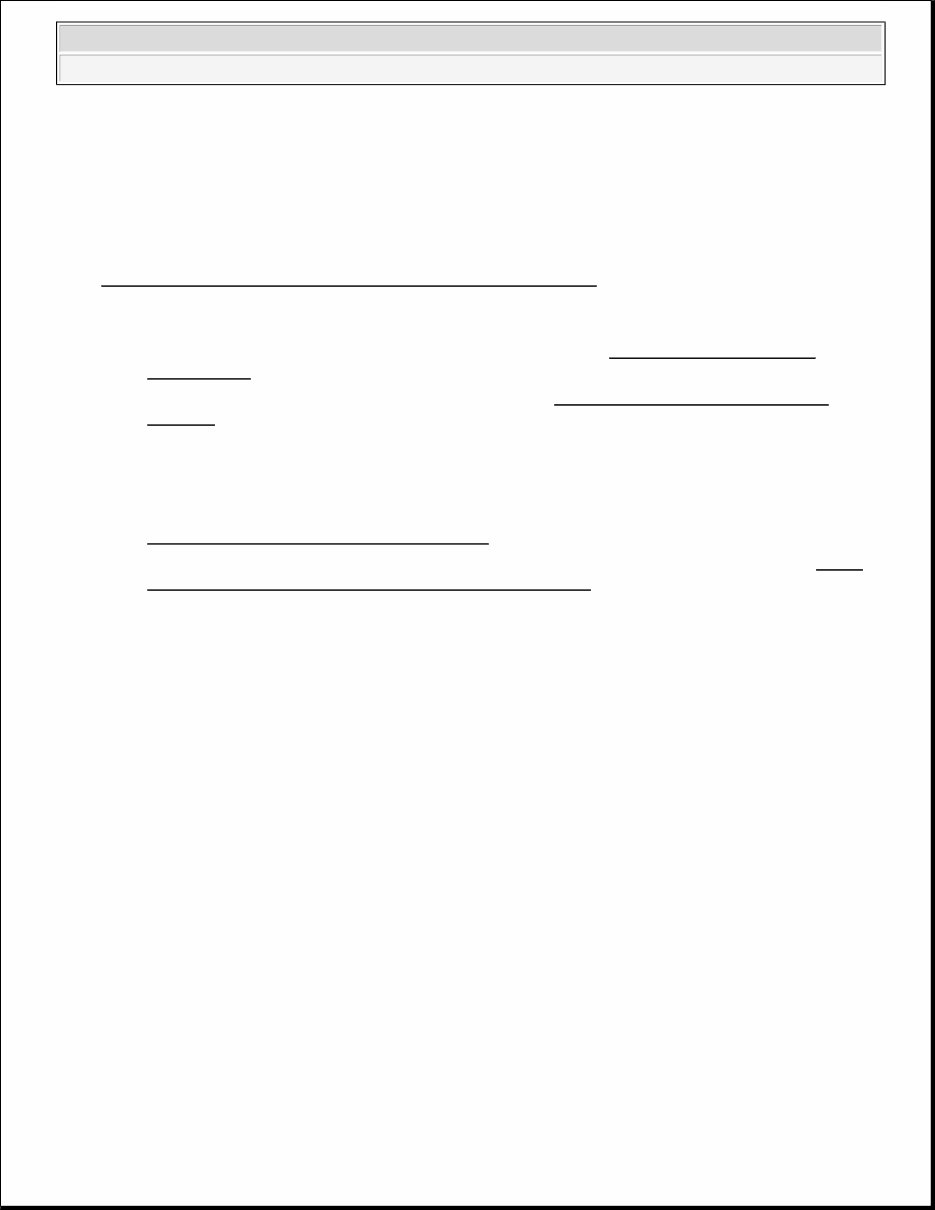
HOW TO CONNECT THE SCAN TOOL (M.U.T.-III)
Required Special Tools:
MB991958: Scan Tool (M.U.T.-III Sub Assembly)
MB991824: Vehicle Communication Interface (V.C.I.)
MB991827: M.U.T.-III USB Cable
MB991910: M.U.T.-III Main Harness A
1. Ensure that the ignition switch is at the "LOCK" (OFF) position.
2. Start up the personal computer.
3. Connect special tool MB991827 to special tool MB991824 and the personal computer.
4. Connect special tool MB991910 to the special tool MB991824.
5. Connect special tool MB991910 to the data link connector.
6. Turn the power switch special tool MB991824 to the "ON" position.
CAUTION: To prevent damage to scan tool MB991958, always turn the ignition switch
to the "LOCK" (OFF) position before connecting or disconnecting scan
tool MB991958.
2008 Mitsubishi Outlander SE
2008 BRAKES Anti-Lock Braking System (ABS) - Outlander
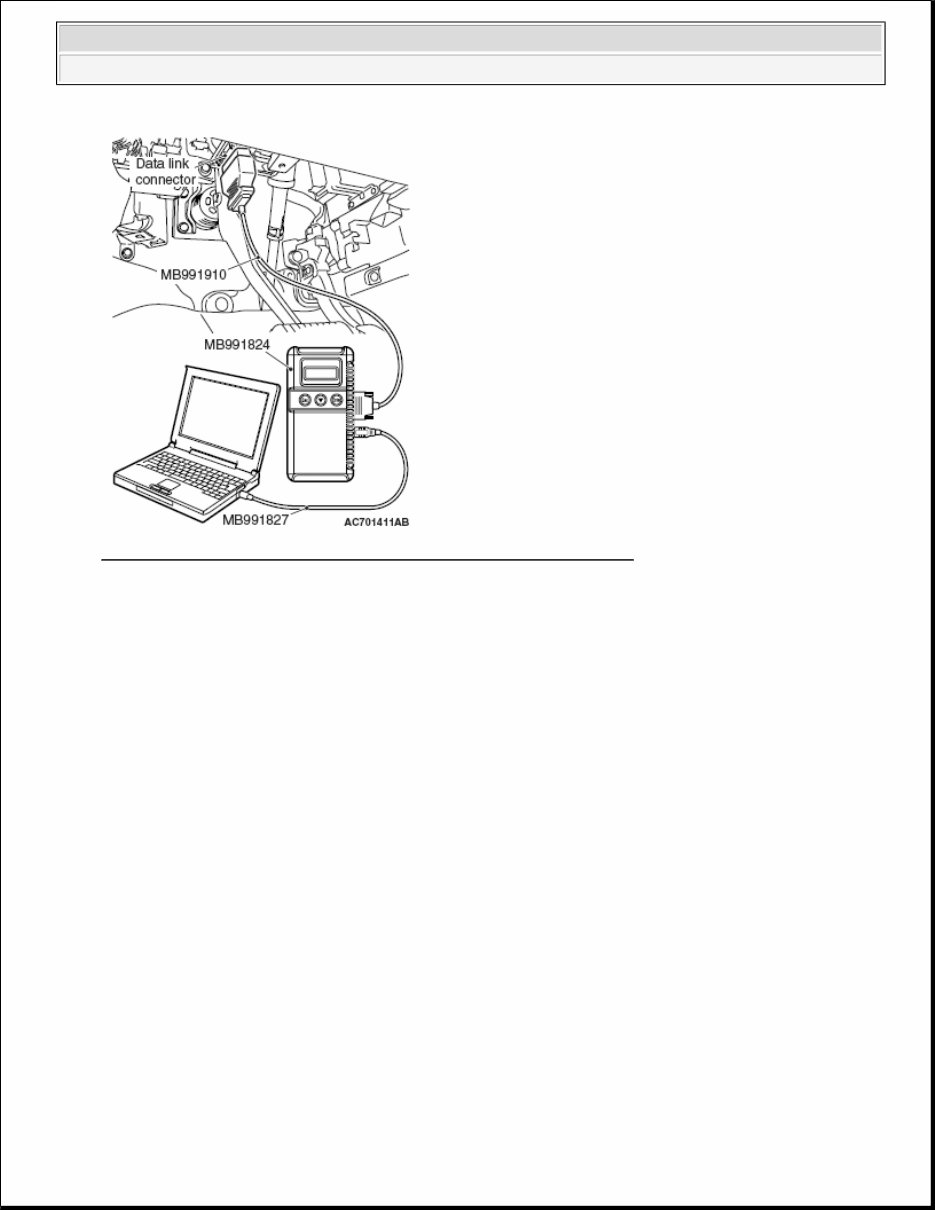
Fig. 2: Connecting Special Tool MB991910 To Data Link Connector
Courtesy of MITSUBISHI MOTOR SALES OF AMERICA.
7. Start the M.U.T.-III system on the personal computer.
HOW TO READ AND ERASE DIAGNOSTIC TROUBLE CODES
Required Special Tools:
MB991958: Scan Tool (M.U.T.-III Sub Assembly)
MB991824: Vehicle Communication Interface (V.C.I.)
MB991827: M.U.T.-III USB Cable
MB991910: M.U.T.-III Main Harness A
NOTE: When the special tool MB991824 is energized, the special tool MB991824
indicator light will be illuminated in a green color.
NOTE: Disconnect the scan tool MB991958 in the reverse order of the connecting
sequence, making sure that the ignition switch is at the "LOCK" (OFF) position.
CAUTION: To prevent damage to scan tool MB991958, always turn the ignition switch
to the "LOCK" (OFF) position before connecting or disconnecting scan
tool MB991958.
NOTE: If the battery voltage is low, diagnostic trouble codes will not be set. Check the
2008 Mitsubishi Outlander SE
2008 BRAKES Anti-Lock Braking System (ABS) - Outlander
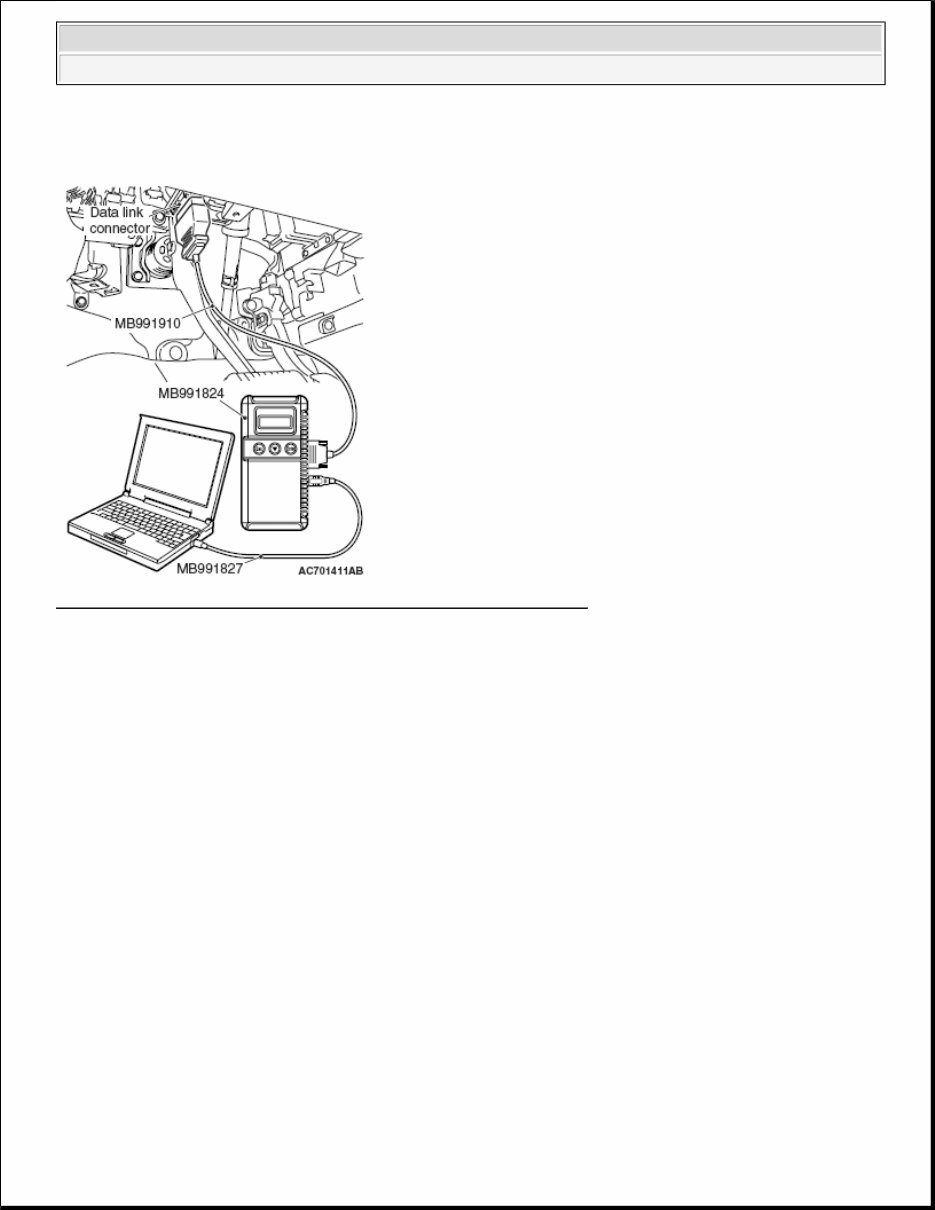
Fig. 3: Connecting Special Tool MB991910 To Data Link Connector
Courtesy of MITSUBISHI MOTOR SALES OF AMERICA.
1. Connect scan tool MB991958 to the data link connector.
2. Turn the ignition switch to the "ON" position.
3. Select "System Select."
4. Select "ABS/ASC/ASTC" from the system list, and select the "OK" button.
5. Select "Diagnostic Trouble Code."
6. If a DTC is set, it is shown.
7. Choose "DTC erase" to erase the DTC.
HOW TO READ DATA LIST
Required Special Tools:
MB991958: Scan Tool (M.U.T.-III Sub Assembly)
MB991824: Vehicle Communication Interface (V.C.I.)
MB991827: M.U.T.-III USB Cable
MB991910: M.U.T.-III Main Harness A
battery if scan tool MB991958 does not display.
CAUTION: To prevent damage to scan tool MB991958, always turn the ignition switch
to the "LOCK" (OFF) position before connecting or disconnecting scan
2008 Mitsubishi Outlander SE
2008 BRAKES Anti-Lock Braking System (ABS) - Outlander
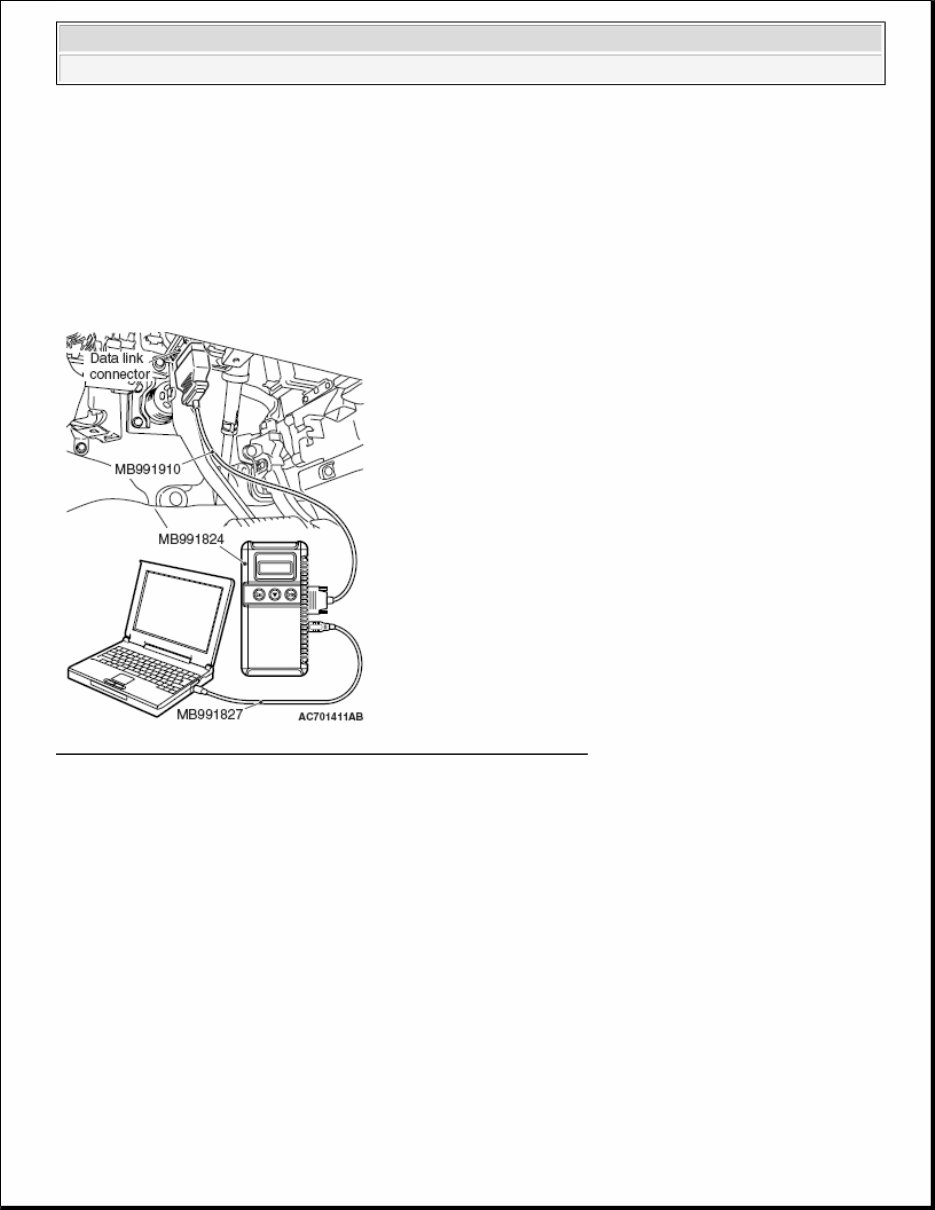
1. Connect scan tool MB991958 to the data link connector.
2. Turn the ignition switch to the "ON" position.
3. Select "System Select."
4. Select "ABS/ASC/ASTC" from the system list, and select the "OK" button.
5. Select "Data List."
Fig. 4: Connecting Special Tool MB991910 To Data Link Connector
Courtesy of MITSUBISHI MOTOR SALES OF AMERICA.
HOW TO PERFORM ACTUATOR TEST
Required Special Tools:
MB991958: Scan Tool (M.U.T.-III Sub Assembly)
MB991824: Vehicle Communication Interface (V.C.I.)
MB991827: M.U.T.-III USB Cable
MB991910: M.U.T.-III Main Harness A
tool MB991958.
CAUTION: To prevent damage to scan tool MB991958, always turn the ignition switch
to the "LOCK" (OFF) position before connecting or disconnecting scan
tool MB991958.
2008 Mitsubishi Outlander SE
2008 BRAKES Anti-Lock Braking System (ABS) - Outlander
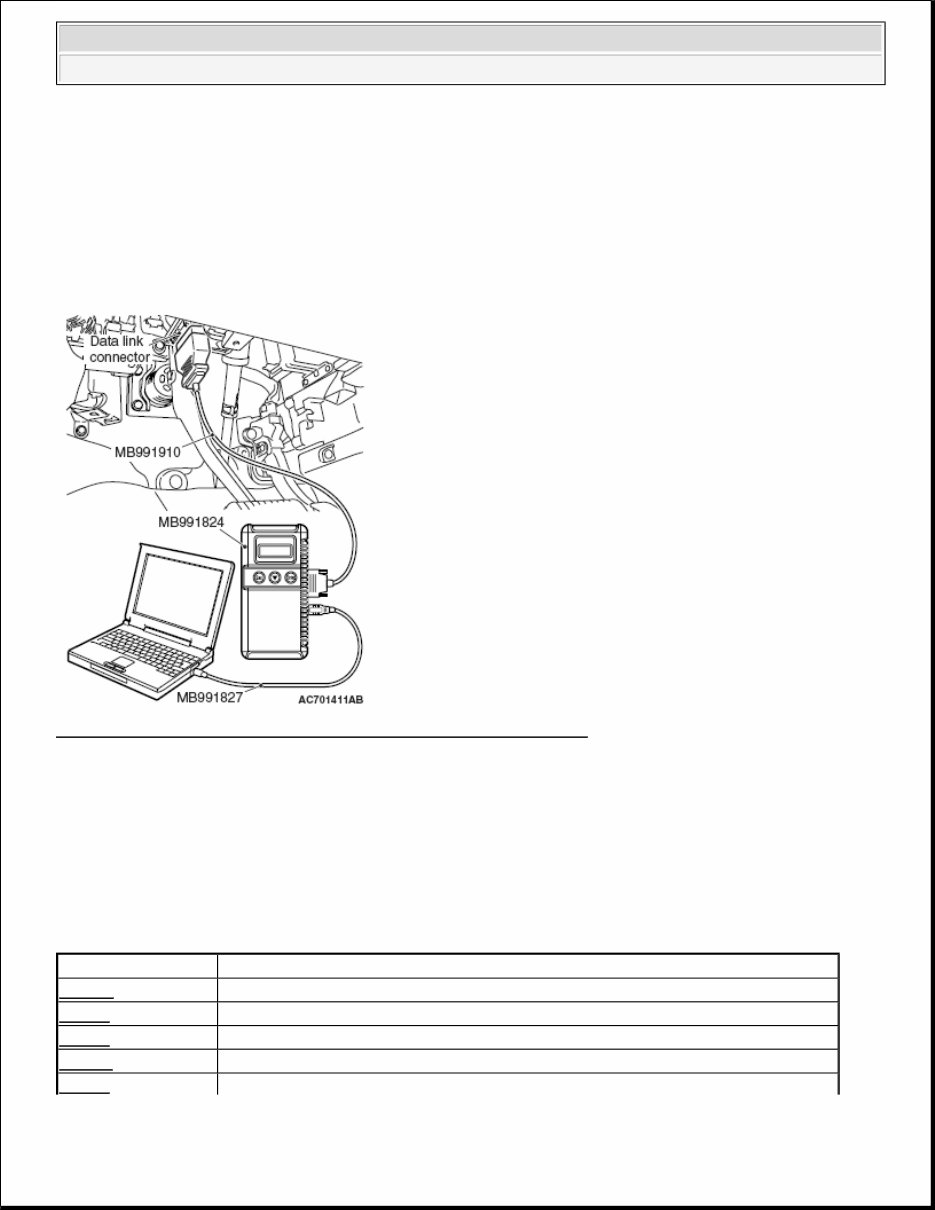
1. Connect scan tool MB991958 to the data link connector.
2. Turn the ignition switch to the "ON" position.
3. Select "System Select."
4. Select "ABS/ASC/ASTC" from the system list, and select the "OK" button.
5. Choose "Actuator Test" from "ABS" screen.
6. Choose an appropriate item and select the "OK" button.
Fig. 5: Connecting Special Tool MB991910 To Data Link Connector
Courtesy of MITSUBISHI MOTOR SALES OF AMERICA.
DIAGNOSTIC TROUBLE CODE CHART
DIAGNOSTIC TROUBLE CODE CHART
CAUTION: During diagnosis, a DTC code associated with other systems may be set
when the ignition switch is turned on with connector(s) disconnected. On
completion, check all systems for DTCs. If DTC code(s) are set, erase them
all.
DTC Inspection item
C100A Abnormality in FL wheel speed sensor circuit
C1015 Abnormality in FR wheel speed sensor circuit
C1020 Abnormality in RL wheel speed sensor circuit
C102B Abnormality in RR wheel speed sensor circuit
C1011 Abnormality in FL wheel speed sensor signal
2008 Mitsubishi Outlander SE
2008 BRAKES Anti-Lock Braking System (ABS) - Outlander

C101C Abnormality in FR wheel speed sensor signal
C1027 Abnormality in RL wheel speed sensor signal
C1032 Abnormality in RR wheel speed sensor signal
C1014 Mutual monitoring of FL wheel speed sensor
C101F Mutual monitoring of FR wheel speed sensor
C102A Mutual monitoring of RL wheel speed sensor
C1035 Mutual monitoring of RR wheel speed sensor
C1041 Abnormality in periodical signal for FL wheel speed sensor
C1042 Abnormality in periodical signal for FR wheel speed sensor
C1043 Abnormality in periodical signal for RL wheel speed sensor
C1044 Abnormality in periodical signal for RR wheel speed sensor
C1046 FL wheel speed sensor control phase time exceeded
C1047 FR wheel speed sensor control phase time exceeded
C1048 RL wheel speed sensor control phase time exceeded
C1049 RR wheel speed sensor control phase time exceeded
C104B Abnormality in FL wheel inlet valve system
C104F Abnormality in FR wheel inlet valve system
C1053 Abnormality in RL wheel inlet valve system
C1057 Abnormality in RR wheel inlet valve system
C105F Abnormality in FL wheel outlet valve system
C1063 Abnormality in FR wheel outlet valve system
C1067 Abnormality in RL wheel outlet valve system
C105B Abnormality in RR wheel outlet valve system
C2104 Malfunction of valve power supply circuit
C1073 Malfunction of motor drive circuit
C2116 Abnormality in pump motor power supply voltage
C1000 Abnormality in stop light switch circuit
C2200 Abnormality in ABS-ECU
C2100 Abnormality in battery voltage (low voltage)
9.7 ± 0.3 V or less
(1)
8.0 ± 0.5 V or less
(1)
C2101 Abnormality in battery voltage (high voltage) 18.0 ± 1.0 V or more
C1395 Brake fluid filling not completed
C2203 VIN not recorded
C1210
(2)
Abnormality in G Abnormality in output voltage
C1242
(2)
Abnormality in G Abnormality in output voltage
C2111
(2)
G sensor power supply circuit Low input
C2112
(2)
G sensor power supply circuit High input
C1608 Implausible diagnosis data
U0001 Bus-off
2008 Mitsubishi Outlander SE
2008 BRAKES Anti-Lock Braking System (ABS) - Outlander
You're Reading a Preview
What's Included?
Lifetime Access
Fast Download Speeds
Online & Offline Access
Access PDF Contents & Bookmarks
Full Search Facility
Print one or all pages of your manual
$31.99
Viewed 14 Times Today


Secure transaction
What's Included?
Lifetime Access
Fast Download Speeds
Online & Offline Access
Access PDF Contents & Bookmarks
Full Search Facility
Print one or all pages of your manual
$31.99
- This complete factory service repair workshop manual is available for instant access on your computer, tablet, or smartphone.
- It covers all repairs, servicing, and troubleshooting procedures with detailed photos and diagrams, making it suitable for professional mechanics and DIY enthusiasts.
- The manual contains step-by-step instructions, highly detailed exploded diagrams, and pictures to guide you through each job correctly.
- You have the option to print out a single page or the entire manual.
- This is the full manual without any limitations or trial periods, and it can be used for life without the need for renewal or extra fees.
- It is fully compatible with all Windows and MAC computers.
Thanks for considering this manual. Click the button to access it.


