Contents 2 Control panel .................................................................................... 3 Anti-theft system.............................................................................. 6 General operation ........................................................................... 10 Radio operation .............................................................................. 14 CD operation .................................................................................. 28 CD autochanger ............................................................................. 34 Navigation operation ...................................................................... 36 User menu ..................................................................................... 72
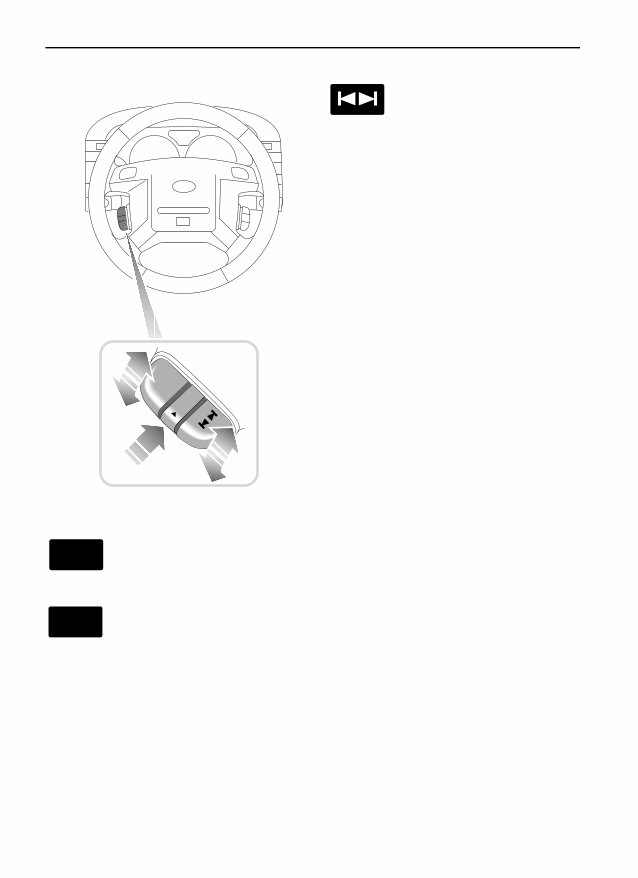
Remote Controls R emote Controls RADIO REMOTE CONTROLS * Volume control Lift or press to increase or decrease the volume. Mode select control Press to change between radio mode, navigation mode and CD mode. The unit will only change to CD mode if an audio CD has been loaded into the unit or CD autochanger*. * If fitted. Search control Lift or press to select the next or previous radio station on the selected waveband. In CD mode, lift the control to move to the next track on the disc, or press to return to the start of the current track. Operate the control repeatedly, or hold the control to move forward or back through several tracks at a time. H3550 VOL MODE VOL MODE
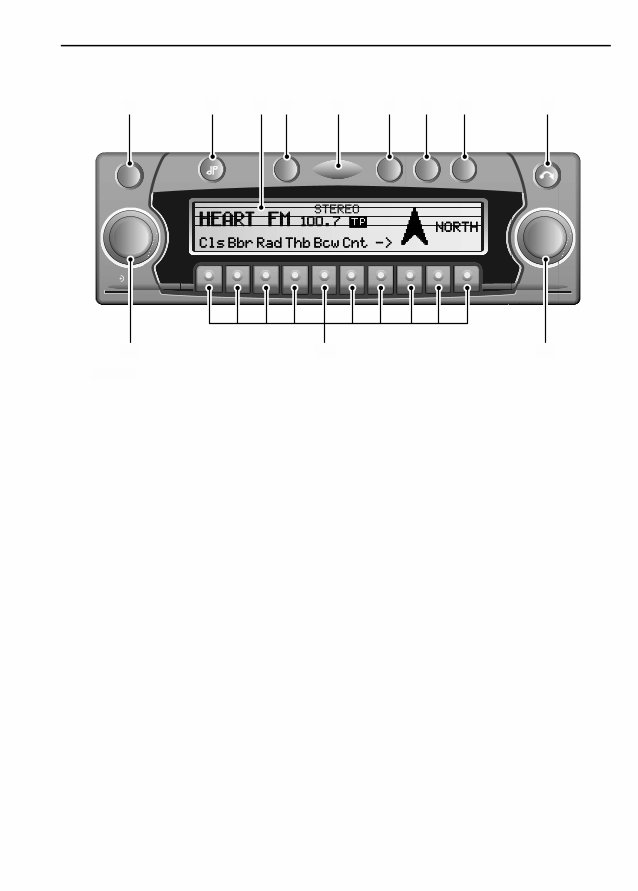
3 Control panel Control panel Control panel CONTROL PANEL 1. On/Off Press to switch ON. The display shows ‘LAND ROVER’ 2. Tone button Press to activate the tone menu. 3. Display 4. Traffic programme button Press to activate the TP menu. 5. Security light 6. CD mode selection button Press to select CD mode, if a music CD is already in the slot or in the CD autochanger. 7. Radio mode selection button Press to select radio mode. While in radio mode, press to select radio menu. 8. Navigation mode selection button Press to select main navigation mode. While in navigation mode, press to select navigation menu. 9. Display/CD eject button Press briefly to fold display panel forwards. Press and hold to eject a CD. 10. Right rotary control Turn to select a menu item, press to confirm selection. 11. Multifunction buttons 12. Left rotary control Press to display information, rotate to adjust the volume. NAVIGATION SYSTEM NAVISYS TP CD CD Rad Rad Nav Info OK ON ON ICE 1242 1 2 4 5 6 7 8 9 11 12 10 3
You're Reading a Preview
What's Included?
Lifetime Access
Fast Download Speeds
Offline Viewing
Access Contents & Bookmarks
Full Search Facility
Print one or all pages of your manual
$41.99
1992 - 2003 Range ROVER, Range Rover Classic Complete Service Manual
This is a comprehensive service manual provided in PDF format. The manual contains detailed instructions and step-by-step diagrams for all workshop procedures, including but not limited to changing the plugs and rebuilding the engine. It also includes electrical diagrams, torque settings, and fluid capacities for all RANGE ROVER models and engines.
Features:
Language: English
Compatibility: Win/Mac
This manual is equipped with numerous pictures and diagrams for easy reference. All pages are printable, allowing you to conveniently take the necessary information with you wherever you go, be it home, office, or repair shop.
It is not a scanned or incomplete manual, and it is designed to cater to both professional mechanics and DIY enthusiasts. The manual provides very easy to follow, step-by-step instructions, making it suitable for all skill levels.
Instant access eliminates shipping costs and waiting time for the CD to arrive by mail.
Reviews
Q&A
Recently Viewed
5,521,897Happy Clients
2,594,462eManuals
1,120,453Trusted Sellers
15Years in Business
Price:
Actual Price:
1992 - 2003 Range ROVER, Range Rover Classic Complete Service Manual




 Lifetime Access




