


100-00 Service Information 2009 Expedition/Navigator
DESCRIPTION AND OPERATION Procedure revision date: 10/05/2012
Symbols Glossary
Symbols are used inside the graphics and in the text area to enhance the information.
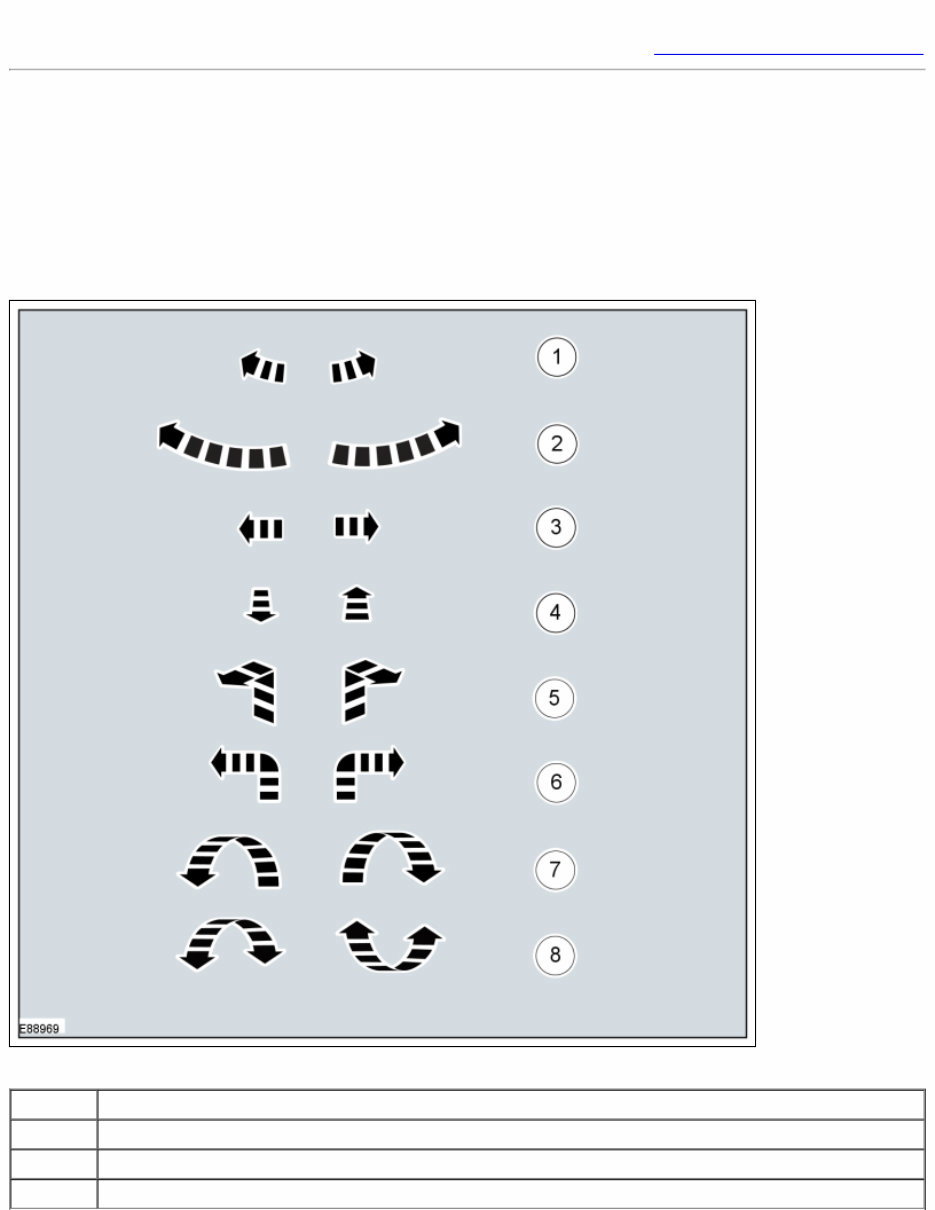
Movement Symbols
Movement symbols provide detailed information to a required component movement. These component movements can be
rotational or 1-3 dimensional movements.
Item Description
1 Minor component movement clockwise/counterclockwise
2 Major component movement clockwise/counterclockwise
3 Component movement to the left/right/up/down
Item Description
4 Component movement towards/away
5 3 dimensional component movement
6 2 dimensional component movement
7 3 dimensional component rotation
8 3 dimensional component cycling
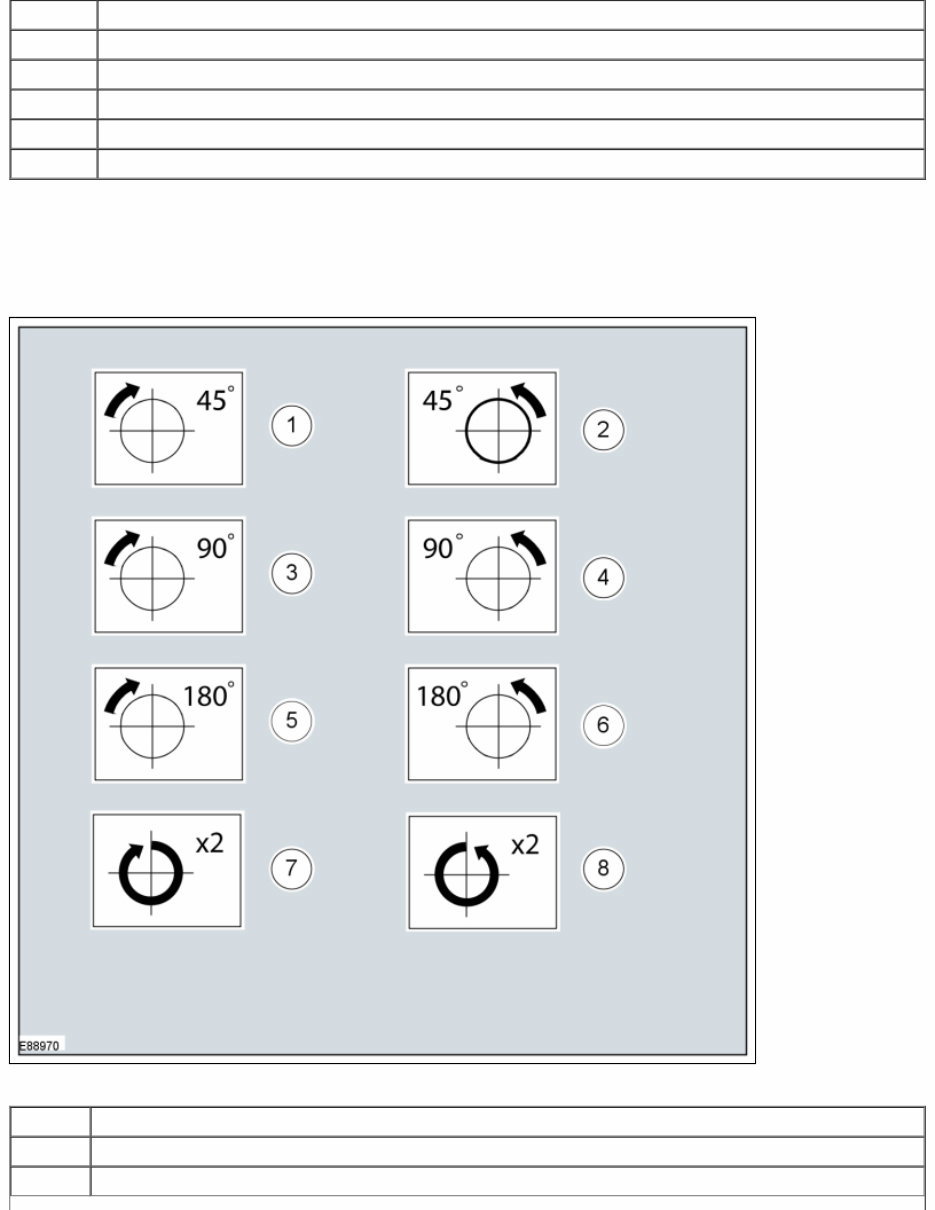
Turn Symbols
Turn symbols are used to provide further information on the direction or angle of component turns.
Item Description
1 Turn the component clockwise through 45°
2 Turn the component counterclockwise through 45°

Item Description
3 Turn the component clockwise through 90°
4 Turn the component counterclockwise through 90°
5 Turn the component clockwise through 180°
6 Turn the component counterclockwise through 180°
7 Turn the component clockwise through 2 complete turns
8 Turn the component counterclockwise through 2 complete turns
Steering Wheel Symbols
Steering wheel symbols are used to provide further information to a required steering wheel position or steering column lock
status.
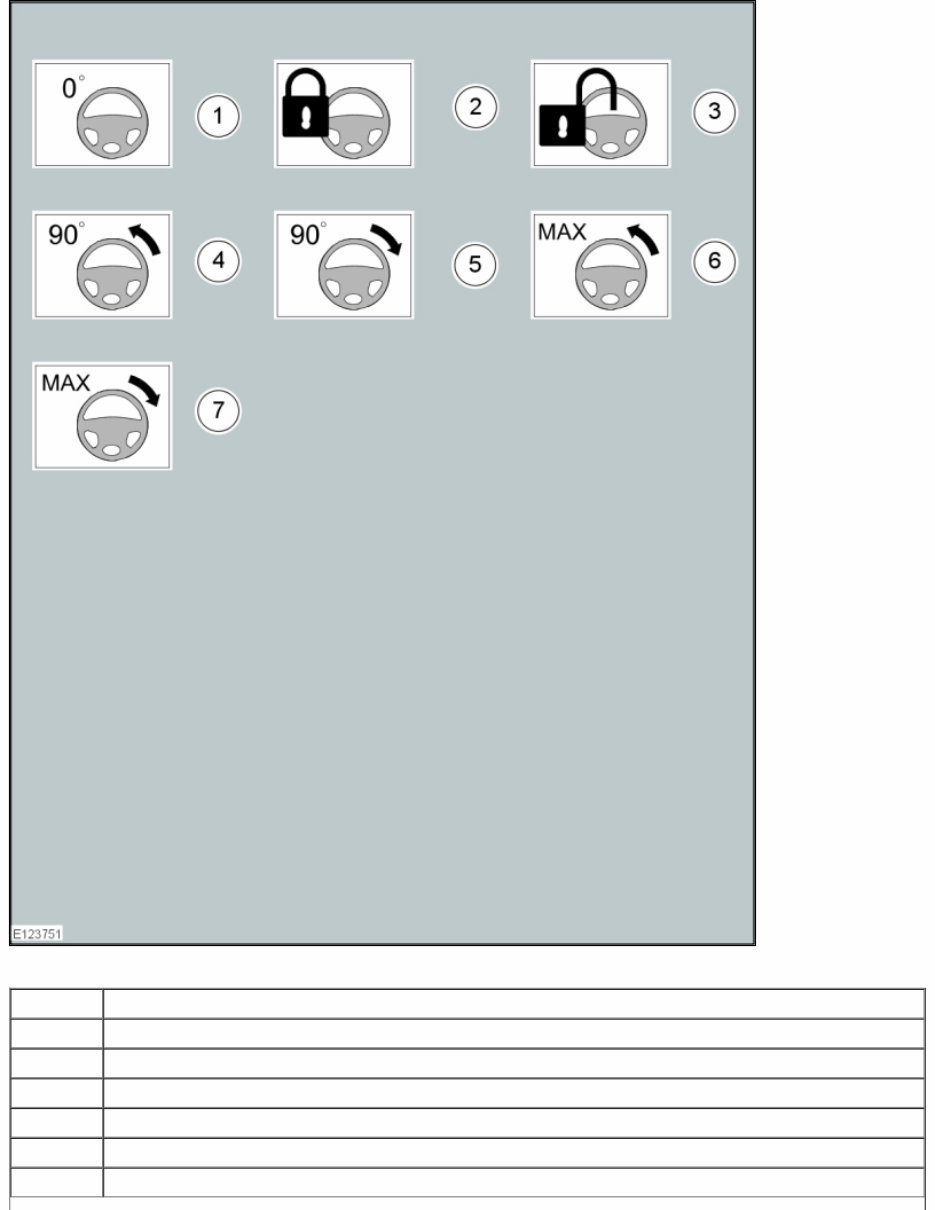
Item Description
1 Steering wheel in straight ahead position
2 Steering column lock locked
3 Steering column lock unlocked
4 Turn the steering wheel to the 90° left position
5 Turn the steering wheel to the 90° right position
6 Turn the steering wheel to the left-hand end position
Item Description
7 Turn the steering wheel to the right-hand end position
Body Types
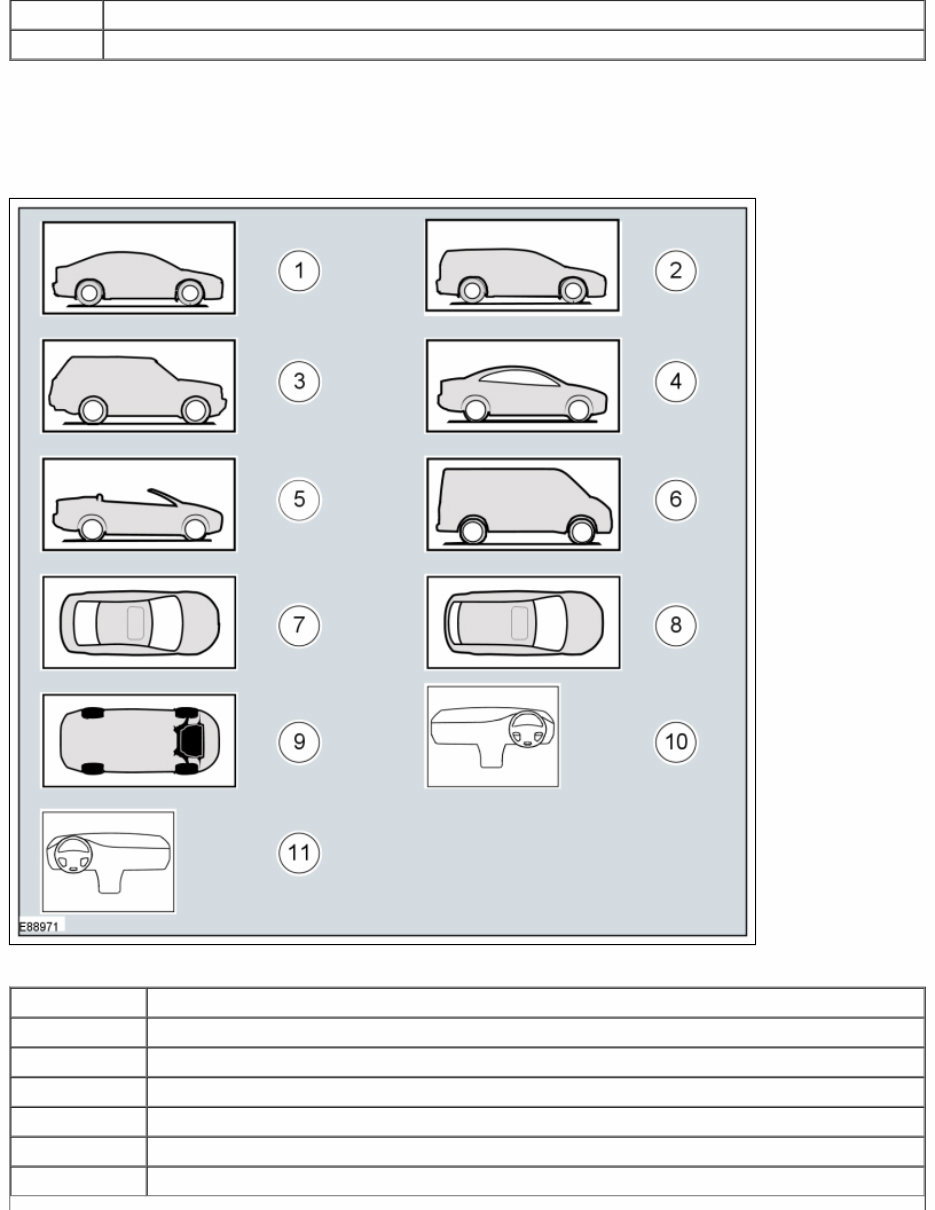
Body type symbols are used to identify different body configurations.
Item Description
1 3, 4, 5-door body style
2 Wagon body style
3 Sport utility vehicle body style
4 Coupe body style
5 Convertible body style
6 Van body style

Item Description
7 3, 4, 5-door body style - Top View
8 Wagon body style - Top View
9 Underbody view
10 Right-hand drive (RHD) vehicle
11 Left-hand drive (LHD) vehicle
Gearshift lever and selector lever position symbols
Gearshift lever and selector lever position symbols are used to show the lever position that is required to be selected to carry
out a procedure step.
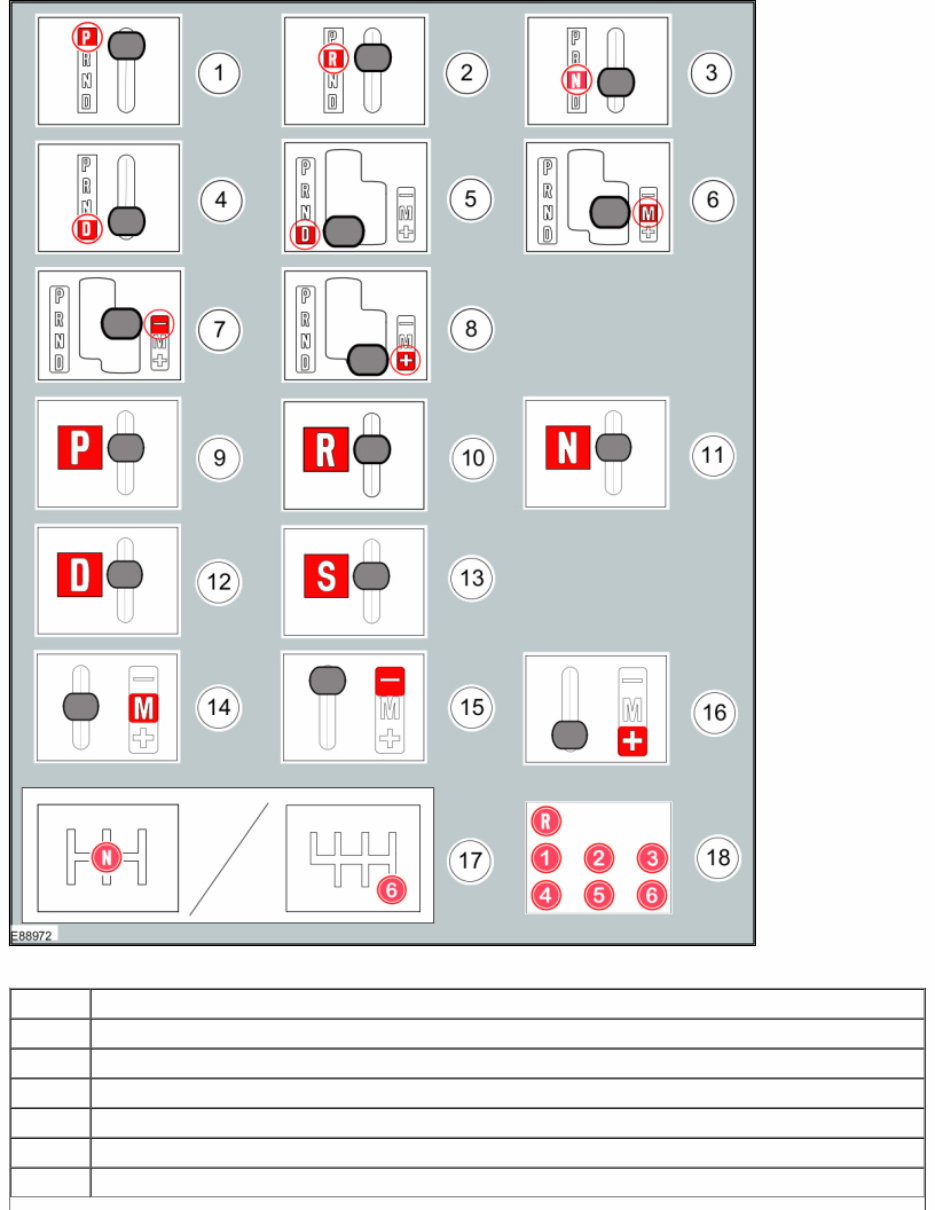
Item Description
1 Replaced by symbol 9
2 Replaced by symbol 10
3 Replaced by symbol 11
4 Replaced by symbol 12
5 Replaced by symbol 12
6 Replaced by symbol 14
Item Description
7 Replaced by symbol 15
8 Replaced by symbol 16
9 Set the selector lever to the park (P) position
10 Set the selector lever to the reverse ( R ) position
11 Set the selector lever to the neutral (N) position
12 Set the selector lever to the drive (D) position
13 Set the selector lever to the drive (S) position
14 Set the selector lever to the drive (M) position
15 Set the selector lever to the drive (-) position
16 Set the selector lever to the drive (+) position
17 Set the gearshift lever to the neutral (N) position
18 Further gearshift lever positions that may appear in Illustrations
Screwdriver symbols
The screwdriver symbols are used to show which screwdriver bit is recommended to carry out a procedure step.
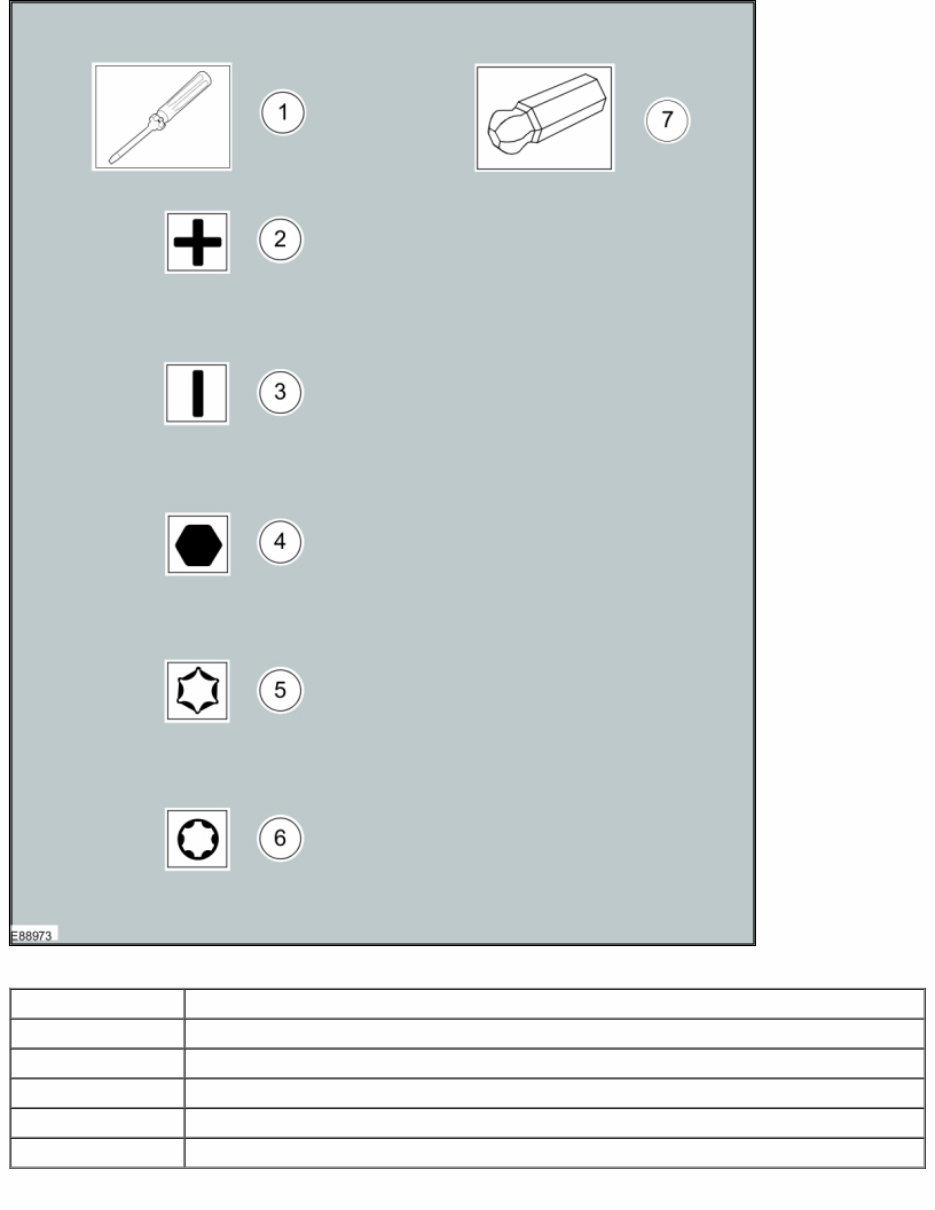
Item Description
1 Screwdriver
2 Cross bladed screwdriver
3 Flat-bladed screwdriver
4 Hexagonal screwdriver
5 TORX screwdriver
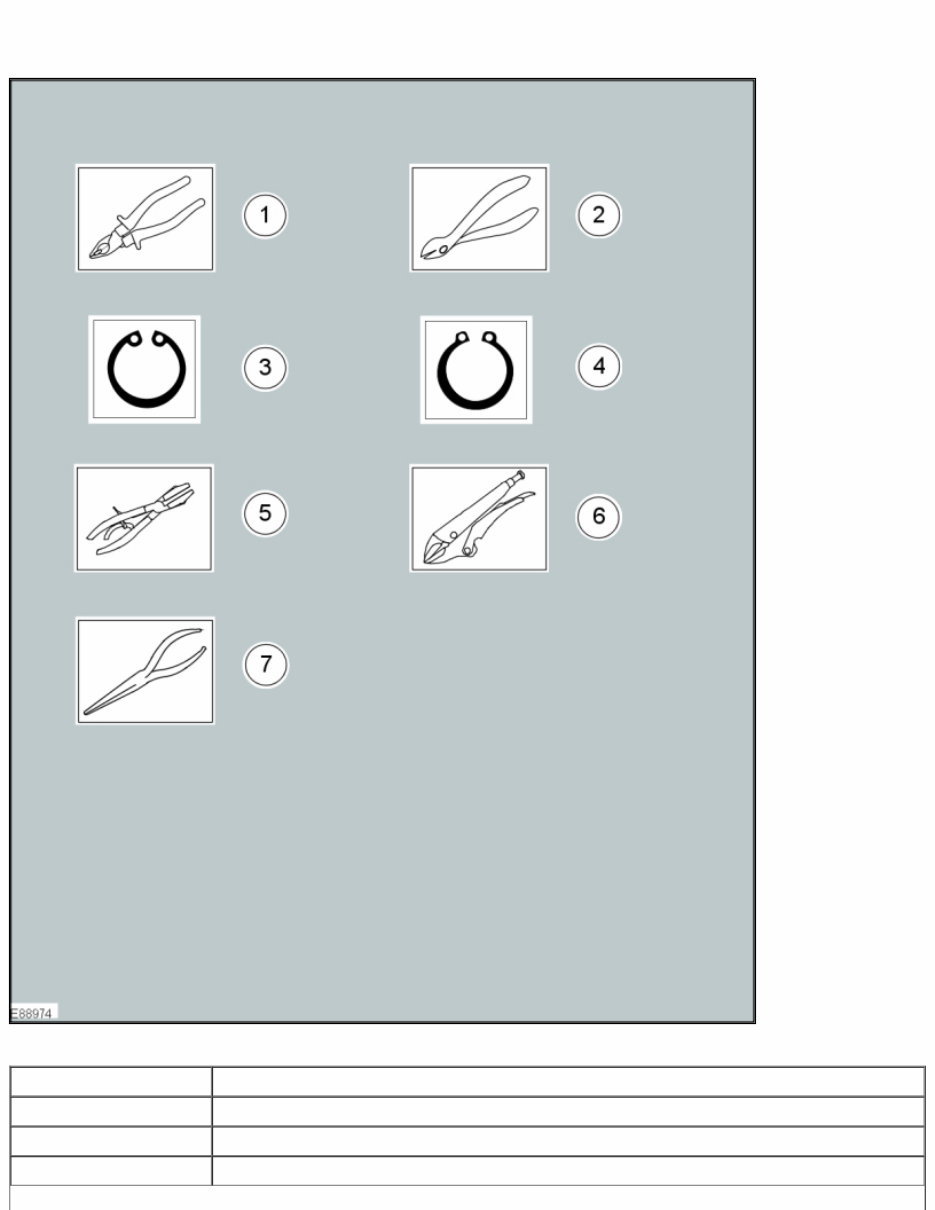
Pliers Symbols
The plier symbols are used to show which pliers is recommended to carry out a procedure step.
Item Description
1 Combination pliers
2 Side cutter pliers
3 Securing ring - inner
You're Reading a Preview
What's Included?
 Lifetime Access
Fast Download Speeds
Online & Offline Access
Access PDF Contents & Bookmarks
Full Search Facility
Print one or all pages of your manual
$31.99
2009 Ford Expedition Service & Repair Manual
Viewed 87 Times Today

What's Included?
Lifetime Access
Fast Download Speeds
Online & Offline Access
Access PDF Contents & Bookmarks
Full Search Facility
Print one or all pages of your manual
$31.99

Secure transaction
What's Included?
Lifetime Access
Fast Download Speeds
Online & Offline Access
Access PDF Contents & Bookmarks
Full Search Facility
Print one or all pages of your manual
Description
The Ford Expedition 2009 Service & Repair Manual is a comprehensive resource designed for both professional mechanics and DIY enthusiasts. This manual provides detailed information on the maintenance, repair, and troubleshooting of the vehicle.
- Extensive coverage of routine maintenance procedures
- In-depth repair instructions for various systems and components
- Technical specifications and diagrams for quick reference
- Step-by-step guides for troubleshooting and resolving common issues
This manual is an essential tool for anyone who needs to work on their Ford Expedition, whether professionally or personally. Its technical language and detailed instructions make it suitable for a wide range of users, from novice DIYers to experienced mechanics.


