


TABLE OF CONTENTS
SECTION PAGE
1
INTRODUCTION ............................................................. 3
2
THINGS TO KNOW BEFORE STARTING YOUR VEHICLE ........................... 7
3
UNDERSTANDING THE FEATURES OF YOUR VEHICLE ............................ 51
4
UNDERSTANDING YOUR INSTRUMENT PANEL ................................. 101
5
STARTING AND OPERATING ................................................ 149
6
WHAT TO DO IN EMERGENCIES ............................................. 175
7
MAINTAINING YOUR VEHICLE .............................................. 187
8
MAINTENANCE SCHEDULES ................................................ 235
9
IF YOU NEED CONSUMER ASSISTANCE ....................................... 251
10
INDEX ................................................................... 261
1
2
3
4
5
6
7
8
9
10


INTRODUCTION
CONTENTS
Introduction ........................... 4
How To Use This Manual ................. 4
Warnings And Cautions .................. 6
Vehicle Identification Number .............. 6
1

INTRODUCTION
This manual has been prepared with the assistance of
service and engineering specialists to acquaint you with
the operation and maintenance of your new vehicle. It is
supplemented by a Warranty Information Booklet and
various customer oriented documents. You are urged to
read these publications carefully. Following the instruc-
tions and recommendations in this manual will help
assure safe and enjoyable operation of your vehicle.
NOTE: After you read the manual, it should be stored
in the vehicle for convenient reference and remain with
the vehicle when sold.
When it comes to service, remember that your manufac-
turers dealer knows your vehicle best, has the factory-
trained technicians and genuine Mopar parts, and is
interested in your satisfaction.
WARNING!
Engine exhaust, some of its constituents, and certain
vehicle components contain or emit chemicals
known to the State of California to cause cancer and
birth defects or other reproductive harm.
HOW TO USE THIS MANUAL
Consult the table of contents to determine which section
contains the information you desire.
The detailed index, at the rear of this manual, contains a
complete listing of all subjects.
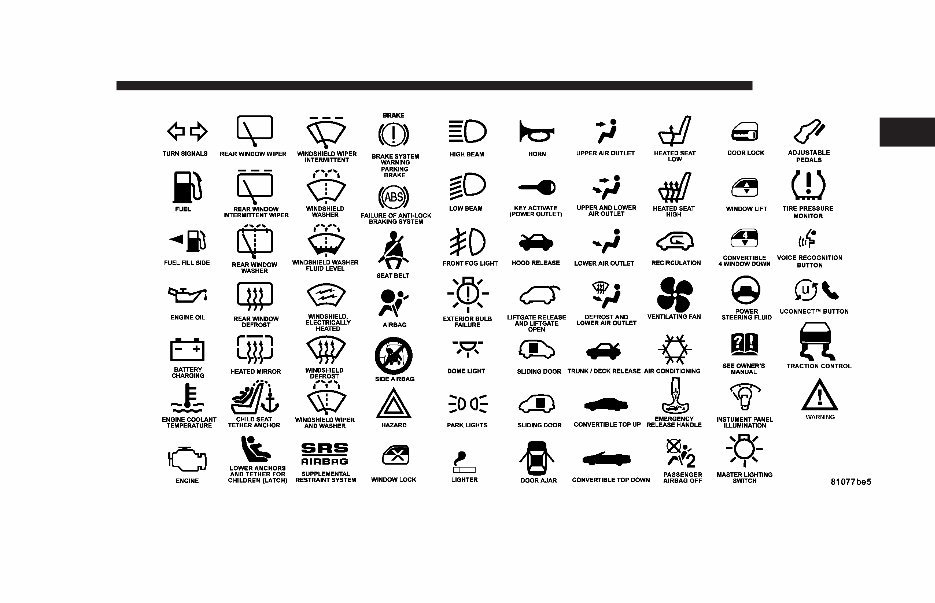
Consult the following table for a description of the
symbols that may be used on your vehicle or throughout
this owner’s manual:
4 INTRODUCTION
INTRODUCTION 5
1
WARNINGS AND CAUTIONS
This manual contains WARNINGS against operating
procedures which could result in an accident or bodily
injury. It also contains CAUTIONS against procedures
which could result in damage to your vehicle. If you do
not read this entire manual you may miss important
information. Observe all Warnings and Cautions.
VEHICLE IDENTIFICATION NUMBER
The vehicle identification number (VIN) is on a stamped
plate at the left front corner of the instrument panel,
visible through the windshield. This number also ap-
pears on the Automobile Information Disclosure Label
affixed to a window on your vehicle. Save this label as a
convenient record of your vehicle identification number
and optional equipment.
6 INTRODUCTION

THINGS TO KNOW BEFORE STARTING YOUR VEHICLE
CONTENTS
A Word About Your Keys ................. 9
▫ Sentry Key Engine Immobilizer — If
Equipped ............................ 9
▫ Ignition Key Removal ...................12
▫ Key-In-Ignition Reminder ................12
▫ Floor Shift Ignition Interlock System .........13
Glove Compartment Lock .................13
Illuminated Entry System .................14
Door Locks ...........................14
▫ Power Door Locks .....................14
▫ Central Locking Feature — If Equipped ......15
▫ “Child-Protection” Lock System (Rear Doors) . .15
▫ Automatic (Rolling) Door Locks ............16
▫ Automatic Unlock On Exit (Only Available If
Automatic Door Locks Enabled) ............18
Remote Keyless Entry ....................18
▫ To Unlock The Doors ...................18
▫ Enable/Disable Lamp Flash ...............19
▫ To Lock The Doors .....................19
▫ Enable/Disable Horn Chirp ...............19
▫ To Unlock The Trunk ....................19
▫ Enable/Disable Trunk Press And Hold .......19
▫ Panic Alarm ..........................20
▫ To Use The Panic Alarm .................20
2

▫ To Program Additional Transmitters .........20
▫ Transmitter Linked To Memory Programming . .21
▫ General Information ....................22
▫ Transmitter Battery Service ...............22
Security Alarm System ...................23
▫ To Set The Alarm ......................23
▫ To Disarm The System ...................24
▫ Security System Manual Override ...........24
Power Windows ........................25
Remote Trunk Lid Release ................25
Trunk Safety Warning ....................26
▫ Trunk Emergency Release ................26
Occupant Restraints .....................27
▫ Lap/Shoulder Belts .....................28
▫ Seat Belts And Pregnant Women ............32
▫ Seat Belt Extender ......................32
▫ Driver And Right Front Passenger Supplemental
Restraint System (SRS) - Airbag ............33
▫ Child Restraint ........................41
Engine Break-In Recommendations ..........48
Safety Tips ............................49
▫ Exhaust Gas ..........................49
▫ Safety Checks You Should Make Inside The
Vehicle ..............................49
▫ Periodic Safety Checks You Should Make
Outside The Vehicle ....................50
8 THINGS TO KNOW BEFORE STARTING YOUR VEHICLE

A WORD ABOUT YOUR KEYS
You can insert the double sided keys into the locks with
either side up.
The dealer that sold you your new vehicle has the key
code numbers for your vehicle locks. These numbers can
be used to order duplicate keys only from your dealer.
Ask your dealer for these numbers and keep them in a
safe place.
CAUTION!
An unlocked car is an invitation to thieves. Always
remove the key from the ignition and lock all the
doors when leaving the vehicle unattended.
Sentry Key Engine Immobilizer — If Equipped
The Sentry Key Immobilizer System prevents unautho-
rized operation of the vehicle by disabling the engine.
The system will shut the engine down after 2 seconds of
running if an invalid key is used to start the vehicle. This
system utilizes ignition keys which have an electronic
chip (transponder) embedded into them. Only keys that
have been programmed to the vehicle can be used to start
and operate the vehicle for more than the two second
validation time period.
The Sentry Key Immobilizer System does not need to be
armed or activated. Operation of the system is automatic
regardless of whether or not the vehicle is locked or
unlocked. During normal operation, the Sentry Key
Indicator light, located on the instrument panel upper
cover, will come on for 3 seconds immediately after the
ignition is turned on for a bulb check. Afterwards, if the
bulb remains on solid, this indicates a problem with the
electronics. If the bulb begins to flash after the bulb check,
this indicates that an invalid key has been used to start
the vehicle or there is a communication failure between
the transponder and the Sentry Key Immobilizer module.
Both of these conditions will result in the engine being
shut down after 2 seconds of running. Keep in mind that
a key which has not been programmed is also considered
an invalid key even if it is cut to fit the ignition for that
vehicle. All of the keys provided with your new vehicle
have been programmed to the vehicle electronics.
THINGS TO KNOW BEFORE STARTING YOUR VEHICLE 9
2

If the Sentry Key Immobilizer System indicator light
comes on during normal vehicle operation (it has been
running for longer than 10 seconds) a fault has been
detected in the electronics and the vehicle should be
serviced as soon as possible.
NOTE:
• The Sentry Immobilizer System is not compatible with
remote starting systems. Use of these systems may
result in vehicle starting problems and loss of security
protection.
• Mobil SpeedPass, additional sentry keys, or any other
transponder equipped components on the same key-
chain will not cause a key-related (transponder)
fault unless the additional part is physically held
against the ignition key being used when starting
the vehicle. Cell phones, pagers, or other RF Elec-
tronics will also not cause interference with this
system.
The Theft Alarm Light, located on top of the instrument
panel, will illuminate for about 3 seconds when the
ignition switch is first turned to the On position. If the
vehicle electronics do not receive a valid signal from the
ignition key, the theft alarm light will flash continuously
to signal that the vehicle has been immobilized. If the
Theft Alarm Light remains On during vehicle operation,
it indicates a fault in the system electronics.
All of the keys provided with your new vehicle have
been programmed to the vehicle electronics.
Important Note about Service
A four digit PIN is needed to service the Sentry Key
Immobilizer System. This number can be obtained by the
dealership. However, this number can also be found on
your customer invoice that you were given upon receipt
of your vehicle. YOU MUST BRING ALL SENTRY KEYS
that are programmed to your vehicle with you when
bringing your vehicle in for service.
Replacement Keys
NOTE: Only keys that have been programmed to the
vehicle electronics can be used to start the vehicle. Once
a Sentry Key has been programmed to a vehicle, it can
not be programmed to any other vehicle.
At the time of purchase, the original owner is provided
with a four digit PIN number. This number is required
10 THINGS TO KNOW BEFORE STARTING YOUR VEHICLE
You're Reading a Preview
What's Included?
 Lifetime Access
Fast Download Speeds
Online & Offline Access
Access PDF Contents & Bookmarks
Full Search Facility
Print one or all pages of your manual
$24.99
2004 Chrysler Concorde Owners Manual
Viewed 88 Times Today

What's Included?
Lifetime Access
Fast Download Speeds
Online & Offline Access
Access PDF Contents & Bookmarks
Full Search Facility
Print one or all pages of your manual
$24.99

Secure transaction
What's Included?
Lifetime Access
Fast Download Speeds
Online & Offline Access
Access PDF Contents & Bookmarks
Full Search Facility
Print one or all pages of your manual
Description
Gain immediate access to this comprehensive manual, available in .PDF format, which is a digital version of the original factory manual. It encompasses all the essential information found in the traditional physical manual, including but not limited to:
- Introduction
- Instrument Cluster
- Entertainment Systems
- Climate Controls
- Lights
- Driver Controls
- Locks and Security
- Seating and Safety Restraints
- Driving
- Customer Assistance
- Reporting safety defects (U.S. only)
- Cleaning
- Maintenance and Specifications
- Engine Compartment
- Engine Oil
- Battery
- Fuel Information
- Air Filter(s)
- Part Numbers
- Refill Capacities
- Lubricant Specifications
- Accessories
To access the manual, you will need a compatible reader such as Acrobat Reader, Foxit, or a similar application. Please note that all designated trademarks and brands mentioned are the property of their respective owners.


