2010 Chevrolet Traverse Owner Manual M In Brief ........................ 1-1 Instrument Panel .............. 1-2 Initial Drive Information ........ 1-4 Vehicle Features ............. 1-15 Performance and Maintenance ................ 1-20 Keys, Doors and Windows ... 2-1 Keys and Locks ............... 2-2 Doors .......................... 2-9 Vehicle Security .............. 2-13 Exterior Mirrors ............... 2-16 Interior Mirrors ................ 2-19 Windows ..................... 2-20 Roof .......................... 2-23 Seats and Restraints ......... 3-1 Head Restraints ............... 3-2 Front Seats .................... 3-3 Rear Seats ................... 3-10 Safety Belts .................. 3-15 Airbag System ................ 3-32 Child Restraints .............. 3-47 Storage ....................... 4-1 Storage Compartments ........ 4-1 Additional Storage Features . . . 4-3 Roof Rack System ............. 4-4 Instruments and Controls .... 5-1 Controls ....................... 5-2 Warning Lights, Gages, and Indicators ................... 5-10 Information Displays .......... 5-22 Vehicle Messages ............ 5-31 Vehicle Personalization ....... 5-40 Universal Remote System .... 5-47 Lighting ....................... 6-1 Exterior Lighting ............... 6-1 Interior Lighting ................ 6-4 Lighting Features .............. 6-5 Infotainment System ......... 7-1 Introduction .................... 7-1 Radio .......................... 7-7 Audio Players ................ 7-13 Rear Seat Infotainment ....... 7-37 Phone ........................ 7-48 Climate Controls ............. 8-1 Climate Control Systems .... . . 8-1 Air Vents ..................... 8-12 Driving and Operating ........ 9-1 Driving Information ............. 9-2 Starting and Operating ....... 9-15 Engine Exhaust .............. 9-21 Automatic Transmission ...... 9-22 Drive Systems ................ 9-25 Brakes ....................... 9-25 Ride Control Systems ........ 9-27 Cruise Control ................ 9-30 Object Detection Systems .... 9-32 Fuel .......................... 9-38 Towing ....................... 9-43 Conversions and Add-Ons . . . 9-53 Vehicle Care ................. 10-1 General Information .......... 10-2 Vehicle Checks ............... 10-4 Headlamp Aiming ........... 10-27 Bulb Replacement .......... 10-27 Electrical System ............ 10-29
2010 Chevrolet Traverse Owner Manual M Wheels and Tires ........... 10-36 Jump Starting ............... 10-78 Towing ...................... 10-82 Appearance Care ........... 10-86 Service and Maintenance ... 11-1 General Information .......... 11-1 Scheduled Maintenance ...... 11-2 Recommended Fluids, Lubricants, and Parts ....... 11-7 Maintenance Records ....... 11-10 Technical Data ............... 12-1 Vehicle Identification ......... 12-1 Vehicle Data .................. 12-2 Customer Information ....... 13-1 Customer Information ........ 13-1 Reporting Safety Defects .... 13-14 Vehicle Data Recording and Privacy ............... 13-15 Index ..................... i-1
iv Introduction Using this Manual To quickly locate information about the vehicle, use the Index in the back of the manual. It is an alphabetical list of what is in the manual and the page number where it can be found. Danger, Warnings, and Cautions Warning messages found on vehicle labels and in this manual describe hazards and what to do to avoid or reduce them. Danger indicates a hazard with a high level of risk which will result in serious injury or death. Warning or Caution indicates a hazard that could result in injury or death. { WARNING These mean there is something that could hurt you or other people. Notice: This means there is something that could result in property or vehicle damage. This would not be covered by the vehicle's warranty. A circle with a slash through it is a safety symbol which means “Do Not,”“Do not do this” or “Do not let this happen.” Symbols The vehicle has components and labels that use symbols instead of text. Symbols are shown along with the text describing the operation or information relating to a specific component, control, message, gage, or indicator. M : This symbol is shown when you need to see your owner manual for additional instructions or information. * : This symbol is shown when you need to see a service manual for additional instructions or information.
Introduction v Vehicle Symbol Chart Here are some additional symbols that may be found on the vehicle and what they mean. For more information on the symbol, refer to the index. 9 : Airbag Readiness Light # : Air Conditioning ! : Antilock Brake System (ABS) g : Audio Steering Wheel Controls or OnStar ® $ : Brake System Warning Light " : Charging System I : Cruise Control B : Engine Coolant Temperature O : Exterior Lamps # : Fog Lamps . : Fuel Gage + : Fuses i : Headlamp High/Low-Beam Changer j : LATCH System Child Restraints * : Malfunction Indicator Lamp : : Oil Pressure } : Power / : Remote Vehicle Start > : Safety Belt Reminders 7 : Tire Pressure Monitor F : Traction Control M : Windshield Washer Fluid
vi Introduction 2 NOTES
In Brief 1-1 In Brief Instrument Panel Instrument Panel .............. 1-2 Initial Drive Information Initial Drive Information ........ 1-4 Remote Keyless Entry (RKE) System ...................... 1-4 Remote Vehicle Start ......... 1-5 Door Locks ................... 1-5 Liftgate ........................ 1-5 Windows ...................... 1-6 Seat Adjustment .............. 1-6 Second Row Seats ........... 1-7 Third Row Seats .............. 1-7 Heated Seats ................. 1-8 Heated and Ventilated Seats ........................ 1-8 Head Restraint Adjustment .... 1-8 Safety Belt .................... 1-8 Sensing System for Passenger Airbag ....................... 1-9 Mirror Adjustment ............. 1-9 Steering Wheel Adjustment ................. 1-10 Interior Lighting .............. 1-11 Exterior Lighting ............. 1-12 Windshield Wiper/Washer .... 1-12 Climate Controls ............. 1-13 Vehicle Features Radio(s) ..................... 1-15 Satellite Radio ............... 1-16 Portable Audio Devices ...... 1-16 Bluetooth ® ................... 1-16 Steering Wheel Controls ..... 1-17 Navigation System ........... 1-17 Driver Information Center (DIC) (With DIC Buttons) . . . 1-18 Cruise Control ............... 1-18 Storage Compartments ...... 1-19 Power Outlets ............... 1-19 Sunroof ...................... 1-20 Performance and Maintenance StabiliTrak ® .................. 1-20 Tire Pressure Monitor ........ 1-21 Tire Sealant and Compressor Kit ............. 1-21 Engine Oil Life System .... . . 1-21 Driving for Better Fuel Economy ................... 1-22 Roadside Assistance Program .................... 1-23 OnStar ® ..................... 1-23
1-2 In Brief Instrument Panel
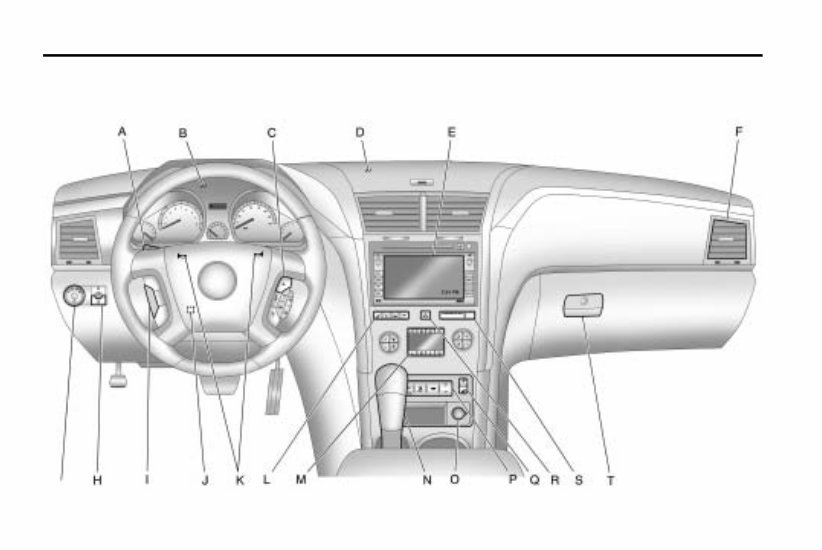
In Brief 1-3 A. Windshield Wiper/Washer on page 5 ‑ 5 . B. Instrument Cluster on page 5‑ 11. C. Steering Wheel Controls on page 5 ‑ 3 . D. Instrument Panel Storage on page 4 ‑ 1 . E. AM-FM Radio on page 7‑7. F. Air Vents on page 8‑12. G. Exterior Lamp Controls on page 6 ‑ 1 . H. Instrument Panel Illumination Control on page 6‑4. I. Cruise Control on page 9‑30. J. Steering Wheel Adjustment on page 5 ‑ 2 . K. Horn on page 5‑5. L. Driver Information Center (DIC) Buttons. See Driver Information Center (DIC) (With DIC Buttons) on page 5‑ 22 or Driver Information Center (DIC) (Without DIC Buttons) on page 5‑ 28. M. Climate Control Systems on page 8 ‑ 1 or Dual Automatic Climate Control System on page 8 ‑ 4 . N. Shift Lever. See Shifting Into Park on page 9‑19. O. Power Outlets on page 5‑9. P. Rear Window Wiper/Washer on page 5 ‑ 6 . Traction Control System (TCS) Disable Button. See StabiliTrak System on page 9‑ 27. Tow/Haul Mode on page 9‑ 24 (If Equipped) . Power Liftgate. See Liftgate on page 2 ‑ 9 (If Equipped). Q. Heated Front Seats on page 3 ‑ 9 . R. Hazard Warning Flashers on page 6 ‑ 3 . S. Passenger Airbag Status Indicator on page 5‑ 15 (If Equipped). T. Glove Box on page 4‑1.
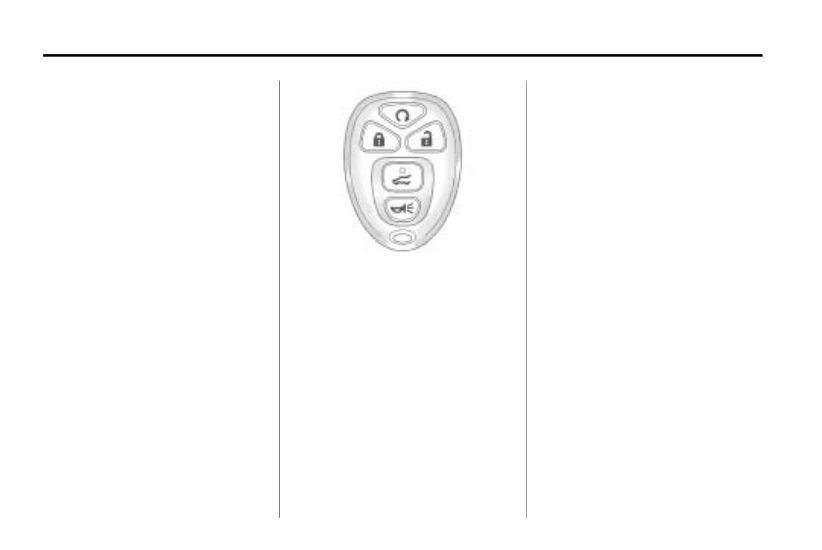
1-4 In Brief Initial Drive Information This section provides a brief overview about some of the important features that may or may not be on your specific vehicle. For more detailed information, refer to each of the features which can be found later in this owner manual. Remote Keyless Entry (RKE) System The RKE transmitter is used to remotely lock and unlock the doors from up to 60 m (195 feet) away from the vehicle. Press K to unlock the driver door. Press K again within five seconds to unlock all remaining doors. Press Q to lock all doors. Lock and unlock feedback can be personalized. To open or close the liftgate, press and hold & until the liftgate begins to move. Press L and release to locate the vehicle. Press L and hold for more than two seconds to sound the panic alarm. Press L again to cancel the panic alarm. See Remote Keyless Entry (RKE) System Operation on page 2‑3.
Introducing the 2010 Chevrolet Traverse Owners Manual!
Discover the essential guide that every owner of a 2010 Chevrolet Traverse needs to navigate their way through the ins and outs of this exceptional vehicle. Whether you are a new owner or have been cruising in your Traverse for some time, this comprehensive manual is designed to provide you with the knowledge and support you need.
Inside the 2010 Chevrolet Traverse Owners Manual, you will find:
An introduction to the Chevrolet Traverse and its features
Important information about vehicle maintenance and care
Tips for optimizing performance and fuel efficiency
Instructions on how to operate various systems and components
A comprehensive troubleshooting guide
Useful diagrams and illustrations to aid understanding
With this manual by your side, you can confidently tackle any challenge that may arise with your 2010 Chevrolet Traverse. Whether it's troubleshooting a technical issue or simply getting to know your vehicle better, this manual has got you covered.
Invest in the 2010 Chevrolet Traverse Owners Manual today and unlock a world of knowledge that will enhance your ownership experience!









 Lifetime Access




