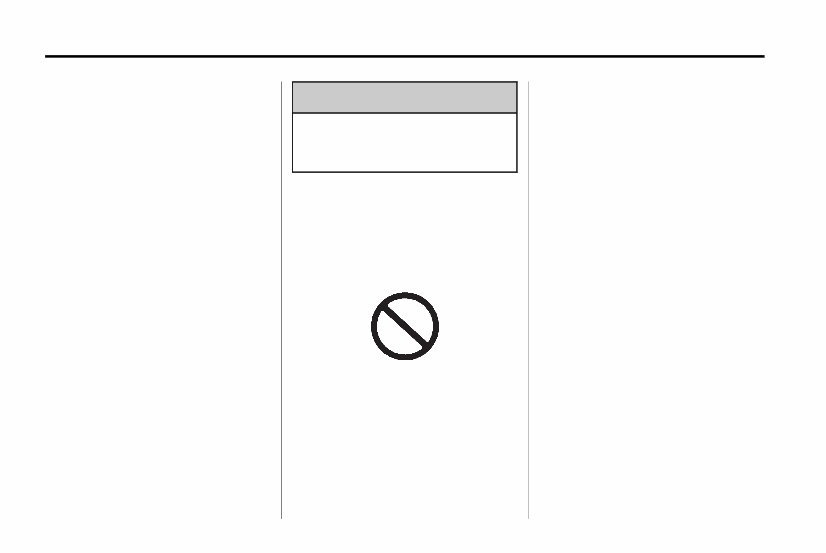
iv Introduction Using this Manual To quickly locate information about the vehicle, use the Index in the back of the manual. It is an alphabetical list of what is in the manual and the page number where it can be found. Danger, Warnings, and Cautions Warning messages found on vehicle labels and in this manual describe hazards and what to do to avoid or reduce them. Danger indicates a hazard with a high level of risk which will result in serious injury or death. Warning or Caution indicates a hazard that could result in injury or death. { WARNING These mean there is something that could hurt you or other people. Notice: This means there is something that could result in property or vehicle damage. This would not be covered by the vehicle's warranty. A circle with a slash through it is a safety symbol which means “Do Not,”“Do not do this,” or “Do not let this happen.” Symbols The vehicle has components and labels that use symbols instead of text. Symbols are shown along with the text describing the operation or information relating to a specific component, control, message, gauge, or indicator. M : This symbol is shown when you need to see your owner manual for additional instructions or information. * : This symbol is shown when you need to see a service manual for additional instructions or information.
Introduction v Vehicle Symbol Chart Here are some additional symbols that may be found on the vehicle and what they mean. For more information on the symbol, refer to the Index. 9 : Airbag Readiness Light # : Air Conditioning ! : Antilock Brake System (ABS) % : Audio Steering Wheel Controls or OnStar ® $ : Brake System Warning Light " : Charging System I : Cruise Control B : Engine Coolant Temperature O : Exterior Lamps # : Fog Lamps . : Fuel Gauge + : Fuses 3 : Headlamp High/Low-Beam Changer j : LATCH System Child Restraints * : Malfunction Indicator Lamp : : Oil Pressure } : Power / : Remote Vehicle Start > : Safety Belt Reminders 7 : Tire Pressure Monitor d : Traction Control M : Windshield Washer Fluid
vi Introduction 2 NOTES
In Brief 1-1 In Brief Instrument Panel Instrument Panel Overview .... 1-2 Initial Drive Information Initial Drive Information ........ 1-4 Remote Keyless Entry (RKE) System ...................... 1-4 Remote Vehicle Start ......... 1-5 Door Locks ................... 1-6 Seat Adjustment .............. 1-6 Heated Seats ................. 1-8 Head Restraint Adjustment .... 1-9 Safety Belts ................... 1-9 Sensing System for Passenger Airbag ....................... 1-9 Mirror Adjustment ............ 1-10 Steering Wheel Adjustment ................. 1-11 Interior Lighting .............. 1-11 Exterior Lighting ............. 1-12 Windshield Wiper/Washer .... 1-13 Climate Controls ............. 1-13 Transmission ................ 1-14 Vehicle Features Radio(s) ..................... 1-15 Satellite Radio ............... 1-16 Portable Audio Devices ...... 1-16 Bluetooth ® ................... 1-16 Steering Wheel Controls ..... 1-17 Cruise Control ............... 1-17 Navigation System ........... 1-18 Driver Information Center (DIC) ............... 1-18 Power Outlets ............... 1-18 Performance and Maintenance Traction Control System (TCS) .............. 1-19 StabiliTrak ® System ......... 1-19 Tire Pressure Monitor ........ 1-19 Tire Sealant and Compressor Kit ............. 1-20 Engine Oil Life System .... . . 1-20 Driving for Better Fuel Economy ................... 1-21 Roadside Assistance Program .................... 1-21 OnStar ® ..................... 1-22
1-2 In Brief Instrument Panel Instrument Panel Overview
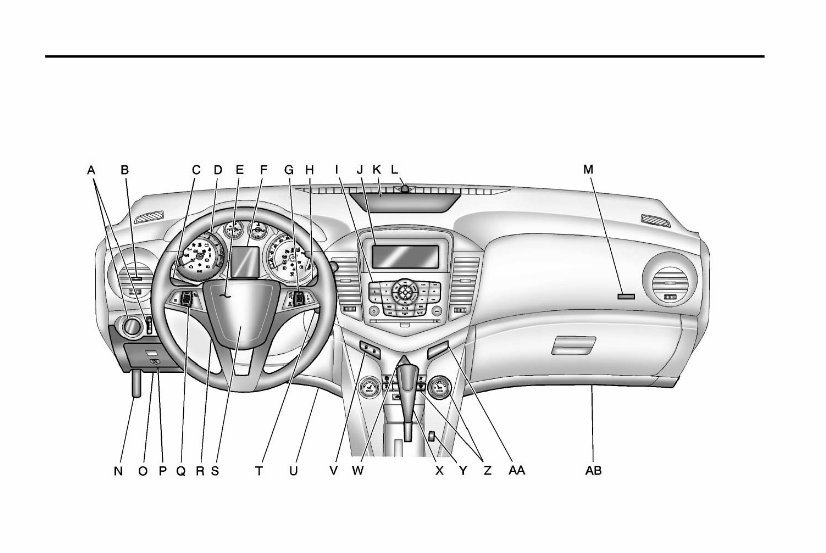
In Brief 1-3 A. Exterior Lamp Controls on page 6‑1. Front Fog Lamps on page 6‑4 (If Equipped). Instrument Panel Illumination Control on page 6‑5. B. Air Vents on page 8‑6. C. Headlamp High/Low-Beam Changer on page 6‑2. Turn and Lane‐Change Lever. See Turn and Lane-Change Signals on page 6‑4. Driver Information Center (DIC) Buttons. See Driver Information Center (DIC) on page 5‑23. D. Instrument Cluster on page 5‑8. E. Horn on page 5‑3. F. Driver Information Center (DIC) on page 5‑23. G. Steering Wheel Controls on page 5‑2. H. Windshield Wiper/Washer on page 5‑3. I. Infotainment on page 7‑1. Satellite Radio on page 7‑13 (If Equipped). J. Infotainment Display Screen. K. Instrument Panel Storage on page 4‑1. L. Light Sensor. See Automatic Headlamp System on page 6‑3. M. Passenger Airbag. See Where Are the Airbags? on page 3‑28. N. Hood Release. See Hood on page 10‑4. O. Data Link Connector (DLC) (Out of View). See Malfunction Indicator Lamp on page 5‑13. P. Instrument Panel Fuse Block on page 10‑38. Q. Cruise Control on page 9‑35. R. Steering Wheel Adjustment on page 5‑2. S. Driver Airbag. See Where Are the Airbags? on page 3‑28. T. Ignition Switch. See Ignition Positions on page 9‑16. U. Driver Knee Airbag. See Where Are the Airbags? on page 3‑28. V. Power Door Locks on page 2‑7. W. Hazard Warning Flashers on page 6‑4. X. Shift Lever. See Automatic Transmission on page 9‑25 or Manual Transmission on page 9‑28.
1-4 In Brief Y. Traction Control System (TCS) on page 9‑32. StabiliTrak ® System on page 9‑33. Z. Climate Control Systems on page 8‑1 (If Equipped). Automatic Climate Control System on page 8‑3 (If Equipped). Heated Front Seats on page 3‑7 (If Equipped). AA. Passenger Airbag Status Indicator on page 5‑12. AB. Passenger Knee Airbag. See Where Are the Airbags? on page 3‑28. Initial Drive Information This section provides a brief overview about some of the important features that may or may not be on your specific vehicle. For more detailed information, refer to each of the features which can be found later in this owner manual. Remote Keyless Entry (RKE) System The Remote Keyless Entry (RKE) transmitter will work up to 20 m (65 ft) away from the vehicle. RKE Transmitter with Remote Start Shown Press the key release button to extend the key blade. The key can be used for the ignition and all locks. Press K to unlock the driver door or all doors. Press Q to lock all doors. Lock and unlock feedback can be personalized. See Vehicle Personalization on page 5‑33.
The 2011 CHEVY / CHEVROLET Cruze Owners Manual is a comprehensive guide that provides essential information for owners of the Chevy Cruze. Whether you're a new owner or have been driving your Cruze for years, this manual is a valuable resource that will help you get the most out of your vehicle.
Designed specifically for the 2011 Chevy Cruze, this manual covers all aspects of the vehicle, from basic maintenance to advanced troubleshooting. It includes detailed instructions, diagrams, and illustrations to assist you in understanding and caring for your Cruze.
Some of the key features of the 2011 CHEVY / CHEVROLET Cruze Owners Manual include:
Overview of vehicle controls and features
Proper maintenance and routine servicing
Fluids and capacities
Electrical system and wiring diagrams
Troubleshooting guide for common issues
Step-by-step instructions for repairs and replacements
Important safety information and precautions
With this manual, you'll have all the information you need to properly care for your 2011 Chevy Cruze. Whether you're a DIY enthusiast or prefer to rely on a mechanic, having this manual on hand will save you time and money by providing accurate and detailed instructions.
Invest in the 2011 CHEVY / CHEVROLET Cruze Owners Manual today and ensure that you have the knowledge and resources to keep your Cruze running smoothly for years to come.










 Lifetime Access




