


2011 CHEVY / CHEVROLET Camaro Owners Manual
What's Included?
 Lifetime Access
Fast Download Speeds
Online & Offline Access
Access PDF Contents & Bookmarks
Full Search Facility
Print one or all pages of your manual

2011 Chevrolet Camaro Owner Manual M
In Brief ........................ 1-1
Instrument Panel .............. 1-2
Initial Drive Information ........ 1-4
Vehicle Features ............. 1-12
Performance and
Maintenance ................ 1-18
Keys, Doors and Windows ... 2-1
Keys and Locks ............... 2-2
Doors .......................... 2-9
Vehicle Security .............. 2-10
Exterior Mirrors ............... 2-13
Interior Mirrors ................ 2-14
Windows ..................... 2-15
Roof .......................... 2-17
Seats and Restraints ......... 3-1
Head Restraints ............... 3-2
Front Seats .................... 3-3
Rear Seats .................... 3-7
Safety Belts .................... 3-8
Airbag System ................ 3-23
Child Restraints .............. 3-39
Storage ....................... 4-1
Storage Compartments ........ 4-1
Additional Storage Features . . . 4-1
Instruments and Controls .... 5-1
Controls ....................... 5-2
Warning Lights, Gauges, and
Indicators .................... 5-6
Information Displays .......... 5-25
Vehicle Messages ............ 5-34
Vehicle Personalization ....... 5-42
Universal Remote System .... 5-46
Lighting ....................... 6-1
Exterior Lighting ............... 6-1
Interior Lighting ................ 6-6
Lighting Features .............. 6-6
Infotainment System ......... 7-1
Introduction .................... 7-1
Radio .......................... 7-8
Audio Players ................ 7-14
Phone ........................ 7-23
Climate Controls ............. 8-1
Climate Control Systems .... . . 8-1
Air Vents ....................... 8-4
Driving and Operating ........ 9-1
Driving Information ............. 9-2
Starting and Operating ....... 9-18
Engine Exhaust .............. 9-28
Automatic Transmission ...... 9-30
Manual Transmission ......... 9-34
Brakes ....................... 9-36
Ride Control Systems ........ 9-38
Cruise Control ................ 9-43
Object Detection Systems .... 9-46
Fuel .......................... 9-48
Towing ....................... 9-53
Conversions and Add-Ons . . . 9-60
Vehicle Care ................. 10-1
General Information .......... 10-2
Vehicle Checks ............... 10-4
Headlamp Aiming ........... 10-35
Bulb Replacement .......... 10-38
Electrical System ............ 10-43
Wheels and Tires ........... 10-50
Jump Starting ............... 10-91
Towing ...................... 10-95
Appearance Care ........... 10-95

2011 Chevrolet Camaro Owner Manual M
Service and Maintenance ... 11-1
General Information .......... 11-1
Scheduled Maintenance ...... 11-2
Recommended Fluids,
Lubricants, and Parts ....... 11-7
Maintenance Records ....... 11-10
Technical Data ............... 12-1
Vehicle Identification ......... 12-1
Vehicle Data .................. 12-2
Customer Information ....... 13-1
Customer Information ........ 13-1
Reporting Safety Defects .... 13-16
Vehicle Data Recording and
Privacy .................... 13-17
Index ..................... i-1
Introduction iii
The names, logos, emblems,
slogans, vehicle model names,
and vehicle body designs appearing
in this manual including, but not
limited to, GM, the GM logo,
CHEVROLET, the CHEVROLET
Emblem, CAMARO, and the
CAMARO Emblem are trademarks
and/or service marks of General
Motors LLC, its subsidiaries,
affiliates, or licensors.
This manual describes features
that may or may not be on your
specific vehicle either because
they are options that you did
not purchase, or due to changes
subsequent to the printing of this
owner manual. Please refer to the
purchase documentation relating
to your specific vehicle to confirm
each of the features found on
your vehicle. For vehicles first
sold in Canada, substitute the
name “General Motors of Canada
Limited” for Chevrolet Motor Division
wherever it appears in this manual.
Keep this manual in the vehicle for
quick reference.
Canadian Vehicle Owners
Propriétaires Canadiens
A French language copy of this
manual can be obtained from your
dealer or from:
On peut obtenir un exemplaire de
ce guide en français auprès du
concessionnaire ou à l'adresse
suivante:
Helm, Incorporated
P.O. Box 07130
Detroit, MI 48207
1-800-551-4123
Numéro de poste 6438 de langue
française
www.helminc.com
Litho in U.S.A.
Part No. 22758699 B Second Printing
©
2010 General Motors LLC. All Rights Reserved.
iv Introduction
Using this Manual
To quickly locate information
about the vehicle, use the Index
in the back of the manual. It is an
alphabetical list of what is in the
manual and the page number
where it can be found.
Danger, Warnings, and
Cautions
Warning messages found on vehicle
labels and in this manual describe
hazards and what to do to avoid or
reduce them.
Danger indicates a hazard with a
high level of risk which will result in
serious injury or death.
Warning or Caution indicates a
hazard that could result in injury
or death.
{ WARNING
These mean there is something
that could hurt you or other
people.
Notice: This means there is
something that could result
in property or vehicle damage.
This would not be covered by
the vehicle's warranty.
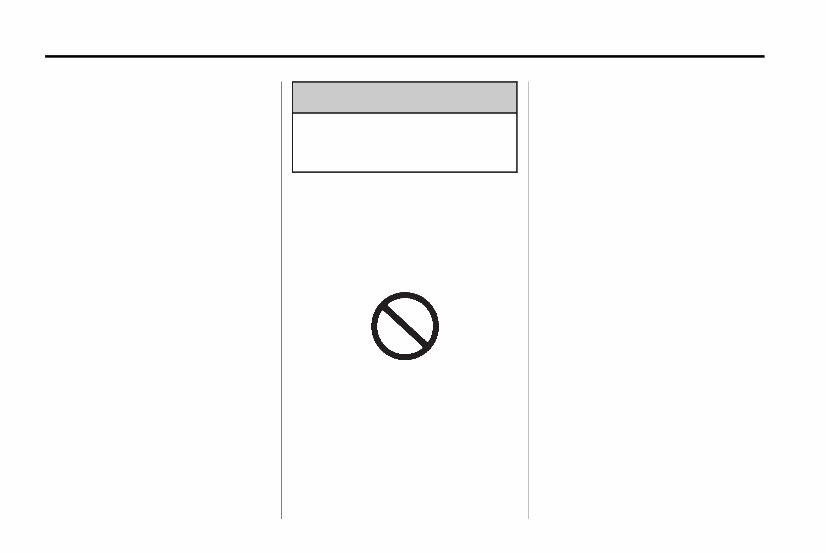
A circle with a slash through it
is a safety symbol which means
“Do Not,”“Do not do this,” or
“Do not let this happen.”
Symbols
The vehicle has components and
labels that use symbols instead of
text. Symbols are shown along with
the text describing the operation or
information relating to a specific
component, control, message,
gauge, or indicator.
M : This symbol is shown when
you need to see your owner manual
for additional instructions or
information.
* : This symbol is shown when
you need to see a service manual
for additional instructions or
information.

Introduction v
Vehicle Symbol Chart
Here are some additional symbols
that may be found on the vehicle
and what they mean. For more
information on the symbol, refer
to the Index.
9 : Airbag Readiness Light
# : Air Conditioning
! : Antilock Brake System (ABS)
g : Audio Steering Wheel Controls
or OnStar
®
$ : Brake System Warning Light
" : Charging System
I : Cruise Control
B : Engine Coolant Temperature
O : Exterior Lamps
# : Fog Lamps
. : Fuel Gauge
+ : Fuses
3 : Headlamp High/Low-Beam
Changer
j : LATCH System Child
Restraints
* : Malfunction Indicator Lamp
: : Oil Pressure
} : Power
/ : Remote Vehicle Start
> : Safety Belt Reminders
7 : Tire Pressure Monitor
d : Traction Control
M : Windshield Washer Fluid

vi Introduction
2 NOTES

In Brief 1-1
In Brief
Instrument Panel
Instrument Panel .............. 1-2
Initial Drive Information
Initial Drive Information ........ 1-4
Remote Keyless Entry (RKE)
System ...................... 1-4
Remote Vehicle Start ......... 1-5
Door Locks ................... 1-5
Trunk Release ................ 1-6
Seat Adjustment .............. 1-6
Heated Seats ................. 1-7
Head Restraint Adjustment .... 1-7
Safety Belts ................... 1-7
Sensing System for Passenger
Airbag ....................... 1-8
Mirror Adjustment ............. 1-8
Steering Wheel Adjustment . . . 1-9
Interior Lighting ............... 1-9
Exterior Lighting .............. 1-9
Windshield Wiper/Washer .... 1-10
Climate Controls ............. 1-11
Transmission ................ 1-11
Vehicle Features
Radio(s) ..................... 1-12
Satellite Radio ............... 1-13
Portable Audio Devices ...... 1-14
Bluetooth
®
................... 1-14
Steering Wheel Controls ..... 1-14
Cruise Control ............... 1-15
Driver Information
Center (DIC) ............... 1-15
Vehicle Personalization ...... 1-16
Ultrasonic Parking Assist .... 1-16
Power Outlets ............... 1-16
Universal Remote System . . . 1-17
Sunroof ...................... 1-17
Performance and Maintenance
Traction Control
System (TCS) .............. 1-18
StabiliTrak
®
System ......... 1-18
Towing ....................... 1-18
Tire Pressure Monitor ........ 1-18
Tire Sealant and
Compressor Kit ............. 1-19
Engine Oil Life System .... . . 1-19
Driving for Better Fuel
Economy ................... 1-19
Roadside Assistance
Program .................... 1-20
OnStar
®
..................... 1-20
1-2 In Brief
Instrument Panel

In Brief 1-3
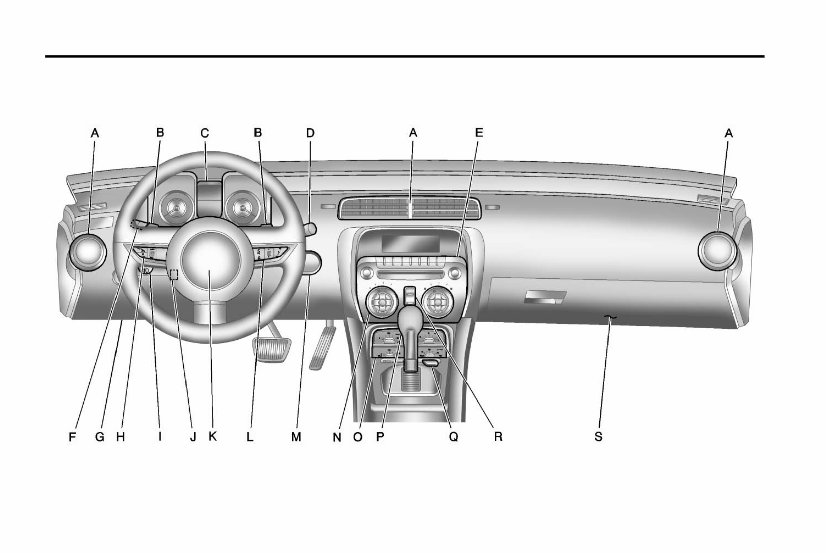
A. Air Vents on page 8‑4.
B. Driver Shift Controls
(If Equipped). See Automatic
Transmission on page 9‑30.
C. Instrument Cluster on page 5‑7.
D. Windshield Wiper/Washer on
page 5‑3.
E. Infotainment on page 7‑1.
F. Turn and Lane‐Change Lever.
See Turn and Lane-Change
Signals on page 6‑5.
Headlamp High/Low-Beam
Changer on page 6‑2.
Flash-to-Pass on page 6‑3.
Driver Information Center
(DIC) Buttons (If Equipped).
See Driver Information Center
(DIC) on page 5‑25.
G. Data Link Connector (DLC)
(Out of View). See Malfunction
Indicator Lamp on page 5‑18.
H. Cruise Control on page 9‑43.
I. Exterior Lamp Controls on
page 6‑1.
Front Fog Lamps on page 6‑5
(If Equipped).
Instrument Panel Illumination
Control on page 6‑6.
J. Steering Wheel Adjustment on
page 5‑2.
K. Horn on page 5‑3.
L. Steering Wheel Controls on
page 5‑2.
M. Head-Up Display (HUD) on
page 5‑29 (If Equipped).
N. Climate Control Systems on
page 8‑1.
O. Transmission Temperature
Gauge on page 5‑12.
Voltmeter Gauge on page 5‑13.
Engine Oil Temperature Gauge
on page 5‑11.
Engine Oil Pressure Gauge on
page 5‑9.
P. Shift Lever. See Shifting Into
Park (Automatic Transmission)
on page 9‑24.
Q. Power Outlets on page 5‑5.
R. Hazard Warning Flashers on
page 6‑5.
Power Door Locks on page 2‑8.
S. Glove Box on page 4‑1.
1-4 In Brief
Initial Drive
Information
This section provides a brief
overview about some of the
important features that may or may
not be on your specific vehicle.
For more detailed information, refer
to each of the features which can be
found later in this owner manual.
Remote Keyless
Entry (RKE) System
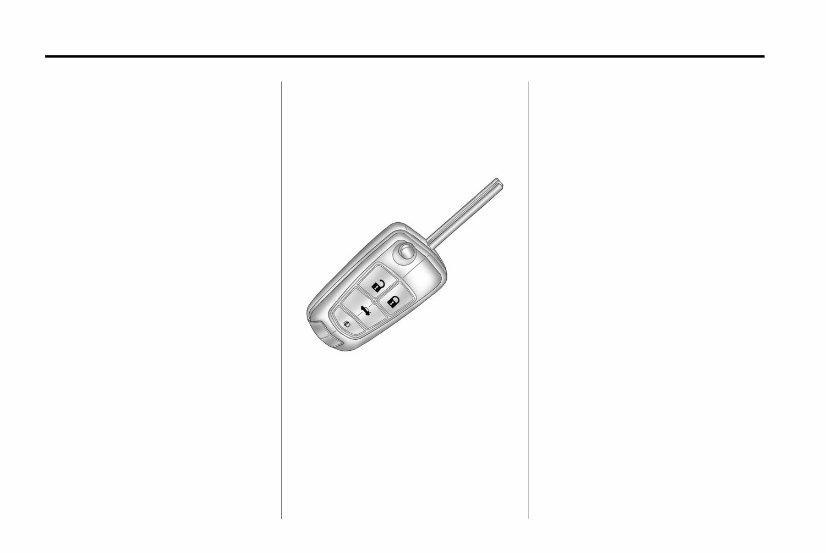
The RKE transmitter will work up to
20 m (65 ft) away from the vehicle.
Press the key release button to
extend the key blade. The key can
be used for the ignition and all
locks.
Press K to unlock the driver door or
all doors.
Press Q to lock all doors.
Lock and unlock feedback can
be personalized. See Vehicle
Personalization on page 5‑42.
Press and hold V to open the
trunk.
Press and release 7 to locate the
vehicle.
Press and hold 7 for at least
two seconds to sound the panic
alarm.
Press 7 again to cancel the panic
alarm.
See Keys on page 2‑2 and Remote
Keyless Entry (RKE) System
Operation on page 2‑3.
You're Reading a Preview
What's Included?
Lifetime Access
Fast Download Speeds
Online & Offline Access
Access PDF Contents & Bookmarks
Full Search Facility
Print one or all pages of your manual
$24.99
$32.99
Viewed 89 Times Today


Secure transaction
What's Included?
Lifetime Access
Fast Download Speeds
Online & Offline Access
Access PDF Contents & Bookmarks
Full Search Facility
Print one or all pages of your manual
$24.99
$32.99
The 2011 CHEVY/CHEVROLET Camaro Owners Manual is a comprehensive guide designed to provide essential information and instructions for Camaro owners. This manual is specifically tailored for the 2011 model year and covers all aspects of operating and maintaining the Camaro.
Key features of the 2011 CHEVY/CHEVROLET Camaro Owners Manual:
- Detailed explanations of the vehicle's features and controls.
- Important safety information and guidelines for safe driving.
- Proper maintenance schedules and procedures to ensure the best performance.
- Troubleshooting tips and advice for common issues.
- Instructions for using various systems and technologies equipped in the Camaro.
- Specifications and technical information for reference.
The 2011 CHEVY/CHEVROLET Camaro Owners Manual is an indispensable resource for owners who want to fully understand their vehicle and take proper care of it. With this manual, you can confidently navigate your Camaro and ensure its longevity and reliability.


