Keys, Doors and Windows ............................ 1-1 Keys and Locks .............. 1-2 Doors ............................ 1-8 Vehicle Security ............ 1-10 Exterior Mirrors ............. 1-12 Interior Mirrors .............. 1-13 Windows ...................... 1-14 Roof ............................ 1-16 Seats and Restraints ......... 2-1 Head Restraints .............. 2-2 Front Seats .................... 2-3 Rear Seats .................... 2-6 Safety Belts ................... 2-6 Airbag System .............. 2-21 Child Restraints ............. 2-35 Storage .............................. 3-1 Storage Compartments .... 3-1 Additional Storage Features ..................... 3-1 Instruments and Controls ............................. 4-1 Instrument Panel Overview .................... 4-4 Controls ......................... 4-6 Warning Lights, Gages, and Indicators ............. 4-9 Information Displays ....... 4-27 Vehicle Messages ......... 4-30 Vehicle Personalization ... 4-38 OnStar System ............. 4-42 Universal Remote System ..................... 4-45 Lighting ............................. 5-1 Exterior Lighting .............. 5-1 Interior Lighting ............... 5-5 Lighting Features ............ 5-6 Infotainment System ......... 6-1 Introduction .................... 6-1 Radio ............................ 6-8 Audio Players ............... 6-14 Phone ......................... 6-22 Climate Controls ............... 7-1 Climate Control Systems ... 7-1 Air Vents ....................... 7-3 Driving and Operating ....... 8-1 Driving Information .......... 8-2 Starting and Operating ... 8-16 Engine Exhaust ............. 8-25 Automatic Transmission ............. 8-26 Manual Transmission ..... 8-30 Brakes ......................... 8-31 Ride Control Systems .... 8-34 Cruise Control ............... 8-38 Object Detection Systems ................... 8-41 Fuel ............................ 8-43 Towing ........................ 8-48 Conversions and Add-Ons ................... 8-55 Vehicle Care ...................... 9-1 General Information ......... 9-2 Vehicle Checks ............... 9-4 Headlamp Aiming .......... 9-34 2010 Chevrolet Camaro Owner Manual M
Bulb Replacement ......... 9-37 Electrical System ........... 9-41 Wheels and Tires .......... 9-48 Jump Starting ............... 9-84 Towing ........................ 9-87 Appearance Care .......... 9-88 Service and Maintenance ..................... 10-1 General Information ....... 10-1 Scheduled Maintenance .............. 10-2 Recommended Fluids, Lubricants, and Parts ........................ 10-7 Maintenance Records ... 10-10 Technical Data ................. 11-1 Vehicle Identification ...... 11-1 Vehicle Data ................. 11-2 Customer Information ...... 12-1 Customer Information ..... 12-1 Reporting Safety Defects ................... 12-13 Vehicle Data Recording and Privacy ............. 12-14 Index ................................... i-1
Using this Manual To quickly locate information about the vehicle use the Index in the back of the manual. It is an alphabetical list of what is in the manual and the page number where it can be found. Danger, Warnings, and Cautions Warning messages found on vehicle labels and in this manual describe hazards and what to do to avoid or reduce them. Danger indicates a hazard with a high level of risk which will result in serious injury or death. Warning or Caution indicates a hazard that could result in injury or death. { WARNING These mean there is something that could hurt you or other people. Notice: This means there is something that could result in property or vehicle damage. This would not be covered by the vehicle’s warranty. A circle with a slash through it is a safety symbol which means “Do Not,” “Do not do this” or “Do not let this happen.” Symbols The vehicle has components and labels that use symbols instead of text. Symbols are shown along with the text describing the operation or information relating to a specific component, control, message, gage, or indicator. M : This symbol is shown when you need to see your owner manual for additional instructions or information. * : This symbol is shown when you need to see a service manual for additional instructions or information. iv Introduction
Vehicle Symbol Chart Here are some additional symbols that may be found on the vehicle and what they mean. For more information on the symbol, refer to the index. 9 : Airbag Readiness Light # : Air Conditioning ! : Antilock Brake System (ABS) g : Audio Steering Wheel Controls or OnStar ® $ : Brake System Warning Light " : Charging System I : Cruise Control B : Engine Coolant Temperature O : Exterior Lamps # : Fog Lamps . : Fuel Gage + : Fuses i : Headlamp High/Low-Beam Changer j : LATCH System Child Restraints * : Malfunction Indicator Lamp : : Oil Pressure } : Power / : Remote Vehicle Start > : Safety Belt Reminders 7 : Tire Pressure Monitor F : Traction Control M : Windshield Washer Fluid Introduction v
✍ NOTES vi Introduction
Keys, Doors and Windows Keys and Locks Keys ...................................1-2 Remote Keyless Entry (RKE) System ..............................1-3 Remote Keyless Entry (RKE) System Operation ................1-3 Remote Vehicle Start .............1-5 Door Locks ..........................1-6 Power Door Locks .................1-7 Lockout Protection .................1-8 Doors Trunk ..................................1-8 Vehicle Security Vehicle Security ..................1-10 Anti-Theft Alarm System .......1-10 Immobilizer .........................1-11 Immobilizer Operation ...........1-11 Exterior Mirrors Convex Mirrors ....................1-12 Power Mirrors .....................1-12 Heated Mirrors ....................1-12 Automatic Dimming Mirror .....1-12 Interior Mirrors Manual Rearview Mirror ........1-13 Automatic Dimming Rearview Mirror .................1-13 Windows Windows ............................1-14 Power Windows ..................1-14 Sun Visors .........................1-16 Roof Sunroof ..............................1-16 Keys, Doors and Windows 1-1
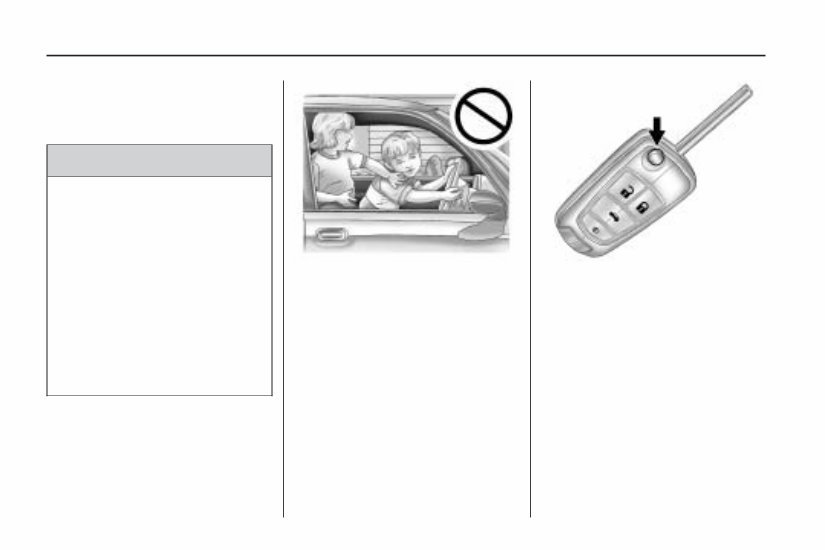
Keys and Locks Keys { WARNING Leaving children in a vehicle with the ignition key is dangerous for many reasons, children or others could be badly injured or even killed. They could operate the power windows or other controls or even make the vehicle move. The windows will function with the keys in the ignition and children could be seriously injured or killed if caught in the path of a closing window. Do not leave the keys in a vehicle with children. The key, that is part of the Remote Keyless Entry (RKE) transmitter, can be used for the ignition and all locks. Press the button on the RKE transmitter to extend the key. Press the button and the key blade to retract the key. See your dealer/retailer if a new key is needed. Notice: If you ever lock your keys in the vehicle, you may have to damage the vehicle to get in. Be sure you have spare keys. If you are locked out of the vehicle, see Roadside Assistance Program on page 12-6 or OnStar ® System on page 4-42. 1-2 Keys, Doors and Windows
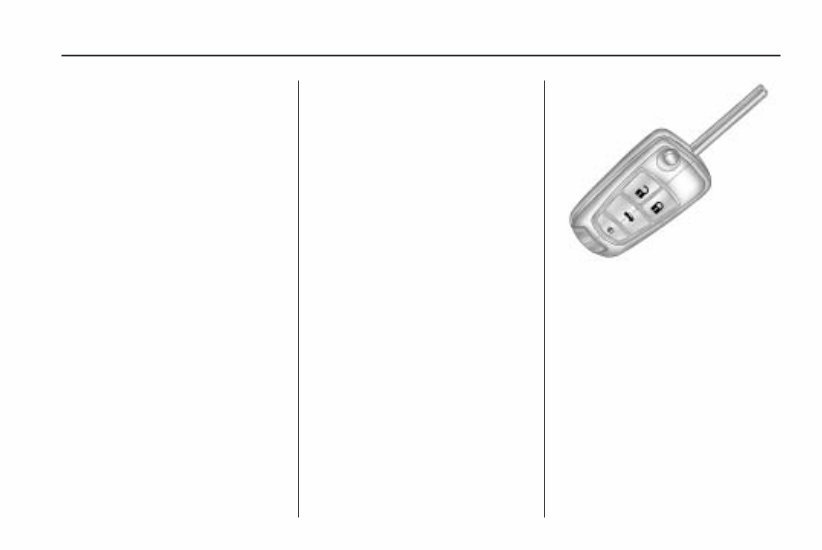
Remote Keyless Entry (RKE) System See Radio Frequency Statement (US, Can) on page 12-15 for information regarding Part 15 of the Federal Communications Commission (FCC) Rules and RSS-210/211 of Industry and Science Canada. Changes or modifications to this system by other than an authorized service facility could void authorization to use this equipment. If there is a decrease in the RKE operating range, try this: • Check the distance. The transmitter may be too far from the vehicle. Stand closer during rainy or snowy weather. • Check the location. Other vehicles or objects may be blocking the signal. Take a few steps to the left or right, hold the transmitter higher, and try again. • Check the transmitter’s battery. See “Battery Replacement” later in this section. • If the transmitter is still not working correctly, see your dealer/retailer or a qualified technician for service. Remote Keyless Entry (RKE) System Operation If available, the Remote Keyless Entry (RKE) transmitter will work up to 65 feet (20 m) away from the vehicle. Other conditions can affect the performance of the transmitter. See Remote Keyless Entry (RKE) System on page 1-3. The following may be available: Q (Lock): Press to lock all doors. The turn signal indicators may flash and/or the horn may sound to indicate locking, see “Remote Feedback” under Vehicle Personalization on page 4-38. If the passenger door is open when Q is pressed, all doors lock. RKE without Remote Start Shown Keys, Doors and Windows 1-3
If the driver door is open when Q is pressed, all doors lock except the driver door, if enabled through the vehicle personalization. Pressing Q may also arm the theft-deterrent system. See Anti-Theft Alarm System on page 1-10. K (Unlock): Press to unlock the driver door or all doors, see “Remote Unlock” under Vehicle Personalization on page 4-38. The turn signal indicators may flash and/or the horn may sound to indicate unlocking, see “Remote Feedback” under Vehicle Personalization on page 4-38. Pressing K will disarm the theft-deterrent system. See Anti-Theft Alarm System on page 1-10. V (Remote Trunk Release): Press and hold to unlock the trunk. 7 (Vehicle Locator/Panic Alarm): Press and release one time to locate the vehicle. The exterior lamps flash and the horn chirps. Press and hold 7 for at least two seconds to sound the panic alarm. The horn sounds and the turn signals flash until 7 is pressed again or the key is placed in the ignition and turned to ON/RUN. / (Remote Vehicle Start): For vehicles with this feature, press Q and then / to start the engine from outside the vehicle using the RKE transmitter. See Remote Vehicle Start on page 1-5 for additional information. Programming Transmitters to the Vehicle Only RKE transmitters programmed to this vehicle will work. If a transmitter is lost or stolen, a replacement can be purchased and programmed through your dealer/retailer. When the replacement transmitter is programmed to this vehicle, all remaining transmitters must also be reprogrammed. Any lost or stolen transmitters will no longer work once the new transmitter is programmed. Battery Replacement Replace the battery if the Replace Battery in Remote Key message displays in the DIC. See “Replace Battery in Remote Key” under Key and Lock Messages on page 4-33. The battery is not rechargeable. See your dealer/retailer to replace the battery. 1-4 Keys, Doors and Windows
Introducing the 2010 CHEVROLET / CHEVY Camaro Owners Manual!
This comprehensive manual is a must-have for all owners of the iconic 2010 CHEVROLET / CHEVY Camaro. Whether you're a new owner or have been enjoying the thrill of driving this classic muscle car for years, this manual is packed with valuable information to help you get the most out of your Camaro.
Inside, you'll find detailed instructions on how to operate and maintain your vehicle, ensuring optimal performance and longevity. From important safety features to recommended maintenance schedules, this manual covers it all.
Key features of the 2010 CHEVROLET / CHEVY Camaro Owners Manual:
Complete guide to understanding the functions and controls of your Camaro
Step-by-step instructions for performing routine maintenance tasks
Tips and techniques for troubleshooting common issues
Insights on how to optimize fuel efficiency
Important information on safety features and precautions
Essential guidelines for towing and vehicle storage
Get ready to enhance your Camaro ownership experience with the 2010 CHEVROLET / CHEVY Camaro Owners Manual. Order your copy today and unlock the full potential of your iconic ride!









 Lifetime Access




