


Seats and Restraint Systems ........................ 7
Front Seats .............................................. 8
Rear Seats ............................................. 18
Safety Belts ............................................ 20
Child Restraints ...................................... 42
Airbag System ........................................ 68
Restraint System Check ......................... 86
Features and Controls ................................. 89
Keys ....................................................... 91
Doors and Locks .................................... 96
Windows ............................................... 103
Theft-Deterrent Systems ....................... 107
Starting and Operating Your Vehicle ..... 111
Mirrors .................................................. 132
OnStar
®
System ................................... 137
Universal Home Remote System .......... 139
Storage Areas ...................................... 151
Sunroof ................................................ 153
Instrument Panel ........................................ 155
Instrument Panel Overview ................... 158
Climate Controls ................................... 180
Warning Lights, Gages, and Indicators .... 188
Message Center ................................... 209
Driver Information Center (DIC) ............ 218
Audio System(s) ................................... 258
Driving Your Vehicle .................................. 287
Your Driving, the Road, and
Your Vehicle ...................................... 288
Towing ................................................. 326
Service and Appearance Care ................... 329
Service ................................................. 332
Fuel ...................................................... 334
Checking Things Under the Hood ......... 340
Rear Axle ............................................. 383
Headlamp Aiming ................................. 384
Bulb Replacement ................................ 387
2007 Cadillac CTS/CTS-V Owner Manual M
1

Windshield Wiper Blade Replacement .... 390
Tires ..................................................... 392
Appearance Care .................................. 435
Vehicle Identification ............................. 445
Electrical System .................................. 446
Capacities and Specifications ................ 457
Maintenance Schedule ............................... 459
Maintenance Schedule .......................... 460
Customer Assistance Information ............. 481
Customer Assistance and Information ..... 482
Reporting Safety Defects ...................... 500
Index ........................................................... 503
2
GENERAL MOTORS, GM, the GM Emblem,
CADILLAC, the CADILLAC Crest & Wreath,
and the name CTS are registered trademarks
of General Motors Corporation.
This manual includes the latest information at
the time it was printed. We reserve the right
to make changes after that time without notice.
For vehicles first sold in Canada, substitute
the name “General Motors of Canada Limited”
for Cadillac Motor Car Division whenever it
appears in this manual.
This manual describes features that may be
available in this model, but your vehicle may not
be equipped with all of them. For example,
more than one entertainment system may be
offered or your vehicle may have been ordered
without a front passenger or rear seats.
Keep this manual in the vehicle, so it will be there
if it is needed while you are on the road. If the
vehicle is sold, leave this manual in the vehicle.
Canadian Owners
A French language copy of this manual can be
obtained from your dealer or from:
Helm, Incorporated
P.O. Box 07130
Detroit, MI 48207
Litho in U.S.A.
Part No. 15864562 A First Printing
©
2006 General Motors Corporation. All Rights Reserved.
3
How to Use This Manual
Many people read the owner manual from
beginning to end when they first receive their
new vehicle. If this is done, it can help you learn
about the features and controls for the vehicle.
Pictures and words work together in the owner
manual to explain things.
Index
A good place to quickly locate information about
the vehicle is the Index in the back of the manual.
It is an alphabetical list of what is in the manual
and the page number where it can be found.
Safety Warnings and Symbols
There are a number of safety cautions in this
book. We use a box and the word CAUTION to
tell about things that could hurt you if you were
to ignore the warning.
{CAUTION:
These mean there is something that could
hurt you or other people.
In the caution area, we tell you what the hazard
is. Then we tell you what to do to help avoid
or reduce the hazard. Please read these cautions.
If you do not, you or others could be hurt.
You will also find a
circle with a slash
through it in this book.
This safety symbol
means “Do Not,”
“Do Not do this” or
“Do Not let this happen.”
4

Vehicle Damage Warnings
Also, in this manual you will find these notices:
Notice: These mean there is something
that could damage your vehicle.
A notice tells about something that can damage
the vehicle. Many times, this damage would not be
covered by your vehicle’s warranty, and it could
be costly. But the notice will tell what to do to help
avoid the damage.
When you read other manuals, you might see
CAUTION and NOTICE warnings in different colors
or in different words.
There are also warning labels on the vehicle. They
use the same words, CAUTION or NOTICE.
Vehicle Symbols
The vehicle has components and labels that use
symbols instead of text. Symbols are shown
along with the text describing the operation or
information relating to a specific component,
control, message, gage, or indicator.
If you need help figuring out a specific name of
a component, gage, or indicator, reference
the following topics:
• Seats and Restraint Systems in Section 1
• Features and Controls in Section 2
• Instrument Panel Overview in Section 3
• Climate Controls in Section 3
• Warning Lights, Gages, and Indicators in
Section 3
• Audio System(s) in Section 3
• Engine Compartment Overview in Section 5
5
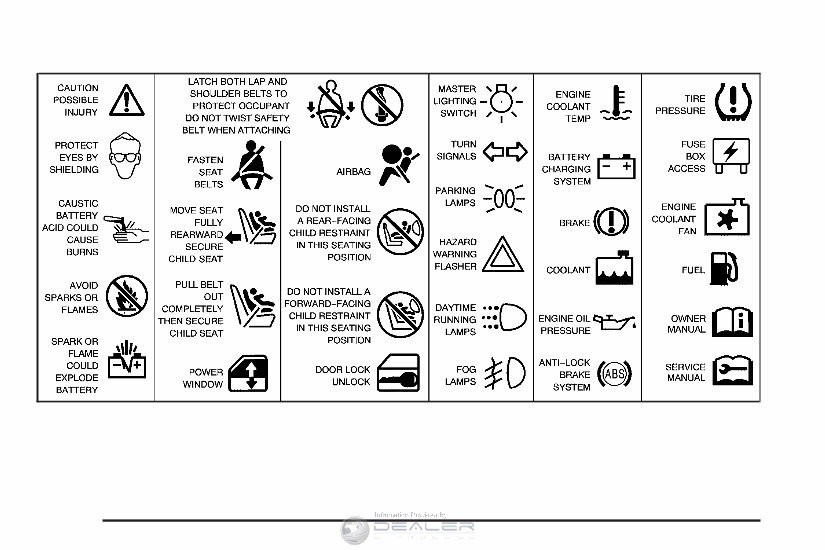
These are some examples of symbols that may be found on the vehicle:
6

Front Seats ..................................................... 8
Manual Seats ................................................ 8
Power Seats ................................................. 9
Power Lumbar ............................................. 10
Heated Seats .............................................. 10
Memory Seat and Mirrors ............................ 11
Reclining Seatbacks .................................... 14
Head Restraints .......................................... 17
Rear Seats .................................................... 18
Split Folding Rear Seat ............................... 18
Safety Belts .................................................. 20
Safety Belts: They Are for Everyone ........... 20
Questions and Answers About Safety Belts .... 25
How to Wear Safety Belts Properly ............. 26
Driver Position ............................................. 26
Safety Belt Use During Pregnancy .............. 33
Right Front Passenger Position ................... 34
Rear Seat Passengers ................................ 34
Rear Safety Belt Comfort Guides ................ 38
Safety Belt Pretensioners ............................ 41
Safety Belt Extender ................................... 41
Child Restraints ............................................ 42
Older Children ............................................. 42
Infants and Young Children ......................... 45
Child Restraint Systems .............................. 49
Where to Put the Restraint .......................... 54
Lower Anchors and Tethers for
Children (LATCH) .................................... 55
Securing a Child Restraint in a
Rear Seat Position ................................... 61
Securing a Child Restraint in the Right
Front Seat Position .................................. 63
Airbag System .............................................. 68
Where Are the Airbags? .............................. 71
When Should an Airbag Inflate? .................. 75
What Makes an Airbag Inflate? ................... 76
How Does an Airbag Restrain? ................... 76
What Will You See After an Airbag
Inflates? ................................................... 77
Passenger Sensing System ......................... 79
Servicing Your Airbag-Equipped Vehicle ...... 84
Adding Equipment to Your
Airbag-Equipped Vehicle .......................... 85
Restraint System Check ............................... 86
Checking the Restraint Systems .................. 86
Replacing Restraint System Parts
After a Crash ........................................... 87
Section 1 Seats and Restraint Systems
7
Front Seats
Manual Seats
{CAUTION:
If the seatback is not locked, it could
move forward in a sudden stop or crash.
That could cause injury to the person
sitting there. Always push and pull on the
seatback to be sure it is locked.
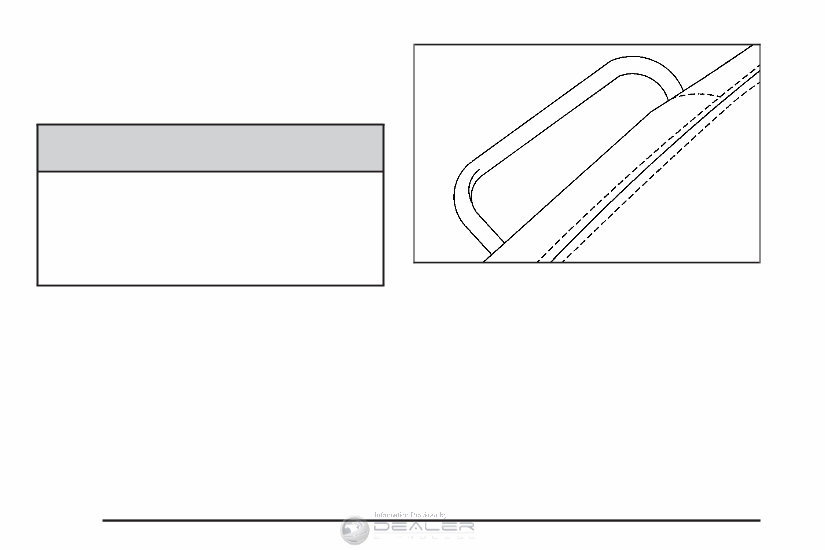
Your vehicle may have manual seats. To adjust
the seat, lift the bar under the front of the
seat to unlock it. Slide the seat to where you want
it and release the bar. Try to move the seat
back and forth with your body to be sure the seat
is locked in place.
8
Power Seats
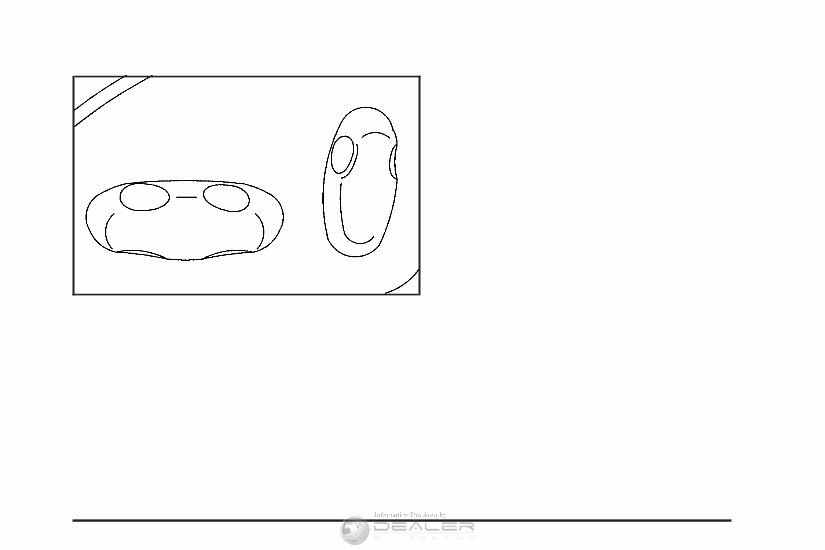
If the vehicle has power seats, the controls used
to operate them are located on the outboard
side of the seats.
• Move the seat forward or rearward by sliding
the horizontal control forward or rearward.
• Raise or lower the front part of the seat
cushion by moving the front of the horizontal
control up or down.
• Raise or lower the rear part of the seat
cushion by moving the rear of the horizontal
control up or down.
• Raise or lower the entire seat by moving the
entire horizontal control up or down.
The vertical control is used for reclining your
seatback. See “Power Reclining Seatbacks” under
Reclining Seatbacks on page 14 for more
information.
9
Power Lumbar
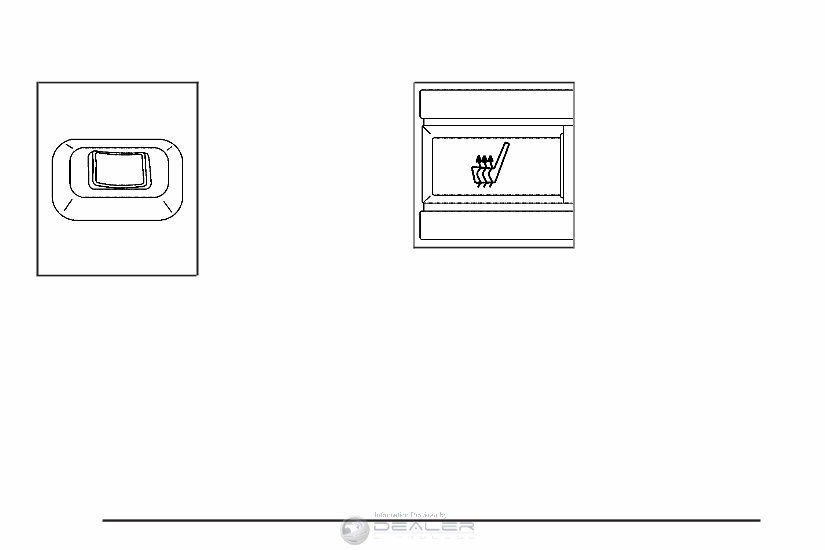
Your vehicle may have
this feature. The driver’s
and passenger’s
seatback lumbar support
can be adjusted by
moving the control
located on the outboard
side of the seat
cushions.
To increase or decrease support, hold the control
forward or rearward. Keep in mind that as your
seating position changes, as it may during
long trips, so should the position of your lumbar
support. Adjust the seat as needed.
Heated Seats
If your vehicle has
heated front seats, the
buttons are located
on the climate
control panel.
There is one button for the driver and one for the
front passenger. Each button has three settings,
LO, HI and off. The active setting appears on
the climate control panel display. The LO setting
warms the seatback and cushion until the seat
approximates normal body temperature. The
HI setting has a slightly higher temperature.
10
You're Reading a Preview
What's Included?
 Lifetime Access
Fast Download Speeds
Online & Offline Access
Access PDF Contents & Bookmarks
Full Search Facility
Print one or all pages of your manual
$24.99
2007 Cadillac CTS Owners Manual
Viewed 98 Times Today

What's Included?
Lifetime Access
Fast Download Speeds
Online & Offline Access
Access PDF Contents & Bookmarks
Full Search Facility
Print one or all pages of your manual
$24.99

Secure transaction
What's Included?
Lifetime Access
Fast Download Speeds
Online & Offline Access
Access PDF Contents & Bookmarks
Full Search Facility
Print one or all pages of your manual
Description
Gain immediate access to this comprehensive manual, available in .PDF format, which is a digital version of the original factory manual. It encompasses all the essential information found in the traditional physical manual, including but not limited to:
- Introduction
- Instrument Cluster
- Entertainment Systems
- Climate Controls
- Lights
- Driver Controls
- Locks and Security
- Seating and Safety Restraints
- Driving
- Customer Assistance
- Reporting safety defects (U.S. only)
- Cleaning
- Maintenance and Specifications
- Engine Compartment
- Engine Oil
- Battery
- Fuel Information
- Air Filter(s)
- Part Numbers
- Refill Capacities
- Lubricant Specifications
- Accessories
To access the manual, you will need a compatible reader such as Acrobat Reader, Foxit, or a similar application. Please note that all designated trademarks and brands mentioned are the property of their respective owners.


