


2009 BUICK ENCLAVE Owners Manual
What's Included?
 Lifetime Access
Fast Download Speeds
Online & Offline Access
Access PDF Contents & Bookmarks
Full Search Facility
Print one or all pages of your manual

Seats and Restraint
System
............................... 1-1
Head Restraints .............. 1-2
Front Seats .................... 1-3
Rear Seats .................... 1-8
Safety Belts .................. 1-12
Child Restraints ............. 1-25
Airbag System .............. 1-45
Restraint System
Check ...................... 1-59
Features and Controls
...... 2-1
Keys ............................. 2-2
Doors and Locks ............ 2-8
Windows ...................... 2-14
Theft-Deterrent
Systems ................... 2-16
Starting and Operating
Your Vehicle ............. 2-20
Mirrors ......................... 2-31
Object Detection
Systems ................... 2-34
OnStar
®
System ............ 2-41
Universal Home Remote
System ..................... 2-44
Storage Areas ............... 2-49
Sunroof ........................ 2-54
Instrument Panel
............... 3-1
Instrument Panel
Overview .................... 3-4
Climate Controls ............ 3-20
Warning Lights, Gages,
and Indicators ............ 3-28
Driver Information
Center (DIC) ............. 3-42
Audio System(s) ............ 3-68
Driving Your Vehicle
......... 4-1
Your Driving, the Road,
and the Vehicle ........... 4-1
Towing ........................ 4-20
Service and Appearance
Care
................................... 5-1
Service .......................... 5-3
Fuel .............................. 5-5
Checking Things Under
the Hood .................... 5-9
All-Wheel Drive ............. 5-33
Headlamp Aiming .......... 5-33
Bulb Replacement ......... 5-33
Windshield
Replacement ............. 5-36
Windshield Wiper Blade
Replacement ............. 5-36
Tires ........................... 5-37
Appearance Care .......... 5-80
Vehicle Identification ...... 5-87
Electrical System ........... 5-87
Capacities and
Specifications ............ 5-94
Maintenance Schedule
...... 6-1
Maintenance Schedule ..... 6-1
Customer Assistance
Information
........................ 7-1
Customer Assistance
and Information ........... 7-1
Reporting Safety
Defects ..................... 7-12
Vehicle Data Recording
and Privacy ............... 7-14
Index
................................... i-1
2009 Buick Enclave Owner Manual M

GENERAL MOTORS, GM, the GM
Emblem, BUICK, the BUICK
Emblem are registered trademarks;
and the name ENCLAVE is a
trademark of General Motors
Corporation.
This manual includes the latest
information at the time it was
printed. GM reserves the right to
make changes after that time
without further notice. For vehicles
first sold in Canada, substitute
the name “General Motors of
Canada Limited” for Buick Motor
Division wherever it appears in this
manual.
This manual describes features that
may or may not be on your
specific vehicle.
Read this manual from beginning to
end to learn about the vehicle’s
features and controls. Pictures,
symbols, and words work together
to explain vehicle operation.
Keep this manual in the vehicle for
quick reference.
Canadian Owners
A French language copy of this
manual can be obtained from your
dealer/retailer or from:
Helm, Incorporated
P.O. Box 07130
Detroit, MI 48207
1-800-551-4123
www.helminc.com
Propriétaires Canadiens
On peut obtenir un exemplaire de
ce guide en français auprès de
concessionnaire ou à l’adresse
suivante:
Helm, Incorporated
P.O. Box 07130
Detroit, MI 48207
1-800-551-4123
www.helminc.com
Index
To quickly locate information about
the vehicle, use the index in the back
of the manual. It is an alphabetical
list of what is in the manual and the
page number where it can be found.
ii Preface
Litho in U.S.A.
Part No. 15919283 B Second Printing
©
2008 General Motors Corporation. All Rights Reserved.
Safety Warnings and
Symbols
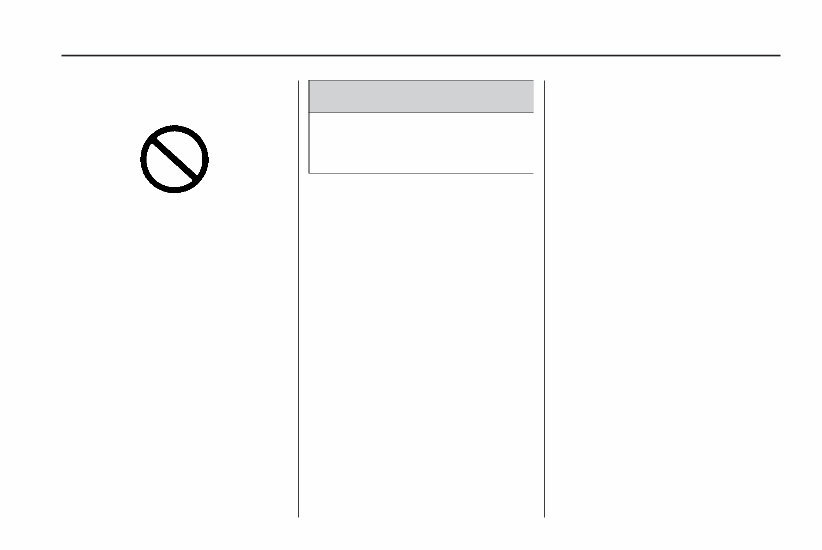
A circle with a slash through it is a
safety symbol which means “Do
Not,” “Do not do this” or “Do not let
this happen.”
A box with the word CAUTION is
used to tell about things that
could hurt you or others if you were
to ignore the warning.
{ CAUTION
These mean there is something
that could hurt you or other
people.
Cautions tell what the hazard is and
what to do to avoid or reduce the
hazard. Read these cautions.
A notice tells about something that
can damage the vehicle.
Notice: These mean there is
something that could damage
your vehicle.
Many times, this damage would not
be covered by the vehicle’s
warranty, and it could be costly. The
notice tells what to do to help
avoid the damage.
There are also warning labels on
the vehicle which use the same
words, CAUTION or Notice.
Vehicle Symbols
The vehicle has components and
labels that use symbols instead
of text. Symbols are shown along
with the text describing the operation
or information relating to a specific
component, control, message,
gage, or indicator.
M : This symbol is shown when
you need to see your owner manual
for additional instructions or
information.
* : This symbol is shown when
you need to see a service manual
for additional instructions or
information.
Preface iii

Vehicle Symbol Chart
Here are some additional symbols
that may be found on the vehicle
and what they mean. For more
information on the symbol, refer to
the index.
9 : Airbag Readiness Light
# : Air Conditioning
! : Antilock Brake System (ABS)
g : Audio Steering Wheel
Controls or OnStar
®
$ : Brake System Warning Light
" : Charging System
I : Cruise Control
B : Engine Coolant Temperature
O : Exterior Lamps
# : Fog Lamps
. : Fuel Gage
+ : Fuses
i : Headlamp High/Low-Beam
Changer
j : LATCH System Child Restraints
* : Malfunction Indicator Lamp
: : Oil Pressure
g : Outside Power Foldaway
Mirrors
} : Power
/ : Remote Vehicle Start
> : Safety Belt Reminders
7 : Tire Pressure Monitor
_ : Tow/Haul Mode
F : Traction Control
M : Windshield Washer Fluid
iv Preface

Seats and
Restraint System
Head Restraints
Head Restraints ....................1-2
Front Seats
Power Seats .........................1-3
Manual Lumbar .....................1-3
Power Lumbar ......................1-4
Heated Seats .......................1-4
Heated and Cooled Seats ......1-4
Memory Seat and Mirrors .......1-5
Reclining Seatbacks ..............1-6
Rear Seats
Rear Seat Operation ..............1-8
Third Row Seats .................1-10
Safety Belts
Safety Belts: They Are
for Everyone .....................1-12
How to Wear Safety
Belts Properly ....................1-16
Lap-Shoulder Belt ................1-20
Safety Belt Use During
Pregnancy ........................1-25
Safety Belt Extender ............1-25
Child Restraints
Older Children .....................1-25
Infants and Young Children ....1-28
Child Restraint Systems ........1-31
Where to Put the Restraint .....1-32
Lower Anchors and Tethers
for Children (LATCH) ..........1-34
Securing a Child Restraint
in a Rear Seat Position ......1-40
Securing a Child Restraint
in the Right Front Seat
Position ............................1-42
Airbag System
Airbag System ....................1-45
Where Are the Airbags? .......1-47
When Should an Airbag
Inflate? .............................1-49
What Makes an Airbag
Inflate? .............................1-50
How Does an Airbag
Restrain? ..........................1-51
What Will You See After
an Airbag Inflates? .............1-51
Passenger Sensing System ....1-53
Servicing Your
Airbag-Equipped Vehicle .....1-57
Adding Equipment to Your
Airbag-Equipped Vehicle .....1-58
Restraint System Check
Checking the Restraint
Systems ...........................1-59
Replacing Restraint System
Parts After a Crash .............1-60
Seats and Restraint System 1-1
Head Restraints
The vehicle’s front seats have
adjustable head restraints in all
outboard seating positions.
{ CAUTION
With head restraints that are not
installed and adjusted properly,
there is a greater chance that
occupants will suffer a neck/spinal
injury in a crash. Do not drive
until the head restraints for all
occupants are installed and
adjusted properly.
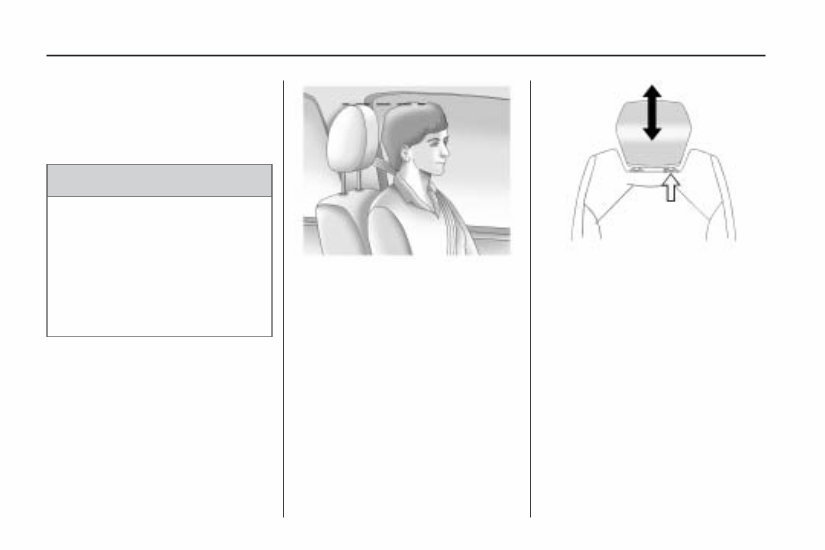
Adjust the head restraint so that the
top of the restraint is at the same
height as the top of the occupant’s
head. This position reduces the
chance of a neck injury in a crash.
Pull the head restraint up to raise it.
To lower the head restraint, press the
release button, located on the head
restraint post on the top of the
seatback, while you push the head
restraint down.
Push down on the head restraint
after the button is released to make
sure that it is locked in place.
1-2 Seats and Restraint System
Front Seats
Power Seats
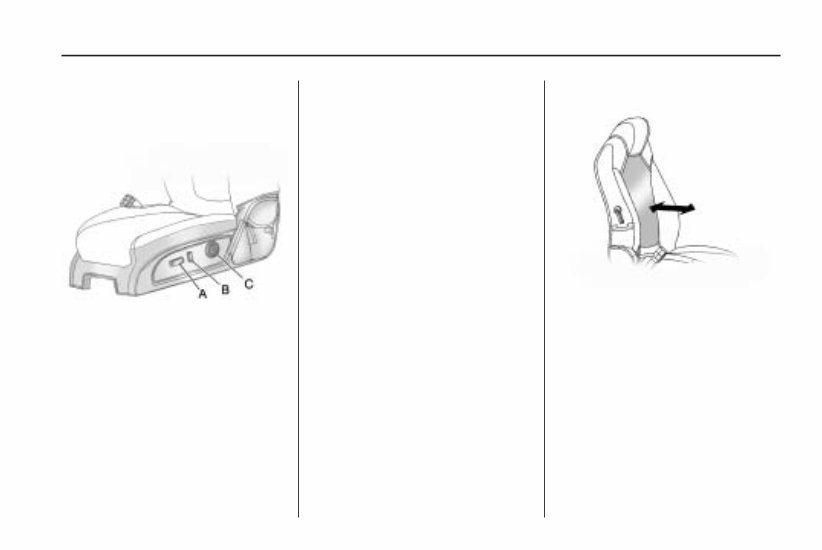
A. Power Seat Adjustment Control
B. Reclining Seatbacks on
page 1-6.
C. Power Lumbar on page 1-4.
If the vehicle has power seats,
the controls are located on
the outboard side of the seats.
Move the seat forward or rearward
by sliding the power seat adjustment
control (A) forward or rearward.
The vehicle may have additional
features to adjust the power seat:
• Raise or lower the entire seat
by moving the power seat
adjustment control (A) up
or down.
• Raise or lower the front part of the
seat cushion by moving the front
of the control up or down.
• Raise or lower the rear part of the
seat cushion by moving the rear
of the control up or down.
The vehicle may have a memory
function which allows seat settings
to be saved and recalled. See
Memory Seat and Mirrors on
page 1-5 for more information.
Manual Lumbar
If the vehicle has this feature, the
handle is located on the inboard side
of the seatback.
Turn the handle rearward to
decrease lumbar support. Turn
the handle forward to increase
lumbar support.
The lumbar support may need to
be adjusted when changing
the seating position.
Driver Seat with Power Seat
Control, Power Recline, and
Power Lumbar shown
Seats and Restraint System 1-3

Power Lumbar
If the seats have power lumbar,
the controls used to operate this
feature are located on the outboard
side of the seats. See “Power
Lumbar” under Power Seats on
page 1-3 for more information.
To increase or decrease lumbar
support, press and hold the front or
rear of the control (C).
Release the control when the
seatback reaches the desired level
of lumbar support.
The lumbar support may need to
be adjusted when changing
the seating position.
Heated Seats
On vehicles with heated front seats,
the controls are located on the center
console. To operate the heated seats
the engine must be running.
I (Heated Seatback): Press to
turn on the heated seatback.
J (Heated Seat and Seatback):
Press to turn on or off the heated
seat and seatback.
The light on the button will come on
to indicate that the feature is on.
Each time the button is pressed,
the temperature settings change
from high, to medium, to low, to off.
Indicator lights above the button
will show the level of heat selected:
three for high, two for medium, and
one for low.
The passenger seat may take
longer to heat up.
If the vehicle has remote vehicle
start and is started using the remote
keyless entry transmitter, the front
heated seats will be turned on to
the high setting if it is cold outside.
See “Remote Vehicle Start”
under Remote Keyless Entry (RKE)
System Operation on page 2-4.
When the ignition is turned on, the
heated seat feature will turn off.
To turn the heated seat feature back
on, press the desired button.
Heated and Cooled Seats
If the front seats have the heated and
cooled seat feature, the buttons used
to control this feature are located on
the front doors near the door handle.
H (Cooled Seat): To cool the entire
seat, press the button with the
cooled seat symbol.
This symbol will appear on the
climate control display to indicate
that the feature is on. Press the
button to cycle through the
temperature settings of high,
1-4 Seats and Restraint System

medium, and low and to turn the
cooled seat off. Indicator bars next to
the symbol designate the level of
cooling selected: three for high,
two for medium, and one for low.
z (Heated Seat and Seatback):
To heat the entire seat, press the
button with the heated seat and
seatback symbol.
This symbol will appear on the
climate control display to indicate
that the feature is on. Press the
button to cycle through the
temperature settings of high,
medium, and low and to turn the
heated seat off. Indicator bars next
to the symbol designate the level
of heat selected: three for high,
two for medium, and one for low.
The heated and cooled seats will
be canceled after the ignition is
turned off. To use the heated and
cooled seat feature after the vehicle
is started, you will need to press the
appropriate seat button again.
Memory Seat and Mirrors
On vehicles with the memory
package, the controls are located
on the driver door.
1: Saves the seating position for
driver 1.
2: Saves the seating position for
driver 2.
S : Recalls the easy exit position.
To save a position in memory:
1. Adjust the driver seat, including
the seatback recliner, both
outside mirrors, and the power
steering column to a comfortable
position.
See Outside Power Mirrors on
page 2-32 for more information.
Not all vehicles will have the
ability to save and recall
the mirror positions.
2. Press and hold button 1 until
two beeps sound to let you
know that the position has
been stored.
A second seating and mirror
position can be programmed by
repeating the above steps and
pressing button 2.
To recall the memory positions,
the vehicle must be in P (Park).
Press and release either button 1
or 2. The seat, outside mirrors, and
power steering column will move
to the position previously stored.
You will hear a single beep.
If the RKE transmitter is used to
enter the vehicle and the remote
recall memory feature has been
turned on, automatic seat and mirror
movement will occur. See “MEMORY
SEAT RECALL” under DIC Vehicle
Customization on page 3-59 for more
information.
To stop recall movement of the
memory feature at any time, press
one of the power seat controls,
memory buttons, or power mirror
buttons.
Seats and Restraint System 1-5
If something has blocked the
driver seat while recalling a memory
position, the driver seat recall may
stop working. If this happens,
remove the obstruction and press
the appropriate control for the area
that is not recalling for two seconds.
Try pressing the memory button
again. If the memory position is still
not being recalled, see your dealer/
retailer for service.
Easy Exit Seat
S : With the vehicle in P (Park),
press the exit button. You will hear
a single beep. The driver seat
will move back into the exit position.
If the easy exit seat feature has
been turned on in the Driver
Information Center (DIC), automatic
seat movement will occur when
the key is removed from the ignition.
For programming information, see
DIC Vehicle Customization on
page 3-59 for more information.
Reclining Seatbacks
Manual Reclining Seatbacks
{ CAUTION
You can lose control of the
vehicle if you try to adjust a
manual driver’s seat while the
vehicle is moving. The sudden
movement could startle and
confuse you, or make you push a
pedal when you do not want to.
Adjust the driver’s seat only when
the vehicle is not moving.
{ CAUTION
If either seatback is not locked, it
could move forward in a sudden
stop or crash. That could cause
injury to the person sitting there.
Always push and pull on the
seatbacks to be sure they are
locked.
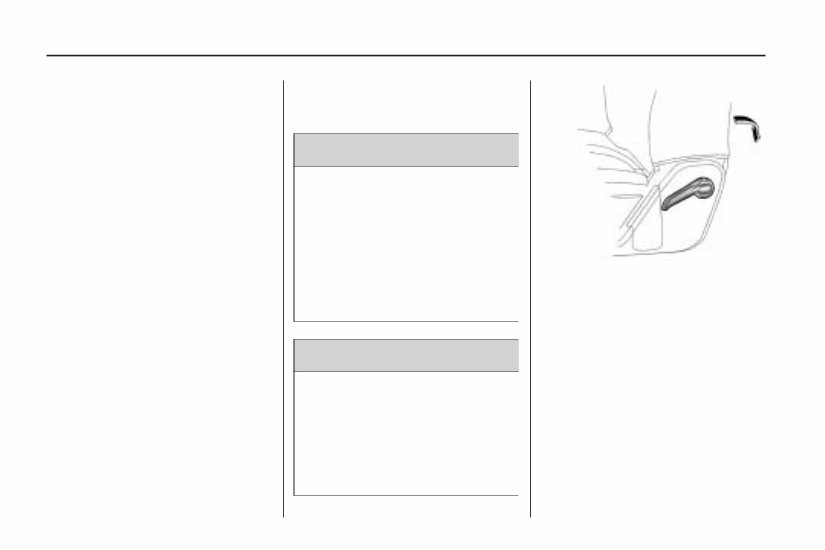
On vehicles with seats that have
manual reclining seatbacks, the lever
used to operate them is located on
the outboard side of the seat.
To recline the seatback:
1. Lift the recline lever.
2. Move the seatback to the desired
position, then release the lever to
lock the seatback in place.
3. Push and pull on the seatback to
make sure it is locked.
1-6 Seats and Restraint System
You're Reading a Preview
What's Included?
Lifetime Access
Fast Download Speeds
Online & Offline Access
Access PDF Contents & Bookmarks
Full Search Facility
Print one or all pages of your manual
$26.99
Viewed 86 Times Today


Secure transaction
What's Included?
Lifetime Access
Fast Download Speeds
Online & Offline Access
Access PDF Contents & Bookmarks
Full Search Facility
Print one or all pages of your manual
$26.99
The 2009 BUICK ENCLAVE Owners Manual is a comprehensive guide that provides detailed information and instructions for owners of the 2009 Buick Enclave. This manual is designed to help owners understand the features, functions, and maintenance requirements of their vehicle.
Key features of the 2009 BUICK ENCLAVE Owners Manual include:
- Introduction to the Buick Enclave
- Important safety information
- Instrument panel overview
- Driving and operating instructions
- Maintenance guidelines
- Troubleshooting tips
- Technical specifications
With this manual, owners can easily access the information they need to properly operate and maintain their 2009 Buick Enclave. Whether it's understanding the vehicle's warning lights, conducting routine maintenance, or troubleshooting common issues, the 2009 BUICK ENCLAVE Owners Manual is an invaluable resource for every Enclave owner.


