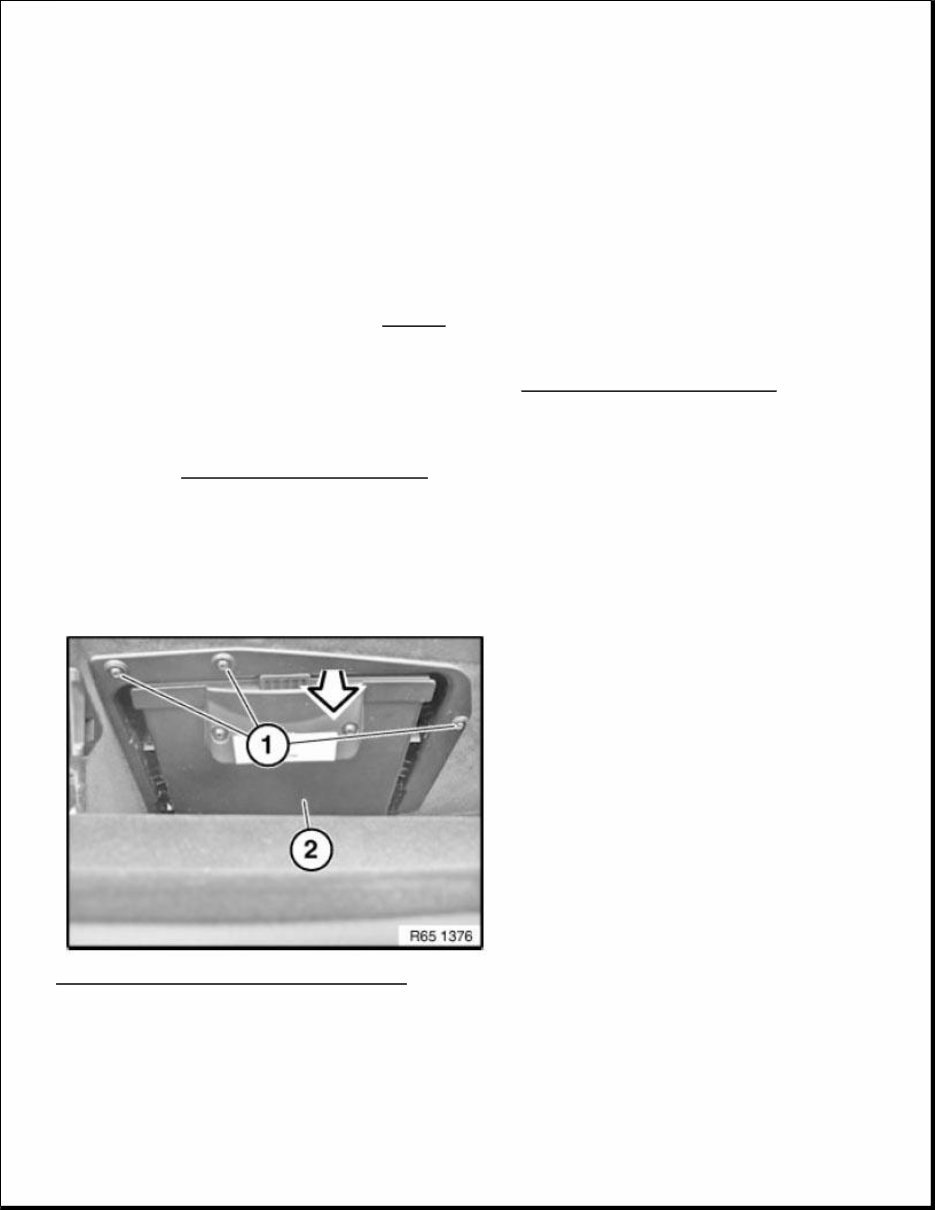
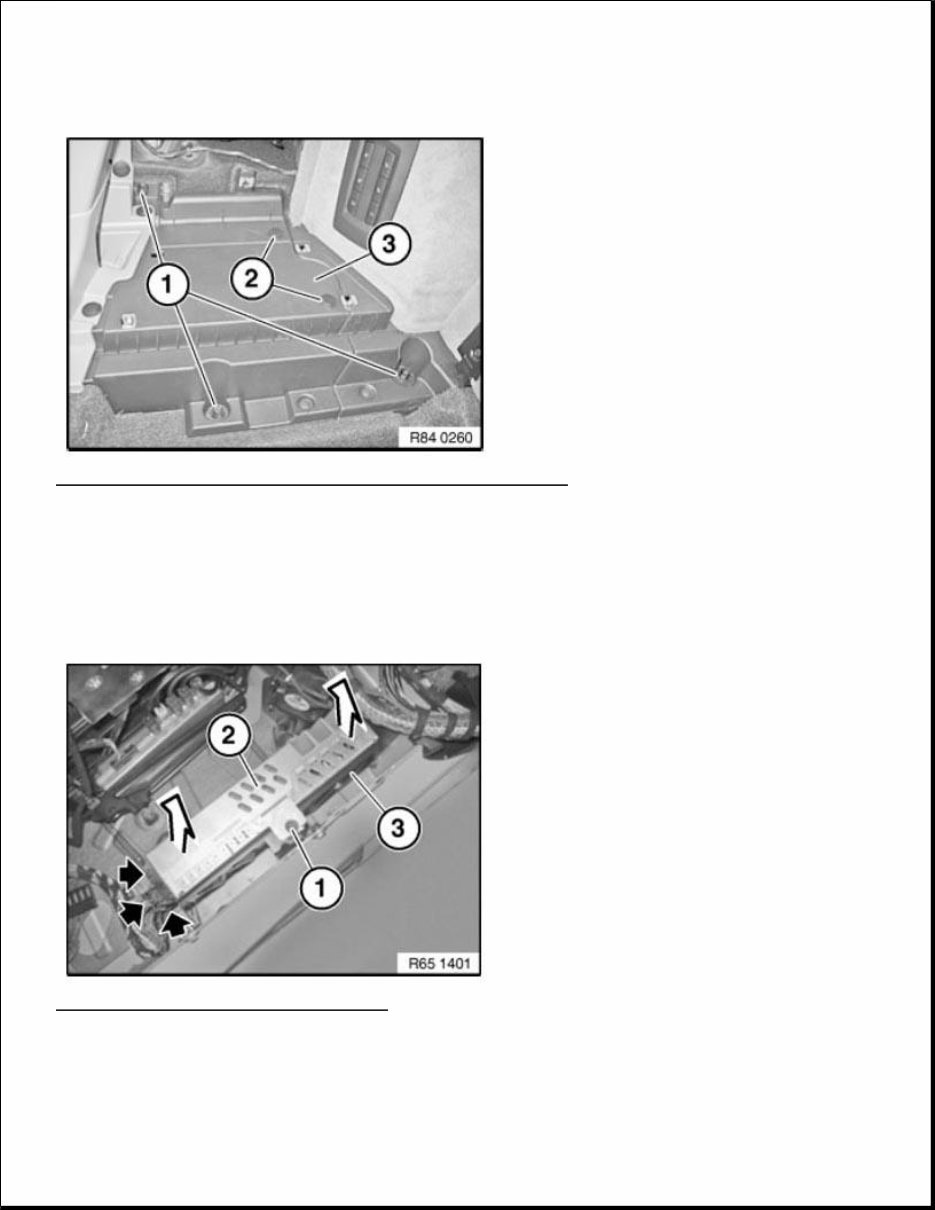
Necessary preliminary tasks Clamp off BATTERY NEGATIVE LEAD . Open glove box. Release screws (1). Remove bracket for DVD changer (2) downward. Fig. 1: Removing Bracket For DVD Changer Courtesy of BMW OF NORTH AMERICA, INC. Installation: Make sure bracket of DVD changer (1) is correctly seated in glove compartment (3). ACCESSORIES AND BODY, CAB Audio, Navigation And Anti-Theft - GT MONO RADIO 65 11 075 REMOVING AND INSTALLING/REPLACING DVD CHANGER IMPORTANT: Read and comply with NOTES on protection against electrostatic damage (ESD protection). NOTE: Comply with notes and instructions on HANDLING OPTICAL FIBRES .
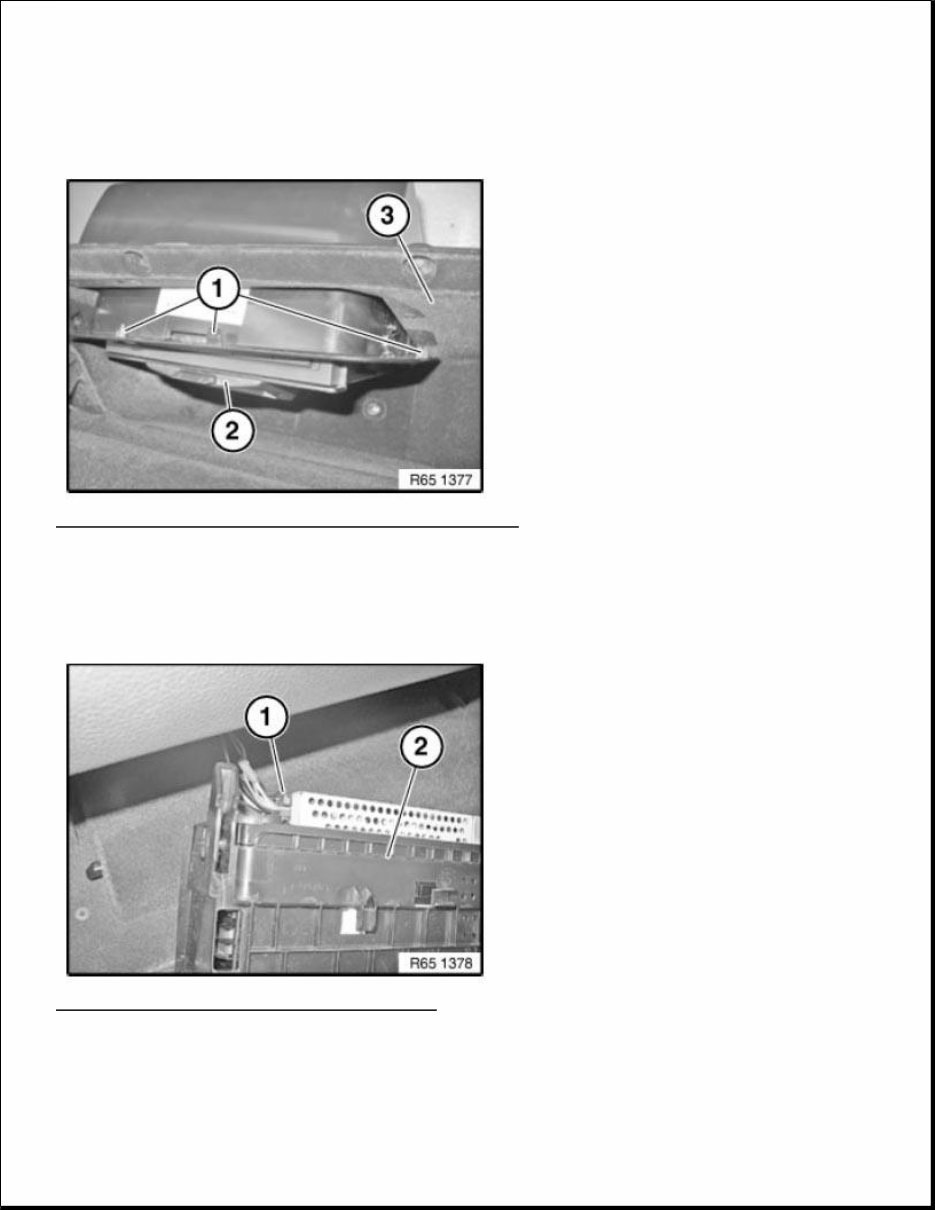
Guide lugs (1) must fit correctly in the corresponding recesses. Fig. 2: Identifying DVD Changer And Glove Compartment Courtesy of BMW OF NORTH AMERICA, INC. Unfasten plug connection (1) and disconnect. Remove bracket (2) with DVD changer. Fig. 3: Identifying Plug Connection And Bracket Courtesy of BMW OF NORTH AMERICA, INC. Replacement:
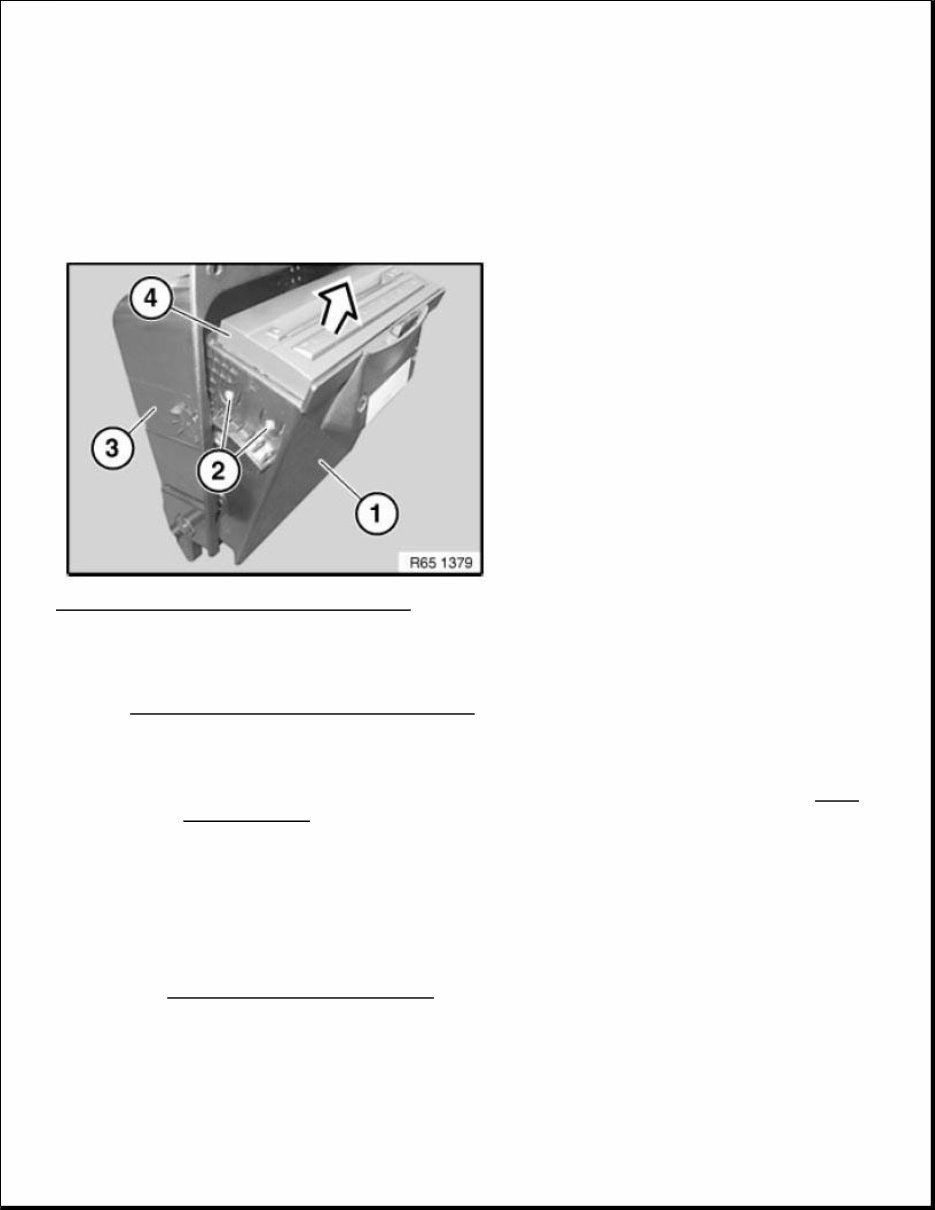
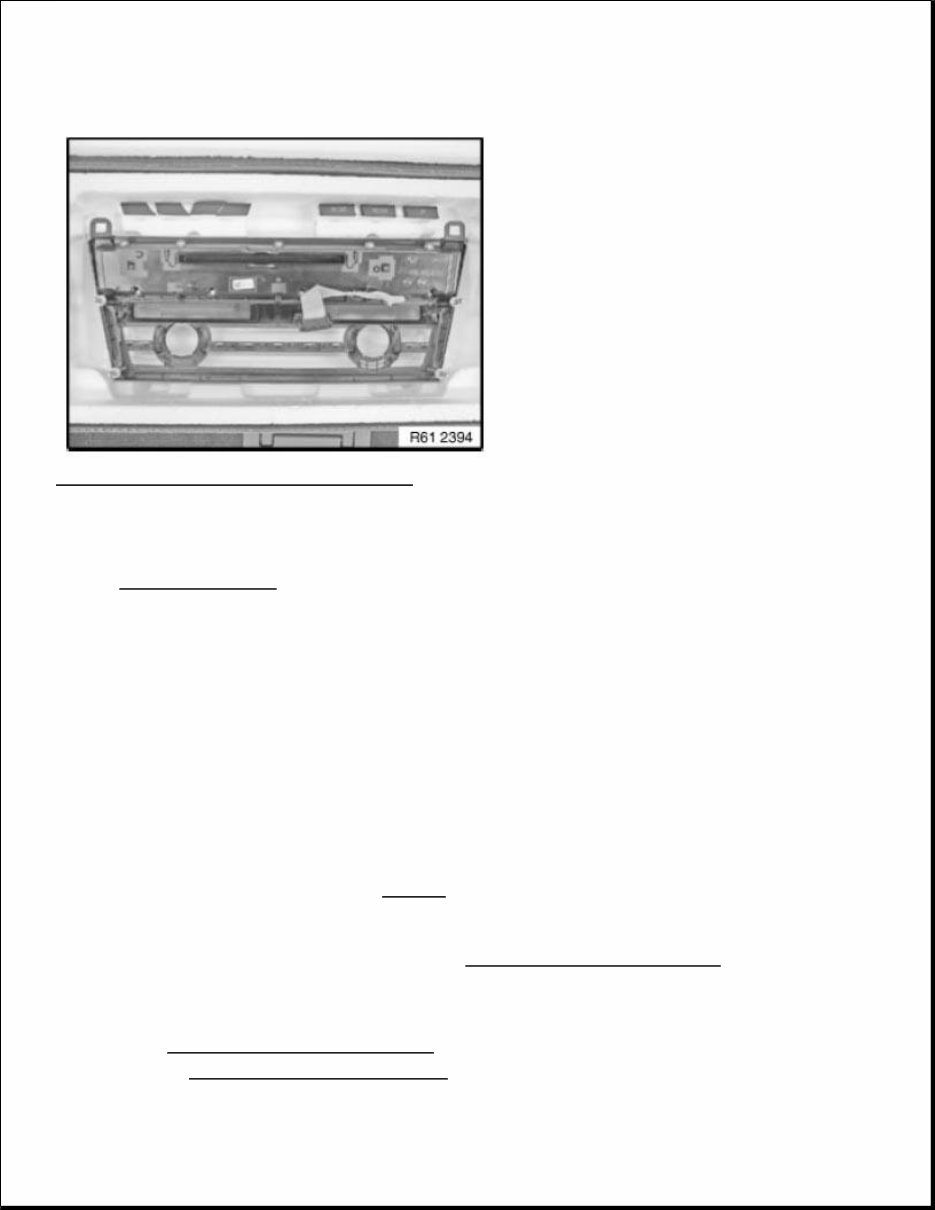
Open fold-down compartment (1). Release left and right screws (2). Pull DVD changer (4) in direction of arrow out of bracket (3). Fig. 4: Pulling DVD Changer Out Of Bracket Courtesy of BMW OF NORTH AMERICA, INC. Replacement: Carry out VEHICLE PROGRAMMING/ENCODING . 61 31 823 REPLACING AUDIO UNIT Necessary preliminary tasks Remove RADIO AND IHKA CONTROLS . IMPORTANT: Read and comply with notes on protection against electrostatic damage (ESD PROTECTION) . IMPORTANT: Use of supplied gloves is mandatory Carry out installation in a dust-free workshop area only. To avoid damage, do not touch or dirty the display area. IMPORTANT: Retrofitting must only be done in the supplied installation cassettes. Use of supplied gloves is mandatory so that there is no damage to the display.
Fig. 5: Identifying Radio And IHKA Controls Courtesy of BMW OF NORTH AMERICA, INC. Installation note: Convert IHKA CONTROLS to new audio unit. STEREO RADIO, AMPLIFIER 65 12 315 REMOVING AND INSTALLING (REPLACING) HU-H There is a hard disk installed in the headunit. Carry out mechanical work on the headunit and adjacent components with care. Avoid subjecting the headunit to vibration/shocks. Necessary preliminary work Remove RADIO AND IHKA CONTROLS . Disconnect NEGATIVE BATTERY CABLE (F03: disconnect both negative battery cables). IMPORTANT: Risk of damage! IMPORTANT: Read and comply with NOTES on protection against electrostatic damage (ESD protection). NOTE: Comply with notes and notes on HANDLING OPTICAL FIBRES .
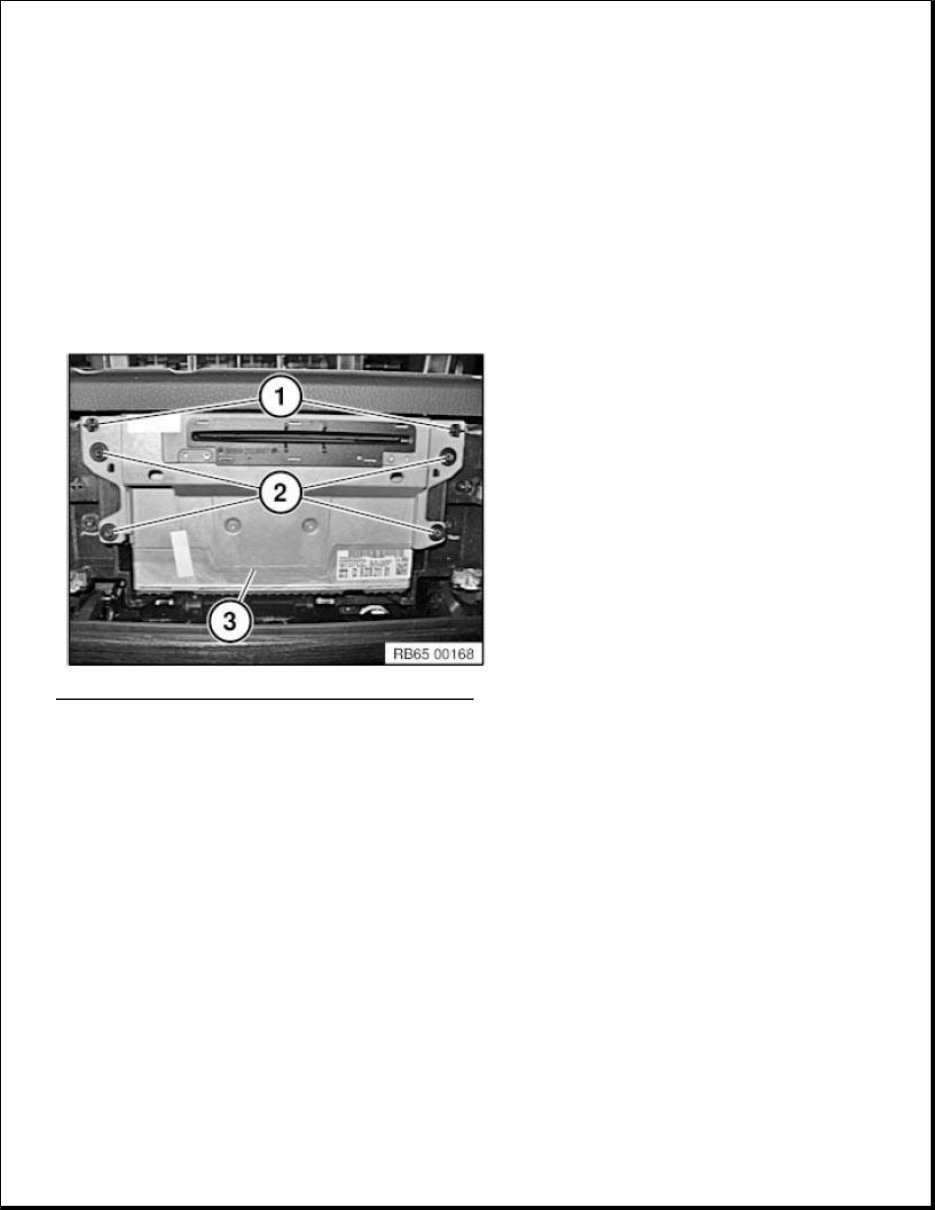
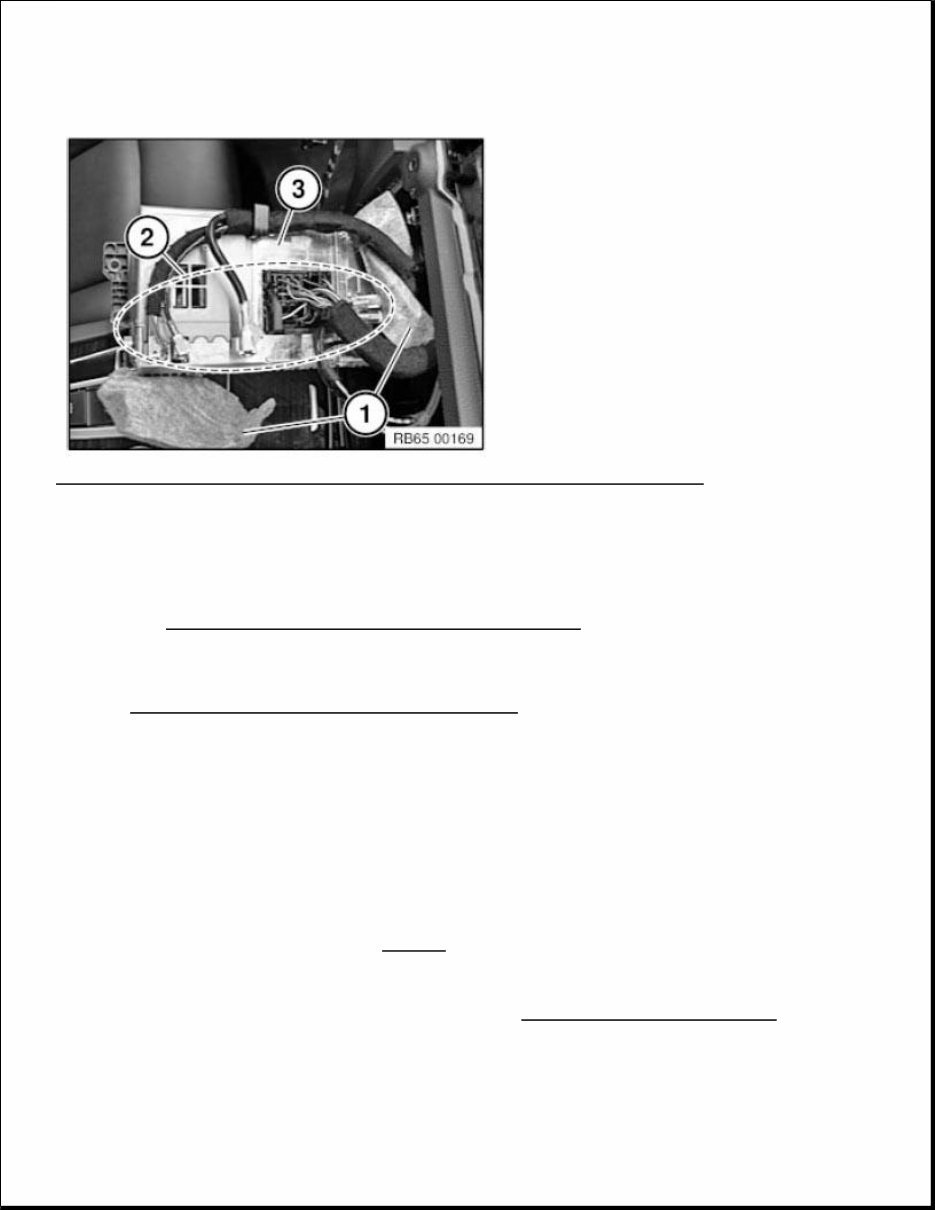
Unfasten screws (2). Pull headunit (3) out of guide. Installation note: Make sure headunit (3) is correctly seated in guide lugs (1). Fig. 6: Identifying Headunit, Guide Lugs And Screws Courtesy of BMW OF NORTH AMERICA, INC. Set the protective nonwoven material (1) aside as shown. Unlock plug connections. (2) and disconnect. Remove headunit (3). NOTE: Picture for example purposes only!
Fig. 7: Identifying Protective Nonwoven Material, Headunit And Plug Connections Courtesy of BMW OF NORTH AMERICA, INC. Only for US models with satellite radio: When replacing the headunit, additional work is required! Refer to REPLACING SATELLITE TUNER, AS OF 09/2009 . Replacement: Carry out VEHICLE PROGRAMMING AND ENCODING . Additionally 1-Series F2x and 3-Series F3x: Load service history: 05 Maintenance and Pre-Delivery Check Service history 65 12 072 REMOVING AND INSTALLING (REPLACING) AMPLIFIER (TOP HIFI SYSTEM) Necessary preliminary work: IMPORTANT: Read and comply with NOTES on protection against electrostatic damage (ESD protection). NOTE: Comply with notes and instructions on HANDLING OPTICAL FIBRES .
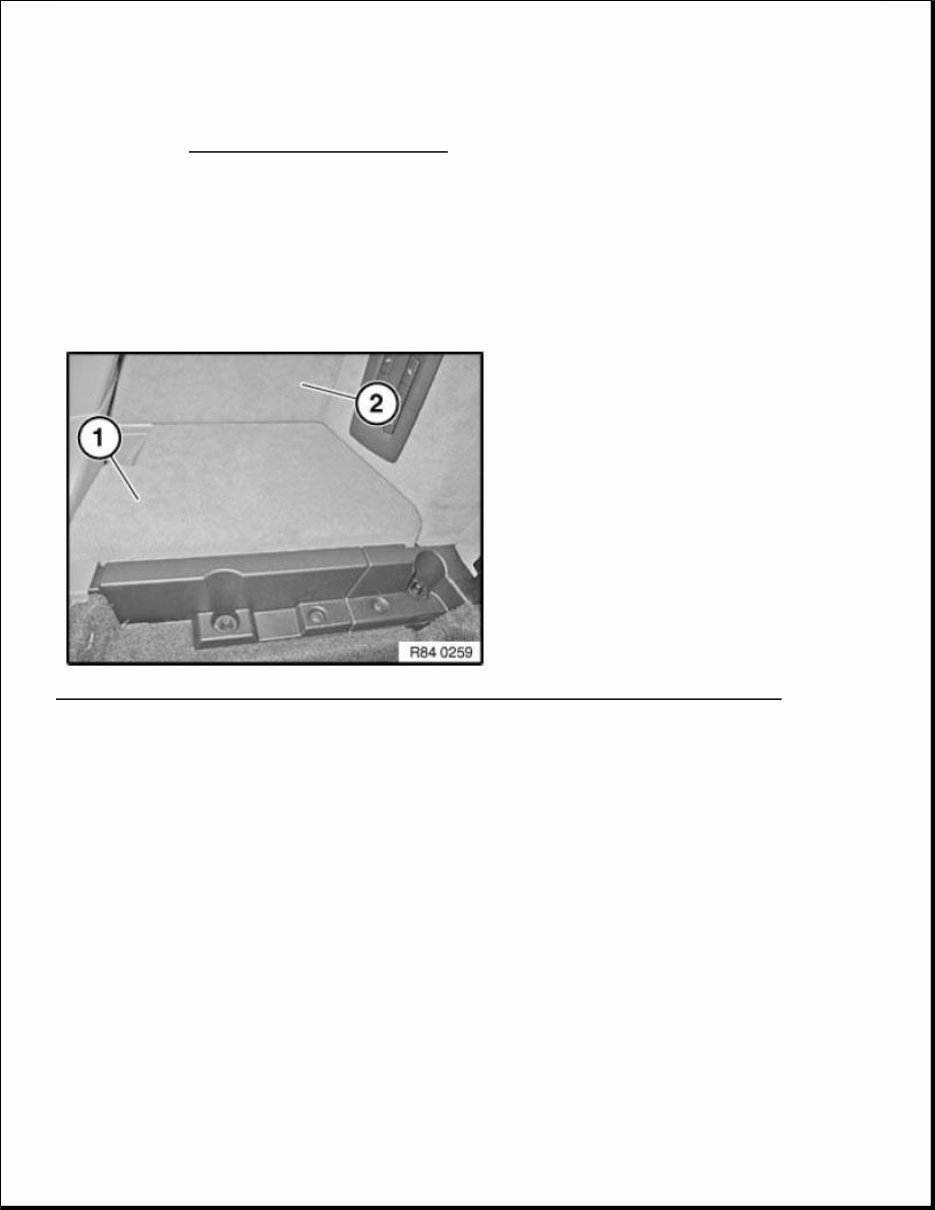
Disconnect NEGATIVE BATTERY CABLE . Remove lid of left luggage compartment trim panel (1). Remove luggage compartment flap (2). Installation note: Make sure lid (1) and flap (2) are correctly seated. Fig. 8: Identifying Luggage Compartment Flap And Left Luggage Compartment Trim Panel Courtesy of BMW OF NORTH AMERICA, INC. Unscrew nuts (1). Lift out expanding rivets (2). Remove left shelf support (3).
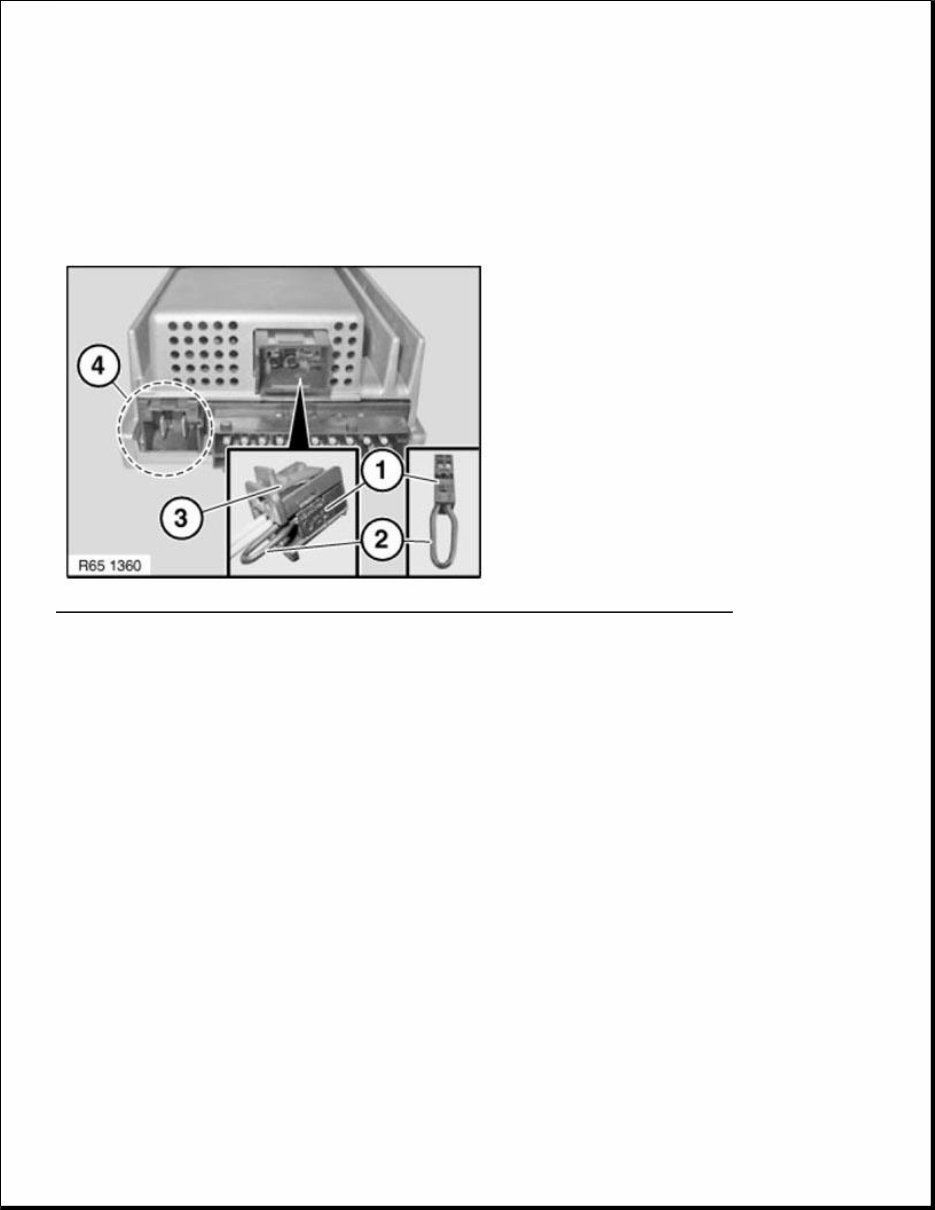
Fig. 9: Identifying Left Shelf Support, Expanding Rivets And Nut Courtesy of BMW OF NORTH AMERICA, INC. Release screw (1). Remove amplifier (2) in direction of arrow from holder (3). Unlock plug connections and disconnect. Fig. 10: Removing Amplifier From Holder Courtesy of BMW OF NORTH AMERICA, INC. NOTE: Until 09/2009 a Top Hifi amplifier with a different pin assignment is installed!
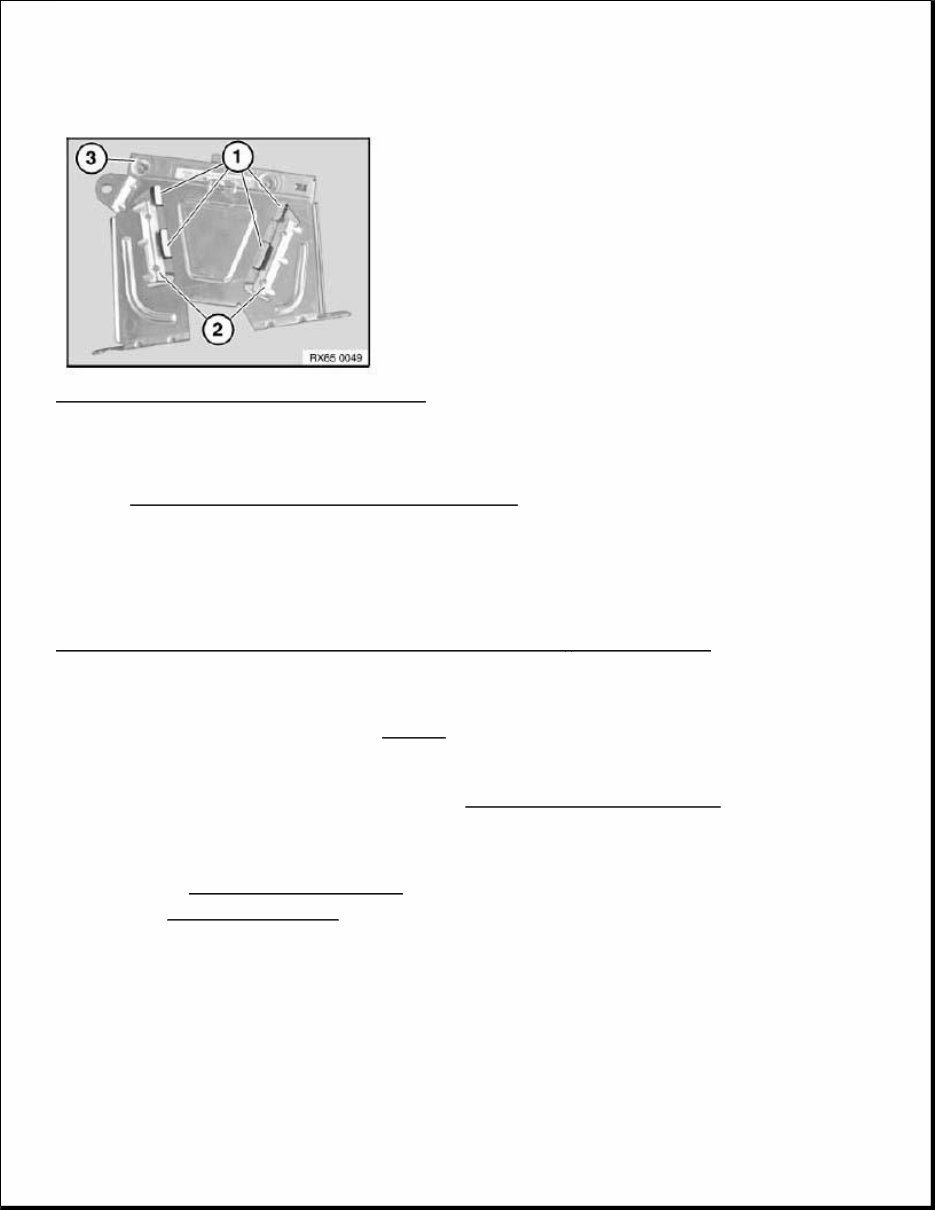
Install cable jumper consisting of socket (1) (BMW Parts Service 6901844) and wire jumper (2) in connector (3). Create wire jumper (2) from wire (cross-section 0.75 mm 2 ) and two stops (BMW Parts Department 1393724). Then connect pins 1 and 2 in the socket (1) with wire jumper (2). Fig. 11: Identifying Cable Jumper, Wire Jumper, Connector And Connector Chamber Courtesy of BMW OF NORTH AMERICA, INC. Installation note: Tabs (1) must be correctly slid into guide (2). Check that amplifier (3) is securely seated. NOTE: Connector chamber (4) is not included in current version and remains unused in new replacement Top HiFi amplifier! NOTE: Picture for example purposes.
Fig. 12: Identifying Tabs, Guide And Amplifier Courtesy of BMW OF NORTH AMERICA, INC. Replacement Carry out VEHICLE PROGRAMMING AND ENCODING . 65 12 053 REMOVING AND INSTALLING/RENEWING CENTRAL BASS SPEAKER - FRONT PASSENGER SIDE - (UNDER FRONT SEAT) Operation is identical to: REMOVING AND INSTALLING CENTRAL BASS SPEAKER - DRIVER'S SIDE 65 12 265 REMOVING AND INSTALLING/REPLACING DVD PLAYER IN REAR CONSOLE Necessary preliminary work Disconnect BATTERY EARTH LEAD . Remove CENTRE CONSOLE . Unlock plug connections (1) and disconnect. IMPORTANT: Read and comply with NOTES on protection against electrostatic damage (ESD protection). NOTE: Comply with notes and notes on HANDLING OPTICAL FIBRES .
You're Reading a Preview
What's Included?
Lifetime Access
Fast Download Speeds
Online & Offline Access
Access PDF Contents & Bookmarks
Full Search Facility
Print one or all pages of your manual
$37.99
2014 BMW 5-Series F07 GRAN TURISMO Service and Repair Manual
Get your hands on the 2014 BMW 5-SERIES F07 GRAN TURISMO SERVICE AND REPAIR MANUAL. Whether you're a professional mechanic or a DIY enthusiast, these Auto Repair Manuals provide comprehensive instructions and procedures to help you fix your vehicle. The manuals contain technical data, diagrams, a complete list of car parts, and pictures, making it easy for even novice car mechanics to follow along. With hundreds of photos and detailed sections, this repair manual covers everything from maintenance and engine to electrical and much more.
These manuals are available in .PDF format, making it convenient for you to print only the pages and diagrams you require. They are compatible with Windows Vista32 and 64, XP, ME, 98, NT, 2000, and Mac, ensuring accessibility for all users. The repair manuals come with complete instructions, illustrations, wiring schematics, and diagrams to facilitate easy servicing and repair of your vehicle.
With this repair manual, you can save time and money by taking on car repairs yourself. It provides you with all the necessary car information and allows you to stay up-to-date and knowledgeable about your vehicle. The manual is printable, allowing you to keep it safely on your PC and print the pages you need in a matter of seconds. Whether it's engine mechanical, cooling system, brake system, steering system, or any other component, this manual has got you covered.
Compatible with all versions of Windows and Mac, this repair manual is a valuable resource for anyone looking to maintain, service, diagnose, and repair their vehicle. It's time to take control of your car repairs and enjoy the satisfaction of fixing your vehicle with ease.
Maintenance
Engine
Control System
Mechanical
Fuel Service Specifications
Emission Control
Intake Exhaust Cooling
Lube
Ignition Starting Charging
Auto Transmission Clutch
Manual Transmission
Transfer Propeller Shaft
Drive Shaft
Differential
Axle Suspension
Tire & Wheel
Brake Control
Brake
Parking Brake
Steering Column
Power Steering
Air Condition
Suppl Restraint System
Seat Belt
Engine Immobilizer
Cruise Control
Wiper & Washer
Door Lock
Meter Audio/Visual
Horn
Windshield/Glass Mirror
Instrument Panel
Seat
Engine Hood/ Door
Exterior & Interior
Electrical
Multiplex/ Can Communication
And much more...
Language: English
Requirements: Adobe Reader and Win (free online)
Take the first step towards becoming an expert in car repairs with these comprehensive repair manuals. They are your go-to resource for all your vehicle maintenance and repair needs.
Reviews
Q&A
Recently Viewed
5,521,897Happy Clients
2,594,462eManuals
1,120,453Trusted Sellers
15Years in Business
Price:
Actual Price:
2014 BMW 5-Series F07 GRAN TURISMO Service and Repair Manual



 Lifetime Access




