

GENERAL INFORMATION
Audi - 1984-12
EGR WARNING LIGHT
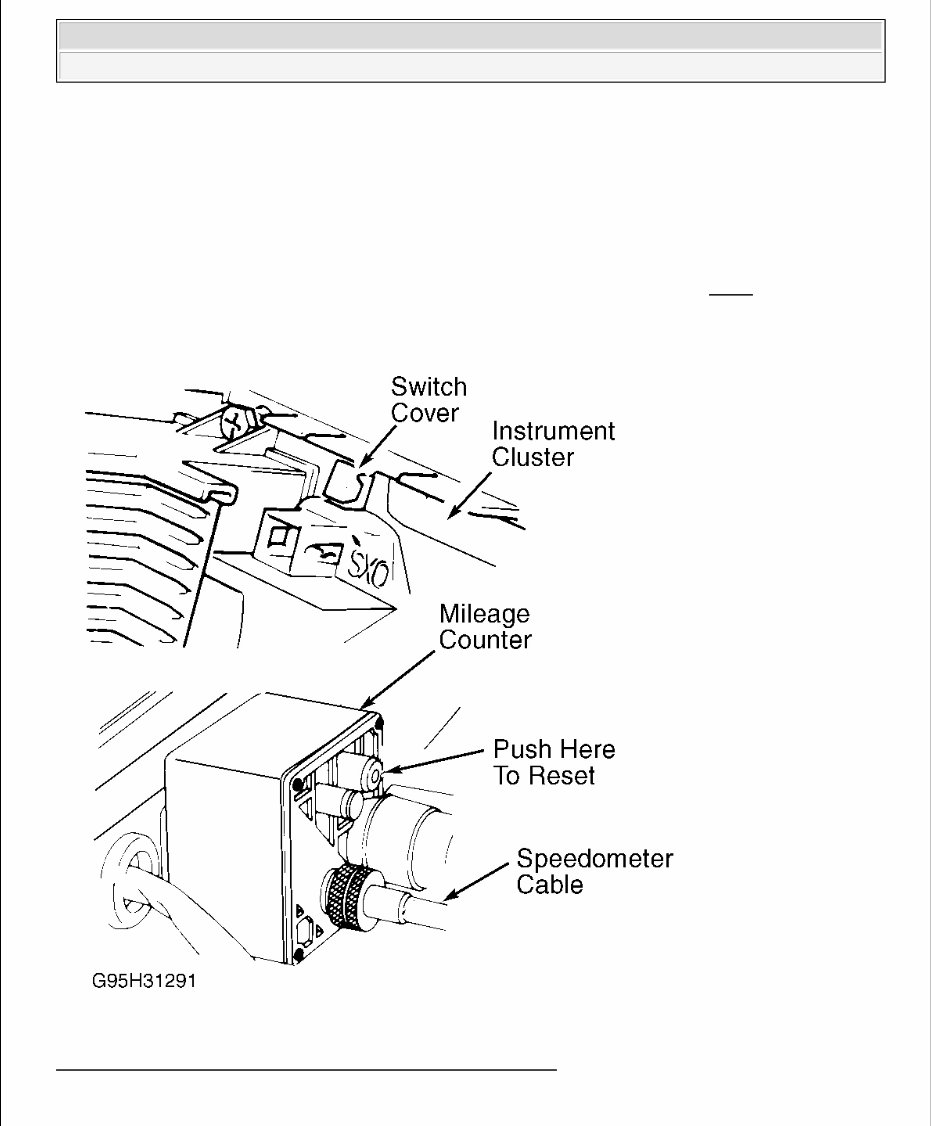
On models equipped with EGR warning light, warning light will come on every 15,000 miles. After EGR
system has been checked, and any faults have been corrected, reset mileage counter. See Fig. 1 .
Fig. 1: Resetting Maintenance Reminder Light Mileage Counter
Courtesy of AUDI OF AMERICA, INC.
2012 Audi Q7 3.0 TDI
GENERAL INFORMATION Audi - 1984-12
OXYGEN SENSOR WARNING LIGHT
OXYGEN SENSOR WARNING LIGHT RESET PROCEDURE INDEX
OXYGEN SENSOR WARNING LIGHT RESET - PROCEDURE 1
Every 30,000 miles an oxygen sensor service reminder light in dash will illuminate. This indicates emissions
system should be checked and oxygen sensor should be replaced.
1. To reset counter, remove 2 upper and/or 2 lower instrument cluster cover screws.
2. Pull cover toward steering wheel.
3. Lift upper instrument cluster cover off of cluster.
4. Break off square plastic switch cover at top center near imprinted OXS. See Fig. 1 .
5. Using a screwdriver, push switch to reset light. On some models, remove instrument cluster if necessary
to access switch.
6. To turn off reminder light on all models except Coupe GT with electronic dash:
Trace speedometer cable to reset box (in-line with cable). See Fig. 1 .
Press White button on box. Turn ignition on, and ensure indicator is out.
OXYGEN SENSOR WARNING LIGHT RESET - PROCEDURE 2
Every 60,000 miles an oxygen sensor service reminder light in dash will illuminate. This indicates emissions
system should be checked and oxygen sensor should be replaced.
NOTE: To determine appropriate reset procedure, refer to OXYGEN SENSOR WARNING
LIGHT RESET PROCEDURE INDEX . Only vehicles listed in this index have an
OXYGSEN SENSOR warning light.
NOTE: The O2S counter on Coupe GT models with electronic dash is solid state
circuitry and cannot be reset. At 30,000 miles, replace oxygen sensor, remove
and discard earning light bulb from cluster.
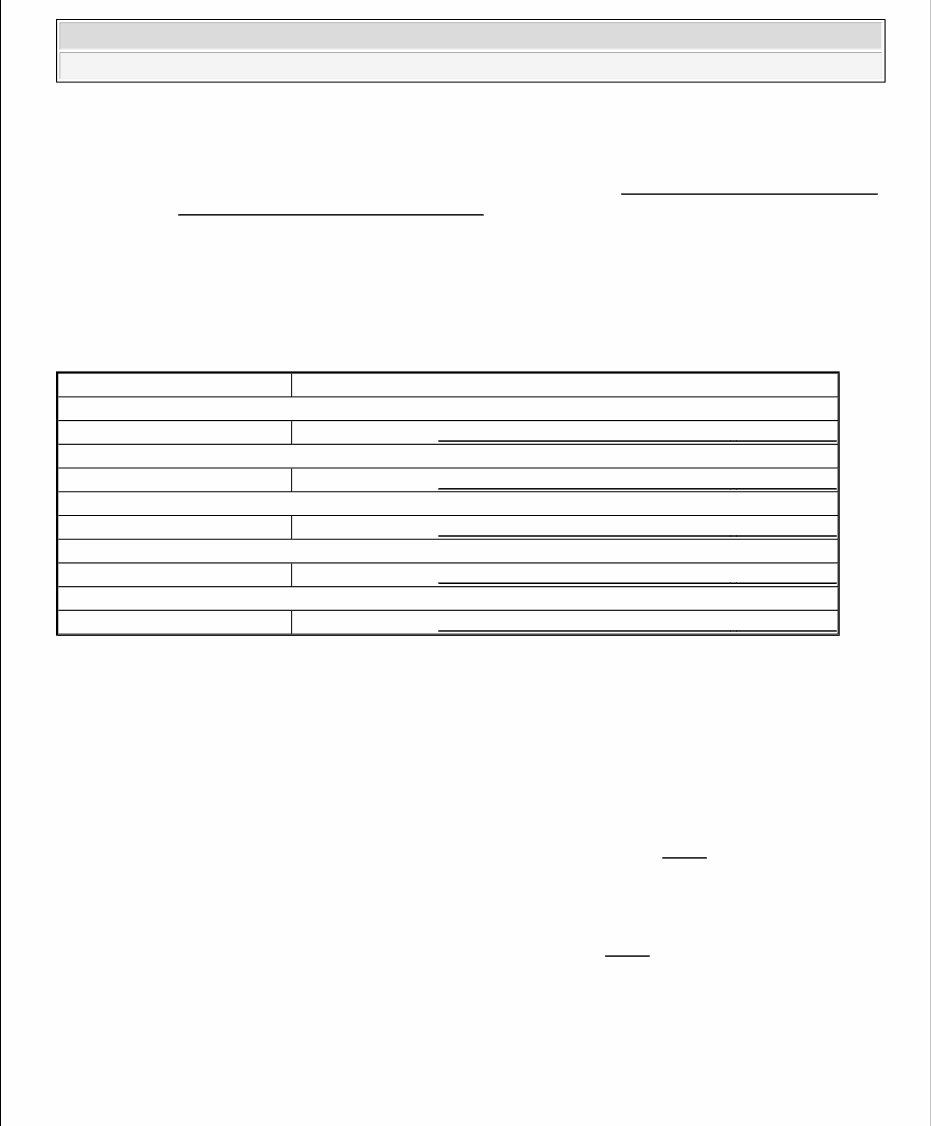
Model & Year Reset Procedure
100/200 Turbo
1989 Oxygen Sensor Warning Light Reset - Procedure 2
4000
1984-87 Oxygen Sensor Warning Light Reset - Procedure 1
5000 Non-Turbo
1984-88 Oxygen Sensor Warning Light Reset - Procedure 1
5000S
1984-88 Oxygen Sensor Warning Light Reset - Procedure 1
5000 Turbo
1984-88 Oxygen Sensor Warning Light Reset - Procedure 2
2012 Audi Q7 3.0 TDI
GENERAL INFORMATION Audi - 1984-12
1. To reset counter, lift rear seat and push button marked OXS on reset box.
2. Turn ignition on, and ensure indicator is out.
3. To turn off reminder light on all models except Coupe GT with electronic dash:
Trace speedometer cable to reset box (in-line with cable). See Fig. 1 .
Press White button on box. Turn ignition on, and ensure indicator is out.
SERVICE REMINDER INDICATOR/SERVICE INTERVAL DISPLAY
SERVICE REMINDER INDICATOR/SERVICE INTERVAL DISPLAY RESET PROCEDURE INDEX
NOTE: To determine appropriate reset procedure, refer to SERVICE REMINDER
INDICATOR/SERVICE INTERVAL DISPLAY RESET PROCEDURE INDEX . Only
vehicles listed in this index have a service reminder indicator or a service
interval display.
NOTE: DO NOT reset display between required service intervals, otherwise service
interval will be incorrect. Service display information will remain intact even
when battery is disconnected.
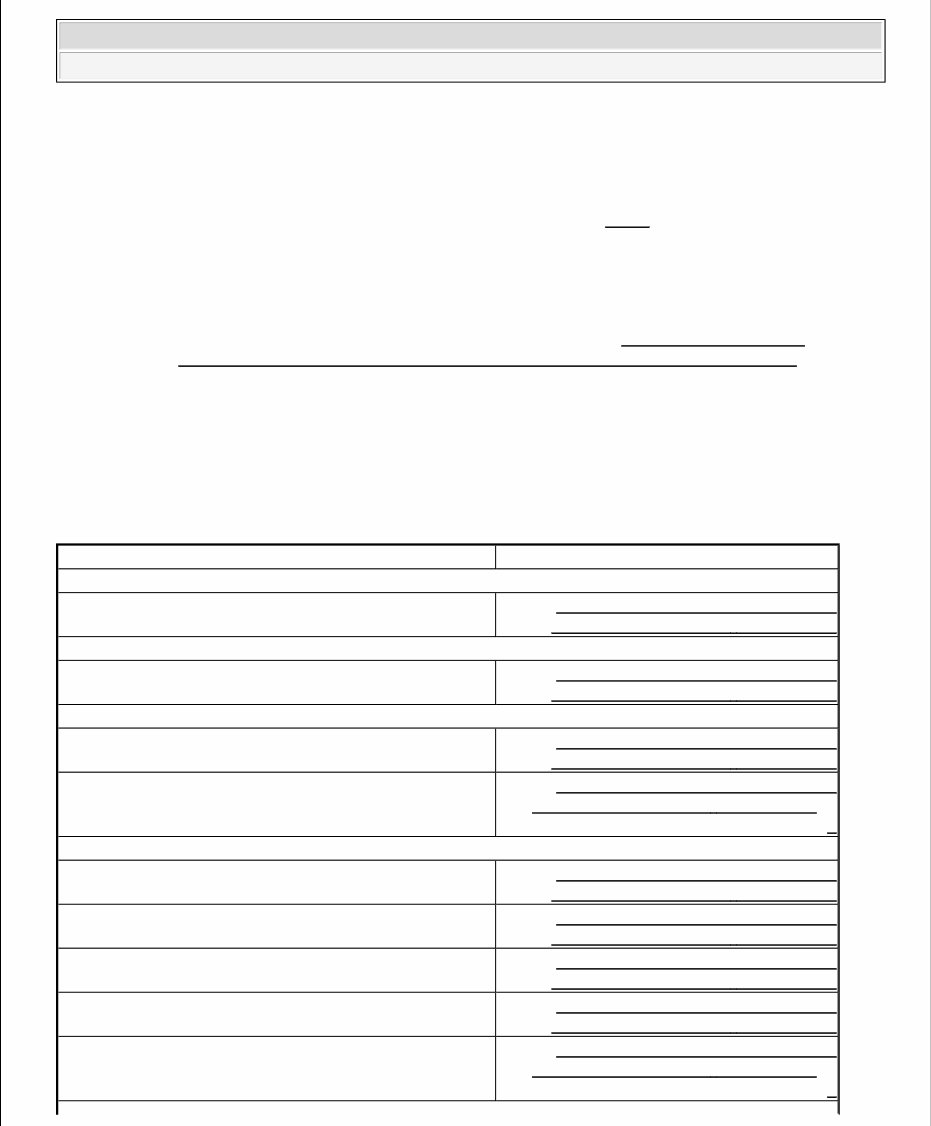
Model & Year Reset Procedure
100
1992-94 Service Reminder Indicator/Service
Interval Display Reset - Procedure 1
Allroad
2001-05 Service Reminder Indicator/Service
Interval Display Reset - Procedure 2
A3
2006-07 Service Reminder Indicator/Service
Interval Display Reset - Procedure 6
2008-12 Service Reminder Indicator/Service
Interval Display Reset - Procedure 8 or
9
A4
1996-97 Service Reminder Indicator/Service
Interval Display Reset - Procedure 1
1998-01 Service Reminder Indicator/Service
Interval Display Reset - Procedure 2
2002-05 Service Reminder Indicator/Service
Interval Display Reset - Procedure 4
2006-07 Service Reminder Indicator/Service
Interval Display Reset - Procedure 6
2008-12 Service Reminder Indicator/Service
Interval Display Reset - Procedure 7 or
8
2012 Audi Q7 3.0 TDI
GENERAL INFORMATION Audi - 1984-12
A5
2008-12 Service Reminder Indicator/Service
Interval Display Reset - Procedure 7 or
8
A6
1995-97 Service Reminder Indicator/Service
Interval Display Reset - Procedure 1
1998-04 Service Reminder Indicator/Service
Interval Display Reset - Procedure 3
2005-08 Service Reminder Indicator/Service
Interval Display Reset - Procedure 1
2009-12 Service Reminder Indicator/Service
Interval Display Reset - Procedure 7 or
8
A6 Avant Quattro
1999-04 Service Reminder Indicator/Service
Interval Display Reset - Procedure 3
A7
2012 Service Reminder Indicator/Service
Interval Display Reset - Procedure 8
A8
1997-02 Service Reminder Indicator/Service
Interval Display Reset - Procedure 1
2003-12 Service Reminder Indicator/Service
Interval Display Reset - Procedure 8 or
10
Q5
2009-11 Service Reminder Indicator/Service
Interval Display Reset - Procedure 7 or
8
Q7
2010-12 Service Reminder Indicator/Service
Interval Display Reset - Procedure 8 or
11
RS4
2007-08 Service Reminder Indicator/Service
Interval Display Reset - Procedure 6
RS6
2003 Service Reminder Indicator/Service
Interval Display Reset - Procedure 3
R8
2008-12 Service Reminder Indicator/Service
Interval Display Reset - Procedure 8 or
9
2012 Audi Q7 3.0 TDI
GENERAL INFORMATION Audi - 1984-12
SERVICE REMINDER INDICATOR/SERVICE INTERVAL DISPLAY RESET - PROCEDURE 1
SERVICE REMINDER INDICATOR/SERVICE INTERVAL DISPLAY RESET - PROCEDURE 2
1. Switch ignition off.
2. Press trip recorder reset button (2) on instrument cluster and at same time switch ignition on. See Fig. 2 .
Trip recorder display (3) will read "service OIL".
3. Release button.
S4
1992-94 Service Reminder Indicator/Service
Interval Display Reset - Procedure 1
2000-02 Service Reminder Indicator/Service
Interval Display Reset - Procedure 2
2004-05 Service Reminder Indicator/Service
Interval Display Reset - Procedure 4
2006-07 Service Reminder Indicator/Service
Interval Display Reset - Procedure 6
2008-12 Service Reminder Indicator/Service
Interval Display Reset - Procedure 7 or
8
S5
2008-12 Service Reminder Indicator/Service
Interval Display Reset - Procedure 7 or
8
S6
1995 Service Reminder Indicator/Service
Interval Display Reset - Procedure 1
2009-11 Service Reminder Indicator/Service
Interval Display Reset - Procedure 8
S8
2002-09 Service Reminder Indicator/Service
Interval Display Reset - Procedure 1
TT
2000-06 Service Reminder Indicator/Service
Interval Display Reset - Procedure 5
2008-12 Service Reminder Indicator/Service
Interval Display Reset - Procedure 8 or
9
NOTE: Factory scan tool, VAG 1551/1552 or VAS 5051, is required to reset service
reminder indicator.
NOTE: Depending on make of instrument cluster, display on trip recorder will
2012 Audi Q7 3.0 TDI
GENERAL INFORMATION Audi - 1984-12
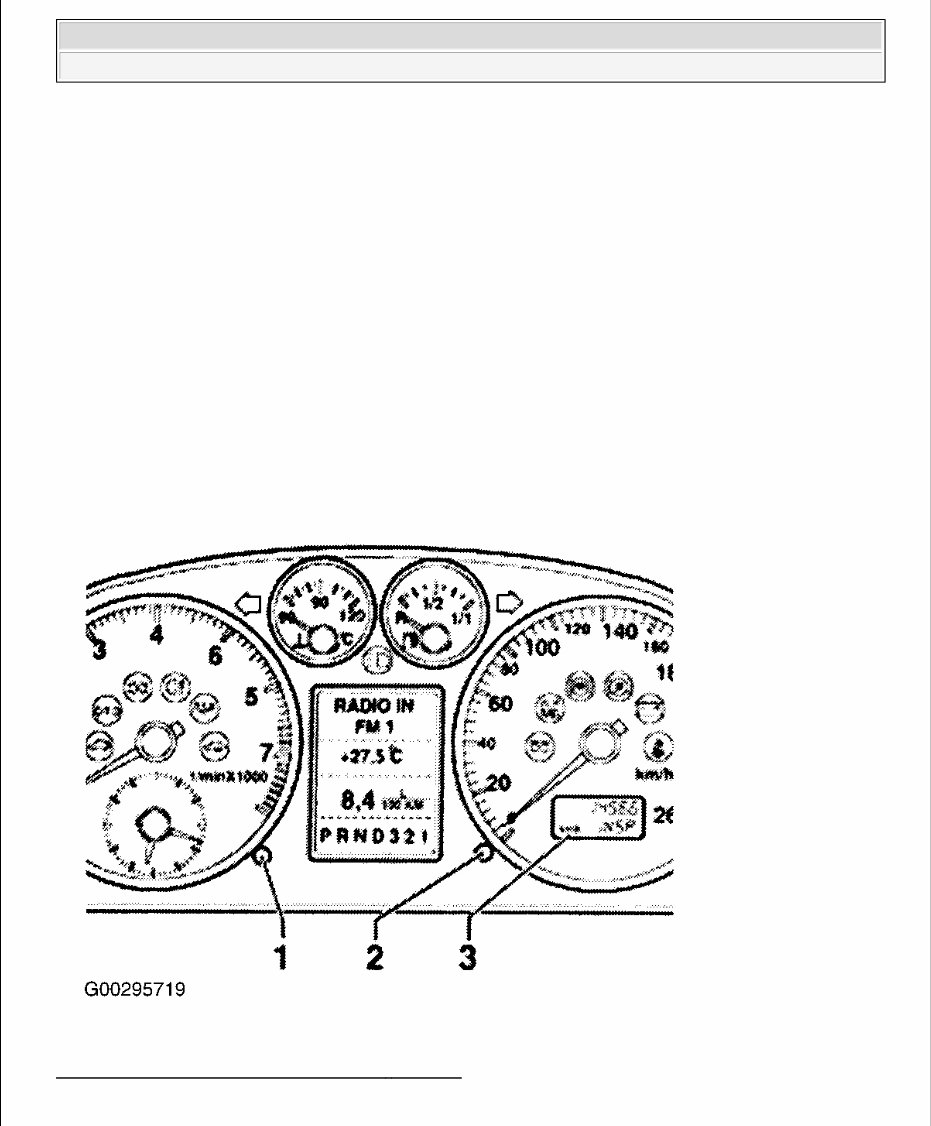
4. Pull clock adjuster button (1) on instrument cluster and hold for approximately 2 seconds. This resets
"service OIL" display.
5. Press trip recorder reset button again to advance to next type of service.
6. Release button. Trip recorder display will read "service INSP".
7. Pull clock adjuster button on instrument cluster and hold for approximately 2 seconds. This resets
"service INSP" display.
8. Switch ignition off.
Fig. 2: Identifying SRI Reset Button (1998 - 2001 A4)
Courtesy of AUDI OF AMERICA, INC.
either continue to read "service OIL' (Nippon Seiki) or change to "- - -
" (VDO).
NOTE: Depending on the make of the instrument cluster, the display on the trip
recorder will either continue to read "service INSP" (Nippon Seiki) or
change to " - - -" (VDO).
2012 Audi Q7 3.0 TDI
GENERAL INFORMATION Audi - 1984-12

SERVICE REMINDER INDICATOR/SERVICE INTERVAL DISPLAY RESET - PROCEDURE 3
Factory scan tool, VAG 1551, can be used to reset SRI or perform the following:
1. Turn ignition off.
2. Press reset button for trip recorder (2) in instrument cluster and switch ignition on at same time. See Fig.
2 . "Service OIL" will appear on trip recorder display (3).
3. Pull out clock adjuster knob(1) in instrument cluster and hold in position until message "Service OIL" is
cancelled. Trip recorder display will now read "Service - - - ".
4. Press trip recorder reset button again to call up next service message. The message "Service INSP" will
appear on trip recorder display.
5. Pull out clock adjuster knob in instrument cluster and hold in position until message "Service INSP" is
cancelled. Trip recorder display will now read "Service - - -".
6. Turn ignition off.
SERVICE REMINDER INDICATOR/SERVICE INTERVAL DISPLAY RESET - PROCEDURE 4
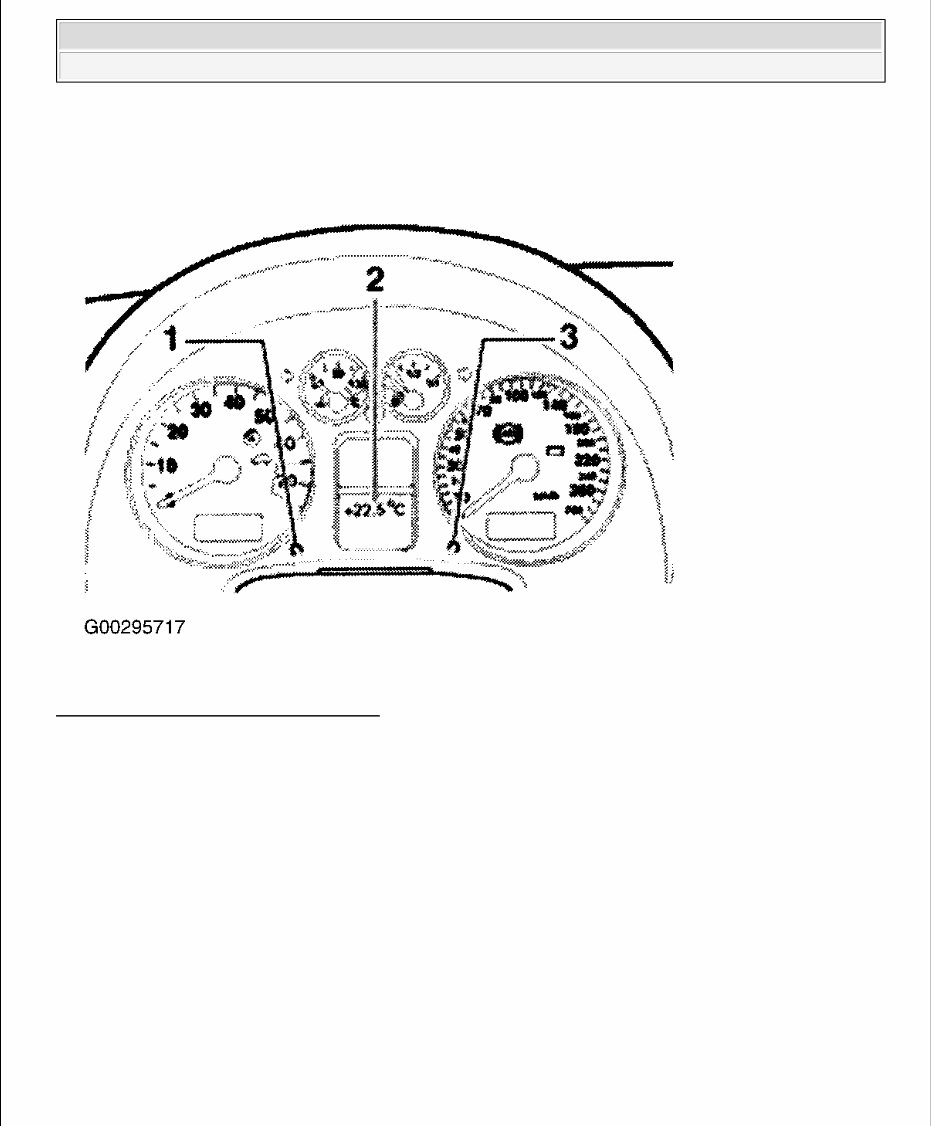
To display remaining distance to service, with ignition on, press button (marked with wrench symbol) on right
side of instrument cluster. A function test can be performed with the engine idling or when vehicle speed has
reached at least 3 MPH. If there is a priority 1 malfunction (Red symbol), distance remaining will not display.
Distance remaining will be updated every 310 miles.
On a new vehicles or immediately after a service has been performed, a "SERVICE IN ---- MI (KM) --- DAYS"
message will be displayed for the first 310 miles. As soon as less than 1200 miles of driving are left before the
next service is due, a "SERVICE IN 1,200 MI (2,000 KM) --- DAYS" message will be displayed when ignition
switch is turned to ON position. The display will return to normal after 5 seconds. If service is due immediately,
a "SERVICE!" message will be displayed when ignition switch is turned to ON position. Display will return to
normal after 5 seconds. To reset interval display after performing required service, perform the following:
1. Turn ignition off.
2. Press button (1) on right side of instrument cluster and turn ignition switch to ON position. See Fig. 3 .
Either "SERVICE IN ---- MI (KM)" or "SERVICE!" message will be displayed.
3. Press reset button (2) on right side of instrument cluster until the following message "SERVICE IN ----
MILES --- DAYS" and "SERVICE!" is displayed. Display will return to normal after 5 seconds.
NOTE: Service reminder can be reset manually or by using VAS 5051 factory scan tool.
If resetting without VAS 5051, the service is automatically set to a fixed interval
9942 miles (16 000 km).
2012 Audi Q7 3.0 TDI
GENERAL INFORMATION Audi - 1984-12
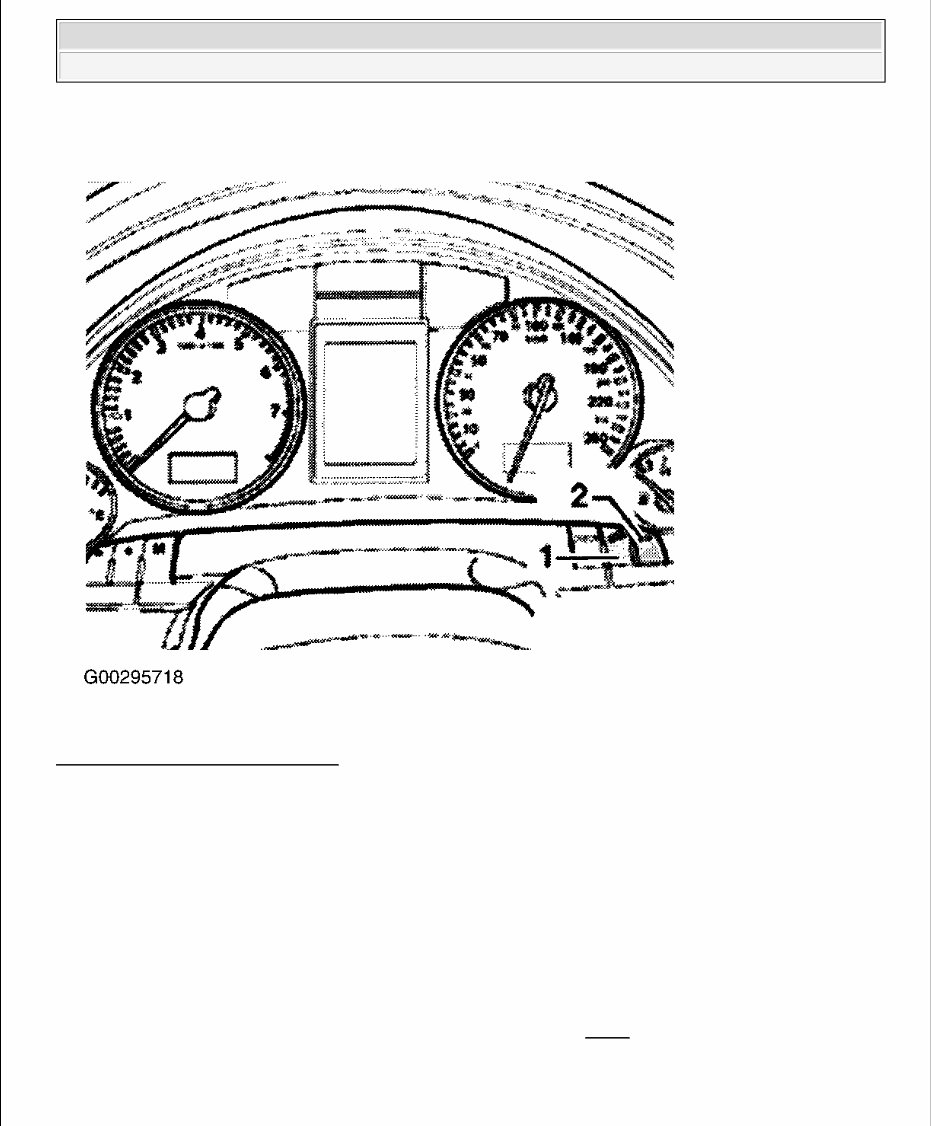
Fig. 3: Identifying SRI Reset Button
Courtesy of AUDI OF AMERICA, INC.
SERVICE REMINDER INDICATOR/SERVICE INTERVAL DISPLAY RESET - PROCEDURE 5
To display remaining distance to service, turn ignition on. Press button on left side of instrument cluster display
(lower right side of tachometer). A system function test can be performed with the engine idling or when
vehicle speed has reached at least 3 MPH. If there is a priority "1" malfunction (Red symbol), distance
remaining will not display. If service is needed soon, "SERVICE IN 1200 MLS" will be displayed. If service is
now due, "SERVICE!" will appear. The display will return to normal after 5 seconds. To reset interval display
after performing required service:
1. Turn ignition off.
2. Turn ignition on while pressing trip recorder reset button (3). See Fig. 4 . "SERVICE!" will appear in the
display (2).
3. Press button on left side of instrument cluster display (1) until "SERVICE!" is cleared from the display.
Display should now show next service event required. If there is a defect in the instrument cluster, dEF
2012 Audi Q7 3.0 TDI
GENERAL INFORMATION Audi - 1984-12
will appear in the trip odometer display area continuously. Vehicle must be serviced.
Fig. 4: Identifying SRI Reset Button (TT)
Courtesy of AUDI OF AMERICA, INC.
SERVICE REMINDER INDICATOR/SERVICE INTERVAL DISPLAY RESET - PROCEDURE 6
1. Turn ignition on. A wrench symbol appears on instrument cluster display (odometer area).
2. Pull knob (trip odometer reset) located on bottom of speedometer to activate reset mode.
3. Pull knob out again until display "SERVICE IN - - - MILES" or "SERVICE" appears in the display. If
reset button is not pushed within 5 seconds, the display reset mode closes and will not reset counter
SERVICE REMINDER INDICATOR/SERVICE INTERVAL DISPLAY RESET - PROCEDURE 7
To reset service reminder: Using CAR button on radio, select "Service interval display", then select "Reset oil
change interval".
SERVICE REMINDER INDICATOR/SERVICE INTERVAL DISPLAY RESET - PROCEDURE 8
Service Interval Display Reset
2012 Audi Q7 3.0 TDI
GENERAL INFORMATION Audi - 1984-12

Follow these steps in sequential order:
1. Connect the Vehicle Diagnosis, Testing and Information System (VAS).
2. Select "Guided Functions".
3. Select "Service Work".
4. Now follow guided program.
Oil Quality Adapting
Follow these steps in sequential order:
1. Connect VAS.
2. Select "Guided Fault Finding or Guided Functions".
3. Go to "function/component selection".
4. Select "Service Work".
5. Select "Combination Processor, changing oil quality".
6. Now follow guided program.
Maximum Values Adapting
Follow these steps in sequential order:
1. Connect VAS.
2. Select "Guided Fault Finding or Guided Functions".
3. Go to - function/component selection.
4. Select "Service Work".
5. Select "Combination Processor, adjusting maximum WIV value".
6. Now follow guided program.
Fixed Interval Maximum Values:
NOTE: It is necessary to change oil quality if changed between inspection.
Inspection Service = Oil quality 1.
WIV = Maintenance Interval Extension.
Please follow guided program function description.
Minimum mileage in Km 15000
Maximum mileage in Km 15000
Maximum time interval in days 365
NOTE:
WIV = Maintenance Interval Extension
2012 Audi Q7 3.0 TDI
GENERAL INFORMATION Audi - 1984-12
You're Reading a Preview
What's Included?
 Lifetime Access
Fast Download Speeds
Online & Offline Access
Access PDF Contents & Bookmarks
Full Search Facility
Print one or all pages of your manual
$39.99
2012 Audi Q7 Service & Repair Manual
Viewed 98 Times Today

What's Included?
Lifetime Access
Fast Download Speeds
Online & Offline Access
Access PDF Contents & Bookmarks
Full Search Facility
Print one or all pages of your manual
$39.99

Secure transaction
What's Included?
Lifetime Access
Fast Download Speeds
Online & Offline Access
Access PDF Contents & Bookmarks
Full Search Facility
Print one or all pages of your manual
Description
- The 2012 Audi Q7 Service & Repair Manual is a comprehensive guide that provides troubleshooting and replacement procedures recommended by the manufacturer.
- It includes step-by-step instructions, clear images, and exploded-view illustrations, making it useful for both professional mechanics and DIY enthusiasts.
- Regular maintenance is essential for the durability of your vehicle, and this manual equips you with the necessary information to address wear and tear issues.
- With the manufacturer's recommended troubleshooting charts and replacement procedures, this manual helps you save on repairs and increase your vehicle's reliability.
- It eliminates the hassle of flipping through numerous pages and offers the convenience of digital access, allowing easy search, screenshot, and bookmark functions.
- Additionally, the manual is printable and compatible with various electronic devices, including PC & Mac computers, Android and Apple smartphones & tablets, etc. It requires Adobe Reader, which is available for free.


