

www.OBD2express.co.uk

CONTENTS
Version1.0 01/01/07
Operating Manual
Transponder Key Duplicator—AD90
PAGE
1.0 GENERAL INFORMATION 1
2.0 GENERAL OPERATION 2
3.0 CRYPTO TRANSPONDER INTERFACE 5
4.0 PC PROGRAM OPERATION 10
5.0 TRANSPONDER INFORMATION 13
6.0 TRANSPONDER TYPES 14
7.0 SOFTWARE UPDATING 15
8.0 SPECIFICATION 16
www.OBD2express.co.uk

1
1.0 GENERAL INFORMATION
The professional duplicating machine, AD90, has been designed and
built to keep pace with the constant evolution of transponder car keys.
The AD90 key duplicator features the most innovative electronic
components in the field of radio frequencies thus allowing easy
detection, reading and cloning (duplication) of fixed code transponders
and the identification of cryptographic transponder codes.
The AD90 in addition has major features such as copying of Crypto 42
type transponders and the Texas 4C and 4D transponders. These are
additional options but make the AD90 a powerful tool.
Features:
• Read transponder
• Write onto transponder
• Copy transponder
• Software update from Internet
• Usable with PC software
• Available to be used with the ‘Chip Decoder System’
• Adaptable to future projects.
• Wide range menu language
AD90 can detect, read and duplicate (using an appropriate key blank) Philips,
Megamos, Temic and Texas transponders:
Reads fixed code transponders:
• Philips® PCF7930/31 - Silca® 33, 73
• Philips® PCF7935 40,41,42,44,45
• Temic®-Silca® 11 i 12
• Megamos® - Silca® 13
• Silca® T5
• Texas® - Silca® 4C
Recognises :
• Megamos® crypto - Silca® 48,
• Philips® crypto - Silca® 46,
• Texas crypto 4D,
• Fixed 11, 12, 13, 33, 73, 4C, T5
• Crypto 40, 41, 42, 44, 45, 4D, 48
• Rolling + Crypto 46
Copies:
• 11, 12 Temic
• 13 Megamos
• 33, 73 Philips
• 4C Texas
• 4D Texas crypto
• T5 Nova
www.OBD2express.co.uk
2
2.0 GENERAL OPERATION
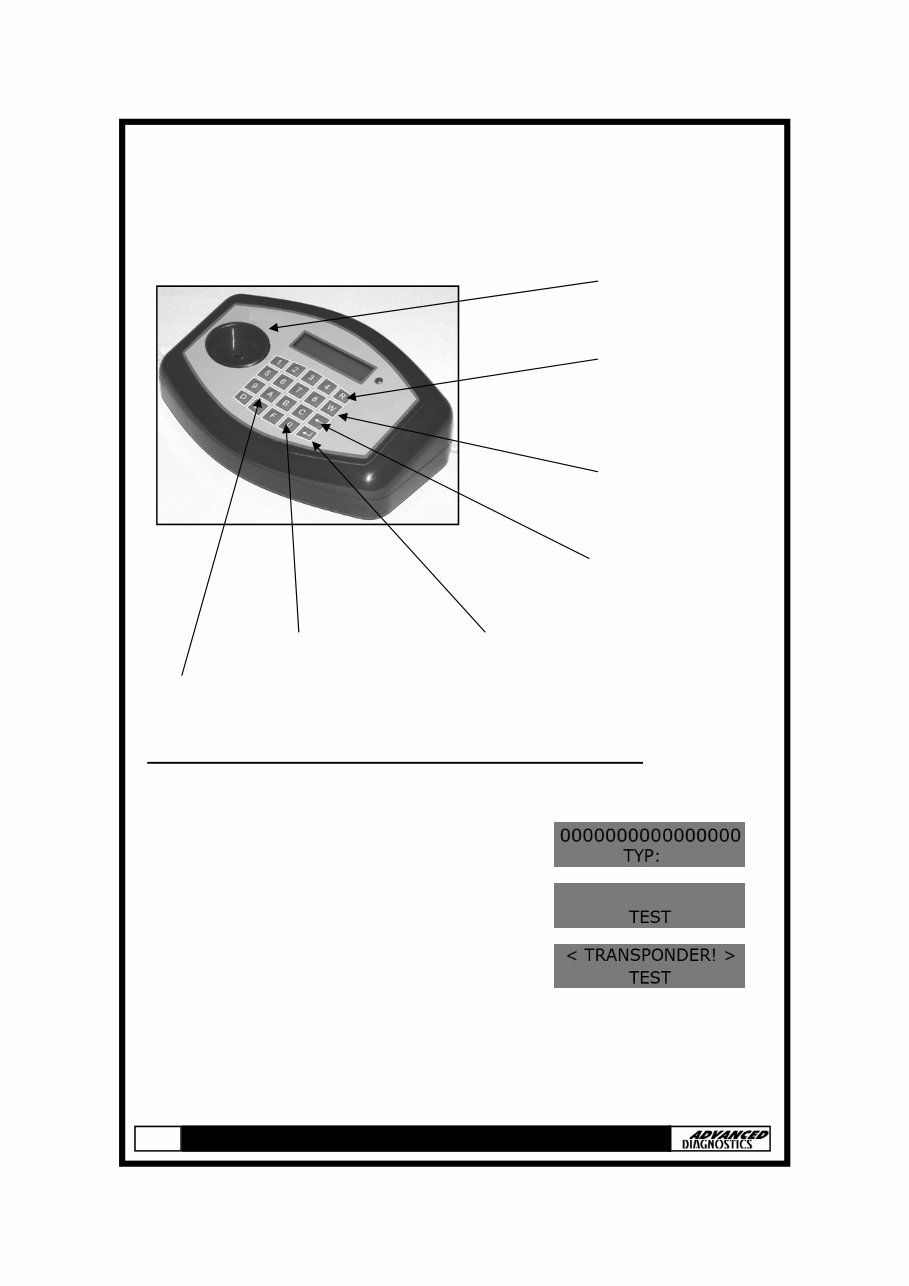
DETECTING THE PRESENCE OF A TRANSPONDER
NOTE: This function can be used for:
• Philips 40-41-42-44-45
• Temic 11-12
• Megamos 13
1. Switch to ’TEST’ mode by pressing the ‘A’
button.
2. The LCD indicates the presence of a transponder.
NOTE : ‘TEST’ does not detect Texas transponders and Philips HITAG 2
(PCF7936 in crypto mode).
After testing, press the ESC button to return to ‘READ’ mode.
R = READ
LETTER ENTRY ENTER
BACK/ESC
W = WRITE
NUMBER ENTRY
KEY READER
www.OBD2express.co.uk

3
2.0 GENERAL OPERATION
READING
1. Insert key into the key reader.
2. Press the ‘R’ button.
3. The transponder information will be displayed.
NOTE: If the transponder is locked ‘LCK’ is displayed in the bottom left corner.
WRITING
1. Insert key/transponder to write into the key reader and
press the ‘W’ button
2. Select the required transponder by pressing the relevant number on the AD90.
3. If ‘WRITE ERROR’ is displayed check the transponder
type and try again.
12223344556677788
READ
12223344556677788
128 TYP : 33
00000000000000000
TYP:
12223344556677788
1-TEXAS 3-ESC
12223344556677788
WRITE
12223344556677788
128 TYP : 33
12223344556677788
1-PH 2-T5 3-ESC
12223344556677788
VERIFY
12223344556677788
SUCCESS
12223344556677788
WRITE ERROR
www.OBD2express.co.uk

4
2.0 GENERAL OPERATION
WRITING WITH THE KEYPAD
1. Clear display by pressing ‘R’ with no transponder in
the key reader.
2. Insert the key/transponder to be written into the key reader.
3. Select required transponder type by pressing the ‘W’
button then press ‘ENTER’ to confirm.
4. Type in the required code - press the ‘W’
button to move the curser to the right and the ‘R’
button to move the curser to the left.
5. Press ‘ENTER’ then press ‘W’.
6. Select the required transponder by pressing the relevant number on the AD90.
7. If ’WRITE ERROR’ is displayed check the transponder
type and try again.
12223344556677788
1-TEXAS 3-ESC
12223344556677788
WRITE
12223344556677788
1-PH 2-T5 3-ESC
12223344556677788
VERIFY
12223344556677788
SUCCESS
12223344556677788
WRITE ERROR
TYP:11 2-CHANGE
3-ESC 4-OK
00000000000000000
00000000000000000
TYP:
www.OBD2express.co.uk
5
3.0 CRYPTO TRANSPONDER
INTERFACE
The Crypto Transponder Interface can be used in conjunction with the AD90 to copy first
generation Philips crypto transponders (type 42) fitted to VAG group vehicles.
Transponder part numbers:
• Advanced Keys - AKTP3
• Elme Tools - CRTP101
• Key Line - TK10
• Silca - T10
• JMA - TP10
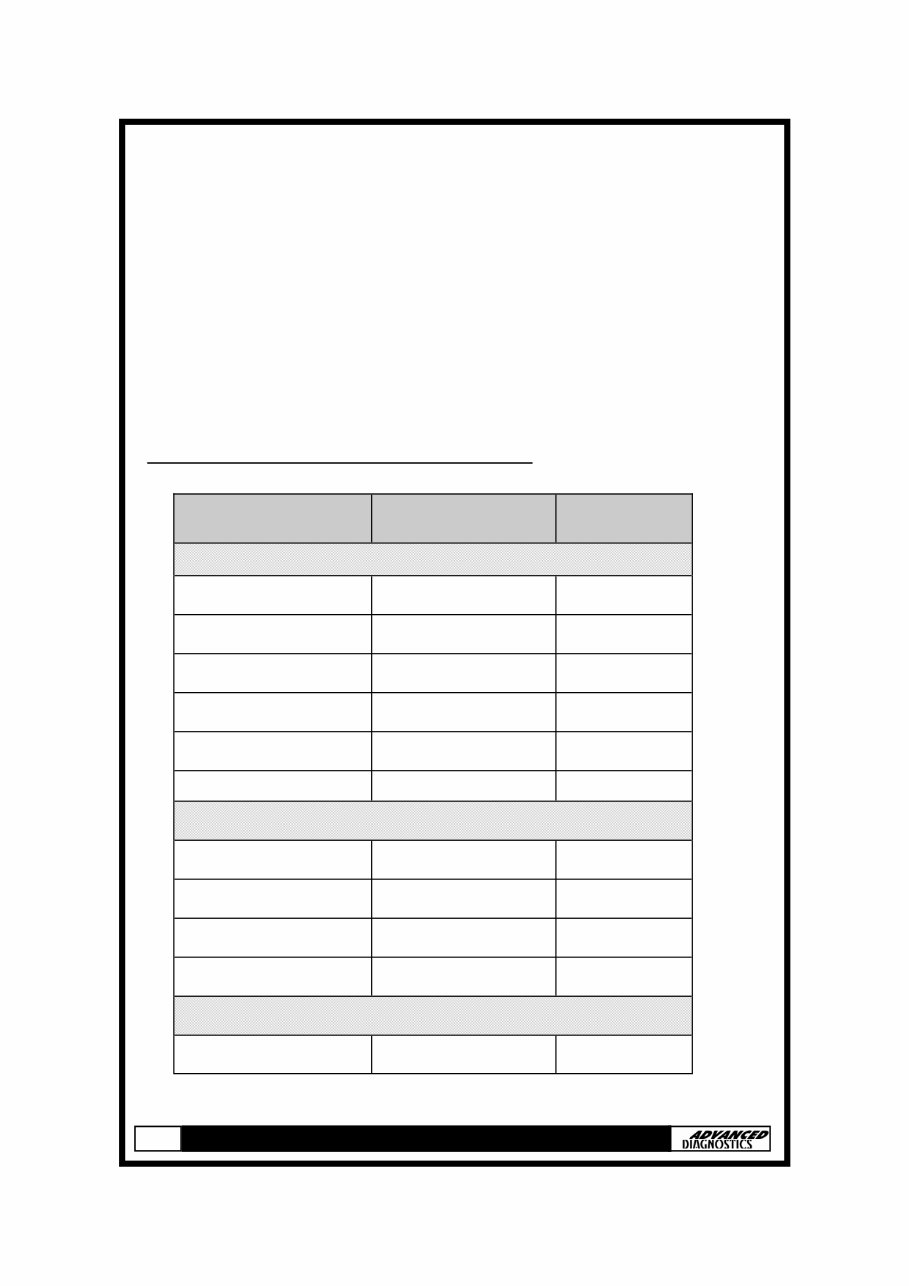
Vehicles fitted with this type of transponder:
Model Years AD90 ID
VOLKSWAGEN
Caddy 99-00 42
Golf Cabrio 98> 42
Lupo 98-00 42
Polo 98-00 42
Sharan 98-00 42
Transporter 98-00 42
SEAT
Arosa 99-01 42
Cordoba Vario 99> 42
Ibiza 98-02 42
Inca 98-00 42
Galaxy 98-00 42
FORD
www.OBD2express.co.uk
6
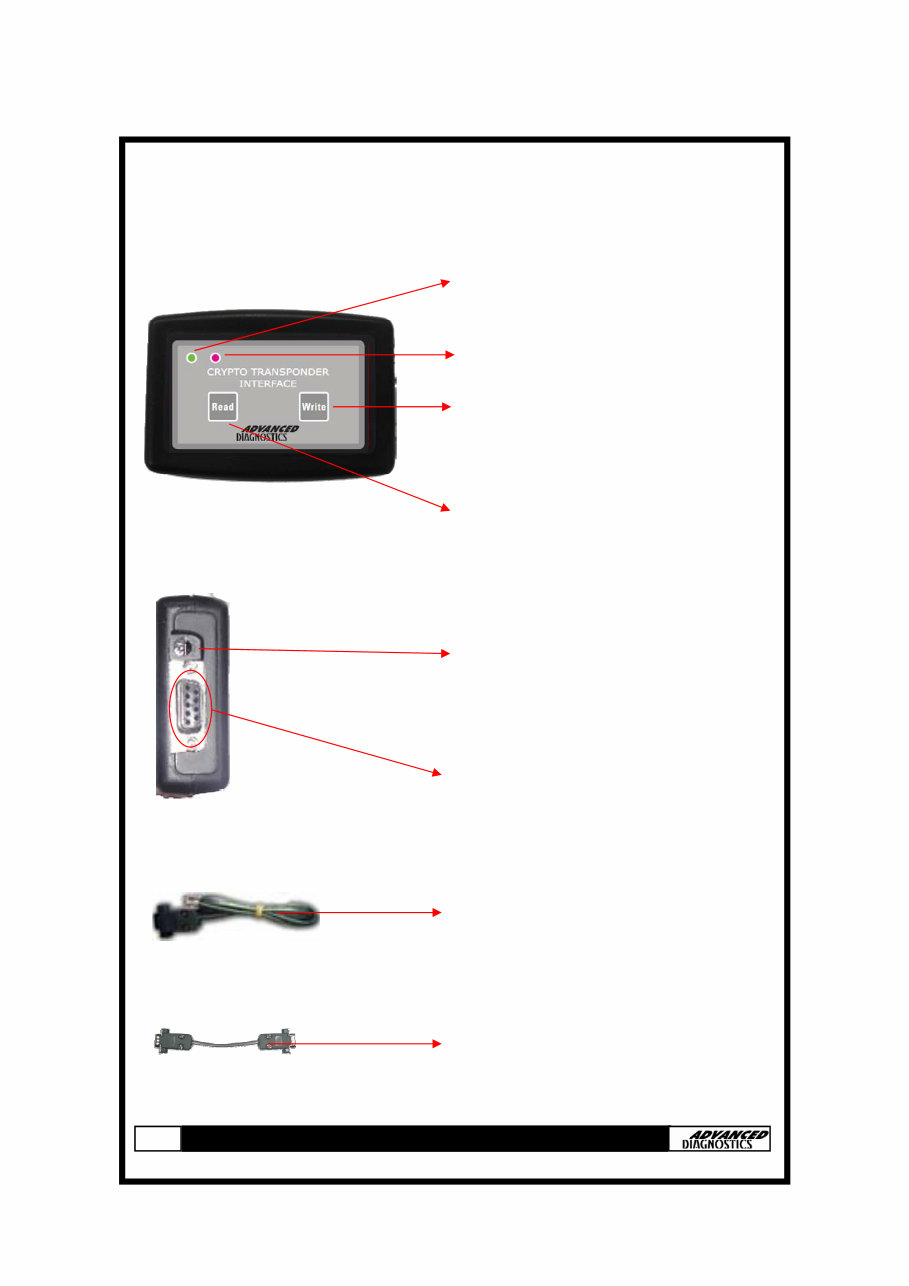
Green LED - indicates that the procedure
is being carried out correctly
Red LED - flashes fault codes
‘Write’ key - press to write data to the
new transponder
‘Read’ key - press to read the
transponder to be copied
Power connection (9 to 12 V dc)
RS-232 plug, used to connect the device
to the AD90
This lead will connect the AD90 to the
PC, Chip Decoder System or other
accessories
RS-232 lead (male-male), to connect the
Crypto Transponder Interface to the
AD90
3.0 CRYPTO TRANSPONDER
INTERFACE
www.OBD2express.co.uk
7
3.0 CRYPTO TRANSPONDER
INTERFACE
NOTE: Before starting the copying procedure, please make sure that your
AD90 software version is 3.14 or higher. If not please contact your distributor
for assistance.
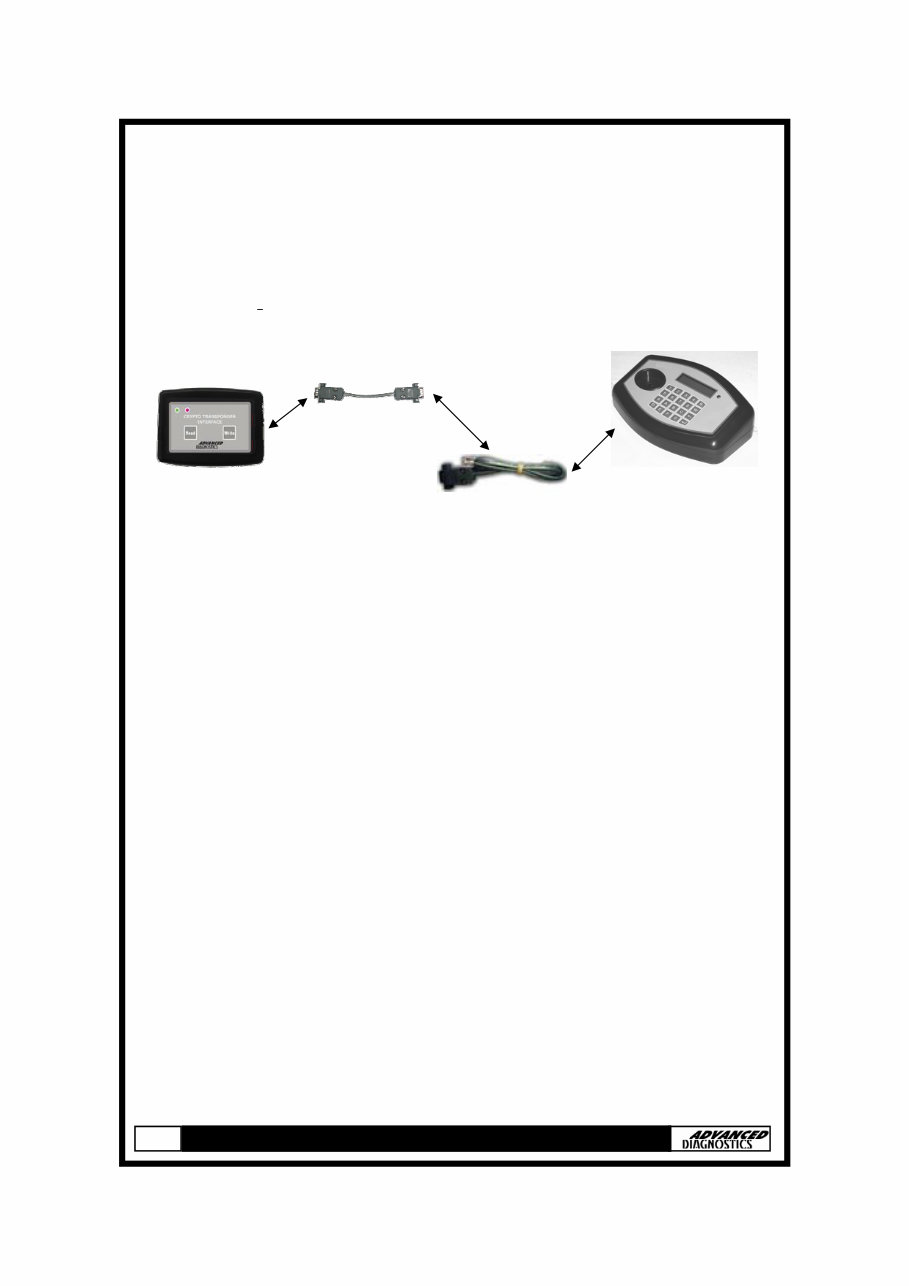
Connect the hardware together as shown below.
1. Connect the power supplies to the AD90 and the Crypto Transponder
Interface. The green and red LEDs will illuminate for one second and then
extinguish.
NOTES:
i) If non-original power supplies are used for the AD90 or the Crypto
Transponder Interface the warranty will be invalid.
ii) Please check that there is nothing that may short circuit the devices when
they are connected to the power supplies.
2. Insert the key into the AD90 key reader.
3. Press the ‘Read’ key on the Crypto Transponder Interface, the green LED
will illuminate and will remain on throughout the reading procedure.
4. Once the transponder code has been recorded, the green LED will start to
flash. Remove the original transponder from the AD90 and insert the new
transponder/key into the AD90 key reader.
5. Press the ‘Write’ key on the Crypto Transponder Interface, the green LED
will illuminate and will remain on throughout the writing procedure.
6. Once the copying procedure is completed, the green LED will extinguish and
the key/transponder can be removed from the key reader.
www.OBD2express.co.uk
8
3.0 CRYPTO TRANSPONDER
INTERFACE
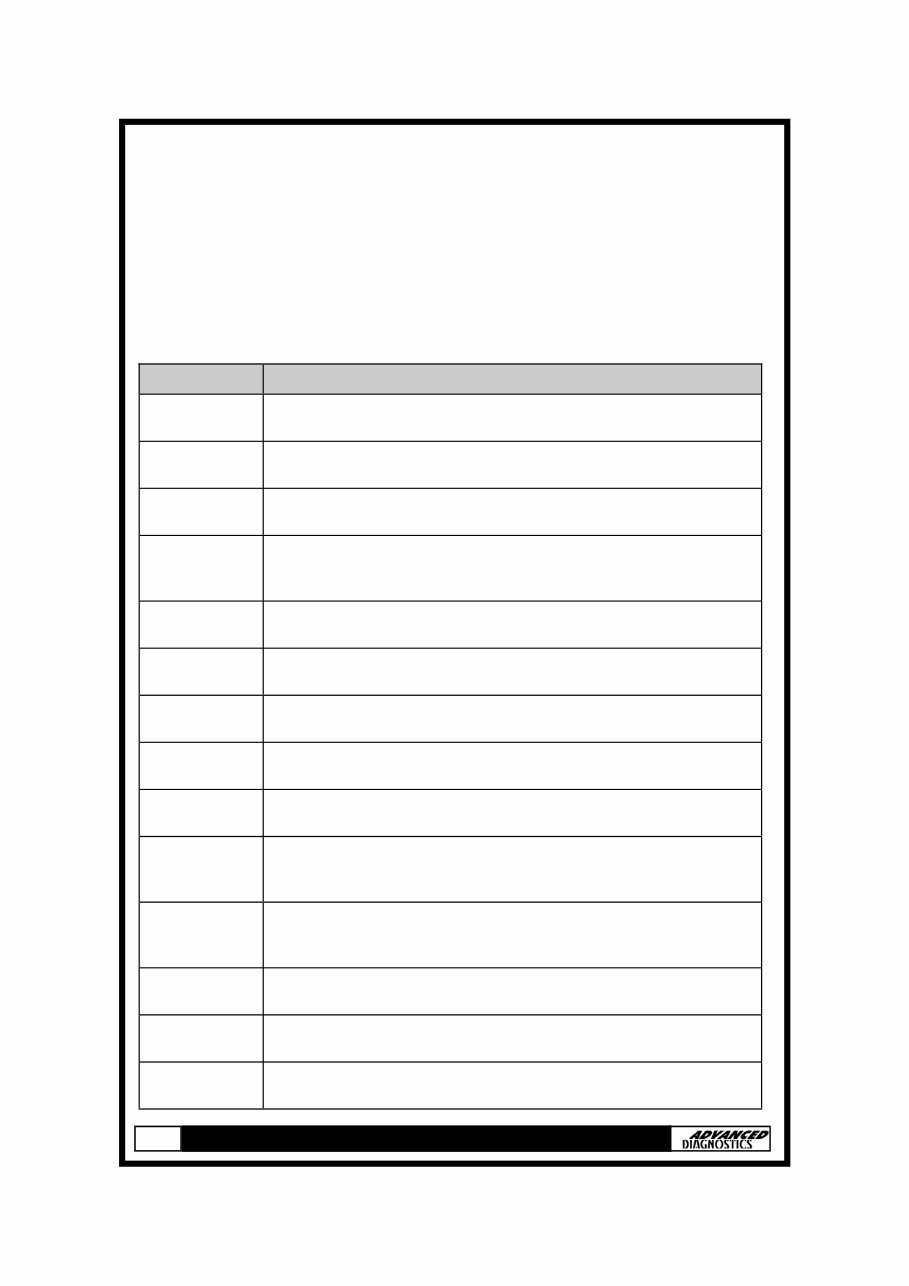
If a problem is detected, the red LED will indicate a fault code by blinking. The
number of times the LED blinks denotes what the fault code is, please refer to the
chart below:
Blinks Description
1
Communication error
Check all connections and make sure devices are on
2
Transponder not found
Check that the transponder is in the AD90 key reader
3
Wrong transponder.
Swap it to a PHILIPS PCF 7935 / 79935, 42 ID
4
Wrong transponder data
The transponder seems to be OK but the data does not meet
the Philips 42 standard
5
Incorrect command to the AD90
Disconnect and re-connect all devices
6
Wrong AD90 software version
Version must be 3.14 or higher
7
Wrong data sent by AD90
Repeat the procedure
8
Time Out
You took to long to press a key
9
Transponder cannot be decrypted
Contact your distributor
10
Not enough memory
Data too large, use a different transponder and repeat
procedure
11
Incorrect transponder data
The transponder seems to be OK but the data does not meet
the Philips 42 standard
12
Wrong data sent to AD90
Repeat the procedure
13
Communication error
Check all connections and make sure devices are on
14
Communication error to AD90
Check all connections and make sure devices are on
www.OBD2express.co.uk
You're Reading a Preview
What's Included?
 Lifetime Access
Fast Download Speeds
Online & Offline Access
Access PDF Contents & Bookmarks
Full Search Facility
Print one or all pages of your manual
$31.99
User Operating Manual Transponder Key Duplicator AD90
Viewed 29 Times Today

What's Included?
Lifetime Access
Fast Download Speeds
Online & Offline Access
Access PDF Contents & Bookmarks
Full Search Facility
Print one or all pages of your manual
$31.99

Secure transaction
What's Included?
Lifetime Access
Fast Download Speeds
Online & Offline Access
Access PDF Contents & Bookmarks
Full Search Facility
Print one or all pages of your manual
Description
The Transponder Key Duplicator AD90 is a valuable tool for both professional mechanics and DIY enthusiasts. This manual provides comprehensive instructions on how to operate the AD90 key duplicator. Whether you are duplicating transponder keys for automotive repair or personal use, this manual will guide you through the process with clear and detailed steps.
With the AD90 manual, you will learn how to effectively duplicate transponder keys, ensuring accuracy and efficiency. The step-by-step instructions cover the usage of the AD90 duplicator, making it an essential resource for anyone working with transponder keys.


