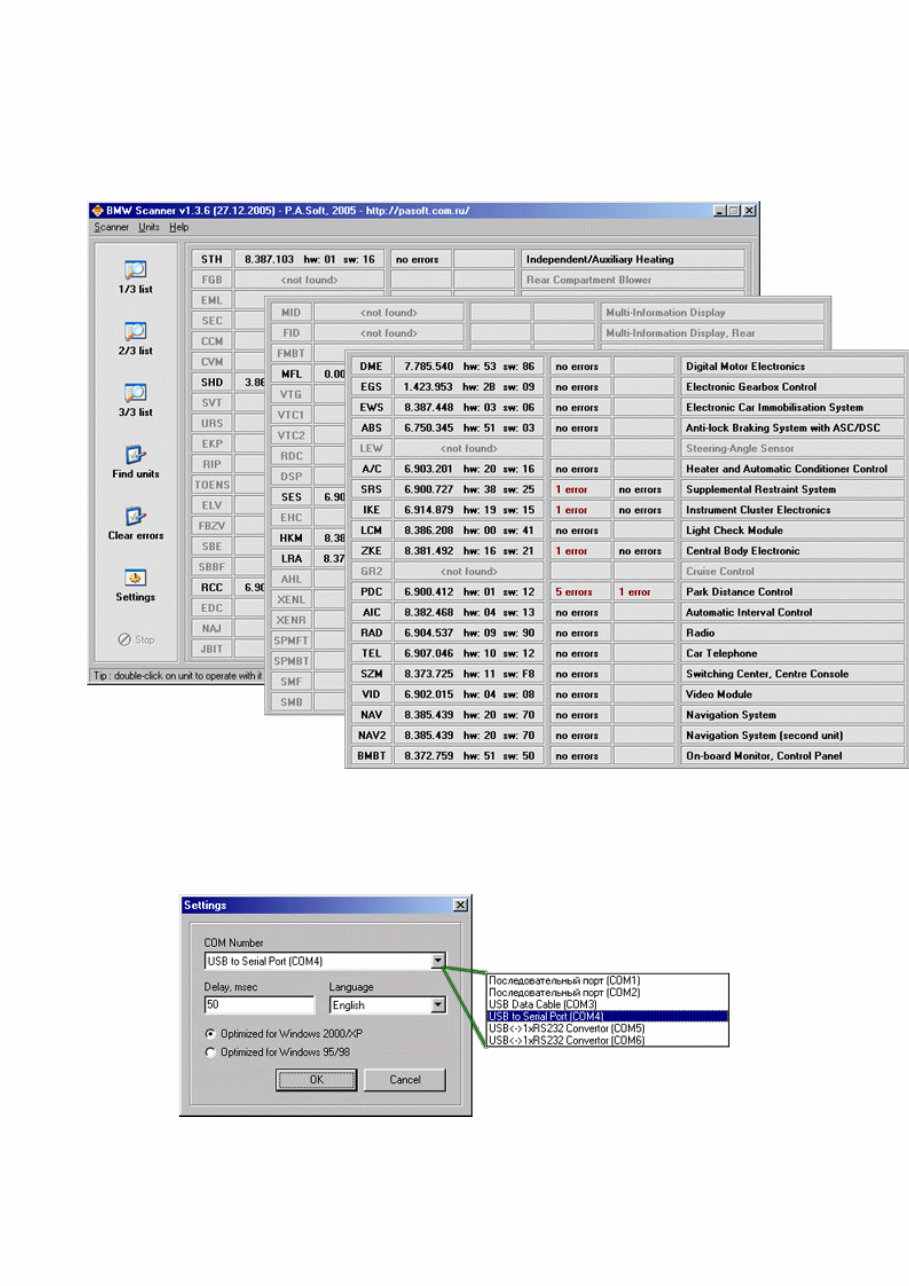
BMW Scanner 1.3.6 First of all the list of supported units is much bigger for now. At this moment software supports almost all electronic units than could be installed on "old" chassis. In main menu you can see new [ CLEAR ERRORS ] function. It was cutted from [ FIND UNITS ] procedure. The reason of doing this was a lot of customers asks because in previous versions [ FIND UNITS ] procedure contained also automatically malfunctions codes reset that was making malfunctions analysis more difficult. A little changes was done also in settings menu. You can see it on next screenshot : For standart COM port selection in [ COM Number ] field now you can see list of all available COM ports. This list was read from windows registry, so that's no more necessary to select working COM port by checking all of them. All you need to do is only select necessary for you COM port and use it. Its also making virtual COM port detection more easy. Virtual
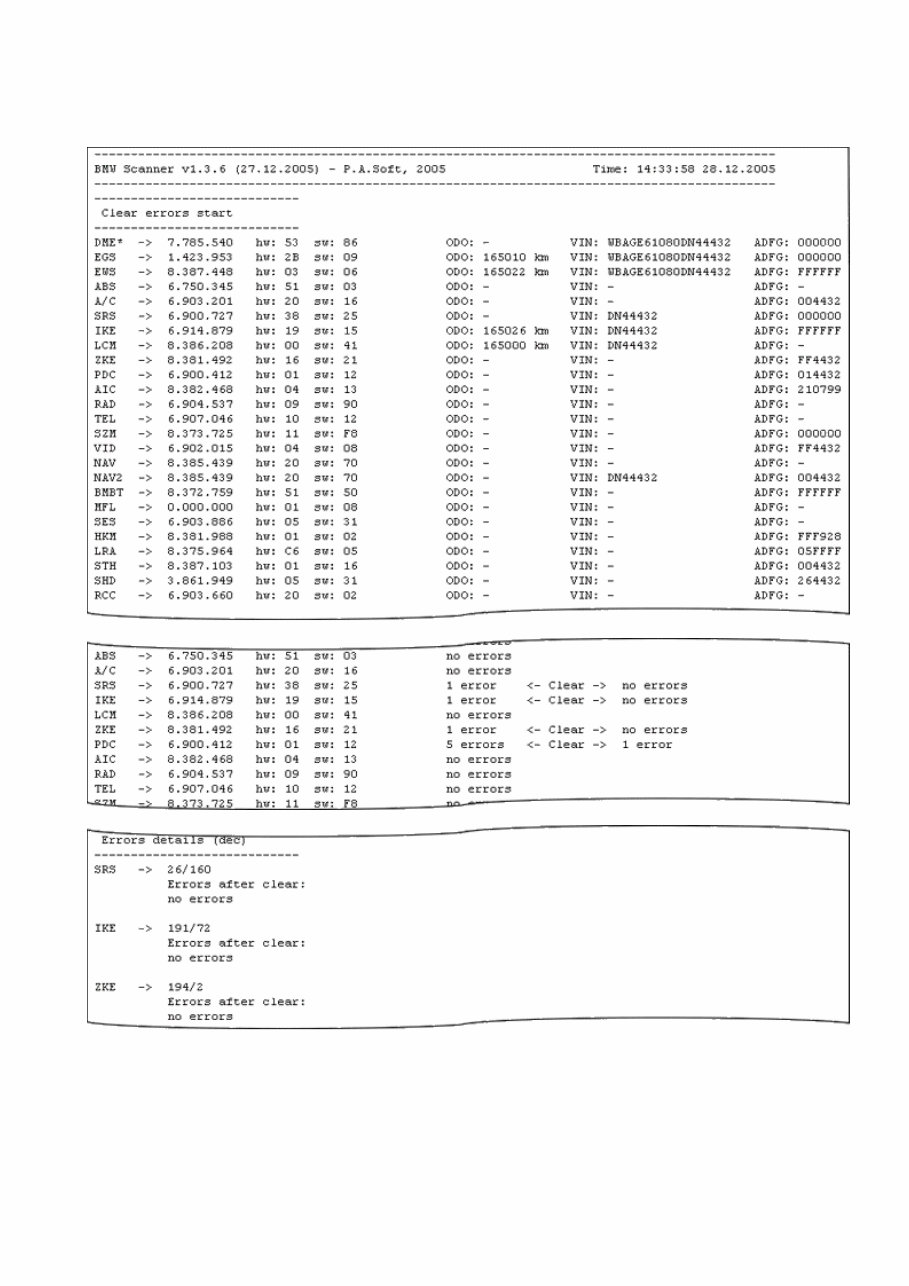
COM using when adapter works with USB to COM converter, that making possible using adapter on computers that have no COM port (for example it can be modern laptops). A little changes you can see also in log file structure: Except standart data about installed units mileage and VIN in log file you also can see detail information about found malfunctions codes and ADFG data. More information about it you can read in "ADFG - "present" from BMW ?" In new version you can also read log file from main program window using [Scanner]/[View log-file] option or [F5] key. There is also different way to save log files. In previous versions log file has fixed name ( bmwscan.log ) and all the time when program was run more and more times all previously saved data in file was erased. In new version log file name contains also date and time when program was started, that makes impossible to lost previous data and more easy to find necessary file in
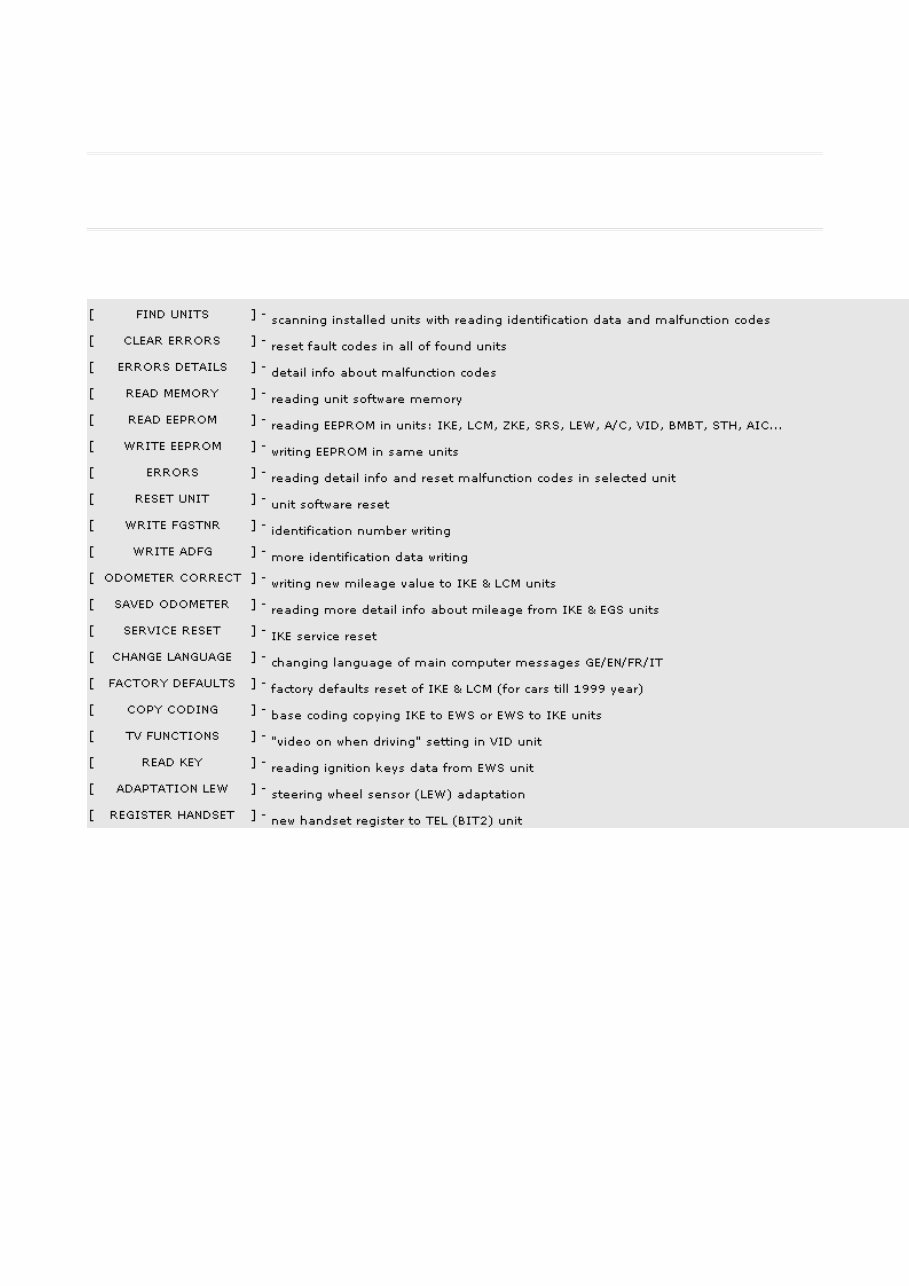
arhives. Program functions Brief list of functions: In BMW Scanner V1.3.6 you can see the same windows structure, there are a few changes only in functions menu and program database.
There is different dashboard classification also, using memory access method. For old variant with numbers only (1,2...13) now you can see new classification like: EEPROM memory type + comment (for example 93S56-3, 93S66-Tacho, M35080-E46, etc). It gives to user more so important information if manual algorithm select using when works with unknown for user dashboard- see "List of supported IKE units".
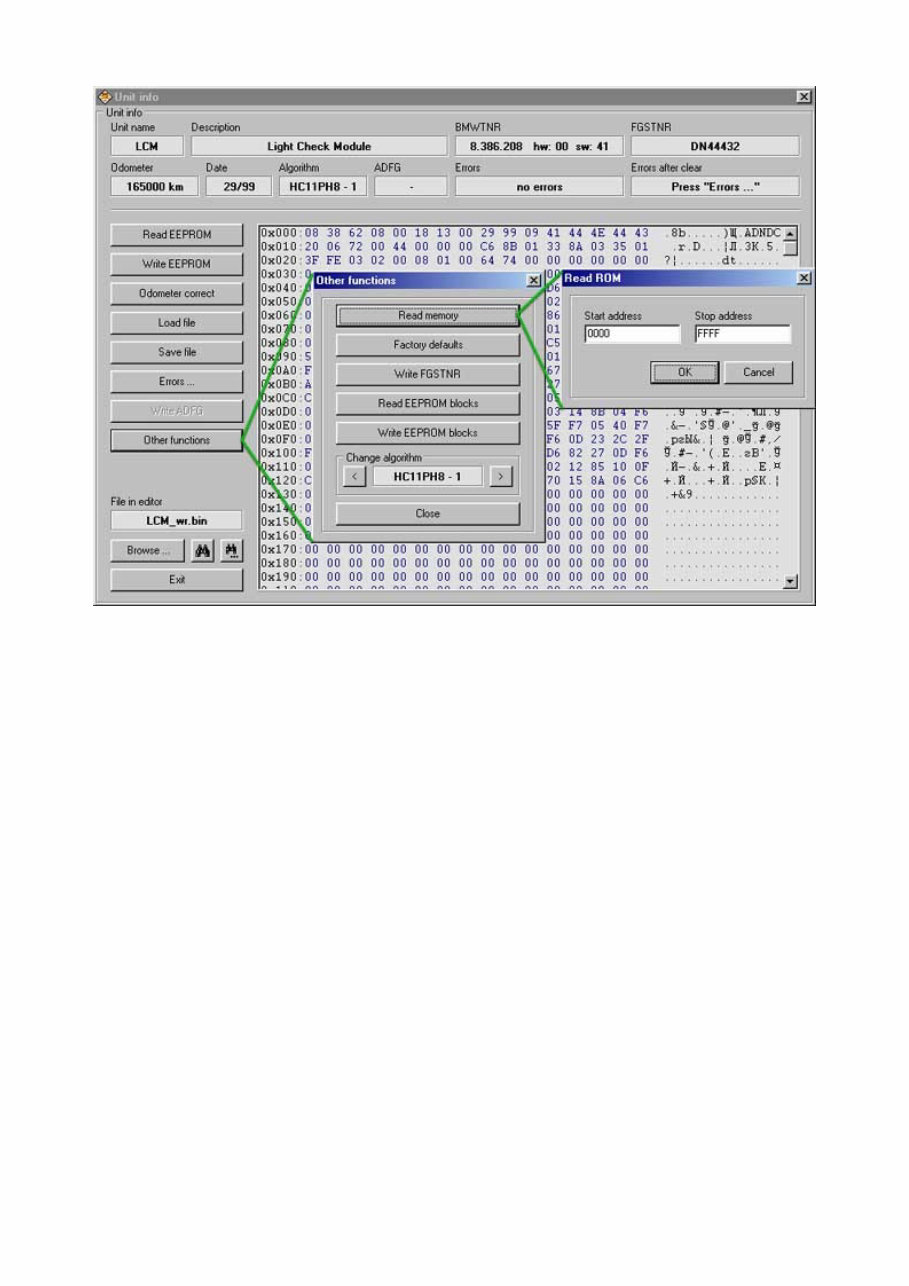
LCM window is still same with old functions, added only new SW versions of unit. At this moment program can work with all known SW versions of LCM units till 09.2005, including SW76,SW77 - see. "List of tested LCM units".
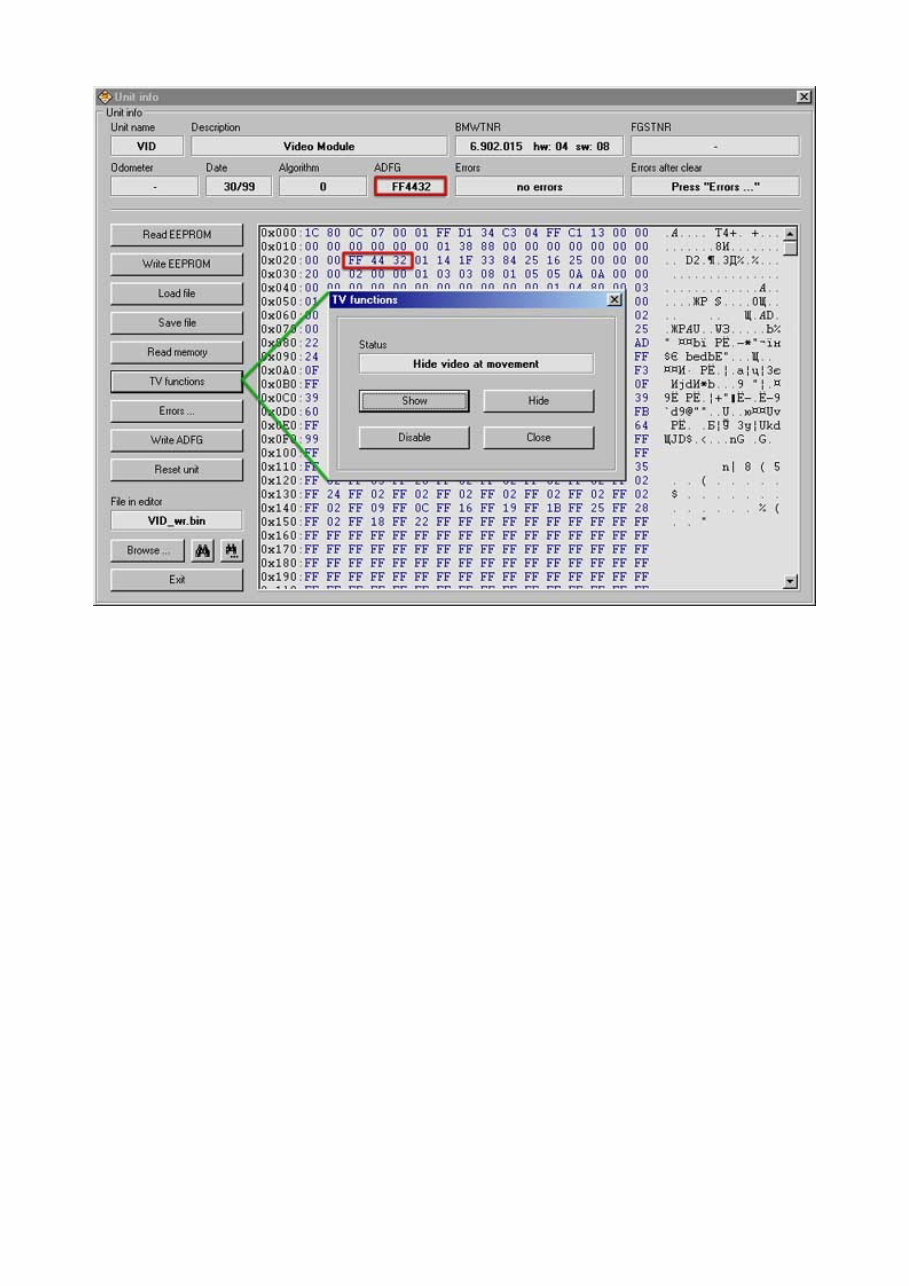
A lot of new functions are available now when work with video module (VID). Added functions like read/write EEPROM memory of unit, software memory reading, and also video when driving settings. This function will help you to set one of 3 possible video settings: show when driving / hide when driving / disable constantly.
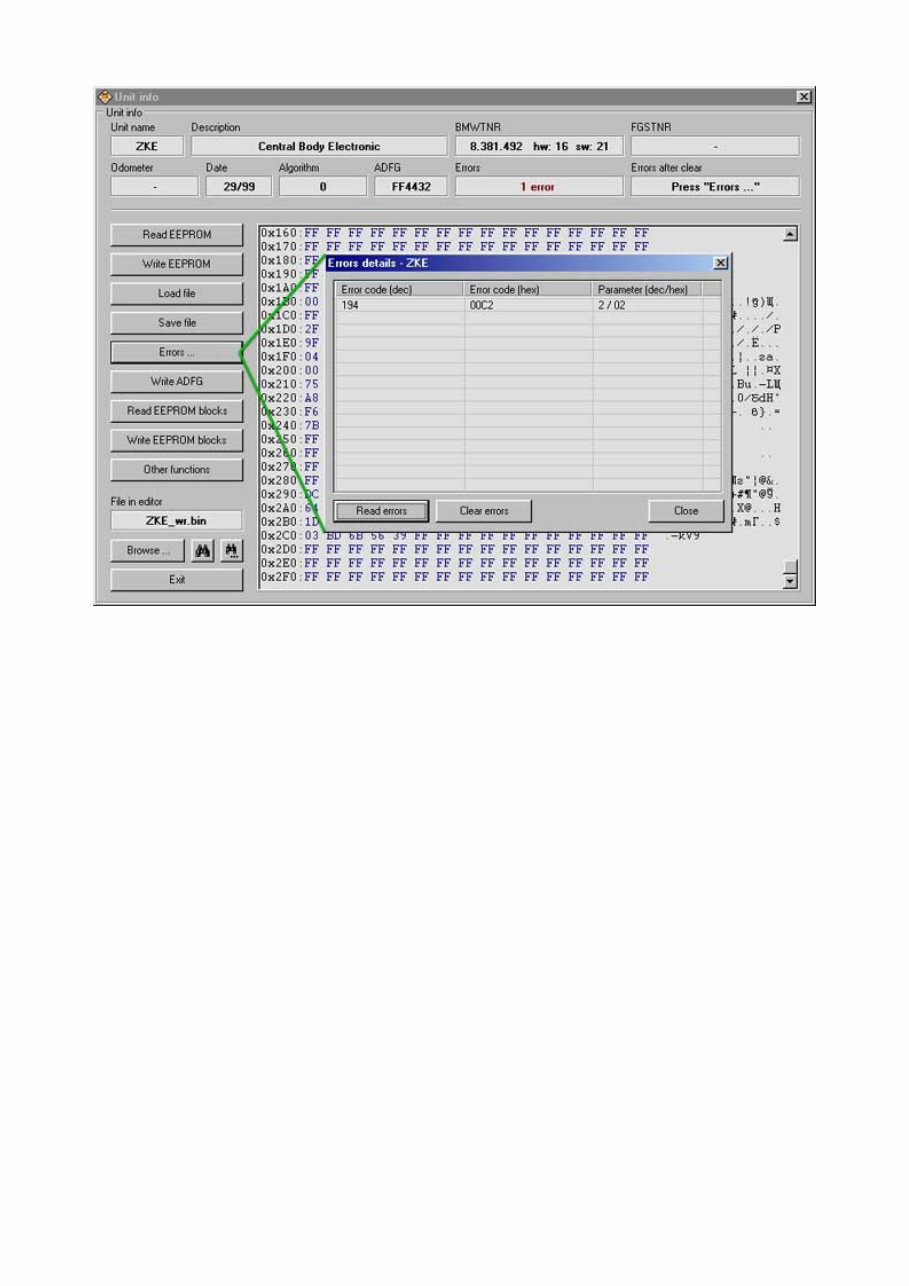
On this screenshot you can see example of work with malfunction codes. Sure that is not enough for good diagnostic – you also have to know all malfunction codes decrypting. But its still better that nothing. Using [ ERRORS DETAILS ] function is possible also from program main window ( double click on mistake count output field ).
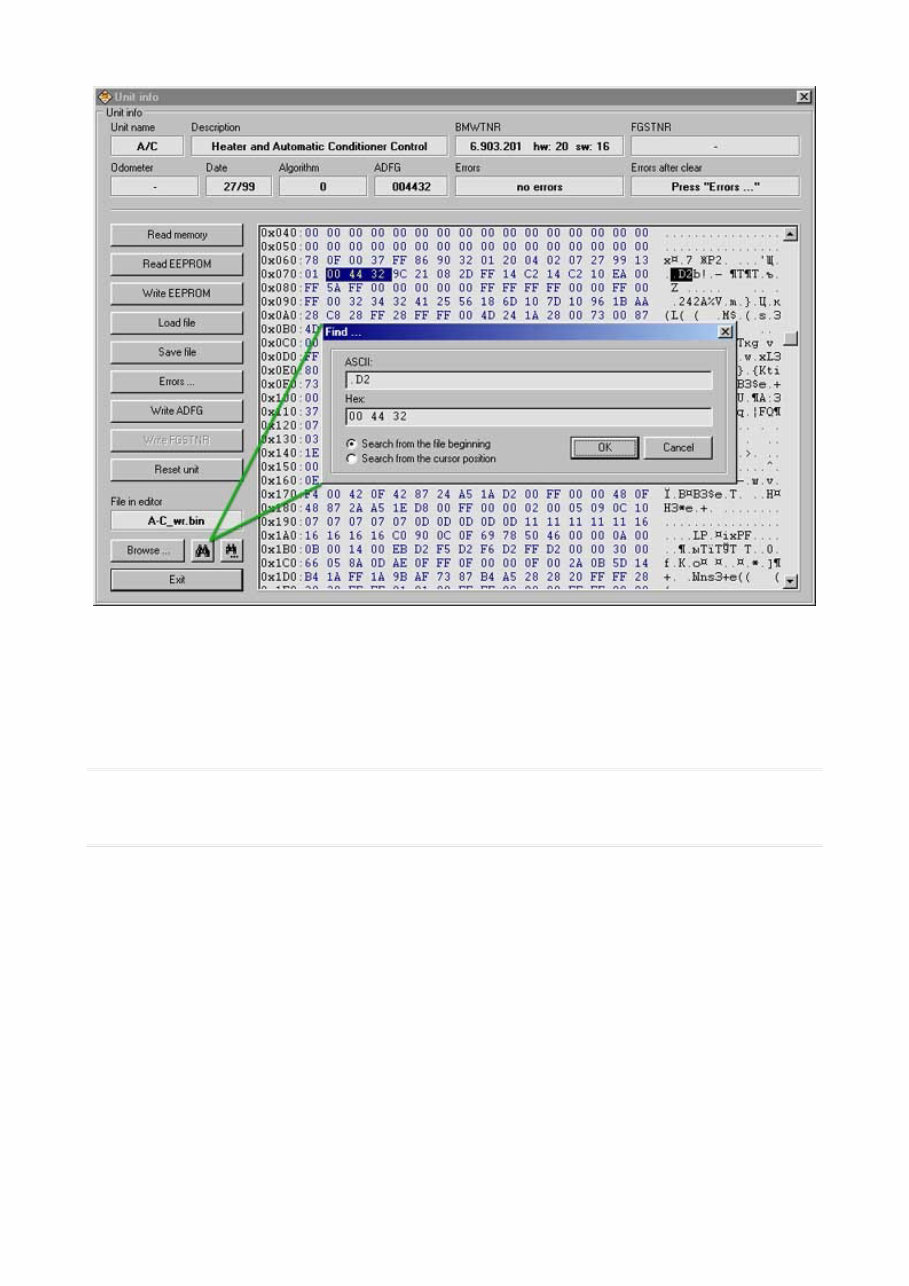
One more interesting and good function was added to the program, it was done on customers demand – searching on file in editor window. It can be not only data that was read by program from unit, but any bin file that was loaded with [ LOAD FILE ] or [ BROWSE ] function. List of supported IKE & LCM modules IKE ----------------------------------- BMWTNR HW SW EEPROM-IDNR ----------------------------------- 3.413.124 04 07 M35080 - 2 3.413.132 04 07 M35080 - 2 ----------------------------------- BMWTNR HW SW EEPROM-IDNR ----------------------------------- 6.948.237 23 20 M35080 - 1 8.352.207 06 08 93S56 - 1
00 11 HC11P2-1 00 31 HC11P2-2 00 41 HC11PH8-1 00 42 HC11PH8-1 00 43 HC11PH8-1 01 11 HC11P2-1 01 20 HC11P2-1 01 21 HC11P2-1 01 31 HC11P2-2 01 41 HC11PH8-1 02 42 HC11PH8-1 02 43 HC11PH8-1 04 11 HC11P2-4 04 51 HC912-2 05 11 HC11P2-4 05 51 HC912-2 06 11 HC11P2-4 06 52 HC912-8 06 53 HC912-3 07 11 HC11P2-4 07 20 HC912-9 07 65 HC912-1 07 70 HC912-10 07 76 HC912-11 07 77 HC912-11 ---------------------- 08 11 HC11P2-4 08 13 HC11P2-4 08 36 HC912-4 08 40 HC11PH8-2 08 76 HC912-11 09 13 HC11P2-4 09 36 HC912-4 09 40 HC11PH8-2 09 76 HC912-11 10 20 HC11P2-3 10 31 HC11P2-2 10 32 HC11P2-2 10 41 HC11PH8-1 11 41 HC11PH8-1 15 30 HC912-5 16 31 HC912-7 22 35 HC912-6 24 36 HC912-4 25 36 HC912-4 C1 40 HC11PH8-2 C1 41 HC11PH8-1 C1 43 HC11PH8-1 D1 41 HC11PH8-1 D1 42 HC11PH8-1 ---------------------- About less known mileage copies in BMW of 1999-2005 year cars There is same information on almost all of the people about where mileage data in BMW is situated. Well known standard list of units contains IKE, LCM, EWS and malfunction codes parameters also. But, as usually, real situation is a little bit harder and some part of units contains hidden data also that helps us to know is digits on dashboards LCD true or false. Calling this data as mileage copies is not absolutely correct because its not current mileage but saved when some of diagnostic procedures was done value. Good thing here is that reading of such data from units gives us very important information when car condition analyze has to be done. Lets try to explain this all on examples. First example is SW14-SW21 ( M35080, E38/E39/E53 of 2000-2005 year) and SW13 ( 93S66 of 1999-2000 year) IKE units. All necessary and interesting information about it you can see on next screenshot:
This manual is a comprehensive guide for the Bmw Scanner 1 4 User service. It is designed for individuals interested in the technical aspects of this brand and is readily accessible without any barriers.
All the technical details provided in this manual are directly sourced from the manufacturer, offering complete information on the desired brand.
It is dedicated to both maintenance and repairs, with a team of skilled mechanics contributing their expertise to assist you.
The manual aims to deliver quality information, including various equipment and diagrams, to meet the needs of customers seeking comprehensive service details for diagnostics, repair, and maintenance of cars.
Upon instant access to this manual, you can easily print each section as needed.
If the desired information is not found in this manual, you can reach out, and we will address your concerns.
This manual provides step-by-step instructions, along with access to pictures, diagrams, assembly, disassembly, cleaning, repairing, and maintenance of the Bmw Scanner 1 4 User service.
It contains maintenance and repair details, including:
Mechanical specifications of the vehicle
Technical specifications of the vehicle
Introductory Mechanics
Equipment elevation
Collisions
Products and supplies
Painting
Description of various parts of the vehicle
Take advantage of the instant accessibility of this manual, without the need to wait for printed copies or incur postage expenses. Embrace the opportunity to access the necessary information promptly and efficiently in the 21st century.
Start immediately with what you've proposed, without any delays.



 Lifetime Access