


Repair Manual CASIO SF-3300/3600 DIARY 1998
What's Included?
 Lifetime Access
Fast Download Speeds
Online & Offline Access
Access PDF Contents & Bookmarks
Full Search Facility
Print one or all pages of your manual

SF-3300/SF-3600 (ZX-733A/ZX-733E,G)
JULY 1998
R
(without price)
SF-3600

CONTENTS
1. SPECIFICATIONS .......................................................................................................... 1
2. OPERATION CHECK ..................................................................................................... 2
3. DATA TRANSFER .......................................................................................................... 3
4. TROUBLESHOOTING .................................................................................................... 4
5. SCHEMATIC DIAGRAMS .............................................................................................. 5
6. PARTS LIST ................................................................................................................... 7
7. EXPLODED VIEW .......................................................................................................... 8

— 1 —
1. SPECIFICATIONS
Display: Liquid crystal display
Power supply: Two lithium batteries (CR2032)
Power consumption: 0.1 W
Current consumption: At. DC 6.0 V ± 0.1 V
When AC key is pressed; Max. 19 μA. Typ. 10 μA
While Power OFF; Max. 15 μA
While buzzing; Max. 765 μA
When backlighting; Max. 17,500 μA
Battery life: Approximately 1 year under the following test conditions: Unit turned
on one hour each day (5 minutes operation, 55 minutes no operation),
with two backlight operations and one Daily Alarm operation per day.
Low battery message: DC 5.4 V ± 2.5 %
Auto power off: Approx. 6 minutes after last key operation
Ambient temperature range: 0 °C ~ 40 °C (32 °F ~ 104 °F)
Dimensions: 14.6 (H) × 132 (W) × 82 (D) mm ........ Folded
(
5
/ 8" (H) × 5
1
/ 4" (W) × 3
1
/4" (D))
11.3 (H) × 132 (W) × 160 (D) mm ...... Unfolded
(
5
/ 8" (H) × 5
1
/ 4" (W) × 6
1
/4" (D))
Weight: 105 g (3.7 oz) including batteries
— 2 —
NAME
E-mail
TEL
FAX
CELL
EDIT SEARCH SHIFT
PAGE
NAME
E-mail
TEL
FAX
CELL
EDIT SEARCH SHIFT
PAGE
NAME
E-mail
TEL
FAX
CELL
EDIT SEARCH SHIFT
PAGE
E-mail
CELL
SHIFT
PAGE
NAME
TEL
FAX
EDIT SEARCH
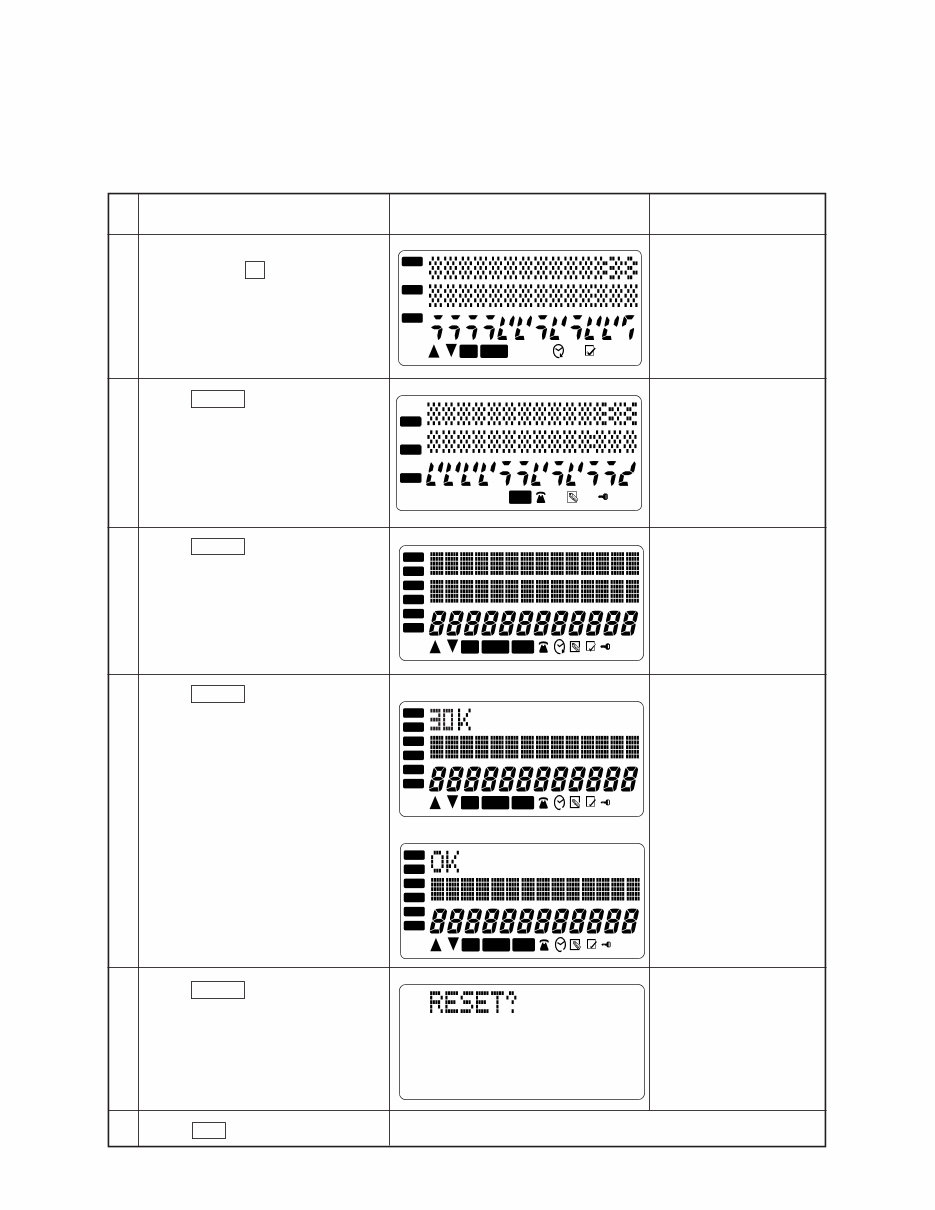
2. OPERATION CHECK
Note: Performing this check, the data saved to SF-3300/3600 are deleted.
Before performing the operation, save the data to another unit referring “3. DATA TRANSFER”
on page 3.
No.
1
2
3
4
5
6
KEY
While pushing down the RESET
button, press G then release the
RESET button.
Press CLEAR for about 1 second.
Press CLEAR for about 1 second.
Press CLEAR for about 1 second.
Press CLEAR for about 1 second.
Press SET .
DISPLAY NOTE
The unit emits a buzz.
RESET button is located
on the back of the unit.
If the unit is faulty, LCD
indicates “NG” instead
of “OK”.
— END —
(SF-3300)
(SF-3600)
— 3 —
GND
SCLK
SOUT
SIN
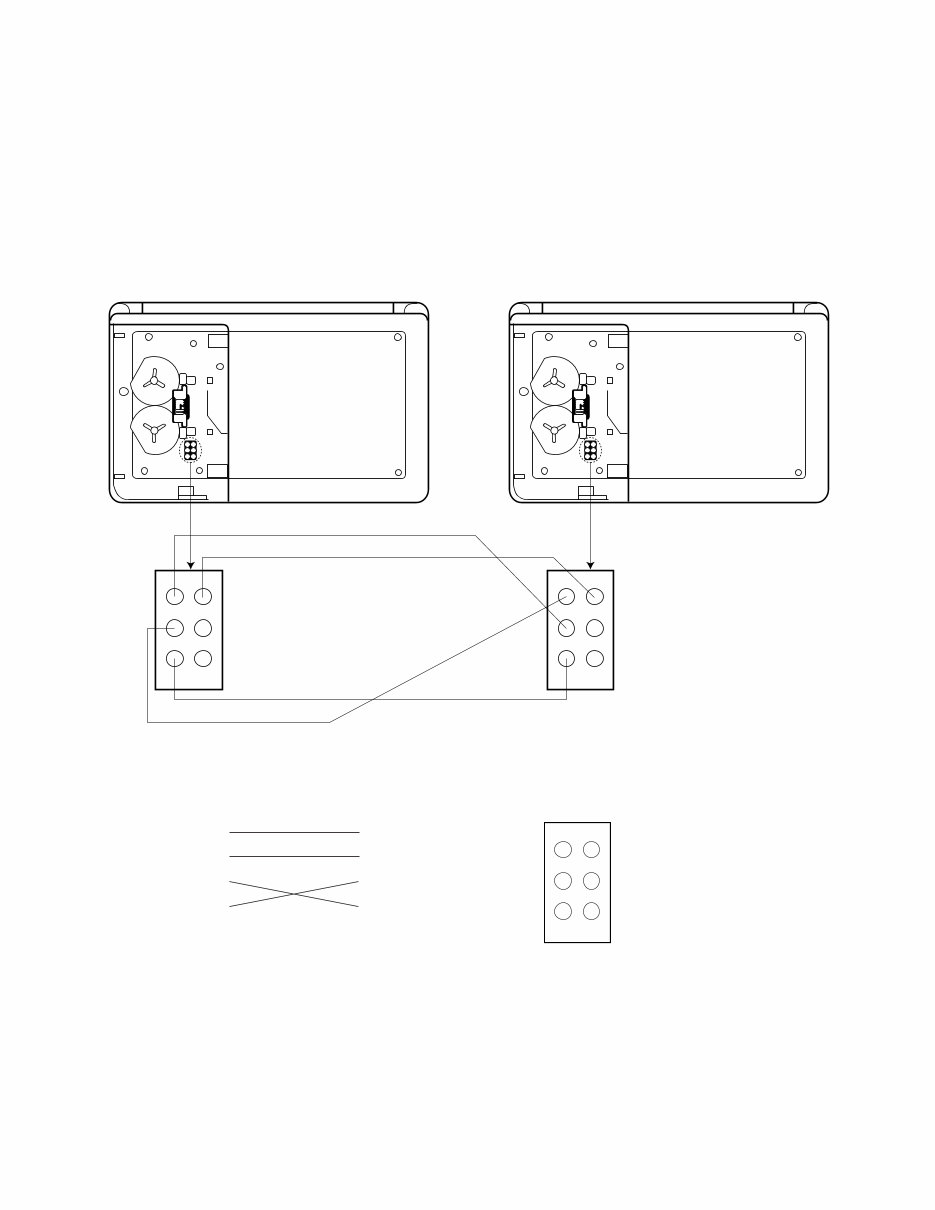
3. DATA TRANSFER
The SF-3300/3600 can transfer the stored data to another SF-3300/3600.
Note: Before connecting wires, be sure to reset the Backup unit.
1. Remove the battery cover.
2. Connect 4 terminals on the PCB with wires as shown in the figure below.
Wiring
GND GND
SCLK_ SCLK_
SIN SIN
SOUT SOUT
RESET
User's unit Backup unit
RESET
— 4 —
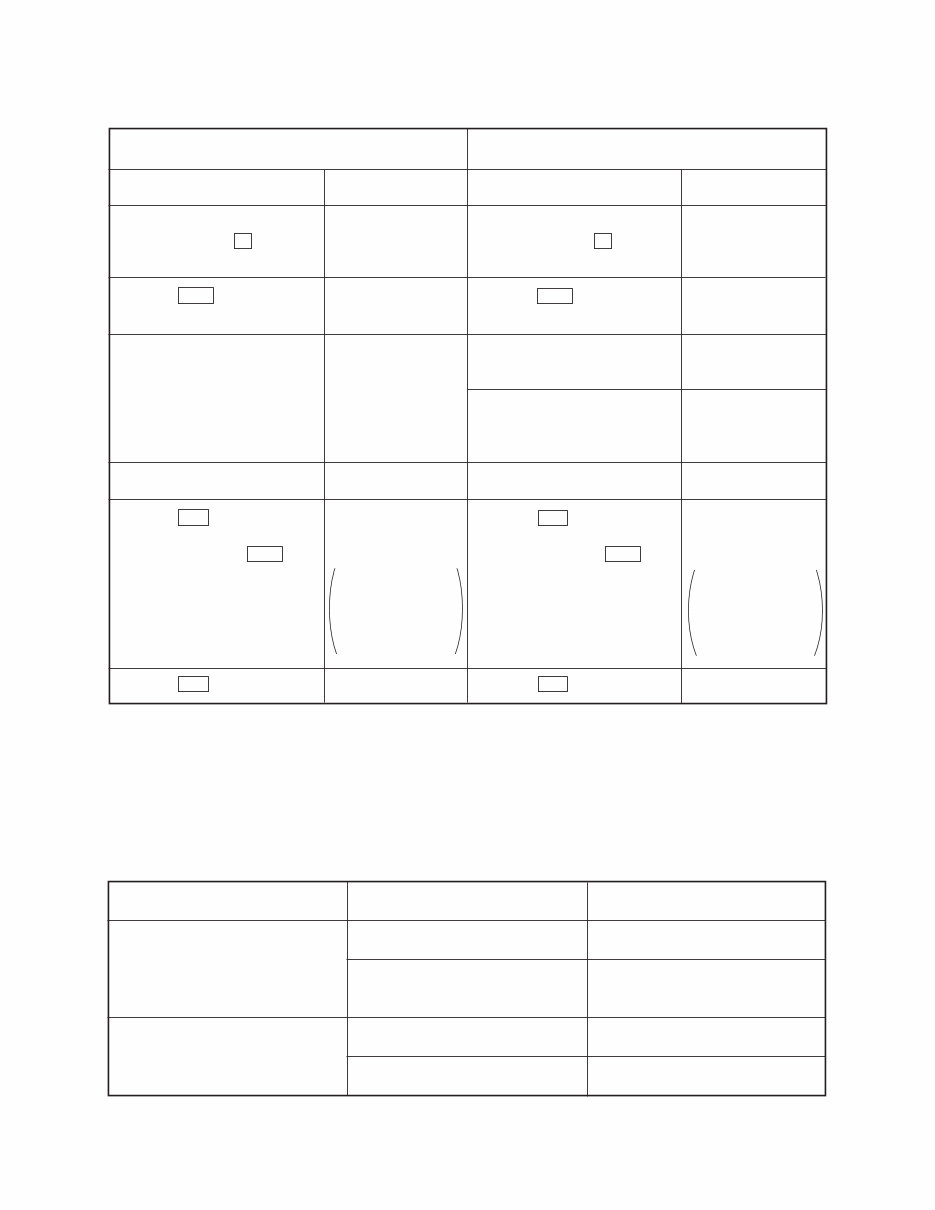
Note: Perform the operation in numerical order.
User's unit
Back up unit
Operation
1 While pushing down RESET
button, press E then re-
lease RESET button.
4 Press SET .
5 After the data transmis-
sion....
It takes a few minutes to
complete the data transfer.
7 Press RESET button.
9 Press ON .
Note: Never press SET as it
deletes all the data.
A Press ON (OFF).
Operation
2 While pushing down RESET
button, press F then re-
lease RESET button.
3 Press SET .
6 When the data is transferred
properly......
In case the data transfer
ends incomplete......
8 Press RESET button.
0 Press ON .
Note: Never press SET as it
deletes all the data.
B Press ON (OFF).
4. TROUBLESHOOTING
Before doing the following solutions, save data if possible.
SYMPTOM SOLUTION CAUSE
No power
Weak battery Replace batteries
Resolder Poor soldering of the power
supply circuit
No display at all or wrong display
Defective heat seal Replace the heat seal
Defective LCD Replace the LCD
Display
T?
(Unit emits a buzz.)
T?
(Unit emits a buzz.)
OK!
RESET?
USED FREE
5250 60220
The above example
is DC-8500 display.
The numbers vary
depending on the
quantity of data.
Display
R?
(Unit emits a buzz.)
R?
(Unit emits a buzz.)
OK?
NG!
or
RESET?
RESET?
USED FREE
5250 60220
The above example
is DC-8500 display.
The numbers vary
depending on the
quantity of data.
— 5 —
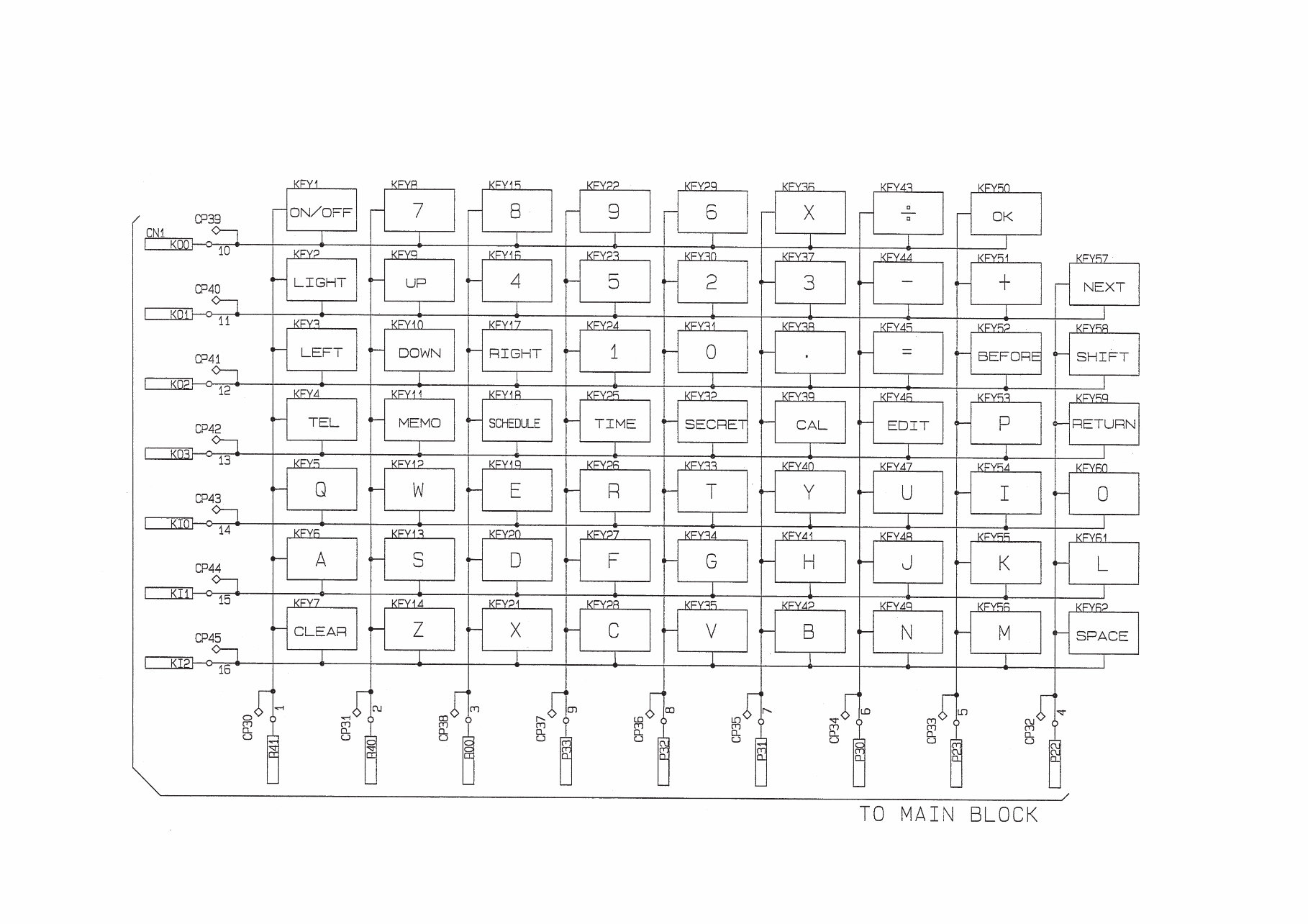
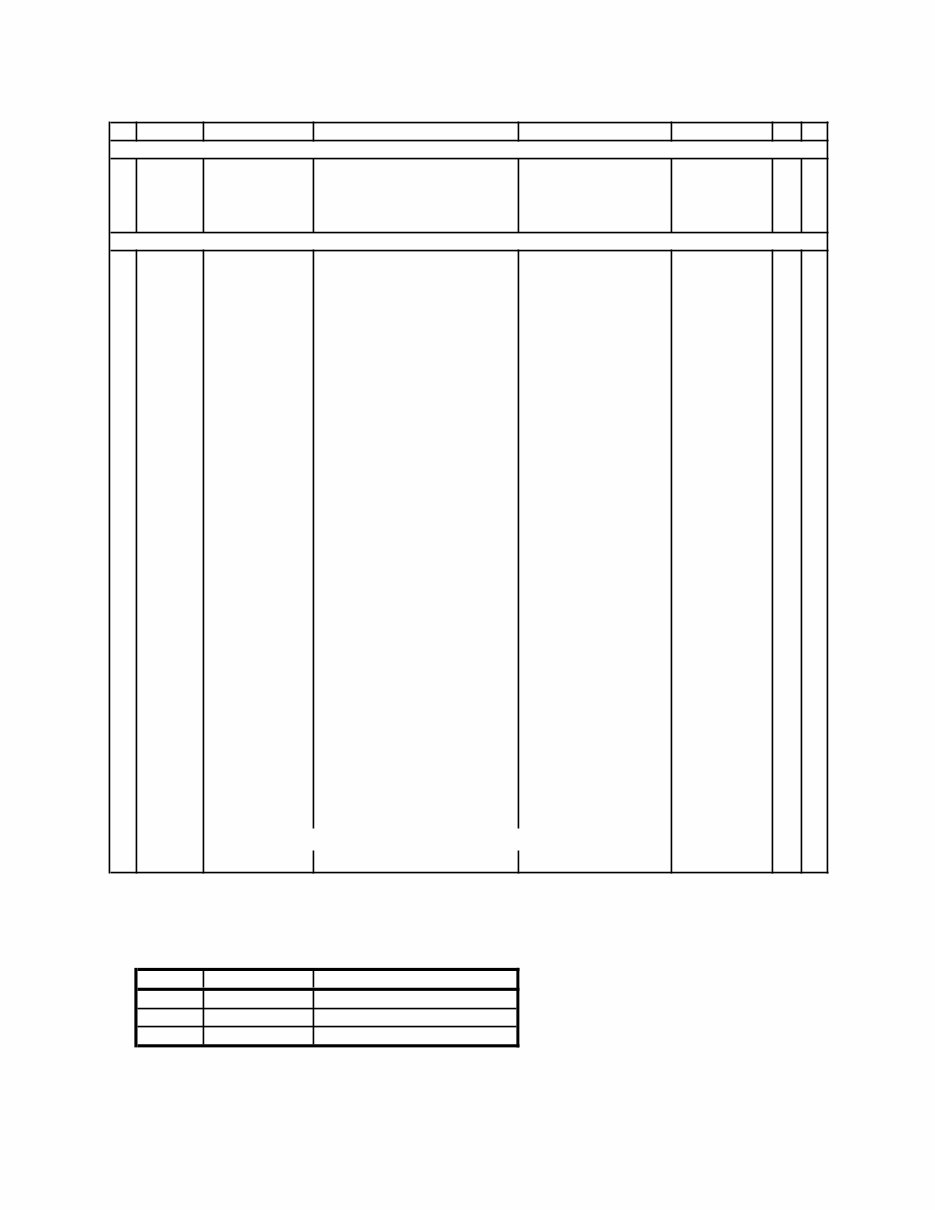
5. SCHEMATIC DIAGRAMS
Main block
— 6 —
Key block
— 7 —
6. PARTS LIST
N Item Code No. Parts Name Specification Applicable Q R
PCB ASSY
IC6 2011 3955 LSI/S-RAM UPD43256BGU-B12 A 1 C
IC6 2011 3955 LSI/S-RAM UPD43256BGU-B12 E, G 2 C
N 1 6423 0340 SPRING/BATTERY HA310640-1 Common 2 C
N 2 6421 5990 SPRING/BATTERY HA410593-1 Common 2 C
COMPONENTS
N 3 6423 5100 PCB ASSY HA210134*1 A 1 B
N 3 6423 5110 PCB ASSY HA210134*2 E, G 1 B
N 4 3335 6748 LCD LD-B10369GY Common 1 B
N 5 6423 0270 HEAT SEAL HA410849-1 Common 1 B
6 6418 1080 ELECTRO LUMINESCENCE A341294-1 Common 1 B
N 7 6423 0370 SPACER/LCD HA310642-1 Common 1 C
N 8 6422 6300 PLATE/POLARIZATION UP-10123C Common 1 C
N 9 6423 0120 CASE/UPPER HA110177-1 A 1 X
N 9 6423 0130 CASE/UPPER HA110177-2 E 1 X
N 9 6423 0140 CASE/UPPER HA110177-3 G 1 X
N 10 6423 0150 CASE/LOWER HA110178-1 A, E 1 X
N 10 6423 0170 CASE/LOWER HA110178-3 G 1 X
N 11 6423 0180 HARD COVER HA110179-1 A 1 X
N 11 6423 0190 HARD COVER HA110179-2 E 1 X
N 11 6423 0200 HARD COVER HA110179-3 G 1 X
N 12 6423 0210 COVER/BATTERY HA210121-1 A, E 1 C
N 12 6423 0230 COVER/BATTERY HA210121-3 G 1 C
N 13 6423 0240 BUTTON HA310623-1 A, E 1 C
N 13 6423 0450 BUTTON HA310623-2 G 1 C
N 14 6423 0250 KNOB HA310624-1 Common 1 C
N 15 6423 0300 LABEL HA310630-1 A 1 C
N 15 6423 0430 LABEL HA310630-2 E 1 C
N 15 6423 0440 LABEL HA310630-3 G 1 C
N 16 6423 0310 RUBBER/CONTACT HA110182-1 A, E 1 C
N 16 6423 0330 RUBBER/CONTACT HA110182-3 G 1 C
17 6419 9840 RUBBER/CONTACT A341594-1 Common 1 C
18 6420 2600 SPACER A442667-1 Common 1 C
N 19 3122 3571 BUZZER 64PE27044 Common 1 C
N 20 6423 0400 TAPE/BUZZER HA410774-1 Common 1 C
Parts prices will be informed separately by Parts Price List.
Notes: N- New parts Essential
Q-Quantity used per unit Stock recommended
R-Rank Others
No stock recommended
*Applicable:
Model Color of Case
A SF-3300 Black
E SF-3600 Black
G SF-3600 Pale Gold
R-A:
B:
C:
X:

— 8 —
7. EXPLODED VIEW
You're Reading a Preview
What's Included?
Lifetime Access
Fast Download Speeds
Online & Offline Access
Access PDF Contents & Bookmarks
Full Search Facility
Print one or all pages of your manual
$30.99
$40.99
Viewed 87 Times Today


Secure transaction
What's Included?
Lifetime Access
Fast Download Speeds
Online & Offline Access
Access PDF Contents & Bookmarks
Full Search Facility
Print one or all pages of your manual
$30.99
$40.99
Get the repair manual for CASIO SF-3300/3600 DIARY 1998. This manual contains easy step-by-step guides and illustrations for simple to complicated repairs. It is useful for both professional mechanics and DIY enthusiasts. The manual provides information on specifications, operation check, data transfer, troubleshooting, schematic diagrams, parts list, exploded view, and more. It is a printable manual with a total of 11 pages in English format. Compatible with Win/Mac, it offers easy-to-follow instructions, diagrams, and pictures. No technical knowledge or skills are needed, making it a cost-saving solution.


