



Kitchen Aid Service Manual
What's Included?
 Lifetime Access
Fast Download Speeds
Online & Offline Access
Access PDF Contents & Bookmarks
Full Search Facility
Print one or all pages of your manual
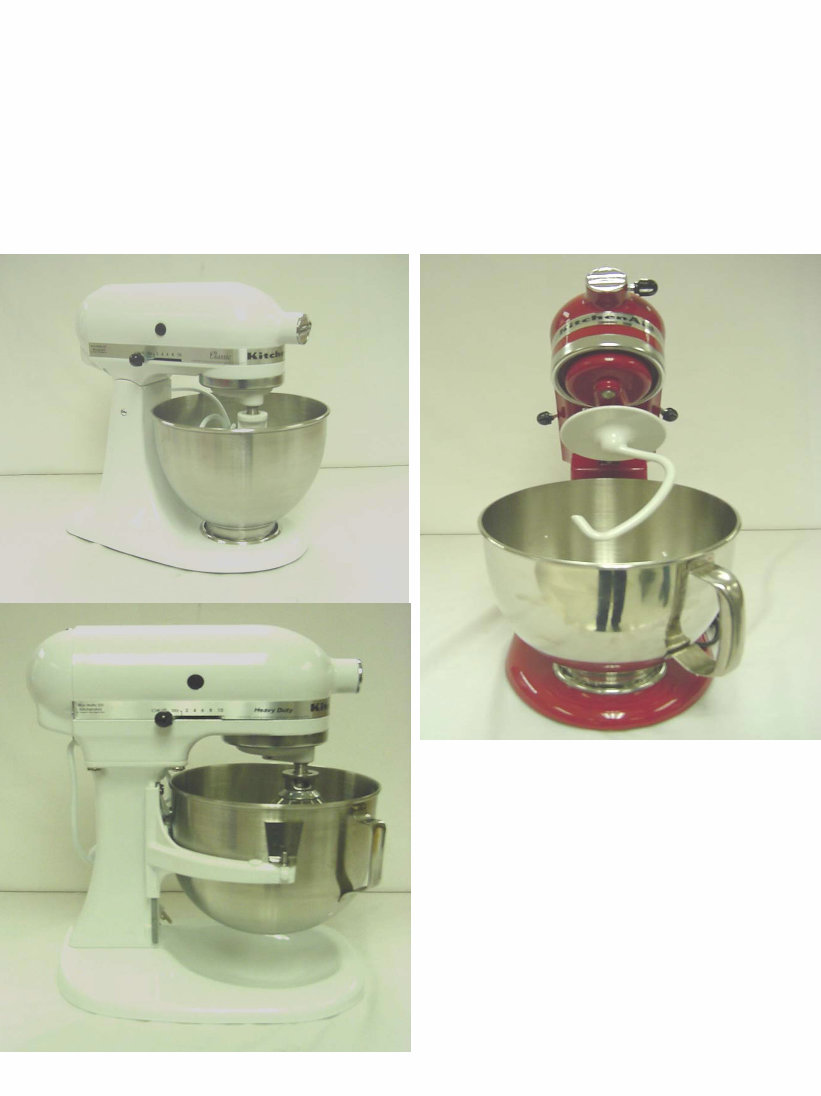
SERVICE MANUAL for
KITCHENAID
STAND MIXER
Models K45SS KSM75
KSM90 KSM103
KSM110 KSM150
KSM151 K5SS
KSM5 KSM50P
KSMC50 KPM5
KPM50 KP50P
Printed in U.S.A. September, 2005 LIT4177310-C

KITCHENAID
Stand Mixer Service Manual Lit4177310-C 2005 KITCHENAID
Safety Guidelines
This Service Manual is written for the Professional Service Technician who has familiarity with the
KitchenAid Stand Mixer. The following Safety Guidelines should be adhered to when servicing this product.
SERVICE ENVIRONMENT
•The workplace will be dry and sanitary at all times and all units should be inspected for cleanliness before
any work is started.
•Visually inspect the unit requiring service in a well luminated area.
•A mild, non-abrasive dishwashing soap solution and clean towel can be used to wash any unit requiring
attention.
•The hands of the service technician should be clean at all times during service procedure.
ELECTRICAL CONSIDERATIONS
•The workplace for the stand mixer will have properly grounded AC outlets that adhere to all Local
Electrical Codes that are applicable at the time of repair.
•The Stand Mixer Power Cord should always be inspected first before testing the mixer operation.
Do NOT run the mixer if the Power Cord is damaged -- replace it.
•All disassembly and assembly procedures discussed in this manual should be conducted with the unit
disconnected from the AC mains.
•Do NOT leave the unit unattended while running the mixer for speed range and bowl clearance checks.
Always unplug the unit immediately after concluding these tests.
Technician
•The Service Technician should wear Protective Eyewear at all times when conducting a repair on the Stand
Mixer.
•Loose fitting sweaters, shirts sleeves or bracelets should NOT be worn while servicing the Stand Mixer.
SAFETY

KITCHENAID
Stand Mixer Service Manual Lit4177310-C 2005 KITCHENAID
INDEX: Stand Mixer Repair Manual
K45SS KSM75 KSM90 KSM103 KSM110 KSM150 KSM151
K5SS KSM5 KSM50P KSMC50 KPM5 KPM50 KP50P
SECTION SUBJECT PAGE
- General Information 1
1 Disassembly of Gearcase and Planetary 2
2 Disassembly of Motor and Control Unit 6
3 Repairs to Motor and Control Unit 11
4 Repairs to Gearcase and Planetary 16
5 Repairs to Pedestal 21
6 Adjustment to Control Unit 22
7 Repairs to Bowl Lift Assembly 26
8 Troubleshooting the Bowl Lift Assembly 30
APPENDIX SUBJECT
A Tools Required for Stand Mixer Service
B Problem Solving Quick Reference Guide
C Domestic Model Wiring Diagram
D International Model Wiring Diagram - RF Filter
E International Model Wiring Diagram - Bowl Interlock RF Filter
F Stand Mixer Serial Number Codes
Introduction
All KitchenAid Stand Mixers are well designed and carefully built. Normally they
will give continual use year after year without service attention.
Careful records have been maintained over a period of years to determine and
correct, through improved design, any troubles that might possibly develop.
An effort has been made in preparation of this manual to cover them all.
INDEX

KITCHENAID
Stand Mixer Service Manual LIT4177310-C 2005 KitchenAid
Heating
Under normal conditions, the mixer will not show
any tendency to heat because of the built-in
ventilating system in the motor.
Under heavy loads with extended mixing time
periods, the head may heat up to the point of being
uncomfortable to touch.
Speed Control
The speed control of the mixer is attained through
the use of a governor assembly mounted at the rear
of the control plate assembly.
The electrical circuit is made and broken by the action
of the fly ball governor revolving against the control
plate.
When the switch lever is moved to an ON position,
the position of the control plate with respect to the
governor is changed by the action of the switch lever.
Thus, when the control plate is set close to the
governor, a relatively low speed of the motor causes the
governor to make or break the mixer’s electrical circuit
through the control plate.
When the control plate is set farther away, a greater
motor speed is required before the governor starts
breaking the circuit.
The action of the governor is such that the speed of the
motor will remain constant for a given setting of the
control plate within certain loads.
After certain loads have been exceeded, the speed of the
motor will drop to meet the torque requirements of the
given load.
Speed is controlled by the governor and the control
plate in conjunction with the phase control.
TRIAC RMS VOLTAGE
BOTH CONTACTS OPEN - 40 VOLTS
ONE CONTACT OPEN - 80 VOLTS
BOTH CONTACTS CLOSED - FULL VOLTAGE
NOTE: The triac regulates the power the motor sees
depending on control board contacts.
A device called a triac is a part of the phase control
circuit.
This device determines the amount of power the motor
sees dependent upon the condition of the control board
contacts.
If both contacts are open, about 40 volts RMS is
applied to the motor and about 80 volts is applied when
either contact is closed and the other is open.
GENERAL INFORMATION
Normal Performance
The KitchenAid Stand Mixer is powered with a
universal motor which will operate on 50 or 60 hertz,
alternating current only.
The Voltage of the power supply should be within 10
volts either way of the voltage stamped on the mixer
trimband and nameplate.
A mixer in good running condition will start turning
slowly when the switch lever is moved from the “OFF”
position to the “STIR” position.
As the switch lever is moved to successively higher
positions, the speed of the beater increases until the #10
speed is reached.
At stir position, the planetary should turn at
approximately 60 RPM; at the #10 position all models
turn at approximately 255 RPM, with the exception of
K45SS models built before May 6th, 2002 (WM19),
which turn at approximately 280 RPM.
KITCHENAID STAND MIXER RPM
SPEED *K45SS OTHER MODELS
STIR 60 RPM 60 RPM
#10 255 RPM 255 RPM
Prior to May 6th, 2002,
#10 280 RPM
*Note: All models have similar RPM, except K45SS
units built before May 6
th
, 2002, which run at 280 RPM
in the #10 position.
The mixer will run quietly in the lower speed range;
however, some noise can be expected on the higher speed
settings due to hum of gears and the motor.
When the mixer is first turned to the stir position, there
may be a slight clattering, irregular noise. This noise will
disappear as the lubrication in the gearcase warms up.
The switch lever should move freely with the “feel” of
definite positions for speed numbers stir, 2, 4, 6, 8 and 10.
Speed numbers 3, 5, 7 and 9 do not have definite notches.
Power
A mixer will have full power on all speed settings. To
check for full power, carefully hold the planetary with
one hand and move the switch lever on and off with the
other hand.
At the stir position, it should not be possible to stall the
planetary except by a very great effort; nor should the
planetary slow down noticeably when the retarding
pressure is applied.
PAGE 1
KITCHENAID
Stand Mixer Service Manual LIT4177310-C 2005 KitchenAid
When both contacts are closed, the triac is full
on; consequently, full power is applied to the
motor. In this way, the speed is controlled.
If the mixer motor begins to run too fast for a
particular speed setting, one or both contacts
open, which cuts back on the voltage the motor
sees, thus slowing it up.
If the motor operation becomes too slow, one or
both contacts will close, applying the needed
voltage to the motor to sufficiently increase
motor speed.
This is always accomplished through the triac.
The control plate contacts control the triac, and
in turn, controls the amount of power supplied to
the motor.
BEATER
The beater should fit freely on the beater shaft
located in the planetary.
Power is transmitted from the motor to the
center-bevel gear assembly by means of the
worm gear.
The center-bevel gear assembly engages the
beater pinion, located in the planetary, to turn the
beater shaft.
The attachment hub bevel gear also meshes with
the center-bevel gear assembly to transmit power
when various attachments are being used.
LUBRICATION
Under normal service conditions, the mixer will
not require lubrication for many years.
The gear case is lubricated with an ample supply
of Benalene 930-2 grease (6 fluid ounces), which
lubricates all the gears and shafts.
GEARCASE LUBRICATION
All KitchenAid Stand Mixer Gearcases are
lubricated with 6 Fluid Ounces of:
BENALENE 930-2 GREASE (OR EQUIVALENT)
NOTE: Gearcases lubricated with this grease
will not require lubrication for years.
The motor bearing and the beater shaft bearing
are oil impregnated.
The rear motor bearing has a felt washer which
has been presoaked in oil.
The front motor bearing in the mixer housing is
a ball bearing.
SECTION 1
DISASSEMBLY OF THE GEARCASE AND
PLANETARY
A. All solid state KitchenAid mixers have the
same motor and control parts and the gears in the
gearcase are alike, with one exception: “K45SS
units built prior to May 6th, 2002.”
Planetary parts are all the same, except that some
early production K5SS had a lead weight.
Gearing and motor instructions are for both tilt
head and bowl lift machines and any differences
will be pointed out.
BOWL LIFT - Models K5SS,KSM5,KSM50,
KSMC50,KPM5, KPM50, KP50. The bowl is
raised and lowered into position.
TILT HEAD - Models K45SS, KSM45, KSM75,
KSM90, KSM103, KSM110, KSM150, KSM151,
KSM152. The mixer head is tilted up and down
into position.
Bowl, column, base and bowl lift details are
covered separately in section 7.
B. Before repairs are attempted on any KitchenAid
mixer, a wattmeter test should be made. To make
the test, set the wattmeter to the proper voltage.
Next, plug the cord from the mixer into the
wattmeter. Turn on the current and run the mixer.
If the wattmeter shows up to 135 watts, going from
stir to #10 speed, the mixer is in good condition.
If the wattmeter reading is 175 to 400 watts, there
is a problem.
High wattage mixer readings indicate either
electrical or mechanical problems.
Check first for bearing/gear drag, then for
motor/brush problems.
CAUTION: Always remove power cord from
electrical outlet before servicing any part of the
mixer.
PAGE 2
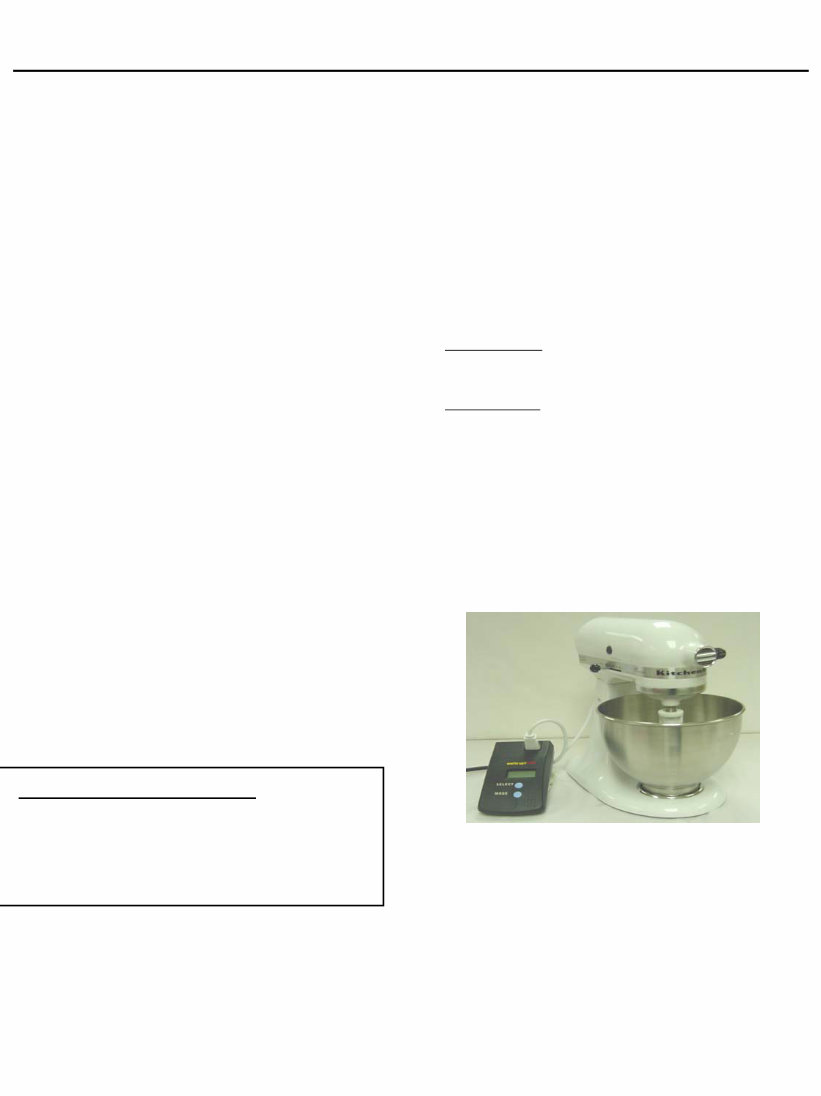
KitchenAid stand mixer shown with a digital wattmeter

KITCHENAID
Stand Mixer Service Manual LIT4177310-C 2005 KitchenAid
C. Note: remove the bowl and any attachments
before disassembly of unit.
Remove the #6-32x3/8” (tapered head) screw
from the end cover (Fig. 1).
Remove the two #6-32x3/16” screws that hold the
trimband to the gearcase-motor housing (Fig. 2).
With the screws removed, take the trimband off and
set aside.
D. To save the paint, lay the unit in a padded cradle
or on a cloth pad.
To remove the pedestal from the gearcase-bottom
cover, turn the unit upside down in a padded cradle.
Loosen the set screw with a screwdriver (Fig. 3)
Using a drift punch and hammer, drive out the
hinge pin (Fig. 4) and lift the pedestal off the
gearcase-bottom cover.
E. To remove the planetary, first remove the drip
ring . Use a screwdriver on the upper edge of the
drip ring and gently tap the screwdriver to remove
the drip ring (Fig. 5).
PAGE 3
FIG # 1
Fig. 1 The end cover is removed by removing the
tapered head endcover screw.
Fig. 2 The trimband can be removed after removing the
trimband screws.
Fig. 3 Loosen the hinge pin setscrew to remove the
pedestal from the bottomcover.
Fig. 4 A drift punch and hammer is used to drive out the
hinge pin.

KITCHENAID
Stand Mixer Service Manual LIT4177310-C 2005 KitchenAid
Fig. 5 The Drip Cup fits tightly and must be started off by
tapping it.
With a 5/32” drift punch, remove the groove pin
that holds the planetary to the vertical center shaft
(Fig. 6).
With the pin out, the planetary can be removed
from the center shaft. Using two (2) screwdrivers,
pry the planetary up and off the shaft (Fig. 7).
F. Remove the power cord from the bottom cover
by sliding the molded strain relief out of the slot in
the bottom cover (Fig. 8).
To remove the power cord with the Heyco strain
relief used on older models, use a pair of pliers to
squeeze the strain relief while pulling up (Fig. 9).
Reverse this procedure to reinstall it.
G. To remove the bottom cover from the gearcase-
motor housing, unscrew the five (5) #10-24 special
screws (Fig. 10). These screws hold the internal
gear into the bottom cover.
Next remove the four (4) filister head screws from
the bottom cover (Fig. 11).
Page 4
Fig. 6 Removal of the groove pin that holds the
planetary to the vertical center shaft
Fig. 7 Use two screwdrivers to pry the planetary off the
shaft.
Fig. 8 Pull back on the molded strain relief to remove
the power cord from the slot in the bottom cover.
Fig. 9 Removal of Heyco strain relief using pliers.

KITCHENAID
Stand Mixer Service Manual LIT4177310-C 2005 KitchenAid
Fig. 11 The bottom cover is removed after removing the
four #10-24 filister head screws.
To remove the bottom cover from the gearcase-
motor housing, insert a drift punch through the hole
in the center shaft and lift, while using a screwdriver
to break the bottom cover loose.
Use the slots in the side of the gearcase to do
this (Fig. 12).
Do NOT pry in the area of the transmission gasket,
as this may prevent the gasket from sealing properly
upon reassembly.
The transmission gears will come out with the
bottom cover. Be careful not to allow any grease to
fall into the motor area of the housing.
Fig. 12 While lifting up on the center shaft, use a screw
driver to gently pry the bottom cover from the
housing.
H. Remove the attachment hub bevel gear from
the gearcase-motor housing.
This gear is removed by simply pulling it out of
the attachment hub (Fig. 13). The gear will clear
the worm of the motor’s armature shaft and
should be easy to remove.
Note: For clarity, the pictures in this manual have
no grease shown in the gearcase. Normally the
gearcase has 6 oz. of grease surrounding the gears.
I. Clean out the gearcase and remove as much of
the grease as possible.
The gearcase may be thoroughly cleaned when
the motor has been removed.
Fig. 10 Removal of the 5 special screws holding the
internal gear in the bottom cover.
Page 5
Fig. 13 The attachment hub bevel gear being removed
from the mixer attachment hub bearing.

KITCHENAID
Stand Mixer Service Manual LIT4177310-C 2005 KitchenAid
SECTION 2
DISASSEMBLY OF STAND MIXER MOTOR
AND CONTROL UNIT
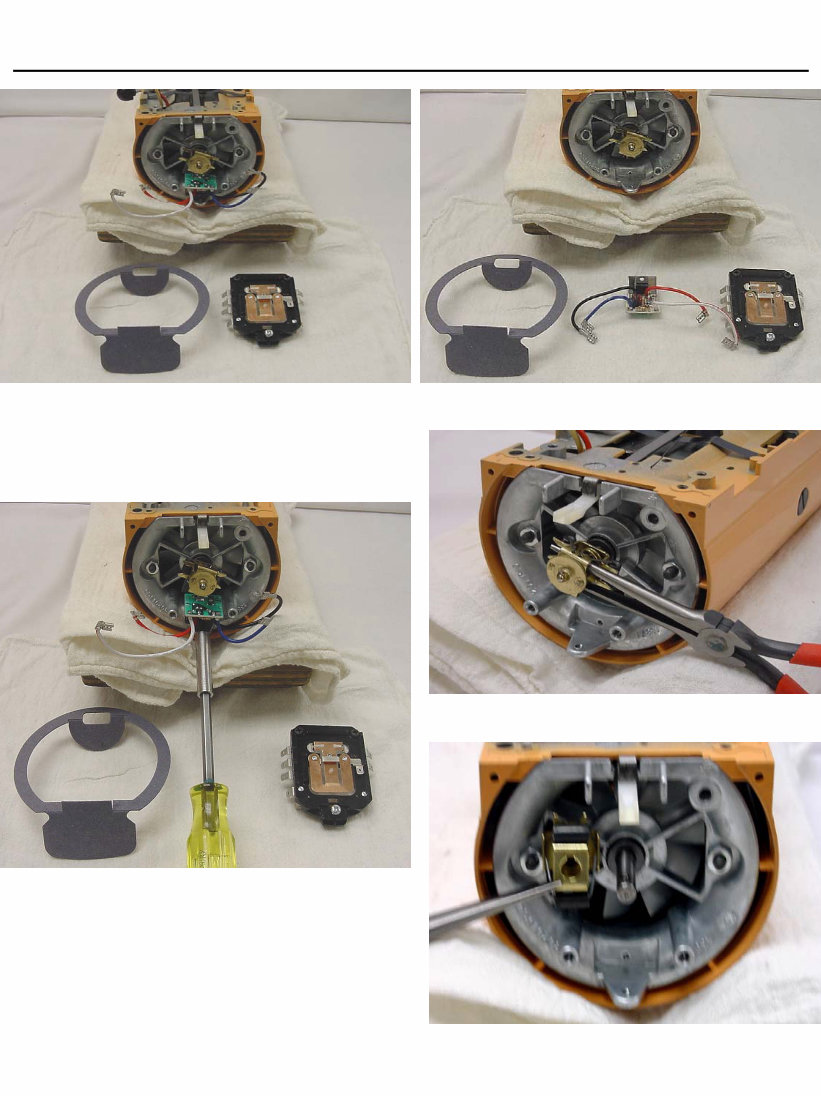
A. Start the disassembly of the control unit by
removing the cord flag terminals from the control
board and the ground wire from the bearing bracket
(Fig. 14).
Remove the motor stator flag terminals from the
control board ( Fig. 15).
Note: All service operations discussed
here should be performed with the mixer
disconnected from the A. C. mains.
Remove the end seal and disconnect the phase
control flag terminals from the control board
(Fig. 16).
Unhook the control board spring at the bottom of
the control board (Fig. 17).
Unlock the two lock nuts on the control board a
unscrew the two adjusting screws.
The mixer control board can now be removed a
set aside for later evaluation (Fig. 18 ).
Fig. 14 Removal of the cord flag terminals and
cord ground wire.
nd
nd
Fig. 15 The removal of the motor stator flag
terminals from the control board.
Fig. 16 After removing the end seal, remove the
phase control flag terminals.
Fig. 17 Unhook the control board spring.
Page 6
KITCHENAID
Stand Mixer Service Manual LIT4177310-C 2005 KitchenAid
B. The phase control can now be disassembled from
the bearing bracket, if necessary, by unscrewing the
#4-40 x 1/4” pan head screw (Figs. 19 & 20).
C. With a pair of needle nose pliers, carefully pry
off the governor assembly. (Fig. 21) Do NOT
bend.
Remove the governor drive pin and lay it aside so
it will not be lost (Fig. 22).
Fig. 18 Mixer housing with end seal and
control board removed.
Fig. 19 Removal of the phase control (Triac)
from the bearing bracket.
Fig. 20 Phase control or (triac) shown
removed in lower center.
Fig. 21 Needle nose plier used to pry governor off
the motor shaft.
Fig. 22 Governor shown removed from the shaft
of the motor.
Page 7
You're Reading a Preview
What's Included?
Lifetime Access
Fast Download Speeds
Online & Offline Access
Access PDF Contents & Bookmarks
Full Search Facility
Print one or all pages of your manual
$28.99
$37.99
Viewed 11 Times Today


Secure transaction
What's Included?
Lifetime Access
Fast Download Speeds
Online & Offline Access
Access PDF Contents & Bookmarks
Full Search Facility
Print one or all pages of your manual
$28.99
$37.99
Whether you're a professional mechanic or a DIY enthusiast, this manual is ideal for repairing your vehicle. It contains model-specific information and is not generic. You can access this manual instantly upon payment completion, eliminating the need to wait for unreliable postal delivery. Additionally, you have the convenience of printing only the necessary pages.


