LG DLEX3470V DLEX3470W Service Manual & Repair Guide
What's Included?
Lifetime Access
Fast Download Speeds
Online & Offline Access
Access PDF Contents & Bookmarks
Full Search Facility
Print one or all pages of your manual
ELECTRIC & GAS DRYER SERVICE MANUAL CAUTION READ THIS MANUAL CAREFULLY TO DIAGNOSE PROBLEMS PROPERLY AND TO PROVIDE QUALITY SERVICE SAFELY ON THESE DRYERS. U.S.A. Website: http://us.lgservice.com Canadian Website: http://lg.ca MODEL : Electric Gas DLEX3470* DLGX3471*
2 To avoid injury to persons, disconnect power before servicing this product. If electrical power is required for diagnosis or test purposes, disconnect the power immediately after performing the necessary checks. ! WARNING ! WHAT TO DO IF YOU SMELL GAS: IMPORTANT SAFETY NOTICE The information in this service guide is intended for use by individuals possessing skill and experience in electrical, electronic, and mechanical appliance repair. Any attempt to repair a major appliance may result in injury to persons, and property damage. The manufacturer or seller cannot be responsible for the interpretation of this information, nor can it assume any liability in connection with its use. RECONNECT ALL GROUNDING DEVICES If grounding wires, screws, straps, clips, nuts, or washers used to complete a path to ground are removed for service, they must be returned to their original position and properly fastened. IMPORTANT Electrostatic Discharge (ESD) Sensitive Electronics ESD problems are present everywhere. ESD may damage or weaken the electronic control assembly. The new control assembly may appear to work well after repair is finished, but failure may occur at a later date due to ESD stress. ■ Use an anti-static wrist strap. Connect wrist strap to green ground connection point or unpainted metal in the appliance. - OR - Touch your finger repeatedly to a green ground connection point or unpainted metal in the appliance. ■ Before removing the part from its package, touch the anti-static bag to a green ground connection point or unpainted metal in the appliance. ■ Avoid touching electronic parts or terminal contacts; handle electronic control assembly by edges only. ■ When repackaging the failed electronic control assembly in an anti-static bag, observe the instructions above. ■ Do not try to light a match, or cigarette, or turn on any gas or electrical appliance. ■ Do not touch any electrical switches. Do not use any phone in your building. ■ Clear the room, building, or area of all occupants. ■ Immediately call your gas supplier from a neighbor’s phone. Follow the gas supplier’s instructions carefully. ■ If you cannot reach your gas supplier, call the fire department.
3 1. SPECIFICATIONS ............................................................................................................... 4 2. FEATURES AND BENEFITS ............................................................................................... 6 3. INSTALLATION INSTRUCTIONS ........................................................................................ 6 4. DRYER CYCLE PROCESS ................................................................................................ 13 5. COMPONENT TESTING INFORMATION ......................................................................... 14 6. MOTOR DIAGRAM AND SCHEMATIC ............................................................................. 17 7. WIRING DIAGRAM ............................................................................................................ 18 8. STEAM FUNCTION ............................................................................................................ 19 8-1. STEAM CYCLE GUIDE ............................................................................................ 19 8-2. TROUBLESHOOTING .............................................................................................. 20 8-3. DISPLAY FAULT/ERROR CODES ............................................................................ 21 9. FLOW SENSOR FUNCTION ............................................................................................. 22 9-1. FLOW SENSOR ....................................................................................................... 22 9-2. INSTALLATION TEST (EXHAUST CHECK) ............................................................ 23 10. DIAGNOSTIC TEST ........................................................................................................ 25 10-1. TEST 1 120V AC ELECTRICAL SUPPLY ............................................................ 26 10-2. TEST 2 THERMISTOR TEST - MEASURE WITH POWER OFF ......................... 29 10-3. TEST 3 MOTOR TEST ......................................................................................... 30 10-4. TEST 4 MOISTURE SENSOR .............................................................................. 31 10-5. TEST 5 DOOR SWITCH TEST ............................................................................. 32 10-6. TEST 6 HEATER SWITCH TEST - ELECTRIC TYPE .......................................... 33 10-7. TEST 7 GAS VALVE TEST - GAS TYPE .............................................................. 34 CONTENTS 10-8. TEST 8 MOTOR ASSEMBLY, DC, PUMP ............................................................ 35 10-9. TEST 9 GENERATOR ASSEMBLY ...................................................................... 35 11. CHANGE GAS SETTING (NATURAL GAS, PROPANE GAS) ....................................... 36 12. DISASSEMBLY INSTRUCTIONS .................................................................................... 38 13. EXPLODED VIEW ............................................................................................................ 48 13-1. CONTROL PANEL AND PLATE ASSEMBLY ......................................................... 48 13-2. PANEL DRAWER ASSEMBLY AND GUIDE ASSEMBLY ........................................ 49 13-3-1. CABINET AND DOOR ASSEMBLY: ELECTRIC TYPE ....................................... 50 13-3-2. CABINET AND DOOR ASSEMBLY: GAS TYPE .................................................. 51 13-4-1. DRUM AND MOTOR ASSEMBLY: ELECTRIC TYPE ......................................... 52 13-4-2. DRUM AND MOTOR ASSEMBLY: GAS TYPE .................................................... 53
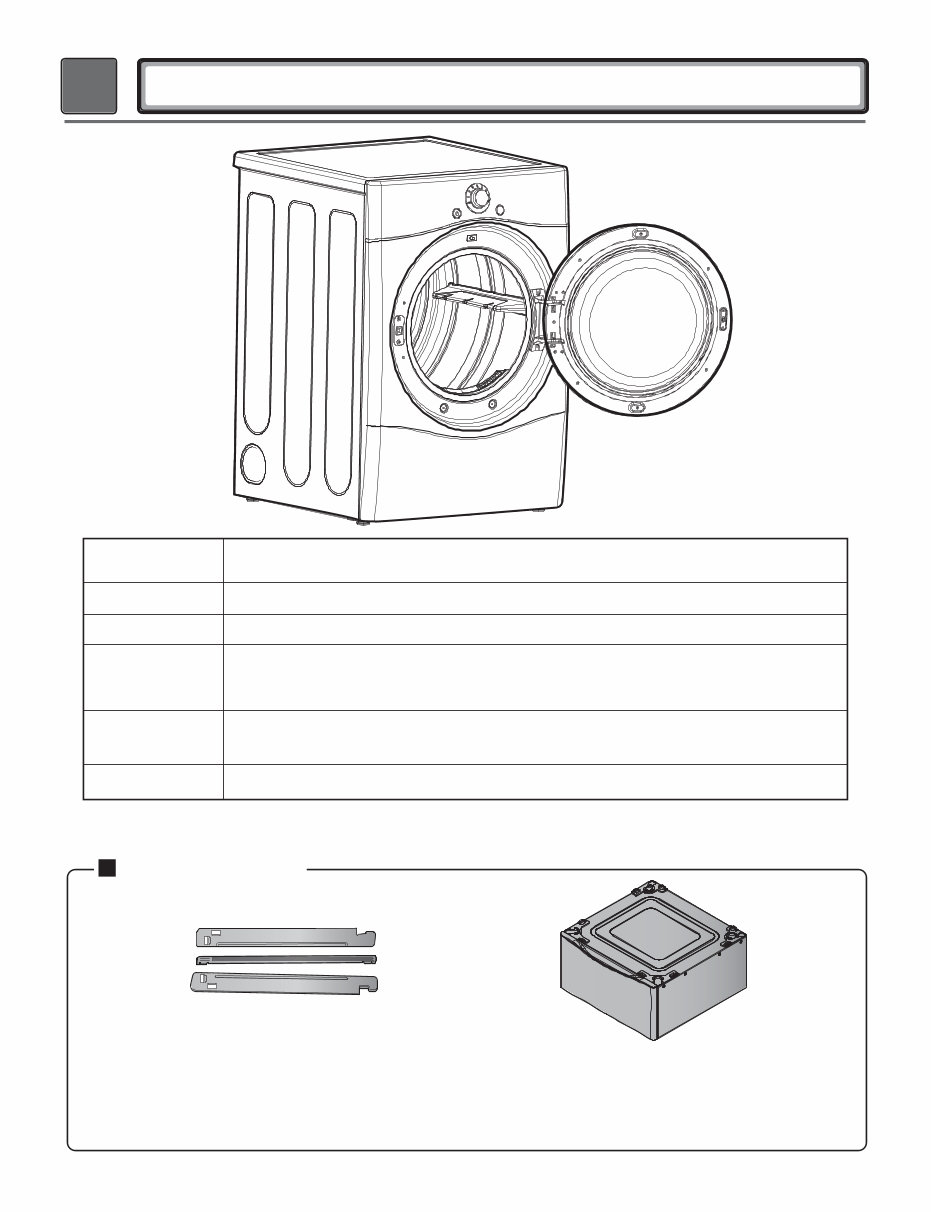
4 1 SPECIFICATIONS See page 7 Stacking kit (1 each) Purchased Separately ACCESSORIES Model DLEX3470* DLGX3471* Name Electric and Gas Dryer Please refer to the rating label regarding detailed information 27” (W) X 30” (D) X 38 / ” (H), 51” (D with door open) 68.6 cm (W) X 76.1 cm (D) X 98.3 cm (H), 129.7 cm (D with door open) 11 16 Size Weight Dryer capacity - Normal Cycle IEC 7.3 cu.ft. (22.5 lb/10.2 kg) - Steam Cycle IEC 7.3 cu.ft. (8 lb/3.6 kg) 136 lbs (62 kg) Power supply 8 e g a p e e S Pedestal (1 each) Purchased Separately
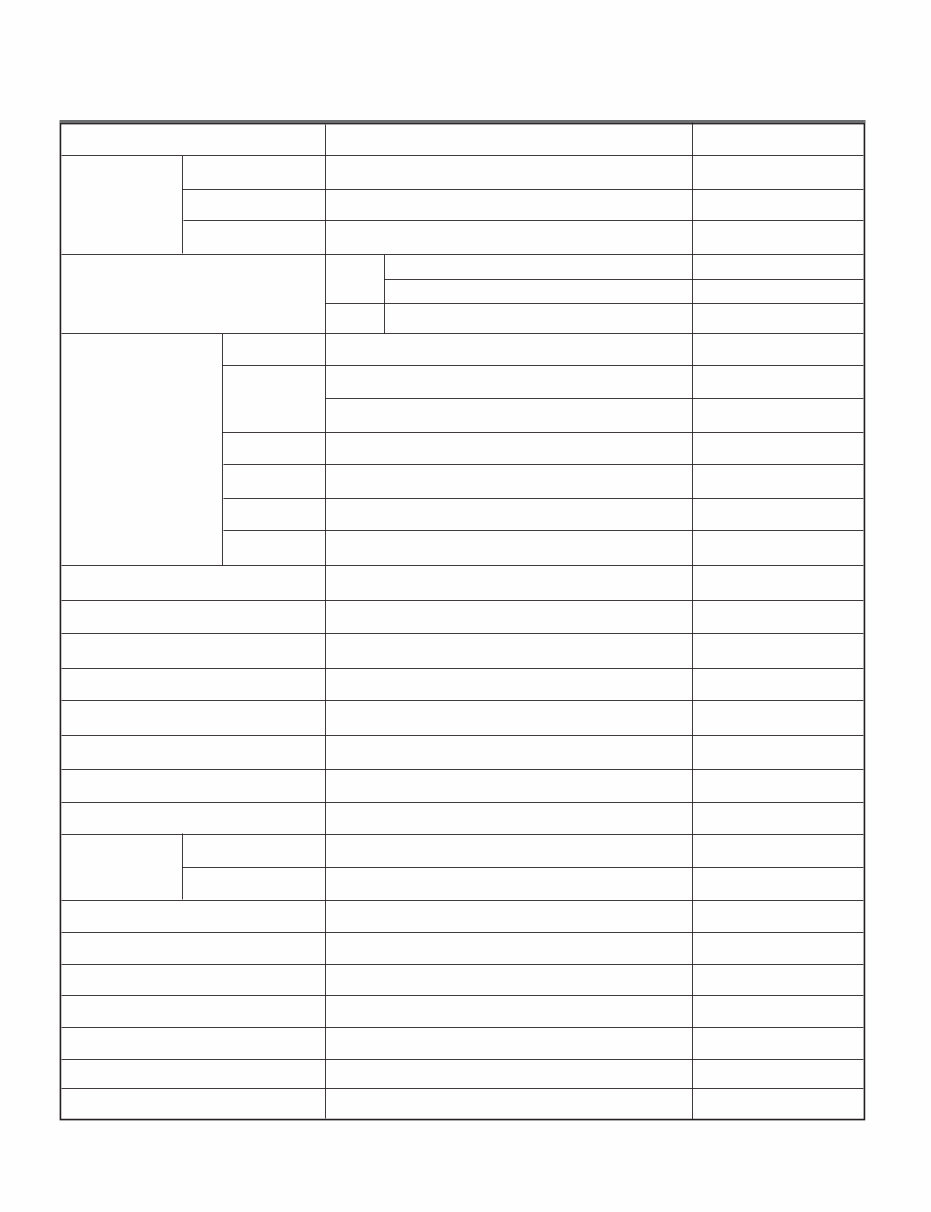
Sound levels High / Medium / Low / Off 5 ITEM DLEX3470* DLGX3471* REMARK Blue White / Stainless Silver Powder coating Color Top Plate Door Trim Power Consumption Motor Heater Lamp Gas Valve AG Heater Pump Control Type Drum Capacity Weight (lbs) - Net/Gross Number of Programs Number of Dry Options Number of Temperature Controls Moisture Temperature Number of Dry Levels Reversible Door Drum Dryer Rack Child Lock Interior Light Product (WxDxH) Sensor Power Supply Material and Finish Chrome Elec. Gas 120 V / 240 V / 60 Hz (26 A) 120 V / 208 V / 60 Hz (23 A) 120 V / 60 Hz (11.5 A) 250 W (4.5 A) 5400 W (22.5 A) 4100 W (21 A) 15 W (0.2 A) 13 W (0.11 A) x 2 1100 W (9.2 A) 2.4 W (0.15 A) Electronic 7.3 cu.ft. 126 / 146 12 5 5 5 Available Available Available Stainless Available Available Available Packing (WxDxH) AC 240 V (Electric Model) AC 208 V (Electric Model) DC 12V DC 120V(Gas Model) DC 120V(Steam Model) DC 9V(Steam Model) Thermistor Electrode sensor 27” X 30” X 38 / ” 11 16 29 / ” X 30 / ” X 44 / ” 1 2 3 4 3 4
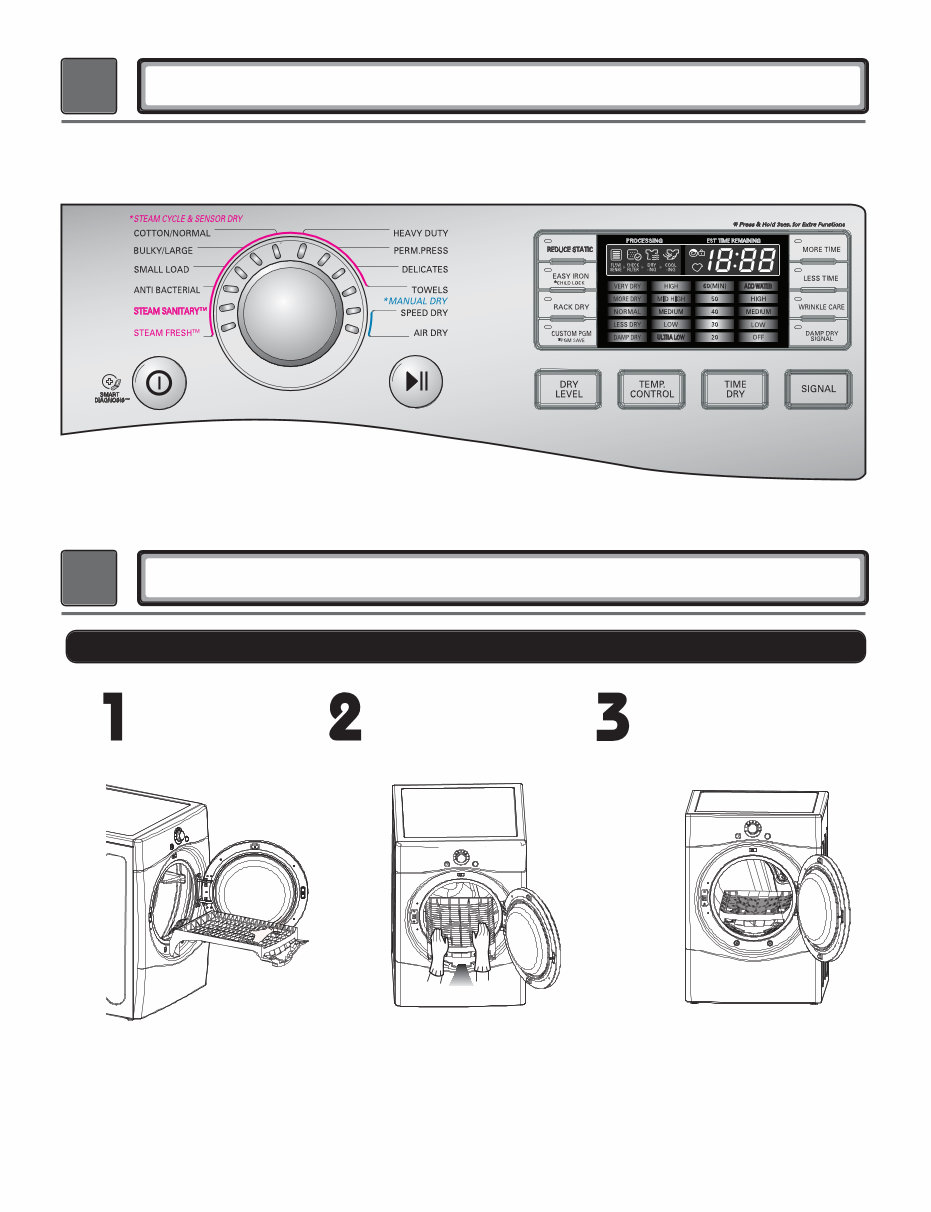
2 FEATURES AND BENEFITS DLEX3470* / DLGX3471* 6 3 INSTALLATION INSTRUCTIONS Dryer Rack Installation Instructions Open the door. Hold the dryer rack with both hands. Put the dryer rack into the drum Check and be sure that the front of the rack is properly seated behind the lint filter.
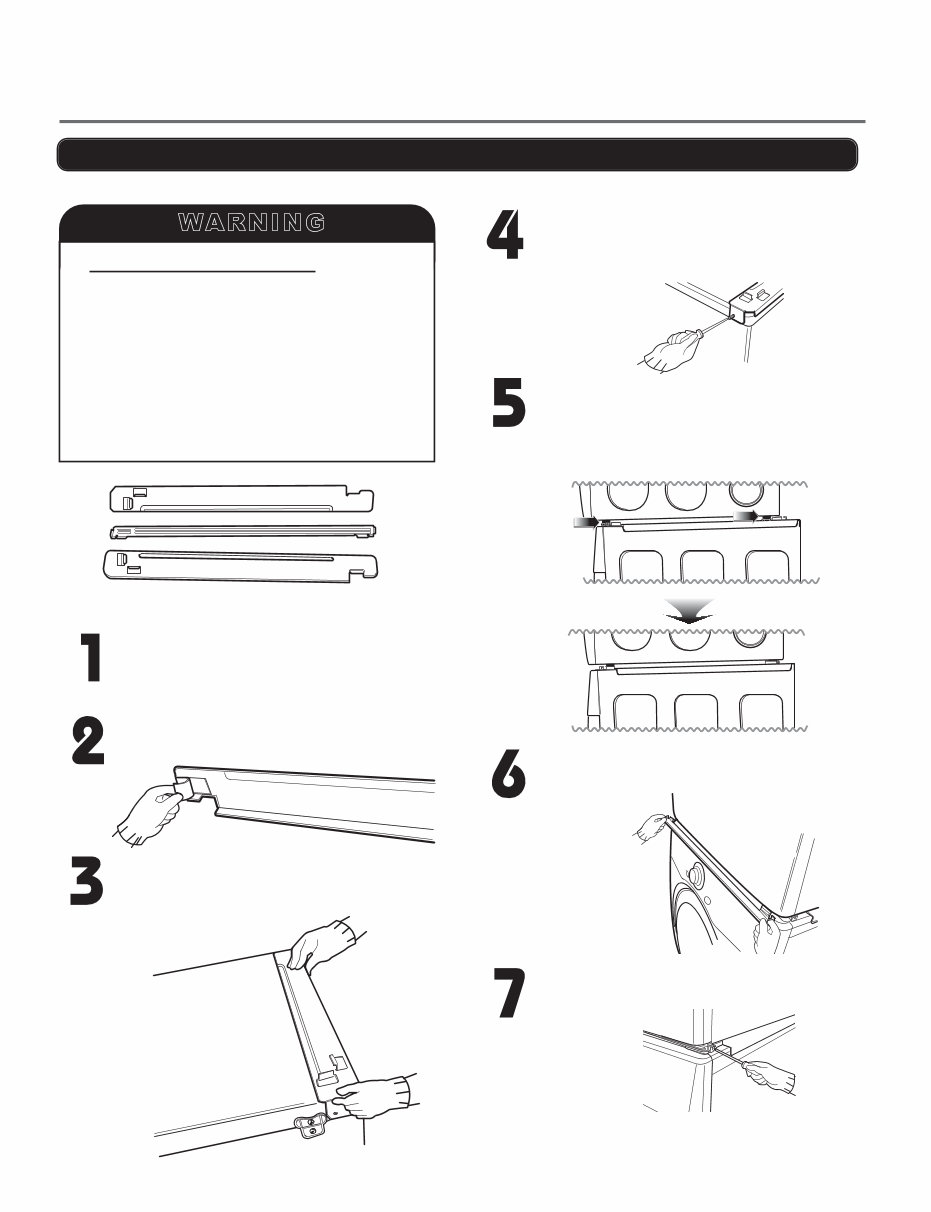
Peel the protective paper from the tape on the side bracket. 7 Secure the side bracket to the washer with a screw on the back of the bracket. Repeat Steps 2, 3, and 4 for the other side. Place the dryer on top of the washer by placing the legs as shown. Be careful not to pinch fingers between the washer and dryer. Slide the dryer back against the stop on the side rail. Fit the side bracket firmly to the side of the top plate by attaching the double-faced tape to the top plate as picture shown. Insert the front rail of the stacking kit. Push the front rail back against the stops on the side brackets. • Do not use a stacking kit with a gas dryer in potentially unstable conditions like a mobile home. Stacking Kit Installation Instructions Place the washer firmly on a stable, even and solid floor as product installation instructions describe in the owner’s manual. Do not attempt this alone! At least two people are required to lift and position the dryer on top of a washing machine! Failure to heed this warning can result in serious physical injury and damage to the appliance. To reduce the risk of Injury to persons adhere to all industry recommended safety procedures including the use of long sleeved gloves and safety glasses. W A R N I N G Stacking kit Attach the front bracket to the side rails with a screw on each side. To ensure safe and secure installation, please observe the instructions below.
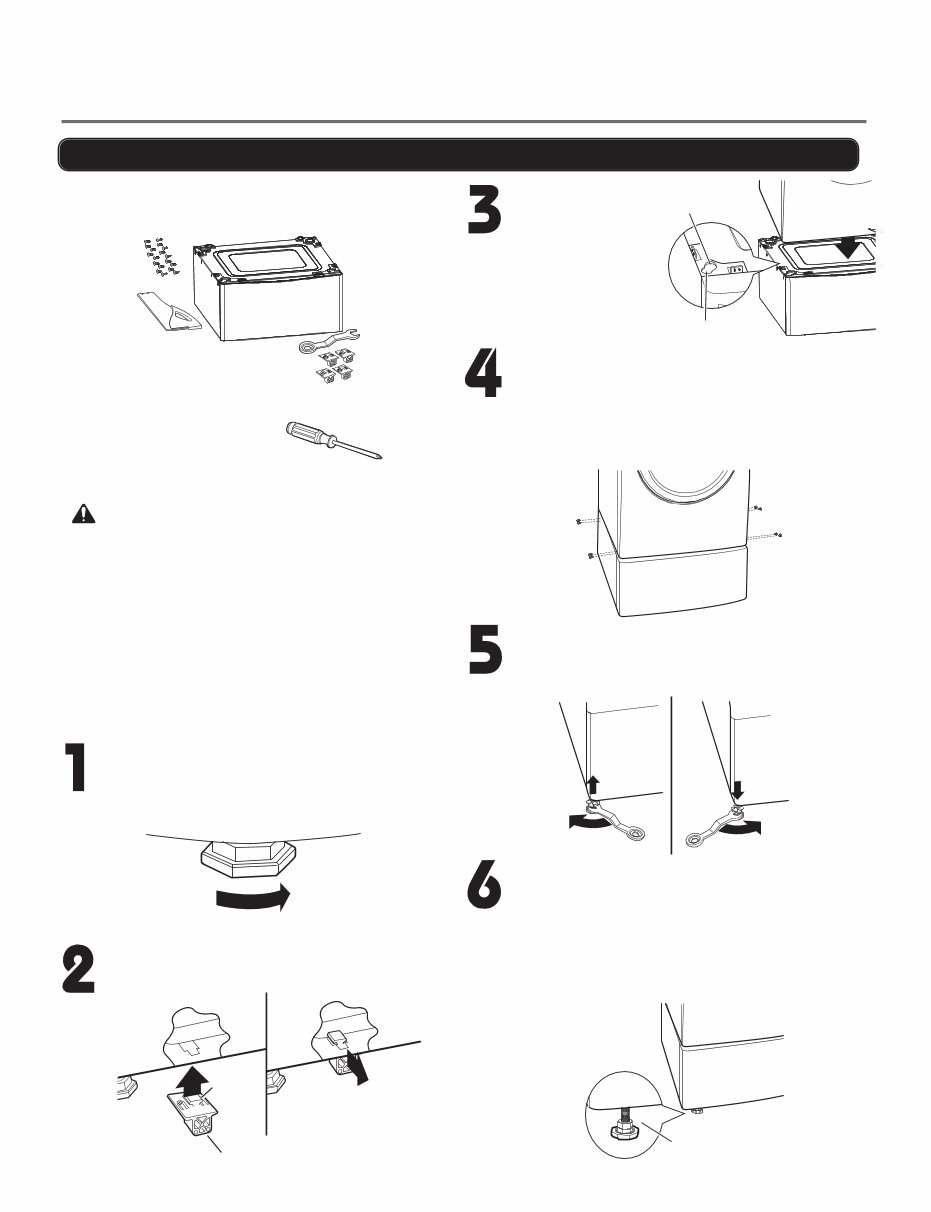
8 Pedestal Installation Instructions The pedestal accessory includes: • Drawer divider (1) • Wrench (1) • Screws (18) † • T-clips (4) †† Tools Needed for Installation: • Phillips screwdriver • Wrench (supplied) † Dryer installation only uses 8 screws †† For dryer only To ensure safe and secure installation, please thoroughly follow the instructions below. • Incorrect installation can cause serious accidents. • The appliances are heavy. Two or more people are required when installing the pedestal. There is a risk of serious back injury or other injuries. • Do not allow children to play in or on the drawer. There is a risk of suffocation or injury. • Do not step on the handle. There is a risk of serious injury. • If appliances are already installed, disconnect them from all power, water, or gas lines and from draining or venting connections. Failure to do so can result in electrical shock, fire, explosion, or death. • To reduce the risk of Injury to persons adhere to all industry recommended safety procedures including the use of long sleeved gloves and safety glasses. WARNING Retract fully Retainer T-clip Make sure the leveling feet of the dryer are fully retracted. NOTE: The appliance and pedestal assembly must be placed on a solid, sturdy, level floor for proper operation. Insert the T-clip of the 4 retainers into the dryer base as shown. Press up on the back of the clip and pull outward to lock into place. Place the dryer on the pedestal. Make sure the front and back feet are in the correct positions. The dryer feet will fit into the innermost positions as shown. Make sure the screws on the pedestal align with the holes in the retainers, then install 4 screws on each side to securely attach the appliance to the pedestal. NOTE: If the screws are not installed properly, noise and vibration may result. Move the appliance to the desired location. Securely tighten all locknuts by hand. NOTE: Noise and vibration may result if locknuts are not tightened. Be sure to connect the appliances to all water, power, or gas lines and draining or venting connections before operation. If there is excessive vibration during the first operation after installation, slightly adjust the leveling feet. Loosen the locknuts on all 4 leveling feet of the pedestal until you can turn them with the wrench. Turn clockwise to raise or counterclockwise to lower until the pedestal is level and all 4 feet are solidly against the floor. For dryer For washer/combo Raise Lower Locknut
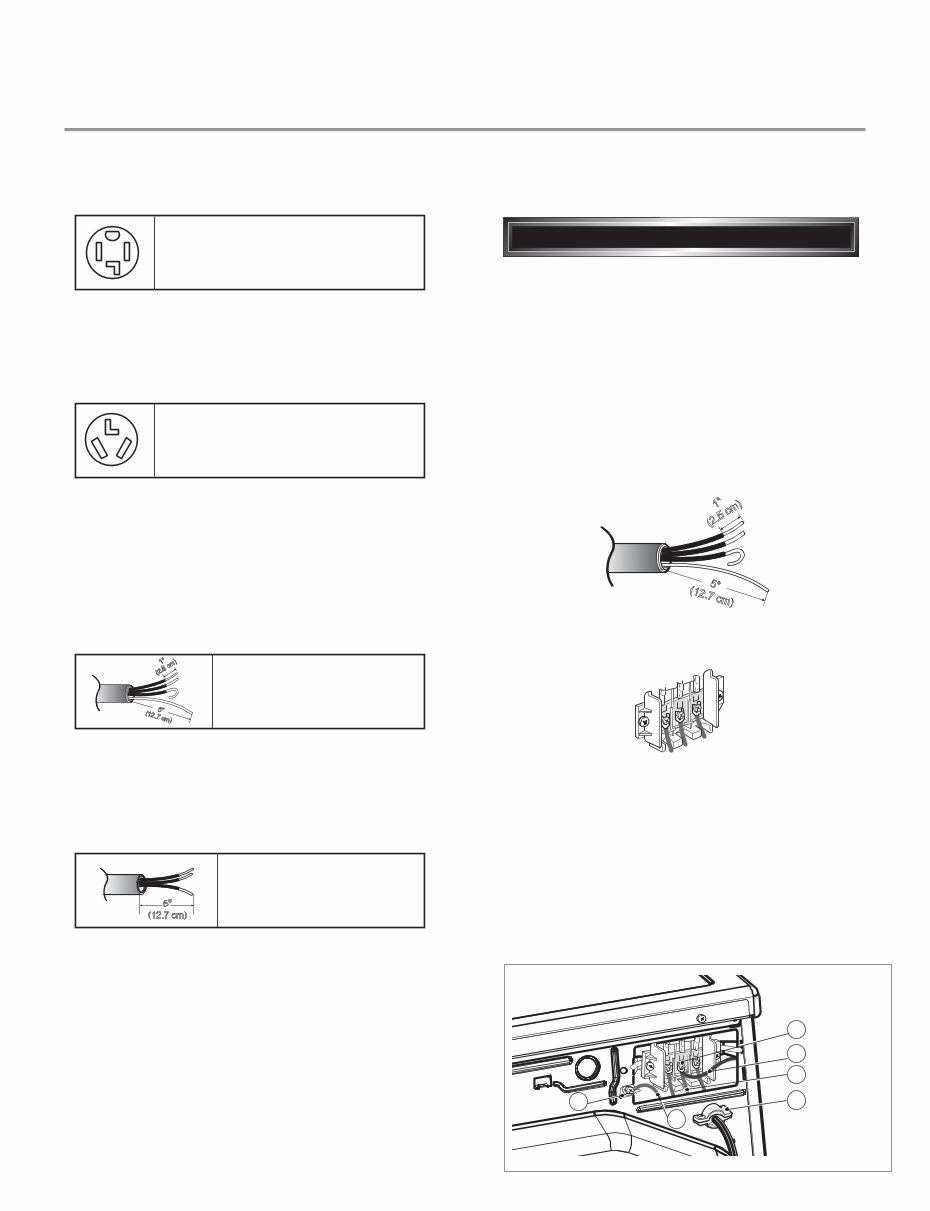
Use the instructions under option 2 or 3 if your home has a 3-wire receptacle (NEMA type 10-30R). Use option 2 if local codes and ordinances permit the connection of a chassis ground to the neutral connector. If this is not permitted, use option 3. Review the following options to determine the appropriate electrical connection for your home 3-1. Connection with a Power Supply Cord. If this type is available at your home. you will be connecting to a fused disconnect or circuit breaker box Important : Grounding through the neutral conductor is prohibited for (1) new branch-circuit installations, (2) mobile homes, and (3) recreational vehicles, and (4) areas where local codes prohibit grounding through the neutral conductor. Prepare minimum 5 ft(1.52 m) of length in order for dryer to be replaced. First, peel 5 inch (12.7 cm) of covering material from end. Make a 5 inch of ground wire bared. After cutting 1 1 /2 inch (3.8 cm) from 3 other wires. peel insulation back 1inch (2.5 cm). Make ends of 3 wires a hook shape. Then, put the hooked shape end of the wire under the screw of the terminal block(hooked end facing rightward) and pinch the hook together and screw tightly. Use the instructions under option 1 if your home home has a 4-wire receptacle (NEMA type 14-30R). If this type is available at your home. you will be connecting to a fused disconnect or circuit breaker box 1. Connect neutral wire(white) of power cord to center terminal block screw. 2. Connect red and black wire to the left and right terminal block screws. 3. Connect ground wire(green) of power cord to external ground screw and move neutral ground wire of appliance and connect it to center screw. 4. Make sure that the strain relief screw is tightened. and be sure that all terminal block nuts are on tight and power cord is in right position. 1 " (2.5 cm) 5 " (12.7 cm) 3-wire direct 4-wire receptacle (NEMA type14-30R) 3-wire receptacle (NEMA type10-30R) 4-wire direct 5" (12.7 cm) 4-wire connection : Direct wire 1" (2.5 cm) 5 " (12.7 cm) F a b E D C 9
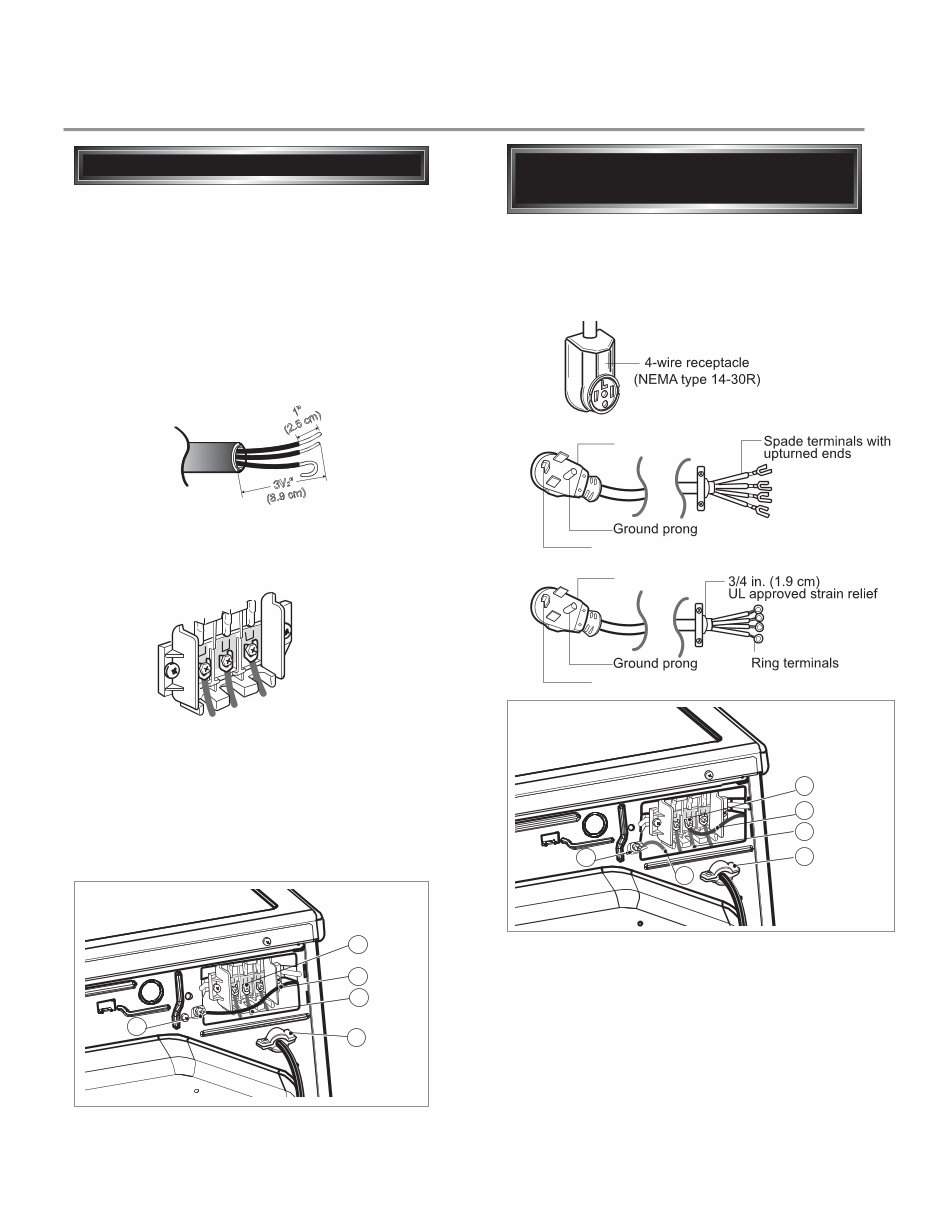
Important : Grounding through the neutral conductor is prohibited for (1) new branch-circuit installations, (2) mobile homes, and (3) recreational vehicles, and (4) areas where local codes prohibit grounding through the neutral conductor. Prepare minimum 5 ft(1.52 m) of length in order for dryer to be replaced. First, peel 3 1 /2 inch (8.9 cm) of covering material from end and bare 1 inch from the ends. 1. Connect neutral wire(white) of power cord to center terminal block screw. 2. Connect red and black wire to the left and right terminal block screws. 3. Make sure that the strain relief screw is tightened and be sure that all terminal block nuts are on tight and power cord is in right position. Then, put the hooked shape end of the wire under the screw of the terminal block(hooked end facing rightward) and pinch the hook together and screw tightly. 1 " ( 2 . 5 c m ) 3V 2 " (8.9 cm) 3-wire connection : Direct wire 1. Connect the neutral wire (white) of the power cord to the center terminal block screw. 2. Connect the red and black wires to the left and right terminal block screws. 3. Connect the ground wire (green) of the power cord to the external ground screw. Remove the neutral ground wire of appliance and connect it to center screw. 4. Make sure that the strain relief screw is tightened and that all terminal block nuts are tight and the power cord is in the right position. F a b E D C Option 1 : 4-wire connection with a power supply cord. E a D B C 10 lf your local codes or ordinances do not allow the use of a 3 wire connection, or you are installing your dryer in a mobile home, you must use a 4-wire connection. 4-prong plug 4-prong plug Neutral prong Neutral prong
Why replace while you can upgrade or repair? This service and repair manual is used by the Official Certified LG Technicians. It will help you to troubleshoot and repair your dryer!
Contents:
Specifications
Features and Benefits
Installation Instructions
Dryer Cycle Process
Component Testing Information
Motor Diagram and Schematic
Wiring Diagram
Troubleshooting
Diagnostic Test
Disassembly Instructions
Exploded View
This service manual is very detailed and illustrated with pictures and step-by-step instructions on how to repair/service this device the best way there is! Please note this is the OFFICIAL service and repair manual in format, no scanned-in or bootlegged copy. This manual is made in the highest resolution, so when you print the pages you need it is all in great quality! You can easily print this manual from any printer and any computer!
***INSTANT access*** After your payment, you will have instant access to your access. No shipping fee, no waiting on postal delivery, you can start doing your repairs right away!
Specifications:
Language: English
Format: .PDF
Pages: 54
Platform: Windows and MAC
Looking for a service manual but can't find it anywhere? Please contact us with your request! As you can see we've got the largest & most comprehensive service manual database out there, so a good chance we can help you out!
Recently Viewed
5,521,897Happy Clients
2,594,462eManuals
1,120,453Trusted Sellers
15Years in Business
Price:
Actual Price:
LG DLEX3470V DLEX3470W Service Manual & Repair Guide



 Lifetime Access