


Vizio VA320E LCD TV Service Manual
What's Included?
 Lifetime Access
Fast Download Speeds
Online & Offline Access
Access PDF Contents & Bookmarks
Full Search Facility
Print one or all pages of your manual
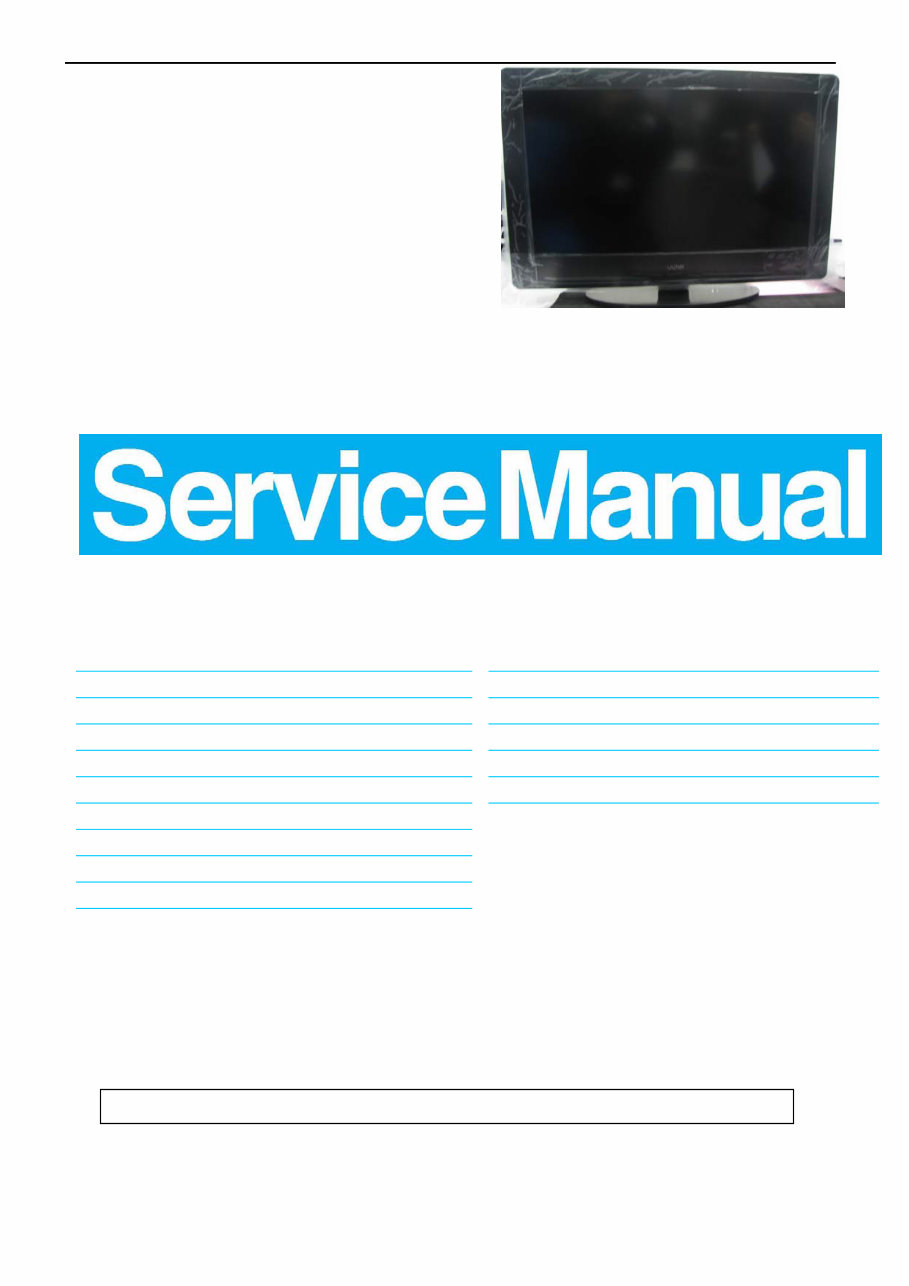
32″LCD TV VA320E
1
Service
Service
Service
TABLE OF CONTENTS
Description Page Description Page
SAFETY NOTICE
ANY PERSON ATTEMPTING TO SERVICE THIS CHASSIS MUST FAMILIARIZE HIMSELF WITH THE CHASSIS
AND BE AWARE OF THE NECESSARY SAFETY PRECAUTIONS TO BE USED WHEN SERVICING
ELECTRONIC EQUIPMENT CONTAINING HIGH VOLTAGES.
CAUTION: USE A SEPARATE ISOLATION TRANSFOMER FOR THIS UNIT WHEN SERVICING
8.PCB Layout …………………....... .... . . . . ........29
9. Block Diagram.……........................................... 36
10. Schematic……………...…………..………………...37
11. White-Balance, Luminance Adjustment...................61
12. Exploded View………………………………….…... .. 64
13. BOM List……………….…………………………….66
Table Of Contents.......……..............................…........1
Important Safety Notice.......................................……......2
Revision List…………………………………………………3
1. General Specification..............................………........4
2. Operating Instructions…………………….……….......5
3. Input/Output Specification…………....................…....14
4. Mechanical Instructions…………………….................16
5.Factory Model…………………… ................. 20
6.ISP Upgrade………………………….…….……..... 21
7.Repair Flow Chart ………….………………....….......25
Model:VA320E

32″LCD TV VA320E
2
Important Safety Notice
Proper service and repair is important to the safe, reliable operation of all AOC Company Equipment. The service
procedures recommended by AOC and described in this service manual are effective methods of performing service
operations. Some of these service operations require the use of tools specially designed for the purpose. The
special tools should be used when and as recommended.
It is important to note that this manual contains various CAUTIONS and NOTICES which should be carefully read in
order to minimize the risk of personal injury to service personnel. The possibility exists that improper service
methods may damage the equipment. It is also important to understand that these CAUTIONS and NOTICES ARE
NOT EXHAUSTIVE. AOC could not possibly know, evaluate and advise the service trade of all conceivable ways in
which service might be done or of the possible hazardous consequences of each way. Consequently, AOC has not
undertaken any such broad evaluation. Accordingly, a servicer who uses a service procedure or tool which is not
recommended by AOC must first satisfy himself thoroughly that neither his safety nor the safe operation of the
equipment will be jeopardized by the service method selected.
Hereafter throughout this manual, AOC Company will be referred to as AOC.
WARNING
Use of substitute replacement parts, which do not have the same, specified safety characteristics might create
shock, fire, or other hazards.
Under no circumstances should the original design be modified or altered without written permission from AOC.
AOC assumes no liability, express or implied, arising out of any unauthorized modification of design.
Servicer assumes all liability.
FOR PRODUCTS CONTAINING LASER:
DANGER-Invisible laser radiations when open AVOID DIRECT EXPOSURE TO BEAM.
CAUTION-Use of controls or adjustments or performance of procedures other than those specified herein may
result in hazardous radiation exposure.
CAUTION -The use of optical instruments with this product will increase eye hazard.
TO ENSURE THE CONTINUED RELIABILITY OF THIS PRODUCT, USE ONLY ORIGINAL MANUFACTURER'S
REPLACEMENT PARTS, WHICH ARE LISTED WITH THEIR PART NUMBERS IN THE PARTS LIST SECTION OF
THIS SERVICE MANUAL.
Take care during handling the LCD module with backlight unit
-Must mount the module using mounting holes arranged in four corners.
-Do not press on the panel, edge of the frame strongly or electric shock as this will result in damage to the screen.
-Do not scratch or press on the panel with any sharp objects, such as pencil or pen as this may result in damage to
the panel.
-Protect the module from the ESD as it may damage the electronic circuit (C-MOS).
-Make certain that treatment person’s body is grounded through wristband.
-Do not leave the module in high temperature and in areas of high humidity for a long time.
-Avoid contact with water as it may a short circuit within the module.
-If the surface of panel becomes dirty, please wipe it off with a soft material. (Cleaning with a dirty or rough cloth may
damage the panel.)

32″LCD TV VA320E
4
1. General Specification
Display panel
Panel Model : CMO V315B3-LN3
Active Area : 697.6845(H)* 392.256(V) inch diagonal
Outline Dimension : 760mm (H) X 450mm (V) X 41.1mm (D)
Pixel Pitch : 0.17025(H)* 0.51075(V) mm
Pixel Format : 1366 X 768 (WXGA), RGB strip arrangement
Color Depth : 8 bit, 16.7M colors
Luminance : 450Cd/m2, Typ
Backlight : CCFL
Response Time : 6.5msec.(Typ. : gray to gray )
Contrast Ratio : 1500:1(Min.) 2500:1(Typ.)
EEFL MTBF : 50,000 hrs min.
Power Supply
PSU : N/A
AC-input : 100~264 Vac +/-, 50~60Hz
Normal Operation Power consumption : < 117W (Game mode)
Standby power : < 1W (120V/60Hz only)
Power cord length : 1.8M
Power cord type : 3 lead with earth plug, pluggable (US type)
Power indicator : LED (On: White, Standby: Amber)
Environmental Conditions
Temperature : 0°C to 40°C
Humidity : 10 to 90%(non –condensing)
Altitude : 0 to 10000 feet
Air pressure : 700 to 1100 mBAR
Note: recommend at 0 to 35°C, Humidity less than 60 %
32″LCD TV VA320E
5
2. Operating Instructions
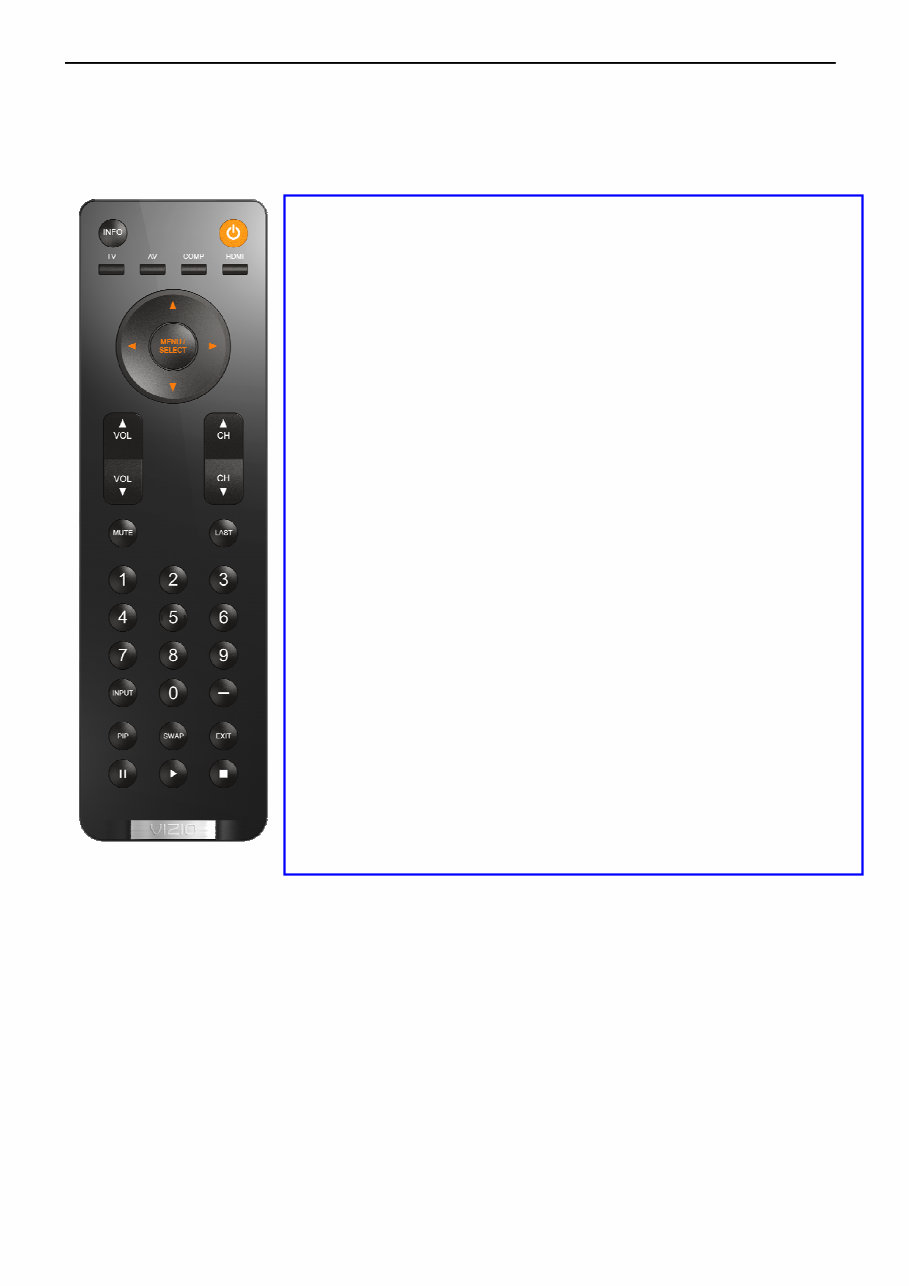
2.1 The Use of Remote Control
POWER: Press to turn on/off the TV from or to standby mode.
INPUT: Press to select TV/COMP1/COMP2/AV/HDMI1/HDMI2/HDMI
SIDE/VGA
TV: Press to select TV input
AV: Press to select AV input
COMP: Press to select COMPONENT1/ COMPONENT2 input
HDMI: Press to select HDMI1/HDMI2/HDMI-SIDE input
Number Key: 1. Press number button to direct access to TV channel
2. Press the pass code to activate the factory mode
3. Press to activate the Channel Lock (enter PIN code for
Channel lock)
4. If channel list OSD active – jump to that channel in the
channel list (not tune the channel until OK is pressed)
- Dot button: Use the button for digital channels.
LAST: 1.Press to alternate between the currently viewed program
and previously viewed program
2. Press to return previous level and exit OSD
INFO: To display information of TV channel or input source
INPUT: 1. The Source List should be activated and show on OSD.
2. Press repeatedly to select the signal source.
3. 1
st
press displays current, subsequent presses advance
VOL +/ -: Press to adjust the volume
MUTE : Interrupt the sound or restore it.
CH +/ - : 1. Press to browse channels
2. Press to turn on TV from stand by mode
3. The channel number should appear on the set
MENU/SELECT: Press to activate OSD menu and activate the
setting/selection of OSD
Cursor Key: 1. Press button to navigate OSD menu
2. Cursor right key perform confirmation as well as proceed
next level of OSD
PIP: Function not available
SWAP: Function not available
EXIT: Exit OSD
PAUSE: Function not available
PLAY: Function not available
STOP: Function not available
32″LCD TV VA320E
6
MAIN MENU
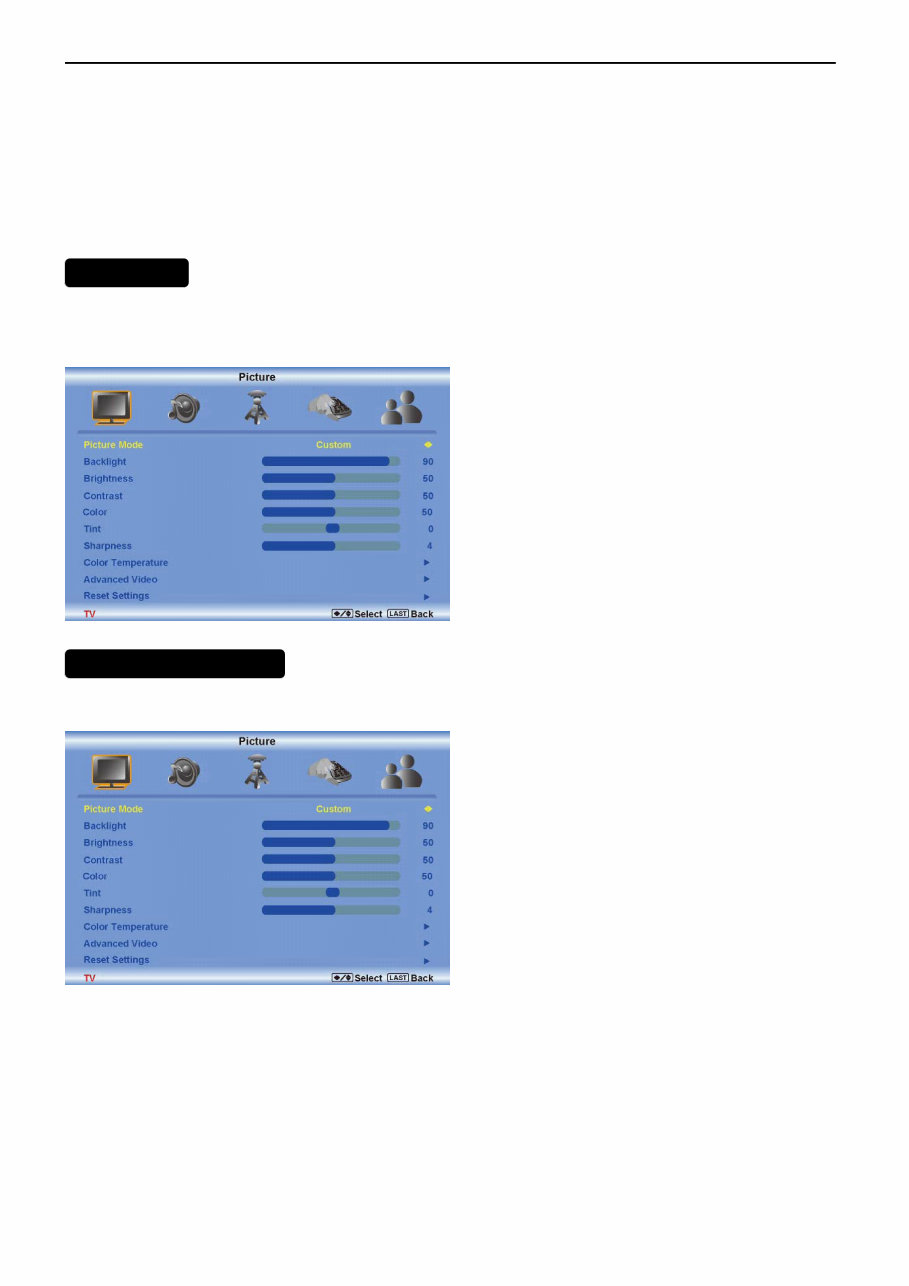
PICTURE ADJUSTMENT
2.2 To Use the Menus
MENU/SELECT – Press to launch the On-Screen Display (OSD) menu. When navigating the OSD, this button is
used to select your chosen option.
Arrow Buttons ( ) – After pressing
MENU/SELECT, use arrow buttons to navigate through the OSDs and adjust options, then press
MENU/SELECT to select your chosen option.
VOL (▲ or ▼) – Press to increase or decrease the speaker volume.
CH (▲ or ▼) – Press to step up or down through the TV channels
The OSD consists of several menu options: Picture, Audio, TV,Setup and Parental.
Note: Some of the submenu options may vary depending on your selected input source.
Press the MENU button to activate the On Screen Display (OSD), select the Picture option to adjust the Picture
Mode,Backlight, Brightness, Contrast, color, tint,Sharpness,Color Temperature and Advanced Video.
The following options are available in the Picture menu:
Picture Mode
Select Custom, Home, Movie, Game (Sports).
Backlight
Backlight adjusts the overall brilliance of the picture. It does not affect the Brightness (black level) or Contrast
(white level) of the picture. If DCR is activated, backlight adjustment is not available.

32″LCD TV VA320E
7
Brightness
Brightness adjusts the black levels in the picture. If the brightness is too low you will not be able to see the detail in
darker parts of the picture and if the brightness is too high the picture will look washed out.
Contrast
Contrast adjusts the white levels in the picture. If the contrast is too low the picture will look washed out and if the
contrast is too high you will not be able to see any detail in the bright parts of a picture.
Color
The Color setting adjusts the amount of color in the picture.
Tint
The Tint adjusts the hue of the picture. The easiest way to set tint is to look at flesh tones and adjust for a realistic
appearance. In most cases, the default middle position is correct.
Sharpness
The Sharpness setting adjusts the sharpness of the picture.
Color Temperature
Adjust your HDTV color temperature. Adjust Red, Green, and Blue.
.
Advanced Video
• DNR - DNR (Dynamic Noise Reduction) diminishes picture artifacts caused by the digitizing of
moving images.
• Black Level Extender - Black Level Extender extends grey levels to black to improve
contrast.
• White Peak Limiter - White Peak Limiter limits excessive white in bright areas of the picture.
• CTI - Select CTI (Chrominance Transient Improvement) to reduce time transitioning from one
color to another. The effect will be seen as sharpening the border between colors.
• Flesh Tone - Adjust flesh tones of the picture. This may result in a more pleasing production
of sky and flesh colors.
• DCR (Dynamic Contrast Ratio) - DCR (Dynamic Contrast Ratio) automatically adjusts the
contrast between brighter and darker scenes. When activated, adjustment of the Backlight is
not available.
Audio adjustment
When viewing a DTV / TV or an HDMI, Component, AV, or PC source, the following audio adjustment
OSD screens are available when you press MENU on the remote control. The source you are viewing is
displayed in orange text in the bottom left-hand corner of the OSD.
Press □ / □ / ▲ / ▼ to select and adjust options, then press LAST when finished making adjustments.
Press LAST to return to the previous screen or repeatedly to exit the OSD.

32″LCD TV VA320E
8
Volume
Increase or decrease the HDTV speaker volume.
Bass
Adjust low frequency sounds. You can also adjust for bass boost or attenuation.
Treble
Adjust high frequency sounds. You can also adjust for treble boost or attenuation.
Balance
Adjust the sound to the left or right.
SRS TSXT
Turn the simulated surround feature On or Off.
Digital Audio Out
Send digital audio from your HDTV to an external audio system.
• PCM - Select to output audio in 2-channel stereo.
•Dolby Digital – Select to produces 5.1 channel Dolby Digital ® surround sound audio.
Speakers
Turn-off the internal TV speakers when listening to the audio through your home theater system.
Lip Sync
Adjust the audio of the program being viewed so that it matches the movement of the lips of someone talking on the
screen.
Auto Volume Level (AVL)
Turns the auto volume level feature On or Off.
Reset Settings
Reset only the audio settings to the factory values without affecting any other settings.
32″LCD TV VA320E
9
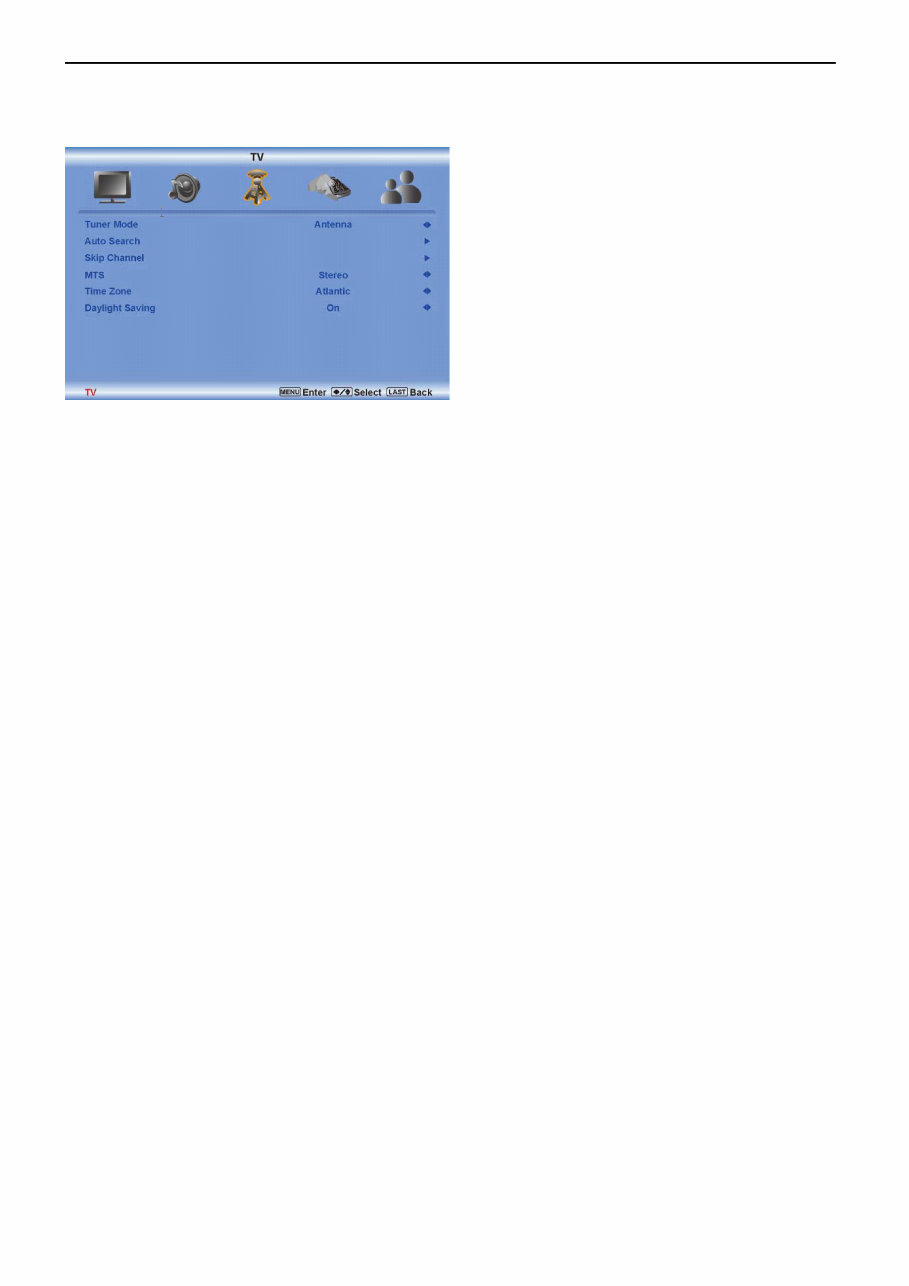
TV Adjusting
Press ◄ / ► / ▲ / ▼ to select and adjust options, then press LAST when finished making adjustments. Press
LAST to return to the previous screen or repeatedly to exit the OSD.
Tuner Mode
Select the Tuner Mode option in the TV submenu to set the tuner mode. Press the right arrow button to select from
Antenna and Cable.
Auto Search
Select the Auto Search option in the TV submenu to set the Auto search. Press the right arrow button to adjust the
Analog channels and Digital channels.
Skip Channel
Select the Skip channel option in the TV submenu to set the Analog.
MTS
Select the MTS option in the TV submenu to set the MTS. Press the right button to select the Stereo,SAP,and Mono.
Time Zone
Select the Time Zone option in the TV submenu to set the time zone.Press the right button to select the zone among
Eastern,Indiana,Central,Mountain,Hawaii,Arizona,Pacific,and Alaska.
Daylight Saving
Select the Daylight Saving option in the TV submenu .Press the right button to select the statue of dayling saving,On
or OFF.
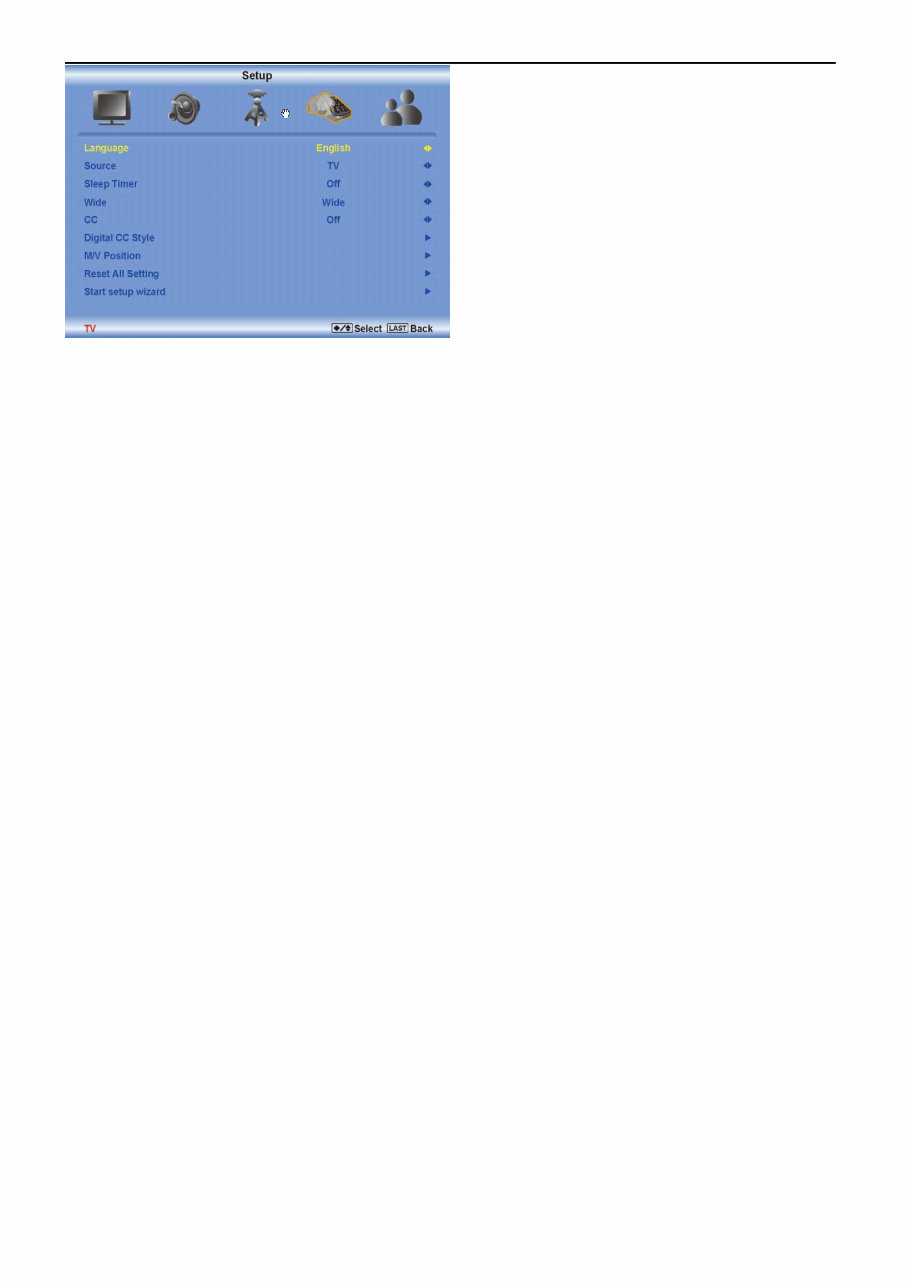
Setup
Press the MENU button to activate the On Screen Display (OSD). Select the Setup option to adjust the
Language,Source,Sleep Timer,Side,CC,Digital CC Styla, H/V position,and Reset All setting.
32″LCD TV VA320E
10
Language.
Select the Language option in the Setup submenu to set up the language.Press the right button you can select
English,Francais,and Espanol.
Source
Select the Source option in the Setup submenu to set the source mode.Press the right button to change the soruce
TV or Comp.
Sleep Timer
Select the Sleep Timer option in the Setup submenu to set the sleep time.
Wide
Select the Wide option in the Setup submenu to set the Wide
CC
Select the CC option in the Setup submenu to set the CC
Digital CC Style
Select the Digital CC style option in the Setup submenu to set the Digital CC style
H/V Position
Select the H/V Position option in the Setup submenu to set the H/V Position
Reset All Setting
Select the Reset All setting in the Setup submenu to Reset All Setting
Parental
Press the MENU button to activate the On Screen Display (OSD). Select the Parental option to adjust the Password.

32″LCD TV VA320E
11
Password
Select the Password Set option in the Parental submenu to set the password for parental control options. Press the
right arrow button and the Password panel will be displayed. Enter the four digit password using the number buttons
on the remote control. Enter it a second time to confirm you entered it correctly.
Note: If you forget your password, entering 5351 will allow you to set a new password. This feature is not
available when HDMI, Component, or VGA is selected as the input source.
You're Reading a Preview
What's Included?
Lifetime Access
Fast Download Speeds
Online & Offline Access
Access PDF Contents & Bookmarks
Full Search Facility
Print one or all pages of your manual
$28.99
Viewed 62 Times Today


Secure transaction
What's Included?
Lifetime Access
Fast Download Speeds
Online & Offline Access
Access PDF Contents & Bookmarks
Full Search Facility
Print one or all pages of your manual
$28.99
This is a comprehensive service manual for the Vizio VA320E LCD TV. It contains detailed technical information and instructions for repair and maintenance, making it an invaluable resource for both professional mechanics and DIY enthusiasts.


