


Onkyo HT-RC460 Service Manual and Repair Guide
What's Included?
 Lifetime Access
Fast Download Speeds
Online & Offline Access
Access PDF Contents & Bookmarks
Full Search Facility
Print one or all pages of your manual
En
AV RECEIVER
HT-RC460
Instruction Manual
Contents
Safety Information and Introduction ............ 2
Table of Contents ........................................... 5
Connections ................................................. 11
Turning On & Basic Operations.................. 19
Advanced Operations .................................. 43
Controlling Other Components................... 66
Appendix ....................................................... 73
Internet Radio Guide
Remote Control Codes
En-2
Safety Information and Introduction
Important Safety Instructions
1. Read these instructions.
2. Keep these instructions.
3. Heed all warnings.
4. Follow all instructions.
5. Do not use this apparatus near water.
6. Clean only with dry cloth.
7. Do not block any ventilation openings. Install in
accordance with the manufacturer’s instructions.
8. Do not install near any heat sources such as radiators,
heat registers, stoves, or other apparatus (including
amplifiers) that produce heat.
9. Do not defeat the safety purpose of the polarized or
grounding-type plug. A polarized plug has two blades
with one wider than the other. A grounding type plug
has two blades and a third grounding prong. The wide
blade or the third prong are provided for your safety. If
the provided plug does not fit into your outlet, consult
an electrician for replacement of the obsolete outlet.
10. Protect the power cord from being walked on or
pinched particularly at plugs, convenience receptacles,
and the point where they exit from the apparatus.
11. Only use attachments/accessories specified by the
manufacturer.
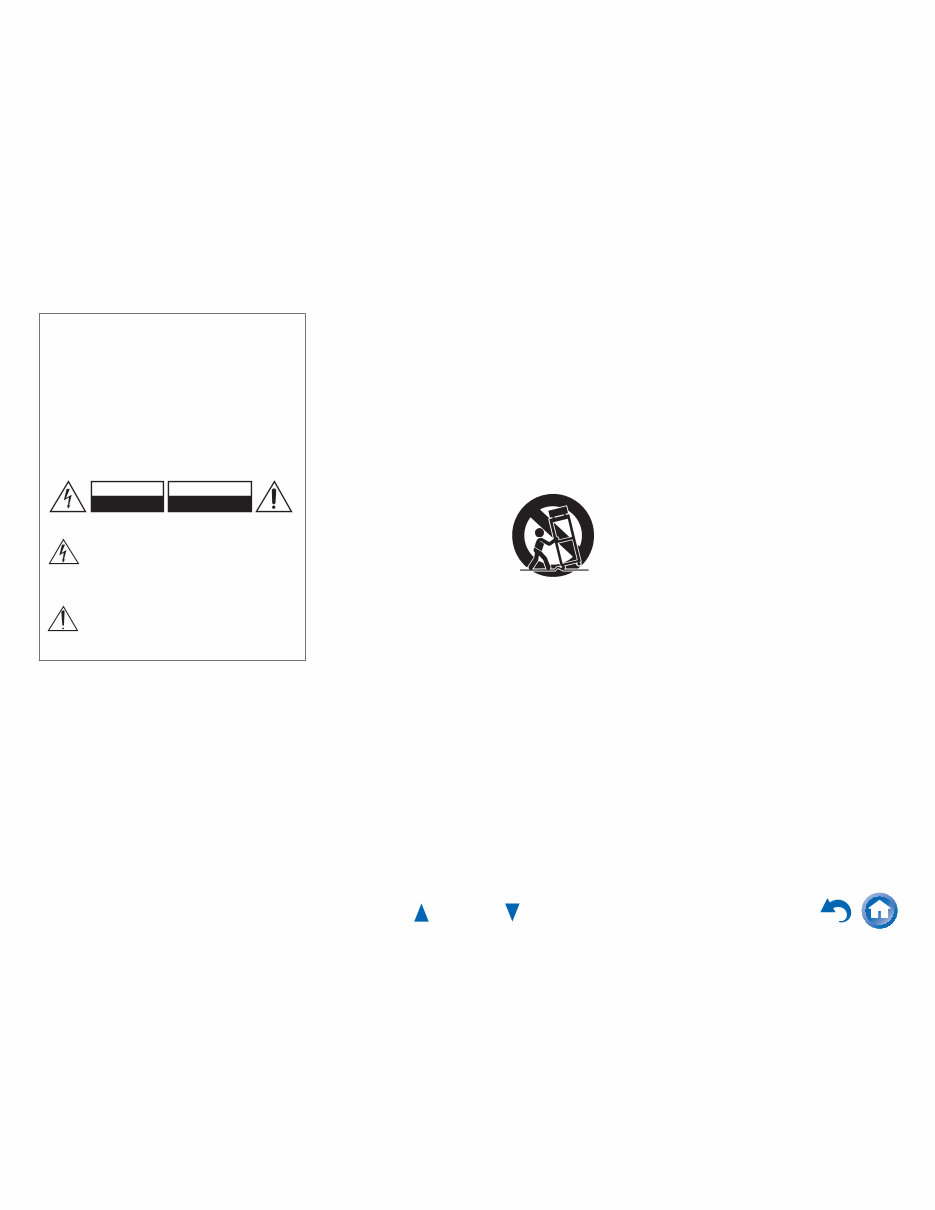
12. Use only with the cart, stand,
tripod, bracket, or table
specified by the manufacturer,
or sold with the apparatus.
When a cart is used, use
caution when moving the
cart/apparatus combination to
avoid injury from tip-over.
13. Unplug this apparatus during lightning storms or when
unused for long periods of time.
14. Refer all servicing to qualified service personnel.
Servicing is required when the apparatus has been
damaged in any way, such as power-supply cord or
plug is damaged, liquid has been spilled or objects
have fallen into the apparatus, the apparatus has been
exposed to rain or moisture, does not operate normally,
or has been dropped.
15. Damage Requiring Service
Unplug the apparatus from the wall outlet and refer
servicing to qualified service personnel under the
following conditions:
A. When the power-supply cord or plug is damaged,
B. If liquid has been spilled, or objects have fallen
into the apparatus,
C. If the apparatus has been exposed to rain or water,
D. If the apparatus does not operate normally by
following the operating instructions. Adjust only
those controls that are covered by the operating
instructions as an improper adjustment of other
controls may result in damage and will often
require extensive work by a qualified technician to
restore the apparatus to its normal operation,
E. If the apparatus has been dropped or damaged in
any way, and
F. When the apparatus exhibits a distinct change in
performance this indicates a need for service.
16. Object and Liquid Entry
Never push objects of any kind into the apparatus
through openings as they may touch dangerous voltage
points or short-out parts that could result in a fire or
electric shock.
The apparatus shall not be exposed to dripping or
splashing and no objects filled with liquids, such as
vases shall be placed on the apparatus.
Don’t put candles or other burning objects on top of
this unit.
17. Batteries
Always consider the environmental issues and follow
local regulations when disposing of batteries.
18. If you install the apparatus in a built-in installation,
such as a bookcase or rack, ensure that there is
adequate ventilation.
Leave 20 cm (8") of free space at the top and sides and
10 cm (4") at the rear. The rear edge of the shelf or
board above the apparatus shall be set 10 cm (4") away
from the rear panel or wall, creating a flue-like gap for
warm air to escape.
WARNING:
TO REDUCE THE RISK OF FIRE OR ELECTRIC SHOCK,
DO NOT EXPOSE THIS APPARATUS TO RAIN OR
MOISTURE.
CAUTION:
TO REDUCE THE RISK OF ELECTRIC SHOCK, DO NOT
REMOVE COVER (OR BACK). NO USER-SERVICEABLE
PARTS INSIDE. REFER SERVICING TO QUALIFIED
SERVICE PERSONNEL.
The lightning flash with arrowhead symbol, within an
equilateral triangle, is intended to alert the user to the
presence of uninsulated “dangerous voltage” within
the product’s enclosure that may be of sufficient
magnitude to constitute a risk of electric shock to
persons.
The exclamation point within an equilateral triangle is
intended to alert the user to the presence of important
operating and maintenance (servicing) instructions in
the literature accompanying the appliance.
WARNING
RISK OF ELECTRIC SHOCK
DO NOT OPEN
RISQUE DE CHOC ELECTRIQUE
NE PAS OUVRIR
AVIS
PORTABLE CART WARNING
S3125A

Safety Information and Introduction
En-3
Precautions
1. Recording Copyright—Unless it’s for personal use
only, recording copyrighted material is illegal without
the permission of the copyright holder.
2. AC Fuse—The AC fuse inside the unit is not user-
serviceable. If you cannot turn on the unit, contact your
Onkyo dealer.
3. Care—Occasionally you should dust the unit all over
with a soft cloth. For stubborn stains, use a soft cloth
dampened with a weak solution of mild detergent and
water. Dry the unit immediately afterwards with a
clean cloth. Don’t use abrasive cloths, thinners,
alcohol, or other chemical solvents, because they may
damage the finish or remove the panel lettering.
4. Power
WARNING
BEFORE PLUGGING IN THE UNIT FOR THE
FIRST TIME, READ THE FOLLOWING SECTION
CAREFULLY.
AC outlet voltages vary from country to country. Make
sure that the voltage in your area meets the voltage
requirements printed on the unit’s rear panel (e.g., AC
230 V, 50 Hz or AC 120 V, 60 Hz).
The power cord plug is used to disconnect this unit
from the AC power source. Make sure that the plug is
readily operable (easily accessible) at all times.
For models with [POWER] button, or with both
[POWER] and [ON/STANDBY] buttons:
Pressing the [POWER] button to select OFF mode
does not fully disconnect from the mains. If you do not
intend to use the unit for an extended period, remove
the power cord from the AC outlet.
For models with [ON/STANDBY] button only:
Pressing the [ON/STANDBY] button to select
Standby mode does not fully disconnect from the
mains. If you do not intend to use the unit for an
extended period, remove the power cord from the AC
outlet.
5. Preventing Hearing Loss
Caution
Excessive sound pressure from earphones and
headphones can cause hearing loss.
6. Batteries and Heat Exposure
Warning
Batteries (battery pack or batteries installed) shall not
be exposed to excessive heat as sunshine, fire or the
like.
7. Never Touch this Unit with Wet Hands—Never
handle this unit or its power cord while your hands are
wet or damp. If water or any other liquid gets inside
this unit, have it checked by your Onkyo dealer.
8. Handling Notes
• If you need to transport this unit, use the original
packaging to pack it how it was when you originally
bought it.
• Do not leave rubber or plastic items on this unit for a
long time, because they may leave marks on the
case.
• This unit’s top and rear panels may get warm after
prolonged use. This is normal.
• If you do not use this unit for a long time, it may not
work properly the next time you turn it on, so be sure
to use it occasionally.
For U.S. models
FCC Information for User
CAUTION:
The user changes or modifications not expressly approved
by the party responsible for compliance could void the
user’s authority to operate the equipment.
NOTE:
This equipment has been tested and found to comply with
the limits for a Class B digital device, pursuant to Part 15
of the FCC Rules. These limits are designed to provide
reasonable protection against harmful interference in a
residential installation.
This equipment generates, uses and can radiate radio
frequency energy and, if not installed and used in
accordance with the instructions, may cause harmful
interference to radio communications. However, there is no
guarantee that interference will not occur in a particular
installation. If this equipment does cause harmful
interference to radio or television reception, which can be
determined by turning the equipment off and on, the user is
encouraged to try to correct the interference by one or more
of the following measures:
• Reorient or relocate the receiving antenna.
• Increase the separation between the equipment and
receiver.
• Connect the equipment into an outlet on a circuit different
from that to which the receiver is connected.
• Consult the dealer or an experienced radio/TV technician
for help.
For Canadian Models
NOTE: THIS CLASS B DIGITAL APPARATUS
COMPLIES WITH CANADIAN ICES-003.
For models having a power cord with a polarized plug:
CAUTION: TO PREVENT ELECTRIC SHOCK,
MATCH WIDE BLADE OF PLUG TO WIDE SLOT,
FULLY INSERT.
Modèle pour les Canadien
REMARQUE: CET APPAREIL NUMÉRIQUE DE LA
CLASSE B EST CONFORME À LA NORME NMB-003
DU CANADA.
Sur les modèles dont la fiche est polarisée:
ATTENTION: POUR ÉVITER LES CHOCS
ÉLECTRIQUES, INTRODUIRE LA LAME LA PLUS
LARGE DE LA FICHE DANS LA BORNE
CORRESPONDANTE DE LA PRISE ET POUSSER
JUSQU’AU FOND.
Safety Information and Introduction
En-4
Supplied Accessories
Make sure you have the following accessories:
*
In catalogs and on packaging, the letter at the end of the product
name indicates the color. Specifications and operations are the
same regardless of color.
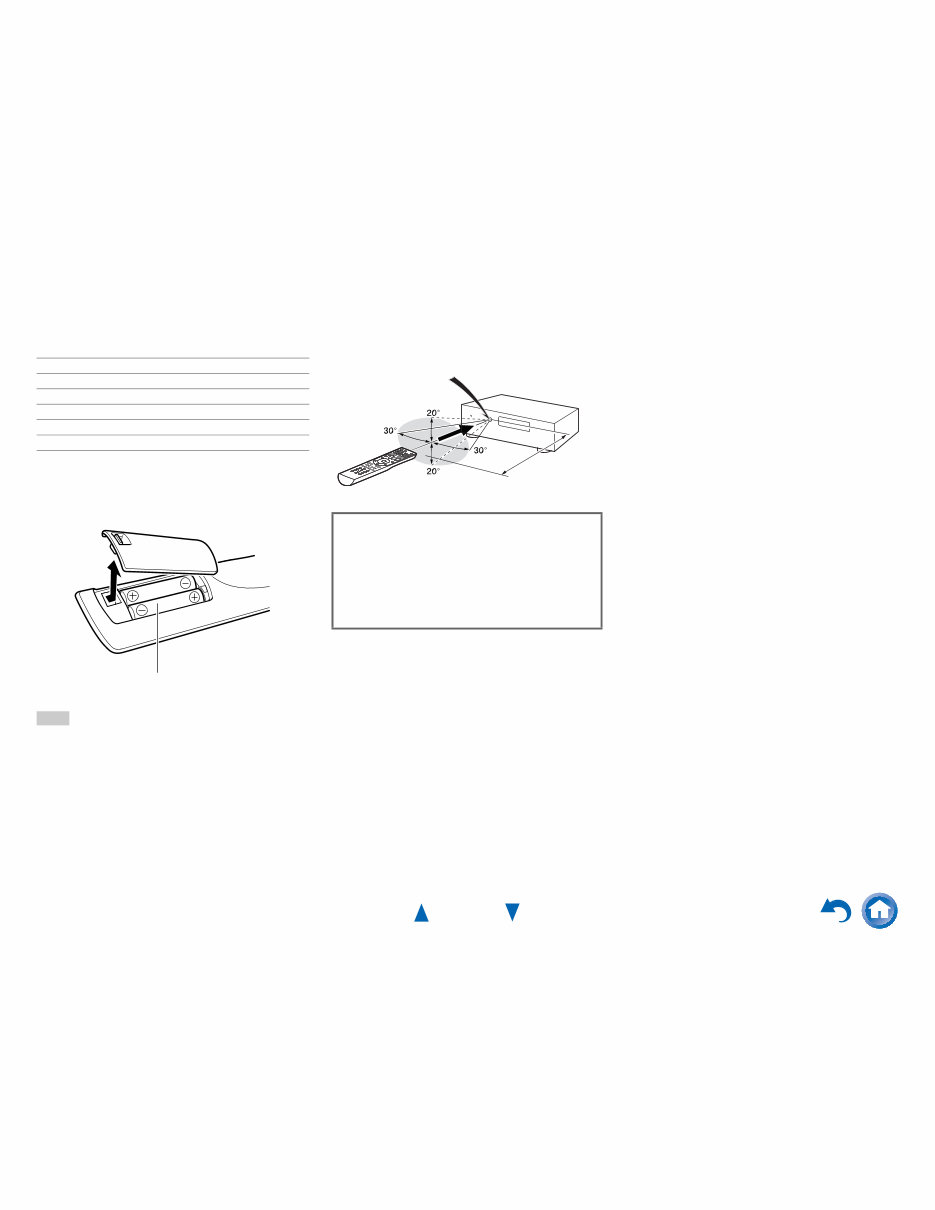
■ Installing the batteries
Note
• If the remote controller doesn’t work reliably, try replacing the
batteries.
• Don’t mix new and old batteries or different types of batteries.
• If you intend not to use the remote controller for a long time,
remove the batteries to prevent damage from leakage or
corrosion.
• Remove expired batteries as soon as possible to prevent damage
from leakage or corrosion.
■ Aiming the remote controller
To use the remote controller, point it at the AV receiver’s
remote control sensor, as shown below.
Indoor FM antenna (➔ page 18)
AM loop antenna (➔ page 18)
Speaker cable labels (➔ page 12)
Speaker setup microphone (➔ page 33)
Remote controller (RC-834M) and two batteries (AA/R6)
Quick Start Guide
Batteries (AA/R6)
Remote control sensor
AV receiver
Approx. 16 ft. (5 m)
Thank you for purchasing an Onkyo AV Receiver.
Please read this manual thoroughly before making
connections and plugging in the unit.
Following the instructions in this manual will
enable you to obtain optimum performance and
listening enjoyment from your new AV Receiver.
Please retain this manual for future reference.
Safety Information and Introduction
En-5
Table of Contents
Safety Information and Introduction
Important Safety Instructions ......................................2
Precautions ...................................................................3
Supplied Accessories...................................................4
Table of Contents..........................................................5
Features .........................................................................6
Front & Rear Panels......................................................7
Front Panel..................................................................7
Display ........................................................................8
Rear Panel ..................................................................9
Remote Controller.......................................................10
Controlling the AV Receiver ......................................10
Connections
Connecting the AV Receiver ......................................11
Connecting Your Speakers .......................................11
About AV Connections ..............................................14
Connecting Components with HDMI .........................15
Connecting Your Components ..................................16
Connecting Onkyo RI Components...........................17
Connecting the Antennas..........................................18
Connecting the Power Cord ......................................18
Turning On & Basic Operations
Turning On/Off the AV Receiver ................................19
Turning On ................................................................19
Turning Off ................................................................19
Initial Setup..................................................................20
Selecting the Language
for the Onscreen Setup Menus...............................20
Audyssey 2EQ: Auto Setup.......................................20
Source Connection....................................................21
Remote Mode Setup .................................................21
Network Connection..................................................21
Terminating the Initial Setup .....................................21
Playback ...................................................................... 22
Playing the Connected Component .......................... 22
Controlling Contents of USB or Network Devices..... 23
Understanding Icons on the Display ......................... 24
Playing an iPod/iPhone via USB............................... 24
Playing a USB Device............................................... 25
Listening to vTuner Internet Radio............................ 26
Registering Other Internet Radio .............................. 27
Changing the Icon Layout
on the Network Service Screen.............................. 27
Playing Music Files on a Server ............................... 28
Remote Playback...................................................... 29
Listening to AM/FM Radio ........................................ 30
Using Basic Functions ............................................... 32
Using the Automatic Speaker Setup ......................... 32
Using the Listening Modes ....................................... 35
Using the Home Menu .............................................. 40
Using the Sleep Timer .............................................. 41
Setting the Display Brightness .................................. 41
Displaying Source Information .................................. 41
Changing the Input Display....................................... 41
Using the Music Optimizer ........................................ 42
Muting the AV Receiver ............................................ 42
Using Headphones ................................................... 42
Advanced Operations
On-screen Setup ......................................................... 43
Using the Quick Setup .............................................. 43
Using the Audio Settings of Quick Setup .................. 44
Using the Setup Menu (HOME) ................................ 46
About the HYBRID STANDBY indicator ................... 47
Setup menu items ..................................................... 47
Input/Output Assign .................................................. 48
Speaker Setup .......................................................... 50
Audio Adjust.............................................................. 52
Source Setup ............................................................ 53
Listening Mode Preset .............................................. 58
Miscellaneous ........................................................... 59
Hardware Setup ........................................................ 59
Remote Controller Setup .......................................... 63
Lock Setup ................................................................ 63
Zone 2 .......................................................................... 64
Making Zone 2 Connections ..................................... 64
Controlling Zone 2 Components ............................... 65
Controlling Other Components
iPod/iPhone Playback via Onkyo Dock .................... 66
Using the Onkyo Dock.............................................. 66
Controlling Your iPod/iPhone ................................... 67
Controlling Other Components................................. 68
Preprogrammed Remote Control Codes .................. 68
Looking up for Remote Control Codes ..................... 68
Entering Remote Control Codes............................... 69
Remapping Colored Buttons .................................... 69
Remote Control Codes
for Onkyo Components Connected via RI ............. 70
Resetting the REMOTE MODE Buttons ................... 70
Resetting the Remote Controller .............................. 70
Controlling Other Components ................................. 70
Appendix
Troubleshooting ......................................................... 73
Firmware Update ........................................................ 79
Connection Tips and Video Signal Path .................. 83
Using an RIHD-compatible TV, Player,
or Recorder .............................................................. 86
About HDMI ................................................................. 88
Network/USB Features............................................... 89
License and Trademark Information ........................ 92
Specifications ............................................................. 93
To reset the AV receiver to its factory defaults, turn it
on and, while holding down CBL/SAT, press
8ON/STANDBY (➔ page 73).
Safety Information and Introduction
En-6
Features
Amplifier
• 80 Watts/Channel @ 8 ohms (FTC)
• Optimum Gain Volume Circuitry
• H.C.P.S. (High Current Power Supply) Massive High
Power Transformer
Processing
• Incorporates Qdeo™ technology for HDMI Video
Upscaling (to 4K Compatible)
• HDMI (Audio Return Channel, 3D, DeepColor,
x.v.Color, Lip Sync, DTS-HD Master Audio, DTS-HD
High Resolution Audio, Dolby TrueHD, Dolby Digital
Plus, DSD and Multi-CH PCM)
• Dolby Pro Logic IIz
• Non-Scaling Configuration
• A-Form Listening Mode Memory
• Direct Mode
• Music Optimizer for Compressed Digital Music files
• 192 kHz/24-bit D/A Converters
• Powerful and Highly Accurate 32-bit Processing DSP
• Jitter Cleaning Circuit Technology
Connections
• 8 HDMI Inputs (1 on front panel) and 2 Outputs
• Onkyo pfor System Control
• 4 Digital Inputs (2 Optical/2 Coaxial)
• Component Video Switching (1 Input/1 Output)
• Banana Plug-Compatible Speaker Posts
• Powered Zone 2
• Bi-Amping Capability for FL/FR with SBL/SBR
• Internet Radio Connectivity
• Network Capability for Streaming Audio Files
• 2 USB Inputs (Front/Rear) for Memory Devices and
iPod
®
/iPhone
®
models (Enables Display of Album
Artwork)
*
Only the front-panel USB input is compatible with
iPod/iPhone.
• MHL-Enabled AUX Front Input
Miscellaneous
• 40 FM/AM Presets
• Audyssey 2EQ
®
to correct room acoustic problems
• Audyssey Dynamic EQ
®
for loudness correction
• Audyssey Dynamic Volume
®
to maintain optimal
listening level and dynamic range
• Crossover Adjustment
(40/50/60/70/80/90/100/120/150/200 Hz)
• A/V Sync Control Function (up to 800 ms)
• Auto Standby Function
• On-Screen Display via HDMI
• Preprogrammed u-Compatible Remote
Safety Information and Introduction
En-7
Front & Rear Panels
For detailed information, see the pages in parentheses.
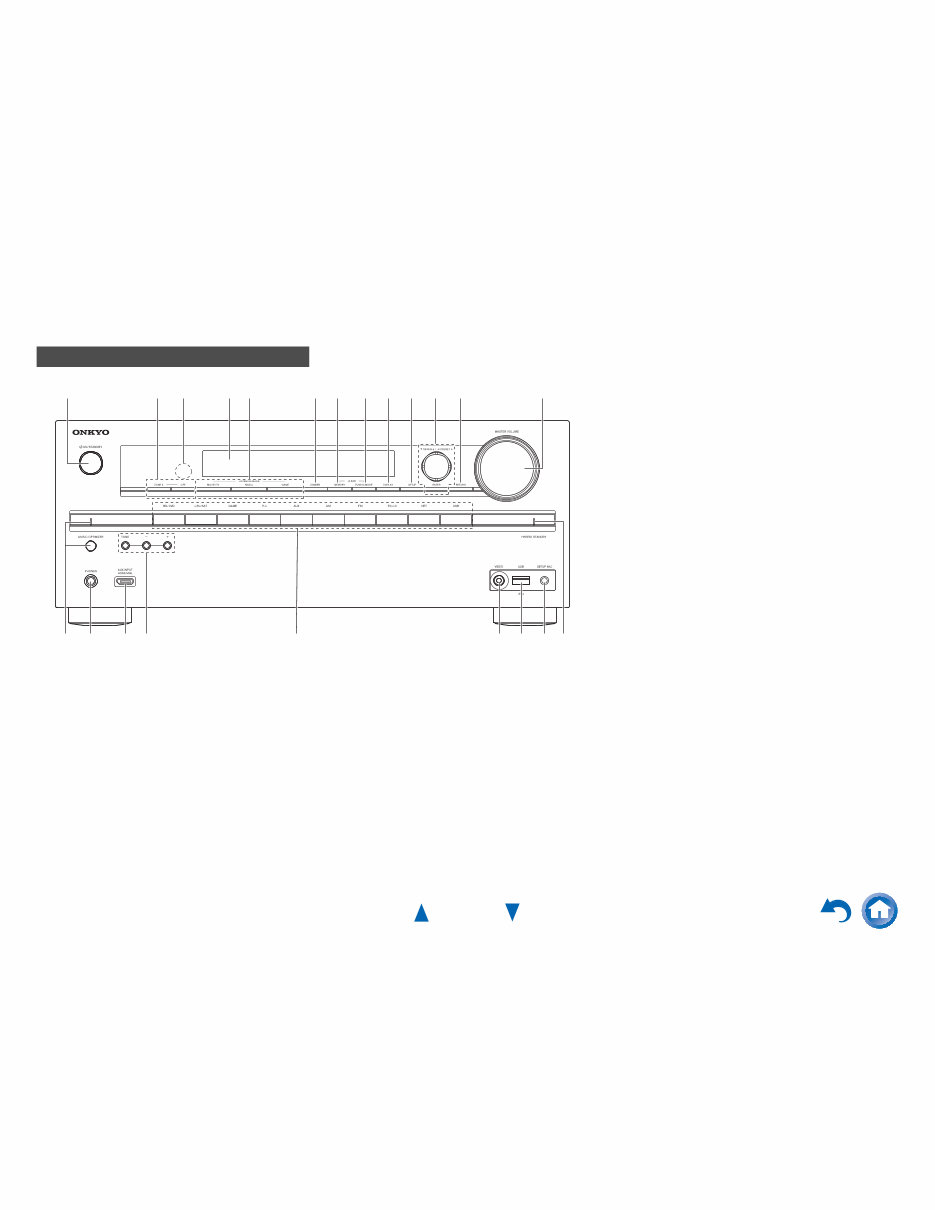
a 8ON/STANDBY button (19)
b ZONE 2, OFF buttons (65)
c Remote control sensor (4)
d Display (8)
e LISTENING MODE buttons (35)
f DIMMER button (41)
g MEMORY button (31)
h TUNING MODE button (30)
i DISPLAY button (41)
j SETUP button (46)
k TUNING q/w (30), PRESET e/r (31), cursor and
ENTER buttons
l RETURN button
m MASTER VOLUME control (22)
n MUSIC OPTIMIZER button and indicator (42, 45)
o PHONES jack (42)
p AUX INPUT HDMI/MHL jack (15)
q TONE and Tone Level buttons (44)
r Input selector buttons (22)
s VIDEO jack (16)
t USB port (16)
u SETUP MIC jack (33)
v HYBRID STANDBY indicator (47)
Front Panel
a c e d f g h i j k l m b
r t o q p n s u v
Safety Information and Introduction
En-8
s
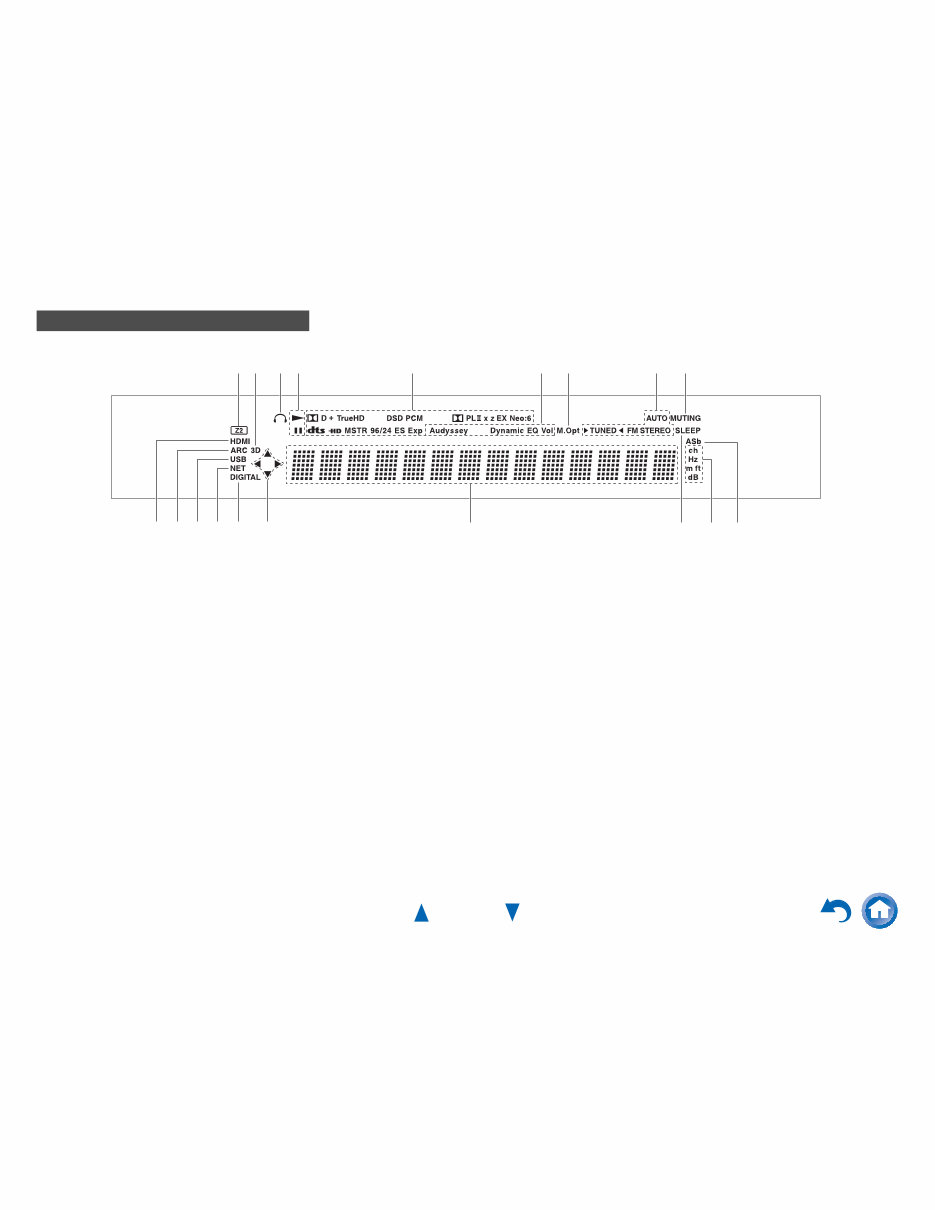
For detailed information, see the pages in parentheses.
a Z2 (Zone 2) indicator (65)
b 3D indicator
This lights when a 3D input signal is detected.
c Headphone indicator (42)
d 1, 3 and cursor indicators (24)
e Listening mode and format indicators (35)
f Audyssey indicator (32, 53)
Dynamic EQ indicator (54)
Dynamic Vol indicator (54)
g M.Opt indicator (42, 45)
h Tuning indicators
AUTO indicator (30)
TUNED indicator (30)
FM STEREO indicator (30)
i MUTING indicator (42)
j Input indicators (84)
HDMI indicator (60)
DIGITAL indicator
k ARC indicator (61)
l USB indicator (24, 25)
m NET indicator (26 to 29, 62)
n Message area
o SLEEP indicator (41)
p Channel/Unit indicators
ch indicator
Hz indicator
m/ft indicator
dB indicator
q ASb indicator (61)
Display
j d n o q k m p j l
d c e h g f a b i
Safety Information and Introduction
En-9
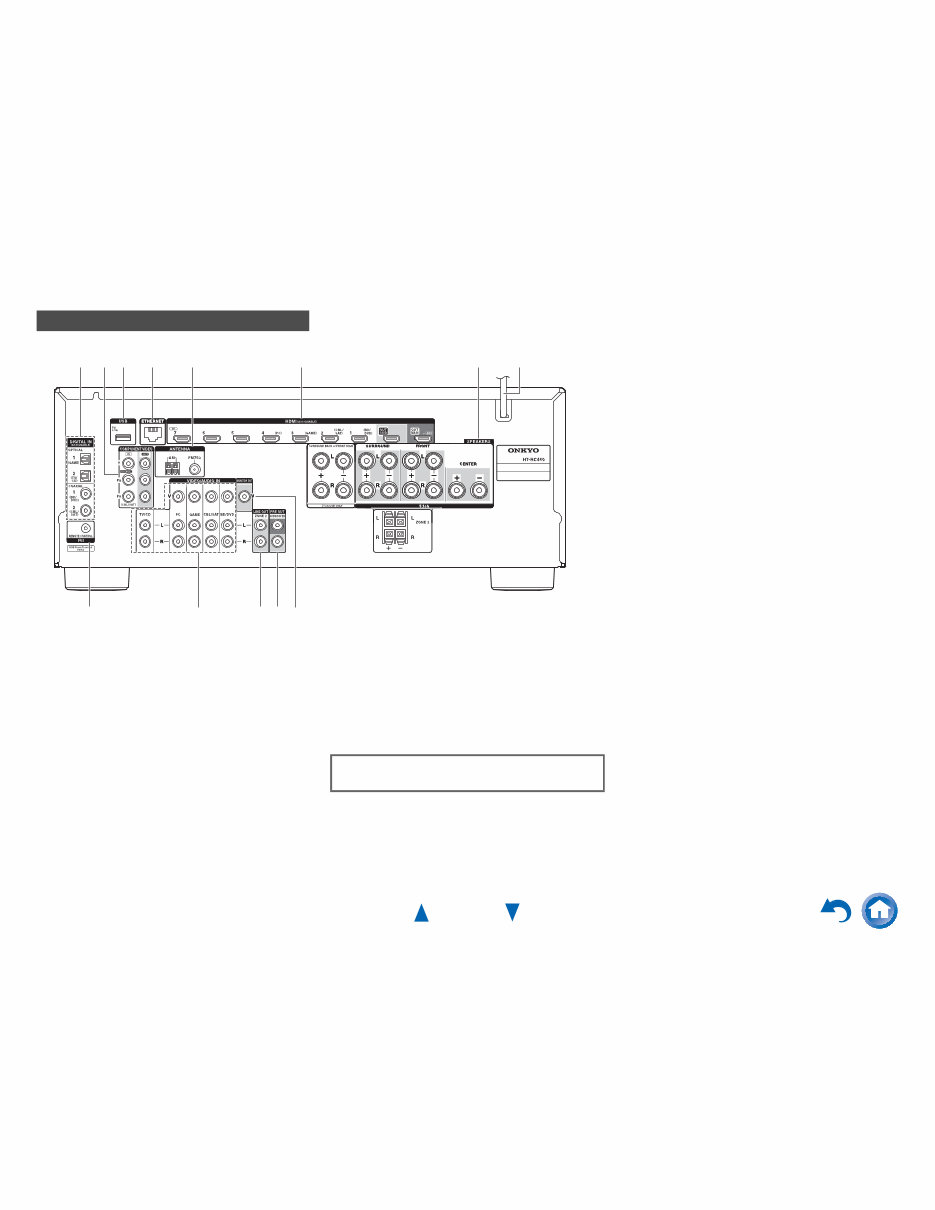
a DIGITAL IN COAXIAL and OPTICAL jacks
b COMPONENT VIDEO IN and OUT jacks
c USB port
d ETHERNET port
e FM ANTENNA jack and AM ANTENNA terminal
f HDMI IN and HDMI output (HDMI OUT MAIN and
HDMI OUT SUB) jacks
g SPEAKERS terminals
(CENTER, FRONT, SURROUND, SURROUND
BACK or FRONT HIGH, ZONE 2)
h Power cord
i u REMOTE CONTROL jack
j Composite video and analog audio jacks
(BD/DVD IN, CBL/SAT IN, GAME IN, PC IN,
TV/CD IN)
k ZONE 2 LINE OUT jacks
l SUBWOOFER PRE OUT jacks
m MONITOR OUT V jack
Rear Panel
a e b d c f h g
i j m k l
See “Connecting the AV Receiver” for connection
(➔ pages 11 to 18).
Safety Information and Introduction
En-10
Remote Controller
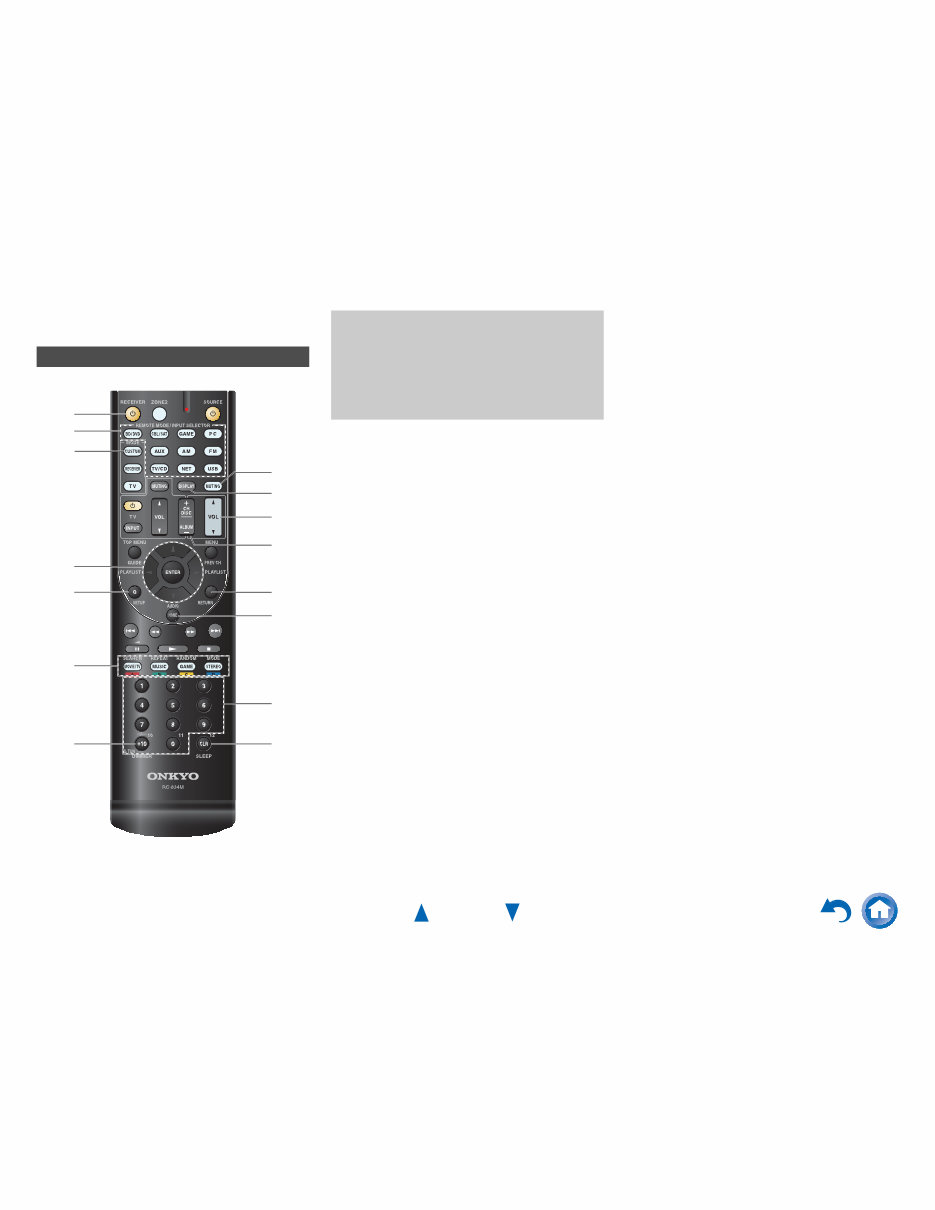
For detailed information, see the pages in parentheses.
a 8 RECEIVER button (19)
b REMOTE MODE/INPUT SELECTOR buttons (22)
c q/w/e/r and ENTER buttons
d Q SETUP button (43)
e Listening Mode buttons (35)
f DIMMER button (41)
g MUTING button (42)
h DISPLAY button (41)
i VOL q/w button (22)
j RETURN button
k HOME button (40)
l SLEEP button (41)
■ Controlling the tuner
To control the AV receiver’s tuner, press AM or FM (or
RECEIVER).
a q/w buttons (30)
b D.TUN button (30)
c DISPLAY button
d CH +/– button (31)
e Number buttons (30)
*1
To control a component, you must first enter the remote
control code.
See “Entering Remote Control Codes” for more details
(➔ page 69).
Controlling the AV Receiver
a
i
j
k
d
l bf
d
ac
b
g
hc
e
e
*1
To control the AV receiver, press RECEIVER to select
Receiver mode.
You can also use the remote controller to control
Onkyo Blu-ray Disc/DVD player, CD player, and
other components.
See “Entering Remote Control Codes” for more
details (➔ page 69).
You're Reading a Preview
What's Included?
Lifetime Access
Fast Download Speeds
Online & Offline Access
Access PDF Contents & Bookmarks
Full Search Facility
Print one or all pages of your manual
$36.99
Viewed 64 Times Today


Secure transaction
What's Included?
Lifetime Access
Fast Download Speeds
Online & Offline Access
Access PDF Contents & Bookmarks
Full Search Facility
Print one or all pages of your manual
$36.99
This service and repair manual is an essential resource for both professional mechanics and DIY enthusiasts. It is fully illustrated with schematic diagrams, block diagrams, printed circuit boards, terminal descriptions, exploded views, and a comprehensive parts list catalog. With instant access after payment, there are no shipping fees or waiting on postal delivery, allowing you to begin repairs within minutes.
Specifications:
- Language: English
- Format: PDF
- Pages: 127


