Panasonic DMR EX97 EX97EB Service Manual and Repair Guide
What's Included?
Lifetime Access
Fast Download Speeds
Online & Offline Access
Access PDF Contents & Bookmarks
Full Search Facility
Print one or all pages of your manual
SQT0994 Operating Instructions Thank you for purchasing this product. Please read these instructions carefully before using this product, and save this manual for future use. Model number suffix “EB” denotes UK model. DVD Recorder Model No. DMR-EX97 Software (Firmware) Update To support the latest features, it’s very important you install the latest updates to maintain proper operation of your unit. For details, refer to “Software (Firmware) Update” (> 68) or http://panasonic.jp/support/global/cs/ (This site is in English only.) EB
SQT0994 2 Unit • Do not place sources of naked flames, such as lighted candles, on this unit. • This unit may receive radio interference caused by mobile telephones during use. If such interference occurs, please increase separation between this unit and the mobile telephone. • This unit is intended for use in moderate climates. Safety precautions WARNING Unit • To reduce the risk of fire, electric shock or product damage, - Do not expose this unit to rain, moisture, dripping or splashing. - Do not place objects filled with liquids, such as vases, on this unit. - Use only the recommended accessories. - Do not remove covers. - Do not repair this unit by yourself. Refer servicing to qualified service personnel. - Do not let metal objects fall inside this unit. - Do not place heavy items on this unit. AC mains lead • To reduce the risk of fire, electric shock or product damage, - Ensure that the power supply voltage corresponds to the voltage printed on this unit. - Insert the mains plug fully into the socket outlet. - Do not pull, bend, or place heavy items on the lead. - Do not handle the plug with wet hands. - Hold onto the mains plug body when disconnecting the plug. - Do not use a damaged mains plug or socket outlet. • The mains plug is the disconnecting device. Install this unit so that the mains plug can be unplugged from the socket outlet immediately. CAUTION • This unit utilizes a laser. Use of controls or adjustments or performance of procedures other than those specified herein may result in hazardous radiation exposure. Placement • Place this unit on an even surface. • To reduce the risk of fire, electric shock or product damage, - Do not install or place this unit in a bookcase, built-in cabinet or in another confined space. Ensure this unit is well ventilated. - Do not obstruct this unit’s ventilation openings with newspapers, tablecloths, curtains, and similar items. - Do not expose this unit to direct sunlight, high temperatures, high humidity, and excessive vibration. Batteries • Danger of explosion if battery is incorrectly replaced. Replace only with the type recommended by the manufacturer. • Mishandling of batteries can cause electrolyte leakage and may cause a fire. - Do not mix old and new batteries or different types at the same time. - Do not heat or expose to flame. - Do not leave the battery(ies) in a car exposed to direct sunlight for a long period of time with doors and windows closed. - Do not take apart or short circuit. - Do not recharge alkaline or manganese batteries. - Do not use batteries if the covering has been peeled off. - Remove batteries if you do not intend to use the remote control for a long period of time. Store in a cool, dark place. • When disposing of the batteries, please contact your local authorities or dealer and ask for the correct method of disposal.
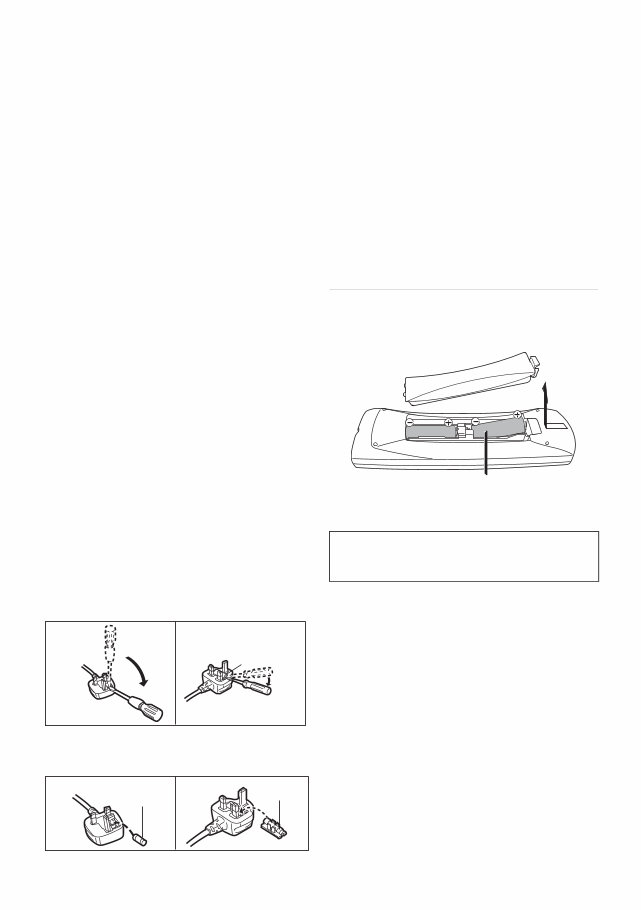
SQT0994 3 (For the AC mains plug of three pins) For your safety, please read the following text carefully. This appliance is supplied with a moulded three pin mains plug for your safety and convenience. A 5-ampere fuse is fitted in this plug. Should the fuse need to be replaced please ensure that the replacement fuse has a rating of 5-ampere and that it is approved by ASTA or BSI to BS1362. Check for the ASTA mark Ï or the BSI mark Ì on the body of the fuse. If the plug contains a removable fuse cover you must ensure that it is refitted when the fuse is replaced. If you lose the fuse cover the plug must not be used until a replacement cover is obtained. A replacement fuse cover can be purchased from your local dealer. Before use Remove the connector cover. How to replace the fuse The location of the fuse differ according to the type of AC mains plug (figures A and B). Confirm the AC mains plug fitted and follow the instructions below. Illustrations may differ from actual AC mains plug. 1. Open the fuse cover with a screwdriver. 2. Replace the fuse and close or attach the fuse cover. Please check and identify the supplied accessories. (Product numbers are correct as of August 2015. These may be subject to change.) • Do not use AC mains lead with other equipment. Insert batteries Insert so the poles (i and j) match those in the remote control. Caution for AC Mains Lead Fuse cover Figure A Figure B Figure A Figure B Fuse (5 ampere) Fuse (5 ampere) Supplied accessories Remote control (N2QAYB001059): 1 pc. Batteries for remote control: 2 pcs. AC mains lead (K2CT2YY00098): 1 pc. RF coaxial cable (K2KYYYY00247): 1 pc. HDMI cable (K1HY19YY0011): 1 pc. About descriptions in these operating instructions • Pages to be referred to are indicated as “> ±±”. R6/LR6, AA (Alkaline or manganese batteries)
Getting started Watching broadcasts Recording Playing back video Editing video Copying video Photo and Music With Other Equipment Convenient functions Troubleshooting Reference SQT0994 5
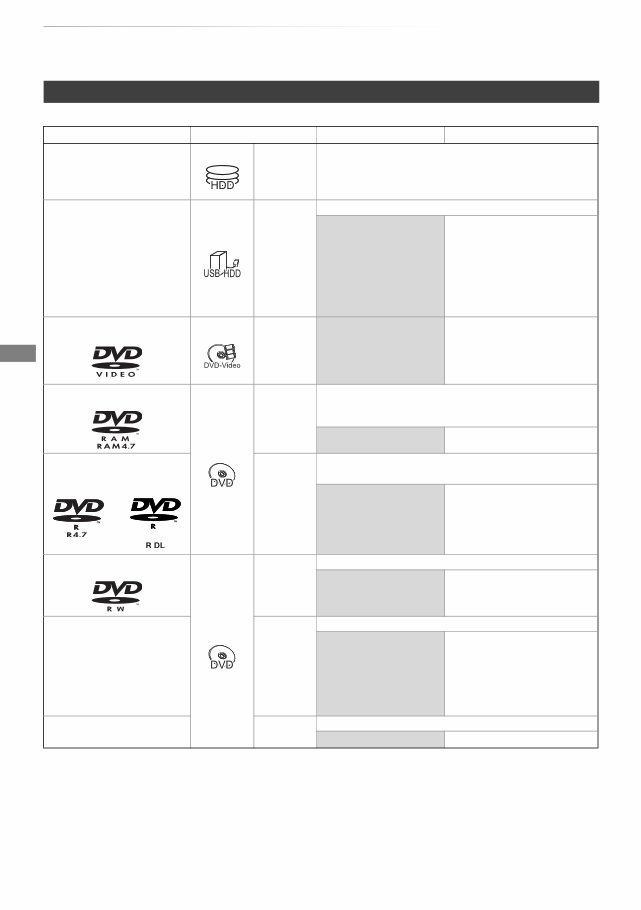
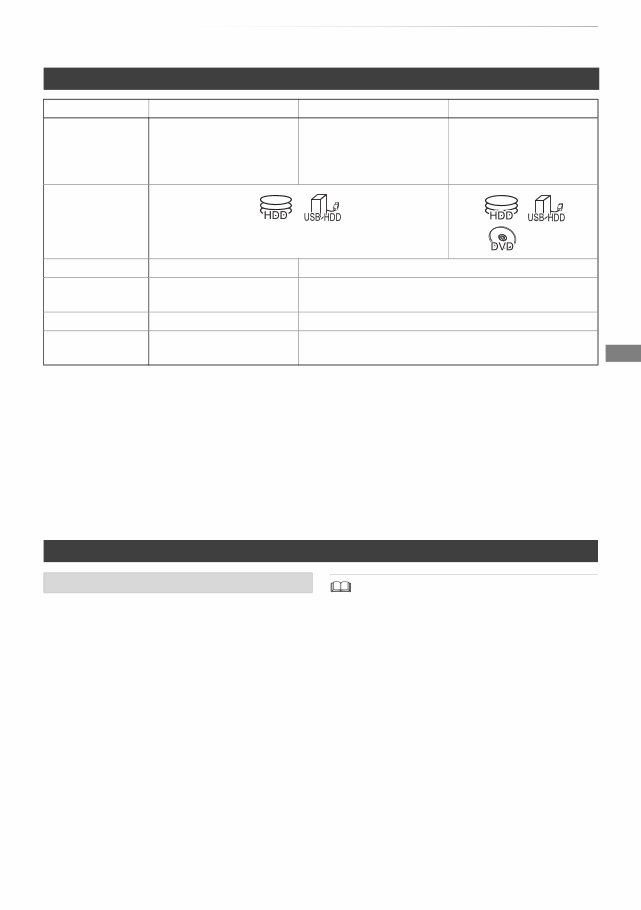
Getting started SQT0994 6 HDD and media information Getting started For more details, refer also to the specifications. (> 78) (–: Impossible) Recordable/playable contents Media type Standard symbol Recordable contents Playable contents Built-in hard disk drive (HDD) [HDD] • Video • AVCHD/AVCHD 3D • JPEG • MPO (3D photo) • MP4 • MPEG2 • Xvid • MKV • AAC • MP3 External hard disk drive (USB HDD) (> 9) [USB_HDD] • Video §1 – • AVCHD/AVCHD 3D §2, 3 • MP4 • MPEG2 • Xvid • MKV • JPEG • AAC • MP3 • MPO (3D photo) DVD-Video §4 [DVD-V] – • Video DVD-RAM [RAM] • Video • JPEG • MPO (3D photo) – • AVCHD §2 DVD-R DVD-R DL [DVD-R] • Video • AVCHD §2 – • Xvid • MKV • JPEG • MPO (3D photo) • AAC • MP3 DVD-RW [DVD-RW] • Video – • AVCHD §2 +R/+R DL [+R] • Video – • Xvid • MKV • AVCHD §2 • JPEG • MPO (3D photo) • AAC • MP3 +RW [+RW] • Video – • AVCHD §2
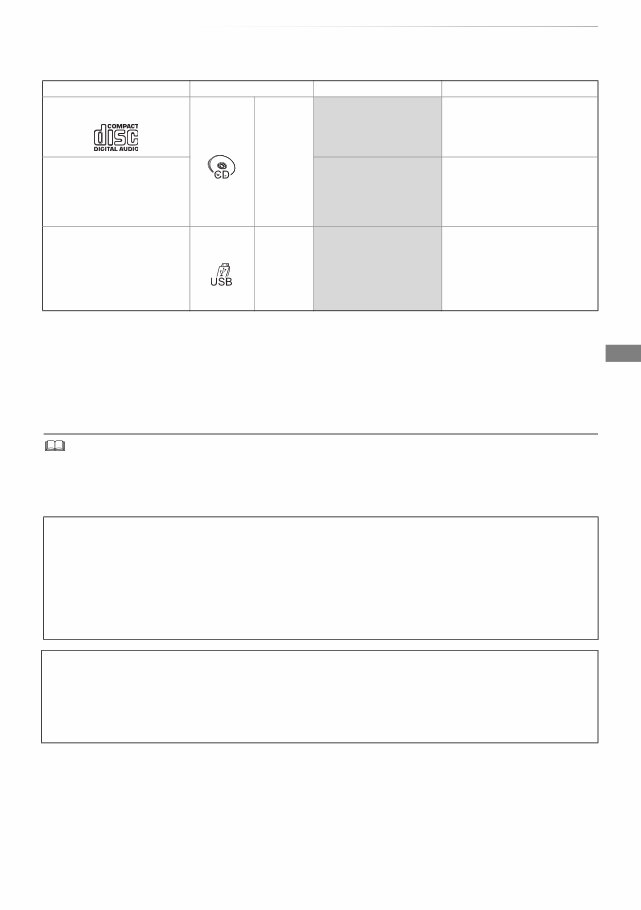
Getting started SQT0994 7 (–: Impossible) • [+RW] This unit cannot record to 8X Speed +RW disc. • With certain recording states and folder structures, the play order may differ or playback may not be possible. • It may not be possible to play the above media in some cases due to the type of media, the condition of the recording, the recording method, and how the files were created. Media type Standard symbol Recordable contents Playable contents Audio CD (CD-DA) [CD] – • Music CD (including CD-R/RW) – • Xvid • MKV • JPEG • MPO (3D photo) • AAC • MP3 USB memory [USB] – • AVCHD/AVCHD 3D §2, 3 • MP4 • MPEG2 • Xvid • MKV • AAC • MP3 • JPEG • MPO (3D photo) §1 It cannot be recorded directly. (Only compatible with copying from the built-in HDD) §2 Recorded with AVCHD format compatible devices (Panasonic video camera, etc.). It may not be able to play back, add, or edit depending on the device. §3 It cannot be played back directly from the USB HDD or USB memory. Playback is possible by copying to the built-in HDD. (> 54) §4 Includes finalised DVD-R, DVD-R DL, DVD-RW, +R and +R DL. The recording and playback of content on this or any other device may require permission from the owner of the copyright or other such rights in that content. Panasonic has no authority to and does not grant you that permission and explicitly disclaims any right, ability or intention to obtain such permission on your behalf. It is your responsibility to ensure that your use of this or any other device complies with applicable copyright legislation in your country. Please refer to that legislation for more information on the relevant laws and regulations involved or contact the owner of the rights in the content you wish to record or playback. Indemnity concerning recorded content Panasonic does not accept any responsibility for damages directly or indirectly due to any type of problems that result in loss of recording or edited content (data), and does not guarantee any content if recording or editing does not work properly. Likewise, the above also applies in a case where any type of repair is made to the unit (including any other non-HDD related component).
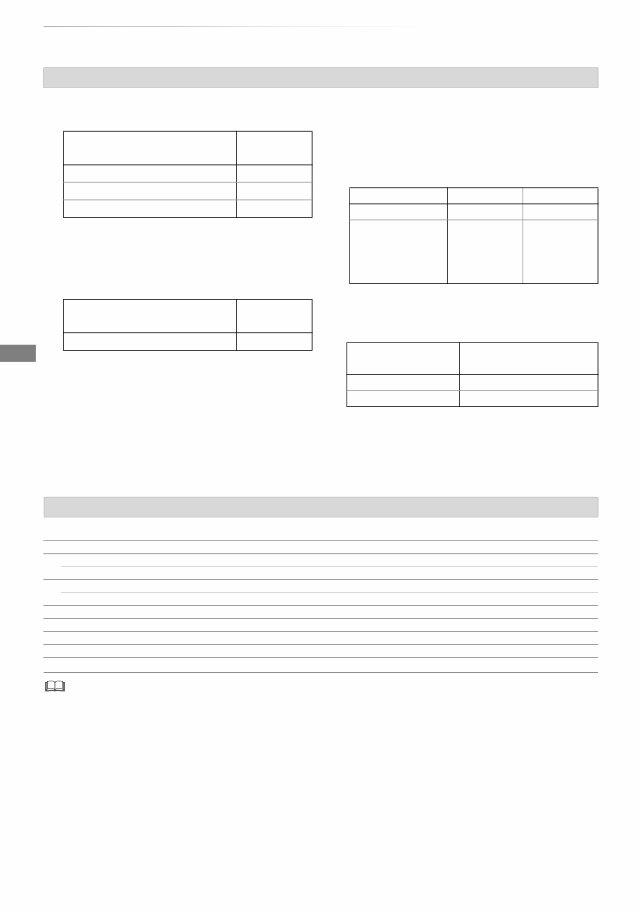
Getting started SQT0994 8 HDD and media information ∫ Broadcast Recordings Numbers of titles that can be recorded: • Maximum numbers of titles are including recordings of HD CAMCORDER. ∫ HD CAMCORDER Recordings MPEG-4 AVC/H.264 (based on AVCHD) Numbers of titles that can be recorded: • Maximum numbers of titles are including recordings of Broadcast. ∫ Photo files Compatible pixels: Between 34k34 and 8192k8192 pixels Sub sampling: 4:2:2, 4:2:0 (Motion JPEG is not supported.) Maximum numbers of contents: ∫ Video files/Audio files Numbers of contents that can be copied to internal HDD: USB device: • Each folder can store up to 1000 files. • We recommend that you limit the depth of folder trees to about five levels. • The video file and subtitle text files are inside the same folder, and the file names are the same except for the file extensions. • Some files may not be played back even if they have these extensions. Information about contents Media Maximum titles HDD 1000 DVD-RAM, DVD-R, DVD-RW 99 +R, +RW 49 Media Maximum titles HDD 1000 Media Folders Files HDD – 20000 DVD-RAM, DVD-R, +R, CD-R, CD-RW, USB device 500 10000 Contents Maximum numbers of folders and files Video 20000 Audio 20000 About extension of files MP4: “.mp4” “.mov” MPEG2: “.mpg” “.mpeg” “.m2ts” “.mts” “.ts” Xvid: “.avi” Subtitle text files: “.srt” “.sub” “.txt” MKV: “.mkv” Subtitle text files: “.srt” “.sub” “.txt” JPEG: “.jpg” MPO: “.mpo” AAC: “.m4a” MP3: “.mp3”
Getting started SQT0994 9 §1 FR (Flexible Recording Mode): The unit automatically selects the best possible recording rate between XP mode and EP mode. §2 The SD quality programme cannot be converted to HD quality. §3 You cannot select during play whether it activates or deactivates. §4 Audio descriptions will be lost after File Conversion is performed. Audio descriptions cannot be exported to discs. §5 You cannot select during play whether it appears or disappears. Approximate recording times Refer to “Recording modes and approximate recording times”. (> 78) You can use an external HDD (USB HDD) in the following two ways (A single HDD cannot handle those two ways simultaneously), and a USB memory for data files. • For recorded titles Moving titles in the built-in HDD to a USB HDD to save the capacity of the built-in HDD. • The USB HDD must first be registered on this unit. (> 55) • The USB HDD over 3 TB is not usable. • For data files Playing back MP4, JPEG, MP3, etc. in a USB device with this unit. • The USB device must be formatted in FAT12, FAT16, FAT32 or NTFS file system. • The USB device over 2 TB is not usable. • This unit supports USB 2.0 High Speed. • Although this unit can use USB 3.0 devices as USB 2.0 devices. • This unit does not recognise USB HDDs other than those in which the size of one sector is 512-bytes or 4096-bytes. (For details, consult the dealer of your USB HDD.) • This unit supports USB mass storage device class. • This unit does not guarantee connection with all USB devices. Recording mode Recording Mode DR HG/HX/HE/HL/HM XP/SP/LP/EP/FR §1 Feature Programmes can be recorded in a nearly perfect broadcasted state. Recording can be done with reduced recording volume in High definition (HD) quality §2 . Recording can be done with reduced recording volume in Standard definition (SD) quality. Recordable media Multiple audio Record all multiple audio Record only one audio §3 Audio Description Can be recorded Cannot be recorded §4 Subtitles Can be recorded Can be recorded (only one subtitle) §5 Surround audio Surround audio as the broadcast Stereo audio Notes Notes for the USB device
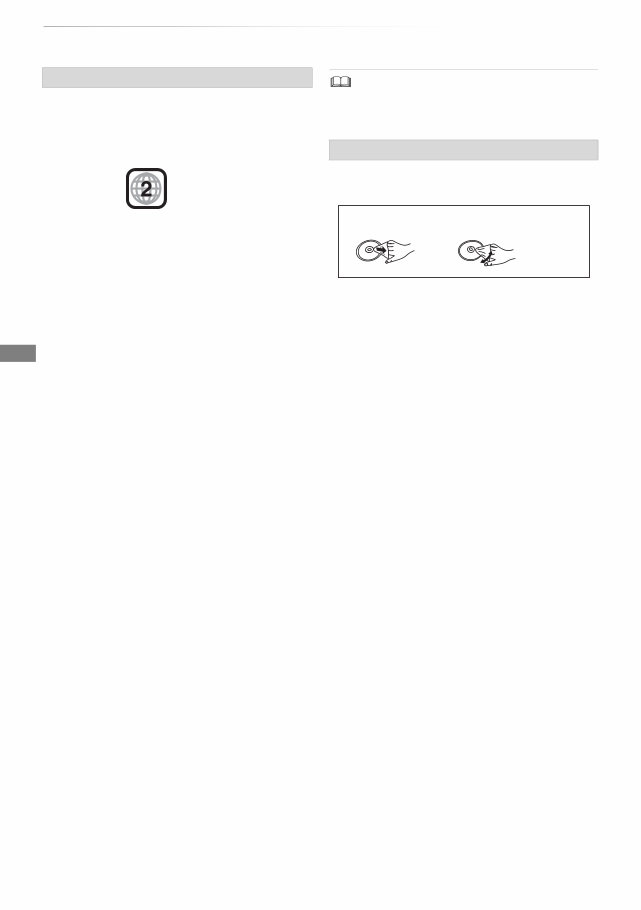
Getting started SQT0994 10 HDD and media information • Region management information The unit can play back DVD-Video discs of the following regions codes, including “ALL”: • Disc recorded on another device • It may be necessary to finalise the disc, create Top Menu or close the session on the equipment used for recording to play on this unit. • [DVD-RW] Recorded in DVD Video Recording (DVD-VR) format - This unit can play back and copy to HDD. - This unit does not support editing or recording. - It is possible to record and edit with DVD-Video (DVD-V) format by formatting discs with this unit. • Recording may not be possible to discs which were used for recording on other equipment. • Play on other players • [DVD-R] [DVD-RW] [+R] Finalisation is needed. (> 70) • [+RW] If the disc failed to play on other equipment, we recommend you create a Top Menu (> 70). • [DVD-R] The disc created in AVCHD format can only be played back on AVCHD compatible equipment. • Regarding 8 cm Disc This unit cannot record or edit the 8 cm disc. Only playback or copy to the HDD is possible. • Discs that cannot be played - Blu-ray Disc - DVD-RAM in a cartridge - 2.6 and 5.2 GB DVD-RAM, 12 cm - DVD-Audio - Super Video CD, Super Audio CD, Video CD • Operation and sound quality of CDs that do not conform to CD-DA specifications (copy control CDs, etc.) cannot be guaranteed. • Do not touch the recorded surface of the discs. • Wipe with a damp cloth and then wipe dry. Notes for the disc e.g., Media handling • Do not attach labels or stickers to discs. • Do not use disc cleaning sprays, benzine, thinner, static electricity prevention liquids or any other solvent. • Do not use the following discs: - Discs with exposed adhesive from removed stickers or labels (rental discs, etc.). - Discs that are badly warped or cracked. - Irregularly shaped discs, such as heart shapes. DO DO NOT
This service and repair manual for the Panasonic DMR-EX97 EX97EB DVD HDD Recorder is an essential resource for both professional mechanics and DIY enthusiasts. It contains in-depth information on safety and precautions, product specifications, disassembly and reassembly, adjustments, service modes, service fixture and tools, troubleshooting, schematic diagrams, block diagrams, printed circuit boards, exploded views, and replacement parts list. The manual is highly detailed and includes illustrated pictures and step-by-step instructions for effective repair and servicing of the device.
It is the official and complete service and repair manual, available in PDF format with high-resolution pages for quality printing. With instant access, there are no shipping fees or waiting for postal delivery, allowing you to commence repairs within minutes of obtaining the manual.
Specifications:
Language: English
Format: PDF
Pages: 129
Recently Viewed
5,521,897Happy Clients
2,594,462eManuals
1,120,453Trusted Sellers
15Years in Business
Price:
Actual Price:
Panasonic DMR EX97 EX97EB Service Manual and Repair Guide



 Lifetime Access