


Denon AVR X7200W X7200WA Service Manual & Repair Guide
What's Included?
 Lifetime Access
Fast Download Speeds
Online & Offline Access
Access PDF Contents & Bookmarks
Full Search Facility
Print one or all pages of your manual
START::|sX3k6VQNaf/6VbQg1Aav9Q==|Et47GD/ke3ODnkHXa491WKZgCp4aT5bOv8c/PAauonw=|XOIUVeyoWOE5XcW
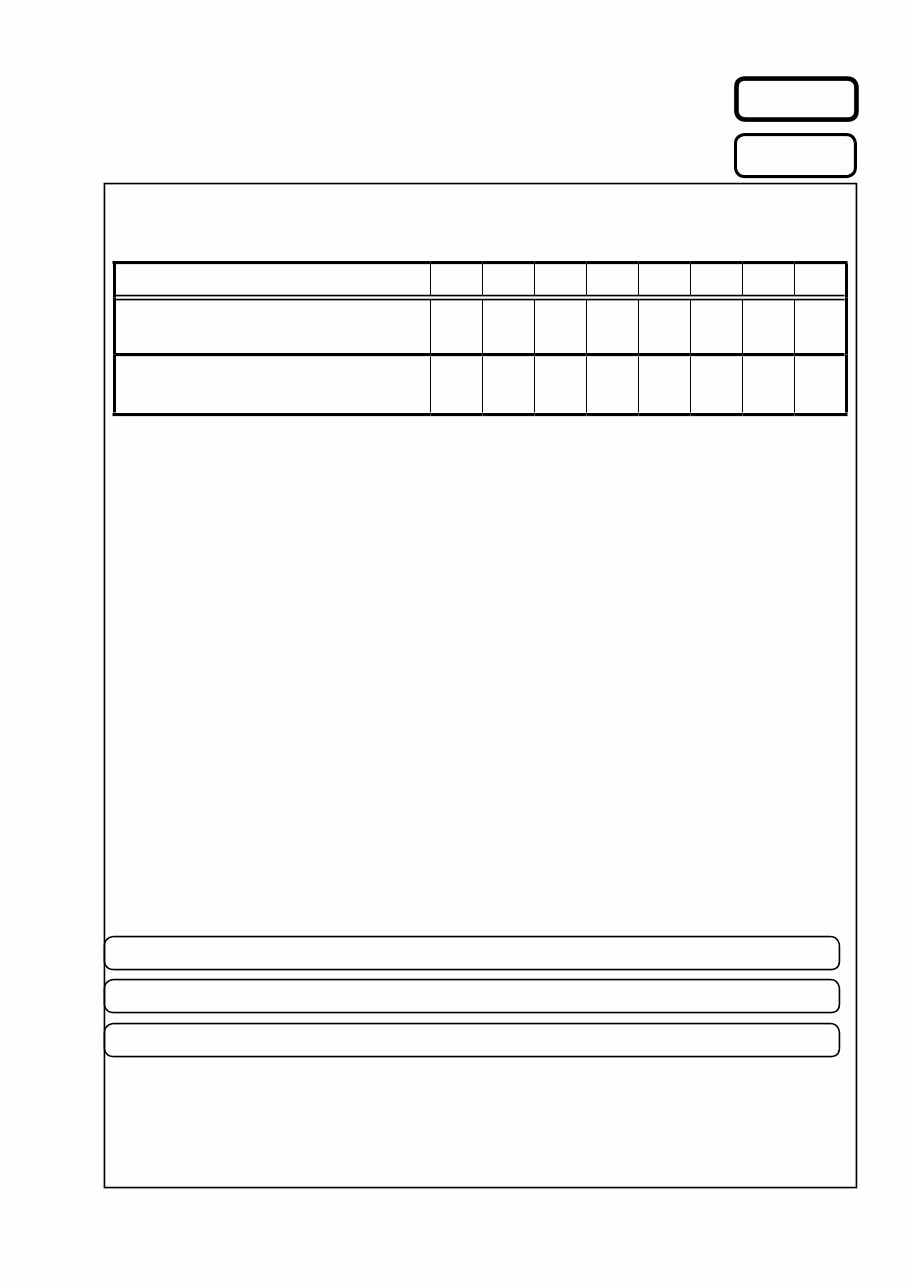
MODEL JP E3 E2 EK EA E1 E1C E1K
AVR-X7200W P P P
AVR-
X7200WA
P P P P
INTEGRATED NETWORK AV RECEIVER
S1529V07DM/DG1707
Ver. 7
• Please use this service manual with referring to the operating instructions without fail.
• Some illustrations using in this service manual are slightly different from the actual set.
• For purposes of improvement, specifications and design are subject to change without notice.
Please refer to the
MODIFICATION NOTICE. e
SERVICE MANUAL
e
D&M Holdings Inc.

ABOUT THIS MANUAL .............................................................3
What you can do with this manual ............................................3
Using Adobe Reader (Windows version) ..................................4
SAFETY PRECAUTIONS ..........................................................6
NOTE FOR SCHEMATIC DIAGRAM.........................................7
NOTE FOR PARTS LIST ...........................................................7
TECHNICAL SPECIFICATIONS ................................................9
DIMENSION ...............................................................................9
Precautions During Service...................................................10
Initializing This Unit .................................................................10
Service Jigs .............................................................................10
DISASSEMBLY ........................................................................ 11
1. CX870 ASSY for CX870 model only ..................................14
2. FRONT PANEL ASSY ........................................................14
3. RADIATOR ASSY...............................................................15
4. SMPS ASSY.......................................................................16
5. POWER TRANS ................................................................17
6. BACK PANEL ASSY...........................................................18
SPECIAL MODE ......................................................................19
Special Mode Configuration Buttons .......................................19
1. Version Display Mode ........................................................20
2. PANEL / REMOTE LOCK Selection Mode.........................24
3. Selection Modes for Service-related Operations................25
DIAGNOSTIC PATH DIAGRAM.........................................31
4. Remote ID Setup Mode......................................................75
5. Additional Source mode s ...............................................76
6. Protection Pass Mode ........................................................76
7. CX870 / CY920 Reboot Mode............................................77
8. CX870 / CY920 Initialization Mode ....................................77
JIG FOR SERVICING ..............................................................78
Procedure after Replacing the Microprocessor, etc. ..........80
Firmware Update Procedure..................................................80
1. Updating by USB................................................................80
2. Updating by DPMS.............................................................90
ADJUSTMENT .........................................................................97
SURROUND MODES AND PARAMETERS ............................98
TROUBLE SHOOTING ..........................................................101
1. POWER............................................................................101
2. Analog video ....................................................................102
3. HDMI/DVI .........................................................................104
4. AUDIO..............................................................................106
5. Network/Bluetooth/USB ...................................................109
6. SMPS ............................................................................... 115
Audio Check PASS .............................................................. 117
CLOCK FLOW & WAVE FORM IN DIGITAL BLOCK ........... 118
LEVEL DIAGRAM.................................................................. 119
GND DIAGRAM .....................................................................127
POWER DIAGRAM................................................................128
CPU DIAGRAM......................................................................130
PRINTED WIRING BOARDS.................................................131
SCHEMATIC DIAGRAMS (1/37) ...........................................140
SCH01_DIGITAL CONNECT ................................................140
SCH02_DIR ADC ZONEDAC ...............................................141
SCH03_AUDIO PLD .............................................................142
SCH04_DSP1 .......................................................................143
SCH05_DSP2 .......................................................................144
SCH06_DSP3 .......................................................................145
SCH07_DSP4 .......................................................................146
SCH08-1_MAIN CPU_OLD ..................................................147
SCH08-2_MAIN CPU_NEW .................................................148
SCH09_SUB CPU.................................................................149
SCH10_DECODER...............................................................150
SCH11-1_HDMI SW1 AVR-X7200W ONLY ..........................151
SCH11-2_HDMI SW1 AVR-X7200WA ONLY ........................152
SCH12-1_HDMI SW2 AVR-X7200W ONLY ..........................153
SCH12-2_HDMI SW2 AVR-X7200WA ONLY ........................154
SCH13_IP SCALER ..............................................................155
SCH14_IP SCALER DDR .....................................................156
SCH15-1_VIDEO PLD AVR-X7200W ONLY.........................157
SCH15-2_VIDEO PLD AVR-X7200WA ONLY.......................158
SCH16-1_HDMI RX TX AVR-X7200W ONLY .......................159
SCH16-2_HDMI RX TX AVR-X7200WA ONLY .....................160
SCH17-1_HDMI SUPPLY AVR-X7200W ONLY ....................161
SCH17-2_HDMI SUPPLY AVR-X7200WA ONLY ..................162
SCH18-1_NETWOR AVR-X7200W ONLY ............................163
SCH18-2_NETWOR AVR-X7200WA ONLY_OLD.................164
SCH18-3_NETWOR AVR-X7200WA ONLY_NEW................165
SCH19-1_MAIN DAC ............................................................166
SCH19-2_MAIN DAC ............................................................167
SCH20-1_ZONEDAC ADC ...................................................168
SCH20-2_ZONEDAC ADC ...................................................169
SCH21_REAR USB ..............................................................170
SCH22_AUDIO VIDEO CONNECT ......................................171
SCH23_AUDIO VOLUME .....................................................172
SCH24_PREOUT..................................................................173
SCH25_VIDEO SELECTOR .................................................174
SCH26_FRONT JACK ..........................................................175
SCH27_CONNECT ...............................................................176
SCH28_FRONT HDMI USB..................................................177
SCH29_SPEAKER................................................................178
SCH30_REG.........................................................................179
SCH31_FLD ..........................................................................180
SCH32_SMPS ......................................................................181
SCH33_AMP CONNECT ......................................................182
SCH34_232C PHONO..........................................................183
SCH35_POWER AMP...........................................................184
SCH36_CX870 CONNECT AVR-X7200W ONLY..................185
SCH37_BT MODULE AVR-X7200W ONLY ..........................186
EXPLODED VIEW .................................................................187
PACKING VIEW .....................................................................188
SEMICONDUCTORS .............................................................189
1. IC's ...................................................................................189
2. FL DISPLAY ..................................................................... 211
CONTENTS
2
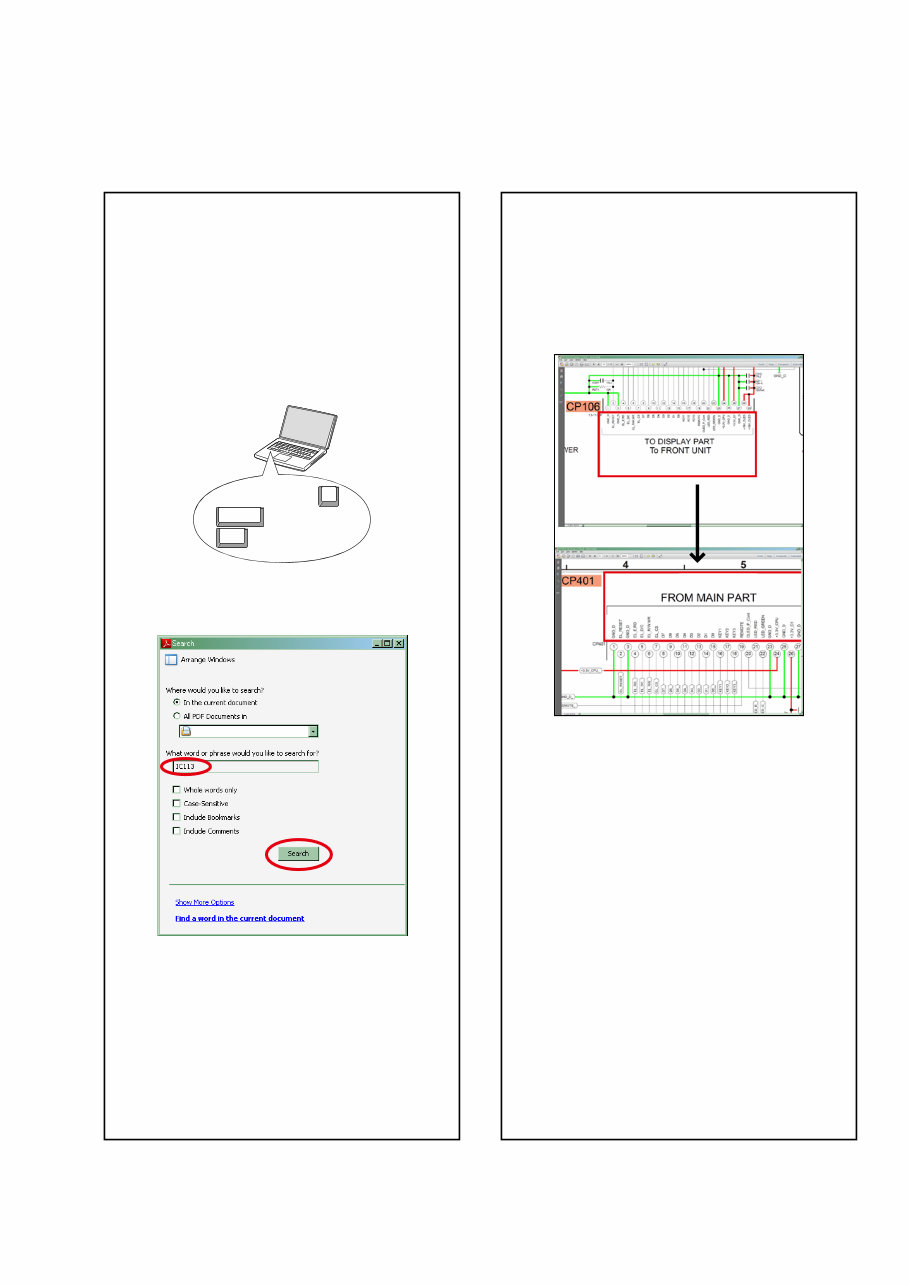
Jump to the target of a schematic
diagram connector
Click the Ref. No. of the target connector in the red
box around a schematic diagram connector.
•The screen jumps to the target connector.
•Page magnification stays the same as before the
jump.
CP401
CP106
v
ABOUT THIS MANUAL
Read the following information before using the service manual.
What you can do with this manual
Search for a Ref. No. (phrase)
(Ctrl+Shift+F)
You can use the search function in Acrobat Reader to
search for a Ref. No. in schematic diagrams, printed
wiring circuit diagrams, block diagrams, and parts
lists.
1.Press Ctrl+Shift+F on the keyboard.
• The Search window appears.
2.Enter the Ref. No. you want to search for in the
Search window, and then click the Search button.
•A list of search results appears.
3.Click an item on the list.
• The screen jumps to the page for that item, and the
search phrase is displayed.
Ctrl
Shift
F
3
Using Adobe Reader (Windows version)
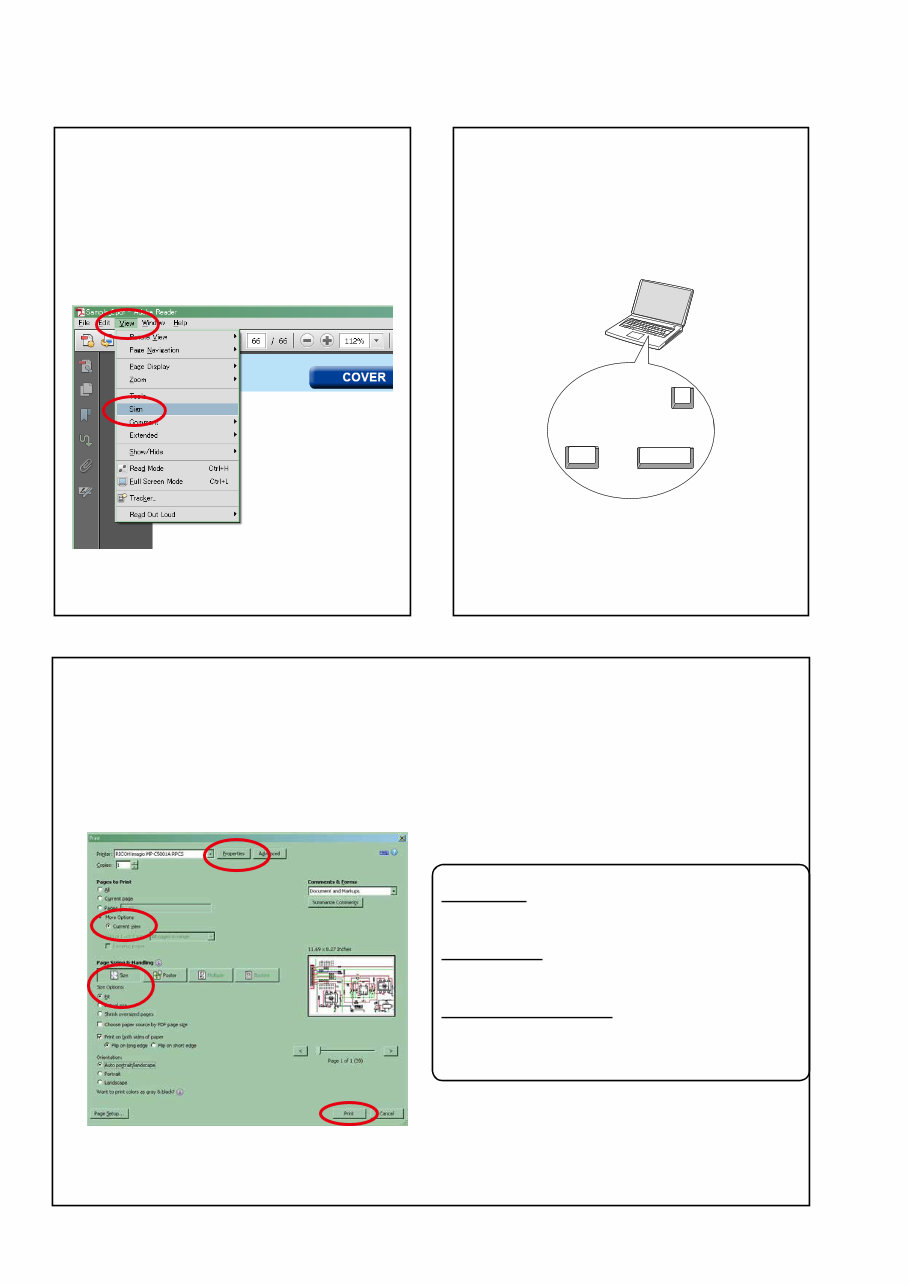
• Properties
Click this button and check that the printer is set to a
suitable paper size.
• Page to print
Select the following checkbox.
"More Options" : "Current View"
• Page Sizing & Handling
Select the following checkbox.
"Size" / "Size Options" : "Fit"
Add notes to this data (Sign)
The Sign function lets you add notes to the data in
this manual.
Save the file once you have finished adding notes.
[Example using Adobe Reader X]
On the "View" menu, click "Sign".
• The Sign pane appears.
[Example using Adobe Reader 9]
On the "Document" menu, click "Sign".
Magnify schematic / printed circuit
board diagrams - 1
(Ctrl+Space, mouse operation)
Press Ctrl+Space on the keyboard and drag the
mouse to select the area you want to view.
• The selected area is magnified.
• When you want to move the area shown, hold
down Space and drag the mouse.
• When you want to show a full page view, press
Ctrl+0 on the keyboard.
Ctrl Space
0
Print a magnified part of the manual
The Properties dialog box and functions will vary depending on your printer.
1. Drag the mouse to magnify the part you want to print.
2. On the "File" menu, click "Print".
3. Configure the following settings in the Print dialog box.
4. Click the Print button to start printing.
4
Magnify schematic / printed circuit
board diagrams - 2
(Pan & Zoom function)
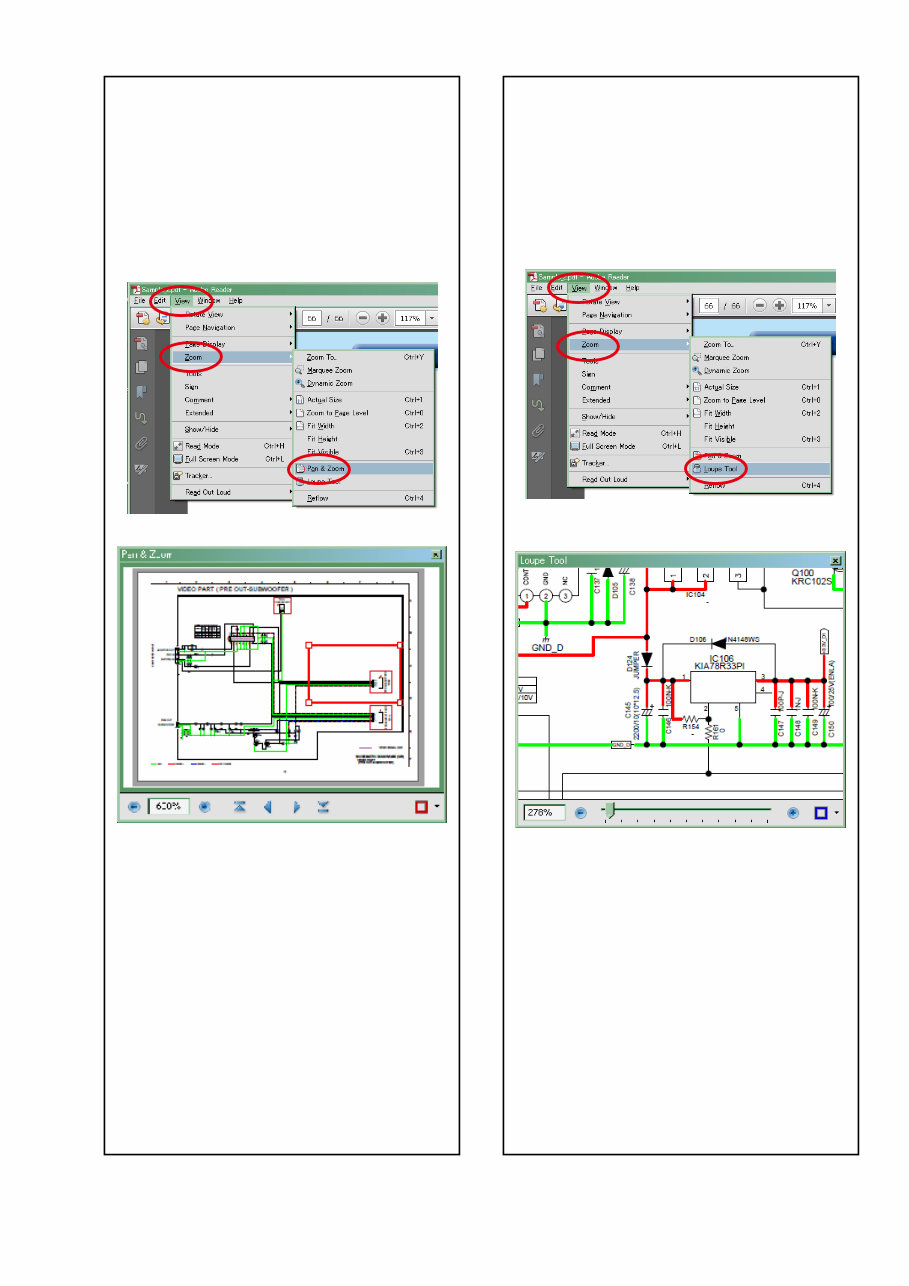
The Pan & Zoom function lets you see which part of
a magnified diagram is being shown in a separate
window.
[Example using Adobe Reader X]
On the "View" menu, point to "Zoom", and then click
"Pan & Zoom".
• The Pan & Zoom window appears on the screen.
[Example using Adobe Reader 9]
On the "Tools" menu, point to "Select & Zoom", and
then click "Pan & Zoom Window".
Magnify schematic / printed circuit
board diagrams - 3
(Loupe Tool function)
The Loupe Tool function lets you magnify a specific
part of a diagram in a separate window.
[Example using Adobe Reader X]
On the "View" menu, point to "Zoom", and then click
"Loupe Tool".
• The Loupe Tool window appears on the screen.
[Example using Adobe Reader 9]
On the "Tools" menu, point to "Select & Zoom", and
then click "Loupe Tool Window".
5

SAFETY PRECAUTIONS
The following items should be checked for continued protection of the customer and the service technician.
leakage current check
Before returning the set to the customer, be sure to carry out either (1) a leakage current check or (2) a line to chassis
resistance check. If the leakage current exceeds 0.5 milliamps, or if the resistance from chassis to either side of the
power cord is less than 460 kohms, the set is defective.
Be sure to test for leakage current with the AC plug in both polarities, in addition, when the set's power is in each state
(on, off and standby mode), if applicable.
CAUTION
Please heed the following cautions and instructions during servicing and
inspection.
◎ Heed the cautions!
Cautions which are delicate in particular for servicing
are labeled on the cabinets, the parts and the chassis,
etc. Be sure to heed these cautions and the cautions
described in the handling instructions.
◎ Cautions concerning electric shock!
(1) An AC voltage is impressed on this set, so if you
touch internal metal parts when the set is energized,
you may get an electric shock. Avoid getting an
electric shock, by using an isolating transformer
and wearing gloves when servicing while the set is
energized, or by unplugging the power cord when
replacing parts, for example.
(2) There are high voltage parts inside. Handle with
extra care when the set is energized.
◎ Caution concerning disassembly and
assembly!
Through great care is taken when parts were
manufactured from sheet metal, there may be burrs on
the edges of parts. The burrs could cause injury if fingers
are moved across them in some rare cases. Wear gloves
to protect your hands.
◎ Use only designated parts!
The set's parts have specific safety properties (fire
resistance, voltage resistance, etc.). Be sure to use parts
which have the same properties for replacement. The
burrs have the same properties. In particular, for the
important safety parts that are indicated by the z mark
on schematic diagrams and parts lists, be sure to use
the designated parts.
◎ Be sure to mount parts and arrange the wires
as they were originally placed!
For safety seasons, some parts use tapes, tubes or other
insulating materials, and some parts are mounted away
from the surface of printed circuit boards. Care is also
taken with the positions of the wires by arranging them
and using clamps to keep them away from heating and
high voltage parts, so be sure to set everything back as
it was originally placed.
◎ Make a safety check after servicing!
Check that all screws, parts and wires removed or
disconnected when servicing have been put back in their
original positions, check that no serviced parts have
deteriorate the area around. Then make an insulation
check on the external metal connectors and between
the blades of the power plug, and otherwise check that
safety is ensured.
(Insulation check procedure)
Unplug the power cord from the power outlet, disconnect
the antenna, plugs, etc., and on the power. Using a 500V
insulation resistance tester, check that the insulation
resistance value between the inplug and the externally
exposed metal parts (antenna terminal, headphones
terminal, input terminal, etc.) is 1MΩ or greater. If it is
less, the set must be inspected and repaired.
Many of the electric and the structural parts used in the
set have special safety properties. In most cases these
properties are difficult to distinguish by sight, and the use
of replacement parts with higher ratings (rated power
and withstand voltage) does not necessarily guarantee
that safety performance will be preserved. Parts with
safety properties are indicated as shown below on the
wiring diagrams and the parts list in this service manual.
Be sure to replace them with the parts which have the
designated part number.
(1) Schematic diagrams.......Indicated by the z mark.
(2) Parts lists.......Indicated by the z mark.
The use of parts other than the
designated parts could cause electric
shocks, fires or other dangerous
situations.
CAUTION Concerning important
safety parts
6
NOTE FOR SCHEMATIC DIAGRAM
WARNING:
Parts indicated by the z mark have critical characteristics. Use ONLY replacement parts recommended by the manufacturer.
CAUTION:
Before returning the set to the customer, be sure to carry out either (1) a leakage current check or (2) a line to chassis resistance check.
If the leakage current exceeds 0.5 milliamps, or if the resistance from chassis to either side of the power cord is less than 460 kohms, the
set is defective.
WARNING:
DO NOT return the set to the customer unless the problem is identified and remedied.
NOTICE:
ALL RESISTANCE VALUES IN OHM. k=1,000 OHM / M=1,000,000 OHM
ALL CAPACITANCE VALUESARE EXPRESSED IN MICRO FARAD, UNLESS OTHERWISE INDICATED. P INDICATES MICRO-MICRO
FARAD. EACH VOLTAGE AND CURRENT ARE MEASURED AT NO SIGNAL INPUT CONDITION. CIRCUIT AND PARTS ARE SUBJECT
TO CHANGE WITHOUT PRIOR NOTICE.
NOTE FOR PARTS LIST
1. Parts indicated by "nsp" on this table cannot be supplied.
2. When ordering a part, make a clear distinction between "1" and "I" (i) to avoid mis-supplying.
3. A part ordered without specifying its part number can not be supplied.
4. Part indicated by " ★ " mark is not illustrated in the exploded view.
WARNING: Parts indicated by the z mark have critical characteristics. Use ONLY replacement parts recommended by the manufacturer.
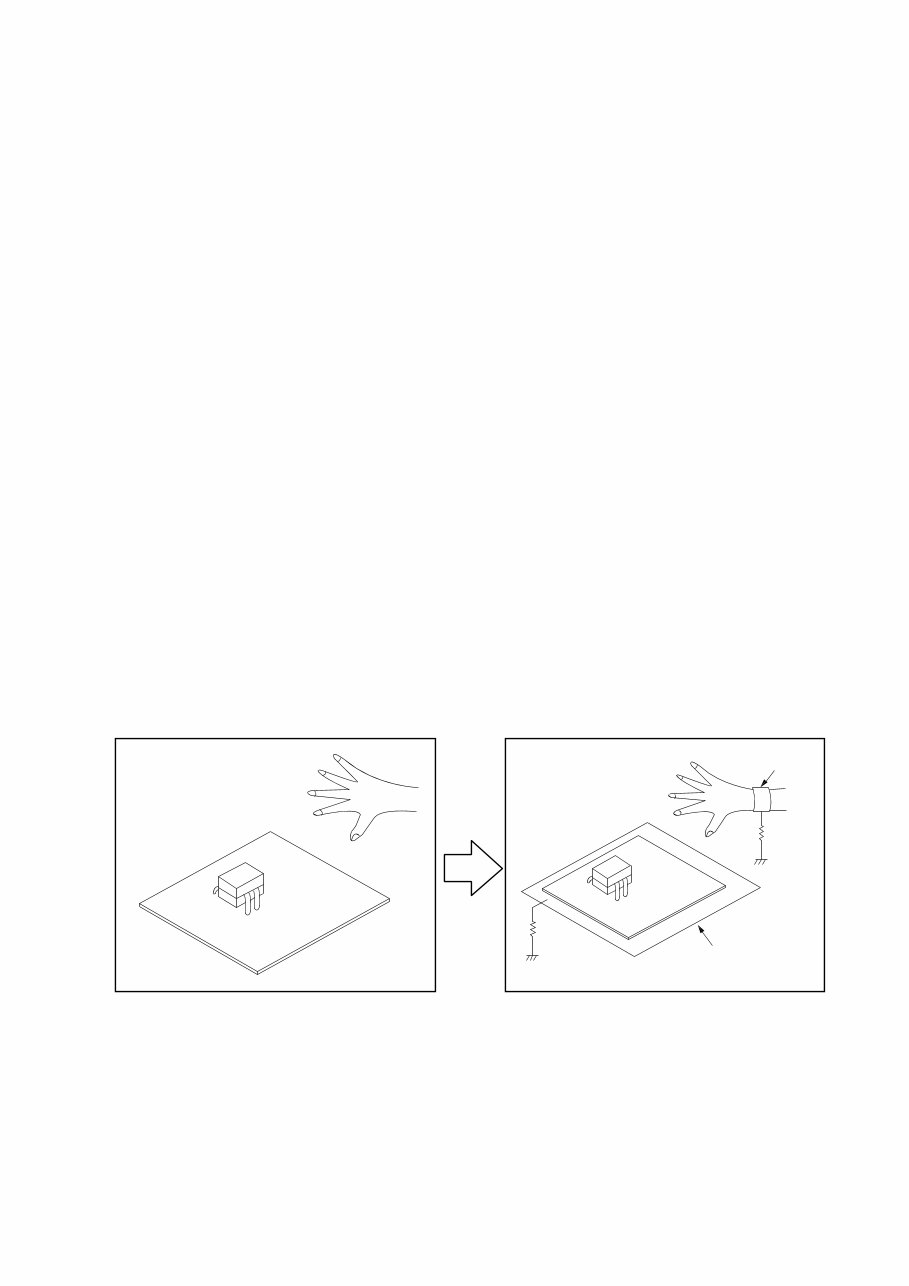
INSTRUCTIONS FOR HANDLING SEMI-CONDUCTORS AND OPTICAL UNIT
Electrostatic breakdown of the semi-conductors or optical pickup may occur due to a potential difference caused by
electrostatic charge during unpacking or repair work.
1. Ground for Human Body
Be sure to wear a grounding band (1 MΩ) that is properly grounded to remove any static electricity that may be
charged on the body.
2. Ground for Workbench
Be sure to place a conductive sheet or copper plate with proper grounding (1 MΩ) on the workbench or other surface,
where the semi-conductors are to be placed. Because the static electricity charge on clothing will not escape through
the body grounding band, be careful to avoid contacting semi-conductors with your clothing
<Incorrect>
CBA
Grounding Band
Conductive Sheet or
Copper Plate
1MΩ
1MΩ
<Correct>
CBA
7

Personal notes:
8
TECHNICAL SPECIFICATIONS
n Audio section
• Power amplifier
Rated output :
Front:
150W+150W (8Ω, 20Hz - 20kHz with 0.05% T.H.D.)
190W+190W (6Ω, 1kHz with 0.7% T.H.D)
Center:
150W (8Ω, 20Hz - 20kHz with 0.05% T.H.D.)
190W (6Ω, 1 kHz with 0.7 % T.H.D.)
Surround:
150W+150W (8Ω, 20 Hz - 20 kHz with 0.05% T.H.D.)
190W+190W (6Ω, 1 kHz with 0.7 % T.H.D.)
Surround back:
150W+150W (8Ω, 20 Hz - 20 kHz with 0.05% T.H.D.)
190W+190W (6Ω, 1 kHz with 0.7 % T.H.D.)
Height1 / Front wide / Height2:
150W+150W (8Ω, 20 Hz - 20 kHz with 0.05% T.H.D.)
190W+190W (6Ω, 1 kHz with 0.7 % T.H.D.)
Rated output:
170 W x 2-channel (8 Ω)
280 W x 2-channel (4 Ω)
Output connectors:4 - 16Ω
n Analog section
Input sensitivity/Input impedance:200 mV/47 kΩ
Frequency response: 10 Hz - 100 kHz — +1, -3 dB(Direct mode)
S/N:102 dB(IHF-A weighted, Direct mode)
Distortion:0.005 % (20 Hz – 20 kHz) (Direct mode)
Rated output:1.2 V
n Digital section
D/A output:Rated output — 2 V (at 0 dB playback)
Total harmonic distortion — 0.008 % (1 kHz, at 0 dB)
S/N ratio — 102 dB
Dynamic range — 100 dB
Digital input:Format — Digital audio interface
n Phono equalizer section
Input sensitivity: 2.5 mV
RIAA deviation: ±1 dB (20 Hz to 20 kHz)
S/N: 74 dB (IHF-A)
Distortion factor: 0.03 % (1 kHz, 3 V)
n Video section
• Standard video connectors
Input/output level and impedance:1 Vp-p, 75 Ω
Frequency response:5 Hz – 10 MHz — 0, –3 dB
• Color component video connector
Input/output level and impedance:Y signal — 1 Vp-p, 75 Ω
PB / CB signal — 0.7 Vp-p, 75 Ω
PR / CR signal — 0.7 Vp-p, 75 Ω
Frequency response:5 Hz - 60 MHz — 0, -3 dB
n Tuner section
Reception frequency range:FM 87.5 MHz - 107.9 MHz (for E3)
FM 87.5 MHz - 108.0 MHz (for E2, E1C)
FM 76.0 MHz - 90.0 MHz (for JP)
AM 530 kHz - 1710 kHz (for E3)
AM 522 kHz - 1611 kHz (for E2, E1C)
AM 522 kHz - 1629 kHz (for JP)
Effective sensitivity: FM 1.5μV (14.8dBf) (for E3)
FM 1.2μV (12.8dBf) (for E2, E1C, JP)
AM 20 μV (for E3)
AM 18 μV (for E2, E1C, JP)
50 dB sensitivity: MONO ― 2.8 μV (20.2 dBf) (for E2, E1C, JP)
S/N ratio (IHF-A): MONO ― 70 dB (for E3)
MONO ― 78 dB (for E2, E1C, JP)
STEREO ― 68 dB (for E3)
STEREO ― 67 dB (for E2, E1C, JP)
HD ― FM 85dB AM 85dB (for E3)
Distortion (1 kHz): MONO ― 0.1 % (for E3)
MONO ― 0.7 % (1 kHz) (for E2, E1C, JP)
SRETEO ― 0.2 % (for E3)
SRETEO ― 1.0 % (1 kHz) (for E2, E1C, JP)
HD ― FM 0.02% AM 0.02% (for E3)
n Wireless LAN section
Network type (wireless LAN standard): Conforming to Wi-Fi®z1
Security: WEP 64 bit, WEP 128 bit
WPA/WPA2-PSK (AES)
WPA/WPA2-PSK (TKIP)
Radio frequency: 2.4 GHz
No. of channels: 1 - 11 ch (for E3)
1 - 13 ch (for E2, E1C, JP)
z1 The Wi-Fi® CERTIFIED Logo and the Wi-Fi CERTIFIED On-Product
Logo are registered trademarks of the Wi-Fi Alliance.
n Bluetooth section
Communications system:Bluetooth Version 2.1 + EDR
(Enhanced Data Rate)
Transmission power:Maximum 2.5 mW (Class 2)
Maximum communication range:Approx. 32.8 ft/10 m in line of sight
Frequency band:2.4 GHz band
Modulation scheme:FHSS (Frequency-Hopping Spread Spectrum)
Supported profiles:A2DP (Advanced Audio Distribution Profile) 1.2
AVRCP (Audio Video Remote Control Profile) 1.4
Corresponding codec:SBC, AAC
Transmission range (A2DP):20 Hz - 20,000 Hz
n General
Power supply:(for E3) : AC 120 V, 60 Hz
(for E2) : AC 230 V, 50 Hz / 60Hz
(for E1C) : AC 220 V, 50 Hz
(for JP) : AC 100 V, 50 Hz / 60Hz
Power consumption:780W
Power consumption in standby mode:0.1W
Power consumption in CEC standby mode:0.5W
Power consumption in network standby mode :4.5W
(Adapted to NEW DIGITAL PCB products) :2.7W
For purposes of improvement, specifications and design are subject to
change without notice.
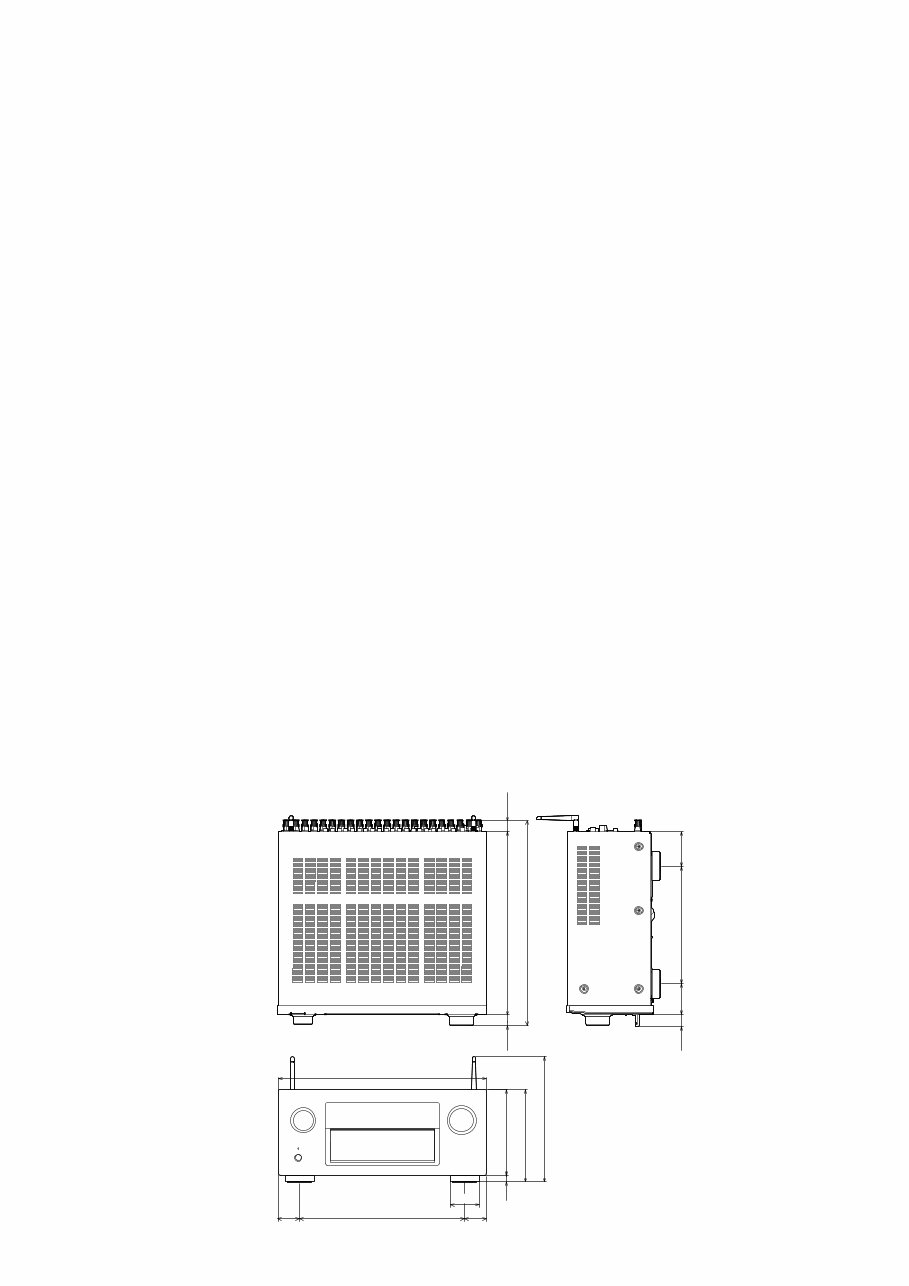
DIMENSION
Unit:in. (mm)
Weight:31 lb 1 oz (14.1 kg)
434
16 180
196
259
344
60
45 45
245
65 73
25
383
427
22 22
h
9
PRECAUTIONS DURING SERVICE
Initializing This Unit
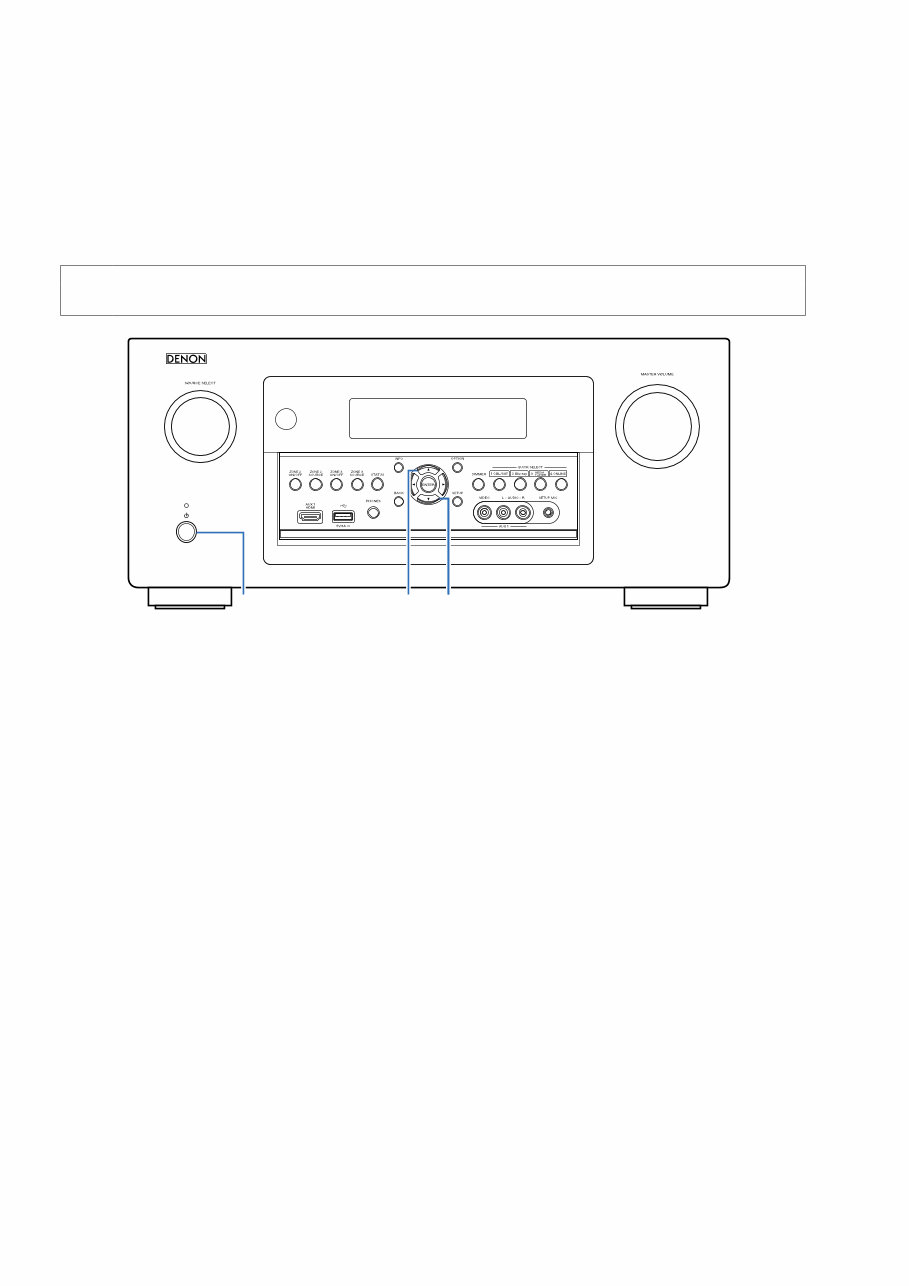
Initialize this unit if you have replaced the microcomputer, one of the parts around the microcomputer, or the digital PCB.
1. Press the power button to turn off the power.
2. Hold down buttons "CURSOR d" and "CURSOR f" at the same time and press the power button to turn on the power.
3. Release the buttons after confirming that the display flashes in intervals of approximately 1 second.
* The unit is initialized.
NOTE: • If the status in step 3 does not occur, start again from step 1.
• Initializing the device restores settings configured by the user to the factory settings. Take note of your settings beforehand
and reconfigure them after initialization.
Service Jigs
The following jigs (extension cable kit) are used when repairing the PCBs.
Order the jigs from your dealer if necessary.
8U- 110084S : EXTENSION UNIT KIT : 2 Set
(See 78 page)
X CURSOR d CURSOR f
10
You're Reading a Preview
What's Included?
Lifetime Access
Fast Download Speeds
Online & Offline Access
Access PDF Contents & Bookmarks
Full Search Facility
Print one or all pages of your manual
$36.99
$48.99
Viewed 25 Times Today


Secure transaction
What's Included?
Lifetime Access
Fast Download Speeds
Online & Offline Access
Access PDF Contents & Bookmarks
Full Search Facility
Print one or all pages of your manual
$36.99
$48.99
This Denon AVR X7200W X7200WA Integrated Network Audio/Video Receiver service and repair manual is an essential resource for both professional mechanics and DIY enthusiasts. It contains comprehensive technical information required for servicing and repairing the receiver.
- Specifications
- Adjustments
- Special Modes
- Disassembly Instructions
- Semiconductors
- Troubleshooting
- Clock Flow & Wave Forms
- Surround Modes and Parameters
- Firmware Update Procedures
- Block Diagrams
- Level Diagram
- Printed Wiring Boards
- CPU Diagram
- GND Diagram
- Wiring Diagrams
- Power Diagram
- Schematic Diagrams
- Exploded Views
- Parts List Catalog
This official advanced service manual is available in high-resolution format and provides instant access after payment, allowing for quick initiation of repairs. The manual is in English and consists of 245 pages.


