C C P P 7 7 / / C C P P 8 8 U U S S E E R R M M A A N N U U A A L L TM TM Intelligent Security & Fire Ltd Downloaded from www.Manualslib.com manuals search engine
P P a a g g e e 1 1 Introduction Welcome to the eurosec control panel. Your installation company will have programmed your system to protect your premises to the highest possible standards. Several user programmable options are available that will be covered later in this manual. Throughout this manual refer- ence will be made to the User Code, the factory set default is 5678. This code is programmable along with eight other User Codes. Full Setting the System Two methods are available for Full Set.After checking the premises are secure. 1) Press Quick followed by Full OR Enter a valid User Code followed by Full. 2) The exit tone will now sound. 3) Exit the premises via an authorised exit route . Note: Pressing the Quick key during exit will shorten the exit time to 3 seconds. Note: To abort the exit enter a valid User Code. Intelligent Security & Fire Ltd Downloaded from www.Manualslib.com manuals search engine
P P a a g g e e 2 2 Part Setting the System (using Part 1) Up to three Part Sets may be available for your system. Please refer to the customer details at the rear of this manual for information about Part Set zones. Part Set zones will be omitted from the system when that particular Part Set is used. To set the system using Part 1. 1) Press Quick followed by Part OR Enter a valid User Code followed by Part 2) Retire to an unprotected area. Part Setting the System (using Part2 or 3) Two other Part Sets may be available for your system. Part 2 is a sec- ond set of zones that may be omitted and Part 3 will combine Part 1 and Part 2. To use Part 2 or 3. 1) Press Quick followed by 2 or 3. OR Enter a valid User Code followed by 2 or 3. 2) Retire to an unprotected area. Note: Pressing the Quick key during exit will shorten the exit time to 3 seconds. Note: To abort the exit enter a valid User Code. Intelligent Security & Fire Ltd Downloaded from www.Manualslib.com manuals search engine
P P a a g g e e 3 3 Unsetting the System 1) Enter the premises via an authorised Entry Point. 2) The Entry Tone will sound. 3) Proceed to the keypad and enter a valid User Code. Display After an Alarm After an alarm has occurred the system should be unset as above. The display will show the zone that caused the alarm via a flashing LED. Resetting After an Alarm After an alarm the system needs to be reset. To reset the system. If Any Code Reset has been programmed. 1) Press Reset Or If Master Code Reset has been programmed. 1) Enter a valid User Code 2) Press Reset Note: The terms of your insurance may prohibit User reset. Contact your installation company if none of the above procedures are effective. Intelligent Security & Fire Ltd Downloaded from www.Manualslib.com manuals search engine
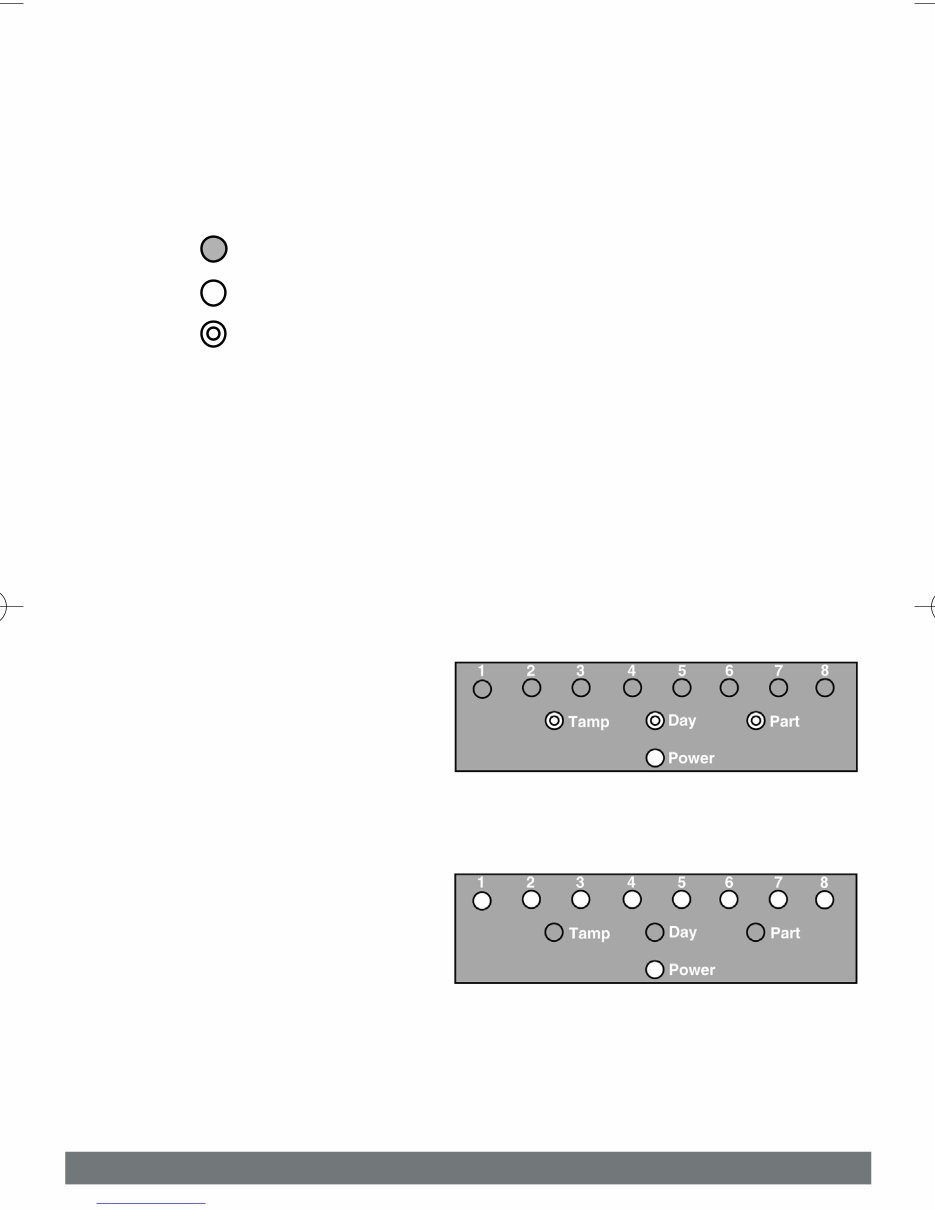
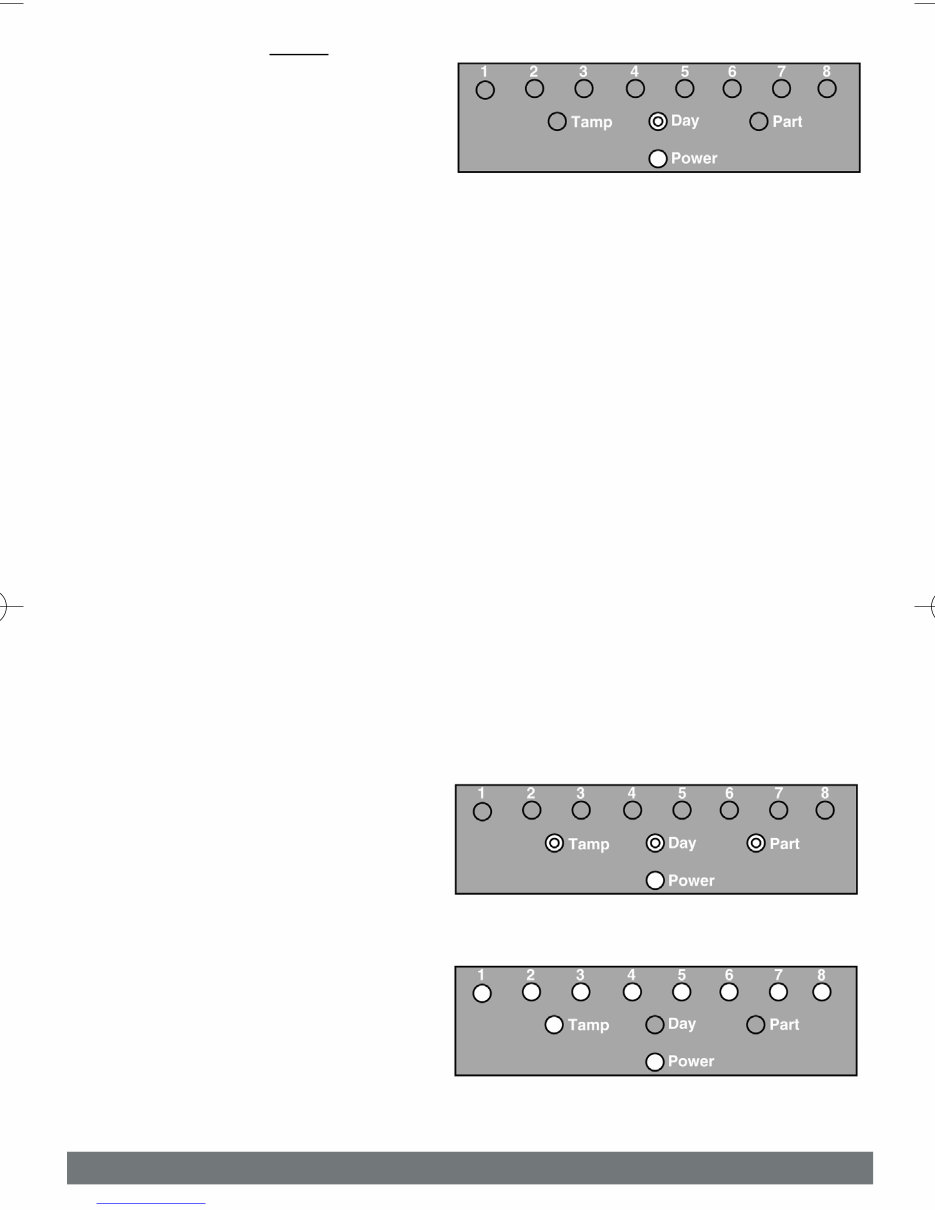
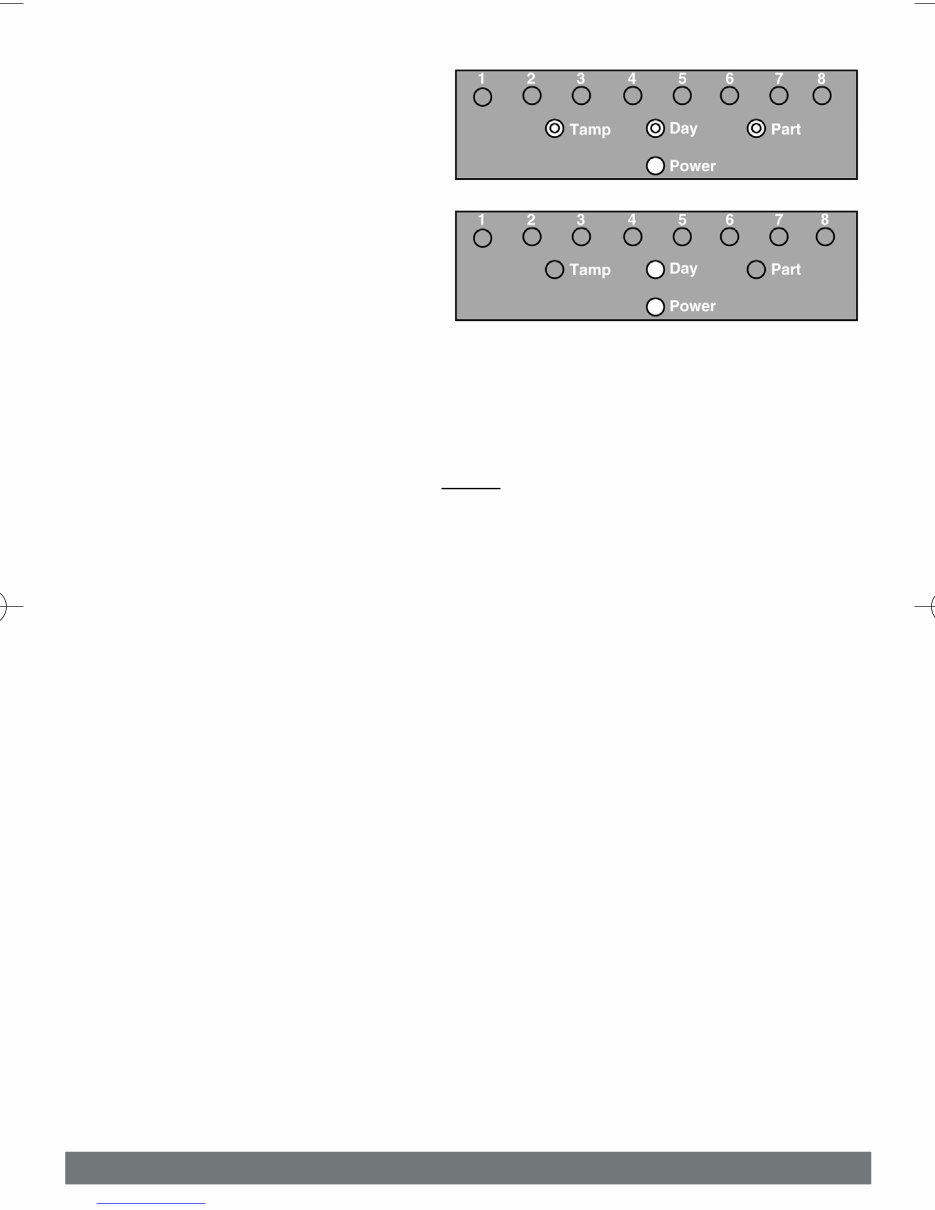
P P a a g g e e 4 4 Programmable User Options Throughout this section reference will be made to the LEDs on the dis- play.Three modes are possible for each LED ON, OFF or FLASHING. Programmable User Option may only be accessed via a Master Code. Fig. 1 LED Modes Key Zone Remove Option This option allows individual zones to be removed (omitted) when the system is being set. It is only applicable to the one Set state and will need to be repeated for subsequent Sets. If you are removing particu- lar zones on a regular basis ask your installation company to include them in a Part Set. 1) Enter a valid User Code followed by No the display will show (this is user programming mode) 2) Press 4 the display will show 3) Press the key(s) corresponding to the zone(s) you wish to remove (omit) from the next Set. OFF ON FLASHING Intelligent Security & Fire Ltd Downloaded from www.Manualslib.com manuals search engine
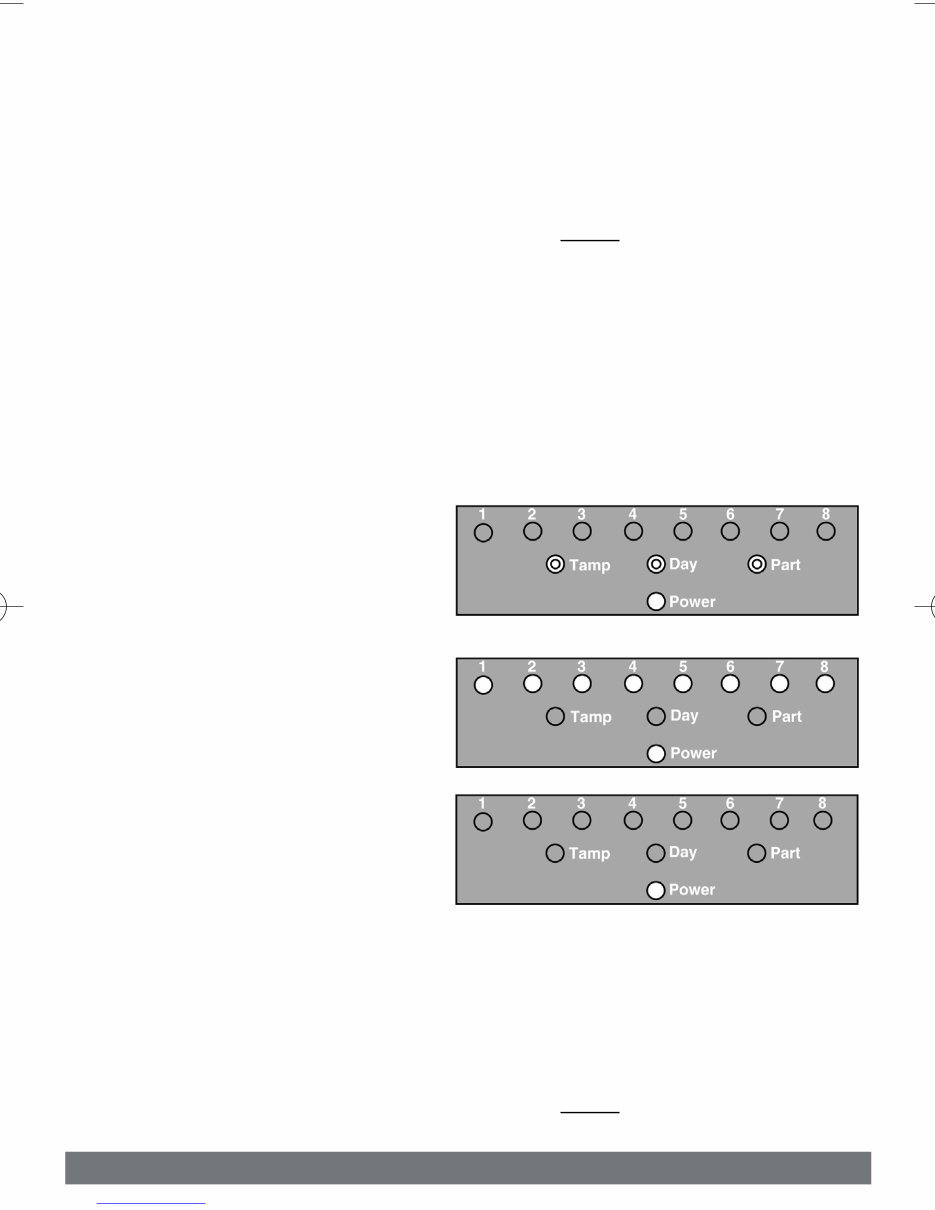
P P a a g g e e 5 5 4) Press 0 twice the display will show 5) Press Full for Full Set or Press Part for Part 1 Set or Press 2 for Part 2 Set or Press 3 for Part 3 Set 6) The system will now start the relevant Set with the zones you selected removed (omitted). Note: This will be for the one Set state only. System Test This option allows the User to test zones, bells and strobes on the system. 1) Enter a valid User Code followed by No the display will show (this is user programming mode) 2) Press 5 the display will show Intelligent Security & Fire Ltd Downloaded from www.Manualslib.com manuals search engine
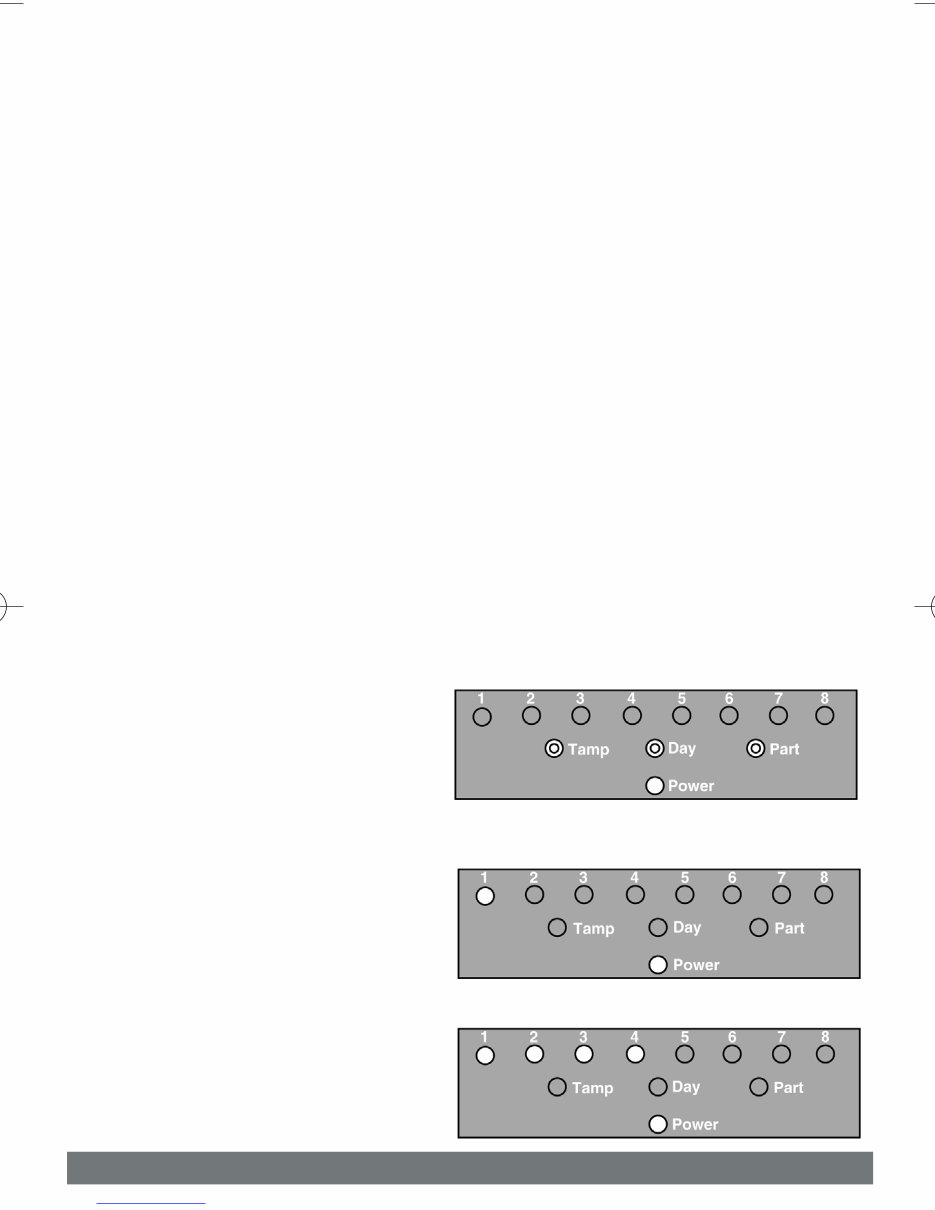
P P a a g g e e 6 6 3) Violate each zone on the system (as you do so the corresponding LED will extinguish) to verify its integrity 4) To test the bells (external sounders) and strobe press 9. To stop the bell test press 9 again. 5) To escape back to Unset press 0 three times. Turning Chime On/Off Your installation company may have programmed a group of zones or a single zone as Chime. This Chime function may be turned on or off by the User. 1) Enter a valid User Code followed by No the display will show 2) Press 7 the display may show or 3) If LEDs 1 to 7 are On then Chime is On If LEDs 1 to 7 are Off then Chime is Off Press No to change the Chime Status 4) To escape back to Unset press 0 three times. Intelligent Security & Fire Ltd Downloaded from www.Manualslib.com manuals search engine
P P a a g g e e 7 7 Programming User Codes Up to nine user codes may be programmed on predetermined levels these are. User Numbers 1 to 3 Master Level Allows Set, Part Set, Unset and User Programming Mode. User Numbers 4 to 7 User Level Allows Set, Part Set and Unset. User Numbers 8 to 9 Set Only Level Allows Set Only User Number 1 is factory default 5678. This code may only be changed. There is no facility for deleting this code. All other codes may be changed or deleted as required. To program User Codes. 1) Enter a valid User Code followed by No the display will show. 2) Press 9 the display will show. 3) Enter a single digit for the User No. you wish to program. the display will show. Intelligent Security & Fire Ltd Downloaded from www.Manualslib.com manuals search engine
P P a a g g e e 8 8 4) Enter the four digit code you require the display will show provided your code has been accepted or If your code has not been accepted If your code has not been accepted it may already be in use please return to step 1 and use a different code. 5) Provided the code has been accepted in 4 you may escape to Unset by pressing 0 twice . Keypad Alert If programmed by your installation company keys 1 & 3 when pressed together will act as alert keys. The exact function will depend on what they have been programmed for but for example if they are pro- grammed as panic pressing them will activate the alarm when the sys- tem is set or unset. Keypad activation is indicated by LEDs 1 & 3 Flashing. Tamper Tampers and other system problems will be indicated via the Tamp LED. Please contact your installation company. Intelligent Security & Fire Ltd Downloaded from www.Manualslib.com manuals search engine
The Eurosec CP8 LCD intruder alarm control panel manual is an essential resource for both professional mechanics and DIY enthusiasts. This comprehensive manual provides detailed information on the installation, operation, and maintenance of the Eurosec CP8 LCD intruder alarm control panel.
Inside the manual, you will find step-by-step instructions for setting up the control panel, programming user codes, and troubleshooting common issues. Additionally, it includes comprehensive wiring diagrams, technical specifications, and a detailed explanation of the control panel's features and functions.
Whether you are a professional installer or a homeowner looking to understand and maintain your Eurosec CP8 LCD intruder alarm control panel, this manual is an invaluable reference.



 Lifetime Access