Confidential PRECAUTIONS Precautionary notations throughout the text are categorized relative to 1) Personal injury and 2) damage to equipment. DANGER Signals a precaution which, if ignored, could result in serious or fatal personal injury. Great caution should be exercised in performing procedures preceded by DANGER Headings. WARNING Signals a precaution which, if ignored, could result in damage to equipment. The precautionary measures itemized below should always be observed when performing repair/maintenance procedures. DANGER 1. ALWAYS DISCONNECT THE PRODUCT FROM THE POWER SOURCE AND PERIPHERAL DEVICES PERFORMING ANY MAINTENANCE OR REPAIR PROCEDURES. 2. NO WORK SHOULD BE PERFORMED ON THE UNIT BY PERSONS UNFAMILIAR WITH BASIC SAFETY MEASURES AS DICTATED FOR ALL ELECTRONICS TECHNICIANS IN THEIR LINE OF WORK. 3. WHEN PERFORMING TESTING AS DICTATED WITHIN THIS MANUAL, DO NOT CONNECT THE UNIT TO A POWER SOURCE UNTIL INSTRUCTED TO DO SO. WHEN THE POWER SUPPLY CABLE MUST BE CONNECTED, USE EXTREME CAUTION IN WORKING ON POWER SUPPLY AND OTHER ELECTRONIC COMPONENTS. 4. WHEN DISASSEMBLING OR ASSEMBLING A PRODUCT, MAKE SURE TO WEAR GLOVES TO AVOID INJURIER FROM METAL PARTS WITH SHARP EDGES. WARNING 1. REPAIRS ON EPSON PRODUCT SHOULD BE PERFORMED ONLY BY AN EPSON CERTIFIED REPAIR TECHNICIAN. 2. MAKE CERTAIN THAT THE SOURCE VOLTAGES IS THE SAME AS THE RATED VOLTAGE, LISTED ON THE SERIAL NUMBER/RATING PLATE. IF THE EPSON PRODUCT HAS A PRIMARY AC RATING DIFFERENT FROM AVAILABLE POWER SOURCE, DO NOT CONNECT IT TO THE POWER SOURCE. 3. ALWAYS VERIFY THAT THE EPSON PRODUCT HAS BEEN DISCONNECTED FROM THE POWER SOURCE BEFORE REMOVING OR REPLACING PRINTED CIRCUIT BOARDS AND/OR INDIVIDUAL CHIPS. 4. IN ORDER TO PROTECT SENSITIVE MICROPROCESSORS AND CIRCUITRY, USE STATIC DISCHARGE EQUIPMENT, SUCH AS ANTI-STATIC WRIST STRAPS, WHEN ACCESSING INTERNAL COMPONENTS. 5. REPLACE MALFUNCTIONING COMPONENTS ONLY WITH THOSE COMPONENTS BY THE MANUFACTURE; INTRODUCTION OF SECOND-SOURCE ICs OR OTHER NON-APPROVED COMPONENTS MAY DAMAGE THE PRODUCT AND VOID ANY APPLICABLE EPSON WARRANTY. 6. WHEN USING COMPRESSED AIR PRODUCTS; SUCH AS AIR DUSTER, FOR CLEANING DURING REPAIR AND MAINTENANCE, THE USE OF SUCH PRODUCTS CONTAINING FLAMMABLE GAS IS PROHIBITED.
Confidential About This Manual This manual describes basic functions, theory of electrical and mechanical operations, maintenance and repair procedures of the printer. The instructions and procedures included herein are intended for the experienced repair technicians, and attention should be given to the precautions on the preceding page. Manual Configuration This manual consists of six chapters and Appendix. CHAPTER 1.PRODUCT DESCRIPTIONS Provides a general overview and specifications of the product. CHAPTER 2.OPERATING PRINCIPLES Describes the theory of electrical and mechanical operations of the product. CHAPTER 3.TROUBLESHOOTING Describes the step-by-step procedures for the troubleshooting. CHAPTER 4.DISASSEMBLY / ASSEMBLY Describes the step-by-step procedures for disassembling and assembling the product. CHAPTER 5.ADJUSTMENT Provides Epson-approved methods for adjustment. CHAPTER 6.MAINTENANCE Provides preventive maintenance procedures and the lists of Epson- approved lubricants and adhesives required for servicing the product. Symbols Used in this Manual Various symbols are used throughout this manual either to provide additional information on a specific topic or to warn of possible danger present during a procedure or an action. Be aware of all symbols when they are used, and always read NOTE, CAUTION, or WARNING messages. Indicates an operating or maintenance procedure, practice or condition that is necessary to keep the product’s quality. Indicates an operating or maintenance procedure, practice, or condition that, if not strictly observed, could result in damage to, or destruction of, equipment. May indicate an operating or maintenance procedure, practice or condition that is necessary to accomplish a task efficiently. It may also provide additional information that is related to a specific subject, or comment on the results achieved through a previous action. Indicates an operating or maintenance procedure, practice or condition that, if not strictly observed, could result in injury or loss of life. Indicates that a particular task must be carried out according to a certain standard after disassembly and before re-assembly, otherwise the quality of the components in question may be adversely affected. A D J U S T M E N T R E Q U I R E D C A U T I O N C H E C K P O I N T W A R N I N G
Confidential Revision Status Revision Date of Issue Description A July 29, 2009 First Release
Epson Artisan 810/Epson Stylus Photo PX810FW/TX810FW/Epson Artisan 710/Epson Stylus Photo PX710W/TX710W Revision A 6 Confidential Contents Chapter 1 PRODUCT DESCRIPTION 1.1 Features. ............................................................................................................... 10 1.2 Printing Specifications. ........................................................................................ 11 1.2.1 Basic Specifications . ................................................................................... 11 1.2.2 Ink Cartridge . .............................................................................................. 11 1.2.3 Print Mode . ................................................................................................. 12 1.2.4 Supported Paper . ......................................................................................... 14 1.2.5 Printing Area. .............................................................................................. 17 1.3 Scanner Specifications. ........................................................................................ 17 1.3.1 Scanning Range . ......................................................................................... 18 1.4 General Specifications . ........................................................................................ 18 1.4.1 Electrical Specifications . ............................................................................ 18 1.4.2 Safety Approvals (Safety standards/EMI) . ................................................. 19 1.4.3 Acoustic Noise . ........................................................................................... 19 1.4.4 Durability (TBD) . ....................................................................................... 19 1.4.5 Environmental Conditions . ......................................................................... 19 1.5 Interface . .............................................................................................................. 20 1.5.1 USB Interface . ............................................................................................ 20 1.5.2 FAX Interface (Epson Artisan 810/Epson Stylus Photo PX810FW/TX810FW only)........ 20 1.5.3 Network Interface . ...................................................................................... 20 1.5.4 Memory Card Slots . .................................................................................... 22 1.6 Control Panel . ...................................................................................................... 23 1.6.1 Operation Buttons & LEDs . ....................................................................... 23 1.6.2 Control Panel Functions in Each Mode . ..................................................... 24 1.6.2.1 Control Panel Functions . ..................................................................... 24 1.7 Specification for Each Function . ......................................................................... 26 1.7.1 Stand-alone Copy Function (Copy Mode) . ................................................. 26 1.7.1.1 Supported Paper and Copy Mode . ....................................................... 26 1.7.1.2 Stand-alone Copy Menu . ..................................................................... 27 1.7.1.3 Copy Speed (TBD) . ............................................................................. 27 1.7.1.4 Relation Between Original and Copy. ................................................. 28 1.7.2 Memory Card Direct Print Function (Photos Mode) . ................................. 28 1.7.2.1 Supported Paper and Print Mode. ........................................................ 28 1.7.2.2 Supported File Type and Media Type . ................................................ 29 1.7.2.3 Automatic Detection of Images in Memory Card . .............................. 29 1.7.2.4 Specifications for Handling Image Data . ............................................ 29 1.7.2.5 Memory Card Direct Print Menu . ....................................................... 30 1.7.2.6 Makes Prints from Index Sheet Function . ........................................... 31 1.7.2.7 Print Layout . ........................................................................................ 32 1.7.3 Camera Direct Print Function (PictBridge) . ............................................... 35 1.7.3.1 Available DSC. .................................................................................... 35 1.7.3.2 Print Settings Available from DSC . .................................................... 35 1.7.3.3 General Operation Procedure . ............................................................. 36 1.7.3.4 Operations when a DSC is connected . ................................................ 36 1.7.4 Various Settings (Setup Mode). .................................................................. 37 1.7.5 FAX Function (FAX Mode) (Epson Artisan 810/Epson Stylus Photo PX810FW/TX810FW only) . ...... 39 1.7.5.1 Basic Specifications . ........................................................................... 39 1.7.5.2 Supported Functions . ........................................................................... 39 1.7.6 Other Functions . ......................................................................................... 42 1.7.6.1 Scan Mode . .......................................................................................... 42 1.7.6.2 Backup Data . ....................................................................................... 42 1.7.6.3 Print Ruled Papers . .............................................................................. 42 1.7.6.4 Coloring Book . .................................................................................... 42 Chapter 2 OPERATING PRINCIPLES 2.1 Overview . ............................................................................................................ 44 2.1.1 Printer Mechanism. ..................................................................................... 44 2.1.2 Printhead . .................................................................................................... 44 2.1.3 Motors & Sensors . ...................................................................................... 45 2.1.4 PG setting . .................................................................................................. 47 2.2 Power-On Sequence . ........................................................................................... 48 2.2.1 Simple Reset Sequence. .............................................................................. 49 2.2.2 All Reset Sequence . .................................................................................... 51 2.3 Printer Initialization. ............................................................................................ 54 Chapter 3 TROUBLESHOOTING 3.1 Overview . ............................................................................................................ 56 3.1.1 Specified Tools . .......................................................................................... 56 3.1.2 Preliminary Checks. .................................................................................... 56
Epson Artisan 810/Epson Stylus Photo PX810FW/TX810FW/Epson Artisan 710/Epson Stylus Photo PX710W/TX710W Revision A 7 Confidential 3.2 Troubleshooting. .................................................................................................. 57 3.2.1 Motor and Sensor Troubleshooting . ........................................................... 57 3.3 Troubleshooting by Error Message . .................................................................... 58 3.3.1 Error Message List . ..................................................................................... 58 3.3.2 Troubleshooting by Error Message . ........................................................... 60 3.4 Troubleshooting without Error Message . ............................................................ 72 3.4.1 Troubleshooting Printer Mechanism Problems . ......................................... 72 3.4.2 Troubleshooting Electrical Problems . ........................................................ 78 3.4.3 Troubleshooting I/F-related Problems . ....................................................... 78 3.5 Troubleshooting Duplex Unit Problems. ............................................................. 80 3.6 Network Troubleshooting. ................................................................................... 81 3.7 FAX Troubleshooting (Epson Artisan 810/Epson Stylus Photo PX810FW/TX810FW only) ................ 83 3.7.1 FAX Log . .................................................................................................... 83 3.7.2 Error Code/Superficial Phenomenon-Based Troubleshooting ................... 87 3.8 Fax Function/External Connection Function Check (Epson Artisan 810/Epson Stylus Photo PX810FW/TX810FW only) ................ 89 3.8.1 Outline . ....................................................................................................... 89 3.8.2 Fax Function and External Connection Function Check . ........................... 89 3.8.2.1 Fax Function Check by [Method A] and External Connection Function Check . .................................................................................................. 89 3.8.2.2 Fax Function Check by [Method B] and External Connection Function Check . .................................................................................................. 93 3.8.2.3 Fax Function Check by [Method C] and External Connection Function Check . .................................................................................................. 94 Chapter 4 DISASSEMBLY/ASSEMBLY 4.1 Overview . ............................................................................................................ 96 4.1.1 Precautions . ................................................................................................. 96 4.1.2 Tools . .......................................................................................................... 97 4.1.3 Work Completion Check . ........................................................................... 97 4.1.4 Additional Procedure/Procedural Differences . ........................................... 99 4.2 Disassembly Procedures . ................................................................................... 101 4.2.1 Parts transferred from the old printer when replacing the Printer Mechanism 103 4.2.2 Replacing the Head Supply Assy . ............................................................ 104 4.2.3 Removing the Housing . ............................................................................ 105 4.2.3.1 ADF Unit (Artisan 810/PX810FW/TX810FW only) ........................ 105 4.2.3.2 Scanner Unit . ..................................................................................... 106 4.2.3.3 Hinge . ................................................................................................ 108 4.2.3.4 Upper Left Housing / Panel Lock Button.......................................... 109 4.2.3.5 Upper Housing . ................................................................................. 110 4.2.3.6 Rear Left Housing . ............................................................................ 112 4.2.3.7 Left Housing / Decoration Belt L. ..................................................... 112 4.2.3.8 Stacker Assy . ..................................................................................... 113 4.2.3.9 Rear ASF Paper Guide Cover . .......................................................... 114 4.2.3.10 Rear Right FAX Housing . ............................................................... 115 4.2.3.11 Right Housing / Card Cover . ........................................................... 116 4.2.3.12 Cassette Unit/EJ Cover Assy. .......................................................... 117 4.2.3.13 Paper Guide Top Assy. .................................................................... 118 4.2.4 Removing the Circuit Board . .................................................................... 119 4.2.4.1 Panel Unit . ......................................................................................... 119 4.2.4.2 Main Board / Grounding Plate M/B . ................................................. 121 4.2.4.3 Power Supply Unit . ........................................................................... 124 4.2.4.4 Wireless LAN Board . ........................................................................ 125 4.2.4.5 Card Slot Assy. .................................................................................. 126 4.2.5 Disassembling the Printer Mechanism . .................................................... 127 4.2.5.1 Printhead. ........................................................................................... 127 4.2.5.2 CR Scale . ........................................................................................... 133 4.2.5.3 PF Encoder . ....................................................................................... 134 4.2.5.4 Decompression Pump Unit. ............................................................... 135 4.2.5.5 CSIC Assy . ........................................................................................ 136 4.2.5.6 Ink Supply IC Holder Assy . .............................................................. 137 4.2.5.7 Ink System. ........................................................................................ 140 4.2.5.8 Lower ASF Paper Guide Assy . ......................................................... 142 4.2.5.9 CDR Tray Assy . ................................................................................ 145 4.2.5.10 Pick-up Roller . ................................................................................ 146 4.2.5.11 Waste Ink Tray Assy . ...................................................................... 147 4.2.5.12 Lower Paper Guide Waste Ink Pad Assy . ....................................... 149 4.2.6 Disassembling Scanner Unit . .................................................................... 150 4.2.6.1 Scanner Upper Housing (Artisan 810/PX810FW/TX810FW) . ........ 150 4.2.6.2 Scanner Motor Unit . .......................................................................... 151 4.2.6.3 Scanner Carriage Unit . ...................................................................... 152 4.2.6.4 Scanner CR Encoder Board. .............................................................. 155 4.2.6.5 Cover Open Sensor. ........................................................................... 156 4.2.7 Disassembly of the ADF Unit (Artisan 810/PX810FW/TX810FW only) 157 4.2.7.1 ADF Hinge . ....................................................................................... 157 4.2.7.2 ADF Cover Assy/ADF Cover L . ....................................................... 158 4.2.7.3 ADF LD Frame Assy . ....................................................................... 159 4.2.7.4 ADF Right Cover/ADF Rear Cover . ................................................. 159 4.2.7.5 ADF Cover Stacker/ADF Document Support Cover . ....................... 161 4.2.7.6 ADF Front Cover . ............................................................................. 162 4.2.7.7 ADF Document Support Assy. .......................................................... 162
Epson Artisan 810/Epson Stylus Photo PX810FW/TX810FW/Epson Artisan 710/Epson Stylus Photo PX710W/TX710W Revision A 8 Confidential 4.2.7.8 ADF Frame Unit . ............................................................................... 163 4.2.7.9 ADF Motor Unit . ............................................................................... 164 4.2.7.10 ADF PF Roller. ................................................................................ 166 4.3 Disassembly/reassembly procedures specific to Artisan 710/PX710W/TX710W.. 168 4.3.1 Removing the Housing . ............................................................................ 168 4.3.1.1 Scanner Unit (Artisan 710/PX710W/TX710W) . .............................. 168 4.3.1.2 Upper Left Housing (Artisan 710/PX710W/TX710W) .................... 170 4.3.1.3 Upper Housing (Artisan 710/PX710W/TX710W) . ........................... 171 4.3.1.4 Rear Left Housing (Artisan 710/PX710W/TX710W)....................... 173 4.3.1.5 Left Housing/Decoration Belt L (Artisan 710/PX710W/TX710W) . 174 4.3.1.6 Rear Right Housing (Artisan 710/PX710W/TX710W) .................... 175 4.3.1.7 Right Housing/Card Cover (Artisan 710/PX710W/TX710W) ......... 176 4.3.2 Removing the Circuit Board (Artisan 710/PX710W/TX710W) .............. 177 4.3.2.1 Panel Unit (Artisan 710/PX710W/TX710W) . .................................. 177 4.3.2.2 Main Board/Grounding Plate M/B (Artisan 710/PX710W/TX710W) 179 4.3.2.3 Card Slot Assy (Artisan 710/PX710W/TX710W) . ........................... 182 4.3.3 Disassembling the Scanner Unit (Artisan 710/PX710W/TX710W) ........ 183 4.3.3.1 Document Cover. ............................................................................... 183 4.3.3.2 Scanner Upper Housing (Artisan 710/PX710W/TX710W) ............. 183 4.4 Routing FFC/cables . .......................................................................................... 185 Chapter 5 ADJUSTMENT 5.1 Adjustment Items and Overview . ...................................................................... 194 5.1.1 Servicing Adjustment Item List . ............................................................... 194 5.1.2 Required Adjustments . ............................................................................. 200 5.2 Adjustment Using Adjustment Program . .......................................................... 202 5.2.1 Top Margin Adjustment . .......................................................................... 202 5.2.2 Bi-D Adjustment . ...................................................................................... 202 5.2.3 PW Adjustment/First Dot Position Adjustment . ...................................... 203 5.2.4 Head Angular Adjustment . ....................................................................... 204 5.2.5 PF Adjustment . ......................................................................................... 205 5.2.6 MAC Address Setting . .............................................................................. 206 5.2.7 PG Offset Value Adjustment . ................................................................... 208 5.2.8 Case Open Sensor Check . ......................................................................... 209 5.2.9 AID inspection . ......................................................................................... 212 5.2.10 Banding Reduction System (BRS) Adjustment / Paper Feed Amount Profile (PFP) Correction. ....................................................................................... 213 5.2.10.1 BRS (Banding Reduction System) Adjustment . ............................. 215 5.2.10.2 PFP Adjustment . .............................................................................. 216 5.3 Adjustment without Using Adjustment Program . ............................................. 218 5.3.1 PG Adjustment/PG Inspection. ................................................................. 218 5.3.1.1 PG Adjustment . ................................................................................. 218 5.3.1.2 PG Inspection . ................................................................................... 222 5.3.2 CR Timing Belt Tension Inspection . ........................................................ 223 5.3.3 PF Timing Belt Tension Inspection . ......................................................... 224 5.3.4 Touch Panel Adjustment (Epson Artisan 810/Epson Stylus Photo PX810FW/TX810FW only) . .... 225 5.4 Other functions . ................................................................................................. 227 5.4.1 I/S Decompress . ........................................................................................ 227 5.4.2 AID SHK Error Reset . .............................................................................. 228 Chapter 6 MAINTENANCE 6.1 Overview . .......................................................................................................... 231 6.1.1 Cleaning . ................................................................................................... 231 6.1.2 Service Maintenance. ................................................................................ 231 6.1.2.1 Printhead cleaning . ............................................................................ 231 6.1.2.2 Service Call . ...................................................................................... 232 6.1.3 Lubrication. ............................................................................................... 232
Confidential CHAPTER 1 PRODUCT DESCRIPTION
Epson Artisan 810/Epson Stylus Photo PX810FW/TX810FW/Epson Artisan 710/Epson Stylus Photo PX710W/TX710W Revision A PRODUCT DESCRIPTION Features 10 Confidential 1.1 Features Epson Artisan 810/Epson Stylus Photo PX810FW/TX810FW/Epson Artisan 710/ Epson Stylus Photo PX710W/TX710W are color inkjet printers that have 4 in 1 functions (Printer for PC, Scanner for PC, Standalone copy, Memory card printing). Common features Printer • Printing from a computer or directly printing from a memory card • Auto duplex printing using Duplex Printing Unit (option for some destinations) • Built-in CD/DVD tray • Front double paper feeding function using a double-deck cassette • Auto nozzle check (printhead cleaning) using AID • Maximum print resolution: 5760 (H) x 1440 (V) dpi • F6 Turbo II print head achieves higher print speed than ever (Black: 180 nozzles x 1, Color: 180 nozzles x 5 per color) • Six independent ink cartridges is installed (Dye inks) • Borderless printing on specified EPSON brand paper is available Scanner • Scanning from a computer • Offers a function that directly stores a scan data to a memory card Copy • High quality copy using the printing and scanning functions. Offers seven preset copy layouts USB interfaces • Enables to print images in an external storage device • Backup copy of a memory card can be made on an external media • Offers camera direct print (PictBridge) Network • Available for printing, scanning, and memory card access via wired/wireless network Bluetooth • Mounting the optional Bluetooth unit offers wireless communication with an external device Features unique to Epson Artisan 810/Epson Stylus Photo PX810FW/ TX810FW FAX • Sending/receiving fax ADF • Continuous scanning using an ADF Differences between the models Epson Artisan 810/Epson Stylus Photo PX810FW/TX810FW/Epson Artisan 710/ Epson Stylus Photo PX710W/TX710W are different on ADF, FAX and the Panel specifications as shown below. Note* : When scanning using ADF Dimensions Epson Artisan 810/Epson Stylus Photo PX810FW/TX810FW • Dimensions *1 : 466 mm (W) x 385 mm (D) x 198 mm (H) • Weight *2 : 10.5 kg Epson Artisan 710/Epson Stylus Photo PX710W/TX710W • Dimensions *1 : 466 mm (W) x 385 mm (D) x 150 mm (H) • Weight *2 : 9.0 kg Note *1: Paper support and stacker are closed. Rubber feet are included. *2 : Except ink cartridges and cables such as the AC cable, etc. Item Epson Artisan 810/Epson Stylus Photo PX810FW/ TX810FW Epson Artisan 710/Epson Stylus Photo PX710W/ TX710W LCD display size 3.5 inch 2.5 inch Panel operation Touch panel Button Scanner resolution (Main scan x Sub scan) 4,800 dpi x 4,800 dpi (1,200 dpi x 600 dpi) * 2,400 dpi x 4,800 dpi ADF Equipped --- FAX function Supported ---
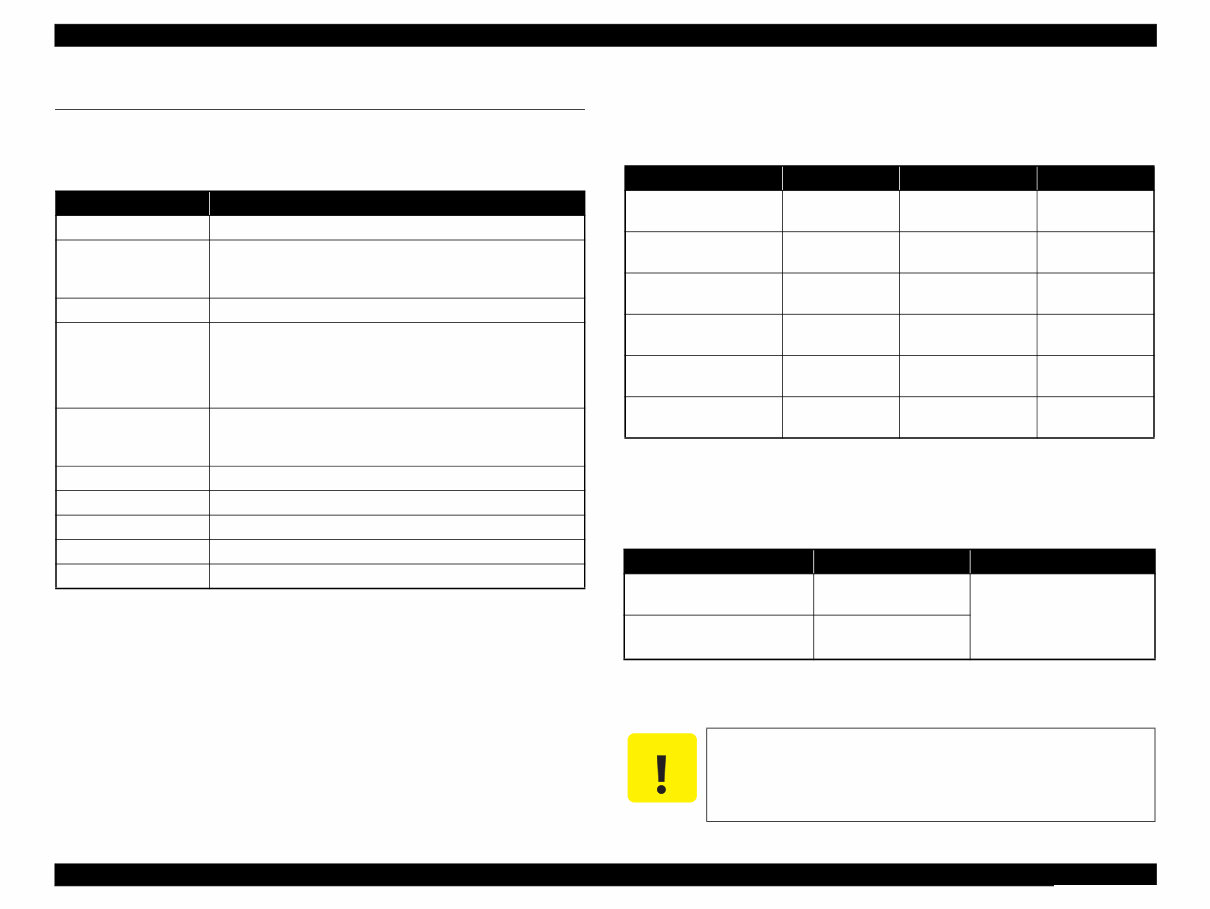
Epson Artisan 810/Epson Stylus Photo PX810FW/TX810FW/Epson Artisan 710/Epson Stylus Photo PX710W/TX710W Revision A PRODUCT DESCRIPTION Printing Specifications 11 Confidential 1.2 Printing Specifications 1.2.1 Basic Specifications 1.2.2 Ink Cartridge The product numbers of the EPSON ink cartridges for this printer are shown below. Shelf life Two years from production date (if unopened), six months after opening package. Storage Temperature Dimension 12.7 mm (W) x 68 mm (D) x 47 mm (H) Table 1-1. Printer Specifications Item Specification Print method On-demand ink jet Nozzle configuration Black: 180 nozzles x 1 Color: 180 nozzles x 5 (Light Cyan, Magenta, Yellow, Cyan, Light Magenta) Print direction Bi-directional minimum distance printing, Unidirectional printing Print resolution Horizontal x Vertical (dpi) • 360 x 180 • 720 x 720 • 360 x 360 • 5760 x 1440 • 720 x 360 Control code • ESC/P Raster command • ESC/P-R (RGB) command • EPSON Remote command Input buffer size 64 Kbytes Paper feed method Friction feed, using the ASF (Auto Sheet Feeder) Paper path Front feed, front out Paper feed rates 86 msec. (at 25.4 mm feed) PF interval Programmable in 0.01764 mm (1/1440 inch) steps Table 1-2. Product No. of Ink Cartridges Color EAI CISMEA/Asia Euro Black T0981 (S) T0811N (S) T0821N (2S) T0791 (S) T0801 (2S) Cyan T0982 (S) T0992 (2S) T0812N (S) T0822N (2S) T0792 (S) T0802 (2S) Magenta T0983 (S) T0993 (2S) T0813N (S) T0823N (2S) T0793 (S) T0803 (2S) Yellow T0984 (S) T0994 (2S) T0814N (S) T0824N (2S) T0794 (S) T0804 (2S) Light Cyan T0985 (S) T0995 (2S) T0815N (S) T0825N (2S) T0795 (S) T0805 (2S) Light Magenta T0986 (S) T0996 (2S) T0816N (S) T0826N (2S) T0796 (S) T0806 (2S) Table 1-3. Storage Temperature Situation Storage Temperature Limit When stored in individual boxes -20 o C to 40 o C (-4 o F to 104 o F) 1 month max. at 40 o C (104 o F) When installed in main unit -20 o C to 40 o C (-4 o F to 104 o F) C A U T I O N Do not use expired ink cartridges. The ink in the ink cartridge freezes at -16 °C (3.2 o F). It takes about three hours under 25 °C (77 o F) until the ink thaws and becomes usable.
Are you experiencing issues with your Epson Printer? Why spend money on repairs when you can easily do it yourself? This comprehensive service and repair manual is utilized by certified Epson technicians and is equally beneficial for professional mechanics and DIY enthusiasts.
Key features of this manual include:
Safety and Precautions
Product Specifications
Disassembly & Reassembly
Adjustments
Maintenance
Troubleshooting
System Diagrams
Replacement Parts list
Illustrated with detailed pictures and step-by-step instructions, this manual provides in-depth guidance on repairing and servicing your printer. It is the official service and repair manual, ensuring the highest resolution for quality prints.
Upon payment, you will gain instant access to the manual, eliminating shipping delays. The manual is available in English and is compatible with Windows & MAC platforms.
If you are unable to find a specific service manual, feel free to reach out to us. With one of the largest service manual databases, we may be able to assist you with your request.



 Lifetime Access