


Sony VAIO VGN-FZ Series Service manual
What's Included?
 Lifetime Access
Fast Download Speeds
Online & Offline Access
Access PDF Contents & Bookmarks
Full Search Facility
Print one or all pages of your manual

Sony VAIO VGN-FZ Series Service Manual
1
Sony VAIO VGN-FZ Series
Service Manual
Overview:
The purpose of this manual is to guide technicians through the proper procedures for servicing
the VGN-FZ Series Sony VAIO Notebook systems. Utilizing this manual will assist
technicians with replacement of all major components of the system.
Table of Contents:
1. Memory Replacement
2. Hard Drive Replacement
3. Optical Drive Replacement
4. Keyboard Cover Replacement
5. Keyboard Replacement
6. LCD Assembly Replacement
7. Bottom Housing Replacement
8. Audio Board Replacement
9. DC Jack Replacement
10. RJ-15/RJ-11 Jack Replacement
11. Switch Board Replacement
12. Wireless Card Replacement
13. Modem Replacement
14. VGA Heatsink Replacement
15. CPU Fan & CPU Heatsink Replacement
16. Motherboard Replacement
17. Speakers Replacement
18. Touchpad Buttons Replacement
19. LCD Panel Replacement
20. Cable Routing Addendum
Required Tools:
Non-marking Pry Tool
#1 Phillips Head Screwdriver
Needle Tool or Dental Pick
Anti-Static Wrist Strap
Multiple Containers for Screw Sorting
**IMPORTANT – PLEASE MAKE A NOTE OF CABLE ROUTING PRIOR TO
DISASSEMBLY – IMPROPER ROUTING WILL PREVENT THE KEYBOARD,
KEYBOARD COVER, OR PALMREST FROM SITTING PROPERLY**
Sony VAIO VGN-FZ Series Service Manual
2
1. Memory Replacement
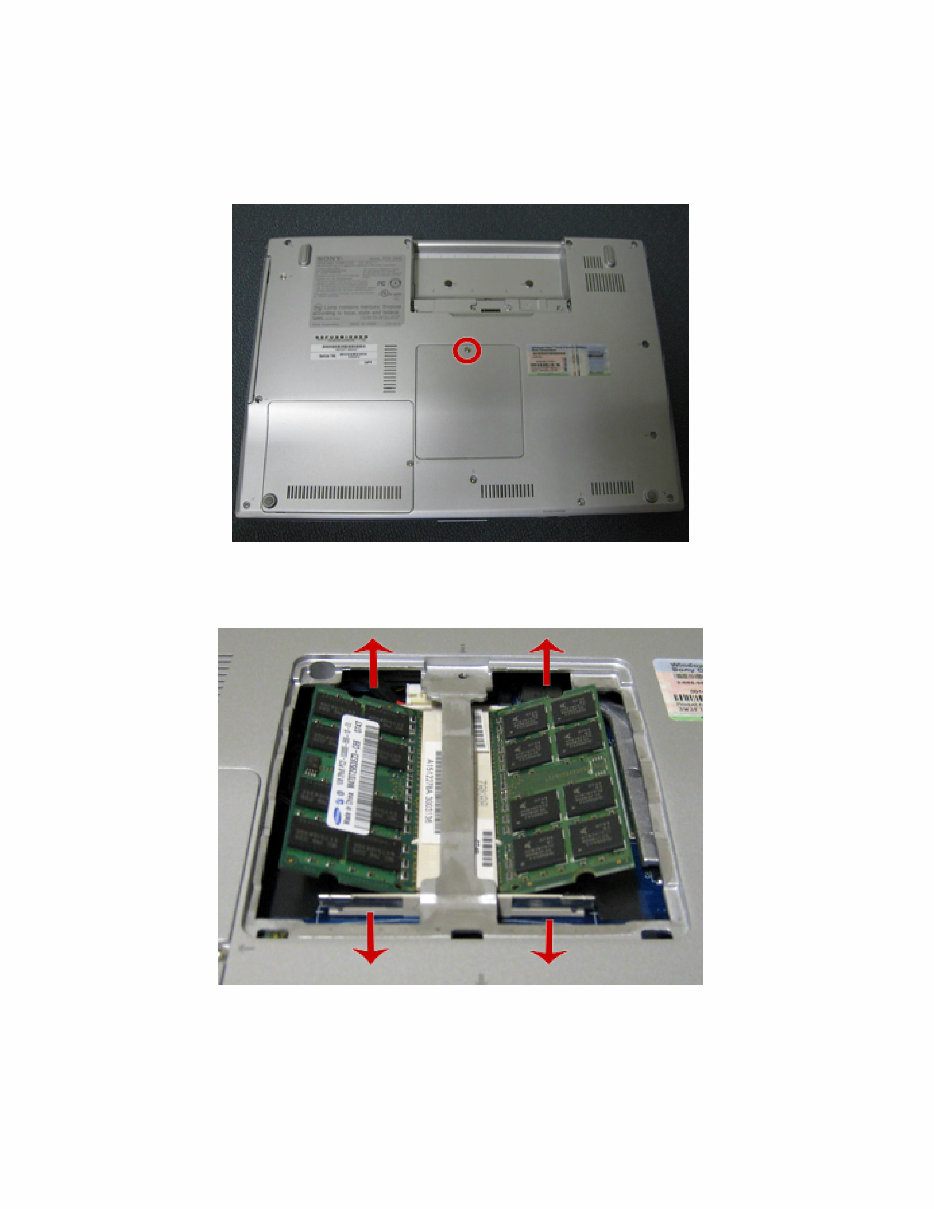
• Remove the 1 screw from the Memory access panel and remove the cover.
• Pull the retaining clips to the sides to release, and remove the module.

Sony VAIO VGN-FZ Series Service Manual
3
To install the new memory:
• Align the notch in the memory module to the notch in the slot.
• Insert the memory at an angle back into the slot, and press down ensuring the memory seats
completely.
• Replace the memory access panel and screw.
Sony VAIO VGN-FZ Series Service Manual
4
2. Hard Drive Replacement
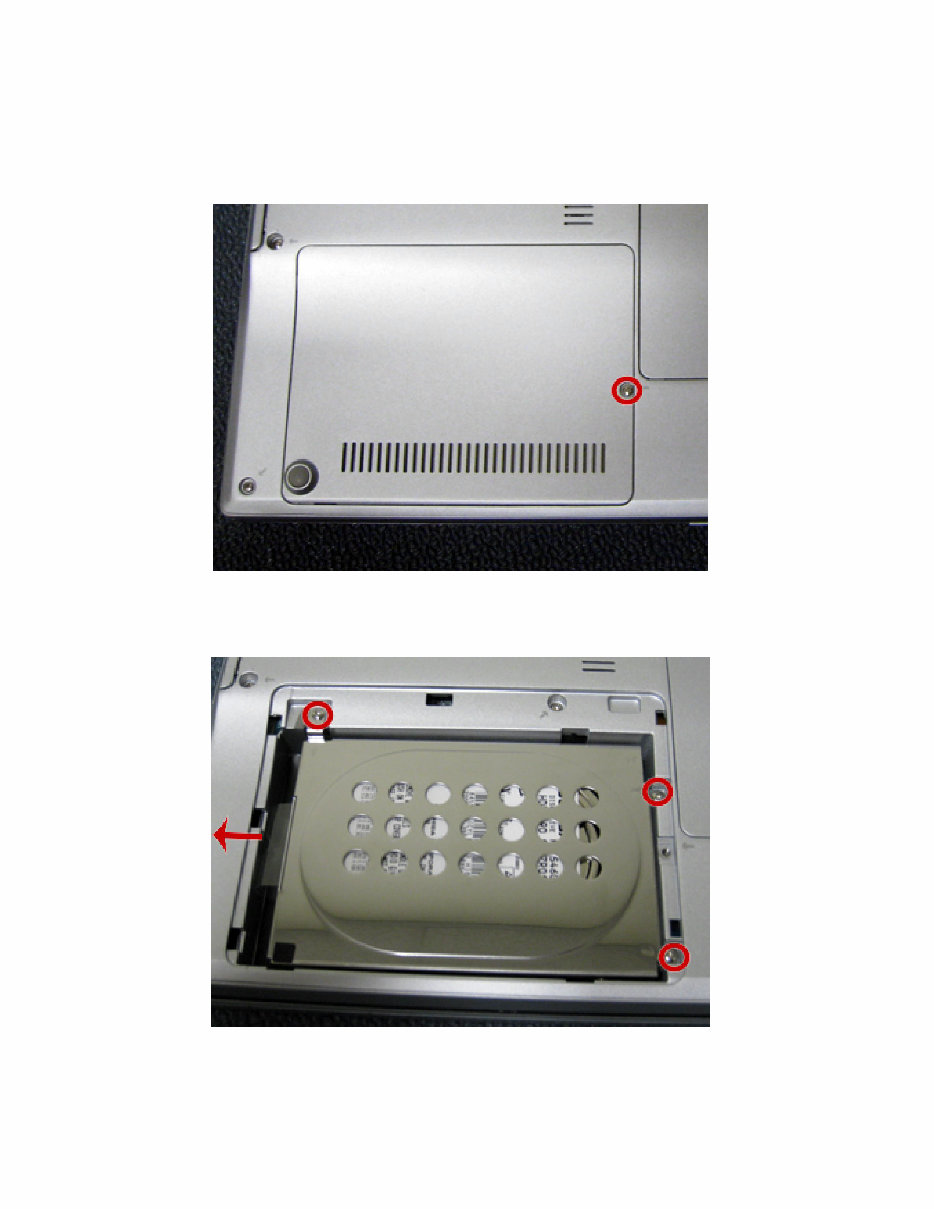
• Remove the 1 screw, and access panel.
• Remove the 3 screws that secure the hard drive bracket to the bottom housing.
• Slide the drive out to the left to remove.

Sony VAIO VGN-FZ Series Service Manual
5
• Remove the 2 screws from each side of the hard drive to remove it from the retaining
bracket.
To install the hard drive:
• Reinstall the hard drive back into the bracket.
• Reinstall the 4 screws that secure the hard drive to the bracket.
• Slide the drive back into the connector.
• Reinstall the 3 screws.
• Reinstall the access panel and screw.
Sony VAIO VGN-FZ Series Service Manual
6
3. Optical Drive Replacement
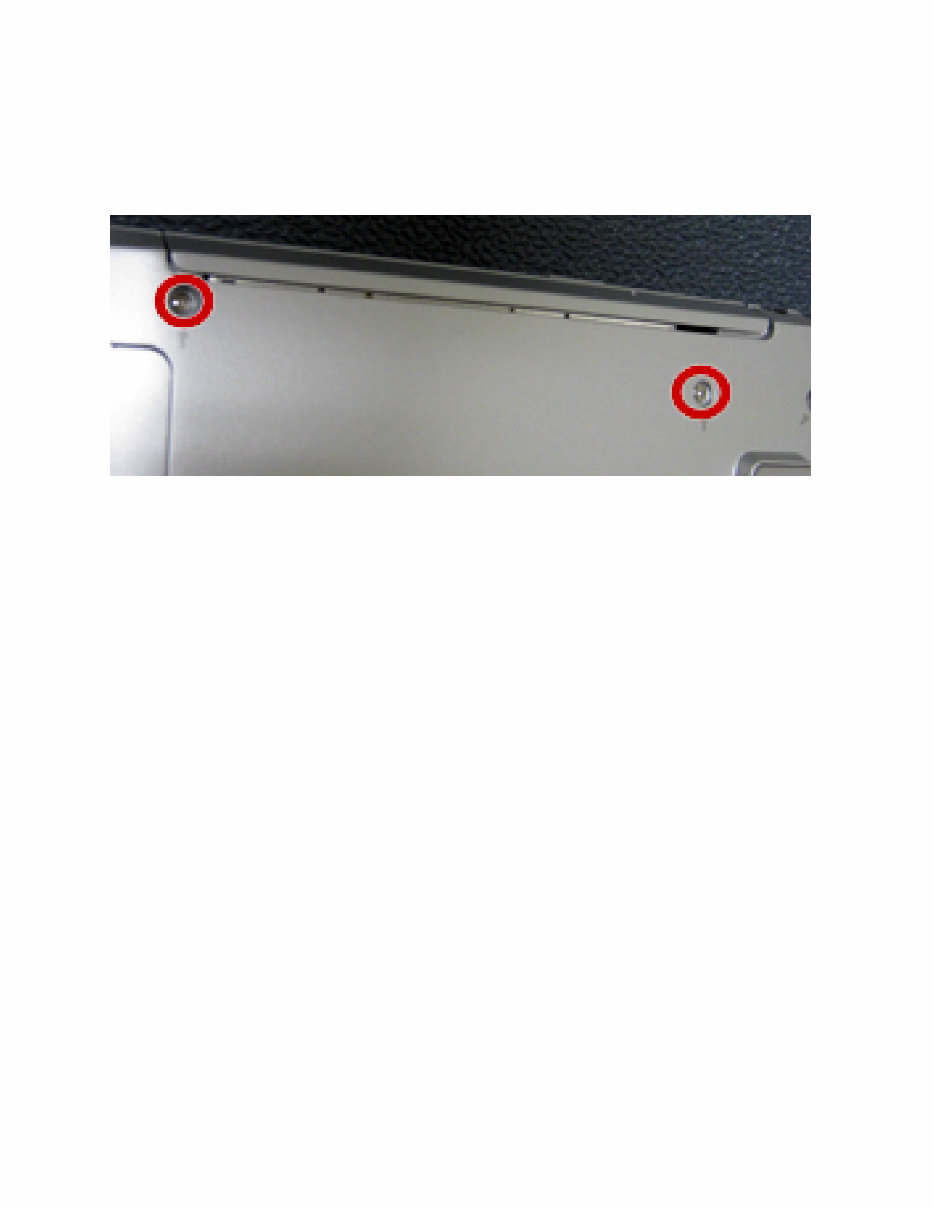
• Remove the 2 screws securing the optical drive to the bottom housing.
• Slide the drive out.
• Remove the 2 screws from each side of the drive to remove the drive from the bracket.
To install the optical drive:
• Reinstall the optical drive back into the bracket.
• Reinstall the 4 screws that secure the optical drive to the bracket.
• Slide the drive back into the slot.
• Reinstall the 2 screws.
Sony VAIO VGN-FZ Series Service Manual
7
4. Keyboard Cover Replacement
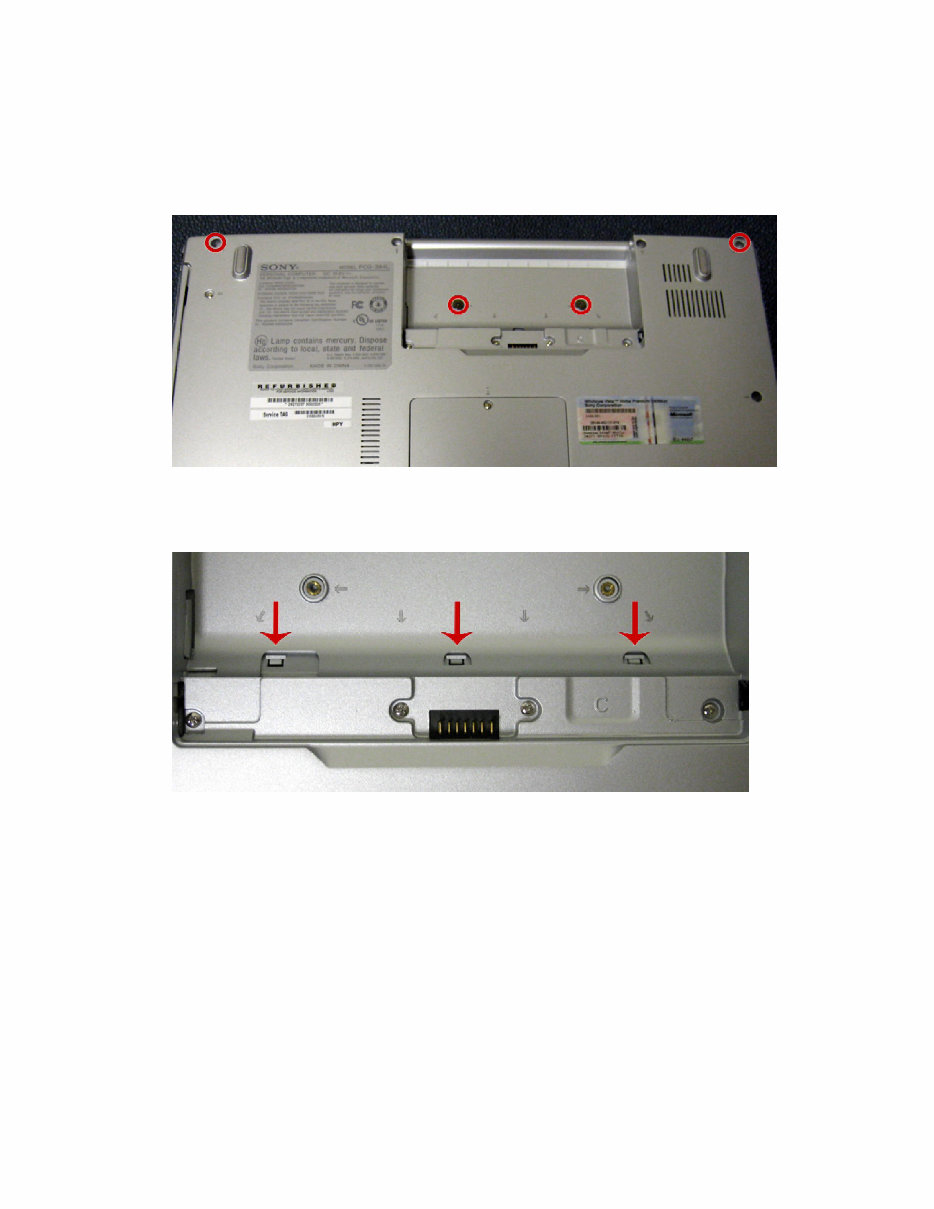
• Remove the 4 screws.
• Press in the 3 clips.
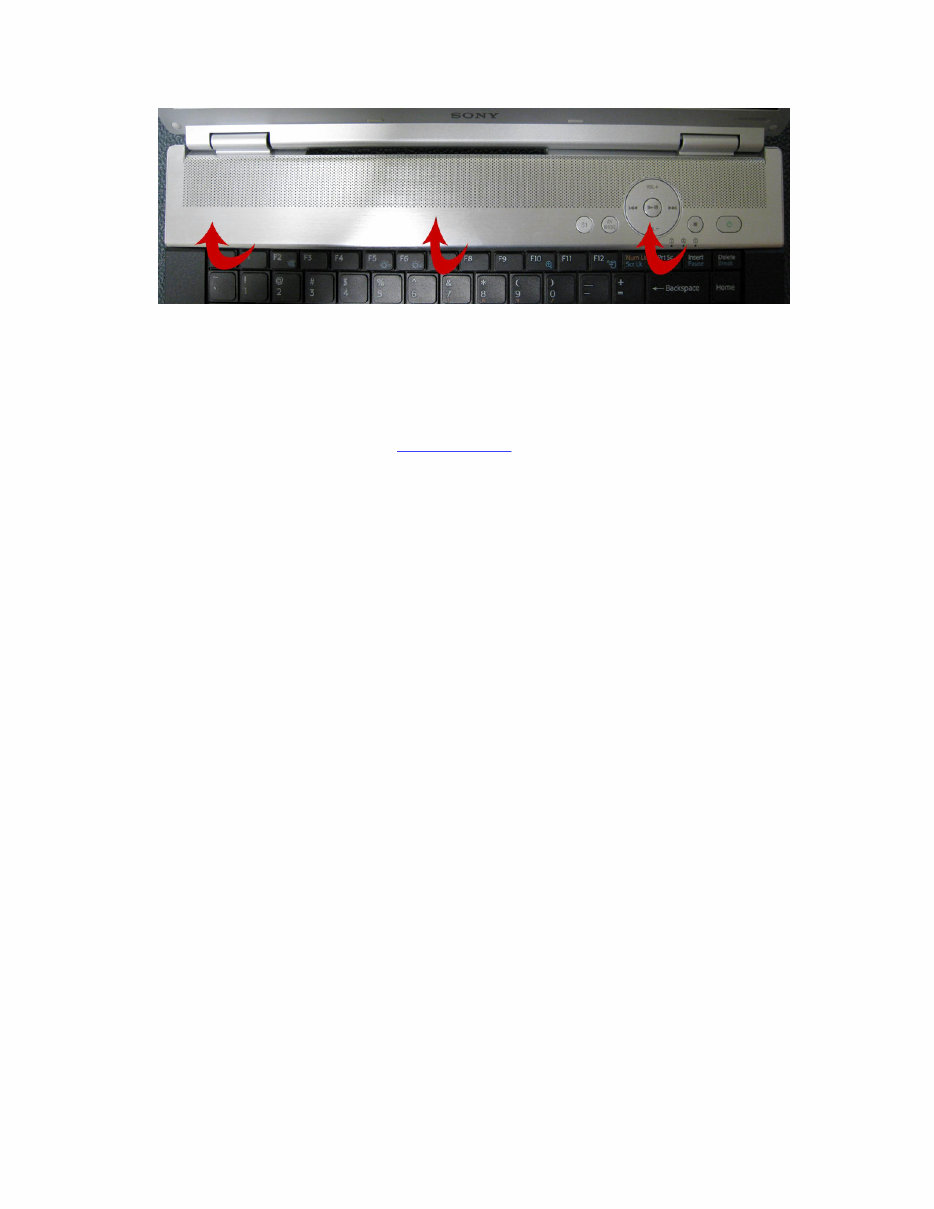
• Using the non-marking pry tool, release the kb cover clips and rotate up towards the
LCD.
Sony VAIO VGN-FZ Series Service Manual
8
To install the keyboard cover:
• Reinstall the cover making sure it is secure and flush. Verify the front and back hinge
covers are snapped together properly.
• Reinstall the 4 screws from the bottom housing .
Sony VAIO VGN-FZ Series Service Manual
9
5. Keyboard Replacement
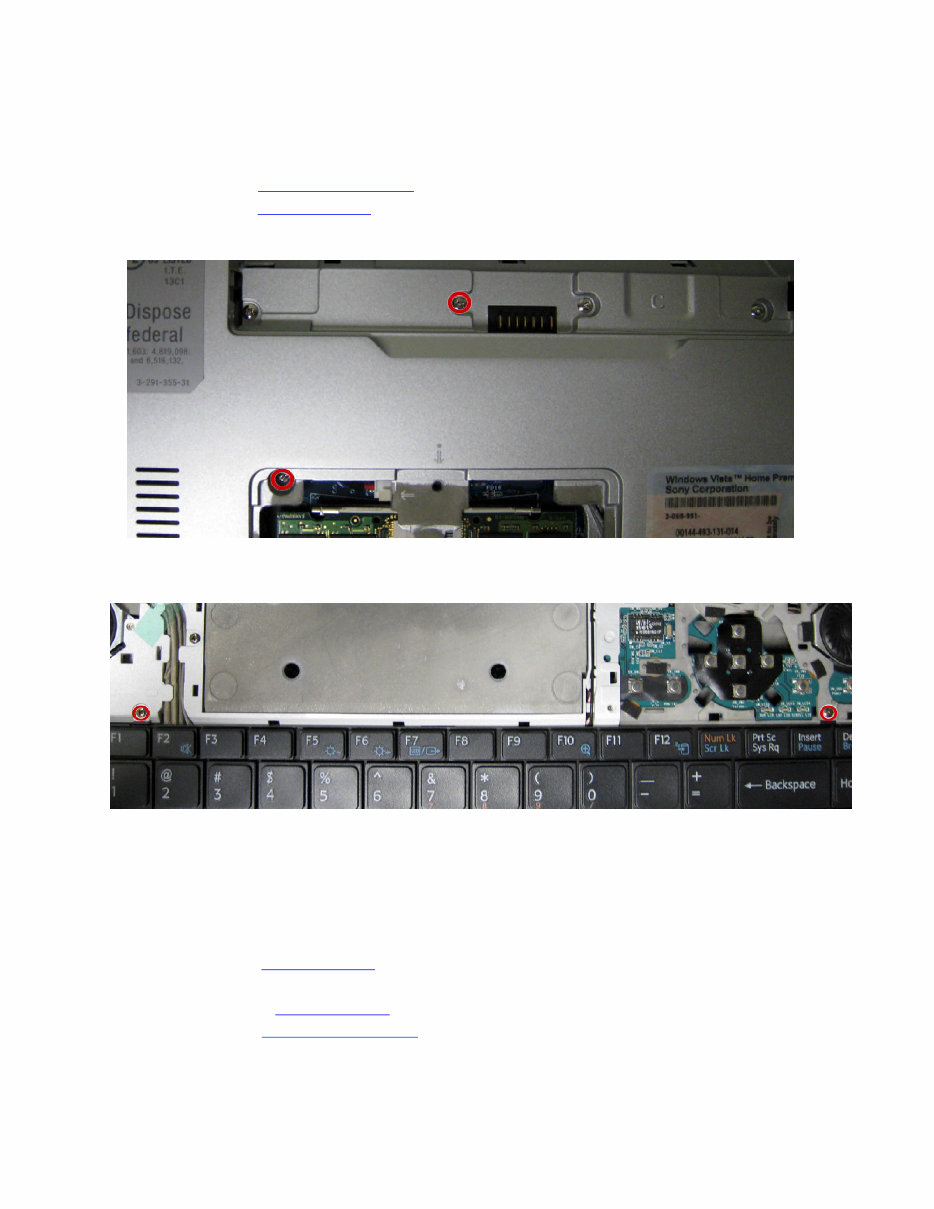
• Remove the memory access panel .
• Remove the keyboard cover .
• Remove the 2 screws.
• Remove the 2 keyboard screws.
• Tilt the keyboard up and disconnect the keyboard cable.
To install the keyboard:
• Reconnect the keyboard cable.
• Reinstall the keyboard.
• Reinstall the keyboard cover .
• Reinstall the top 2 keyboard screws.
• Reinstall the 2 bottom housing screws.
• Reinstall the memory access panel .
Sony VAIO VGN-FZ Series Service Manual
10
6. LCD Assembly Replacement
• Note the cable routing.
• Remove the keyboard cover .
• Remove the keyboard .
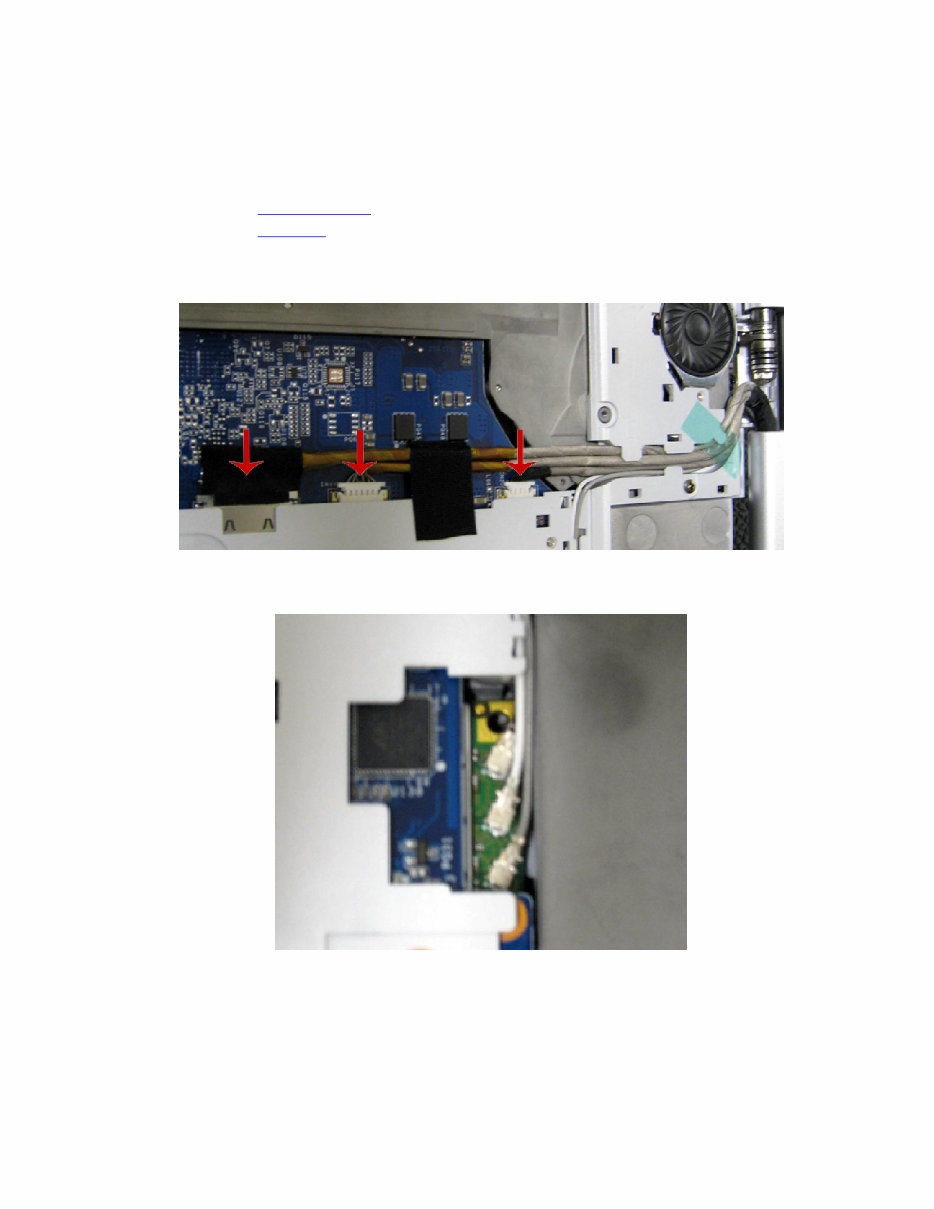
• Disconnect the camera, inverter, and LCD cables.
• Disconnect the wireless LAN cables.
• Disconnect the MIC cable. Carefully remove the harness from underneath the edge of the
palm rest.
You're Reading a Preview
What's Included?
Lifetime Access
Fast Download Speeds
Online & Offline Access
Access PDF Contents & Bookmarks
Full Search Facility
Print one or all pages of your manual
$35.99
Viewed 50 Times Today


Secure transaction
What's Included?
Lifetime Access
Fast Download Speeds
Online & Offline Access
Access PDF Contents & Bookmarks
Full Search Facility
Print one or all pages of your manual
$35.99
Sony VAIO VGN-FZ Series Service manual is a comprehensive guide that provides detailed instructions for repairing and maintaining the Sony VAIO VGN-FZ Series. Whether you are a professional mechanic or a DIY enthusiast, this manual offers valuable insights into addressing various issues with your car.
- Memory replacement
- Hard drive replacement
- Optical drive replacement
- Keyboard cover replacement
- Keyboard replacement
- LCD assembly replacement
- Bottom housing replacement
- Audio board replacement
- DC jack replacement
- RJ-15/RJ-11 jack replacement
- Switch board replacement
- Wireless card replacement
- Modem replacement
- VGA heatsink replacement
- CPU Fan & CPU Heatsink replacement
- Motherboard replacement
- Speakers replacement
- Touchpad buttons replacement
- LCD panel replacement
- Cable routing addendum
The manual is available in PDF format, compatible with all versions of Windows and Mac. It is presented in English and requires Adobe Reader for access. By utilizing this service manual, you can enhance your understanding of the Sony VAIO VGN-FZ Series, stay informed about its maintenance, and make informed decisions regarding its upkeep. We are confident that this manual will prove to be a valuable resource for you.


