2 Colour [ HDC-TM700/SD700 ] (K)...........Black Type [ HDC-SD707 ] (S)...........Silver Type (K)...........Black Type 4 TABLE OF CONTENTS PAGE PAGE 1 Safety Precautions ----------------------------------------------- 3 1.1. General Guidelines ----------------------------------------3 1.2. Leakage Current Cold Check ---------------------------3 1.3. Leakage Current Hot Check (See Figure 1.)--------3 1.4. How to Discharge the Capacitor on Flash P.C.B.----------------------------------------------------------4 2 Warning -------------------------------------------------------------- 5 2.1. Prevention of Electrostatic Discharge (ESD) to Electrostatically Sensitive (ES) Devices ----------5 2.2. How to Recycle the Lithium Ion Battery (U.S. Only)-----------------------------------------------------------5 2.3. Caution for AC Cord (For EB/GC) ---------------------6 2.4. How to Replace the Lithium Battery -------------------7 3 Service Navigation------------------------------------------------ 8 3.1. Introduction --------------------------------------------------8 3.2. General Description About Lead Free Solder (PbF) ----------------------------------------------------------8 3.3. How to Define the Model Suffix (NTSC or PAL model)---------------------------------------------------------9 4 Specifications ---------------------------------------------------- 10 5 Service Fixture & Tools --------------------------------------- 13 5.1. When Replacing the Main P.C.B. --------------------13 5.2. Service Position ------------------------------------------ 13 Downloaded from www.Manualslib.com manuals search engine
3 1 Safety Precautions 1.1. General Guidelines 1. IMPORTANT SAFETY NOTICE There are special components used in this equipment which are important for safety. These parts are marked by in the Schematic Diagrams, Circuit Board Layout, Exploded Views and Replacement Parts List. It is essen- tial that these critical parts should be replaced with manu- facturer’s specified parts to prevent X-RADIATION, shock, fire, or other hazards. Do not modify the original design without permission of manufacturer. 2. An Isolation Transformer should always be used during the servicing of AC Adaptor whose chassis is not isolated from the AC power line. Use a transformer of adequate power rating as this protects the technician from acci- dents resulting in personal injury from electrical shocks. It will also protect AC Adaptor from being damaged by acci- dental shorting that may occur during servicing. 3. When servicing, observe the original lead dress. If a short circuit is found, replace all parts which have been over- heated or damaged by the short circuit. 4. After servicing, see to it that all the protective devices such as insulation barriers, insulation papers shields are properly installed. 5. After servicing, make the following leakage current checks to prevent the customer from being exposed to shock hazards. 1.2. Leakage Current Cold Check 1. Unplug the AC cord and connect a jumper between the two prongs on the plug. 2. Measure the resistance value, with an ohmmeter, between the jumpered AC plug and each exposed metal- lic cabinet part on the equipment such as screwheads, connectors, control shafts, etc. When the exposed metal- lic part has a return path to the chassis, the reading should be between 1 MΩ and 5.2 MΩ. When the exposed metal does not have a return path to the chassis, the reading must be infinity. 1.3. Leakage Current Hot Check (See Figure 1.) 1. Plug the AC cord directly into the AC outlet. Do not use an isolation transformer for this check. 2. Connect a 1.5 kΩ, 10 W resistor, in parallel with a 0.15 μF capacitor, between each exposed metallic part on the set and a good earth ground, as shown in Figure 1. 3. Use an AC voltmeter, with 1 kΩ/V or more sensitivity, to measure the potential across the resistor. 4. Check each exposed metallic part, and measure the volt- age at each point. 5. Reverse the AC plug in the AC outlet and repeat each of the above measurements. 6. The potential at any point should not exceed 0.75 V RMS. A leakage current tester (Simpson Model 229 or equiva- lent) may be used to make the hot checks, leakage cur- rent must not exceed 1/2 mA. In case a measurement is outside of the limits specified, there is a possibility of a shock hazard, and the equipment should be repaired and rechecked before it is returned to the customer. Figure. 1 Downloaded from www.Manualslib.com manuals search engine
4 1.4. How to Discharge the Capacitor on Flash P.C.B. CAUTION: 1. Be sure to discharge the capacitor on FLASH P.C.B.. 2. Be careful of the high voltage circuit on FLASH P.C.B. when servicing. [Discharging Procedure] 1. Refer to the disassemble procedure and Remove the necessary parts/unit. 2. Put the insulation tube onto the lead part of Resistor (ERG5SJ102:1kΩ /5W). (an equivalent type of resistor may be used.) 3. Put the resistor between both terminals of capacitor on FLASH P.C.B. for approx. 5 seconds. 4. After discharging confirm that the capacitor voltage is lower than 10V using a voltmeter. Fig. F1 Downloaded from www.Manualslib.com manuals search engine
5 2 Warning 2.1. Prevention of Electrostatic Discharge (ESD) to Electrostatically Sensitive (ES) Devices Some semiconductor (solid state) devices can be damaged easily by static electricity. Such components commonly are called Elec- trostatically Sensitive (ES) Devices. Examples of typical ES devices are integrated circuits and some field-effect transistors and semiconductor "chip" components. The following techniques should be used to help reduce the incidence of component damage caused by electrostatic discharge (ESD). 1. Immediately before handling any semiconductor component or semiconductor-equipped assembly, drain off any ESD on your body by touching a known earth ground. Alternatively, obtain and wear a commercially available discharging ESD wrist strap, which should be removed for potential shock reasons prior to applying power to the unit under test. 2. After removing an electrical assembly equipped with ES devices, place the assembly on a conductive surface such as alumi- num foil, to prevent electrostatic charge buildup or exposure of the assembly. 3. Use only a grounded-tip soldering iron to solder or unsolder ES devices. 4. Use only an antistatic solder removal device. Some solder removal devices not classified as "antistatic (ESD protected)" can generate electrical charge sufficient to damage ES devices. 5. Do not use freon-propelled chemicals. These can generate electrical charges sufficient to damage ES devices. 6. Do not remove a replacement ES device from its protective package until immediately before you are ready to install it. (Most replacement ES devices are packaged with leads electrically shorted together by conductive foam, aluminum foil or compara- ble conductive material). 7. Immediately before removing the protective material from the leads of a replacement ES device, touch the protective material to the chassis or circuit assembly into which the device will be installed. CAUTION : Be sure no power is applied to the chassis or circuit, and observe all other safety precautions. 8. Minimize bodily motions when handling unpackaged replacement ES devices. (Otherwise harmless motion such as the brushing together of your clothes fabric or the lifting of your foot from a carpeted floor can generate static electricity (ESD) suf- ficient to damage an ES device). 2.2. How to Recycle the Lithium Ion Battery (U.S. Only) Downloaded from www.Manualslib.com manuals search engine
6 2.3. Caution for AC Cord (For EB/GC) 2.3.1. Information for Your Safety IMPORTANT Your attention is drawn to the fact that recording of pre- recorded tapes or discs or other published or broadcast material may infringe copyright laws. WARNING To reduce the risk of fire or shock hazard, do not expose this equipment to rain or moisture. CAUTION To reduce the risk of fire or shock hazard and annoying interference, use the recommended accessories only. FOR YOUR SAFETY DO NOT REMOVE THE OUTER COVER To prevent electric shock, do not remove the cover. No user serviceable parts inside. Refer servicing to qualified service personnel. 2.3.2. Caution for AC Mains Lead For your safety, please read the following text carefully. This appliance is supplied with a moulded three-pin mains plug for your safety and convenience. A 5-ampere fuse is fitted in this plug. Should the fuse need to be replaced please ensure that the replacement fuse has a rating of 5 amperes and it is approved by ASTA or BSI to BS1362 Check for the ASTA mark or the BSI mark on the body of the fuse. If the plug contains a removable fuse cover you must ensure that it is refitted when the fuse is replaced. If you lose the fuse cover, the plug must not be used until a replacement cover is obtained. A replacement fuse cover can be purchased from your local Panasonic Dealer. If the fitted moulded plug is unsuitable for the socket outlet in your home then the fuse should be removed and the plug cut off and disposed of safety. There is a danger of severe electrical shock if the cut off plug is inserted into any 13-ampere socket. If a new plug is to be fitted please observe the wiring code as shown below. If in any doubt, please consult a qualified electrician. 2.3.2.1. Important The wires in this mains lead are coloured in accordance with the following code: As the colours of the wires in the mains lead of this appliance may not correspond with the coloured markings identifying the terminals in your plug, proceed as follows: The wire which is coloured BLUE must be connected to the ter- minal in the plug which is marked with the letter N or coloured BLACK. The wire which is coloured BROWN must be connected to the terminal in the plug which is marked with the letter L or coloured RED. Under no circumstances should either of these wires be con- nected to the earth terminal of the three pin plug, marked with the letter E or the Earth Symbol. 2.3.2.2. Before Use Remove the Connector Cover as follows. 2.3.2.3. How to Replace the Fuse 1. Remove the Fuse Cover with a screwdriver. 2. Replace the fuse and attach the Fuse cover. Blue Neutral Brown Live Downloaded from www.Manualslib.com manuals search engine
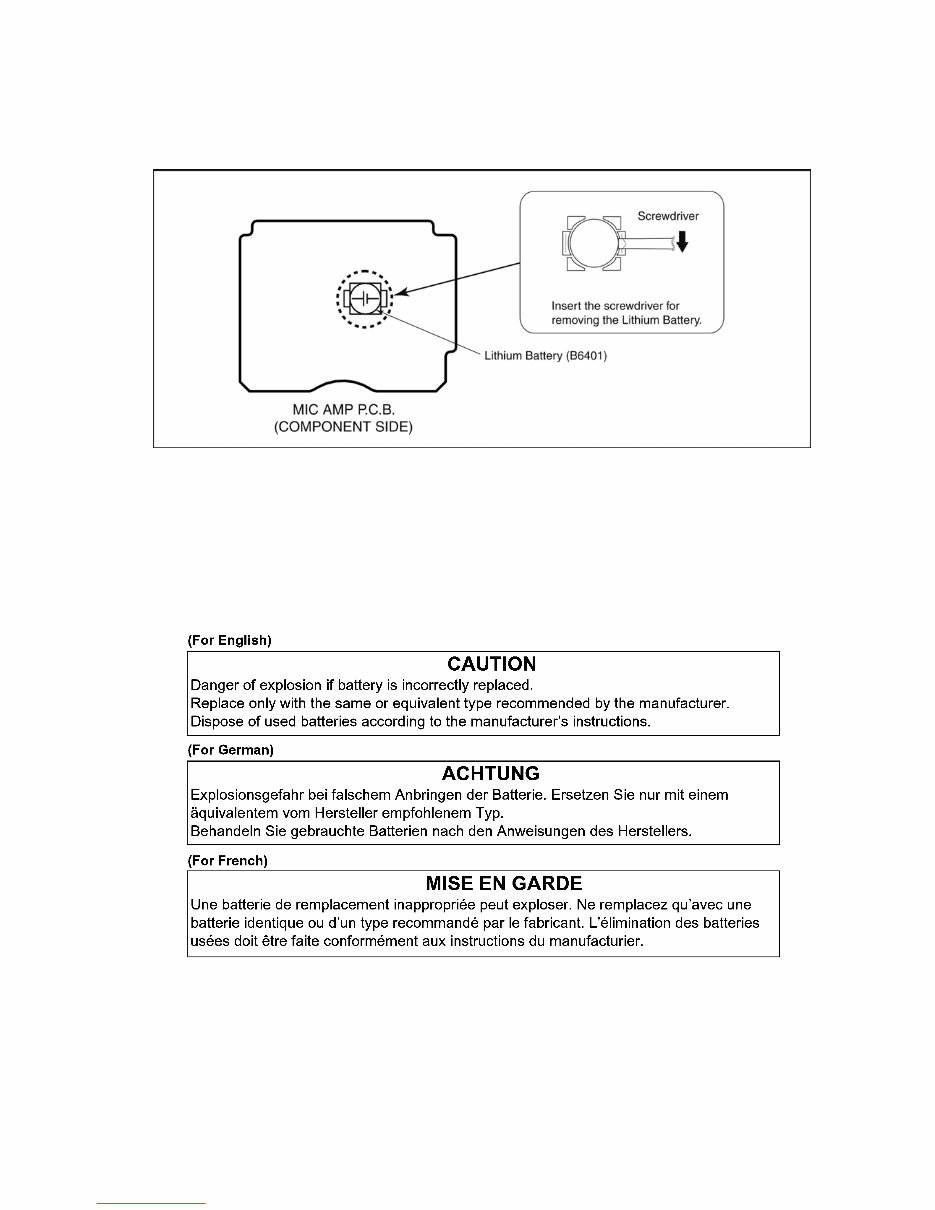
7 2.4. How to Replace the Lithium Battery 2.4.1. Replacement Procedure 1. Remove the MIC AMP P.C.B.. (Refer to Disassembly Procedures.) 2. Remove the Lithium battery (Ref. No. “B6401” at component side of MIC AMP P.C.B.) and then replace it into new one. NOTE: This Lithium battery is a critical component. (Type No.: ML-614S/ZTK Manufactured by Energy Company, Panasonic Corporation) It must never be subjected to excessive heat or discharge. It must therefore only be fitted in requirement designed specifically for its use. Replacement batteries must be of same type and manufacture. They must be fitted in the same manner and location as the original battery, with the correct polarity contacts observed. Do not attempt to re-charge the old battery or re-use it for any other purpose. It should be disposed of in waste products destined for burial rather than incineration. NOTE: Above caution is applicable for a battery pack which is for HDC-TM700/SD700/SD707 series, as well. 1. Battery Pack for this model. 2. Button-type battery for Remote controller (CR2025: Being supplied from Energy Company, Panasonic Corporation). Downloaded from www.Manualslib.com manuals search engine
8 3 Service Navigation 3.1. Introduction This service manual contains technical information, which allow service personnel’s to understand and service this model. Please place orders using the parts list and not the drawing reference numbers. If the circuit is changed or modified, the information will be followed by service manual to be controlled with original service manual. 3.2. General Description About Lead Free Solder (PbF) The lead free solder has been used in the mounting process of all electrical components on the printed circuit boards used for this equipment in considering the globally environmental conservation. The normal solder is the alloy of tin (Sn) and lead (Pb). On the other hand, the lead free solder is the alloy mainly consists of tin (Sn), silver (Ag) and Copper (Cu), and the melting point of the lead free solder is higher approx.30°C (86°F) more than that of the normal solder. Distinction of P.C.B. Lead Free Solder being used Service caution for repair work using Lead Free Solder (PbF) • The lead free solder has to be used when repairing the equipment for which the lead free solder is used. (Definition: The letter of “PbF” is printed on the P.C.B. using the lead free solder.) • To put lead free solder, it should be well molten and mixed with the original lead free solder. • Remove the remaining lead free solder on the P.C.B. cleanly for soldering of the new IC. • Since the melting point of the lead free solder is higher than that of the normal lead solder, it takes the longer time to melt the lead free solder. • Use the soldering iron (more than 70W) equipped with the temperature control after setting the temperature at 350±30°C (662±86°F). Recommended Lead Free Solder (Service Parts Route.) • The following 3 types of lead free solder are available through the service parts route. RFKZ03D01KS-----------(0.3mm 100g Reel) RFKZ06D01KS-----------(0.6mm 100g Reel) RFKZ10D01KS-----------(1.0mm 100g Reel) Note * Ingredient: tin (Sn) 96.5%, silver (Ag) 3.0%, Copper (Cu) 0.5%, Cobalt (Co) / Germanium (Ge) 0.1 to 0.3% Downloaded from www.Manualslib.com manuals search engine
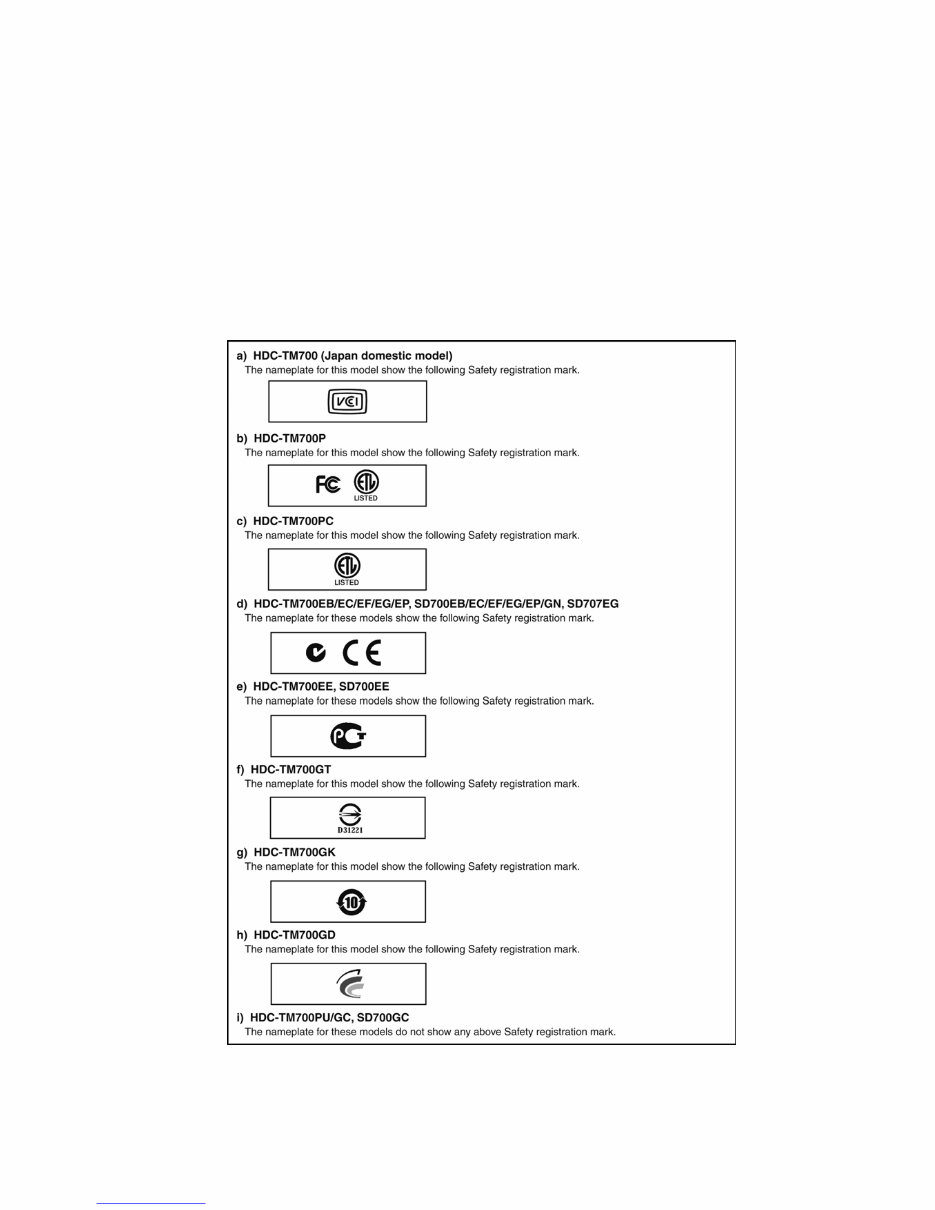
9 3.3. How to Define the Model Suffix (NTSC or PAL model) There are nine kinds of HDC-TM700/SD700/SD707. • a) HDC-TM700 (Japan domestic model) • b) HDC-TM700P • c) HDC-TM700PC • d) HDC-TM700EB/EC/EF/EG/EP, SD700EB/EC/EF/EG/EP/GN, SD707EG • e) HDC-TM700EE, SD700EE • f) HDC-TM700GT • g) HDC-TM700GK • h) HDC-TM700GD • i) HDC-TM700PU/GC, SD700GC What is the difference is that the “INITIAL SETTING” data which is stored in Flash ROM mounted on Main P.C.B.. 3.3.1. Defining methods: To define the model suffix to be serviced, refer to the rating label which is putted on the Unit. NOTE: After replacing the MAIN P.C.B., be sure to achieve adjustment. The adjustment instruction is available at “software download” on the “Support Information from NWBG/VDBG-AVC” web-site in “TSN system”, together with Maintenance software. Downloaded from www.Manualslib.com manuals search engine
10 4 Specifications Downloaded from www.Manualslib.com manuals search engine
Are you experiencing issues with your Panasonic HD Camcorder? Instead of replacing it or spending a significant amount on repairs, why not take matters into your own hands?
This comprehensive service and repair manual is utilized by Official Certified Panasonic Technicians and is designed to assist you in troubleshooting and repairing your Video Camera.
With this manual, you will gain valuable insights into:
Safety & Precautions
Product Specifications
Service Modes
Disassembly & Reassembly
Adjustments
Troubleshooting
Maintenance
Schematic Diagram
Block Diagram
Circuit Board
Exploded Views
Replacement parts list
This manual provides comprehensive coverage for ALL worldwide HDC-TM700/SD700/SD707 models, including but not limited to:
HDC-TM700P
HDC-TM700PC
HDC-TM700PU
HDC-TM700EB
HDC-TM700EC
HDC-TM700EE
HDC-TM700EF
HDC-TM700EG
HDC-TM700EP
HDC-TM700GC
HDC-TM700GD
HDC-TM700GK
HDC-TM700GT
HDC-SD700EB
HDC-SD700EC
HDC-SD700EE
HDC-SD700EF
HDC-SD700EG
HDC-SD700EP
HDC-SD700GC
HDC-SD700GN
HDC-SD707EG
This detailed service manual is accompanied by illustrations and step-by-step instructions, ensuring you can effectively repair and service your device.
You can conveniently print this manual from any computer and printer. Please note that this is the OFFICIAL service and repair manual in .PDF format, ensuring the highest resolution for quality printing.
Upon payment, you will gain instant access to your manual, eliminating shipping fees and wait times. This manual is available in English and consists of 83 pages, compatible with both Windows and MAC platforms.
If you are unable to find a specific service manual, feel free to reach out to us. With one of the largest service manual databases, we may be able to assist you!
Recently Viewed
5,521,897Happy Clients
2,594,462eManuals
1,120,453Trusted Sellers
15Years in Business
Price:
Actual Price:
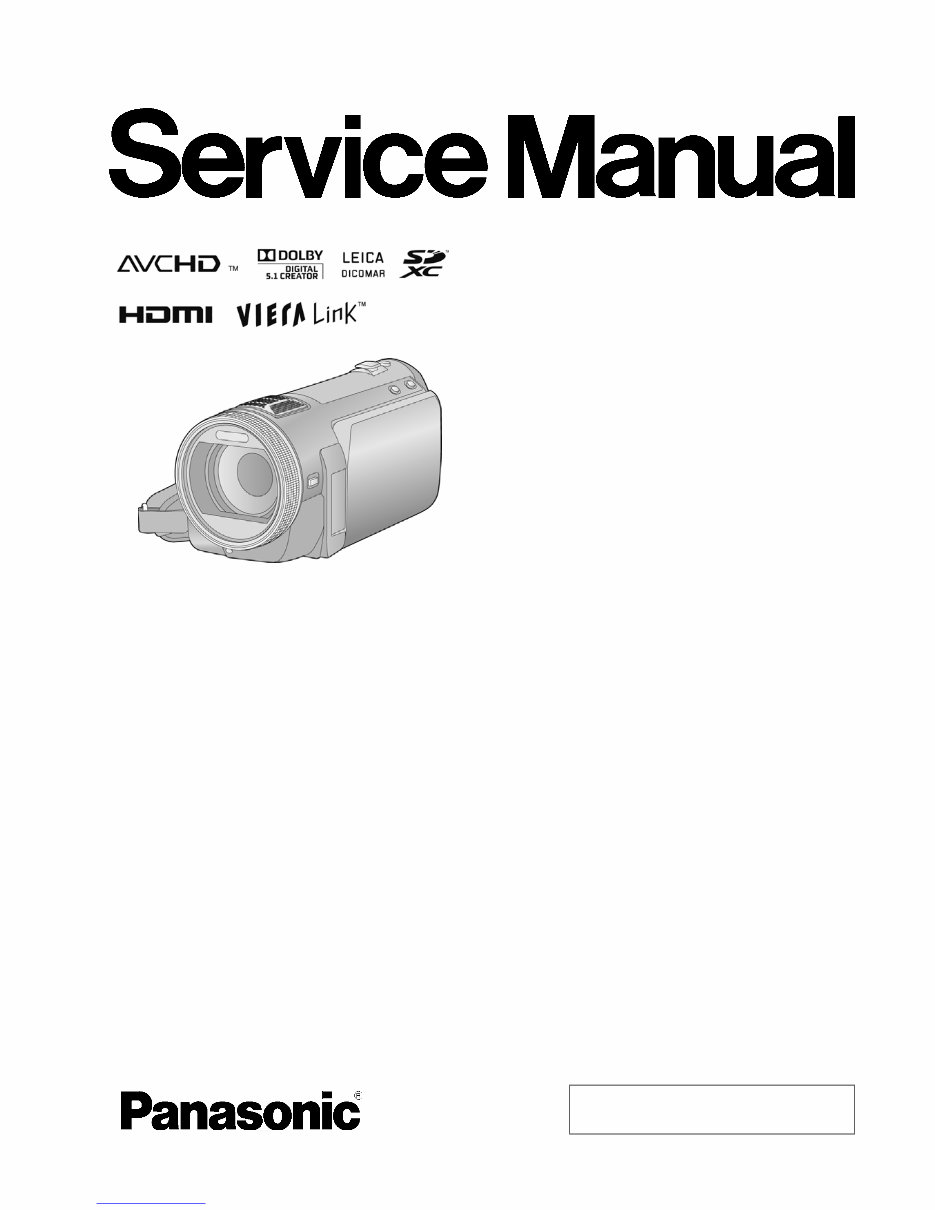
Panasonic HDC-TM700 SD700 SD707 Service Manual & Repair Guide



 Lifetime Access