V4 Temp.mif 77 11 338 820 "The repair procedures given by the manufacturer in this document are based on the technical specifications current when it was prepared. The methods may be modified as a result of changes introduced by the manufacturer in the production of the various component units and accessories from which his vehicles are constructed." All copyrights reserved by Renault. EDITION ANGLAISE Copying or translating, in part or in full, of this document or use of the service part reference numbering system is forbidden without the prior written authority of Renault. This Technical Note relates to onboard computer Reprogramming and Calibration operations using a RENAULT.NET connection or a Reprogramming CD (Part No.: 77 11 298 859). Technical Note 3585A ALL TYPES Subsection concerned: 01B COMPUTER REPROGRAMMING AND CALIBRATION PROCEDURE
CONTENTS Page GENERAL INFORMATION......................................................................................................................................... 1 Tooling required ....................................................................................................................................................... 1 Calibration ............................................................................................................................................................... 2 Reprogramming ....................................................................................................................................................... 2 OPERATING PROCEDURE (Programming and reprogramming a computer)........................................................... 3 Preparing the RENAULT CLIP diagnostic tool ......................................................................................................... 3 Preparing the vehicle ............................................................................................................................................... 3 Programming phase - reprogramming..................................................................................................................... 4 Returning the vehicle ............................................................................................................................................... 4 CLIP screens depending on programming - reprogramming step........................................................................... 5 Linking the screens.................................................................................................................................................. 6 CODE SERVER PROCEDURE (in CD mode only) .................................................................................................. 15 CONSULTING THE COMPUTER IDENTIFICATION FRAME .................................................................................. 17 CONSULTING THE COMPUTER'S HISTORY ......................................................................................................... 17 CONSULTING THE DIAGNOSTIC TOOL LOG ........................................................................................................ 18 TRACE FILE (upon the request of Techline)............................................................................................................. 19 Creating the trace file ............................................................................................................................................ 19 Recovering the trace file after programming - reprogramming .............................................................................. 19
VEHICLE GENERAL INFORMATION Programming – Reprogramming the computers 01B 01B-1 101B VEHICLE GENERAL INFORMATION Programming – Reprogramming the computers GENERAL INFORMATION Two types of operation can be carried out in after-sales, either programming or reprogramming of the computer. These operations apply to all vehicles and all types of (re)programmable computer (e.g: Injection, Gearbox, Air conditioning, Instrument panel, Parking brake, UCH). The two types of operation are carried out with the RENAULT CLIP diagnostic tool using either RENAULT.NET, or the Calibration - Reprogramming CD Part No. 77 11 298 859. The reprogramming data available via RENAULT.NET is always more up to date than that available on the CD (Part no. 77 11 298 859). The CD is edited and distributed every month in the same way as the diagnostic tools update. Each CD cancels and replaces the previous one. Tooling required: ● CLIP with the most recent update. ● 1 connection to RENAULT.NET (requires a CLIP with a RF kit and a RENAULT.NET certificate) or 1 reprogramming CD, Part No. 77 11 298 859 from the current month. ● 1 RENAULT approved battery charger. ● The FAULT FINDING REPAIR MANUAL relevant to the vehicle and the system to be (re)programmed. ● 1 RENAULT.NET connection to the NRE reprogramming codes server for each calibration - reprogramming with a reprogramming CD (See CODE SERVER PROCEDURE).
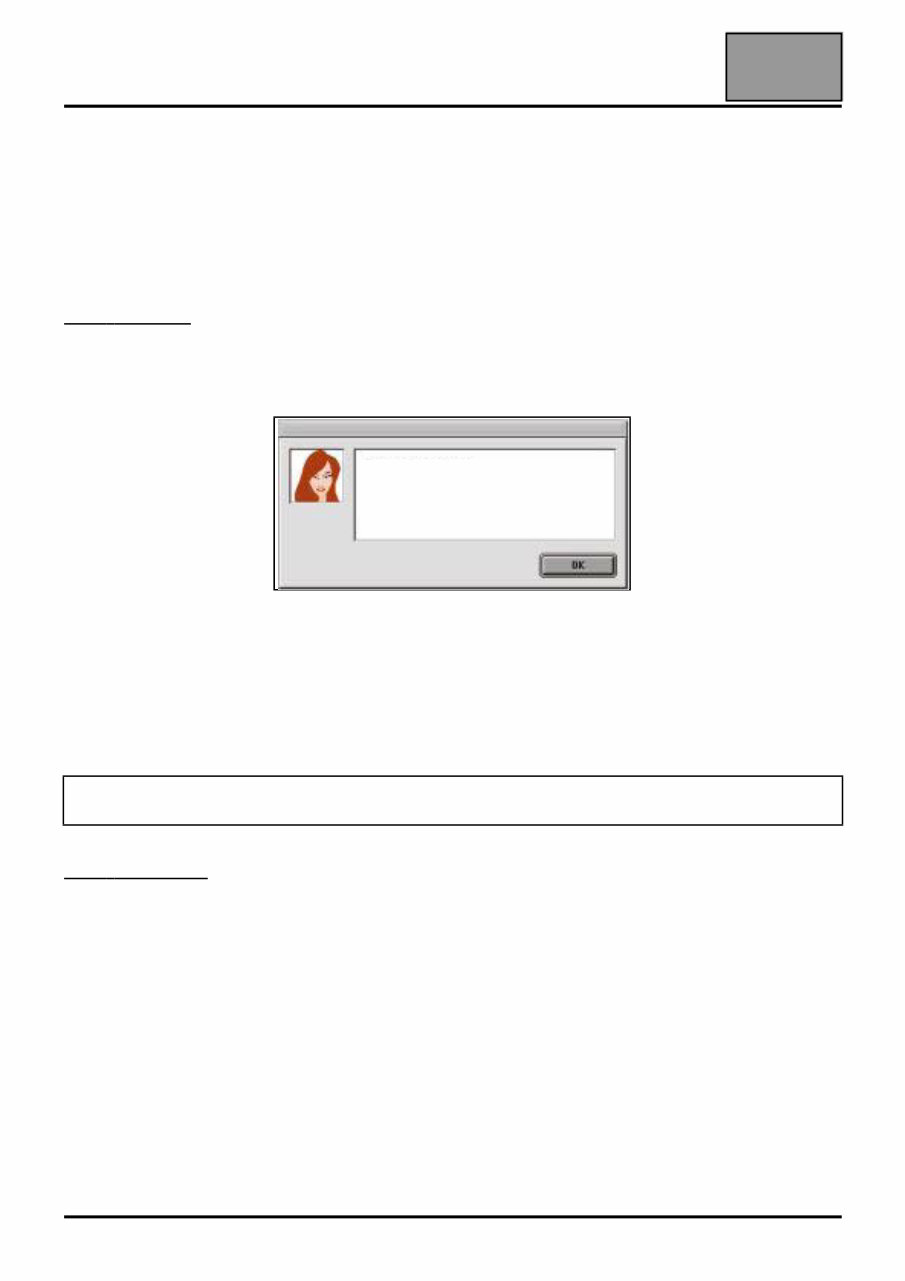
VEHICLE GENERAL INFORMATION Programming – Reprogramming the computers 01B 01B-2 Computer The operation consists of downloading the calibration using the RENAULT CLIP diagnostic tool . It affects computers supplied as non operational (also known as blank) by the Parts Department for all vehicles in the RENAULT range, but only for certain types of computer. The types of computers which are delivered blank and to be calibrated are, to date, engine management (Petrol, Diesel and GPL injection), automatic and sequential gearboxes and ABS/ESP computers. When T o Program: The operation is carried out as part of a computer replacement operation. The non operational status of the computer, as delivered by the Parts Department, is specified in DIALOGYS by the message: Reprogramming The operation consists of exchanging the software and/or calibration for the most recent version using the RENAULT CLIP diagnostic tool. This relates to computers already fitted to the vehicle as well as computers supplied as operational (also called "full". E.g: Air conditioning) by the Parts Department, for the entire RENAULT range. It enables systematic replacement of the computer to be avoided. When T o Reprogram: The operation is carried out within the framework of: ● an OTS or a Technical Note arising from a fault resulting from an After-Sales problem, or a functional improvement. ● RENAULT Technical Directives or following a request from the Techline. After having entered the VIN in the main menu, the types of (re)programmable computer are displayed in the RENAULT CLIP diagnostic tool REPROGRAMMING menu. Information: Specific characteristic. COMPUTER TO BE PROGRAMMED
VEHICLE GENERAL INFORMATION Programming – Reprogramming the computers 01B 01B-3 OPERATING PROCEDURE (Programming and reprogramming a computer) The operating procedure for Calibration and Reprogramming operations is strictly identical. The operation is carried out using the RENAULT CLIP diagnostic tool, either connected to RENAULT.NETor with the reprogramming CD. Preparing the RENAULT CLIP diagnostic tool ● Always use the latest available version of the CLIP update. ● Always use the RENAULT.NET connection if available, in preference to the CD. ● Whenever the CD mode is being used for calibration - reprogramming, always use the latest available version of the CD. ● Connect CLIP to the mains. ● Set the Windows screen saver time for the RENAULT CLIP diagnostic tool to NONE or 60 minutes minimum. Setting the RENAULT CLIP diagnostic tool Windows monitor screen locking delay: In the RENAULT CLIP diagnostic tool Windows system: ● Right click on the mouse and select Properties. ● In the new Display Properties window, select the Screen Saver tab. Then set the screen saver to (None) or set the Wait time delay to a minimum of 60 minutes. ● Confirm and close the display windows. Preparing the vehicle ● Connect an approved battery charger to the vehicle. ● Switch off all the vehicle's electrical consumers (Lights, Interior lighting, Air conditioning, CD Radio, etc). ● Switch on the ignition (+ forced + after ignition, See Procedure). WARNING To prevent any computer malfunctioning or locking, the following operations must be carried out before (re)programming. The reprogramming data available via RENAULT.NET is always more up to date than that available on the CD.
VEHICLE GENERAL INFORMATION Programming – Reprogramming the computers 01B 01B-4 Programming - reprogramming phase ● Enter the exact VIN of the vehicle in the RENAULT CLIP diagnostic tool main menu. ● Find the Parts Department reference number for the computer to be reprogrammed (see CONSULTING THE COMPUTER IDENTIFICATION FRAME ), which is necessary in the event of an EMERGENCY PROCEDURE. ● During any calibration and reprogramming: In the CD mode only, enter a reprogramming code: see CODE SERVER PROCEDURE . ● At the end of calibration and reprogramming, observe the following instructions: ● Proceed to the WARRANTY SCREEN by pressing the NEXT button. Note the CODECAL and the SUPPLIER CODE and transfer them to the Repair Order. If the CODECAL and the SUPPLIER CODE are lost, they can be recovered: see CONSULTING THE TOOL LOG. Returning the vehicle ● Test all the computers and deal with any faults present. ● Check that all the vehicle's current systems are correctly configured. WARNING Using a VIN which is not allocated to the vehicle risks compromising the correct running of the programming - reprogramming operation, as well as the conformity of the vehicle Apply the correct pre-reprogramming Procedure for the vehicle and for the system to be reprogrammed. – For example, in the case of a diesel injection: Backup the computer data if the command is available. – For example, in the case of an Automatic Transmission: Put the gear lever in the P position. WARNING DO NOT WORK ON THE VEHICLE OR OPERATE THE DIAGNOSTIC TOOL. Apply the pre-reprogramming procedure to the vehicle and to the system to be reprogrammed. – For example, in the case of a diesel injection: Write the saved computer data if the command is available. – Enter the VIN into the computer. Always deal with faults in all computers (when a computer is being reprogrammed, it cannot transmit data to the multiplex network. As a result, faults will be generated in other computers connected to the multiplex network).
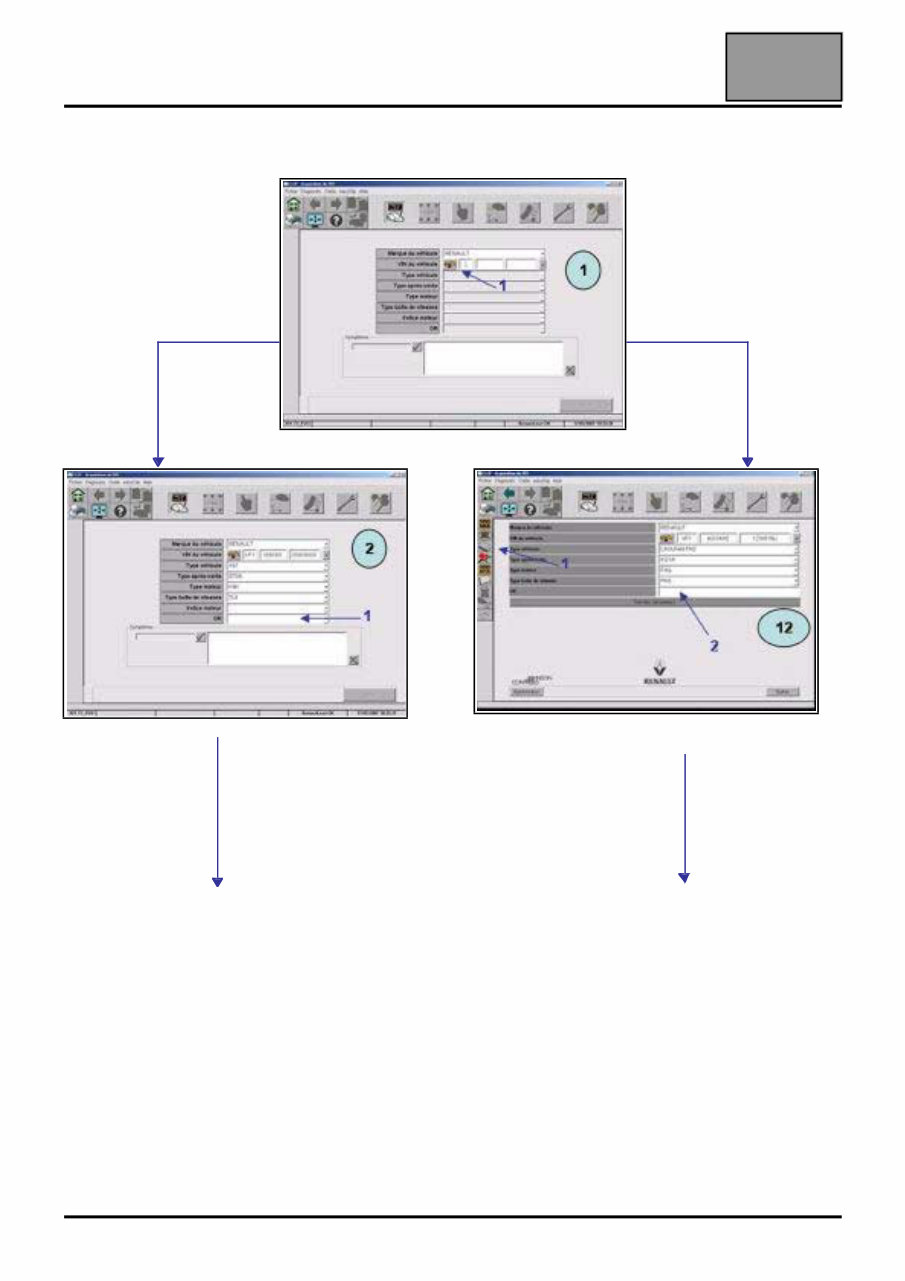
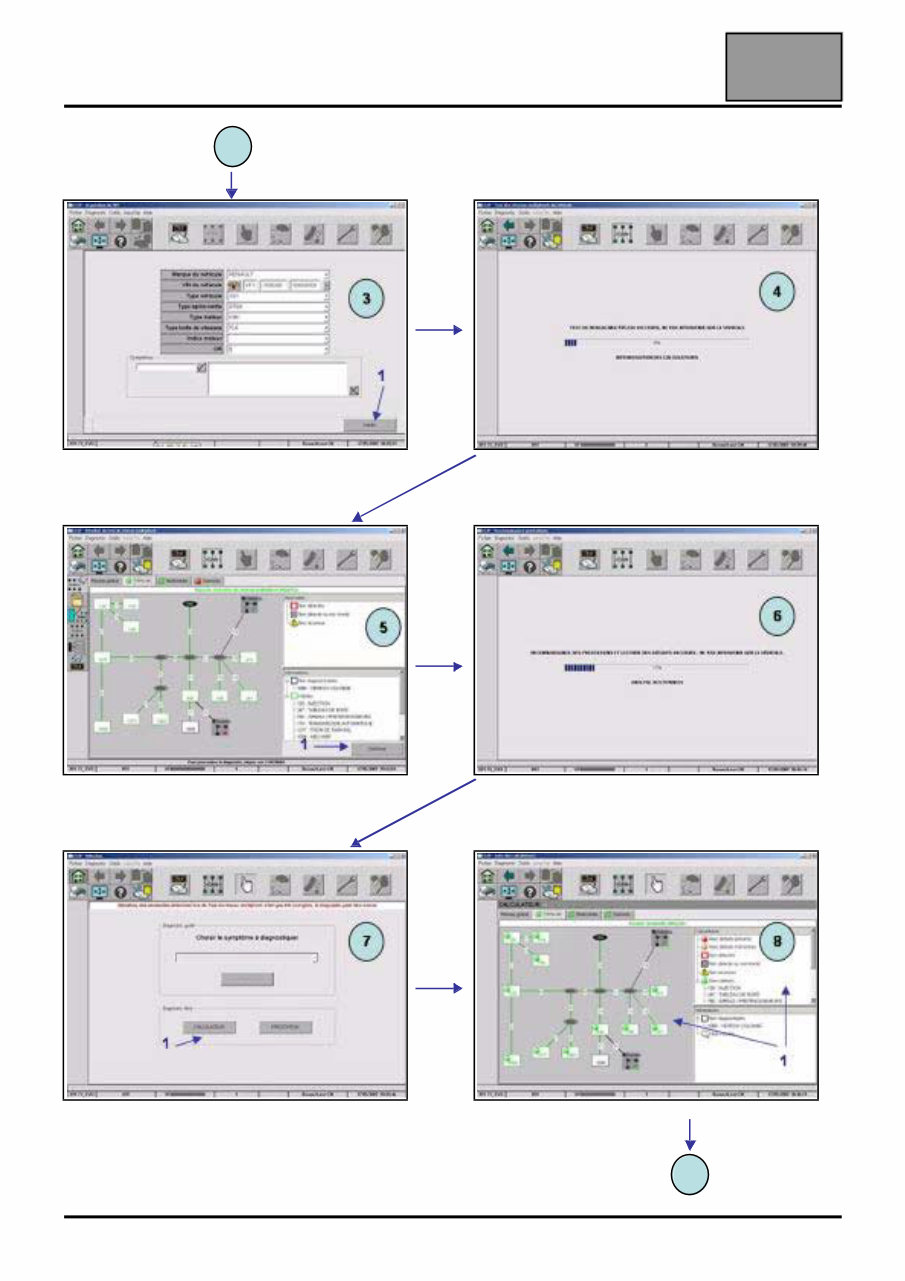
VEHICLE GENERAL INFORMATION Programming – Reprogramming the computers 01B CLIP screens depending on programming – reprogramming step Screen Step Commentary 02 12 CLIP home CLIP determines, via the VIN, the Technical Specification of the vehicle. Warning: To ensure that reprogramming is carried out effectively, enter the correct VIN for the vehicle (17 characters). 02 12 Reprog home Select REPROGRAMMING and the system to (re)program. 15 Choice of computer 16 Connecting CLIP identifies the computer concerned and recovers the technical data necessary for the (re)programming operation. 17 Entering and confirming repair order/ Entering Vehicle Technical Specification Enter the After-Sales information necessary for the warranty. Note: Enter the repair order if it has not been written in the main menu. The "Vehicle Technical Specification" field is to be filled in at the request of Techline or if required in a reprogramming Technical Note. 18 Pre-reprogramming Message Description of the environment to be set up before any reprogramming. Warning: Follow the instructions which can differ from one computer and vehicle to the next. 19 Checking battery voltage CLIP automatically checks the voltage level necessary for the correct running of the re-programming operation. 20 Select the reprogramming mode Choose the technical resource: either RENAULT.NET or CD. 21 22 Finding the file(s) RENAULT.NET CLIP finds the technical data to download to the computer. In RENAULT.NET mode, a password is needed for authentication. CD 23 File selection Confirm the operation by selecting the Software reference to be downloaded. 24 Enter the reprogramming code in CD mode. See CODES SERVER PROCEDURE In CD mode only: ● CLIP provides a reprogramming code. ● Provide the code management server with the reprogramming code and the VIN. ● The server issues an "After-Sales reprogramming code". ● Enter this code in CLIP. 25 File downloading CLIP downloads the technical data to the computer. 26 Post-reprogramming Message Description of the actions to carry out to finish the reprogramming operation and return the conforming vehicle. Warning: Follow the instructions which can differ from one computer and vehicle to the next. 27 Warranty screen CLIP provides the warranty screen describing the operation performed and the CODECAL necessary for the Warranty procedure. 01B-5
VEHICLE GENERAL INFORMATION Programming – Reprogramming the computers 01B 01B-6 Order of the screens 1: Obtain vehicle VIN automatically. 1: Enter the repair order. See New Interface 1: Select the reprogramming page. 2: Enter the repair order. See Interface 2
VEHICLE GENERAL INFORMATION Programming – Reprogramming the computers 01B 01B-7 New Interface 1: Select the Validate button. 1: Select the Continue button. 1: Select the Computer button. Multiplex network test. Analyse data and Read faults. 1: Select the system to be reprogrammed. 2 9
The 2016 Renault Clio IV Service and Repair Manual is a comprehensive guide for maintaining and fixing your Renault Clio IV model. Whether you are a professional mechanic or a DIY enthusiast, this manual provides all the information you need to keep your vehicle in top condition.
With detailed instructions, diagrams, and illustrations, this manual covers a wide range of service and repair procedures. From routine maintenance tasks such as oil changes and filter replacements to more complex repairs like engine overhauls and electrical system troubleshooting, this manual has got you covered.
Features of the 2016 Renault Clio IV Service and Repair Manual:
Step-by-step instructions for all service and repair procedures.
Comprehensive coverage of all models and variants:
Renault Clio IV Hatchback
Renault Clio IV Estate
Renault Clio IV RS
Renault Clio IV GT-Line
Easy-to-follow diagrams and illustrations for better understanding.
Detailed troubleshooting guides for common issues.
Proper maintenance schedules to prolong the lifespan of your vehicle.
Tips and tricks from professional mechanics to make the process easier.
Whether you need to perform regular maintenance or tackle a complex repair, the 2016 Renault Clio IV Service and Repair Manual is an invaluable resource that will save you time and money. Get your copy today and keep your Renault Clio IV running smoothly for years to come.



 Lifetime Access