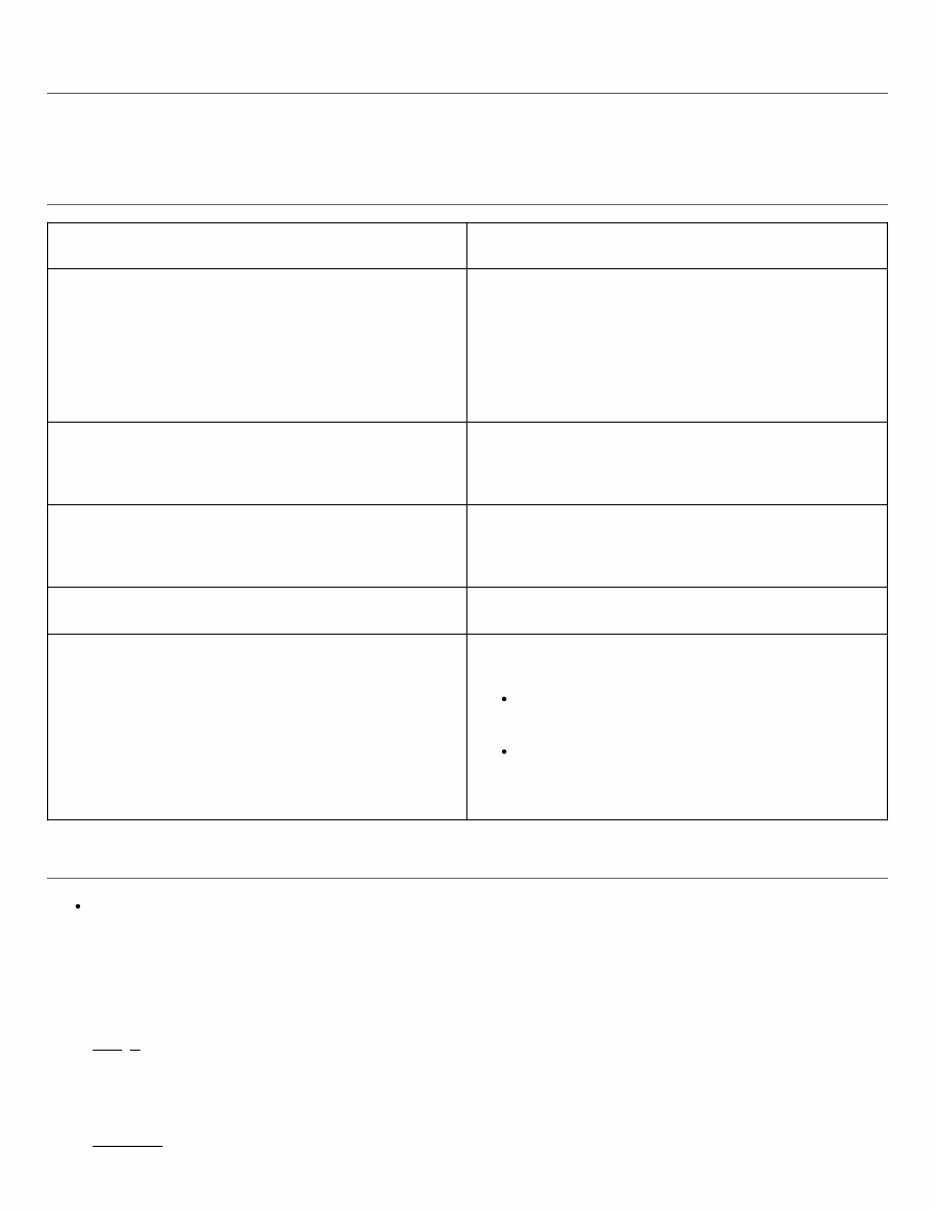
HOW TO USE THIS MANUAL : Repair Manual GUID-D2D9AE1C-303E-4459-8A3C-E16FD6C2A1B7 DESCRIPTION This volume explains “Removal, Disassembly, Installation, Inspection and Adjustment” and “Trouble Diagnosis”. TERMS Item Description DANGER To be used to inform an operation which will cause a death or serious personal injury if instructions are not following. Example: Touching high voltage components without using the appropriate protective equipment will cause electrocution. WARNING To be used to inform an operation which may cause a death or serious personal injury if instructions are not following. CAUTION To be used to inform an operation which may cause personal injury or component damage if instructions are not following. NOTE To be used to inform you helpful information. BOLD STATEMENTS except DANGER, WARNING and NOTE Give you helpful information. Standard value: Tolerance at inspection and adjustment. Limit value: The maximum or minimum limit value that should not be exceeded at inspection and adjustment. UNITS The UNITS given in this manual are primarily expressed as the SI UNIT (International System of Unit), and alternatively expressed in the metric system and in the yard/pound system. Also with regard to tightening torque of bolts and nuts, there are descriptions both about range and about the standard tightening torque. “Example” Range Outer Socket Lock Nut : 59 - 78 N·m (6.0 - 8.0 kg-m, 43 - 58 ft-lb) Standard Drive Shaft Installation Bolt : 44.3 N·m (4.5 kg-m, 33 ft-lb)
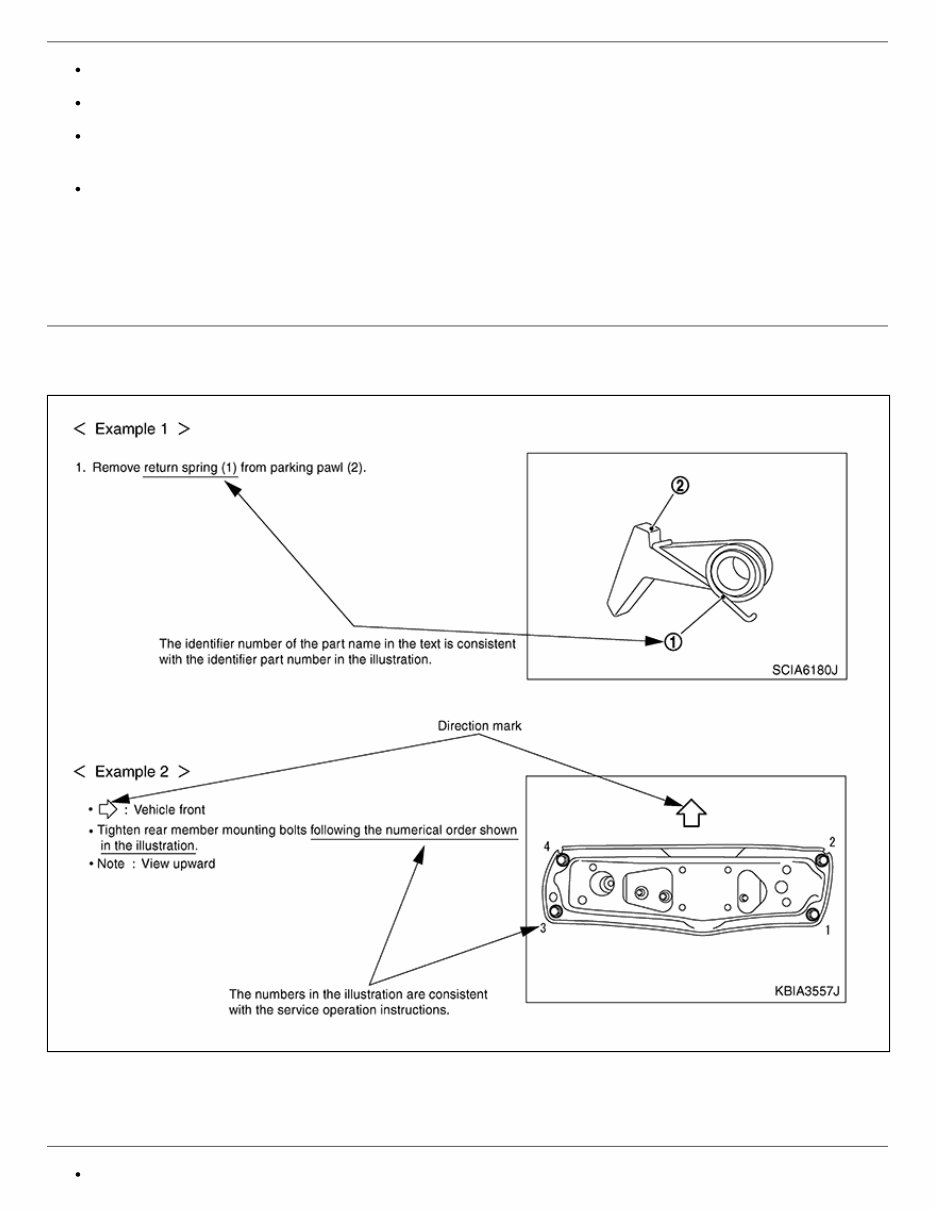
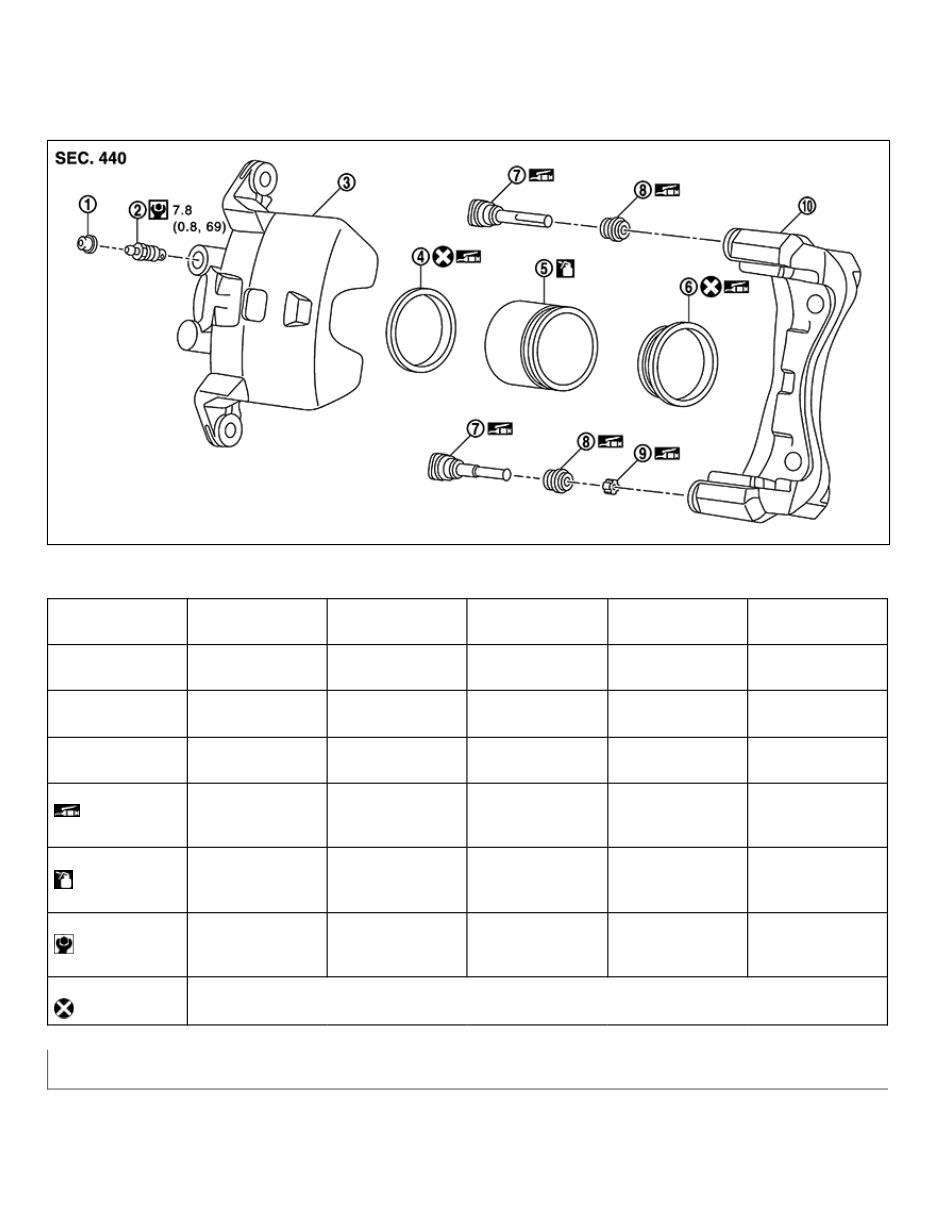
CONTENTS THE CONTENTS are listed on the first page of each section. THE TITLE is indicated on the upper portion of each page and shows the part or system. THE PAGE NUMBER of each section consists of two or three letters which designate the particular section and a number (e.g. “BR-5”). THE SMALL ILLUSTRATIONS show the important steps such as inspection, use of special tools, knacks of work and hidden or tricky steps which are not shown in the previous large illustrations. Assembly, inspection and adjustment procedures for the complicated units such as the automatic transaxle or transmission, etc. are presented in a step-by-step format where necessary. RELATION BETWEEN ILLUSTRATIONS AND DESCRIPTION The following sample explains the relationship between the part description in an illustration, the part name in the text and the service procedures. GUID-NISSAIA0519E COMPONENTS THE LARGE ILLUSTRATIONS are exploded views (see the following) and contain tightening torques, lubrication points, section number of the PARTS CATALOG (e.g. SEC. 440) and other information
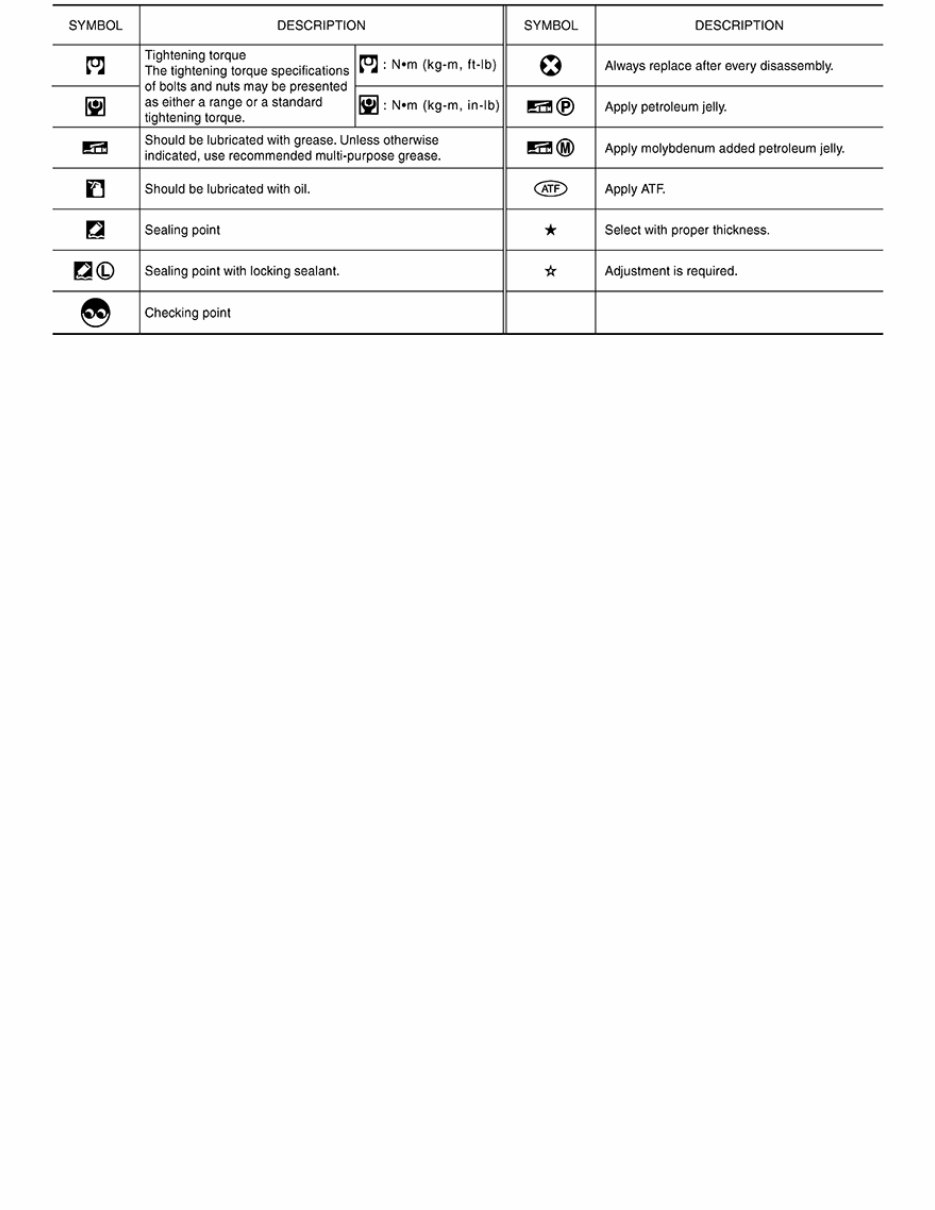
necessary to perform repairs. The illustrations should be used in reference to service matters only. When ordering parts, refer to the appropriate PARTS CATALOG. Components shown in an illustration may be identified by a circled number. When this style of illustration is used, the text description of the components will follow the illustration. GUID-NISJPFIA0511GB 1. Cap 2. Bleeder valve 3. Cylinder body 4. Piston seal 5. Piston 6. Piston boot 7. Sliding pin 8. Sliding pin boot 9. Bushing 10. Torque member : Apply rubber grease. : Apply brake fluid. : N·m (kg-m, in-lb) : Always replace after every disassembly Symbols
GUID-NISSAIA0749E
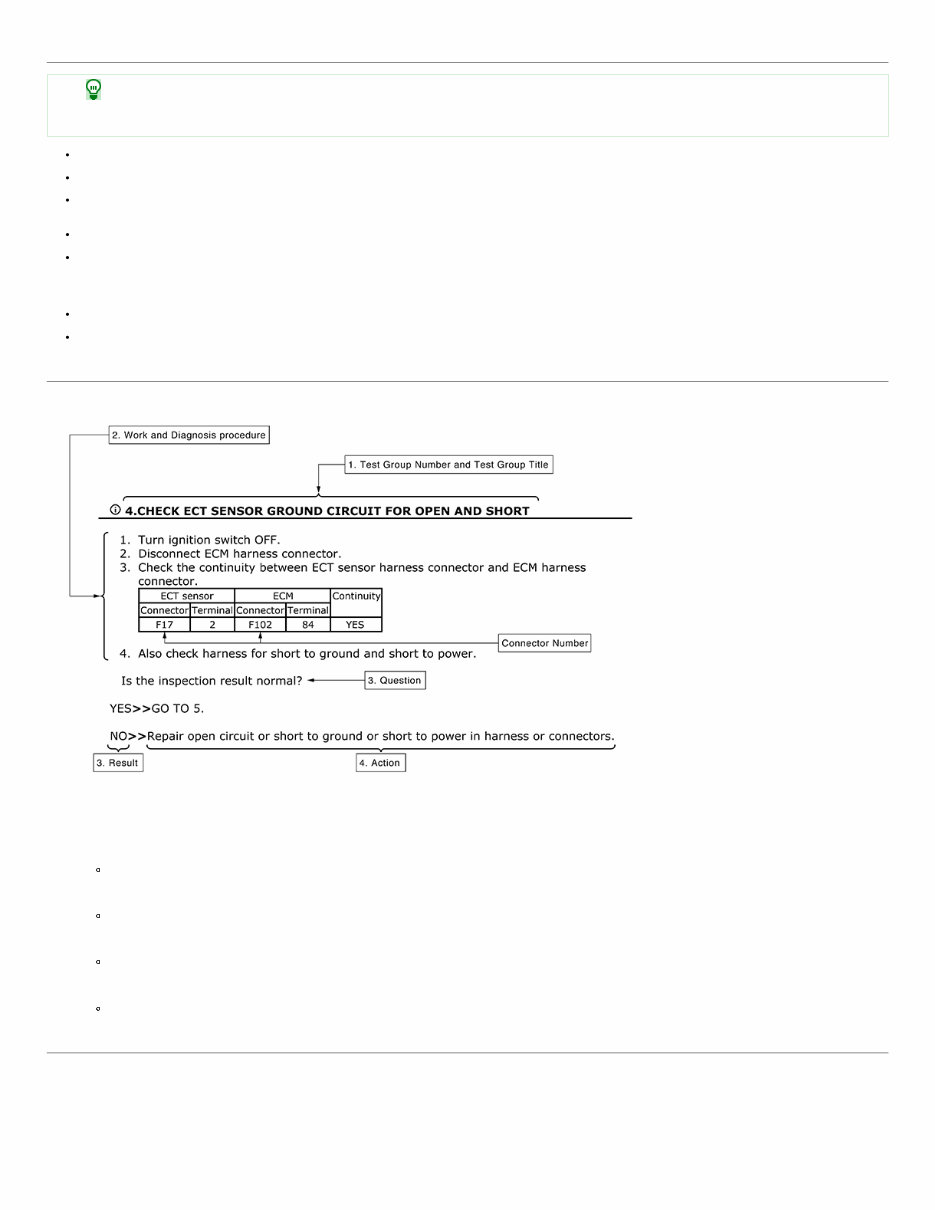
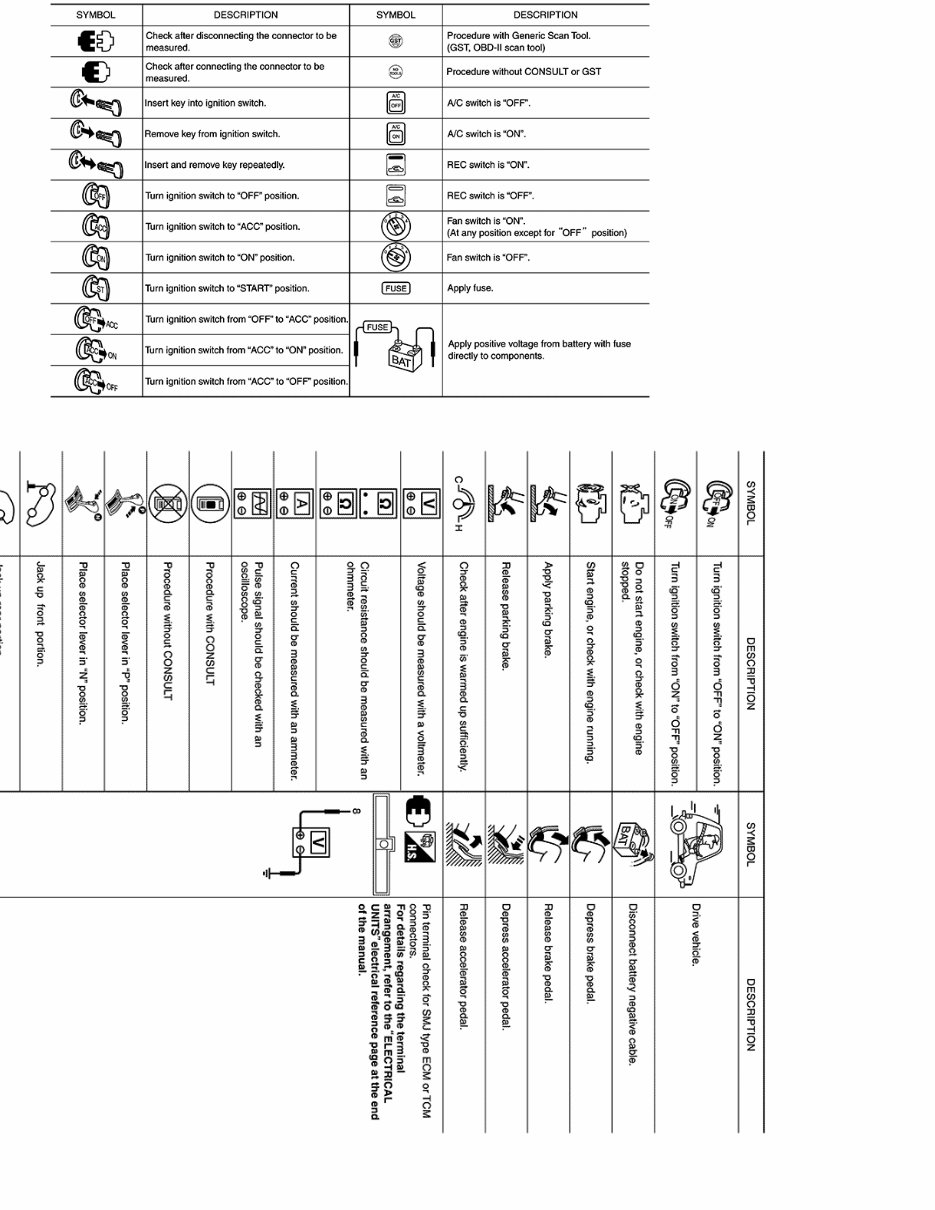
HOW TO USE THIS MANUAL : Diagnosis Manual GUID-DCAE3A67-EC11-4CCD-AEDF-238B134F16B9 DESCRIPTION Note: Trouble diagnoses indicate work procedures required to diagnose problems effectively. Observe the following instructions before diagnosing. Before performing trouble diagnoses, read the “Work Flow” in each section. After repairs, re-check that the problem has been completely eliminated. Refer to Component Parts and Harness Connector Location for the Systems described in each section for identification/location of components and harness connectors. When checking circuit continuity, ignition switch should be OFF. Refer to the Circuit Diagram for quick pinpoint check. If you need to check circuit continuity between harness connectors in more detail, such as when a sub-harness is used, refer to Wiring Diagram in each individual section and Harness Layout in PG section for identification of harness connectors. Before checking voltage at connectors, check battery voltage. After accomplishing the Diagnosis Procedures and Electrical Components Inspection, check that all harness connectors are reconnected as they were. HOW TO FOLLOW TEST GROUPS IN TROUBLE DIAGNOSIS GUID-TGALAIA0017GB 1. Test group number and test group title Test group number and test group title are shown in the upper portion of each test group. 2. Work and diagnosis procedure Start to diagnose a problem using procedures indicated in enclosed test groups. 3. Questions and results Questions and required results are indicated in test group. 4. Action Next action for each test group is indicated based on result of each question. KEY TO SYMBOLS SIGNIFYING MEAAUREMENTS OR PROCEDURES
GUID-NISJPAIA0982GB GUID-NISJSAIA1461GB
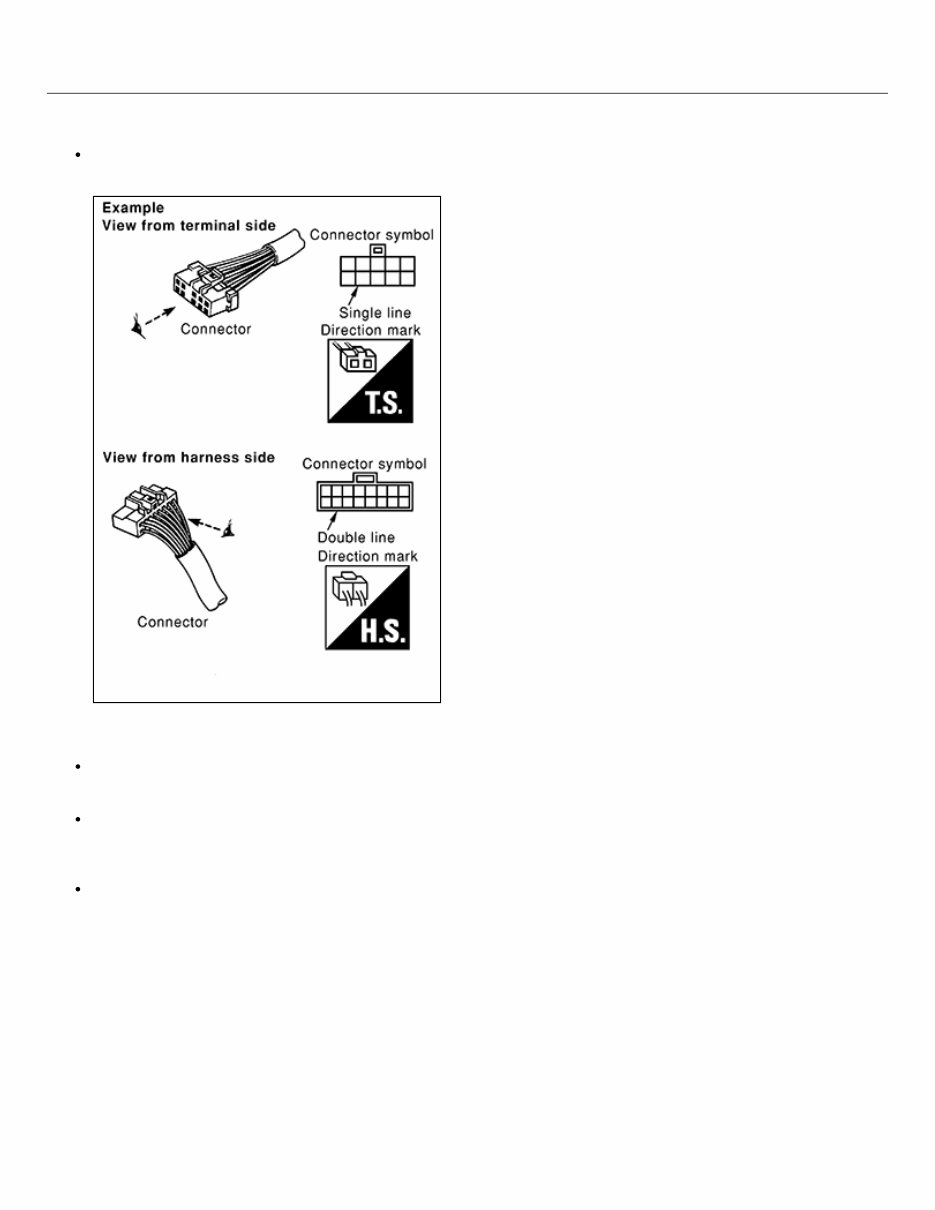
HOW TO USE THIS MANUAL : Wiring Diagram GUID-9B3EFD17-E4DC-460D-8B2D-AC827E6CC2D6 CONNECTOR SYMBOLS Most of connector symbols in wiring diagrams are shown from the terminal side. Connector symbols shown from the terminal side are enclosed by a single line and followed by the direction mark. GUID-NISSAIA0257E Connector symbols shown from the harness side are enclosed by a double line and followed by the direction mark. Certain systems and components, especially those related to OBD, may use a new style slide-locking type harness connector. For description and how to disconnect, refer to PG section, “Description”, “HARNESS CONNECTOR”. Male and female terminals
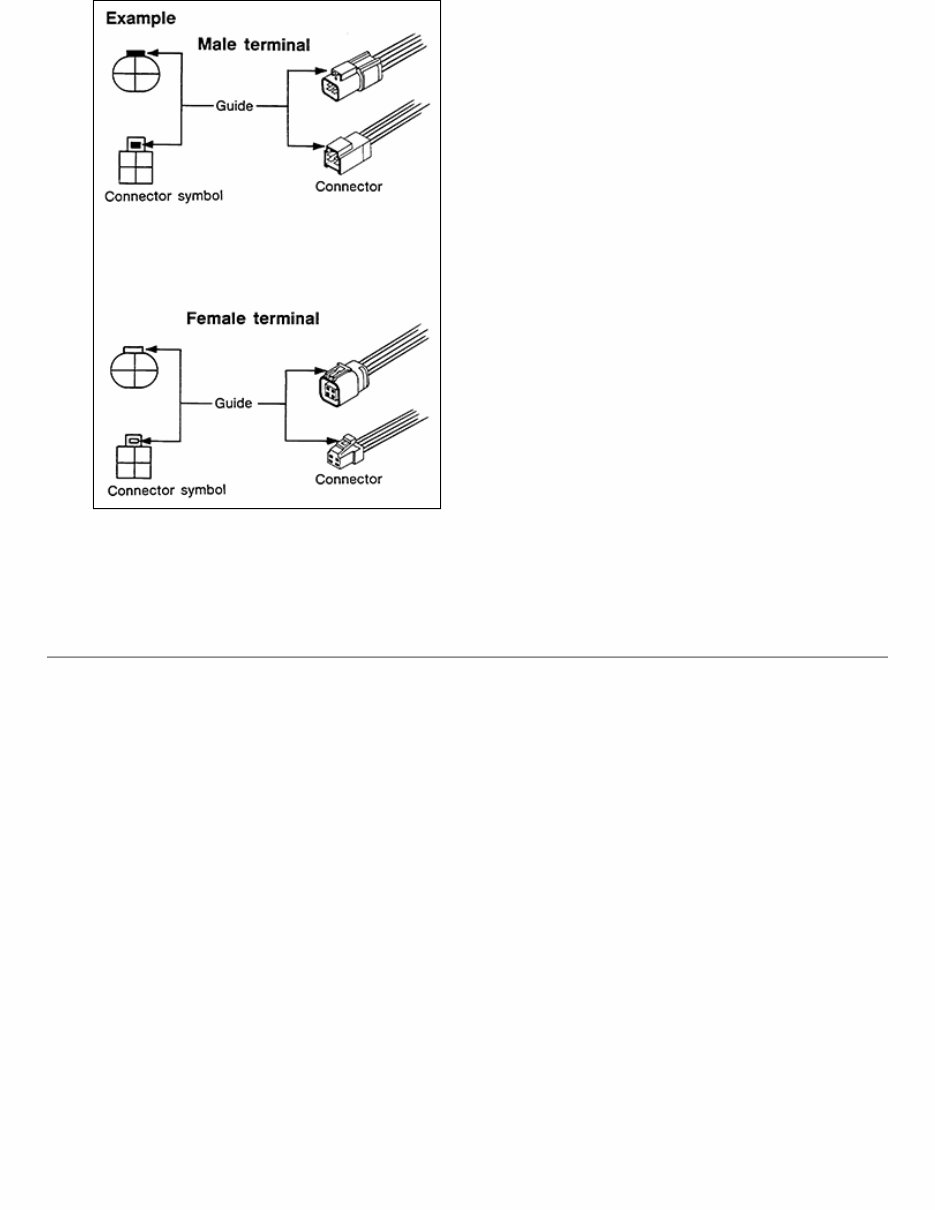
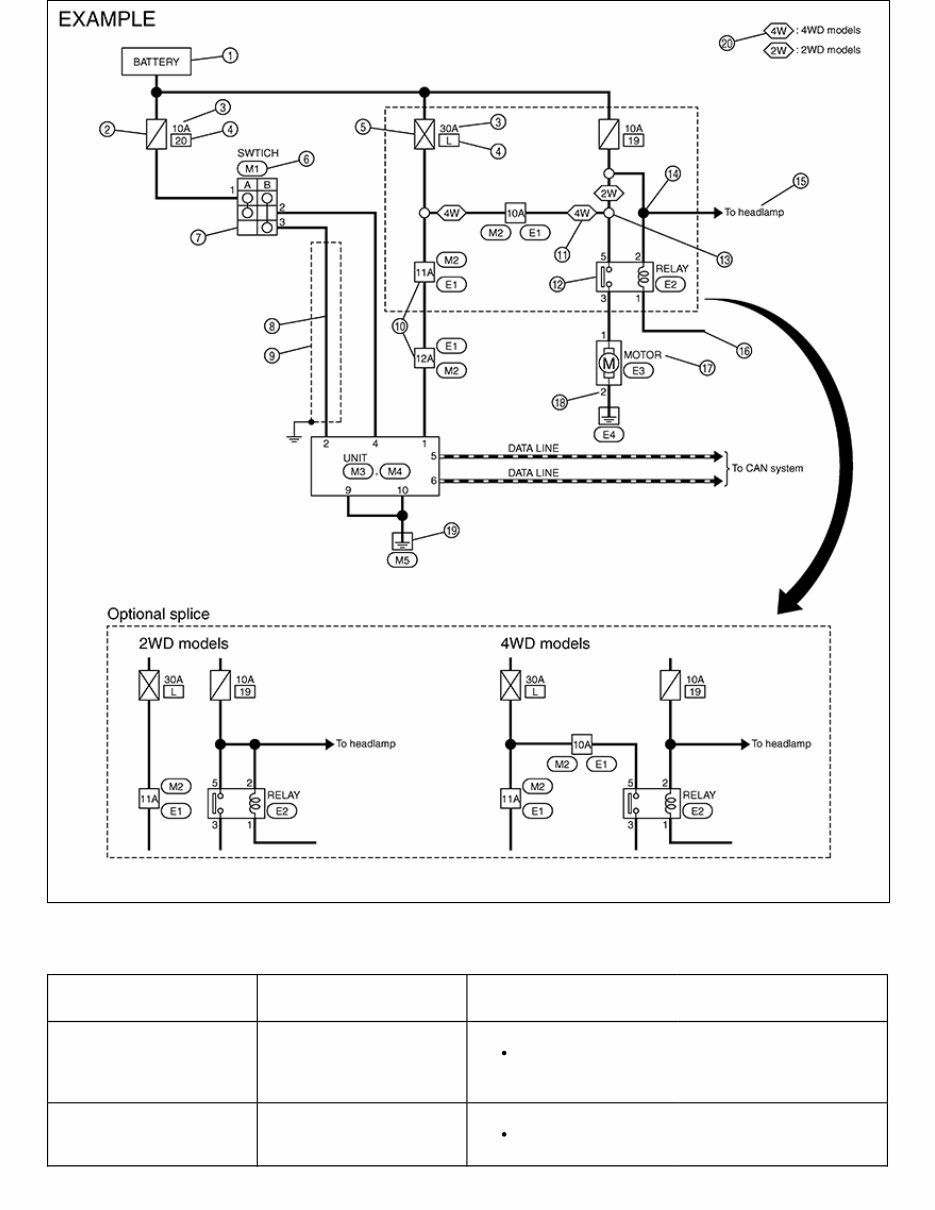
GUID-NISSGI363 Connector guides for male terminals are shown in black and female terminals in white in wiring diagrams. SAMPLE/WIRING DIAGRAM -EXAMPLE- Each section includes wiring diagrams.
GUID-NISJRAWC3780GB Description Number Item Description 1 Power supply This means the power supply of fusible link or fuse. 2 Fuse “/” means the fuse.
Number Item Description 3 Current rating of fusible link/fuse This means the current rating of the fusible link or fuse. 4 Number of fusible link/fuse This means the number of fusible link or fuse location. 5 Fusible link “X” means the fusible link. 6 Connector number Alphabetic characters show to which harness the connector is placed. Numeric characters show the identification number of connectors. 7 Switch This shows that continuity exists between terminals 1 and 2 when the switch is in the A position. Continuity exists between terminals 1 and 3 when the switch is in the B position. 8 Circuit (Wiring) This means the wiring. 9 Shielded line The line enclosed by broken line circle shows shield wire. 10 Connectors This means that a transmission line bypasses two connectors or more. 11 Option abbreviation This means the vehicle specifications which layouts the circuit between “ ”. 12 Relay This shows an internal representation of the relay. 13 Optional splice The open circle shows that the splice is optional depending on vehicle application. 14 Splice The shaded circle “ ” means the splice. 15 System branch This shows that the circuit is branched to other systems. 16 Page crossing This circuit continues to an adjacent page.
Are you tired of constantly having to take your 2020 Nissan Kicks to the repair shop for every little issue? With the 2020 Nissan Kicks Service & Repair Manual, you can take a DIY approach to fixing your vehicle. This comprehensive manual includes all the troubleshooting and replacement procedures recommended by the manufacturer, with step-by-step instructions, clear images, and exploded-view illustrations.
While your vehicle is known for its durability, regular maintenance is still essential to keep it running smoothly. And with time, even with proper maintenance, some parts will wear out and need to be replaced. Luckily, this manual has got you covered with all the information you need to fix your vehicle, saving you money on repairs and increasing its reliability.
The 2020 Nissan Kicks Service & Repair Manual includes troubleshooting charts and detailed replacement procedures, making it easy for you to fix your vehicle without having to flip through endless pages. And with its electronic format, you can access it on any device, from your PC or Mac to your smartphone or tablet. No more greasy, torn, or lost pages – simply carry it with you, search for specific information, take screenshots, and bookmark pages for easy access.
But if you prefer a physical copy, you can easily print out the manual as well. So why not take control of your vehicle's maintenance and keep the repair shop at bay? Get the 2020 Nissan Kicks Service & Repair Manual today and have all the information you need to keep your vehicle running smoothly.
Printable:
Yes
Language:
English
Compatibility:
Pretty much any electronic device, including PC and Mac computers, Android and Apple smartphones and tablets, etc.



 Lifetime Access