


KIA Texton Immobiliser Key Teaching Guide Manual
What's Included?
 Lifetime Access
Fast Download Speeds
Online & Offline Access
Access PDF Contents & Bookmarks
Full Search Facility
Print one or all pages of your manual

Texton Immobiliser
Key Teaching Guide
This guide cover vehicles fitted with Texton and Texton by Shinchang
in-key immobiliser systems, including
• Credos
• Shuma
• Spectra
• AL Sportage (Up to 2003MY)
• GQ Carnival (Up to 2005MY)
• BC Rio (Up to 2005MY)
KIA MOTORS AUSTRALIA
2
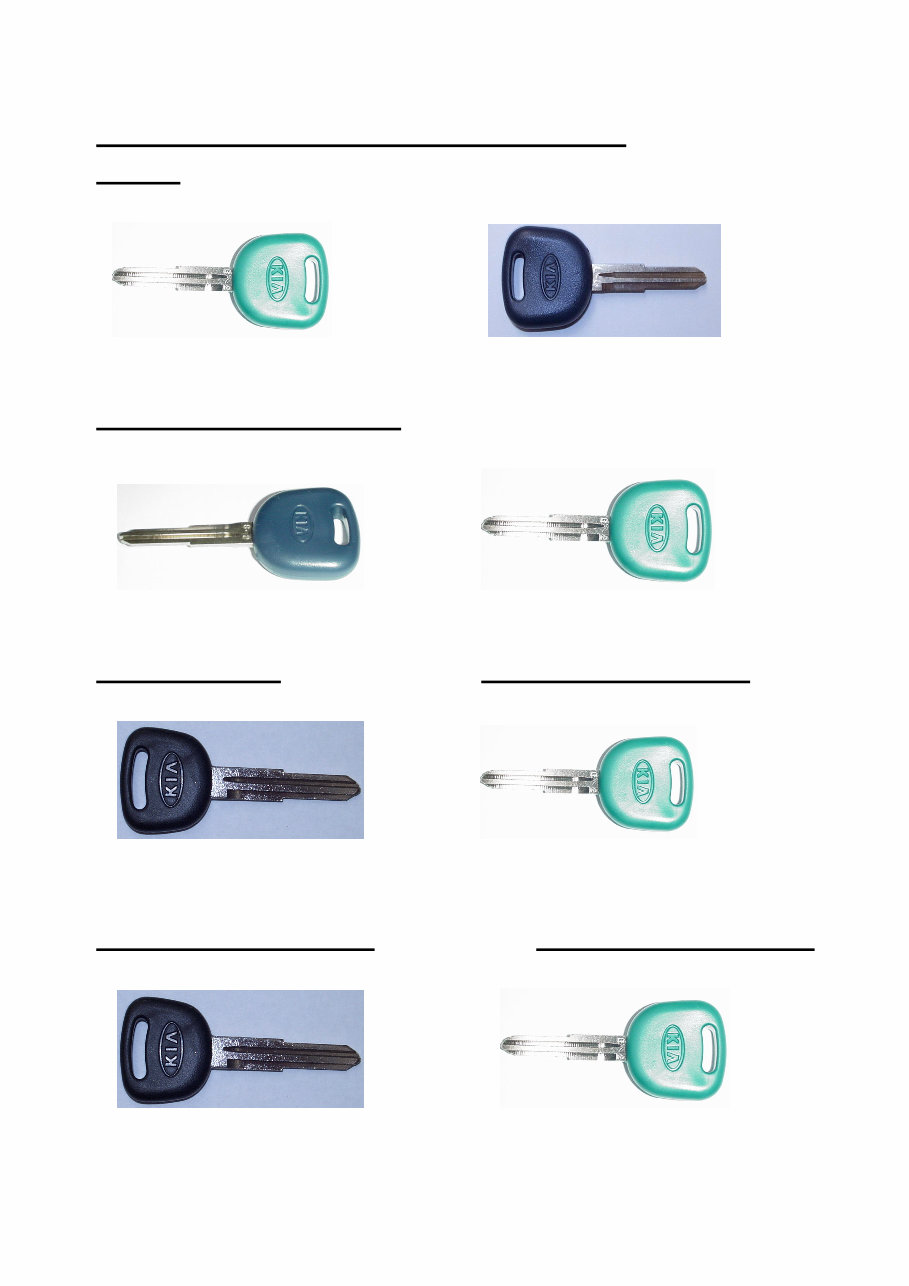
KIA IMMOBILISER KEY IDENTIFICATION
Credos
Green Head Black Head
Texton by Shinchang Texton
AL Sportage (1998 ~ 2003)
Deep Blue Head Green Head
Texton Texton by Shinchang
Shuma / Carens Spectra (Feb 2002- on )
Black Head (Zylux Immobiliser) Green Head
Refer to Service Bulletin 183-61-24 Texton by Shinchang
BC Rio (Up to Feb 2002) BC Rio (Feb 2002- 2005)
Black Head (Zylux Immobiliser) Green Head
Refer to Service Bulletin 183-61-24 Texton by Shinchang
3
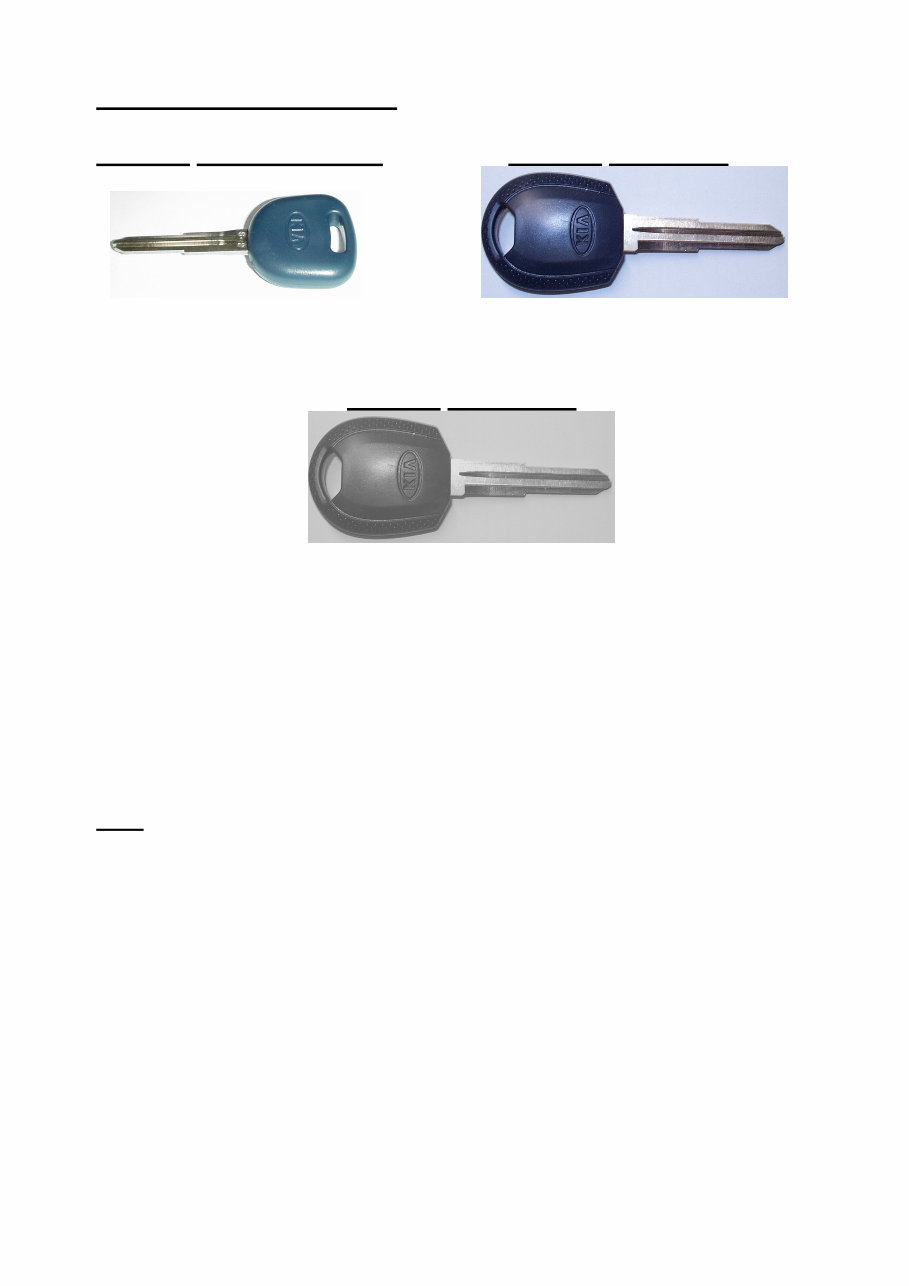
GQ Carnival (2000 ~ 2005)
Series 1 Deep Blue Head Series 2 Blue Head
Texton Texton by Shinchang
Series 3 Grey Head
Texton by Shinchang
Note –
Always check the VIN and build date and confirm the part
number with your Parts Department before ordering any parts.
Note
Some Rio, Shuma and Carens vehicles are fitted with locally supplied Zylux
Immobilisers. For repair and service information refer to Service Bulletin 183-61-24.
For assistance with Zylux immobiliser systems call
Zylux Technical Support (03) 9482 2203
In addition, Pregio, K2700 and K2900 are fitted with an RKE & Immobiliser system
supplied by Vision.
For repair and service information refer to Service Bulletin 333-61-50.
For assistance with Vision immobiliser systems call
Vision Technical Support 1 800 035 694
4
TEXTON & TEXTON BY SHINCHANG
KEY TEACHING PROCEDURES USING HISCAN PRO
NOTE - The following procedure details the process when using Hiscan – if using
GDS, the process is similar, but the GDS screens and menus will differ.
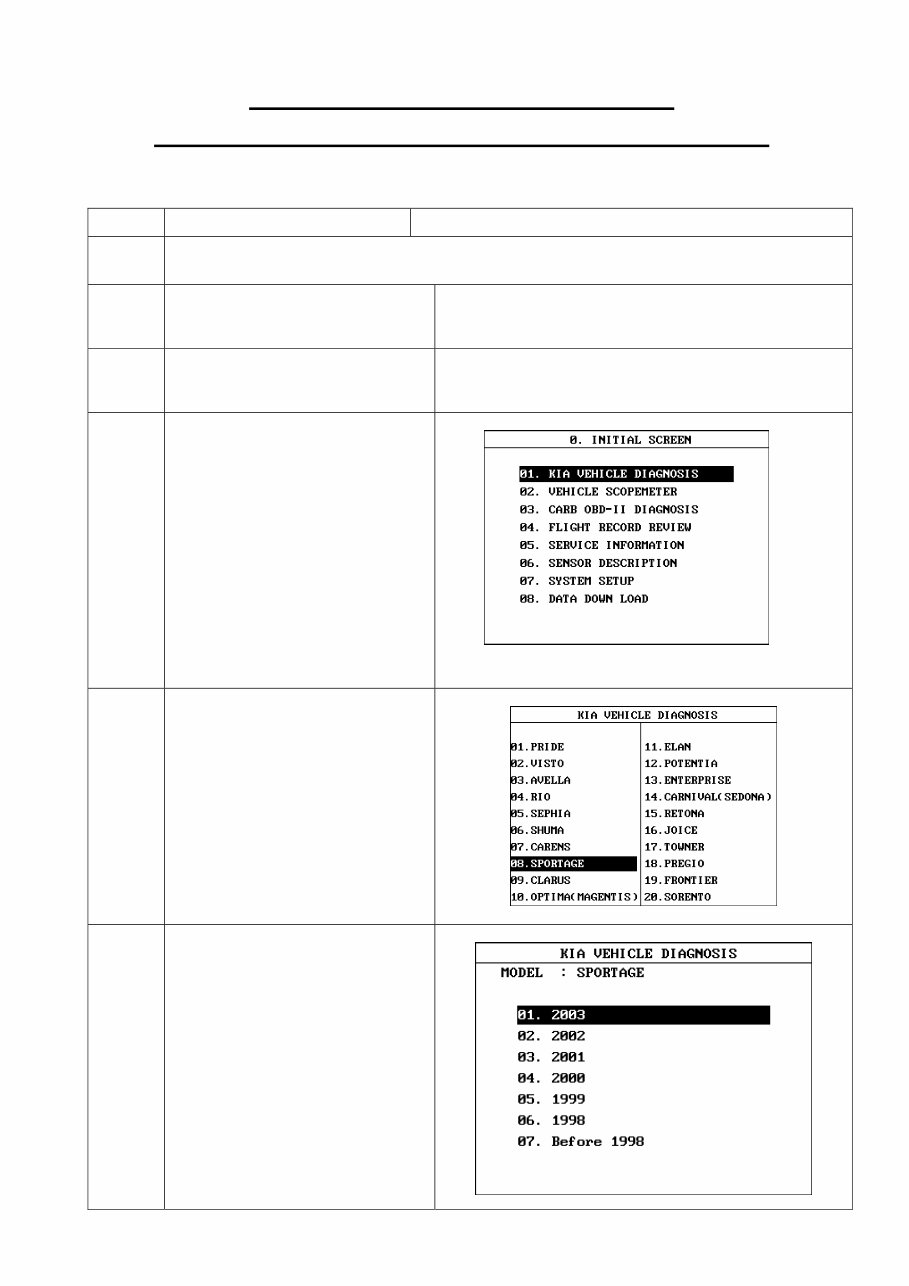
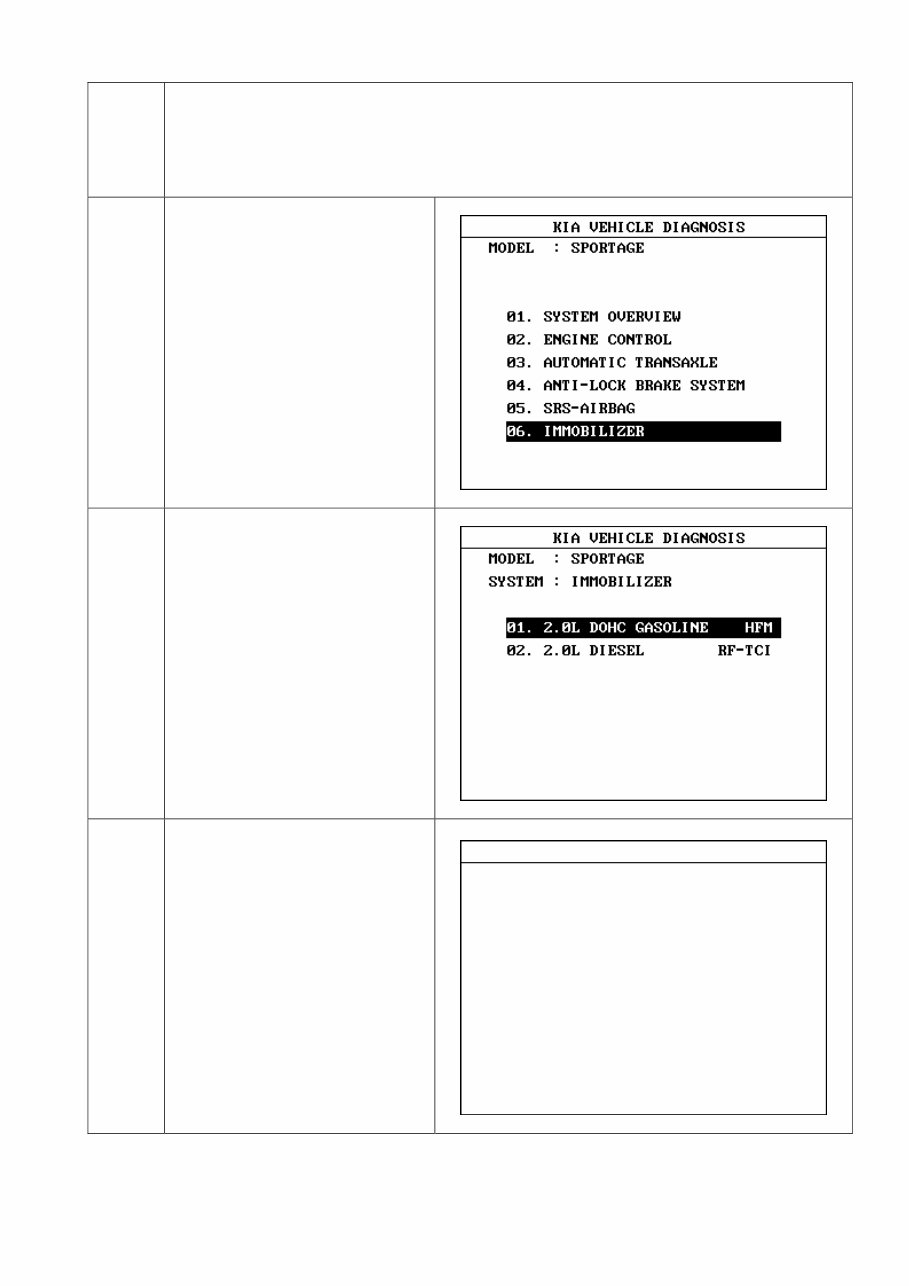
STEP FUNCTION SCREEN DISPLAYED
1. Connect the Hiscan Pro to the vehicle. Use the external power cable to ensure
continuous operation of the Hiscan during these procedures
2. Turn the Hiscan Pro ON.
3. Press the “Enter” key.
4. Select “Vehicle Diagnosis”.
5. Select the vehicle
(In this case “Sportage”).
7.
Select the model year.
The model year is the 10
th
Digit
of the VIN
T = 1996, V = 1997
W = 1998, X = 1999
Y = 2000, 1 = 2001
2 = 2002, 3 = 2003
4 = 2004, 5 = 2005
6 = 2006
5
Hiscan will remind you of the correct colour of the Hiscan DLC cable you must use.
8. Select “Immobiliser”.
9. Select the correct engine type
(In this case “2.0 DOHC”).
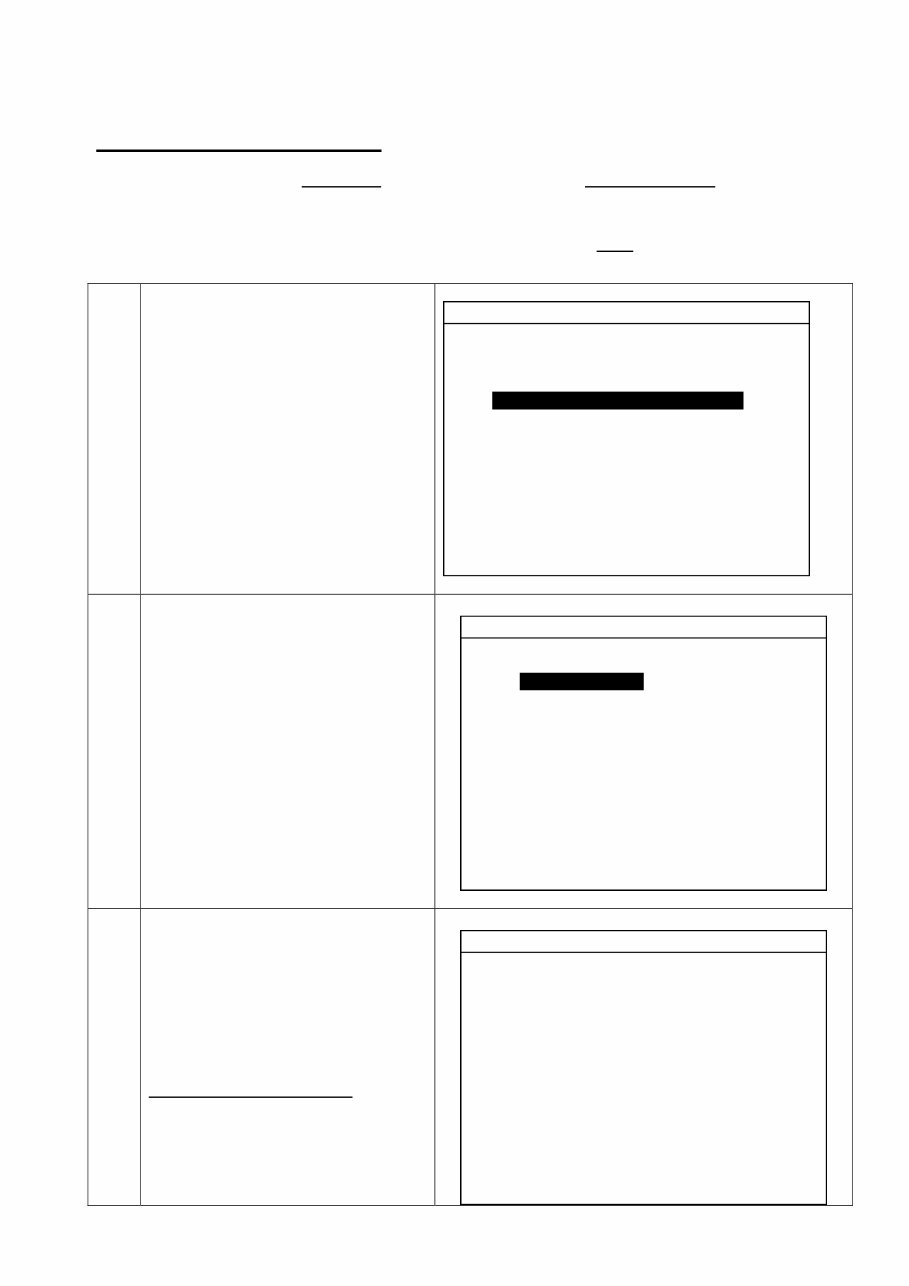
10. This screen gives 2 options.
They are:
01. Encoding Immobiliser.
02. VIM & ECM Diagnosis.
Turn the ignition key OFF
before continuing.
To perform key
teaching/coding, select
01. ENCODING IMMOBILISER
INKEY TYPE IMMOBILISER
01. ENCODING IMMOBILISER
02. VIM & ECM DIAGNOSIS
SET IG. KEY OFF
SELECT ONE OF THE UPPER ITEMS !!
6
To perform “Key Check” (This is for Deep Blue Keys only)
Important Note - If new Keys are being entered into a ‘Deep Blue Key’ immobiliser
system, the “Key Check” function must be performed with the Hiscan Pro, prior to going into
“Normal Coding” or “Key Only Matching” to verify that the Key has been initialised. If the
key has not been initialised, “Key Writing” must be performed prior to performing ‘Normal
Coding’.
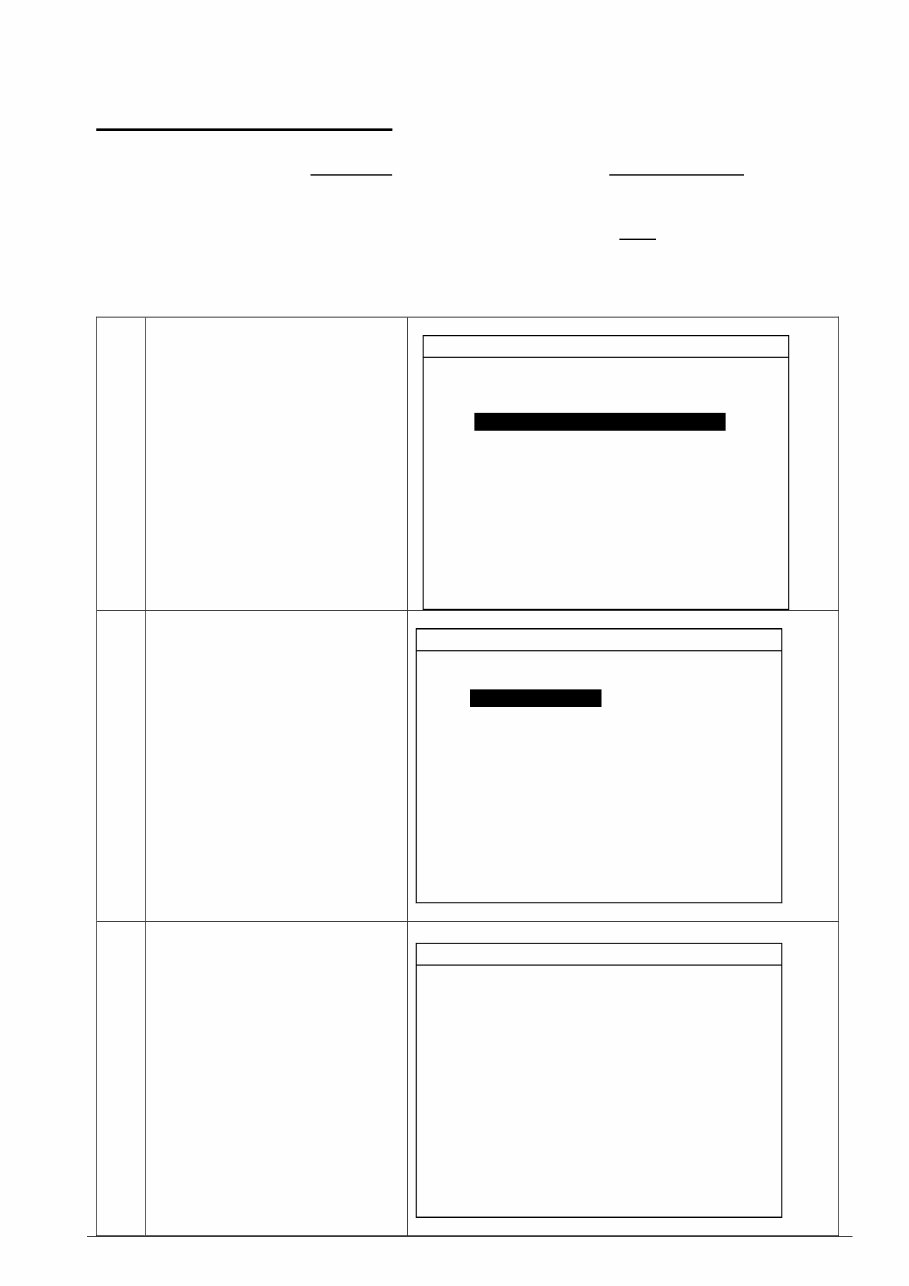
1. Turn the ignition key ON
Select
“VIM & ECM Diagnosis”.
Select
“Key Check (Encrypt Type)”.
2. Turn the ignition OFF
Select “Key Check”.
3. The Key status is displayed.
In this case, the key is
“Initialised”.
If the key is not initialised ,
proceed to “Key Writing”
VIM & ECM CHECK
01. VIM CHECK
02. ECM CHECK
03. KEY CHECK (ENCRYPT TYPE)
SET IG. KEY ON
KEY CHECK (ENCRYPT TYPE)
01. KEY CHECK
02. KEY WRITING
SET IG. KEY OFF
KEY CHECK
(RESULT)
KEY : GOOD
STATUS : KEY IS INITIALISED
RECOMMEND
- If no start, perform (NORMAL CODING)
7
To perform “Key Writing” (This is for Deep Blue Keys only)
Important Note - If new Keys are being entered into a ‘Deep Blue Key’ immobiliser
system, the “Key Check” function must be performed with the Hiscan Pro, prior to going into
“Normal Coding” or “Key Only Matching” to verify that the Key has been initialised. If the
key has not been initialised, “Key Writing” must be performed prior to performing ‘Normal
Coding’.
Ensure that “Key Check” has been completed first to check the key status.
1. Turn the ignition key ON
Select
“VIM & ECM Diagnosis”.
Select
“Key Check (Encrypt Type)”.
2. Turn the ignition OFF
Select “Key Writing”.
3. Key writing successful.
VIM & ECM CHECK
01. VIM CHECK
02. ECM CHECK
03. KEY CHECK (ENCRYPT TYPE)
SET IG. KEY ON
KEY CHECK (ENCRYPT TYPE)
01. KEY CHECK
02. KEY WRITING
SET IG. KEY OFF
KEY CHECK (ENCRYPT TYPE)
Key Writing is Successful.

8
ENCODING IMMOBILISER – Texton & Texton by Shinchang
To perform Normal Coding
• Normal coding is used to teach the first 2 keys to a virgin/neutralised immobiliser.
• Always ensure at least 2 keys are available.
Important Note - If new Keys are being entered into a ‘Deep Blue Key’ then it may be
necessary to perform “Key Check” and “Key Writing” prior to performing ‘Normal Coding’.
Note – Texton & Texton by Shinchang Immobiliser Coding are similar. Ensure
you follow the Hiscan directions when performing any immobiliser encoding operations.
Select “Encoding Immobiliser”.
1. Turn the ignition OFF
Select “Normal Coding”.
INKEY TYPE IMMOBILISER
01. ENCODING IMMOBILISER
02. VIM & ECM DIAGNOSIS
SET IG. KEY OFF
Select one of the upper items !!
ENCODING IMMOBILISER
01. NORMAL CODING
02. NEUTRALISATION
03. CODE CHANGE
04. KEY ONLY MATCHING
Select one of the upper items !!
SET IG. KEY OFF

9
2. Enter the immobiliser access
code.
(This can be obtained from your
Kia Technical Assistance).
An incorrect code will not be
accepted.
Once the 5
th
digit has been
entered, the next screen will
automatically be displayed.
3. The following message appears..
“Please Wait !!
It takes about 5~8 seconds”.
4. • The horn will sound.
• Turn the ignition key ON for 2
seconds then turn it OFF.
• For Black and Deep Blue keys,
depress the rear demister
switch.
• Early Sportage must have the
accelerator pedal pressed.
• Vehicles with Green, Blue or
Grey keys do not require this.
• The horn will sound.
• Using the 1
st
key, turn ignition
ON for 1 second and remove
key.
• Insert 2
nd
key and turn ignition
ON for 1 second and turn it
OFF.
• The horn will sound.
NORMAL CODING
ENTER THE PASSCODE
___
“Please Wait !!
It takes about 5 ~ 8 seconds”
NORMAL CODING STEP
1. After horn sound, turn IG. Key (ON)
for 2 seconds and turn it off.
2. Depress accel pedal or rear Def. SW
and confirm horn sound.
3. Turn first key (ON) and pull it out.
4. Set second key (ON) and check horn.

10
5. The following message appears..
“Coding OK” (Successful).
For more information, press
enter.
6. The Coding result will be
displayed.
CODING OK !!
FOR MORE PRESS (ENT) KEY
CODING RESULT
2 KEYS MATCHED
ANTENNA COIL : OK
ECM COM. : OK
ACCEL/DEF. SW : OK
IGNITION SEQ. : OK
WAKE UP : OK
VIM CONDITION : OK
VIM PASSCODE : XXXXX
CODING RESULT : GOOD
You're Reading a Preview
What's Included?
Lifetime Access
Fast Download Speeds
Online & Offline Access
Access PDF Contents & Bookmarks
Full Search Facility
Print one or all pages of your manual
$31.99
Viewed 47 Times Today


Secure transaction
What's Included?
Lifetime Access
Fast Download Speeds
Online & Offline Access
Access PDF Contents & Bookmarks
Full Search Facility
Print one or all pages of your manual
$31.99
This manual provides comprehensive coverage for vehicles equipped with Texton and Texton by Shinchang in-key immobiliser systems. It includes models such as:
- Credos
- Shuma
- Spectra
- AL Sportage (Up to 2003MY)
- GQ Carnival (Up to 2005MY)
- BC Rio (Up to 2005MY)


