


2010 Cadillac CTS Owners Manual
What's Included?
 Lifetime Access
Fast Download Speeds
Online & Offline Access
Access PDF Contents & Bookmarks
Full Search Facility
Print one or all pages of your manual

2010 Cadillac CTS/CTS-V Owner Manual M
Keys, Doors and Windows ... 1-1
Keys and Locks ............... 1-2
Doors ........................ 1-17
Vehicle Security .............. 1-23
Exterior Mirrors ............... 1-26
Interior Mirrors ................ 1-27
Windows ..................... 1-28
Roof .......................... 1-31
Seats and Restraints ......... 2-1
Head Restraints ............... 2-2
Front Seats .................... 2-3
Rear Seats ................... 2-10
Safety Belts .................. 2-11
Airbag System ................ 2-27
Child Restraints .............. 2-43
Storage ....................... 3-1
Storage Compartments ........ 3-1
Additional Storage Features . . . 3-2
Roof Rack System ............. 3-6
Instruments and Controls .... 4-1
Instrument Panel Overview .... 4-4
Controls ....................... 4-6
Warning Lights, Gages, and
Indicators ................... 4-14
Information Displays .......... 4-31
Vehicle Messages ............ 4-36
Vehicle Personalization ....... 4-51
OnStar
®
System .............. 4-59
Universal Remote System .... 4-61
Lighting ....................... 5-1
Exterior Lighting ............... 5-1
Interior Lighting ................ 5-5
Lighting Features .............. 5-6
Infotainment System ......... 6-1
Introduction .................... 6-1
Radio .......................... 6-9
Audio Players ................ 6-16
Phone ........................ 6-37
Climate Controls ............. 7-1
Climate Control Systems .... . . 7-1
Air Vents ....................... 7-6
Maintenance ................... 7-6
Driving and Operating ........ 8-1
Driving Information ............. 8-2
Starting and Operating ....... 8-17
Engine Exhaust .............. 8-25
Automatic Transmission ...... 8-26
Manual Transmission ......... 8-30
Drive Systems ................ 8-32
Brakes ....................... 8-33
Ride Control Systems ........ 8-37
Cruise Control ................ 8-41
Object Detection Systems .... 8-44
Fuel .......................... 8-49
Towing ....................... 8-54
Conversions and Add-Ons . . . 8-60

2010 Cadillac CTS/CTS-V Owner Manual M
Vehicle Care .................. 9-1
General Information ............ 9-2
Vehicle Checks ................ 9-4
Headlamp Aiming ............ 9-34
Bulb Replacement ............ 9-37
Electrical System ............. 9-40
Wheels and Tires ............. 9-58
Jump Starting ............... 9-103
Towing ...................... 9-108
Appearance Care ........... 9-110
Service and Maintenance ... 10-1
General Information .......... 10-1
Scheduled Maintenance ...... 10-3
Recommended Fluids,
Lubricants, and Parts ....... 10-7
Maintenance Records ....... 10-11
Technical Data ............... 11-1
Vehicle Identification .......... 11-1
Vehicle Data .................. 11-2
Customer Information ....... 12-1
Customer Information ........ 12-1
Reporting Safety Defects .... 12-13
Vehicle Data Recording
and Privacy ............... 12-15
Index ..................... i-1
Introduction iii
GENERAL MOTORS, GM, the GM
Emblem, CADILLAC, the CADILLAC
Crest and Wreath, and the name
CTS/CTS-V are registered
trademarks of General Motors.
This manual describes features that
may or may not be on your specific
vehicle either because they are
options that you did not purchase or
due to changes subsequent to the
printing of this owner manual.
Please refer to the purchase
documentation relating to your
specific vehicle to confirm each of
the features found on your vehicle.
For vehicles first sold in Canada,
substitute the name “General
Motors of Canada Limited” for
Cadillac Motor Car Division
wherever it appears in this manual.
Music recognition technology and
related data are provided by
Gracenote
®
. Gracenote is the
industry standard in music
recognition technology and
related content delivery.
For more information, visit
www.gracenote.com.
DTS and DTS Digital surround
are registered trademarks of
Digital Theater systems, Inc.
Dolby
®
is manufactured under
license from Dolby
®
Laboratories.
Dolby
®
, MLP Lossless, and the
double-D symbol are trademarks
of Dolby
®
Laboratories.
This manual describes features that
may or may not be on your specific
vehicle either because they are
options that you did not purchase or
due to changes subsequent to the
printing of this owner manual.
Please refer to the purchase
documentation relating to your
specific vehicle to confirm each of
the features found on your vehicle.
For vehicles first sold in Canada,
substitute the name “General
Motors of Canada Limited” for
Cadillac Motor Car Division
wherever it appears in this manual.
Litho in U.S.A.
Part No. 25834994 B Second Printing
©
2009 General Motors. All Rights Reserved.

iv Introduction
Canadian Vehicle Owners
Propriétaires Canadiens
A French language copy of this
manual can be obtained from your
dealer/retailer or from:
On peut obtenir un exemplaire de
ce guide en français auprès du
concessionnaire ou à l'adresse
suivante:
Helm, Incorporated
P.O. Box 07130
Detroit, MI 48207
1-800-551-4123
Numéro de poste 6438 de langue
française
www.helminc.com
Using this Manual
To quickly locate information about
the vehicle use the Index in the
back of the manual. It is an
alphabetical list of what is in the
manual and the page number where
it can be found.
Danger, Warnings, and
Cautions
Warning messages found on vehicle
labels and in this manual describe
hazards and what to do to avoid or
reduce them.
Danger indicates a hazard with a
high level of risk which will result in
serious injury or death.
Warning or Caution indicates a
hazard that could result in injury or
death.
{ WARNING
These mean there is something
that could hurt you or other
people.
Notice: This means there is
something that could result in
property or vehicle damage.
This would not be covered by
the vehicle's warranty.
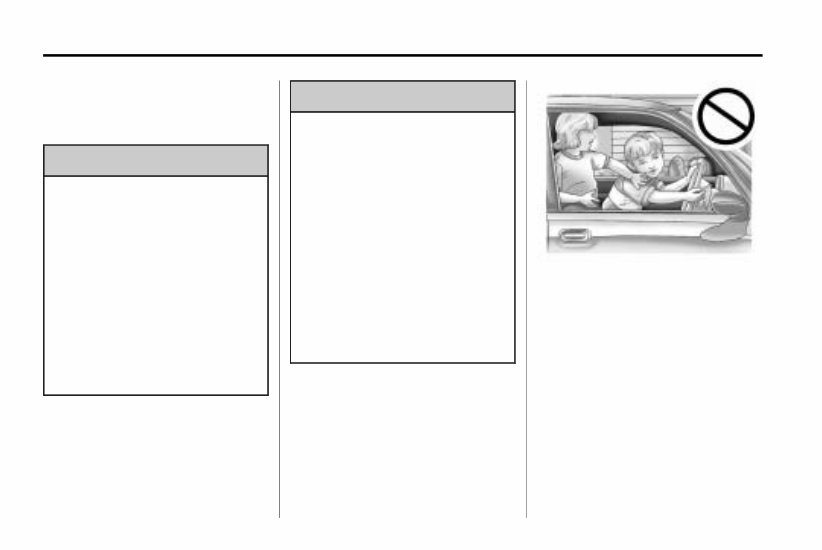
A circle with a slash through it is
a safety symbol which means
“Do Not,”“Do not do this” or “Do not
let this happen.”
Symbols
The vehicle has components and
labels that use symbols instead of
text. Symbols are shown along with
the text describing the operation or
information relating to a specific
component, control, message, gage,
or indicator.
M : This symbol is shown when
you need to see your owner manual
for additional instructions or
information.
* : This symbol is shown when
you need to see a service manual
for additional instructions or
information.

Introduction v
Vehicle Symbol Chart
Here are some additional symbols
that may be found on the vehicle
and what they mean. For more
information on the symbol, refer to
the index.
9 : Airbag Readiness Light
# : Air Conditioning
! : Antilock Brake System (ABS)
g : Audio Steering Wheel Controls
or OnStar
®
$ : Brake System Warning Light
" : Charging System
I : Cruise Control
B : Engine Coolant Temperature
O : Exterior Lamps
# : Fog Lamps
. : Fuel Gage
+ : Fuses
i : Headlamp High/Low-Beam
Changer
j : LATCH System Child
Restraints
* : Malfunction Indicator Lamp
: : Oil Pressure
} : Power
/ : Remote Vehicle Start
> : Safety Belt Reminders
7 : Tire Pressure Monitor
d : Traction Control
M : Windshield Washer Fluid

vi Introduction
2 NOTES

Keys, Doors and Windows 1-1
Keys, Doors and
Windows
Keys and Locks
Keys .......................... 1-2
Remote Keyless Entry (RKE)
System ...................... 1-4
Remote Keyless Entry (RKE)
System Operation
(Key Access) ................ 1-5
Remote Keyless Entry (RKE)
System Operation
(Keyless Access) ............ 1-7
Remote Vehicle Start ........ 1-12
Door Locks .................. 1-14
Central Door Unlocking
System ..................... 1-15
Power Door Locks ........... 1-15
Delayed Locking ............. 1-15
Automatic Door Locks ....... 1-15
Lockout Protection ........... 1-16
Safety Locks ................. 1-16
Doors
Trunk (Sedan) ............... 1-17
Liftgate (Wagon) ............. 1-19
Vehicle Security
Vehicle Security .............. 1-23
Anti-Theft Alarm System ..... 1-23
Immobilizer .................. 1-24
Immobilizer Operation
(Key Access) .............. 1-24
Immobilizer Operation
(Keyless Access) ........... 1-25
Exterior Mirrors
Convex Mirrors .............. 1-26
Power Mirrors ................ 1-27
Folding Mirrors ............... 1-27
Heated Mirrors ............... 1-27
Interior Mirrors
Automatic Dimming Rearview
Mirror ....................... 1-27
Windows
Windows ..................... 1-28
Power Windows ............. 1-28
Sun Visors ................... 1-31
Roof
Sunroof ...................... 1-31
1-2 Keys, Doors and Windows
Keys and Locks
Keys
{ WARNING
Leaving children in a vehicle with
the ignition key is dangerous for
many reasons, children or others
could be badly injured or even
killed. They could operate the
power windows or other controls
or even make the vehicle move.
The windows will function with the
keys in the ignition and children
could be seriously injured or killed
if caught in the path of a closing
window. Do not leave the keys in
a vehicle with children.
{ WARNING
Leaving children in a vehicle with
the keyless access transmitter is
dangerous for many reasons,
children or others could be badly
injured or even killed. They could
operate the power windows or
other controls or even make the
vehicle move. The windows will
function with the keyless access
transmitter in the vehicle and they
could be seriously injured or killed
if caught in the path of a closing
window. Do not leave the keyless
access transmitter in a vehicle
with children.
Keys, Doors and Windows 1-3
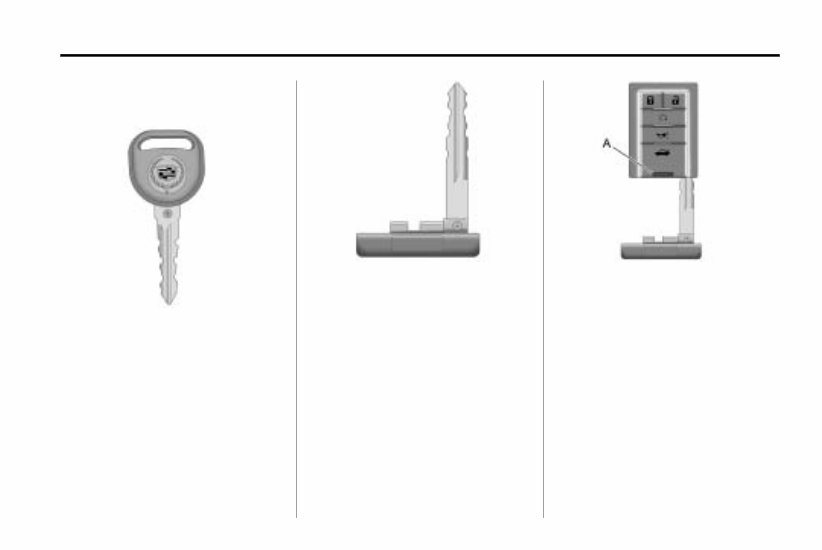
One of the following keys comes
with the vehicle.
This key is used for the driver door,
ignition, and glove box.
This key, located inside the keyless
access transmitter, is used for the
driver door, glove box, and rear seat
pass-through door. See “Rear Seat
Pass-Through Door” under Trunk
(Sedan) on page 1‑ 17 for more
information.
This type of transmitter has a thin
button (A) near the bottom of
the keyless access transmitter.
To remove the key, press (A) and
pull the key out. Never pull the key
out without pressing the button.

1-4 Keys, Doors and Windows
Notice: If the transmitter does not
have a button near the base, do
not pull on the chrome base of
the transmitter. This type of
transmitter does not have a key
inside. Pulling on the base of this
transmitter could damage it.
This vehicle may have the Keyless
Access System. See Ignition
Positions (Key Access) on
page 8‑ 18 or Ignition Positions
(Keyless Access) on page 8‑ 19 for
information on starting the vehicle.
See your dealer/retailer if a new key
is needed.
Notice: If you ever lock your keys
in the vehicle, you may have to
damage the vehicle to get in.
Be sure you have spare keys.
Contact Roadside Service if you
are locked out of the vehicle.
See Roadside Service on
page 12‑ 6.
Remote Keyless Entry
(RKE) System
See Radio Frequency Statement on
page 12‑16 for information
regarding Part 15 of the Federal
Communications Commission (FCC)
Rules and RSS-210/211 of Industry
and Science Canada.
Changes or modifications to this
system by other than an authorized
service facility could void
authorization to use this equipment.
If there is a decrease in the RKE
operating range:
.
Check the distance. The
transmitter may be too far from
the vehicle.
.
Check the location. Other
vehicles or objects may be
blocking the signal.
.
Check the transmitter's battery.
See “Battery Replacement” later
in this section.
.
If the transmitter is still not
working correctly, see your
dealer/retailer or a qualified
technician for service.
You're Reading a Preview
What's Included?
Lifetime Access
Fast Download Speeds
Online & Offline Access
Access PDF Contents & Bookmarks
Full Search Facility
Print one or all pages of your manual
$24.99
Viewed 39 Times Today


Secure transaction
What's Included?
Lifetime Access
Fast Download Speeds
Online & Offline Access
Access PDF Contents & Bookmarks
Full Search Facility
Print one or all pages of your manual
$24.99
Gain immediate access to this comprehensive manual, available in .PDF format, which is a digital version of the original factory manual. It encompasses all the essential information found in the traditional physical manual, including but not limited to:
- Introduction
- Instrument Cluster
- Entertainment Systems
- Climate Controls
- Lights
- Driver Controls
- Locks and Security
- Seating and Safety Restraints
- Driving
- Customer Assistance
- Reporting safety defects (U.S. only)
- Cleaning
- Maintenance and Specifications
- Engine Compartment
- Engine Oil
- Battery
- Fuel Information
- Air Filter(s)
- Part Numbers
- Refill Capacities
- Lubricant Specifications
- Accessories
To access the manual, you will need a compatible reader such as Acrobat Reader, Foxit, or a similar application. Please note that all designated trademarks and brands mentioned are the property of their respective owners.


