


Case IH AFS PRO 600, AFS PRO 700 Operators Manual
What's Included?
 Lifetime Access
Fast Download Speeds
Online & Offline Access
Access PDF Contents & Bookmarks
Full Search Facility
Print one or all pages of your manual

Part number 47369333
1st edition English
June 2012
SOFTWARE OPERATING GUIDE
Software Version 27.*
AFS
®
Pro 600
AFS
®
Pro 700
AFS Field Performer
Large Tractors
Trip Computer

Contents
1 GENERAL
Manual scope............................................................................... 1-1
2 ICONS AND WINDOWS
VEHICLE ICONS
Status and warning icons ............................................................... 2-1
PERFORMANCE AND VEHICLE WINDOWS
Left-hand area .......................................................................... 2-2
Performance windows .................................................................. 2-3
Vehicle and framework windows ...................................................... 2-17
3 SETUP
REMOTE VALVES
Variable flow controls ................................................................... 3-1
Remote valve timers .................................................................... 3-5
Valve locks.............................................................................. 3-9
IMPLEMENTS AND THE HITCH NOTEBOOK
Implements ............................................................................ 3-11
Hitch notebook ........................................................................ 3-18
TRACTOR SETUP
Driveline settings ...................................................................... 3-26
Slip limit ................................................................................ 3-29
Auto PTO settings ..................................................................... 3-30
4 OPERATION
PERFORMANCE APPLICATION
Overview ............................................................................... 4-1
Productivity ............................................................................. 4-4
Performance instant .................................................................... 4-8
Fuel range .............................................................................. 4-9
Performance overall ................................................................... 4-10
Summary screens ..................................................................... 4-13
HEADLAND TURNING SEQUENCES
Introduction ............................................................................ 4-18
Recording a sequence ................................................................ 4-20
Downloading a sequence.............................................................. 4-23

Playing a sequence.................................................................... 4-26
Managing sequences .................................................................. 4-28
SERVICE REMINDERS
Maintenance schedule ................................................................ 4-29
Service reminder operation ............................................................ 4-33
Sharing the display between vehicles ................................................. 4-37


1 - GENERAL
1 - GENERAL
Manual scope
This manual covers the AFS Field Performer functions for
the large tractor application. The manual assumes that
you have read and understood the contents of the display
manual in preparation for this manual.
Your manuals have changed to a layered approach to
match the layered architecture in your new farming soft-
ware. Each manual builds on the knowledge learned in
the previous manual; the display manual is required read-
ing for this application manual.
This application manual is organized as follows:
•
Chapter 2 explains the control and reporting win-
dows available from the Field Performer application
for monitoring productivity and performance during
crop production.
•
Chapter 3 explains how to use software features for
the remote valves, rear hitch, Automatic Productivity
Management (APM) and auto-PTO.
•
Chapter 4 explains how to use the Field Performer
application to monitor productivity and performance;
how to use the electronic End of Row (EOR) sys-
tem; and how to use the service and maintenance
features.
1-1

1 - GENERAL
1-2
2 - ICONS AND WINDOWS
2 - ICONS AND WINDOWS
VEHICLE ICONS
Status and warning icons
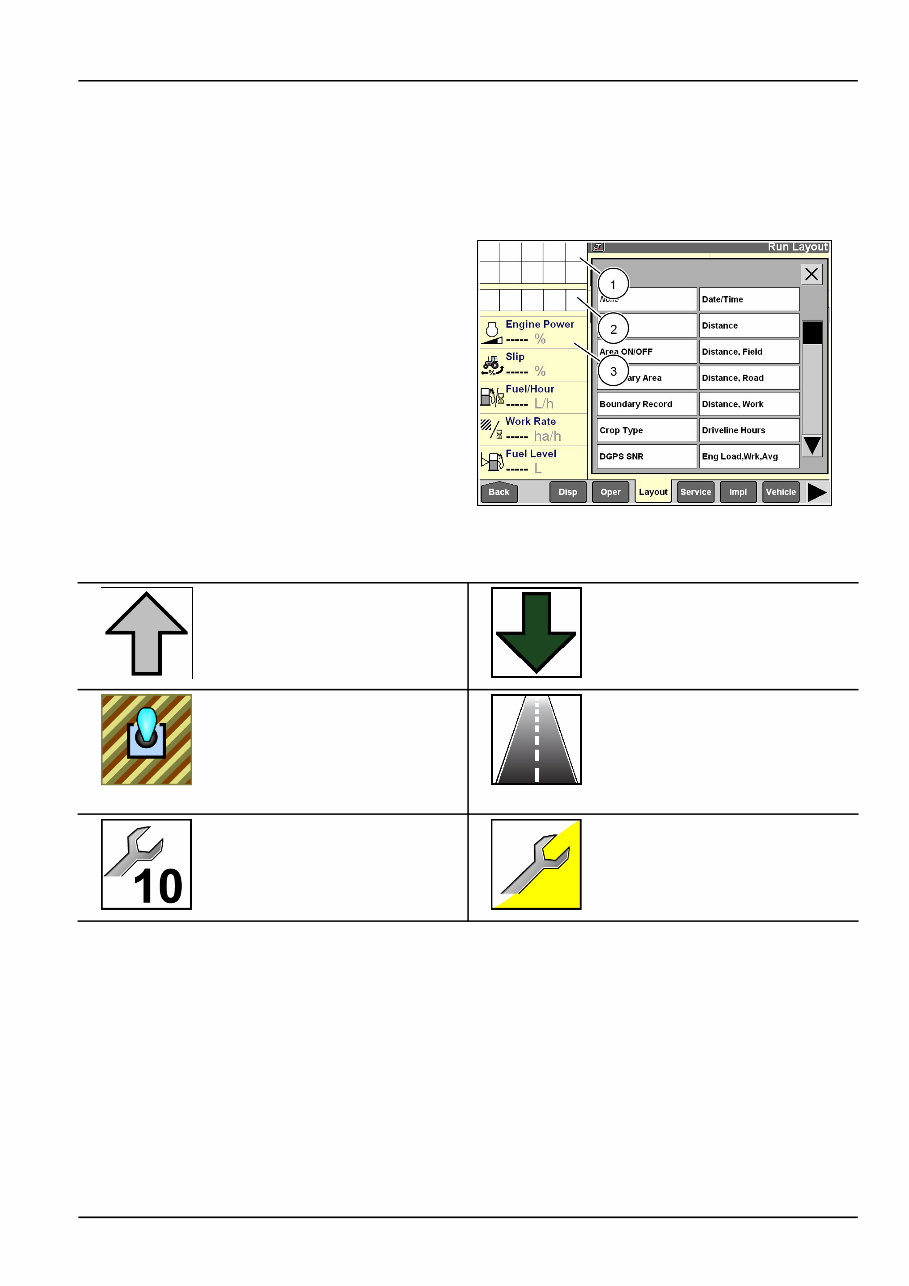
The left hand area is visible on all screens and is split
into three areas for your tractor:
•
the status icon area (1),
•
the horizontal sequence bar used with the electronic
End Of Row (EOR) system (2). See 4-18 for infor-
mation on this feature,
•
and the window area providing operator selected
performance information, productivity information or
maps (3).
RCIL09DSP064BAG 1
Six status icons are specific to the large tractor application
and display in the status area when appropriate.
Implement position icons show the
current position of the hitch-mounted
or towed implement. The up arrow
indicates the implement is raised.
The down arrow indicates the
implement is lowered. Implement
position is determined by the
position of the hitch, the position of
the EHR #1 lever or by input from
the implement status switch.
This area control icon flashes
whenever the Area Control ON/OFF
window is set to off. The operator
must turn area control on to
accumulate any area or time data for
the current task.
The roading icon displays whenever
the operator selects on in the Road
Mode window to indicate the vehicle
is roading to or from the field for the
task. The icon disappears whenever
the selection in the Road Mode
window is changed to off.
Service alert icons inform an
operator when scheduled service or
maintenance is approaching. The
icons count down from 10 hours to 1
hour when a service interval is about
to expire.
When service is due, the icon
changes to a flashing service
wrench. See 4-29 for more
information on the icons and the
maintenance functions within the
large tractor application.
2-1
2 - ICONS AND WINDOWS
PERFORMANCE AND VEHICLE WINDOWS
Left-hand area
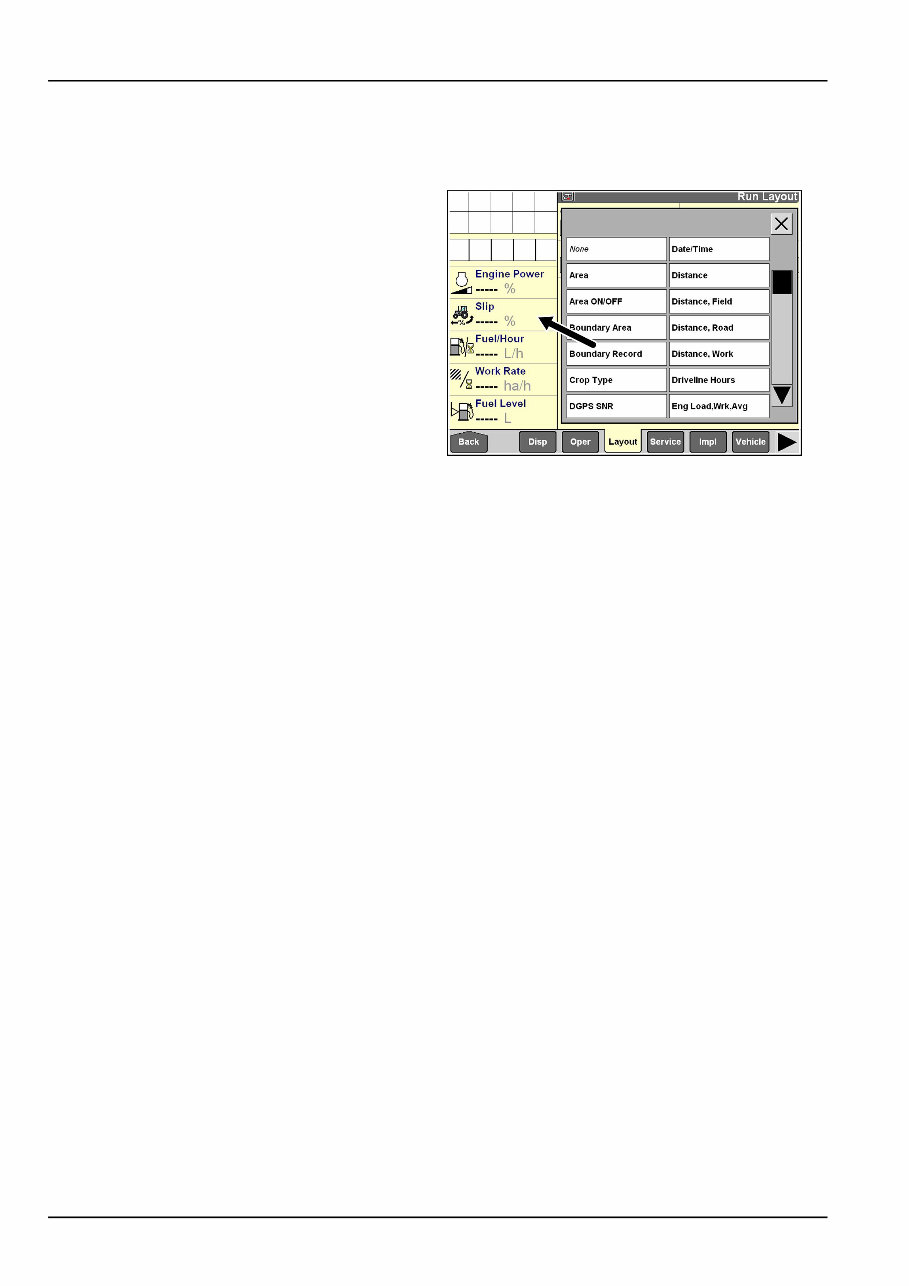
The arrangement of the windows in the left hand area can
be changed by the operator.
Any single-column window or map which can be placed
on the Run and/or Summary screens can be placed in the
left hand area.
Refer to the display manual and its explanation of the Run
Layout screen in the Toolbox to review window placement
in the left hand area.
RCIL09DSP064BAG 1
2-2
2 - ICONS AND WINDOWS
Performance windows
Home screen
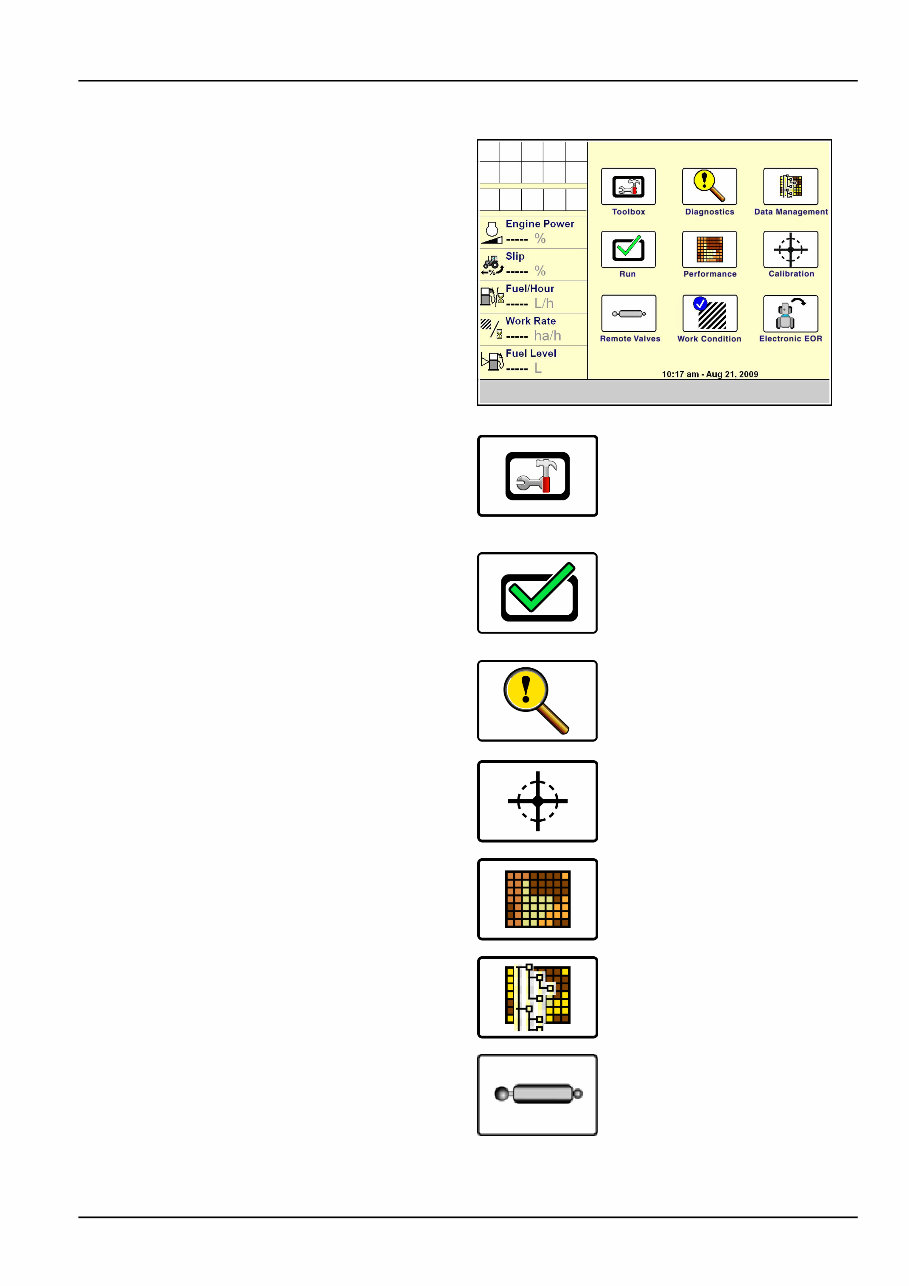
The icons on the home screen organize the screens for
all farming applications by their function.
Any vehicle specific software (for example, autoguidance,
performance, planting, or harvesting software) can add its
components to these navigation icons.
RCIL09DSP090BAG 1
Press the Toolbox icon to access screens for setting dis-
play preferences and operator preferences, for customiz-
ing the Run screens, for setting up the GPS receiver, etc.
The selections vary with the applications installed. The
Toolbox provides the location where shared tools used by
other applications can be configured.
Press the Run icon to access the six user screens for
all applications resident on the display. These are the
screens normally used while operating the equipment.
NOTE: The names for the Run screen navigation icons
cannot be edited.
Press the Diagnostics icon to access screens for check-
ing software revisions, controller status, specific sensor
signals, resource usage, GPS signal status (if equipped),
GPS receiver interface (if equipped), and for checking and
clearing fault codes.
Press the Calibration icon to access the screens for vehi-
cle and application specific calibrations such as distance,
area, crop, steering sensor, etc.
Press the Performance icon to access screens for viewing
the active data set and analyzing operational results.
Press the Data Management icon to access screens for
importing data, filtering data, deleting data, and managing
map items.
Press the Remote Valves icon to access screens for con-
trolling remote valve flow, timers and locks.
2-3

2 - ICONS AND WINDOWS
Press the Work Condition icon to access screens for con-
trolling hitch settings.
Press the Electronic EOR icon to access screens for work-
ing with headland turning sequences.
2-4
You're Reading a Preview
What's Included?
Lifetime Access
Fast Download Speeds
Online & Offline Access
Access PDF Contents & Bookmarks
Full Search Facility
Print one or all pages of your manual
$44.99
Viewed 35 Times Today


Secure transaction
What's Included?
Lifetime Access
Fast Download Speeds
Online & Offline Access
Access PDF Contents & Bookmarks
Full Search Facility
Print one or all pages of your manual
$44.99
The Case IH AFS PRO 600, AFS PRO 700 Tractors Operator's Manual is a comprehensive guide for operating and maintaining Case IH tractors. It covers the AFS Pro 600, AFS Pro 700, AFS Field Performer, and Large Tractors models. The manual provides detailed instructions for safe operation, routine maintenance, and accessing essential service information. Whether you're a professional mechanic or a DIY enthusiast, this manual equips you with the necessary information to keep your equipment running smoothly.
Key features of this manual include:
- AFS Pro 600 model
- AFS Pro 700 model
- AFS Field Performer model
- Large Tractors model
This manual is a valuable resource for Case IH tractor owners, offering engaging and descriptive content. Get your copy today to ensure the optimal performance of your equipment.


