


Case IH 600, 700, AFS PRO 600, AFS PRO 700 Operators Manual
What's Included?
 Lifetime Access
Fast Download Speeds
Online & Offline Access
Access PDF Contents & Bookmarks
Full Search Facility
Print one or all pages of your manual

Part number 47412171
1st edition English
August 2012
SOFTWARE OPERATING GUIDE
Software Version 27.*
AFS
®
Pro 700
Automatic Header Height Control
Combine

Contents
1 CONTROLS/INSTRUMENTS
Monitor Operation
AFS PRO 700 .......................................................................... 1-1
Home screen ........................................................................... 1-6
Toolbox ................................................................................. 1-8
Diagnostics ............................................................................ 1-22
Combine info .......................................................................... 1-26
Performance ........................................................................... 1-31
Run screens ........................................................................... 1-33
Screen layout setup ................................................................... 1-35
Automatic Crop Settings ............................................................... 1-46
Data management ..................................................................... 1-55
Camera - Overview .................................................................... 1-57
Abbreviations used in the monitor ..................................................... 1-58
Calibrations
Calibrations ............................................................................ 1-60
Multi-Function Handle (MFH) .......................................................... 1-63
Header calibration ..................................................................... 1-67
Tire Radius ............................................................................ 1-71
Groundspeed Hydrostat ............................................................... 1-73
Concave Position ...................................................................... 1-76
Upper Sieve ........................................................................... 1-76
Lower Sieve ........................................................................... 1-77
Self-leveling Shoe ..................................................................... 1-78
CVT Rotor ............................................................................. 1-80
CVT Feeder ........................................................................... 1-81
HEADER HEIGHT CONTROL
Header height control overview ....................................................... 1-83
Header height control .................................................................. 1-84
Header height control – Manual mode ................................................ 1-86
Header height control – Return To Cut (RTC) mode .................................. 1-88
Header height control – Auto Header Height Control (AHHC) ........................ 1-90
Header height control – Pressure float mode ......................................... 1-93
Lateral tilt .............................................................................. 1-95
Header connection
Header setup .......................................................................... 1-96
Row Header Setup .................................................................... 1-97
Platform Header Setup ............................................................... 1-102
2 OPERATING INSTRUCTIONS
COMMISSIONING THE UNIT

Camera - Configure .................................................................... 2-1
3 WORKING OPERATIONS
GENERAL INFORMATION
Losses .................................................................................. 3-1
4 SPECIFICATIONS
Calibration error list ......................................................................... 4-1


1 - CONTROLS/INSTRUMENTS
1 - CONTROLS/INSTRUMENTS
Monitor Operation
AFS PRO 700
23119153 1
The AFS Pro 700 monitor features a color display touch
screen.
NOTE: A speaker and an USB connection are located on
the rear of the display as well as a camera input socket.
1-1
1 - CONTROLS/INSTRUMENTS
Navigation
The navigation is done by touching the required field/item
on the monitor screen.
23119145 2
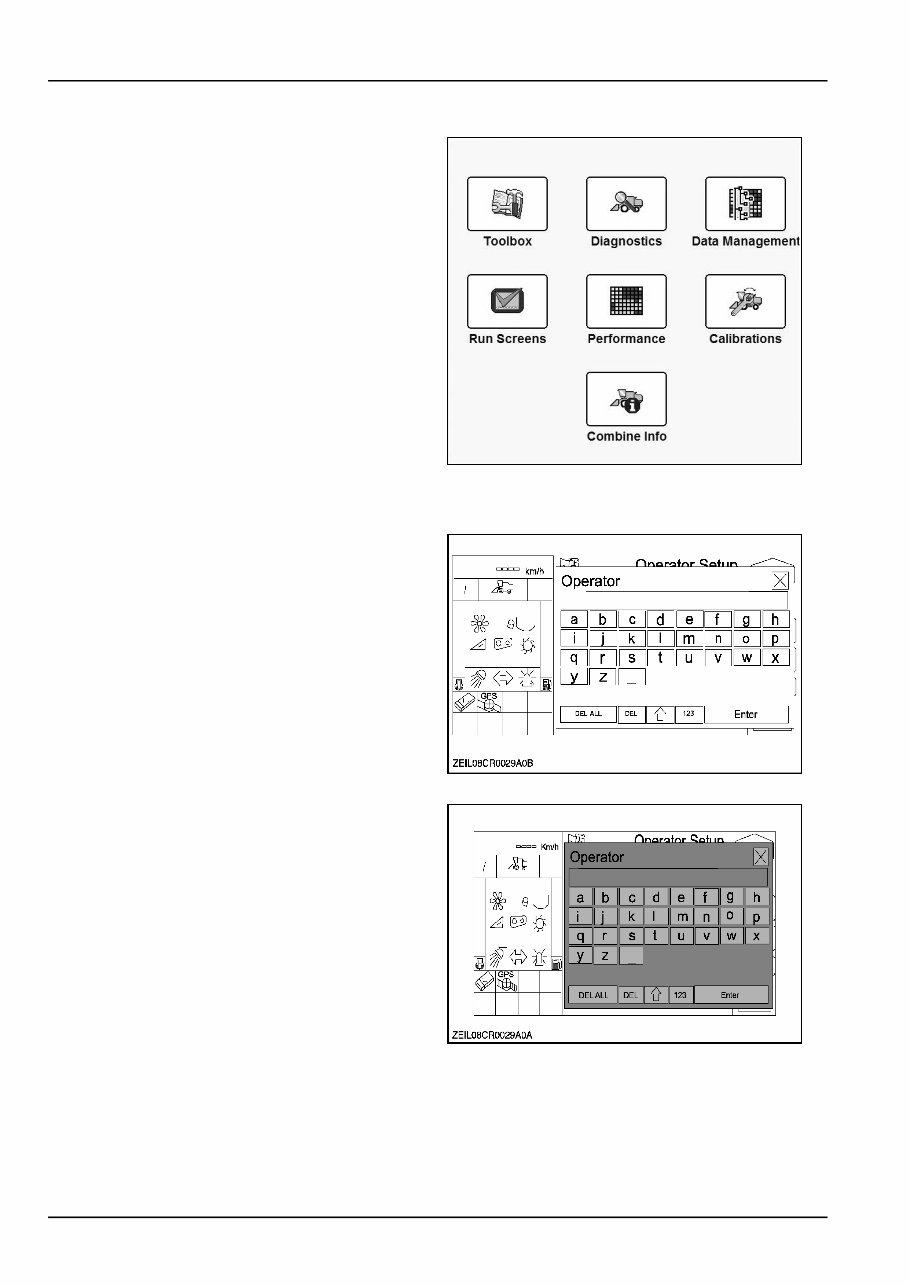
Keypads
Alphanumeric and numeric keypads are part of the frame-
work on the AFS Pro 700 monitor and are available to any
application on the display.
ZEIL08CR0029A0B 3
Each application customizes the keypads according to its
needs. The character sets on the alphanumeric keypad
may vary from application to application as well as lan-
guage setting.
Some may support both uppercase and lowercase alpha-
bets.
Some may support extended character sets beyond the
alphabet.
Some applications may support both an alphanumeric
and a numeric keypad, others may support only one.
Some keypads may show an icon for the currently se-
lected field, others may not.
NOTE: The decimal point or comma may be present on
some numeric keypads and absent on others, depending
on whether decimal increments are supported for a given
value.
Keypad access
Whenever a keypad is needed, to enter a name or a
value, the keypad is displayed automatically by touching
the screen on a field where entry is required.
ZEIL08CR0029A0A 4
1-2
1 - CONTROLS/INSTRUMENTS
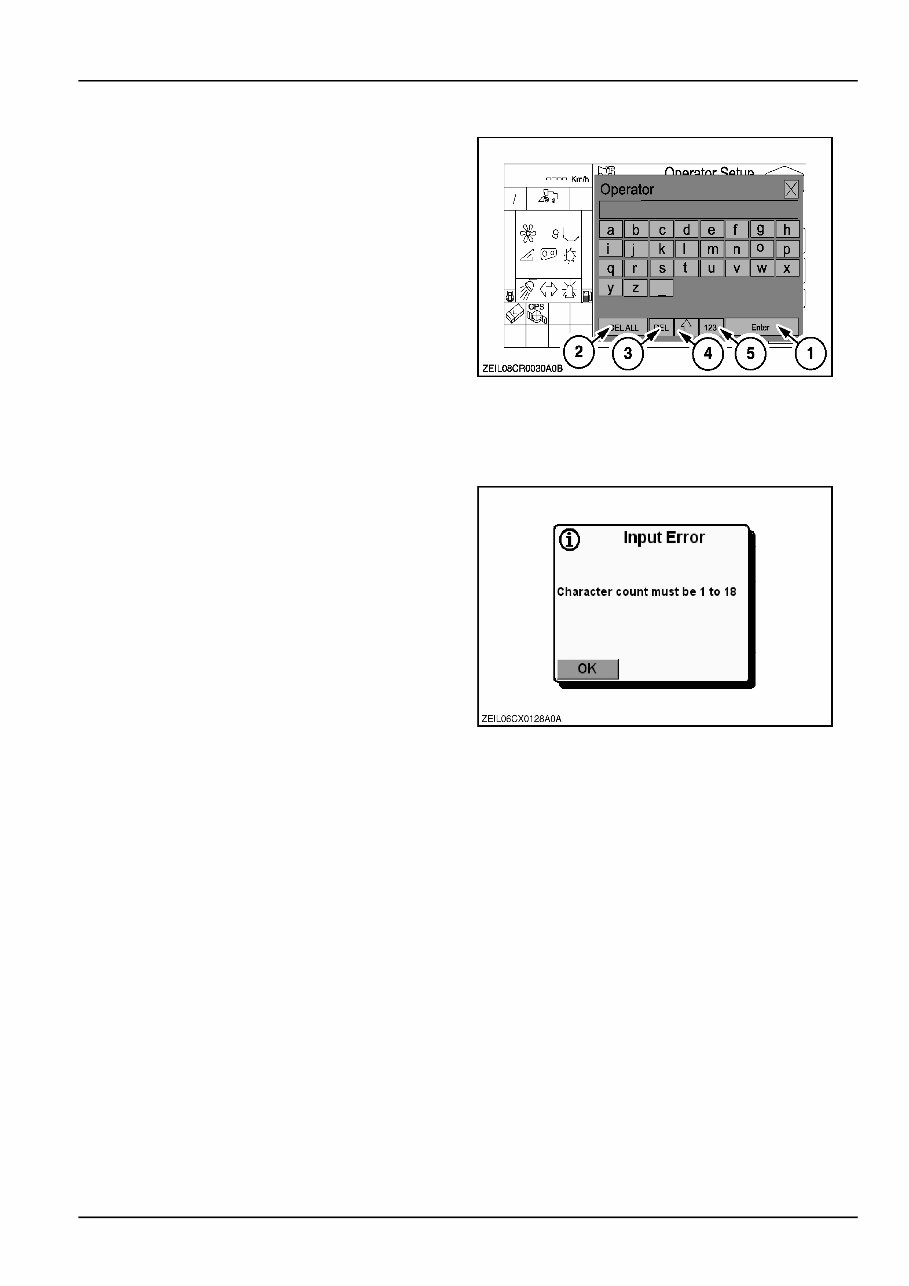
Keypad selections
Touch the display on the required button in the screen to
select the desired character or number.
•
Touch the “ENTER” - button (1), to save the name or
the value.
The keypad will disappear and the field will display
the newly created name or value.
•
Select “DEL ALL” (2) to clear the current entry in
the keypad.
•
Select “DEL” (3) to clear the previous character or
number.
•
Select “⇑” (4) to toggle between uppercase and
lowercase or to return to the letter screen when in
numeric screen.
•
Select “123” (5) to choose the numeric/special
character screen.
ZEIL08CR0030A0B 5
Input error messages
If an operator attempts to edit a name or a number on the
keypad and tries to exit the selected field after deleting
the existing characters without adding new characters, the
following input error message appears: ”character count
must be 1 to 18”.
NOTE: Input Error shown on the figure is just an example.
There are more “Input Errors” related to values, duplicate
names, etc.
ZEIL06CX0128A0A 6
Pop‐up lists
Pop‐up lists are part of the framework on the AFS Pro
700 monitor and are available to any application on the
display.
Pop‐up lists are used:
•
to select an option from a predefined list.
For example, display language or units of measure-
ment.
•
to select an option from a user defined list.
For example, operator's name.
•
to select files for storing, recalling or editing.
1-3
1 - CONTROLS/INSTRUMENTS
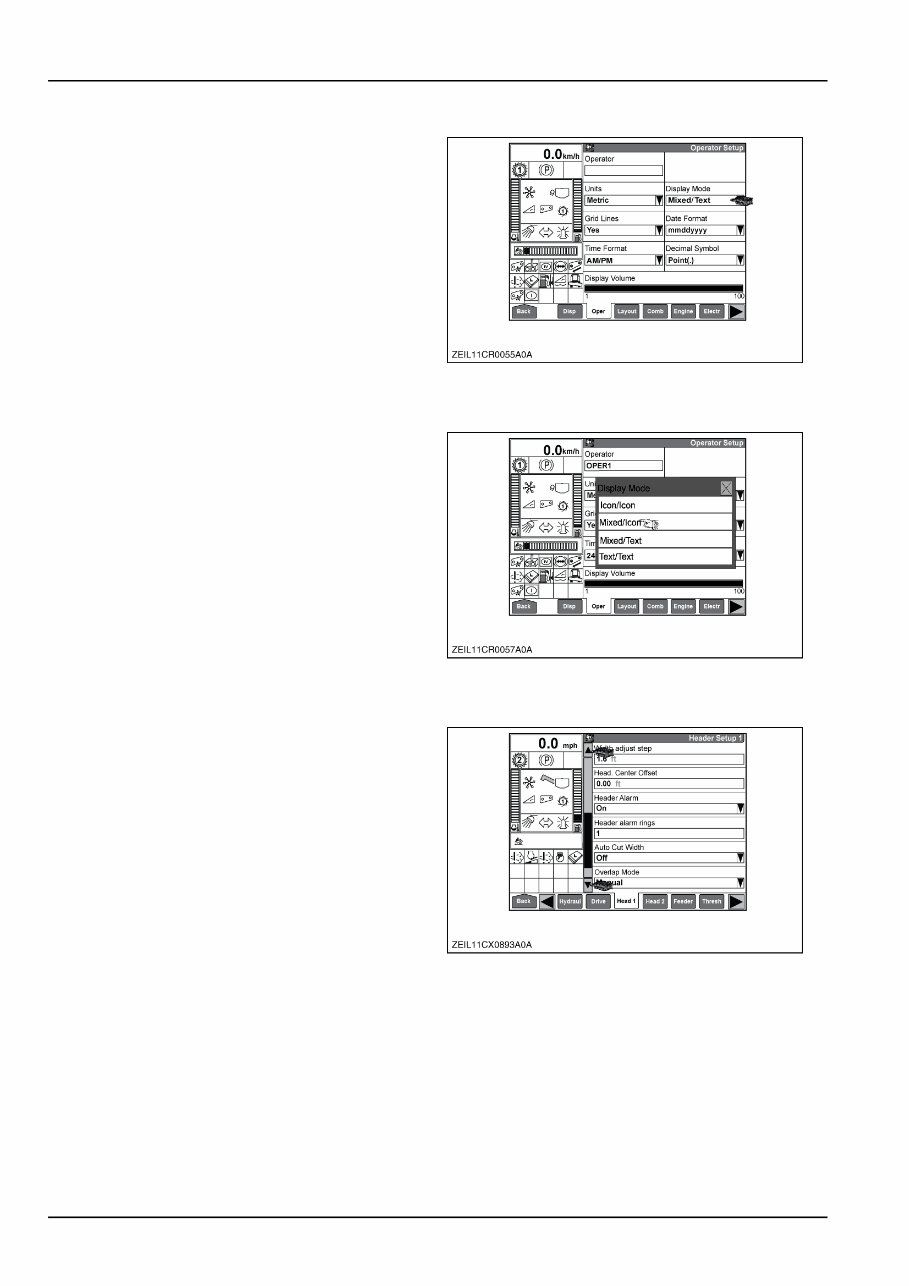
Pop‐up list access
Whenever a pop‐up list is needed, the list is displayed by
touching the field on the touch screen display.
ZEIL11CR0055A0A 7
Pop‐up list selections
Touch the respective field in the pop‐up list on the touch
screen display to select the required entry.
ZEIL11CR0057A0A 8
Scrolling lists
If more entries are present than can be displayed on one
screen, a scroll bar is added to indicate the presence of
additional entries.
Touch the scroll bar arrow up/down to scroll one page
upwards/downwards.
ZEIL11CX0893A0A 9
1-4
1 - CONTROLS/INSTRUMENTS
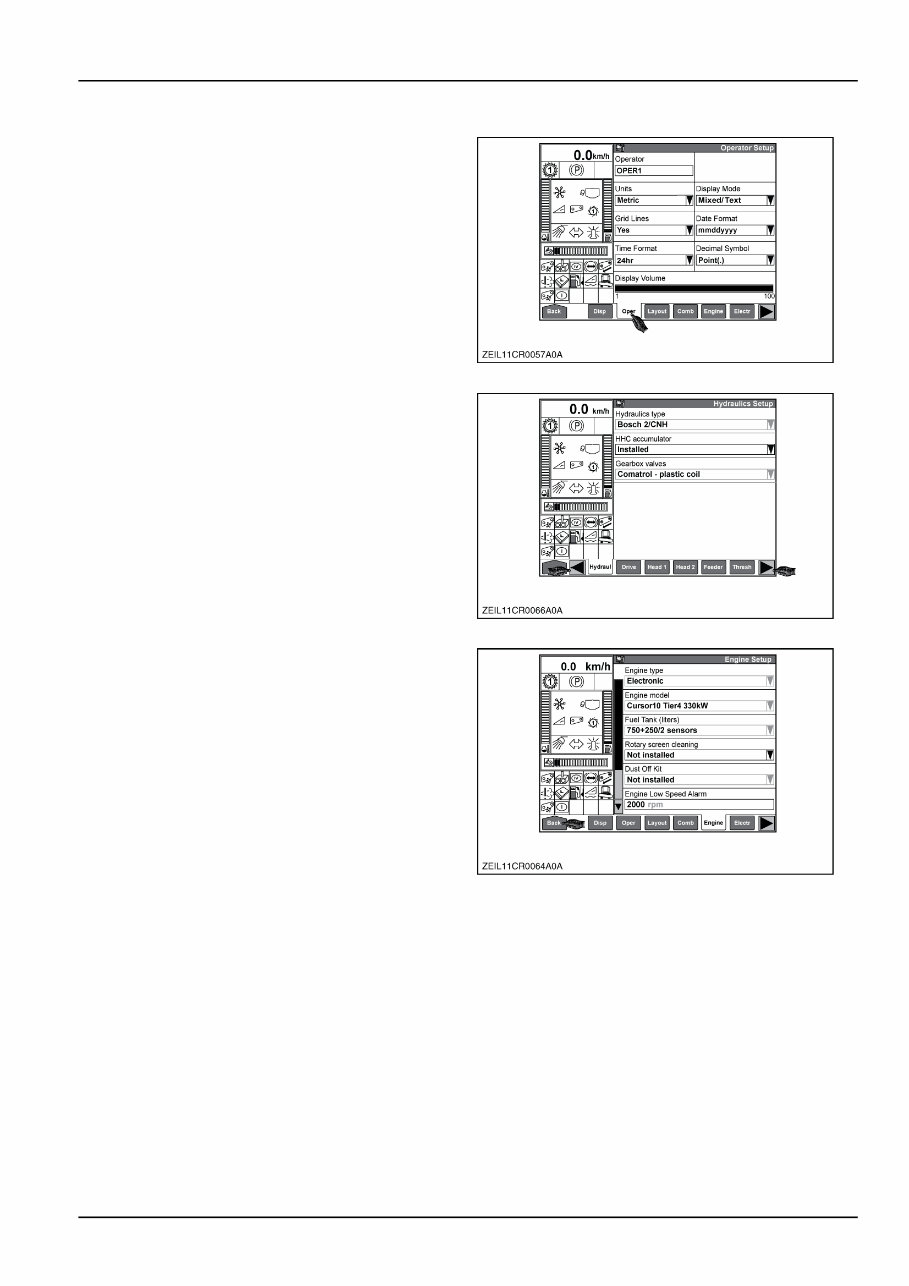
Menu and sub‐menu access
The available menus are located on the right hand side of
the screen and can be accessed by touching the respec-
tive buttons on the touch screen display.
ZEIL11CR0057A0A 10
When more menus are available than can be displayed on
the screen, this is indicated by the black arrow button(s).
Touch the arrow buttons to scroll to the next/previous
page(s).
ZEIL11CR0066A0A 11
Touch the ”Back” button at the left-hand bottom corner of
the display to return to the home page from any screen.
ZEIL11CR0064A0A 12
1-5
1 - CONTROLS/INSTRUMENTS
Home screen
AFS Pro 700 (TOUCH SCREEN) DISPLAY
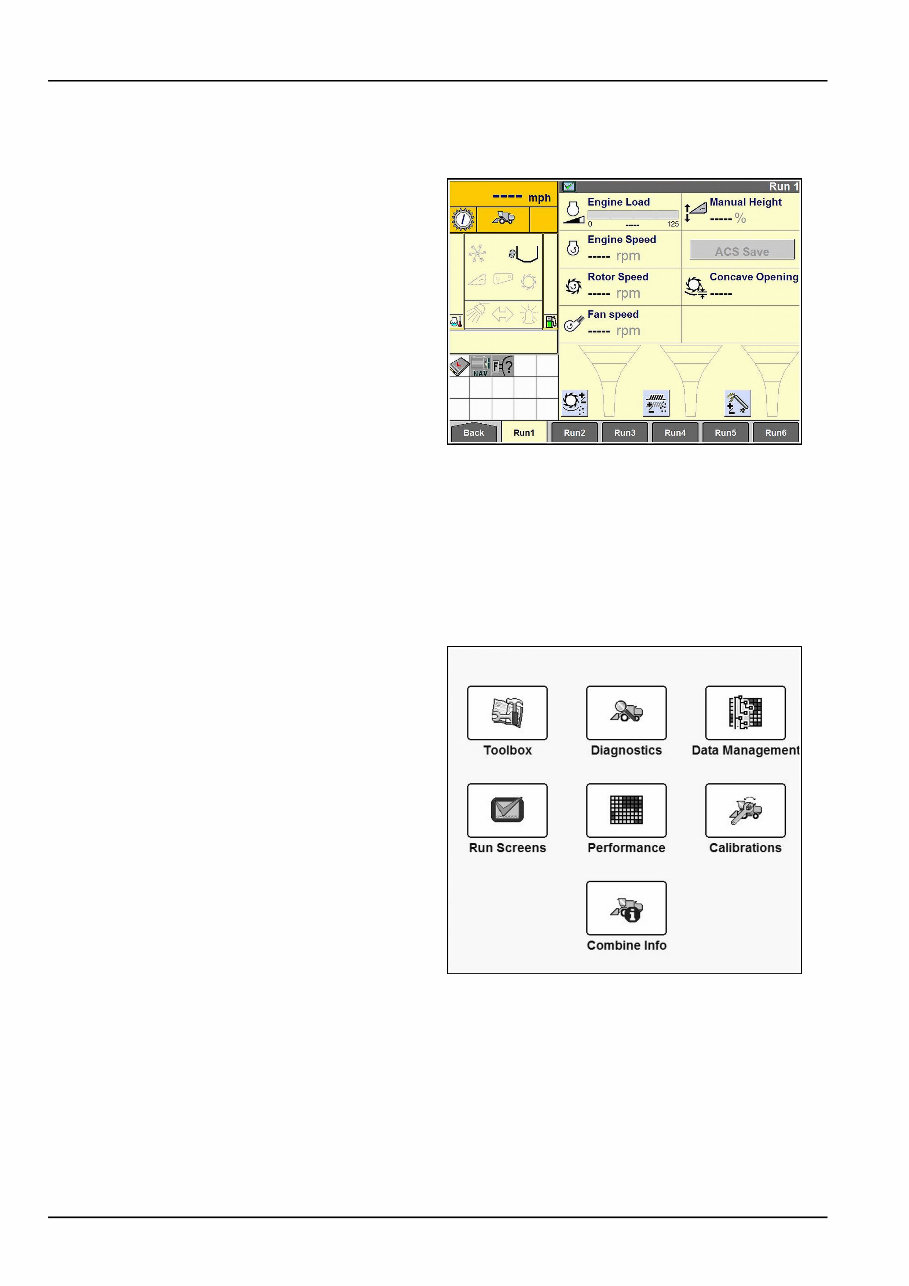
NOTE: The AFS Pro 700 monitor will switch on when the
key is switched on.
NOTE: The AFS Pro 700 monitor always starts up in “Run
1” screen.
NHIL12AF00489AA 1
The vehicle creates the home page for the display. The
content of the home page varies with the vehicle in which
the AFS Pro 700 monitor is resident.
The home page has two standard areas for organizing
components from the vehicle and other software applica-
tions in the display:
Home screen area
•
Toolbox
•
Diagnostics
•
Data Management
•
Run screens
•
Performance
•
Calibrations
•
Combine Info
23119145 2
1-6
You're Reading a Preview
What's Included?
Lifetime Access
Fast Download Speeds
Online & Offline Access
Access PDF Contents & Bookmarks
Full Search Facility
Print one or all pages of your manual
$48.99
$63.99
Viewed 22 Times Today


Secure transaction
What's Included?
Lifetime Access
Fast Download Speeds
Online & Offline Access
Access PDF Contents & Bookmarks
Full Search Facility
Print one or all pages of your manual
$48.99
$63.99
- The Case IH 600, 700, AFS PRO 600, AFS PRO 700 Farming Systems Operator's Manual is a comprehensive guide for operators of these advanced farming systems. It provides operating instructions, maintenance tips, safety guidelines, and service procedures for efficient and safe operation of the Case IH 600, 700, AFS PRO 600, and AFS PRO 700 models.
- The manual is designed to help both professional mechanics and DIY enthusiasts get the most out of their Case IH farming system and ensure its optimal performance.
- The AFS Pro 600,700 Hardi Controller As Applied 3rd Party Manager V26 Operator's Manual is another valuable resource for operators. It specifically focuses on the AFS Pro 600 and AFS Pro 700 models equipped with the Hardi Controller As Applied 3rd Party Manager V26, providing detailed instructions on how to use and manage this system effectively.
- These manuals are essential for anyone looking to operate their Case IH farming system with confidence and precision, regardless of their level of experience with these advanced technologies.


